1
VIRGINIA PANEL CORPORATION
THERMOCOUPLE CONTACTS AND MODULES USER’S MANUAL: SECTION 3
THERMOCOUPLE RECEIVER CONTACT INSTALLATION AND REMOVAL
PART # 610 113 131 / 610 113 132
TOOLS REQUIRED
5
/64 Allen Wrench
Phillips Head Screwdriver (for iCon Modules)
Thermocouple Receiver/ITA Extraction Tool, Part # 910 110 102
CONTACT INSTALLATION INSTRUCTIONS
1.
Assemble the contact to the respective wire.
NOTE: For more information concerning the process of crimping the
contact please see contact assembly instructions in Section 1 of this User’s
Manual.
2.
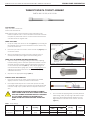
Insert the assembled contact into the back (wiring side) of the assembled
module (Figure A). The contact can only go into one side. Push the
contact forward. Once in place, pull the wire slightly to ensure that the
contact is seated.
CONTACT REMOVAL INSTRUCTIONS
1.
Remove the module from the receiver frame.
NOTE: For more information concerning the process of removing the
module from the receiver frame, see module installation and removal
instructions in Section 4 of this User’s Manual.
2.
Use a 5/64 Allen wrench or Phillips head screwdriver to remove the two 2-56
screws located at the top and bottom of the module (Figure B).
3.
Grasp the module halves and apply force in opposite directions, rocking
the ends of the module while slightly pulling the top of the module away
from the mating bottom section. Be sure to open both sides of the module
simultaneously or contacts could be damaged.
4.
Place the Thermocouple Receiver/ITA Extraction Tool, Part # 910 110 102,
over the contact to be removed/replaced (Figure C). Use care to keep
the tool perpendicular to the surface of the module, otherwise the tool or
the contact could be bent.
5. Once the extraction tool is seated and the retaining ring tabs on the
contact are compressed, push the tool into the module. The contact will
be pushed out of the rear of the module.
Figure A. Contacts inserted into the module.
MODULE MOUNTING
SCREW
MODULE MOUNTING
SCREW
2-56 SCREW
2-56 SCREW
Figure B. Open both sides of the module
simultaneously or pins could be damaged.
EXTRACTION TOOL
DO NOT PUSH THE TOOL INTO THE MODULE UNTIL THE TIP OF
THE EXTRACTION TOOL HAS FULLY SEATED INTO THE MODULE
AND COMPRESSED THE RETAINING RING TABS ON THE
CONTACT.
6.
7.
On the opposite side of the module from the extraction tool, grasp the
contact and hold it while removing the extraction tool. This will prevent
the contact from being pulled back into the module while the tool is
being removed.
A
Replace the module cap using both hands to push the separated
halves together. Replace and tighten the module retaining screws to a
maximum torque of 2 in-lbs [0.23 Nm].
NOTE: The process shown here uses standard/90 Series modules. The same
process is used for modules from other series.
NOTE: If you are using a hybrid module, you may need to reference the User’s
Manual for the other contact type for extraction instructions.
3-1
DETAIL A
Figure C. Ensure that the tool is kept perpendicular
to the module face to avoid damage to the contact
or tool.
For more information visit vpc.com
11/24/09