1
3.5
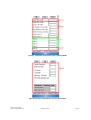
Image Tab
3
4
1
5
2
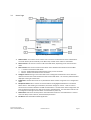
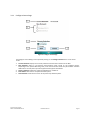
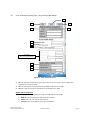
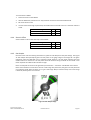
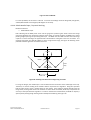
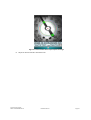
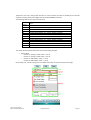
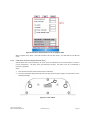
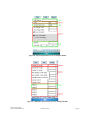
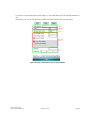
Figure 8. WGR Application Gauge Image Tab
1.
2.
3.
4.
5.
Image (Capture Image): Requests an image capture from the WGR and displays it on the LCD.
Cal (Image Calibration): Initiates the step by step image calibration for defining the gauge center and
the image processing circles.
Config: Opens an option dialog allowing the installer to determine what graphical guidelines are
displayed in the screen.
Sample: Requests a sample gauge reading from the WGR in order to verify proper calibration.
Save: This will allow the user to save the gauge image to a file.
Cypress Envirosystems
Doc # 152-10206-01 Rev 2.0
HHC User Manual
Page 13