Download Installation and QuickStart Guide

Transcript
10
Chapter 1: Installing the WaveTest System
Connecting the Test Points
4. Connecting the Test Points
WARNING. When installing a Test Point, the power connection should always applied last, once all other physical
connections have been established. Similarly, before disconnecting any device from the Test Point, first disconnect
the power. Failure to follow these guidelines could result in
damaged equipment.
WARNING. Avoid accidentally plugging the Ethernet cable
into the Test Point’s timing-cable jacks. Doing so could
introduce an electrical charge that might damage the Test
Point.
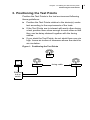
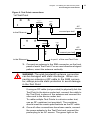
1. First connect the Test Point(s) to the LAN.
2. (If your site is using only one Test Point, skip this step.)
Select any Test Point to serve as the first device in the
daisy-chain and connect a timing cable to sync port 1.
Connect the other end of the cable to sync port 2 of the
second device in the chain.
If there is a third Test Point, connect a second timing
cable to port 1 of the second Test Point and connect
the other end to port 2 of the third device. Proceed similarly until all devices are connected.
WARNING. The Test Points are calibrated for the timing
cables provided by VeriWaveTM. Using other cables may
result in faulty test data. If your installation requires
different length cables, contact technical support at
503-473-8341 or 1-800-457-5919.