1
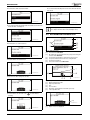
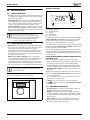
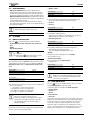
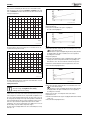
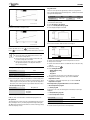
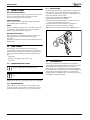
SETTINGS Each circuit is controlled by its own heat curve. The installer sets the type of heating for each circuit, that is Radiator or Underfloor. The heat curve for Underfloor has lower values because the floors do not tolerate such high temperatures. T1(˚C) 80 70 6 720 614 789-18.3I 60 Fig. 24 Settings window Heat curve (radiator) 50 Change the left point: ▶ Press the menu dial when the square is highlighted. The value is then highlighted. 40 30 20 10 20 15 10 5 0 -5 -10 -15 -20 -25 -30 -35 T2(˚C) 6 720 614 789-15.3I Fig. 22 Radiator 6 720 614 789-19.3I The figure indicates the factory setting curve for a radiator circuit. At 2.5 °C the flow set point is 37.4 °C. T1(˚C) 80 70 Fig. 25 ▶ Turn the menu dial to change the value. Press the dial to save or use to return without saving. In the window, the square is highlighted again and any changed values are displayed after the square. In addition, the curve is updated according to the new value. Change the right point: ▶ Turn the menu dial when the square is highlighted. The upper square is changed to outdoor temperature with the corresponding curve value after the colon. The circle marks the relevant curve position. 60 50 ▶ Continue to turn the dial until it shows a square before the colon. ▶ Press the dial to highlight the value. 40 30 20 10 20 15 10 5 0 -5 -10 -15 -20 -25 -30 -35 T2(˚C) 6 720 614 789-16.3I Fig. 23 Floor The figure indicates the factory setting curve for an underfloor circuit. At -2.5 °C the flow set point is 27.2 °C. Setting of heat curve If the heat curve has been set too high, the display will show the message Too high heat curve setting. ▶ Change the heat curve setting. A heat curve is set for each circuit. If the room temperature is perceived to be too high or too low in the circuit, it is preferable to adjust the curve. The curve can be changed in different ways. The slope of the curve can be changed by offsetting the flow temperature upwards or downwards on the left-hand side (the value at outdoor temperature 20 °C, factory value 22.0 °C) as well as the right-hand side (the value at outdoor temperature -35 °C, factory setting 60.0 °C). In addition, the curve can be affected by every 5th outdoor temperature degree. The value at 0 °C is displayed above the curve's left-hand point, factory value 35.7 °C. 12 6 720 614 789-23.3I Fig. 26 ▶ Turn the menu dial to change the value. Press the dial to save or use to return without saving. In the window, the square is highlighted again and any changed values are displayed after the square. In addition, the curve is updated according to the new value. Change a specific value, for example the value at an outdoor temperature of 0 °C: ▶ Turn the menu dial when the square is highlighted until 0 °C is marked ( Fig. 27). ▶ Press the dial to highlight the value. 6 720 802 172 (2012/06)