1
RCA, AUX & SUB
1. Auxiliary Input
The Auxiliary Input Jack is on the
front panel. Insert the AUX IN cable's
stereo plug into the AUX IN jack on the
panel of the unit. Route the other end
of the stereo plug to the headphone
jack of any external audio device such
as walkman and discman. Press the
Mode button to choose AUX. Connect
any portable audio device such as a
DVD player or VCD player to the AUX
IN cable. Use the volume control to
adjust volume.
2. RCA Output
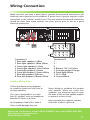
The RCA Output Jack is on the back
of the unit. (Refer to Wiring) This
output is for connecting amplifier,
equalizer, or other audio component
that requires a pre-amp out connection.
(Red = Right, White = Left) Follow the
manufacturers instructions for the
audio component that you are
connecting.
3. Subwoofer Output
The Subwoofer Output Jack is on
the back of the unit. (Refer to Wiring)
This output is for connecting up to 2
subwoofer amplifiers. You must connect
an amplifier to the Subwoofer Output
Jack to drive a subwoofer. Follow the
amplifier's installation instructions.
Press the BND/SUB button to activate
subwoofer control. Press the button
again to turn it off.
FAQ
PROBLEM
CAUSE/SOLUTION
No Power
Check wiring connections.
Check and make sure the fuse is not blown.
Replace with the proper rating/size fuse.
Some errors occur in the LCD or no
functions when buttons are pressed.
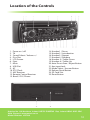
Press the RESET Button (21).
Unable to receive stations
Check and make sure the antenna is connected
properly.
Poor radio reception
Check and make sure the antenna is the correct length.
Make sure the antenna is not broken. If the antenna is
broken, replace it. The antenna is poorly grounded. Check
and make sure the antenna is grounded at mounting
location.
CD’s cannot be loaded
A CD is already loaded in the player. Eject CD.
Songs keep skipping
The CD is dirty or damaged.
File information shows in LCD but will
not play.
If you have files with Digital Rights Management(DRM).
Contact the vendor for proper use.
MP3/WMA files on the USB/SD flash
memory do not play.
Flash memory is formatted as NTSC. Format the flash
memory as FAT or FAT32. The files have Digital Rights
Management (DRM). If the files you are attempting to
play were purchased online, they may have Digital Rights
Management, this unit is not DRM compatible.
Helpline No. UK/Northern Ireland 01270 508538 Rep. Ireland 1800 995 036
Web Support www.quesh.co.uk
Model Number: 43744
18