1
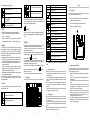
Choice of ranges (or ratings) according to function:
120
660.0mV/6.600V/66.00V/600.0V
660.0mV/6.600V/66.00V/600.0V
60
660.0Ω
6.600kΩ/66.00kΩ/660.0kΩ
6.600MΩ/66.00MΩ
6.600nF/66.00nF/660.0nF
6.600μF/66.00μF/660.0μF/6.600mF/66.00mF
Ω
Symbol
AUTO
MANU
120A AC current measured/Frequency/Duty cycle
2. USE
Description
Automatic range change
Manual range change
2.1
Commissioning
(Data Hold) Freezes the display
66A AC current measured/Frequency/Duty cycle
Value displayed in relative mode
Display of the maximum and minimum values
NB: When the duty cycle measurement is activated, the automatic range change leaves
the range unchanged when the mode is entered: the device changes to manual range
change mode and the "MANU" message is displayed.
ZERO
Place the batteries supplied with the device as follows:
1.
Using a cross-headed screwdriver, unscrew the screw of the compartment cover
on the back of the housing and open the cover;
2.
Place the 2 batteries in their compartment, with the correct polarities;
3.
Close the cover and screw it back to the housing.
Reset for DC current measurements
Diode test function
Continuity test function
-"HOLD" key
-"
In the "HOLD" mode, the device freezes the display of the last value measured.
Pressing the "HOLD" key briefly during a measurement freezes the display: the
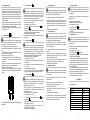
A brief press on the "Backlight" key lights or switches off the display unit backlighting. If
not reactivated, the backlighting switches itself off automatically after approximately 60
seconds.
is then displayed.
message
A second brief press on the "HOLD" key is used to return to the normal measured
value display refresh mode: the message
disappears from the display unit.
-"MAX MIN" key
In the "MAX MIN" mode, the device records the maximum and minimum values of the
measurements made. In this mode, the automatic range change does not change the
range when this mode is entered; if the maximum values exceed the display range
(indicated by the "OL" message), the appropriate higher range must be chosen manually
before reactivating the "MAX MIN" mode.
Successive brief presses on the "MAX MIN" key produce, in order, the following actions:
1st press: the device records and displays the maximum value measured. The
"AUTO" message is replaced by "MANU" and the "MAX" message is displayed.
2nd press: the device records and displays the minimum value measured; the "MAX"
message is replaced by "MIN".
3rd press: the device records the maximum and minimum values measured
simultaneously; it is the value currently measured that is displayed; the "MAX" and
"MIN" messages blink simultaneously on the display unit.
Additional presses serve to display the values recorded one by one by reproducing the
actions of the previous successive presses.
Press the "MAX MIN" key for two seconds to exit from the mode: the "MANU", "MAX",
and "MIN" messages are replaced by "AUTO", indicating that the device once again
changes range automatically.
" (Backlight) key
%
APO
Unit and function Duty cycle
(Auto Power Off) automatic switching off activated
DC measurement and display
AC measurement and display
Display of a negative value
"REL (ZERO)" key
Low battery indicator (battery must be replaced)
The "REL (ZERO)" key is used to subtract the value displayed when the key is pressed
from all subsequent measurement values and display the result of the subtraction.
This mode can be activated by a brief press on the key for all functions except the
frequency and duty cycle measurements.
When display in relative mode is activated, the automatic range change leaves the range
unchanged when the mode is entered: the device changes to manual range change
V
A
(Volt) unit of voltage
(Ampere) unit of current
(milliFarad, nanoFarad, microFarad) units of capacitance
(ohm, kilo-ohm, Megohm) unit of resistance
" messages are displayed.
mode and the "MANU" and "
For DC current measurements, this mode is used to set the display to zero before the
current sensor is placed on the conductor in which the current is to be measured; the
message displayed for this function, in this mode, is "ZERO".
Another brief press on the key effects the return to the normal display mode; the device
returns to the automatic range change mode and the "MANU" and "
" messages are
replaced by the "AUTO" message.
Any change of function by the rotary switch terminates display in the relative mode.
1.3
The display unit
-"Hz" (Hertz) key
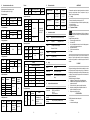
Press the "Hz" key briefly and repeatedly to obtain the following functions according to
the setting of the rotary switch:
Hz
(Hertz) unit of frequency
The "OL" message (OverLoad) indicates an overshoot of the measurement or display
capacity.
1.4
The leads and test probes
The multimeter is equipped with two leads (red and black), each terminated by a test
probe of the same colour.
The leads and test probes are not detachable (they are permanently connected) and,
when not in use, can be stowed in the compartments provided for them on the right side
of the device.
The tips of the test probes (once taken out of their compartments by pressing on them
with a finger), allow voltage, resistance, continuity, diode test, and capacitance
measurements.
The test probes have physical guards that show the operator where the hand grip part
ends, beyond which the fingers must not be placed.
1.5
The current sensor
AC voltage measured/Frequency/Duty cycle
The multimeter has a current sensor that makes it possible to measure a current without
having to open the circuit.
The current sensor and its lead cannot be detached (they are permanently connected);
when not in use, they can be stowed in compartments provided for them on the back of
the device.
The current sensor has a physical guard that shows the operator where the hand grip
part ends, beyond which the fingers must not be placed.
DC voltage measured/Frequency/Duty cycle
-4-
-5-
-6-
2.2
Starting up and check of operation
We recommend performing this procedure at the time of commissioning and, if the device
is used only occasionally, each time it is used.
Hold the "HOLD" key down and switch the instrument on by turning the switch from
"OFF" to "Ω".
Release the "Hold" key and check that the various symbols and segments are
correctly displayed.
A brief press on the "HOLD" key restores the normal display of the selected
function;
If the device is set to the resistance measurement function ("Ω"), check that the
display indicates "A.P.O" (for auto power off), "AUTO" (for automatic range
change), "O.L" (for OverLoad), and "MΩ" (for Megohm);
Withdraw the two leads from their compartment and establish a good contact
between the metallic parts of the two test probes; the value measured and
displayed must change from "O.LMΩ" to "0.0Ω": (the value displayed
may not
be exactly zero, but must remain very close to zero).
The instrument is operational when the various states described above have been
checked and are correct. The rotary switch can then be set to the desired function
or to "OFF" to switch the instrument off.
-7-