1
2.3
Deactivating Auto Power Off
2.5
In order to extend the life of the batteries, the device switches itself off automatically
approximately 15 minutes after it is switched on if no key or change of function has
been activated. The device warns that it is about to switch off by emitting 3 series of 2
audible beeps and, if no action is taken, then emits a long beep and switches itself off.
When the multimeter switches itself off automatically, it can be restarted in the same
configuration by pressing the "HOLD" key twice. Any other action restarts the device,
but changes its configuration.
Automatic switching off can be deactivated by holding down the "Hz", "REL", "MAX
MIN", "RANGE" or "Backlight" key while switching on. Reminder: automatic switching
off is deactivated when the instrument is in the "MAX MIN" mode.
To eliminate the slight residual drain of the batteries in the sleep mode, it is always
best to switch the device "OFF".
2.4
DC current measurement (A
)
For optimum safety, current measurements on circuits at voltages between 300V and
600V must be made only on category III installations or on circuits of which the possible
overvoltage levels are known to be less than those of category III.
The current sensor must not be used at the same time as the test probes.
The instrument has 2 measurement ranges, selected using the rotary switch (60A and
120A).
Remove the current sensor from its compartment on the back of the device (the test
probes are stowed in their own compartment.
Switch the instrument on in the 60A or 120A setting.
Let the value displayed stabilize and briefly press the "REL (ZERO)" key to set the
value displayed to zero. It is often necessary to repeat this operation after measuring
strong currents.
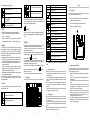
Place the sensor on the cable as indicated by the locating marks (the sensor must be
perpendicular to the cable on which it is placed), see the figure below.
Read the measurement result (after stabilization).
Display of the "-" sign in front of the numerical value indicates that the value measured
is negative: the current is flowing in the direction opposite the polarities indicated on
the sensor.
AC current measurement (A
)
For optimum safety, current measurements on circuits at voltages between 300V and
600V must be made only on category III installations or on circuits of which the possible
overvoltage levels are known to be less than those of category III. The current sensor
must not be used at the same time as the test probes. The instrument has 2
measurement ranges, selected using the rotary switch (60A and 120A).
Remove the current sensor from its compartment on the back of the device (the test
probes are stowed in their own compartment.
Switch the instrument on in the 60A or 120A setting.
" symbol is
Press the "SEL" key briefly to switch to AC current measurement; the "
displayed instead of " ";
Place the sensor on the cable as indicated by the locating marks (the sensor must be
perpendicular to the cable on which it is placed), see the figure above.
Read the measurement result (after stabilization).
Note: best results are obtained when the cable is carefully centred and any nearby cables
are held away from it.
)
2.6
DC voltage measurement (V
For optimum safety, current measurements on circuits at voltages between 300V and
600V must be made only on category III installations or on circuits of which the possible
overvoltage levels are known to be less than those of category III. The instrument has 4
measurement ranges: 660mV, 6,6V, 66V, 600V. The 600mV range can be used only in
the manual range change mode, by repeated presses on the "RANGE" key. The other
ranges can be used in either the manual or the automatic range change mode.
Withdraw the test probes and leads from their compartment.
Switch the instrument on in the "V" setting.
Apply the metallic part of the black test probe on the (assumed) negative part of the
circuit to be tested.
Apply the metallic part of the red test probe on the (assumed) positive part of the
circuit to be tested.
Read the measurement result (after stabilization).
Display of the "-" sign in front of the numerical value indicates that the value measured
is negative (the test probes are reversed with respect to the polarity of the voltage).
)
2.7
AC voltage measurement (V
For optimum safety, current measurements on circuits at voltages between 300V and
600V must be made only on category III installations or on circuits of which the possible
overvoltage levels are known to be less than those of cat. III. The DMM16 has 4
measurement ranges: 660mV, 6,6V, 66V, 600V.
The 600mV range can be used only in the manual range change mode, by repeated
presses on the "RANGE" key. The other ranges can be used in either the manual or the
automatic range change mode.
Withdraw the test probes and leads from their compartment.
Switch the instrument on in the "V" setting.
Note: best results are obtained when the cable is carefully centred and any nearby cables
are held away from it.
" symbol is
Press the "SEL" key briefly to switch to AC voltage measurement (the "
displayed instead of " ")
Apply the metallic part of the black test probe on the part of the circuit to be tested
(assumed) closest to the earth potential.
Apply the metallic part of the red test probe on the part of
the circuit to be tested
(assumed) farthest from the earth potential.
Read the measurement result (after stabilization).
-8-
-9-
2.8
Frequency measurement (Hz)
2.11
For optimum safety, current measurements on circuits at voltages between 300V and
600V must be made only on category III installations or on circuits of which the possible
overvoltage levels are known to be less than those of category III.
The instrument has 3 measurement ranges: 660,0Hz, 6,600kHz and 66,00kHz.
Measurement of the frequency of the voltage measured: start the AC voltage
measurement method, then press the "Hz" key (display of the "Hz" symbol instead of "V").
Measurement of the frequency of the current being measured: start the AC current
measurement method, then press the "Hz" key (the "Hz" symbol is displayed instead
of "A";
Read the measurement result after stabilization.
2.9
Duty cycle measurement (%)
For optimum safety, current measurements on circuits at voltages between 300V and
600V must be made only on category III installations or on circuits of which the possible
overvoltage levels are known to be less than those of category III.
The measurement range is from 10% to 94.9% (50-60Hz). If there is no usable signal or if
the duty cycle is less than 10%, the display indicates "UL", and if the duty cycle is greater
than 94.9%, the display indicates "OL".
For voltage duty cycle measurements, the device switches itself to the manual range
change mode.
Measurement of the duty cycle of the voltage being measured: start the AC voltage
measurement method, then press the "Hz" key twice (the "%" symbol is displayed
instead of "V" and "MANU" instead of "AUTO");
Measurement of the duty cycle of the current being measured: start the AC current
measurement method, then press "Hz" twice ("%" is displayed instead of "A");
Read the measurement result after stabilization.
2.10
Resistance measurement (Ω)
Resistance, continuity, diode test, and capacitance measurements must be made
only on circuits completely disconnected from any power supply, and after any capacitors
have been discharged.
Continuity measurement (Ω)
Resistance, continuity, diode test, and capacitance measurements must be made
only on circuits completely disconnected from any power supply, and after any capacitors
have been discharged.
The instrument indicates continuity by emitting a steady sound when the resistance
measured is less than 50Ω.
The value displayed is the value measured in ohms.
Withdraw the test probes and leads from their compartment.
Switch the instrument on in the "Ω" setting.
" appears.
Press the "SEL" key briefly until "
Apply the metallic tips of the test probes to the terminals of the resistance or of the
circuit to be tested.
Read (if necessary) the measurement result (after stabilization).
2.12
Diode measurement (Ω)
Resistance, continuity, diode test, and capacitance measurements must be made
only on circuits completely disconnected from any power supply, and after any capacitors
have been discharged.
The instrument indicates the voltage across the terminals of the semiconducting junction.
Take out the test probes and leads.
Switch the instrument on in the "Ω" setting.
Press the "SEL" key briefly until the "
" symbol appears
Apply the metallic tips of the test probes to the terminals of the diode or of the junction
to be tested, according to the following polarities;
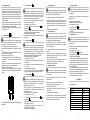
1) forward direction (conducting): apply the black probe to the cathode and the red
probe to the anode. Read the measurement result (after stabilization), see figure A
(the threshold voltage of a silicon diode is between 0.5V and 0.7V; it is between 0.2
and 0.3V for a germanium diode. High-voltage diodes, some Zener diodes, and LEDs
cannot be tested by this method).
2) reverse direction (non-conducting): apply the black probe to the anode and the red
probe to the cathode. Read the measurement result (after stabilization), see figure B
(a diode or junction in good condition causes the display of "OL").
With some types of diode, a measured value outside the stated voltage ranges does
not necessarily mean that the diode or junction is defective.
The instrument has 6 measurement ranges: 660,0Ω, 6,600kΩ, 66,00kΩ, 660,0kΩ,
6,600MΩ and 66,00MΩ.
3. CHARACTERISTICS
All of the ranges can be used with either automatic or manual range change.
Withdraw the test probes and leads from their compartment.
Switch the instrument on in the "Ω" setting.
Apply the metallic tips of the test probes to the terminals of the resistance or of the
circuit to be tested
Read the measurement result (after stabilization).
NB: Touching the elements or circuit during the measurement may lead to erroneous
results. For resistance measurements on nonlinear circuits, it may be necessary to select
the measurement mode and the range to be used manually.
- 10 -
3.1
General conditions
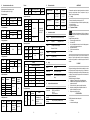
Temperature
Relative humidity
Supply voltage
Frequency range of the applied signal
Sine wave
Peak factor of the applied AC signal
Position of the conductor in the sensor
Adjacent conductors
AC magnetic field
Electric field
- 11 -
23°C ± 2°C
45% to 75%
2,8V ± 0.3V
45-65Hz
pure
√2
centred
none
none
none