1
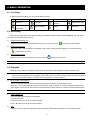
1. Package Contents
□ Digital video recorder (DVR)
□ Thermal conductive silicone rubber
□ Adapter and power cord
□ HDD bracket screws (spare parts)
□ Free licensed software AP disc
□ DSUB PIN connector
□ Manual & quick start & IR remote control manual
□ AAA size battery * 2
□ Vertical panel sticker for remote controller (certain models only)
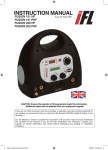
2. FRONT AND REAR PANELS
PLAY
REC
HD D
HD D Fu ll ALAR M TIME R
PL AY
RE C
MENU
ENTER
LIST
ST OP
PA USE
SLOW
ZOOM
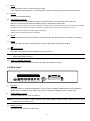
2.1 Front Panel
1)
LED Indication
The following LEDs will be on when:
HDD: HDD is reading or recording
HDD Full: HDD is full
ALARM: Any motion detection is triggered.
TIMER: Timer recording is activated
PLAY: DVR is under playback mode
REC: DVR is under recording mode
: Power is connected
Note: To turn off your DVR, please disconnect the power supply.
2)
1/2/3/4
Press one of these buttons to show the channel display of CH1 ~ CH4 on the monitor.
3)
REC
Press this button to activate manual recording.
4)
PLAY
Press this button to play the latest recorded video.
5)
PAUSE / STOP / REW / FF
Under the playback mode:
Press one of these button to pause / stop / rewind / fast-forward the playback file.
6)
▲+ / ▼- / ◄ / ►
Press one of these direction buttons to move the cursor up/down/left/right.
Under the DVR menu mode, these direction buttons can use for the following operation:
▲▼: Make the selection / Change the settings
◄ ►: Make the selection
-1-
REW
SEQ
FF