1
SCALA RIDER® FM™ |
Cable
AUDIO SOURCES AND PRIORITIES
The different Audio Sources that are connected to the SCALA RIDER
FM are prioritized as follows:
Highest:1. Mobile phone audio (Incoming/outgoing calls) / GPS
device (GPS audio and navigation instructions)
2. FM Radio
Lowest 3. MP3 Connectivity
A high priority Audio Source will always interrupt any lower priority
Audio Source. i.e. Mobile phone call overrides FM radio
Speaker B
Speaker B
USING THE HEADSET
Speaker A
GENERAL USAGE
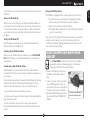
ATTACHING AND REMOVING THE
HEADSET FROM THE HELMET CLAMP
GENERAL FUNCTIONS
DESIRED RESULT:
Turn on the
headset
ATTACHING:
Slide the headset downwards along
the sliding panel until a clicking sound
indicates that the headset is locked in
place.
REMOVING:
Your headset can be removed for charging
and storage by pressing your finger
gently against the tab and sliding
the headset up with the other hand.
We recommend that you remove the
headset from the helmet when not in
use.
Turn off the
headset
Increase the
volume
Decrease the
volume
Press here
to remove
REQUIRED ACTION:
Press the CTRL Button steadily for at least three
seconds. Led indication: three blue flashes.
Audio feedback: Ascending tone (low-high).
Press the CTRL Button steadily for at least three
seconds. Led indication: three red flashes.
Audio feedback: Descending tone (high-low).
Tap the Volume Up Button
Tap the Volume Down Button
AGC (Automatic Gain Control): In addition to manual Volume Control,
the SCALA RIDER FM will automatically increase and reduce its
volume according to ambient noise and driving speed.
7
English
Using two speakers inside the
helmet may be prohibited in
certain jurisdictions. If this is the
case, you should tuck away the
long corded speaker underneath
the helmet padding as follows:
Lead the speaker cord [B]
alongside the rim of the padding
to the right side and then back
to the left side, near speaker
[A]. Then place the speaker [B]
underneath the padding.