1
Deliverable D6.1-3: WISERBUGS (WISER Bioassessment Uncertainty Guidance
Software) tool for assessing confidence of WFD ecological status class
Column C: Base assessment on : Observed values (1) or EQR vales (2) ?
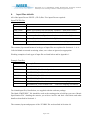
Enter a ‘1’ if the ecological status class for this metric is to based on its observed values (e.g. as
for the Saprobic index in the example below)
Enter a ‘2’ if the ecological status class for this metric is to based on its derived EQR value
whereby the observed value is normalised by its expected RC value and range (e.g. as for the
‘Average score per Taxon’ in the example below).
Column D: Index is integer ?
Enter a ‘1’ if the metric can only take integer values. This ensures the simulated observed values
and the confidence limits are also integers (e.g. as for DFSI in the example below).
4.1.(3)
Ecological status class limits (Columns E-H)
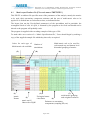
The program complies with the WFD in using five ecological status classes :
‘high’ ‘good’ ‘moderate’ ‘poor’ ‘bad’.
For each individual metric, or MMI, to be used the User must provide the ecological status class
limits for the ‘high’, ‘good’, ‘moderate’ and ‘poor’ classes (Columns E, F, G and H)..
If the metric is to be used in its EQR form, the limits must be for the EQR (e.g. as for the
‘Average score per Taxon’ in the example below.
If the observed values of the metric are to be classified, then the limits should be in terms of the
observed values (e.g. as for the ‘Saprobic Index’ in the example below).
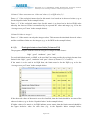
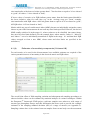
If higher values of a metric or its EQR indicate poorer status, then the limits entered should be
the upper inclusive value for each class (e.g. in the Saprobic Index example below,
Page 21/47