Download Remora Flash
Transcript
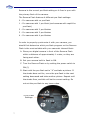
Remora to the correct pre-flash setting so it fires in sync with the primary flash of the camera. The Remora Flash features 4 different pre-flash settings: 0 – For cameras with no pre-flash 1 – For cameras with 1 pre-flash (and cameras with rapid-fire pre-flash) 2 – For cameras with 2 pre-flashes 3 – For cameras with 3 pre-flashes 4 – For cameras with 4 pre-flashes In order to properly synchronize it with your camera, you should first determine which pre-flash program on the Remora Flash is the most suitable with your camera's internal flash: A. Place your digital camera in front of the Remora Flash within a distance of approximately 1 meter, so they are facing each other. B. Set your camera built-in flash to ON. C. Turn the Remora Flash on by setting the power switch to ON (I). D. Start with the pre-flash set to “4” and take a picture. If the strobe does not fire, move the pre-flash to the next setting downward and take another picture. Repeat until the strobe fires, and this will be the correct setting. Do not set the pre-flash to any lower value. 4 Pre-Flash Settings 7