1
2.2 I/O Equipment Installation
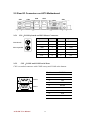
2.5.1 Audio function
The Audio 5.1 channel capabilities are provided by a Realtek ALC655 chipset
supporting digital audio outputs. The audio interface includes two jacks: line-in and
line-out.
2.5.2 Serial COM ports
Two RS-232 connectors build in the rear I/O. One optional COM ports support
RS-232. When an optional touch-screen is ordered with PPC, serial com port can
connect to a serial or an optional touch-screen. One optional COM port supports
RS232/422/485 choice through jumper setting.
2.5.3 Ethernet interface
The Motherboard is equipped with Dual Realtek RTL8111B (Optional Dual Realtek
RTL8101E) chipset which is fully compliant with the PCI 10/100/1000 Mbps
Ethernet protocol compatible. It is supported by major network operating systems.
The Ethernet ports provide the standard RJ-45 jack.
2.5.4 USB ports
Ten USB device may be connected to the system though an adapter cable. Various
adapters may come with USB ports. USB usually connect the external system to the
system. The USB ports support hot plug-in connection. Whatever, you should install
the device driver before you use the device.
2.5.5 External VGA
The Motherboard has one VGA port that can be connected to an external CRT/ LCD
monitor. Use VGA cable to connect to an external CRT / LCD monitor, and connect
the power cable to the outlet. The VGA connector is a standard 15-pin D-SUB
connector.
2.5.6 External DVI
The Motherboard has one DVI port that can be connected to an external DVI/ LCD
monitor. Use DVI cable to connect to an external DVI / LCD monitor, and connect the
power cable to the outlet. The DVI connector is a standard DVI-D connector.
2.5.7 Multiple Display Function
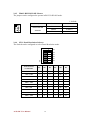
A270 SBC integrated AMD M690G chipset, and provided VGA / LVDS / DVI
outputs. The Mutli-display application is available for A270 SBC. Customers can
A270 SBC User Manual
8