1
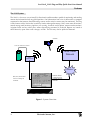
Level Devil® 9142 Plug and Play Quick Start User Manual Setting up for Satellite Communications Provisioning the Satellite Communicator The 9142 MUST be provisioned BEFORE the unit is Satellite ready. Provisioning the 9142 must be done by the communications provider. See the section entitled Provisioning in the 9142 Installation Manual for more details. Software Settings E-mail Address You can select the 9142 unit to talk to you and where you want the data to be sent. In the Back at the Office window, fill out the following fields: - Satellite Modem E-Mail Address . . . the E-mail address used to communicate with the PNP (Plug and Play) Satellite unit. - Speed . . . select the speed dial from the drop down list that matches the one you are using. Your satellite E-mail provider provisions the speed dial (typically #2). Setting up Alarm Levels Alarms are based on a scale of 0 to 255. All sensor readings are converted by the satellite unit to this scale. In the Alarm Level window, enter in the HIGH/HIGH field the highest alarm in counts (the alarm settings range from 0 to 255 counts). The maximum setting for an alarm is 255. Enter in the HIGH field the HIGH alarm, which is an intermediate alarm and should be set less than the HIGH/HIGH alarm. Enter in the LOW field the LOW alarm, which is an intermediate alarm and should be set less than the HIGH alarm but more than the LOW/LOW alarm. The minimum setting is 0 (zero). Enter in the LOW/LOW field the LOW/LOW alarm, which is the lowest alarm and should be set below the LOW alarm. The minimum setting is 0 (zero). To disable an alarm zone, set it equal to 255 for high or 0 for low. 5 Electronic Sensors, Inc.