1
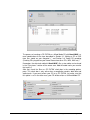
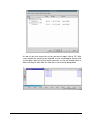
If you select the root item of the file system editor's file tree and select rename,
you can set your data track's Volume ID.
Please, make sure your file system is part of NeroLINUX's destination track list.
The 'NeroLINUX File system' located in the 'Filesystems' folder in NeroLINUX's
source area is the track-representation of the virtual file system you just edited.
The ISO file system is added to the track list automatically if it is empty when you
start editing the virtual file system. If you want to write a different file system on
your medium, just drag and drop one of the other available file systems into the
track list. When you are finished, click the "Record" button in NeroLINUX's
toolbar. Notice that the recording options panel will also give you some control
over the recording process. You can specify not to finalize a medium or to write a
multisession TOC7 . You can also select the writing speed and whether or not to
eject and/or reload the medium after recording.
3.2
Burning images
It has become common to distribute software, esp. Linux distributions in the form
of so-called ‘Images’. These images can be in various format and NeroLINUX
recognized ISO, NRG and CUE images.
To burn these files to a CD or a DVD using NeroLINUX, first make sure that the
recording options are correctly set - especially the recording medium type - and
then click on the ‘Burn Image’ item in the ‘Recorder’ menu. Select the image file
you want to burn in the file selection dialog that pops up and click on ‘Ok’.
Please note that some CUE files might not be burnable under Linux, due to some
character case problems. If you encounter such a problem, just edit the .cue file
and make sure the character case of the binary files is correct.
Please note that when you are burning an image, the following recording options
are ignored, as they are part of the image file:
CD TEXT (Part of the image file)
Burn as CD EXTRA (Part of the image file)
Bootable options (Part of the image file)
3.3
Making an image bootable
The boot structures of a disc following the El-Torito standard are part of the
image file so whenever your image file is bootable the disc you create from it will
automatically become bootable as well.
NeroLINUX
Basic functionality and Interface concept • 21