1
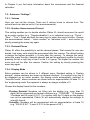
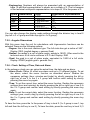
In Chapter 5 you find more information about the conversions and the financial calculator. 7.2: Submenu “Settings” 7.2.1: Volume Here you can set the volume: There are 6 volume levels to choose from. The volume level can also be set to 0 (no announcements). 7.2.2: Number Announcement Format This setting enables you to decide whether Platon XL should announce the result as an entire number (e.g. “Threehundredfive”) or in individual units (e.g. “Three” – “Zero” – “Five”). Press and hold the menu key to select the menu function. Choose the announcement format – “entire number” or “individual units” – and confirm by shortly pressing the menu key again. 7.2.3: Decimal Places Platon XL offers the possibility to set the decimal places. That means the user can decide, how many units should be announced after the comma. The default setting is always the highest possible (= 9 units after the comma). To change this value, select the menu function “decimal places2 and set the preferred number by shortly pressing the left or right key of row 2 in the 3 x 3 group. The higher the number, the more units will be after the comma. Confirm the setting by shortly pressing the menu key again. 7.2.4: Display Mode Entire numbers can be shown in 3 different ways: Standard setting is “floating decimal”, where numbers are shown as decimal numbers. If a number is too big to be displayed as an entire number, the display mode automatically switches to “scientific mode”, where numbers are shown with an exponentiation of base 10. In the ‘engineering mode’ the exponent is always an integer multiple of 3. Choose the display format for the numbers: Floating Decimal: Numbers not fitting into the display (e.g. more than 10 digits) will be presented as decimal numbers (e.g. “12365.886”, “12 thousand 3 hundred and 65 point 8 8 6”). If a number with the 10 digits on the display can not be represented, Platon XL will automatically change the settings to scientific format. Scientific: Numbers will be represented with an exponentiation of base 10 (e.g. “325.22 E 56”, “3 point 2 5 2 2 to the power of 58”). 21