1
2-2. Printer Head Cleaning
Paper dust on the heating elements may lower the printing quality. In this case, clean the
printer head as follows:
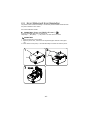
1) Power off the printer.
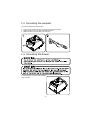
2) Open the printer cover.
3) Clean the thermal elements of the printer head using a cotton swab moistened with
alcohol solvent (ethanol, methanol, IPA)
4) Insert a paper roll and close the printer cover.
(*) Depending on the paper roll used, paper dust may stick to the platen roller and
paper roll end sensor. To remove the paper dust, clean the platen roller and paper roll end
sensor with a cotton swab moistened with water.
- 17 -