1
Status
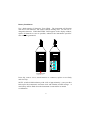
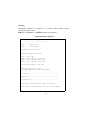
This function shows the current status of the instrument. It shows the
battery strength whether the instrument is paused or running and whether an
overload has occurred. Three bars indicate full battery strength, replace
batteries when one bar is shown.
STATUS shows the status screen. STATUS exits the status screen.
Auto–Range
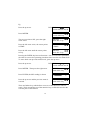
Auto-ranging selects the optimum range for the ambient sound field and may
not be suitable for rapidly fluctuating sound pressure levels, or short period
measurements.
>SETUP<, ENTER, >RANGE<, ENTER, >AUTO<, ENTER.
To de-select Auto-ranging:
>SETUP<, ENTER, >RANGE<, ENTER, >AUTO<, ENTER.
Save
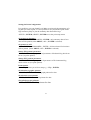
This function saves all meter parameters – e.g. Leq, Lmin, Lmax etc and
waits for the unit to be turned off. When the instrument is turned back on it
will resume measuring from the save point.
>SAVE<, ENTER
Default Settings
This function returns the meter to its factory set defaults.
Setting the Real Time Clock
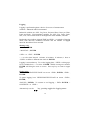
>SETUP<, ENTER. >TIME<, ENTER. Use numeric keys to type hours in
24 hour clock method. ENTER. Use numeric keys to type minutes.
ENTER.
Setting the Real Time Calendar
>SETUP<, ENTER, >DATE<, ENTER. Use numeric keys to type in year.
ENTER. Use numeric keys to type in month. ENTER. Use numeric keys
to type in date. ENTER.
25