1
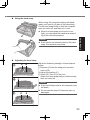
NOTE To conserve power, the following power saving methods are set at the time of purchase. The screen automatically turns off after 15 minutes of inactivity. Getting Started About the battery for this computer This computer uses 2 battery packs. The battery is charged (page 24) and power is consumed only on either battery pack. Those operations switch to the other battery pack automatically. When the computer is connected to the Cradle (optional: CF-VEBU11U), the battery pack is charged when the AC adaptor is connected to the Cradle. With the battery charger (optional: CF-VCBU11U) or the Cradle (optional: CFVEBU11U), you can remove the empty battery pack and charge it while using the computer. You can insert or remove the battery pack while the computer is ON. Be sure not to remove the battery pack being used by mistake. (Refer to Reference Manual “Battery Power” ) The computer automatically enters sleep*1 after 20 minutes of inactivity. *1 Refer to Reference Manual “Sleep and Hibernation Functions” about resuming from sleep. The computer automatically enters standby*2 after 20 minutes of inactivity. *2 Refer to Reference Manual “Standby and Hibernation Functions” about resuming from standby. Note that the computer consumes electricity even when the computer power is off. If the battery pack is fully charged, the battery will fully discharge in the following period of time: When power is off: Approx. 7 weeks In sleep ( ) / standby ( ) : Approx. 2 days In hibernation: Approx. 3 days When the DC plug is not connected to the computer, disconnect the AC cord from your AC wall outlet. Power is consumed simply by having the AC adaptor plugged into an electrical outlet. Power consumption in each mode is as follows. (When AC adaptor is connected) When the screen is off: Approx. 6.7 W In sleep ( ) / standby ( ) : Approx. 1 W The battery pack is fully charged (or not being charged) and the computer is off: Approx. 0.9 W 21