1
9
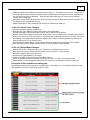
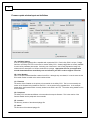
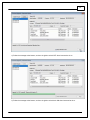
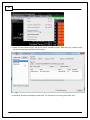
(G) - Images
The number of files or "images" contained within the selected pakgrp file
(H) - Supported Images
The number of valid supported images contained within the selected pakgrp file
(I) - Dynamic Model
Infinity control model files are typically broken into two parts. The dynamic model file primarily contains tuning
table data and calibration constants.
(J) - Firmware
The firmware for the primary microcontroller contained within the pakgrp file. This is the version being
upgraded to.
(K) - Fixed Model
Infinity control model files are typically broken into two parts. The fixed model file primarily contains control
logic math expressions and non-modifiable tuning constants.
(L) - Peripheral Controller
The firmware for the peripheral microcontroller contained within the pakgrp file. This is the version being
upgraded to.
(M) - Keep Calibration Data
Select to keep the existing calibration data and import it into the new configuration during the upgrade
process.
**************************************************************************
Pakgrp files are available to registered Infinity users at aeminfinity.com. You must download and save
your pakgrp file before proceeding with the firmware update process below.
**************************************************************************
BEFORE beginning the update process, be sure to have a saved copy of your tuned session file. If a power
failure occurs during the update process, this is the only way to ensure that the calibration data is not lost.
A power failure at certain critical points in this process could render the ECU inoperative, requiring return
and repair at AEM. Ensure the PC has a full battery charge and/or is connected to AC power. This process
can take UP TO 4 MINUTES to complete, especially if the peripheral microcontroller is updated at the same
time.
If the firmware version on the ECU is older than the version supported by your current version of Infinity
Tuner, a firmware upgrade will be required when you connect. Otherwise, follow the procedure outlined
below.
Note: The firmware update utility is periodically revised and may not match the descriptions below. In
the event of a conflict, please follow the instructions provided in the dialog windows themselves or
supplemental instructions provided by AEM.
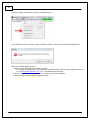
1) Connect to Infinity Tuner.
a. Plug the USB cable from the ECU into your computer USB port and key ignition ON.
b. Open Infinity Tuner.
© 2015 AEM Performance Electronics