1
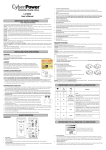
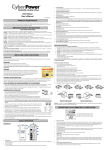
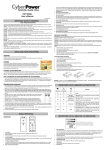
DEFINITIONS FOR LED INDICATORS & AUDIBLE ALARMS
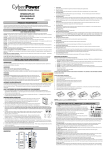
Limited Warranty and Connected Equipment Guarantee
Read the following terms and conditions carefully before using the CyberPower LE850G/ LE1000DG (the “Product”). By using the
Product you consent to be bound by and become a party to the terms and conditions of this Limited Warranty and Connected
Equipment Guarantee (together referred to as this “Warranty”). If you do not agree to the terms and conditions of this Warranty, you
CONDITION
Power
Fault
(LE850G)
Alarm
On
Off
Off
On
Off
should return the Product for a full refund prior to using it.
Who is Providing this Warranty?
CyberPower Systems (USA), Inc. (“CyberPower”) provides this Limited Warranty.
Normal
What Does This Warranty Cover?
On
every 30 seconds
Off
that was connected to the Product and damaged because of the failure of the Product.
Rapid beeping
Utility Failure- The UPS is providing battery power.
What is the Period of Coverage?
every 1/2 second
Rapid beeping indicates the unit will run out of power soon.
This warranty covers the Product for three years. Connected equipment is covered for as long as you own the Product.
Battery Mode or AC/Utility Power Mode Overload Fault-
Who Is Covered?
Occurs when connected equipment exceeds the rating of
This warranty only covers the original purchaser. Coverage ends if you sell or otherwise transfer the Product.
Constant tone
battery outlets of the unit. Please unplug at least one piece
of equipment from battery outlets.
Flash twice every
5 seconds
Off
Constant tone
Flash 3 times
every 5 seconds
1. Before contacting CyberPower, identify Your Product model number, the Purchase Date, and each item of Connected Equipment.
2. Email us at [email protected] or Call us at (877) 297-6937.
piece of equipment from battery outlets and turn on the
3. If your product requires warranty service you must provide a copy of your dated purchase receipt or invoice.
UPS again. If the fault still exists, please contact
How Do You Open A Connected Equipment Claim?
1. Call us at (877) 297-6937 or write to us at Cyber Power Systems (USA), Inc., 4241 12th Ave. E., STE 400, Shakopee, MN 55379, or
Charger Fault- Contact CyberPower Systems for support.
Constant tone
How Do You Get Warranty Service?
Battery Output Short Fault- Please unplug at least one
CyberPower Systems for support.
On
This warranty covers defects in materials and workmanship in the Product under normal use and conditions. It also covers equipment
power-supplied outlets from its battery.
Flash once every
5 seconds
On/Off
Utility Failure- The UPS is providing power to battery
Beep twice
send us an e-mail message at [email protected] for instructions, within 10 days of the occurrence.
2. When you contact CyberPower, identify the Product, the Purchase Date, and the item(s) of Connected Equipment. Have
information on all applicable insurance or other resources of recovery/payment that are available to the Initial Customer and Request
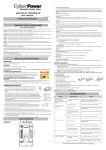
DEFINITIONS FOR ILLUMINATED LCD INDICATORS (LE1000DG)
a Claim Number.
3. You must provide a dated purchase receipt (or other proof of the original purchase) and provide a description of the damage to your
connected equipment.
INPUT voltage meter: This meter measures the AC voltage that the UPS system is receiving from the
4. Pack and ship the product to CyberPower and, if requested, the item(s) of Connected Equipment, a repair cost estimate for the
utility wall outlet. The UPS is designed to continuously supply connected equipment with stable output
damage to the Connected Equipment, and all claim forms that CyberPower provides to you. Show the Claim Number on the shipping
voltage. In the event of a complete power loss, severe brownout, or over-voltage, the UPS relies on its
label or include it with the product. You must prepay all shipping costs, you are responsible for packaging and shipment, and
internal battery to supply consistent 110/120 output voltage. The INPUT voltage meter can be used as
you must pay the cost of the repair estimate.
a diagnostic tool to identify poor-quality input power.
The LCD display indicates a variety
of UPS operational conditions. All
descriptions apply when the UPS is
plugged into an AC outlet and turned
on or when the UPS is on battery.
OUTPUT voltage meter: This meter measures, in real time, the AC voltage that the UPS system is
providing to the computer during normal AC/Utility Power mode, and battery backup mode.
ESTIMATED RUNTIME: This displays the run time estimate of the UPS with the current battery
capacity and load.
How Long Do I Have To Make A Claim?
All claims must be made within ten days of the occurrence.
What Will We Do To Correct Problems?
CyberPower will inspect and examine the Product.
NORMAL icon: This icon appears when the UPS is working under normal conditions.
If the Product is defective in material or workmanship, CyberPower will repair or replace it at CyberPower's expense, or, if
BATTERY icon: During a severe brownout or blackout, this icon appears and an alarm sounds (two short beeps followed by a pause) to indicate
CyberPower is unable to or decides not to repair or replace the Product (if defective) within a reasonable time, CyberPower will refund
the UPS is operating from its internal batteries. During a prolonged brownout or blackout, the alarm will sound continuously to indicate the UPS’s
to you the full purchase price you paid for the Product (purchase receipt showing price paid is required).
batteries are nearly out of power. You should save files and turn off your equipment immediately or allow the software to shut the system down.
If it appears that our Product failed to protect any equipment plugged into it, we will also send you forms for making your claim for the
OVER LOAD icon: This icon appears and an alarm sounds to indicate the battery-supplied outlets are overloaded. To clear the overload, unplug
connected equipment. We will repair or replace the equipment that was damaged because of the failure of our Product or pay you the
some of your equipment from the battery-supplied outlets until the icon turns off and the alarm stops.
fair market value (NOT REPLACEMENT COST) of the equipment at of the time of the damage. We will use Orion Blue Book, or
BATT. CAPACITY meter: This meter displays the approximate charge level of the UPS's internal battery in 20% increments. During a blackout
another a third-party valuation guide, or eBay, craigslist, or other source to establish that amount. Our maximum liability is limited to
or severe brownout, the UPS switches to battery power (the BATTERY icon appears) and the battery charge level decreases.
$150,000 for the LE850G and $200,000 for the LE1000DG.
LOAD CAPACITY meter: This meter displays the approximate output load level of the UPS battery outlets in 20% increments.
Who Pays For Shipping?
FAULT: The following number appears if there is a problem with the UPS. Press the POWER button to turn the UPS off.
We pay when we send items to you; you pay when you send items to us.
E22: Battery Mode or AC/Utility Power Mode Overload fault (Unplug at least one piece of equipment from battery outlets and turn the
UPS on again.)
E21: Battery Output Short fault (Unplug at least one piece of equipment from battery outlets and turn the UPS on again.)
E01: Charger Fault (Contact CyberPower Systems for support)
What Are Some Examples Of What This Warranty Does Not Cover?
1. This Warranty does not cover any software that was damaged or needs to be replaced due to the failure of the Product or any data
that is lost as a result of the failure or the restoration of data or records, or the reinstallation of software.
2. This Warranty does not cover or apply to: misuse, modification, operation or storage outside environmental limits of the Product or
E24: Internal Fault (Contact CyberPower Systems for support)
the equipment connected to it, nor for damage while in transit or in storage, nor if there has been improper operation or maintenance,
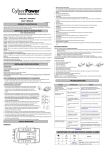
TECHNICAL SPECIFICATIONS
or use with items not designed or intended for use with the Product, such as laser printers, appliances, aquariums, medical or life
support devices, etc.
Model
LE850G
LE1000DG
Capacity
850VA / 460W
1000VA / 530W
What Other Limitations Apply?
1. This Warranty does not apply unless the Product and the equipment that was connected to it were connected to properly wired and
grounded outlets (including compliance with electrical and safety codes of the most current electrical code), without the use of any
adapters or other connectors.
Nominal Input Voltage
120Vac
Input Frequency
60 Hz ± 3 Hz
On-Battery Output Voltage
120Vac ± 5%
2. The Product must have been plugged directly into the power source and the equipment connected to the Product must be directly
connected to the Product and not “daisy-chained” together in serial fashion with any extension cords, another Product or device
similar to the Product, surge suppressor, or power tap. Any such installation voids the Limited Warranty.
3. The Product and equipment connected to it must have been used properly in a suitable and proper environment and in
conformance with any license, instruction manual, or warnings provided with the Product and the equipment connected to it.
Automatic Voltage Regulator (AVR)
Yes
On-Battery Output Frequency
60Hz +/- 1%
4. The Product must have been used at all times within the limitations on the Product’s VA/Watt capacity.
Max. Load for UPS Outlets
850VA / 460W
5. The sole and exclusive remedies of the Initial Customer are those provided by this Warranty.
1000VA / 530W
What Limitations Apply if there is Connected Equipment Guarantee (CEG) Coverage for My Product?
The Product was designed to eliminate disrupting and damaging effects of momentary (less than 1ms) voltage spikes or impulses
Max. Load for Full-Time Surge Protection outlets
12 Amps
from lightning or other power transients. If it can be shown that a voltage spike lasting longer than 1ms has occurred, the occurrence
will be deemed outside the rated capabilities of the Product and the Limited Warranty is void. CyberPower Does Not Cover or
On-Battery Output Wave Form
Simulated Sine Wave Form
Operating Temperature
+ 32°F to 104° F / 0° C to 40° C
Operating Relative Humidity
0 to 90% NON-CONDENSING
Size (W x H x D)
12.2" x 7" x 3.5"
Undertake Any Liability in Any Event for Any of the Following:
1. Loss of or damage to data, records, or software or the restoration of data or records, or the reinstallation of software.
2. Damage from causes other than AC Power Line Transients, spikes, or surges on properly installed, grounded and code-compliant
120 volt power lines in the United States and Canada; transients, surges or spikes on standard telephone land lines, PBX telephone
equipment lines or Base 10T Ethernet lines, when properly installed and connected. (This exclusion applies, for example, to
fluctuations in data transmission or reception, by CATV or RF transmission or fluctuations, or by transients in such transmission.)
Net Weight
13.9 lbs
14.3 lbs
Typical Battery Recharge Time
8 hours typical from total discharge
Typical Battery Life
3 to 6 years, depending on number of discharge/recharge cycles
Recommended Battery
Sealed Maintenance Free Lead Acid Battery
Safety Approvals
UL1778(UPS), cUL107., FCC/DoC Class B
3. Damage from any circumstance described as excluded above with respect to the Product.
4. Damages from fire, flood, wind, rain, rising water, leakage or breakage of plumbing, abuse, misuse or alteration of either the
product or the Connected Equipment.
5. CyberPower excludes any liability for personal injury under the Limited Warranty and Connected Equipment Guarantee.
CyberPower excludes any liability for direct, indirect, special, incidental or consequential damages, whether for damage to or loss of
property [EXCEPT FOR (AND ONLY FOR) the specific limited agreement of CyberPower to provide certain warranty benefits
regarding "Connected Equipment" under this Warranty], loss of profits, business interruption, or loss of information or data. NOTE:
Some States or Provinces do not allow the exclusion or limitation of incidental or consequential damages, so the above limitation may
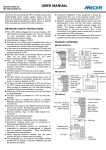
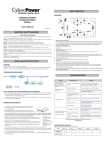
SYSTEM FUNCTION BLOCK DIAGRAM
Input
EMI
Filter
not apply to you.
Surge
Suppressor
AVR
Output
6. The Product is not for use in high-risk activities or with aquariums. The Product is not designed or intended for use in hazardous
environments requiring fail-safe performance, or for use in any circumstance in which the failure of the Product could lead directly to
death, personal injury, or severe physical or property damage, or that would affect operation or safety of any medical or life support
Charger
AC/DC
Inverter
device (collectively, "High Risk Activities"). CyberPower expressly disclaims any express or implied warranty of fitness for High Risk
Activities or with aquariums. CyberPower does not authorize use of any Product in any High Risk Activities or with Aquariums. ANY
SUCH USE IS IMPROPER AND IS A MISUSE OF THE PRODUCT.
Normal Mode
Battery Mode
Where Can I Get More Information?
Battery
The application of the United Nations Convention of Contracts for the International Sale of Goods is expressly excluded.
CyberPower is the warrantor under this Limited Warranty.
CYBERPOWER GREENPOWER UPS™ TECHNOLOGY
For further information please feel free to contact CyberPower at CyberPower Systems (USA), Inc. 4241 12th Ave E., STE 400,
Shakopee, MN 55379; call us at (877) 297-6937; or send us an e-mail message at [email protected].
Advanced Energy-Saving Patented Bypass Technology
CyberPower’s patented GreenPower UPS™ with Bypass Technology reduces UPS energy costs by up to
CyberPower Systems encourages environmentally sound methods for disposal and recycling of its UPS products.
75% compared to conventional UPS models. Even when utility power is normal, conventional UPS models
Please dispose and/or recycle your UPS and batteries in accordance to the local regulations of your state.
constantly pass power through a transformer. By contrast, under normal conditions the advanced circuitry
of a GreenPower UPS™ bypasses the transformer. As a result, the power efficiency is significantly
increased while decreasing waste heat, using less energy, and reducing energy costs.
When an abnormal power condition occurs, the GreenPower UPS™ automatically runs power through its
transformer to regulate voltage and provide “safe” power. Since utility power is normal over 88% of the time,
the GreenPower UPS™ operates primarily in its efficient bypass mode.
The GreenPower UPS™ is also manufactured in accordance with the Restriction on Hazardous Substances (RoHS) directive making
it one of the most environmentally-friendly on the market today.
All rights reserved. Reproduction without permission is prohibited.