1
RONDA CAL. 5020.B (continue)
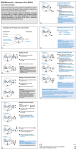
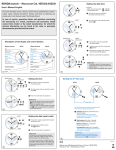
CHRONOGRAPH: INTERMEDIATE OR INTERVAL TIMING
RONDA CAL. 5020.B (continue)
SETTING THE DATE/TIME
Example:
Push-button A
Date/time on the watch:
Present date/time:
Pull out the crown to position II
(the watch continues to run).
Turn the crown until yesterday’s date
appears
Pull out the crown to position III
(the watch stops).
Turn the crown until the correct date
appears.
Continue to turn the crown until the
correct time 8:30 PM appears.
Push the crown back into position I.
Push-button B
MINUTE
COUNTER
Example:
Start: (Start timing.)
Display interval: E.g. 10min 10sec
(timing continues in the background).
Making up the measuring time:
(The 3 chronograph hands are quickly advanced to the
ongoing measured time.)
Push-button B
Stop: (Final time is displayed.)
Reset:
The 3 chronograph hands are returned
to their zero point.
Please note: * Following , further intervals or intermediates can be displayed by pressing push-button B (display
interval / make up measured time, …).
RONDA CAL. 5020.B (continue)
ADJUSTING THE CHRONOGRAPH HANDS TO ZERO POSITION
Please note:
* to set your watch to the exact second, please refer to the chapter entitled “setting the time”.
** please, observe the AM/PM clock rhythm.
Push-button A
Push-button A
60 l www.rodania.com
58 l www.rodania.com
RONDA
CAL. 5020.B (continue)
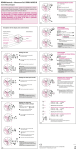
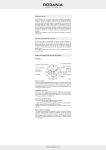
CHRONOGRAPH: BASIC FUNCTION (Start / Stop / Reset)
CENTRE STOP-SECOND
HOUR COUNTER
MINUTE COUNTER
Push-button B
Example:
Start: Press push-button A.
Stop: To stop the timing, press push-button A
once more and read the 3 chronograph counters:
4 h / 20 min / 38 s.
Zero positioning:
Press push-button B.
(The 3 chronograph hands will be reset to their
zero positions.)
Push-button A
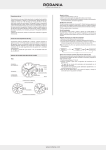
Example:
Start:
Stop:
Restart:
Stop:
(Start timing)
(E.g. 15min 5s following
(Timing is resumed.)
(E.g. 10mn 5s following
= 28min 10s
)
)
(The accumulated measured time is shown.)
MINUTE COUNTER
Please note: * Following
Restart/Stop, …)
COUNTER
MINUTE
COUNTER
Pull out the crown to position III.
(All 3 chronograph hands are in their correct
or incorrect zero position.)
Press push-buttons A and B depressed
simultaneously for at least 2 seconds.
(The centre stop-second rotates by 360°
corrective mode is activated.)
Adjusting the centre stop-second
Single step: A 1 x short
Continuous: A long
Adjusting the next hand B
Adjusting the minute counter hand and the
hour counter hand (mechanical coupled)
Single step: A 1 x short
Continuous: A long
CHRONOGRAPH: ACCUMULATED TIMING
HOUR COUNTER
HOUR
Push-button B
Example: One or several chronograph hands are not in
their correct zero positions and have to be adjusted
(e.g. following a battery change).
Push-button B
Zero positioning:
The 3 chronograph hands
are returning to their zero positions.
, the accumulation of the timing can be continued by pressing push-button A. (Restart/Stop,
www.rodania.com l 59
Returning the crown to position I.
Termination of the chronograph hands
adjustment (can be carried out at any time).
www.rodania.com l 61