1
Apualipttol&WitbiQttq-t
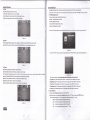
Select C:\, p..r. "ENTER" bruoiIIt"Ir:6i;il. Insert USB Port to USB entry.
2. Press <"/">" to select photo, and then "ENTER" button to enter submenu.
3. SelectC:\, press "ENTER"buttontoentersubmenu
4. Select the specific photo, and press 'TNTER" button to con{irm
5. Press '{X" button to play, and
button to show function menu. Press "X" button to pause, "n"
"
"X"button to play
2.
and Chinese by pressing
"
"/"V'
,enu;
'["
button to repeat all of the programs.
Sbutton
pr".."E"
to show photo detail information;
Restore Factory Default;
key to restore or press
">"
Press"<"
key to return OPTION menu.
Blending;
Press
4.
button to stop or return to the previous
key.
Press" '7'V"toselectRestoreFactory,,andthenpress"ENTER"keytoenterthesub-menu,Themessage"Areyousure?"
3.
"1"
button to play MP3 music stored at music menu; Ebutton to show playlist;
(picture 23)
You can choose English,Franais,Espaol,Portugues,Arabic
next one;
button to play the previous one,
"l'"/'v"
to select Blending,and then press "ENTER" key to choose LOW,MIDDLE,HIcH or OFF mode.
OsdDuration;
Press
"1"/"V"
to selectOsdDuration,and then press "ENTER" keyto choose 5 Sec, I0 Sec, 15 Sec or OFF mode.
(picture 26)
6,
press')"button to show the second function ,"nu;
Press
7.
USB/Card reader function
This Prcjector integrates powerful function to support USB/SD Card reader and you can connect Ex-equipmentsvia the USB/SD Card reader. At
present, system can support usual USB/card reader media players and upgrade to system software.
It can support only the files displaying in the list and the file formate
this product plays. Enter USB by Pressing "SOURCE" key on the remote to
Eor
E
pr".rg,o,
button to ,oom out or zoom in the photo;
E
E
button to rotate the photo counter-clockwise or rotate clockwise.
button to move view.
Press "RETURN" button to exit,
Music Show
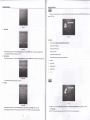
l. Insert USB Pon lo USB entry.
. Press < "/'> " to select music program, and then "ENTER" button to enter submenu.
3. SelectCl, press "ENTER" buttontoenter submenu.
2
"
select input source "USB" or "SD " (for card reader),and then pressing "ENTER" key to enter.
(picture 27)
4. Select the specific song, press
(picture 24)
5. Press
"I"
"I"
pressElbufton to show playlist; press
6. Press
7.
E
one,
button to play the previous
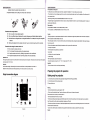
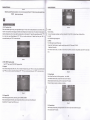
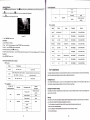
You can choose Photo, Music, lvlovie, Text in the menu(picture 24).
Photo Show
button to play; press "ENTER" button to confim.
fl
press
"X"button
to play next one; press
"I"
button to show music program detail information;
button to set the play period of time
Press "RETURN" button to exit.
Movie Show
1.
Insert USB Port to USB entry.
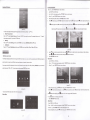
2.Press "<"r'>"toselectmovieprogram,andthen"ENTER"buttontoentersubmenu.
3. Select
(picture 25)
t7
Cl,
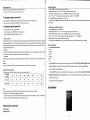
press "ENTER" button to enter submenu(picture 28).
4. Select the specific movie, press
'il"
button to stop or return to the previous menu.
button to play; pross "ENTER" button to confirm.
t8