1
Oiintiu
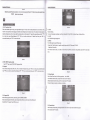
Operstion of LED prujeclot
of LED broiector
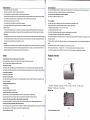
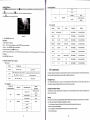
fix the 3 feet of mount to the prolector
The height ofA and
C
3
.
feet (B D E) hole
or other channel.
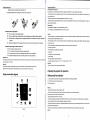
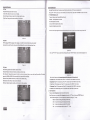
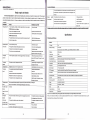
INFO: Press this button to show the information.
fee can be adjusted;
Back View
ENTER:: ok button.
MENU:menu button.
RETURN:Press this button to exit OSD menu.
tr tr tr E, ,"n, button for left, right, up and down.
E E,
(Picture 3)
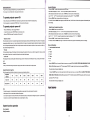
1.PR(Red)
4.Left audio
input (Red)
7.HDMl3 input
2.PB(Blue)
3,Y(Green)
5.Right audio inputwhite)
6.AVlN(Yellow)
8" Remote
Sensor
E E,
'l1.HDMl2 input
'12. Card reader
't3.DTV
'l4.S.video input
'15.
16.VGA
,I7,USB
",
or,,on
DTV mode, press this button to select the following and above
9. Keystone correction knob
t0.HDM|'l inpul
press tnis button to adjust volume.
channel.
lnput
Right audio output (White)
18. Power Switch
19. Left audio output (Red)
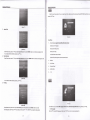
Rear View
E,
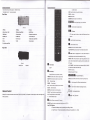
Press this button to paly or pause.
E,
Press this button to stop
.
SUBTITLE: Press to turn ONiOFF subtitles,
AUD.TRACI(TTX:audio track button /Turn teletext function.(DTV).
9,
,,rr,
Select the program(movie or music) start time(suit for
usb/sd)/Display current Channel information(for DTV only).
REPEAT / EPG: Press this button to play video again(suit for usb,sd
card) / press to display electronic program guide (only available under
DTV mode)r
(Picture 4)
1. Exhaust vent
2.Speaker
E,
Power button
DTV channel and radio channel switch key.
ON/OF
DW:DTV menu key.
K, ,r*
ornon
Press this button to mute volume or recover.
P.MODE:Press this button to switch on picture mode.
AUDIO:Press this button to switch on sound mode.
FLIP:
Reversed image.
FREEZE:
FAV:
Picturefreeze.
Press this button to select the favorite channel
CHLIST: channel list button.
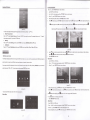
Remote Control
AB / TV RADIO: Press this button to paly selected AB(suit for usb/sd) /
ZOOM:Press this button to zoom the picture.
'16:9/4:3, Press this button to zoom the picture.
(Warning Do not expose the remote control to shocks, liquid or high humidity Do not expose it to direct sunlight or other intense light source
0-9:
Press digital button to select channel.
when you operate.)
-/-:
Channel selection button.
tr:RECALL
OK:Confirm key(for DTV only).
E E E
E:orvupldownitefvrishtkey.
EXIT:Press to exit DTV current menu and return to previous menu.
lil ,r,
Fast backward (for USB/card readerxred button).
E tt,
Fast foruard (for USB/card readerxgreen button).
\-J
PREV: Previous(yellow Button)
I8 *arr,
Next (blue Button)
KEYreturn to previous DTV channel,
SOURCE:Press this button to select specific source such as DTV, SV
lnsert The Batteries
l.
Remove the battery cover by pressing it and sliding it down.
2. lnsertthetwol.5V(AAAsize) batteriesmakingsurethepolarity(+or-) ofthe