1
U
$
Oitttidtid b of,LB D b i6lid,x
2.
s&
Productor Features
1.
2.
3.
4.
Productor Features
2.
3.
4.
5.
'
$rg
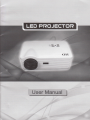
Projector Brief
Safeguards
Warning
t
Projector Overview
'1.
!
.:t;:
-;ri:
'lJ
1.
o&it*0&*i*r&B&ti&&
,]J
Catalogue
Single chip LCD technology
D High performance LED lamp (with 50,000 hrs life)
tr WXGA(1280x768 pixels native, suppori 1280-800,1280X1024 and '1366x768)
!
ll
!
!
compression compatibility for VGA, SVGA, XGA and SXGA
lnput source USB/SD/3'HDMUAV
r'GA,/S-VIDEO/ComponenUDTV(HD digital TV)
User-friendly, multFlanguage on-screen display
keystone correction
tr With USB,SD Slot
tr HD digital Tv(dvb{).
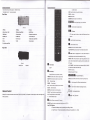
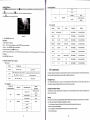
Top view
Bottom view
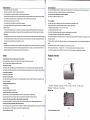
lmportant safeguards
Front view
Please read all these instructions regarding your Led projector and retain them for future reference. Follow all wamings and instructions marked
Back view
on the Led projector.
Rearview
1. Read instructions
All ths safety and operating instructions should be read before the appliance is opsrated.
3.
4.
Operationintroduction
2. Retain instructions
1.
2.
3. Wamings
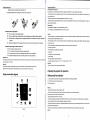
connecting the projector
The safety and operating instructions should be retained for future reference.
Power on/Offthe projector
Menu operation
All warnings on the appliance and in the operating insfiuctions should be adhered to.
4. lnstructions
5.
User's maintenance
1.
2.
3,
4.
5.
All operating instructions must be followed.
Cleaning the lens
5. Cleaning
Cleaning the Projector Housing
Unplug this projector from the wall outlet before cleaning it. Do not use liquid aerosol cleaners. Use a damp soft cloth for cleaning.
Cleaning the Fliter Cover
6. Attachments and equipment
Replacing the Lamp
Never add any attachments and/or eqdpmenl without the approval ofthe manufacturer as
Simple repair and solution
such additions may result in the risk offire, electric shock or other personal injury
7. Waler and moisture
6.
Parameter and function
1.
2.
Do not use this projec'tor near water or in conlact with water.
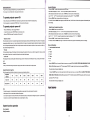
Technicalspecification
8. Accessoribs
Main functions
Do not placs this projector on an unstable cart,stand, tripod, bracket or table. Use only with a cart, stand, tripod bracket, or table
IVofes on the AC Power Cord
This proiector should be operated only from the type of povver source indicated on the marking label. lf you are not sure of the type of
AC Power Cord must meet the requirement of countries where you use this projector.Please confirm yourAC plug type with the graphics below
and ensure that the properAC Power Cord is used.
power,please consult your appliance dealer or local power company.
1
s-------;;t
lT
particular attention to cords at plugs, convenience receptacles, and poinb where they exit from the appliance. Do not put the power cord
sl
ffi
[,"ift#;#
R-------r;l
|
1. Power-cord protection
Power-supply cords should bs routed so that they are not liksly to be walked on or pinched by items placed upon or against them. Pay
N*J
[@]
lN,.9
|l\r/l\,-,1
under a carpet.
12. Ovedoading
Do not overload wall outlels and extension cords as this can result in a fire or electric shock.
13. Objecb and liquids
|
Never push objects of any klnd through openings of this projector as thoy may touch dangerous voltage points or short-out parb that could
result in a flre or electric shock. Never spill liquid of any kind on th6 projector.
lntroduction
Projector Features
The projector offers the following features
.
10. Porer sources
14. Servicing
Do not attempt to service this projector yourself.Refer all s€rvicing to qualified seMce personnel.
15. Oamage requking seruice
Unplug this projector from the wall outlet and refer servicing to qualllied service personnel under the following conditions:
,,.