1
CONTROLS
CV/GATE INPUTS
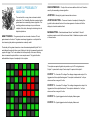
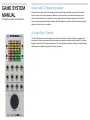
GAME Button - Pressing cycles through the 6 sequencer games. Pressing
The CV/Gate inputs are used to emulate the usage of user interface controls and
automate control of the sequencers. Inputs are activated using any voltage (CV
or gate signal) that rises above the triggering threshold.
and holding for two seconds enables the settings menu.
MODE Button - Functionality of the Mode button is assigned based on the
selected game.
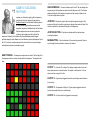
BUTTON Emulates pressing the JOYSTICK button.
RESET Button - Resets the open game.
MODE Emulates pressing the MODE button.
CLOCK Button - With the Game System set to use the internal clock, the
RESET Emulates pressing the RESET button.
Clock button works as a tap tempo button to set the tempo of the internal clock.
With the Game System set to use an external clock, the Clock button acts as a
clock divider for the incoming clock. A number appears in the lower left of the
display to show the selected clock division.
JOYSTICK - Functionality of the Joystick is assigned based on the selected
game.
JOYSTICK BUTTON - Functionality of the Joystick Button is assigned
based on the selected game.
CLOCK External clock signal input. Active only when Clock Mode is set to
External Clock.
LEFT Emulates moving the joystick to the LEFT.
RIGHT Emulates moving the joystick to the RIGHT.
UP Emulates moving the joystick UP.
DOWN Emulates moving the joystick DOWN.
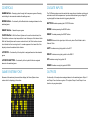
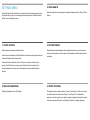
GAME SYSTEM FONT
OUTPUTS
Because of the extremely low resolution display, the Game System has a
custom font for displaying information.
Functionality of the outputs are assigned based on the selected game. Output 1
and Output 2 can function as gate or CV outputs. Output 3 and Output 4 can
function only as gate outputs.