1
Getting Started
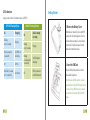
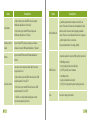
LED Indications
Long press the switch for 2 seconds to turn on / off MT90.
GPS LED Flashlight (Blue)
On
Charging
Flashing
(every 5 seconds)
Sleeping
Flash (1 second on,
1 second off)
No GPS fix or
initializing
Off
GPS fix
Fast Flash (0.3 second
on, 0.3 second off)
Low battery
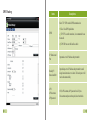
GSM LED Flashlight(Green)
On
A call is coming
in or busy
Flashing
(every 5 seconds)
Sleeping
Flashing
(1 second on and
1 second off)
No GSM signal or
initializing
Off
MT90 is connected
to the GSM network
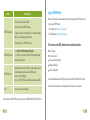
1. Remove the Battery Cover
With the device turned off, you’re your MT90
securely with the front facing down. User the
mini screwdriver to remove 2 screws left and
right in turn, lift up the back cover from the
notch at the bottom of the device.
2. Insert the SIM Card
Place the SIM card into the device with the
gold-colored facing down.
Note: Make sure the SIM card lock is closed;
enough balance with Caller ID Display function
is a must; if using GPRS function, you should
pay attention to the existing SIM card GPRS
charge.
11
12