1
9.0
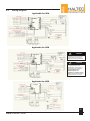
Wiring Diagram (cont’d)
Applicable for XDE
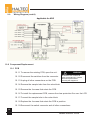
10.0 Component Replacement
10.1 PCB
10.1.1 To remove the existing PCB, open the unit.
!
WARNING
To avoid the risk of electrical
shock, personal injury or death
disconnect power before
servicing this equipment.
10.1.2 Disconnect the switches from the connector.
10.1.3 Unplug all other connections on the PCB.
10.1.4 Remove the sample tube from the valve block
10.1.5 Remove the 4 screws that retain the PCB.
10.1.6 To install the replacement PCB, remove the clear protective film over the LCD.
10.1.7 Connect the sample tube to the valve block.
10.1.8 Replace the 4 screws that retain the PCB in position.
10.1.9 Reconnect the switch connector and all other connections.
16
www.haltec.com