1
SETTING UP VIRTUAL MACHINES
We use the 7-zip file archiver [19] to compress the pre-built Debian Linux guest image described
in Section 2.
To recap, the following software should have been installed on the host before you proceed,
• Oracle VirtualBox(R) 4+
• PuTTY
• 7-zip file archiver
2
Linux Guest Image
We created a Debian Linux guest image and the image is available to download from either Dropbox
or OneDrive. An incomplete but essential summary of the configuration of the virtual machine is
in Table 1.
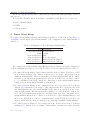
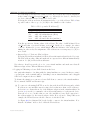
Table 1: Configuration of Pre-built Linux Virtual Machine
Item
Operating System
RAM
Network Adaptor 1
Network Adaptor 2
Network Adaptor 3
Network Adaptor 4
Description
Debian Linux 8.x
64 MB
NAT
Host-only Adaptor
Internal Network dVMen1
Internal Network dVMen1
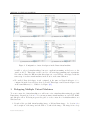
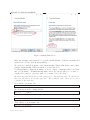
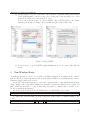
We configured the Virtual machine with 4 Ethernet adaptors. Figure 1 shows the configuration
of the 4 virtual Ethernet adaptors. Note that all adaptors must have different Ethernet addresses.
• We enabled Network Adaptor 1 and configured it in the Network Address Translation (NAT)
mode as shown in Figure 1(a). This mode allows you to access the outside network from
within the virtual machine. Therefore, the traffic between the virtual machine and the outside
network (e.g., the Internet) is via this adaptor. However, from the host, you cannot connect
to, e.g., establish a Secure Shell connection to, this adaptor on the virtual machine without
setting up a port forwarding in VirtualBox on the host [6].
• We enabled Network Adapter 2 and configured it in the Host-only Adaptor mode as shown
in Figure 1(b). In this mode, the adaptor, other adaptors in the Host-only Adaptor model in
this virtual machine and other virtual machines in the same host, and the host are on the
same internal network. This internal network is similar to a lookback interface without the
need of the host’s physical network interface, and importantly it provides connectivity among
virtual machines and the host [5]. Therefore, from the host or other virtual machines, we can
use a Secure Shell client to connect to a virtual machine via the IP address of the Host-only
Adaptor, which saves the effort of setting up port forwarding for multiple virtual machines.
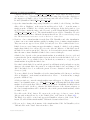
• We enabled Network Adapter 3 and configured it in the Internal Network mode as shown
in Figure 1(c). This mode is for creating a different kind of software-based network which
Revision:134:7b0b97d898ad
2