1
10.0
INSTRUCTIONS FOR ATTACHING THE WORK ‘N’ PLAY TRAY
The below instructions are for attaching the Work ‘n’ Play tray to the
Lightning Pushchair.
CAUTION: THE TRAYS HAVE BEEN RATED TO HOLD UP TO 6.8kgs
15lbs OF WEIGHT. DO NOT OVERLOAD.
WARNING: REMOVE THE TRAY WHEN TRANSPORTING USER IN A
MOVING VEHICLE.
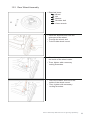
10.1 Contents
• Plastic Tray
• 2 Locking Pins
10.2
Attaching And Removing The Tray
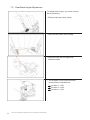
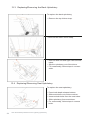
10.2.1 Place the tray on top of the armrest handles as shown on Fig. 1.
10.2.2 Insert a locking pin to both sides as shown on Fig. 2.
10.2.3 For removal, ensure that the tray is free from objects and release
the tray by removing both locking pins.
Fig. 1
Fig. 2
11.0
CLEANING
11.1 Frame
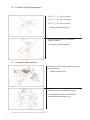
11.1.1 To clean the frame, wipe with a damp cloth and dry thoroughly.
11.1.2 For more stubborn stains wipe with a damp cloth and warm water.
in which a little mild soap has been dissolved. Dry thoroughly.
11.1.3 Never use furniture polish or any spirit to clean the frame.
11.2 Upholstery
11.2.1
11.2.2
11.2.3
11.2.4
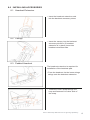
Remove the seat and back upholstery from the Pushchair.
Remove the harness and support boards from the upholstery.
Machine wash in cold water on delicate cycle.
Dry cover thoroughly before re-assembly. Do not tumble dry.
11.3 H-Harness
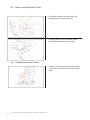
11.3.1 Remove harness from Pushchair.
11.3.2 Wipe with a damp cloth and dry thoroughly. Do not tumble dry.
11.3.3 Do Not immerse in water or wash in a machine
20
User & Workshop Manual for the Lightning Upholstery