1
www.obd2mart.jp
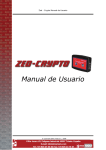
3.0 CRYPTO TRANSPONDER
INTERFACE
NOTE: Before starting the copying procedure, please make sure that your
AD90 software version is 3.14 or higher. If not please contact your distributor
for assistance.
Connect the hardware together as shown below.
1. Connect the power supplies to the AD90 and the Crypto Transponder
Interface. The green and red LEDs will illuminate for one second and then
extinguish.
NOTES:
i) If non-original power supplies are used for the AD90 or the Crypto
Transponder Interface the warranty will be invalid.
ii) Please check that there is nothing that may short circuit the devices when
they are connected to the power supplies.
2. Insert the key into the AD90 key reader.
3. Press the ‘Read’ key on the Crypto Transponder Interface, the green LED
will illuminate and will remain on throughout the reading procedure.
4. Once the transponder code has been recorded, the green LED will start to
flash. Remove the original transponder from the AD90 and insert the new
transponder/key into the AD90 key reader.
5. Press the ‘Write’ key on the Crypto Transponder Interface, the green LED
will illuminate and will remain on throughout the writing procedure.
6. Once the copying procedure is completed, the green LED will extinguish and
the key/transponder can be removed from the key reader.
7