1
GB
CABLE FREE BARO-THERMOHYGROMETER
MODEL: BTHR968
USER’S MANUAL
mb
A
hP a
COMFORT
0
0
INTRODUCTION
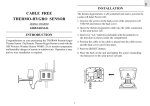
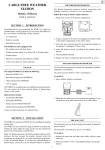
Congratulations on your purchasing the BTHR968 Cable Free
Baro-Thermo-Hygrometer.The Baro-Thermo Hygrometer is used
with the OSI Wireless Weather Station WMR112A to monitor
indoor atmospheric pressure, temperature and humidity. Operation
is easy and no wire installation is required.
SENSOR
G
mb/HPa
D
˚C
reset
inHg
˚F
C
B
F
H
E
1
GB
4. Press the [°C/°F] button to select degrees display in either
Fahrenheit (°F) or Celsius (°C).
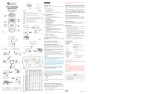
MAIN FEATURES:
5. If degrees are displayed in Fahrenheit, press the [mb/hPA inHG]button and select “inHG” for display of humidity in
inches. If degrees is displayed in Celsius, press the [mb/hPA inHG] and select “mb/hPA” for the humidity display.
A LCD
4 line display indicates weather forecast, pressure,
temperature and humidity .
B °C/°F SLIDE SWITCH
Selects between Centigrade (°C) and Fahrenheit (°F)
6. Slide battery compartment door back into place over the battery
compartment.
C mb/hPA or inHg SWITCH
Selects between mb/hPA or inHg
D RESET BUTTON
Returns all settings to default values
E BATTERY COMPARTMENT
Accommodates four AAA-size batteries
F
BATTERY DOOR
G WALL-MOUNT HOLDER
Supports the remote unit in wall-mounting
To see the readings from the Baro-thermo-hygrometer sensor you
need to own the Main Unit of the WMR112A set. The main unit
displays atmospheric pressure readings, indoor temperature and
relative humidity.
H REMOVABLE TABLE STAND
For standing the remote unit on a flat surface
THE RESET BUTTON
INSTALLATION
See the user’s manual of your main unit for further information.
1. To access the battery compartment, slide the battery
compartment door in the direction of arrows screws. Lift the top
of the unit off from the base.shown on the compartment door.
This button is only used when the unit is operating in an
unfavorable way or malfunctioning. Use a blunt stylus to hold
down the button. All settings will return to their default values.
2. Insert 4 “AAA” size batteries (included) with the polarities in
the direction as shown inside the compartment.
3. Press the [RESET] button.
2
GB
HOW TO USE THE TABLE STAND OR
WALL MOUNTING
SPECIFICATIONS
Temperature Measurement
This sensor comes with a wall-mount holder and a removable stand.
Use either to set up the unit.
Proposed operating range
:
-5°C to 50°C
( 23°F to 122°F )
PRECAUTIONS
Temperature resolution
:
0.1°C (0.2°F)
RF Transmission Frequency
:
433 MHz
Measuring Range
:
25 to 90% RH
Resolution
:
1% RH
Relative Humidity
This product is engineered to give you years of satisfactory service
if you handle it carefully. Here are a few precautions:
(indoor and outdoor)
1. Do not immerse the unit in water.
2. Do not clean the unit with abrasive or corrosive materials. They
may scratch the plastic parts and corrode the electronic circuit.
(indoor and outdoor)
Barometric Pressure /
3. Do not subject the unit to excessive force, shock, dust,
temperature or humidity, which may result in malfunction,
shorter electronic life span, damaged battery and distorted
parts.
Trend Measuring Range
:
600 to 1050 mb
RF Transmission Range
:
100 feet (30 meters)
Temperature sensing cycle
:
around 40 seconds
Power
:
4 x UM4 - “AAA” size
alkaline battery
Weight
:
2.77 ounces(78.4 g)
Dimension
:
180(L) x70(W) x19(H)mm
(17.72 to 31.01 inHg)
4. Do not tamper with the unit’s internal components. Doing so
will invalidate the warranty on the unit and may cause
unnecessary damage. The unit contains no user-serviceable
parts.
5. Only use fresh batteries as specified in the user’s manual. Do
not mix new and old batteries as the old ones may leak.
6. Always read the user’s manual thoroughly before operating the
unit.
(7.09x2.76x.75 inches)
3
GB
o Consult the dealer of an experienced radio/TV technician for
help.
NOTE ON COMPLIANCE
This device complies with Part 15 of the FCC Rules. Operation is
subject to the following two conditions: (1) This device may not
cause harmful interference, and (2) This device must accept any
interference received, including interference that may cause
undesired operations.
CAUTION
— The content of this manual is subject to change without
further notice.
Warning: Changes or modifications to this unit not expressly
approved by the party responsible for compliance could void the
user's authority to operate the equipment.
— Due to printing limitation, the displays shown in this
manual may differ from the actual display.
FCC :
— The contents of this manual may not be reproduced
without the permission of the manufacturer.
NOTE: This equipment has been tested and found to comply with
the limits for a Class B digital device, pursuant to Part 15 of the
FCC Rules. These limits are designed to provide reasonable
protection against harmful interference in a residential installation.
This equipment generates, uses and can radiate radio frequency
energy and, if not installed and used in accordance with the
instructions, may cause harmful interference to radio
communications.
However, there is no guarantee that interference will not occur in a
particular installation. If this equipment does cause harmful
interference to radio or television reception, which can be determined
by turning the equipment off and on, the user is encouraged to try
to correct the interference by one or more of the following measures:
o Reorient or relocate the receiving unit.
o Increase the separation between the equipment.
o Connect the equipment into an outlet on a circuit different from
that to which the receiver is connected.
4
GB
CUSTOMER ASSISTANCE
Should you require assistance regarding this product and its
operation, please contact our customer care department at
800-853-8883 or via email at [email protected].
WARRANTY
This product is warranted to be free of manufacturing defects for a
period of 90 days from date of retail purchase. Defective product
should be directed to the place of retail purchase for exchange.
Should this not be possible, contact our customer care department
for assistance and a return material authorization. No returns may
be made without a return authorization. Please retain your retail
receipt as you may be asked to provide a copy of it for proof of date
purchased.
This warranty does not cover product subjected to abuse, misuse,
accidental damage or tampering.
5