1
LEGAL INFORMATION
Copyright © 2014 ZTE CORPORATION.
ZTE Star 1
Mobile Phone
Quick Start Guide
All rights reserved.
No part of this publication may be quoted, reproduced, translated or used in any form or by any
means, electronic or mechanical, including photocopying and microfilm, without the prior written
permission of ZTE Corporation.
ZTE Corporation reserves the right to make modifications on print errors or update specifications in
this guide without prior notice.
Trademarks
ZTE and the ZTE logos are trademarks of the ZTE
Corporation. Google and Android are trademarks of
Google, Inc. The Bluetooth® trademark and logos
are owned by the Bluetooth SIG, Inc. and any use
of such trademarks by ZTE Corporation is under
license.
Manufactured under license from Dolby Laboratories. Dolby and the double-D symbol are trademarks of Dolby Laboratories.
Other trademarks and trade names are the property of their respective owners.
We offer self-service for our smart terminal device
users. Please visit the ZTE official website (at www.
ztedevice.com) for more information on self-service
and supported product models. Information on the
website takes precedence.
Visit http://www.ztedevice.com to download the
user manual. Just click Support > Manuals from
the home page and then select your location, product type, and name to search for related support
information.
Disclaimer
ZTE Corporation expressly disclaims any liability
for faults and damages caused by unauthorized
modifications of the software.
Product Safety Information
Do not use hand-held while driving
Do not use while re-fuelling
For body-worn operation maintain a
separation of 15 mm
This device may produce a bright or
flashing light
Small parts may cause a choking
hazard
Do not dispose of it in a fire
This device may produce a loud
sound
To prevent possible hearing damage, do not listen at high volume
levels for long periods.
Avoid contact with magnetic media
Switch off when instructed in hospitals and medical facilities
Do not attempt to disassemble
Switch off when instructed in aircrafts and airports
Only use approved accessories
Switch off in explosive environments
Do not rely on this device for emergency communications
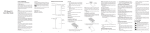
Getting to Know Your Phone
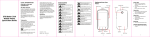
Light & Proximity Sensors
Microphone
Earpiece
Front Camera
Indicator Light
micro-Sim Card Slot
microSDHC Card Slot
Avoid Extreme Temperatures
Keep away from pacemakers and
other personal medical devices
Avoid any contact with liquid, keep it
dry
Menu Key
Home Key
Speaker
Back Key
Infrared Sensor
Microphone
Before Getting Started
Flash
Installing the micro-SIM Card
Back Camera
Switch off your phone before installing the microSIM card.
1. Using the thimble take out the card holders.
Volume Key
Power Key
Charging the Battery
Powering On/Off Your Phone
Make sure the battery is charged before powering
on.
• Press and hold the Power Key to turn on your
phone.
• To turn it off, press and hold the Power Key to
open the options menu. Touch Power off.
•
•
Waking Up Your Phone
Microphone
Charging / micro-USB Jack
Headset Jack
Power Key
• Press and hold to turn on or off airplane mode,
enable silent mode, vibration mode or sound,
restart, or to power off.
• Press to switch your phone to sleep mode or
wake it up.
2. Hold the micro-SIM card and the microSDHC
card with the cut corner oriented as shown and
slip them into the card holders.
Volume Key
• Press and hold to turn the volume up or down.
Home Key
•
•
Touch to return to the home screen from any
application or screen.
Press and hold to open Google search.
Back Key
Touch to go to the previous screen.
Menu Key
Touch to open the menu options.
CAUTION: To avoid damage to the phone, please
do not use other kinds of SIM cards, and do not
use a non-standard micro-SIM card cut from a SIM
card. You can get the standard micro-SIM card
from your service provider.
When you first get your new phone you’ll need to
charge the battery like this:
1. Connect the adapter to the charging jack.
2. Connect the charger to a standard AC power
outlet.
3. Disconnect the charger when the battery is fully
charged.
WARNING! Use only ZTE-approved chargers and
cables. The use of unapproved accessories could
damage your phone or cause the battery to explode.
CAUTION: Do not change the built-in rechargeable
battery in your phone by yourself. The battery can
only be changed by ZTE or ZTE authorised service
provider.
NOTE: If the battery is extremely low, you may be
unable to power on the phone even when it is being charged. In this case, try again after charging
the phone for at least 10 minutes. Contact customer service if you still cannot power on the phone
after prolonged charging.
1. Press the Power Key to activate your screen
display.
2. Long press the screen to unlock.
NOTE:
If you have set an ‘unlock pattern’, or a PIN/password for your phone, you’ll need to draw the
pattern or enter the PIN/password to unlock your
screen.
Using the Touch Screen
Your phone’s touch screen lets you control actions
through a variety of touch gestures.
• Touch
When you want to type using the onscreen
keyboard, select items onscreen such as application and settings icons, or press onscreen
buttons, simply touch them with your finger.
• Touch and Hold
To open the available options for an item (for
example, a message or link in a Web page),
touch and hold the item.
•
•
Swipe or Slide
To swipe or slide means to quickly drag your
finger vertically or horizontally across the
screen.
Drag
To drag, press and hold your finger with some
pressure before you start to move your finger.
While dragging, do not release your finger until
you have reached the target position.
Pinch
In some apps (such as Maps, Browser, and
Gallery), you can zoom in and out by placing
two fingers on the screen at once and pinching
them together (to zoom out) or spreading them
apart (to zoom in).
Rotate the screen
For most screens, you can automatically
change the screen orientation from portrait to
landscape by turning the phone sideways.