1
SQUARE D (SY/MAX COMMUNICATIONS) REFERENCE
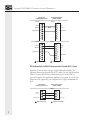
Using the Optional Printer Port
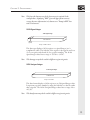
The SOI-260's optional RS-232 printer port may be used to output
Printer Forms to a Printer or other serial device, such as a large ASCII
display unit.
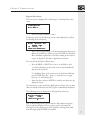
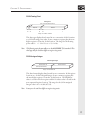
The following configuration illustrates the cabling to be used.
SOI-260 RS-232C
Printer Port
Data Out
Signal Ground
Request to Send
Clear to Send
1
2
3
4
5
6
7
8
9
Male connector
RS-232C Printer
or other
Serial Device
1
2
3
4
5
6
7
8
9
Data In
Signal Ground
Request to Send
Clear to Send
Female connector
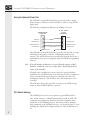
The SOI-260’s optional RS-232 printer port may also be used to accept
ASCII data from a variety of devices, including decoded bar code
scanners. The ASCII data can be entered directly from the device into a
standard data entry screen (configured using the SOI-SPS programming
software).
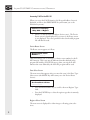
Note If an odd number of characters is received from the scanner, a Null
character is added to create an even byte count. This facilitates word
writes to the controller.
If keypad entry is enabled, the operator may also enter the decimal
equivalent of an ASCII character in the data entry field. For example, an
operator can manually enter 2 characters and then scan a bar code
containing 8 characters. The SOI then writes all 10 characters to the
controller.
The SOI writes data to the controller on receipt of an ASCII carriage
return or when the RETURN key is pressed.
PLC Switch Settings
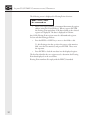
The SY/MAX processor does not require any special DIP switch or
other switch settings to establish communications with the SOI. The
communications parameters (baud rate, data bits, and parity) must
match that of the SY/MAX processor, but unless you have changed
these parameters in the SY/MAX processor, you should not have to reset
anything: the default SOI settings match those of the SY/MAX processor.
4