1
IP Camera User Manual
For further help, please visit www.zmodo.com
Preface
Dear customer, thank you for choosing to purchase and use our IP camera products. This series of IP
monitoring product is the integrated IP network camera which is researched for network video surveillance
monitoring. The series includes network bullet camera, network IR bullet camera, and network dome camera,
etc. High performance, monolithic SOC chip is utilized as media processor which integrates video capture,
compress and transmission. Standard H.264 main profile encoding algorithm ensures more clear and smooth
video transmission. Embedded web server allows user to view real-time footage and remote control via IE
browser. This series of IP camera is well suited for home and small business, as well as any situation which
needs to apply remote network transmission and remote network control. It's easy to install and operate.
Declaration
• The content in this manual may be different from the product version you are using. If you experience any
issue that is not mentioned in this manual, please contact our tech-support or Zmodo Knowledge Base at
kb.zmodo.com.
• The content will be updated time to time. Our company reserves the right to update without notice.
Target Reader
This manual is primarily intended for the following users:
• System planner
• Onsite tech-support and maintenance personnel
• Administrator for system installation
• Users for business operation
Terms in this manual
IP Camera or IPC in this manual means network camera including network bullet camera, network dome
camera, network PT camera, and network IR camera, etc.
• Click: Refers to left-click with your mouse
• Double click: Refers to left-double-click with your mouse
• Right Click: Refers to right-click with your mouse
• Square brackets "[ ]" indicates the window name, menu name and data sheet, such as [Download]
®
Contents
1. PRODUCT INTRODUCTION ...................................................................................................................2
1.1 BRIEF INTRODUCTION .....................................................................................................................2
1.2 MAIN FEATURES ..............................................................................................................................2
1.3 INSTALLATION STATEMENT ............................................................................................................2
1.4 NETWORK IP CAMERA CONNECTION ...........................................................................................3
2. LOG IN .....................................................................................................................................................3
3. PREVIEW ................................................................................................................................................5
4. SYSTEM SETTING ..................................................................................................................................6
4.1 LOCAL CONFIGURATION ..................................................................................................................6
4.2 REMOTE CONFIGURATION ..............................................................................................................7
4.2.1 Video Setting ...............................................................................................................................7
Video Coding ................................................................................................................................7
Video Block ..................................................................................................................................8
4.2.2 Network Parameter ......................................................................................................................9
Wired Setting ...............................................................................................................................9
Wi-Fi Setting ................................................................................................................................9
Listener Port (LPRT) ...................................................................................................................11
PPPOE .......................................................................................................................................11
UPnP (Auto Port Mapping) .........................................................................................................12
Email ...........................................................................................................................................13
FTP .............................................................................................................................................13
DDNS ..........................................................................................................................................14
4.2.3 Video Setting ..............................................................................................................................15
4.2.3.1 Video Loop .....................................................................................................................15
4.2.3.2 Video Plans ....................................................................................................................15
4.2.4 Alarm setting ...............................................................................................................................16
4.2.5 System Information .....................................................................................................................16
4.2.6 Advanced Setting ........................................................................................................................17
4.2.6.1 User Management ..........................................................................................................17
4.2.6.2 Periodic Maintenance .....................................................................................................18
4.2.6.3 Software Update .............................................................................................................19
5. APPENDIX ...............................................................................................................................................20
APPENDIX 1 SPECIFICATION ................................................................................................................20
APPENDIX 2 SYSTEM DEFAULT PARAMETERS ...................................................................................20
APPENDIX 3 APPLCIATION FOR DDNS DOMAIN SERVICE .................................................................21
6. FCC STATEMENT .............................................................................................................28
1
®
1. Product Introduction ▇▅▃
1.1 Brief Introduction
This product is digitally monitored with a traditional analog camera and web video service. Efficient Linux
system, code in flash and small size that’s reliable and steady.
Power
Power
Network
Reset
Reset
Network
Figure 1-1 Network IP Camera and Its Cable Ports
1.2 Main Features
* The highest pixels for100 W, 4M frame rate, real-time image
* Supports up to Max three video streams: One 720P, One VGA, One QVGA;
* Advanced video compression standard, high compression rate and flexible operation
* 720P IP camera applies 1/3”CMOS sensor, VGA IP camera applies 1/4” CMOS sensor, fluid motion pics
* Automatic snapshot in all circumstance
* One key rescue system, network parameter modification and mobile phone live monitor
* Build-in WEB browser supports IE access
* Support multiple user simultaneously, multi-level management ensures high system security.
* Support motion detection alarm (area, sensitivity configurable) and e-mail alert function
* Support online system upgrade by remote control
* Automatic recovery function when the system temporarily loses internet connection.
* Support PPPOE, DDNS, LAN, and Internet (ADSL, Cable Modem)
1.3 Installation Statement
During installation and operation, please pay attention to the following items:
2
®
1.When you received the package product, please check the equipment and accessories according to the
packing list inside the packing case.
2.Before installation please carefully read this user manual.
3.When you install the IP camera, please close the power source of all the related devices.
4.Check the voltage of the power source, to prevent device damage by mismatching of voltage.
5.Installation environment: please do not use equipment under high humidity or temperature. Make sure there
is good ventilation. Do not install it in an environment that experiences frequent vibration.
1.4 Network IP Camera Connection
Figure 1-4 Device Connection of Network IP Camera
Step one: Connect the IP Camera to internet through network cable.
Step two: Connect the power adaptor in the package to the power plug of the IP camera, and access into
electric supply.
Step three: Open the PC, connect with the front-end network IP camera, to configure via software.
Note: It can also apply the way of IP Camera directly connecting with PC.
Note: When using IE browser to visit IP Camera, the IP of local PC should be in the same network
segment with the IP of the IPC.
2. Log in
▇▅▃
When using IE (Internet Explorer) to visit IP camera for the first time, you have to set the security level for
ActiveX controls.
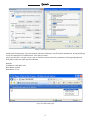
Set security level: Open Internet Explorer, enter the IE Tools menu [Tools/Internet Options/Security Settings/
Custom Level…], set Active X Controls and Plugins to “enable” or “Prompt”, and set the IP address of the IP
Camera as “Trusted sites”.
3
®
Figure 2-1 Security Level Setting
Install ActiveX and plugins: Type the network camera IP address in the IE browser address bar, and press [Enter]
to pop out dialog box of install ActiveX. Click [OK] to install.
Log in and Preview: In Login screen, type in network camera username, password, choosing language and
click [OK] to enter the video preview interface.
Default:
IP Address: 192.168.0.100
User Name: admin
Password: 111111
Figure 2-2 Safety Dialog box
4
®
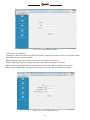
Figure 2-3 Login Interface
3. Preview ▇▅▃
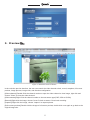
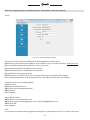
Figure 3-1 Real-time Preview Interface
In the real-time preview interface, the user can control the video channel switch, record, snapshot, full screen
preview, image process, image color, and direction configuration.
[Video channel] Double Click the channel number to open the video channel to view image, right click and
choose "Close" to close the video channel.
[Video stream] Right Click the channel number to choose stream type(720P, VGA or QVGA)
[Record] Right click the image, choose "record" check to start or Close local recording
[Capture] Right click the image, choose "capture" to capture photos.
[Full screen preview] Double click the image to full screen preview, double click once again to go back to the
original image size.
5
®
[Image process] The object of image processing includes brightness
use mouse to drag the slider to set these items, as figure 3-2.
, contrast
, saturation
,
[Color and direction configuration] Image color can be black and white or color, the image can be mirrored
or reversed as figure 3-3.
[PTZ Control] PTZ operations such as up, down, left and right, and lens operations such as varies Zoom, focal
length, and Iris, as figure 3-4.
Figure 3-2 Image Parameter
Adjustment
Figure 3-3 Color and Direction
Control Figure
[System parameter setting] Click this button
[Reboot device] Click this button
3-4 PTZ Control
to enter into system parameter setting interface.
to reboot the device.
4. System Setting ▇▅▃
4.1 Local Configuration
Figure 4-1 Local Configuration
6
®
[Video files packing time] Set the video file packing time,
[Video/captured file storage directory] Set file path for local recording and capture.
After configuration is finished, click [Submit] button, the configuration will take effect immediately.
4.2 Remote configuration
4.2.1 Video Setting
Character Overlay
[Title] Name of video channel will be shown on the up left of the image, maximum 16 characters. Click the
check box and it will display OSD. Un-check the check box, and it will not display the title.
[Time format] You can choose whether to display title , date and time, and also you can choose the time
format.
After setting the date and time, click the [Submit] button, the setting will take effect immediately.
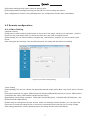
Figure 4-2 Character Overlay Setting
*Video Coding
[Video quality] The user can choose the appropriate desired image quality: Best, Very Good, Good, Common,
Low.
[The type of stream] Two types: CBR(Constant bit rate)and VBR(Variable bit rate) to choose, CBR enables
constant bit rate coding, VBR enables variable bit rate coding.
[Resolution] Set the image resolution. 720P(1280×720=921600 pixel), VGA(640×480=307200 pixel) , and
QVGA(320×240=76800 pixels).
[Frame rate] set coding frame rate per second. Under not satisfying network situation, you can reduce the
frame rate to control the coding bit rate, to ensure the smoothness and continuity of the moving footage.
After setting parameters, click the [Submit] button, the setting will take effect immediately.
7
®
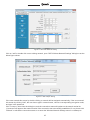
Figure 4-3 Video Code Setting
*Video Block
[Video shield switch] Enable or disable the video shield functionality
[Shield area setting] User can set shield area by dragging mouse with left key pressed, and cancel the shield
box on the shield area by right clicking the mouse. You can choose to shield the whole image, or only shield the
part of the image. It can mask up to four areas. You can right click the shield box to cancel this areas’ shield.
After setting parameters, click the [Submit] button, the setting will take effect immediately.
Figure 4-4 Video Shield Setting
8
®
4.2.2
Network Parameter
*Wired Setting
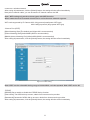
[DHCP] If the router allows DHCP functionality, select DHCP. The IP Camera will obtain IP address
automatically from the router. If the router does not allow for DHCP functionality, then the IP address must be
obtained manually.
[IP address] Set wired cable IP address of IP camera device.
[Subnet mask] Default: 255.255.255.0 (It is highly recommended not to change this setting)
[Gateway] Set gateway IP of IPC, for example if IPC access public network through router, the gateway IP
need to be set as the router IP which has accessed the public network.
[MACaddress] MAC address of IP camera (Read only, cannot change)
[DNS address] If the user has a DDNS account, the DNS address needs to be set as DNS address of the
place where the device is belonging to.
After setting parameters, click the [Submit] button, the setting will take effect immediately.
Figure 4-5 Wired Network Setting
Note: When the network parameter has been revised and saved, the device will reboot. If it is applied in
LAN, please make sure IP address does not conflict with the IP address of other devices or computer in
the same LAN.
*WIFI Setting
[WIFI] Select this check to open the wifi network function of IPC.
[DHCP] If the router allows DHCP function, select this type, IP camera will obtain IP address automatically from
router.
[IP address] Set wireless IP address of IP camera.
[Gateway] Set IP address of the current wireless gateway( router/AP), such as 192.168.0.1.
[Wireless Network Connection] After enabling the Wireless setting, the software will automatically search for
available Wireless networks. The name of all wireless signals including signal intensity and the encryption will
be listed on the screen.
9
®
Figure 4-6 IPC WIFI Network Setting
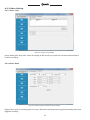
Click on “add” or double click on an existing network, open ”WIFI Wireless Network Settings” dialog box as the
below figure shows:
Figure 4-7 Wifi Hotspot Setting
If the user entered this screen by double clicking, a network will be assigned automatically. If the user entered
this screen by clicking “Add”, the user has to type in network name, choose a corresponding encryption mode,
and type in the password.
Click .Connect., then close the dialog box, and the connection status will update on the search results list.
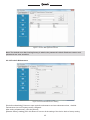
“Connected” will appear after network name if the connection was successfully established; if not, please click
"Refresh" to refresh the connection status or re-enter the Wireless Network Settings menu to re-attempt to
10
®
connect to a wireless network.
After saving all parameters, click the [Submit] button, the setting will take effect immediately.
Now pull out network cable, you can access the IP network camera via Wifi.
Note: WIFI setting only works to those types with WIFI function.
Wired network and wi-fi network should not be set in the same network segment.
WIFI mode supported by IP Camera: 802.11b/g protocol(small power WiFi type)
802.11a/b/g/n protocol (large power WiFi type)
*Listener Port (LPRT)
[Web Listening Port] The default port 80(port 80 is recommended)
[Video Listening Port] default 8000 (8000 is recommended).
[Mobile phone Listening Port] default 9000 (9000 is recommended).
After setting all parameters, click the [Submit] button, the setting will take effect immediately.
Figure 4-8 LPRT setting
Note: LPRT can be selectable during range of 1024~65535, can't be repeated. Web LPRT can be 80.
*PPPOE
[PPPOE] Set to enable or disable the PPPOE dial-up function.
[User name] The ADSL dial-up account, obtain from internet service provider.
[Password] Password of ADSL dial-up account, obtain from internet service provider.
After setting all parameters, click the [Submit] button, the setting will take effect immediately.
11
®
Figure 4-9 PPPOE Parameters Setting
*UPnP (Auto Port Mapping)
[UPnP] If in LAN it has server with UPNP functionality, enable this function, the server will automatically
forward the set port to public network.
[Web mapping port] Set the web port which will be mapping to the server.
[Video mapping port] Set the digital video port which will be mapping to the server
[Mobile phone mapping port] Set the mobile phone port which will be mapping to the server.
After setting all parameters, click the [Submit] button, the setting will take effect immediately.
Figure 4-10 UPnP Port Mapping Setting
12
®
Note: Port mapping can be selectable between 1024~65535. It can't be repeated.
*Email
Figure 4-11 Email parameters setting
This menu is used to set Email address and related parameter of alarm email.
[SMTP server] send email server address, such as SMTP server of Google email box: smtp.gmail.com.
[Receive Email address] Email address to receive the email.
[Send Email address] Email address to send email.
[SMTP password] Log in password for the email box.
[Email title] The title of sending email.
[SMTP port] Port of SMTP Server, such as Gmail email server port as 465, SSL enabled.
After setting all parameters, click the [submit] button, the setting will take effect immediately.
Common email server configurations:
Hotmail server
SMTP Server:smtp.live.com
SMTP User:[email protected]
SMTP Port:25
SSL: Enabled
Yahoo Email server:
SMTP Server: smtp.mail.yahoo.com
SMTP User name:[email protected] [email protected]
SMTP Port: 465
SSL: Enabled
*FTP
FTP services will send the alarm triggered recording file or captured photo via FTP to certain FTP server.
13
®
[FTP server] IP address or HTTP network address of FTP server.
[FTP port] Port of FTP server, default port is 21.
[User] User name of the FTP Server.
[Password] Password of the FTP Server.
After setting all parameters, click the [Submit] button, the setting will take effect immediately.
Figure 4-12 FTP parameters setting
*DDNS
Figure 4-13 DDNS parameter setting
Note: It is only necessary to setup DDNS settings on your NVR, please refer to Part 1; section 2.3.3.4 of
this manual for NVR DDNS setup and configuration.
14
®
4.2.3 Video Setting
4.2.3.1 Video Loop
Figure 4-14 Video Loop Setting
[Loop Video] Click loop video, when the storage of SD card is full, system will overwrite automatically to
continue recording.
4.2.3.2 Video Plans
Figure 4-15 Record Type and Record Time Setting
[Type] Three types of recording types to choose: Schedule recording, Alarm triggered recording and motion
triggered recording.
15
®
[Week/Time] You can choose one day from Monday to Sunday, or choose everyday in the week, also there is
a time period for you to choose. You need to click the time check to enable the time selection.
After setting all parameters, click the [Submit] button, the setting will take effect immediately.
4.2.4 Alarm Setting
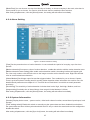
Figure 4-16 Motion Detection Setting
[Time] Set the protection time of motion detection. It can set detail time period of everyday, up to four time
periods.
[Motion detection] Set open or close of motion detection, enable this switch to edit the motion detection area.
[Motion detection area setting] After enable motion detection switch, the setting interface will appear grid
line. User only needs to click the little cube on the image to set the motion detection area. Right click the little
cube to cancel related area detection.
[Alarm Method] Set linkage output format after triggered alarm. Four methods for you to choose: Capture,
record, email and upload. Sending email is sending motion detection alarm information via email to user, the
detailed Email parameter see chapter 4.2.2. There will be no Email alert if user didn't set email parameter
previously.
[Sensitivity] The sensitivity of motion detection includes three levels: High, Little high, Medium, and Low.
[Output delay] Set delay time of alarm linkage, time range is limited between 0~30sec.
After setting all parameters, click the [Submit] button, the setting will take effect immediately.
4.2.5 System Information
[Version] Display device name, system version, video/audio channel number, sensor/alarm input/output, local
storage.
[Time setting switch] Enable this switch to manually set the system date and time; disable this switch then
the system date and time will be synchronized with local PC only to check the status and can't be configured to
disable this switch.
After setting all parameters, click the [Sync time] button, the setting will take effect immediately.
16
®
Figure 4-17 Version Information
Figure 4-18 System Time Setting
4.2.6 Advanced Setting
4.2.6.1 User Management
Each IP camera can be set up to have up to 15 users. Admin is the system default super user and cannot be
deleted, but the admin password can be changed. User's authority is as following.
Super-User authority: operate and set all the function and parameter of IP camera
Common user authority: The common user is allowed to view video, adjust their password and delete their own
account. Common users are not granted any additional authorities.
17
®
Figure 4-19 User Management Interface
Note: The default user after leaving factory is admin, the password is blank. Both user names and
passwords are case sensitive.
4.2.6.2 Periodic Maintenance
Figure 4-20 Periodic Maintenance Setting
[Periodic maintaining] Choose to open periodic maintenance and set maintenance time, detailed
maintenance time on everyday can be configured.
After setting all parameters, click the [Submit]
[Restore factory setting] Click this button to recover all the setting of the device back to factory setting.
18
®
[Reboot device] Click this button to reboot the device.
Note: Periodic maintenance and reboot the device will need to wait for 30 seconds to restore video
surveillance.
4.2.6.3 Software Update
Figure 4-21 Software Update
[Update] Click "..." to browse for the correct update file (application file: IPC-APP, Please not change the file
name), click "Update". During the update, it will display update information. After update finished, IP Camera
will reboot automatically. Log into the device once again and enter the software update interface to check
whether the system version has been updated.
Note: During updating, please do not disconnect the camera from its power source or from the internet
connection.
19
®
5. Appendix ▇▅▃
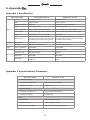
Appendix 1 Specification
Type of Parameter
Camera
VGA Network Camera
720P Network Camera
Sensor
1/3" CMOS sensor
1/4" CMOS sensor
Pixel
1280(H)*720(V)
640(H)× 480(V)
Picture procession
Brightness
Brightness, contrast, saturation
Power
12 V DC @ 600 mA
12 V DC @ 300 mA
Network interface
RJ45 10/100M, with Indicator light.
RJ45 10/100M, with Indicator light.
Indicator light
Power indicator light /Status Indicator light Power indicator light /Status Indicator light
Antenna
Wifi wireless modem/ Wifi Antenna
Reset button
Hold pressing the RESET button 5
Hold pressing the RESET button 5 seconds,
seconds, the system will clear user’s data the system will clear user’s data automatically
automatically and restore factory setting
and restore factory setting
Wifi Antenna
Temperature
Physical
parameters Humidity
-10- 50°C
-10- 50°C
20%-80% Noncondensing
20%-80% Noncondensing
Video
Video compression
H.264/JPEG
H.264/JPEG
Video code
1280 x720/640x480/320x240
640x480/320x240
Sub video code
640x480/ 320x240
320x240
CBR, VBR
CBR, VBR
1~30fps Selectable for main stream and
sub stream
1~30fps Selectable for main stream and sub
stream
Parameters Video Compression
Resolution
Frame rate
Appendix 2 System Default Parameter
User name: admin
password: 111111
Wired cable network
IP address: 192.168.0.100
Subnet mask:255.255.255.0
Gateway: 192.168.0.1
DHCP: Close
Wireless network
IP address: 192.168.0.101
Subnet mask 255.255.255.0
Gateway: 192.168.0.1
DHCP: Close
Port
Web LPRT:80
Web mapping port:3000
Video LPRT:8000
Video mapping port:3001
Mobile phoneLPRT:9000
Mobile phone mapping poprt:3003
20
®
Appendix 3 Port Forwarding & Applying for a Free DDNS Domain Service
For a complete interactive guide that details how to setup your NVR to be accessible from outside internet
networks, please go to www.zmodo.com/network
*NVR DDNS Brief Introduction
DDNS dynamic DNS means real-time analysis to a fixed domain and dynamic public network IP address of IP
camera. All internet users can visit this IP camera through a certain fixed domain that they have setup through
our free DDNS service located at zmododns.com
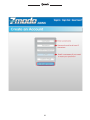
Step 1. Sign up for an account and create domain name for use with your device
a. Sign up for an account at zmododns.com
Choose your desired username and password at our site. You will be informed if an existing user already
exists, or if your email is already registered (limit 1 account per email).
21
®
22
®
b. Create domain name(s) for use with your device(s)
Once signed in, you will need to add a domain. This will be the address used to access your device. Each
account can request up to 5 domains for use with multiple devices at different IP addresses.
23
®
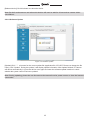
Enter the desired domain name into the blank and hit submit. If the name is available, the user will be informed
of a successful domain creation. Otherwise, the user will need to choose a different name.
Step 2. Configure the NVR to use zmododns.
*The NVR must be actively connected to the internet prior to setting up dynamic DNS
a. In the NVR, navigate to "Configure system settings”, then "Configure network settings”, then click on the
"DDNSSettings”.
b. Choose "zmododns” from the server drop down menu.
c. Enter the newly registered user name into the "Account” field and the password into the "password” field.
d. Enter the full registered domain name into the domain field (for this example, it would be mydvr.zmododns.
com).
e. Be sure the "On” button is checked on the top left.
f. Click "Save” to save the settings.
24
®
Step 3. Access device via domain name or zmododns.com
The user may access his/her device directly via the domain registered (i.e. http://zmodoexample.zmododns.
com)
Zmododns.com will also have the latest updated public IP address for each of the domains on the user's
account. The log in interface is easy and intuitive, and will remember the user's session (no need to log in again
on subsequent visits). Once logged in, the user will be presented with links to his/her domains.
Adjust the IP address of device, the IP address needs to be LAN IP of the router which means the network
segment when you enter into the internet in ordinary time.
25
®
Step 4. Port mapping setting of D-Link router
Type in the IP address of router in browser, to log in the main interface of router management.
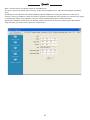
1.Enter the USERNAME and PASSWORD for your router when prompted.
If you are not sure what your router password is, please locate your router onwww.routerpasswords.com
If the default password provided bywww.routerpasswords.com does not successfully log you into your router,
please call your Internet Service Provider to find out your router's USERNAME and PASSWORD.
Click Advanced, then Port Forwarding to enter the port forwarding section of the router.
2. Fill in the port forwarding rules configuration
Name = IPC1
IP Address = 192.168.0.100
External Port TCP = 80
Internal Port TCP = 80
External Port UDP = 80
Internal Port UDP = 80
Click Add/Apply to create
26
®
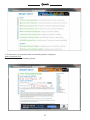
3. To make sure your ports have been successfully opened, navigate to:
www.yougetsignal.com
From there click on Port Forwarding Tester.
27
®
You will need to check each port for connectivity using this tool.
Enter 80 into the PORT NUMBER field, then click CHECK. You should receive the folling notation: PORT80 is
OPEN on XXX.XXX.XXX.XXX
Note: The remote access that you see is your IPC’ external address. This is the IP address you will see when
you access your IPC via other different computers. Please write this down.
If the port is open, then you can visit remotely the IP camera via DDNS domain name at : http://jerry123.zapto.
org or http://xxx.xxx.xxx.xxx:80
FCC Statement
1. This device complies with Part 15 of the FCC Rules. Operation is subject to the
following two conditions:
(1) This device may not cause harmful interference.
(2) This device must accept any interference received, including interference that may cause undesired
operation.
2. Changes or modifications not expressly approved by the party responsible for
compliance could void the user's authority to operate the equipment.
NOTE: This equipment has been tested and found to comply with the limits for a Class B digital device,
pursuant to Part 15 of the FCC Rules. These limits are designed to provide reasonable protection against
harmful interference in a residential installation. This equipment generates uses and can radiate radio
frequency energy and, if not installed and used in accordance with the instructions, may cause harmful
interference to radio communications. However, there is no guarantee that interference will not occur in a
particular installation. If this equipment does cause harmful interference to radio or television reception, which
can be determined by turning the equipment off and on, the user is encouraged to try to correct the interference
by one or more of the following measures:
◆ Reorient or relocate the receiving antenna.
◆ Increase the separation between the equipment and receiver.
◆ Connect the equipment into an outlet on a circuit different from that to which the
receiver is connected.
◆ Consult the dealer or an experienced radio/TV technician for help.
FCC Radiation Exposure Statement
This equipment complies with FCC radiation exposure limits set forth for an
uncontrolled environment. This equipment should be installed and operated with
minimum distance 20cm between the radiator & your body.
28
Lifetime Customer Support
US-based Tech Support: 866-551-6881
24/7 Live Support on www.zmodo.com
Mailing Address:
Champaign Office: 1401 Interstate Drive, Champaign, IL 61822
Los Angeles Office: 17870 Castleton Street, Suite 200, Industry, CA 91748