1
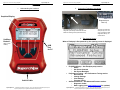
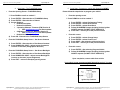
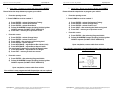
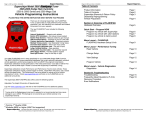
Superchips Inc. Page 5 of 24 Form 0157E 1805 03//29/2007 Superchips Inc. Page 6 of 24 Form 0157E 1805 03//29/2007 Section A – Overview of FLASHPAQ Section A – Overview of FLASHPAQ 1. Understanding the hardware 2. Connecting Flashpaq to my vehicle Graphical Display Diagnostic port close up The Flashpaq plugs into your vehicle’s diagnostic port usually underneath the dash below the steering wheel (see white arrow). The port and cable are setup to only fit on one way. Typically the wider edge faces the top, as shown above. 3. The Opening Screen SoftKeys Buttons When a Flashpaq is first powered up, the opening screen is displayed (Note screen USB Port for PC relation) Vehicle Cable Superchips Inc. 1790 East Airport Blvd., Sanford, FL. 32773 (407) 585-7000 http://www.Superchips.com Superchip & Superchips are registered trademarks of Superchips, Inc. FLASHPAQ Setup – See Flashpaq setup section o About o Set Screen Contrast o Set Screen Backlight Performance Tuning – See Performance Tuning section o Read Vehicle o Change Settings o View Settings o Program Vehicle Advanced Features – See Advanced Features section o Diagnostic Codes o Data Logging (visit www.flashpaq.com for updates) Superchips Inc. 1790 East Airport Blvd., Sanford, FL. 32773 (407) 585-7000 http://www.Superchips.com Superchip & Superchips are registered trademarks of Superchips, Inc.