1
Superchips Inc.
Page 13 of 24 Form 0157E 1805 03//29/2007
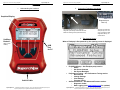
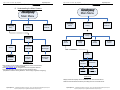
Section A – Overview of FLASHPAQ
FlashPaq
FlashPaq
M ain M enu
FlashPaq
Main Menu
Perform ance
Tuning
Setup
Superchips Inc.
Page 14 of 24 Form 0157E 1805 03//29/2007
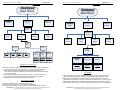
Section A – Overview of FLASHPAQ
Advanced
Features
FlashPaq
Performance
Tuning
Setup
Advanced
Features
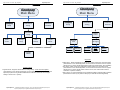
Performance
Tuning
Read
Vehicle
Change
Setup
View
Settings
Performance
Tuning
Program
Vehicle
Read
Vehicle
Change
Setup
View
Settings
Program
Vehicle
Change
Setup
Power Level
Options
View
Settings
Select
Performance
Select
Tow Safe
Select
Economy
Select
Stock
Rev
Limiter (6.0L)
Modify RPM
Stock/Raised
Speed
Limiter
Tire Height
Modify MPH Select Height
Stock/Raised
Inches
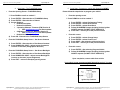
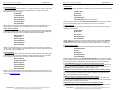
Change Setup – Power Level
Performance: Selects Superchips optimum performance tuning for engine & transmission.
Note: With performance tuning installed you can safely tow/haul up to 6000 lbs.
Tow Safe: Selects Superchips optimum tow tuning for engine & transmission.
Note: With Tow Safe tuning installed you can safely tow/haul up to the OEM’s listed
maximum towing limit.
Economy: Selects Superchips mid-range program tuning for engine & transmission.
Note: With Economy tuning installed you can safely tow/haul up to 8000 lbs
Stock: Selects factory stock tuning for engine & transmission.
Change Setup – Options
Rev Limiter: Allows selection of a raised engine rev limiter.
Speed Limiter: Allows selection of a raised vehicle speed limiter.
Tire Height: Allows changes for after-market tires for speedometer & shift correction.
Superchips Inc. 1790 East Airport Blvd., Sanford, FL. 32773 (407) 585-7000 http://www.Superchips.com
Superchip & Superchips are registered trademarks of Superchips, Inc.
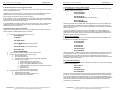
FlashPaq
Status
Display
Vehicle ID
Tuner Status
Power Level
Options
Display
Power Level
Display
Options
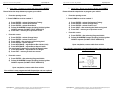
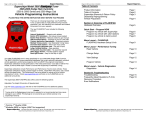
View Settings
Display Vehicle ID & Tuner Status: Displays stored vehicle ID & tuner programming status
(This feature displays previously read data, no communications with the vehicle occur)
Display Power Level: Displays stored user selection from Change Setup - Power Level.
(This feature is for display only, to make changes see Performance Tuning - Change Setup)
Display Options: Displays current settings user has selected from Change Setup – Options.
(This feature is for display only, to make changes see Performance Tuning - Change Setup)
Superchips Inc.
1790 East Airport Blvd., Sanford, FL. 32773 (407) 585-7000 http://www.Superchips.com
Superchip & Superchips are registered trademarks of Superchips, Inc.