1
TR2 RX
Cable Management
550W
>> >>
TR2 RX
Cable Management
ATX 12V 2.2 Version
550W
>> >>
ATX 12V 2.2 Version
3.3 Installation Steps
3.2 Embedded Socket and Modularized
Cable Management
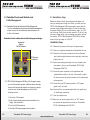
3.2.1 Embedded Socket and Modularized Cable Management:
The new embedded socket and modularized cable management
allows user use only the cables they need and improve the
airflow in the chassis.
Embedded Socket and Modularized Cable Management Design:
To prevent electrical shocks, please disconnect the power cord
from your existing power supply unit. Before you install your new
TR2 RX Cable Management 550W power supply, please check the
red power supply voltage switch setting. You need to match your
local power voltage(115V use for North America, Japan, etc., 230V
use for Europe, South Africa, and other countries). If you don't use
the proper voltage setting, you may damage your system and void
the warranty. TR2 RX Cable Management 550W PSU has voltage
selector which can change to 115V/230V.
Installation Steps
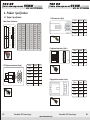
Peripheral/
Floppy/
SATA Connector
3.3.1 Disconnect the power cord from your old power supply.
3.3.2 Follow your computer case manual and disassemble the case.
3.3.3 Disconnect all the power connectors from the motherboard
and from the peripheral devices such as case fans, hard drives,
PCI-Express
Connector
floppy drives. etc.
3.3.4 Remove the existing power supply from your computer case
and replace it with your new Thermaltake TR2 RX Cable
Management 550W PSU.
3.3.5 Connect the power connectors to the motherboard and
peripheral devices (refer to the rest of this manual to match
the various one-way key-locked connectors to the motherboard
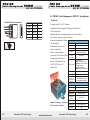
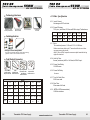
3.2.2 TR2 RX Cable Management 550W unit: On the power supply,
you will find sockets to connect with those cables. Users can
choose which wire set they want to use for devices, graphic
card, fans, etc. Inside the package, you will find the
following wire set:
1. One 4-pin +12V connector
2. Eight 4-pin peripheral power connectors and two 4-pin
floppy drive connectors
3. Four 5-pin S-ATA connectors
4. Two 6-pin PCI-Express graphic card connectors
03
and accessories).
3.3.6 Connect the 6-pin PCI Express connector to PCI Express
graphic card if you need.
Note: Please read the user manual supplied with your graphic card
for detail usage instructions.
3.3.7 Close the computer case.
3.3.8 Make sure your power supply switch is on "OFF" position,
and connect the supplied power cord to your Thermaltake
TR2 RX Cable Management 550W PSU.
Thermaltake TR2 Power Supply
Thermaltake TR2 Power Supply
www.rackmountnet.com
04