1
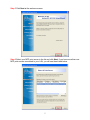
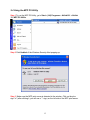
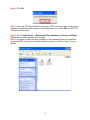
Step 7 Refer to the IP information you wrote down at Step 3. If your computer’s IP
address is not 192.168.1.x (where x is a number between 2-254), select Yes, I want to
change settings, and enter admin (the default password) in the password field.
Otherwise, select NO. Click Next.
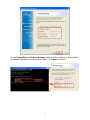
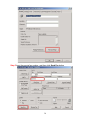
Step 8 In the IP Address field, enter a valid IP address, subnet mask, and default
gateway that matches your local area network.
For example: If your computer’s IP Address is 192.168.0.100, enter the same three
numbers: 192.168.0 in the corresponding fields.
Note: You can leave the last IP Address number 254 as is unless another network
device (i.e. the Default Gateway) is already using that number. If another network
device is already using 254, then change it to another number that is currently not in
use (preferably 200 - 253).
6