1
Table of Contents
SAFETY PRECAUTIONS
3
Storage, Carriage and Usage Conditions
3
Maintenance4
Utilization4
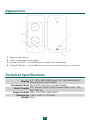
APPEARANCE5
TECHNICAL SPECIFICATIONS
5
GETTING STARTED
Smartphone software installation
Connecting to smartphone, turning it on for the first time, and start
using CoverReader
6
6
6
DEVICE CONTROL
8
Reading books
8
Button Control
8
Tap Zones
9
Sharing Content to the Device
9
Images9
Text9
Wallpaper Settings
10
Call and Message Notifications
10
SETTINGS11
Page Turn
11
Picture output
11
Wallpaper11
Standby Mode
11
Notifications in standby
11
Automatic Power off
11
Uninstall CoverReader
12
TROUBLESHOOTING13
COMPLIANCE WITH INTERNATIONAL STANDARDS
14
LEGAL INFORMATION
15
2