1
XBee/XBee‐PRO™ OEM RF Modules ‐ 802.15.4 ‐ v1.xAx [2007.01.04]
Chapter 2 ‐ RF Module Operation
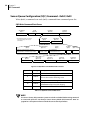
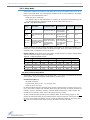
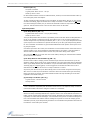
The End Device selects a Coordinator to associate with according to the A1 parameter
“Reassign_PANID” and “Reassign_Channel” flags:
Reassign_PANID Bit Set (bit 0 = 1)- End Device can associate with a PAN with any ID value.
Reassign_PANID Bit Not Set (bit 0 = 0) - End Device will only associate with a PAN whose
ID setting matches the ID setting of the End Device.
Reassign_Channel Bit Set (bit 1 = 1) - End Device can associate with a PAN with any CH
value.
Reassign_Channel Bit Not Set (bit 1 = 0)- End Device will only associate with a PAN whose
CH setting matches the CH setting of the End Device.
After applying these filters to the discovered Coordinators, if multiple candidate PANs exist, the
End Device will select the PAN whose transmission link quality is the strongest. If no valid Coordinator is found, the End Device will either go to sleep (as dictated by its SM (Sleep Mode)
parameter) or retry Association.
Note - An End Device will also disqualify Coordinators if they are not allowing association (A2 AllowAssociation bit); or, if the Coordinator is not using the same NonBeacon scheme as the
End Device. (They must both be programmed with NonBeacon code.)
3. Associate to Valid Coordinator
Once a valid Coordinator is found (step 2), the End Device sends an AssociationRequest message to the Coordinator. It then waits for an AssociationConfirmation to be sent from the Coordinator. Once the Confirmation is received, the End Device is Associated and the Associate LED
will blink rapidly (2 times per second). The LED is solid if the End Device has not associated.
4. End Device Changes once an End Device has associated
Changing A1, ID or CH parameters will cause the End Device to disassociate and restart the
Association procedure.
If the End Device fails to associate, the AI command can give some indication of the failure.
© 2007 MaxStream, Inc.
18