1
MPEG4
4 Channel Digital Recording System
VXM4-4
User Manual
CONTENTS
Before installing
Key features
Front panel description
Rear panel description
Getting started
Connect and switch on
Configuring the live display
Multi screen mode
Choosing channels
Playback
Search
Instant playback
Event Search
Archiving
Telemetry Control
Shut down
Configuring the VXM4 – System Setup
Display
OSD
Monitor
Camera
Camera Title & Covert
Colour Setup
PTZ Setup
Motion Sensor
Sound
Audio
Buzzer
System
Date / Time
Network
Mail
User Management
System Management
Control Device
Event / Sensor
HDD Event
Alarm Input
Alarm Out
Buzzer Out
Email notification
Disk Manage
1
2
3
4
5
5
6
6
6
7
7
8
8
11
10
10
12
12
12
13
14
14
14
15
15
17
17
17
18
18
18
19
19
20
20
21
21
21
21
22
22
23
CONTENTS
Configuring the VXM4 – Record Menu
Recording operations
Continuous / Motion Setup
Recording Settings
Schedule
23
23
23
24
25
Alarm setup
Connecting to the VXM4 remotely
Install the software
Remote client controls
26
27
27
28
Remote client setup
Create a connection group
29
29
Enter VXM4 details
29
Additional configuration
Using the remote client
Connect to a VXM4 group
Live display modes
Saving to AVI file
Viewing events
Telemetry control
Audio monitoring
Audio talkback
Triggering alarms
Connection status
30
31
31
31
32
32
32
33
33
33
33
Remote client playback controls
Searching for footage
Controlling playback
33
34
34
Audio monitoring
Archiving footage
Backup player
Taking a snapshot
34
35
35
35
Event search
Print an image
Viewing events
Remote VXM4 setup
Entering setup
Loading and saving
Appendix A: The Archive Set
Appendix B: Configuring a Netgear DG834
router for use with the VXM4
Appendix C: Connecting external devices
Appendix D: Specifications
Notes
36
36
36
37
37
37
38
39
42
43
44
BEFORE INSTALLING
•
Installation should be carried out only by qualified personnel and in accordance with any
electrical regulations in force at the time.
•
The DVR must be placed on a stable surface or mounted in an approved cabinet. Adequate
ventilation must be provided, taking particular care not to block any of the air vents on the DVR.
•
Adequate protection against lightning strikes and power surges must be installed to prevent
damage to the DVR.
•
Any safety warnings on the DVR and in these instructions must be adhered to.
•
If cleaning is necessary, shutdown the DVR and disconnect power first. Use a soft dry cloth only –
never use any abrasive cleaners.
•
1
Do not attempt to service or repair the DVR as opening or removing covers may expose
dangerous voltages or other hazards. Refer all servicing to qualified service personnel
KEY FEATURES
ENHANCED GRAPHICAL USER INTERFACE (GUI)
The VXM4 menu structure and on screen display is presented in a simple to use and logical GUI format.
GENUINE TRIPLEX OPERATION
The VXM4 will continue to record at full frame rate during local playback, local setup, multi user remote viewing and
playback, and remote setup.
AUDIO
4 audio inputs are supported which can be assigned to any video channel. Live and recorded audio can be monitored
remotely over the internet and remote ‘talkback’ audio transmission to the VXM4 is also possible.
BACKUP
Recorded footage (including audio) can be archived to USB memory stick or CD. Playback software is embedded with
the backup files and the backup also contains the system event log and backup log for full traceability.
REMOTE CONNECTION
Software is provided to allow remote connection to up to 4 VXM4s in one session. Depending on user level, full VXM4
control is available over the internet as well as the ability to remotely configure the VXM4. Alarm outputs on the VXM4
can be remotely triggered over the internet.
COMPREHENSIVE RECORDING SETUP
Recording can be scheduled, alarm activated or motion activated. For each type of recording, frame rates, image
quality and audio recording properties can be adjusted per hour, per day and for each individual channel.
TELEMETRY CONTROL
Full telemetry control is available from the front panel or remote connection and a wide number of speed dome
protocols are supported. Protocols can be set individually for each channel and telemetry speed can be adjusted to
suit particular speed domes.
EXTENSIVE MONITOR SUPPORT
The VXM4 has 3 main monitor outputs (Composite, VGA and S-Video) which can be used simultaneously. Support is
also provided for a spot monitor.
LIVE DISPLAY
The VXM4 displays single or quad screen images and also has a standard sequence mode.
CONFIGURATION BACKUP
All configuration settings on the VXM4 can be saved to USB memory stick or a PC file remotely. The saved data can
then be uploaded to other VXM4 units allowing rapid deployment where more than one VXM4 is being installed.
EMAIL SUPPORT
The VXM4 can send emails to specific users to notify events such as alarm, motion detection, hard drive failure etc.
2
FRONT PANEL DESCRIPTION
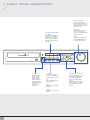
SHUTTLE WHEEL
Used to quickly adjust
playback speed and direction
(page 7). Also used to control
camera zoom when in PTZ
mode (page 11)
JOG RING
CHANNEL SELECTION
BUTTONS
Used to display individual
channels in live display and
playback (page 6 & page 7)
Also used to enter numeric
passwords for the various
login screens
USB port
Supports a wide
variety of USB
memory stick for
archive, system
setting backup and
firmware upgrade.
An additional USB
port is also
provided on the
rear panel
SCR MODE
Selects various display
modes in live display and
playback (page 6 & page 7)
PTZ
Selects PTZ mode in live
display (page 11)
MENU
Displays the setup menus
(page 12)
SEARCH
Displays the search menu
(page 7)
3
When playback is paused,
used to move footage
forwards or backwards, frame
by frame (page 7)
HOLD
Locks the current function of
the SHUTTLE WHEEL so it
can be released (page 7)
CURSOR KEYS, ENTER
and RETURN buttons, and
PLAYBACK CONTROLS
Used for navigating setup
menus, search and archive
screens.
Also used when the VXM4 is in
PTZ mode (page 11), and to
control playback speed and
direction.
REAR PANEL DESCRIPTION
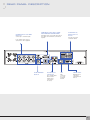
CAMERA INPUTS and LOOP
OUTPUTS
Connect up to 4 camera inputs.
COMPOSITE, VGA AND S-VIDEO
MAIN MONITOR CONNECTIONS
All outputs can be used at the same time if
more than one main monitor connection is
required
ALARM INPUTS,
RELAY OUT and
RS-485
See page 42 for full
connection details
Loop outputs can be used for
connection to other equipment
SPOT MONITOR
OUTPUT
AUDIO INPUTS
& OUTPUTS
Up to 4 audio inputs
and one audio
output can be
connected as
necessary
LAN
SERIAL PORT
LAN
connection
to a router
or internal
network
SERIAL port for
connecting
external RS-232
devices
4
GETTING STARTED
PLEASE NOTE: ALL NECESSARY CONNECTIONS MUST BE MADE BEFORE APPLYING POWER TO THE VXM4!
THE VXM4 IS PRE-CONFIGURED WITH THE FOLLOWING SETTINGS:
25FPS continuous recording rate per channel at SIF (352 x 288) resolution and highest image quality.
•
Time and date set to correct local time
•
Audio inputs 1-4 assigned to video channels 1-4 respectively
•
Telemetry devices set to PELCO-D, 2400 Baud
•
Based on average image recording, the above settings will provide around 7 days recording on a 250GB drive
before the footage starts to be overwritten.
CONNECT AND SWITCH ON
•
Connect up to 4 CAMERA INPUTS as necessary. The VXM4 also has LOOP OUTPUTS so that any signals
can be fed to other equipment if required. Termination is automatically set by the VXM4 depending on
connection type
•
Connect one or more monitors to the VXM4 using the COMPOSITE, VGA or S-VIDEO connections
•
Connect power to the VXM4. The VXM4 checks for proper power connection and emits two beeps. Press any
button on the front panel of the VXM4 to begin operation.
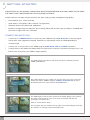
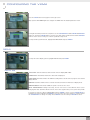
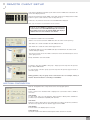
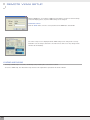
The VXM4 startup screen detects and checks the status of hard drives and the
CDRW / DVR-RW drive
After startup diagnostics are complete, the operator must logon to the system. The
default user name is ‘ADMIN’. Using the CHANNEL SELECTION buttons, key in
the default password of ‘1234’ and press the ENTER button
The VXM4 begins normal operation and shows the default display of all 4 channels.
The status bar at the bottom of the screen shows current time and date and
percentage of hard drive used.
A title for each channel is shown
The red square and clock symbol in the top right of each channel display shows that
the channel is recording in continuous/schedule mode.
5
CONFIGURING THE LIVE DISPLAY
MULTI SCREEN MODE
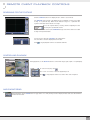
3 different display modes are supported by the 4 channel VXM4.
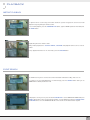
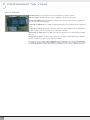
By repeatedly pressing the SCR MODE button, the operator can choose between single screen, quad
screen and basic sequence.
All the display modes are static with the exception of the sequence mode. In this mode, the sequence
symbol (
) is displayed and each channel is shown in full screen for a set period of time (default
3 seconds) before switching to the next channel. The sequence runs indefinitely until a different
display mode is chosen
CHOOSING CHANNELS
To view a particular channel in full screen, press the corresponding CHANNEL SELECTION
button.
Pressing the same CHANNEL SELECTION button again will switch the display back to the last
selected multi screen mode.
6
PLAYBACK
SEARCH
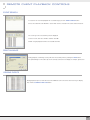
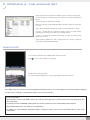
To search for a particular section of recorded footage, press the SEARCH button.
To protect unauthorised viewing of footage, only ADMIN and MANAGER user levels can playback
footage.
To login as ADMIN, enter the default password of 1234 and press ENTER
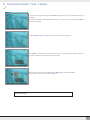
The VXM4 uses a calendar and timeline search method for quick access to recorded footage.
The calendar displayed at the top shows the current month. Days highlighted in green have recorded
footage.
The timeline at the bottom shows a 24 hour status of all channels for the selected day. Light blue areas
show recorded footage.
Press ENTER to select the calendar and use the CURSOR KEYS to move the purple square to the
required day. As different days are selected, the timeline display also changes to show recorded footage
on that day.
Press ENTER to choose the day and move to the timeline.
Use the CURSOR KEYS to move the timeline cursor left or right to select the time segment required.
Each movement of the timeline cursor increases or decreases the time by 15 minutes. The currently
selected time is displayed above the calendar.
Press ENTER to begin playback from the selected time.
The default playback mode is quad screen display. By pressing SCR MODE or using the CHANNEL
SELECTION buttons, it is possible to display single screen or switch to sequence mode in a similar way
to the live display mode.
During playback, turning the SHUTTLE WHEEL steadily clockwise increases the playback speed by up
to 64 times. Turning steadily anticlockwise will reverse play by up to 64 times. When the SHUTTLE
WHEEL is released, playback is paused.
If the HOLD button is pressed and released during SHUTTLE WHEEL operation, the last shuttle function
is held, even if the wheel is released
When playback is paused, the JOG RING can be used to accurately move the footage forward or
backwards, frame by frame.
Playback speed and direction can also be controlled by using the CURSOR KEYS and PLAYBACK
CONTROLS.
To exit playback mode and return to the search screen to choose another time and date, press RETURN.
To exit the search screen and go back to live view, repeatedly press RETURN
7
PLAYBACK
INSTANT PLAYBACK
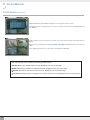
For quick review of recent footage, this feature allows the operator to bypass the search screen and
playback footage beginning five minutes earlier.
To use instant playback, press the FORWARD PLAY button, type the ADMIN password ‘1234’ and press
the ENTER button
Playback begins from 5 minutes earlier.
During instant playback, the SHUTTLE WHEEL, JOG RING and playback buttons can be used as
normal.
To stop playback and return to live view mode, press the RETURN button.
EVENT SEARCH
The VXM4 event log stores events such as motion and alarm activated recording, video loss etc.
To search for an event and playback the recorded footage, press the SEARCH button and log in as
ADMIN with the default password of 1234.
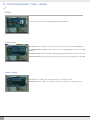
To display the event log screen, press the down CURSOR KEY to select SEARCH BY EVENT and press
ENTER. Various filters can be used to limit the number of events displayed. Using the CURSOR KEYS
and ENTER button, select the FROM and TO date / time and the events and channels required.
8
PLAYBACK
EVENT SEARCH continued
Highlight START and press ENTER to display the event log for the criteria selected.
To playback footage for a particular event, select the event from the list using the CURSOR KEYS and
press ENTER
Playback resumes from the moment the selected event occurred and continues until stopped by the
operator.
During event search playback, the SHUTTLE WHEEL, JOG RING and playback buttons can be used as
normal.
To stop playback and return to live view mode, repeatedly press RETURN
Note: The event log search contains the following selectable entries:
n ALARM: When ticked, all alarm input events are displayed for the chosen date range
n TIMER: When ticked, scheduled recording operations are displayed for the chosen date range
n MOTION: When ticked, all motion detection events are displayed for the chosen date range
n SYSTEM: When ticked, all other events (Video loss, remote connection etc.) are displayed for the chosen date range
9
ARCHIVING
To archive recorded footage to USB memory stick or CD, press the MENU button.
To protect unauthorised viewing and distribution of footage, only the ADMIN user level can archive
footage.
To login as ADMIN, enter the default password of 1234 and press ENTER
Use the CURSOR KEYS to select archiving and press ENTER
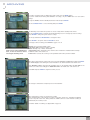
The Archiving screen allows the operator to choose exactly what to backup and to where.
Use the CURSOR KEYS to navigate around the Archiving screen. To change any value or setting:
Press ENTER to change the green cursor to orange
Use the up and down CURSOR KEYS to change the value
Press ENTER to accept the value or RETURN to cancel
To change a tick box setting, press ENTER to toggle on or off
Please note: If using a USB memory
stick, it must be inserted before
selecting the archiving menu
DEVICE: Choose between CDR or USB
START/END TIME: Start and end time to backup
MODE: ‘Backup only’ or ‘Erase and backup’
VIDEO/AUDIO: Video and audio for any channel can be included or excluded from the backup
TITLE: The name of the archive set
EVENT: When selected, the event log for the particular archive time period is included.
Once all the desired archive options have been selected, highlight the START button and press ENTER.
The VXM4 displays a list showing the exact information to be archived and the total archive size.
If the ORIGINAL SIZE is larger than the available space on the backup media, the END TIME of the
archive set is reduced accordingly. The MODIFIED SIZE is the final file size of the archive set.
Select OK and press ENTER to begin the archive process.
The footage is extracted to a temporary area on the hard drive.
Once extracted, the footage is copied to CD or USB.
Note that depending on the amount of footage selected for archive, the extracting and burning
process may take some time, during which the VXM4 cannot be used. Normal recording is
unaffected by the archive process.
For further details on archiving, see Appendix A on page 38
10
TELEMETRY CONTROL
Speed domes and other telemetry devices connected to the VXM4, can be fully controlled from
the front panel.
In live display mode, press the PTZ button. To select a camera to control, use the CHANNEL
SELECTION buttons.
Pan and tilt movement is controlled by the CURSOR KEYS, zoom is controlled by turning the
SHUTTLE WHEEL.
Press SCR MODE or MENU buttons to decrease or increase the preset number.
Press PAUSE to program the preset, or ENTER to call an existing preset.
To control focus and iris, press PTZ again. The left and right CURSOR KEYS adjust focus, the
up and down CURSOR KEYS adjust the iris.
Press RETURN to exit PTZ mode and return to live view.
SHUT DOWN
Only an operator with ADMIN rights can shut down the VXM4.
Press the MENU button, enter the default password ‘1234’ and press ENTER.
Select shutdown and press ENTER. The ADMIN password must be entered again.
The VXM4 shuts down and emits two beeps to indicate that power can be safely removed.
11
CONFIGURING THE VXM4
Press the SETUP button to bring up the menu login screen.
Only operators with ADMIN rights can configure the VXM4. Enter the default password of ‘1234’
To navigate around any items in the setup menu, use the CURSOR KEYS and the ENTER and RETURN
buttons. In general, the ENTER button is used to select and change a particular item and the RETURN
button is used to cancel a change or exit from a particular setup screen
To setup all main system functions, highlight SYSTEM SETUP and press ENTER.
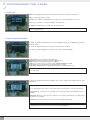
DISPLAY
To setup the various display options, highlight DISPLAY and press ENTER
DISPLAY: OSD
STATUS BAR: Turns the status bar at the bottom of the live display ON or OFF
CAMERA TITLE: Determines whether the camera title is displayed
EVENT ICON: Determines whether the VXM4 recording status is shown at the top right of each channel
display window
BORDER: Determines whether there is a border around each channel in multi screen display mode
BORDER COLOUR: If the border is ON, the operator can choose the colour
MENU TRANSPARENCY: During menu setup, the live view can be seen behind the menu screen.
Changing this value determines whether the live view is more (higher value) or less (lower value) visible
To change any of these settings, highlight OSD and press ENTER to select. Use the CURSOR KEYS to
navigate to the option required. Press ENTER to select the option (the cursor changes to orange) and use
the CURSOR KEYS to change the setting. Press ENTER to save the setting or RETURN to cancel.
12
CONFIGURING THE VXM4
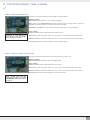
DISPLAY: MONITOR
SEQUENCE DWELL: The time that each screen is displayed in a sequence operation
SPOT-OUT DWELL: The time that each screen is displayed on the spot monitor outputs
DE-INTERLACE MODE: When recording any channels in D1 resolution (704 x 576) this should be set to
ON to prevent judder during playback
ALARM POP-UP MODE: When set to ON, an alarm input will cause the associated channel to display full
screen
ALARM POP-UP DWELL: Determines how long the full screen popup is displayed after an alarm input. If
the alarm condition continues, the popup screen is displayed constantly
MOTION POP-UP MODE: When set to ON, motion detection will cause the associated channel to display
full screen
MOTION POP-UP DWELL: Determines how long the full screen popup is displayed after motion detection.
If motion continues, the popup screen is displayed constantly
To change any of these settings, highlight MONITOR and press ENTER to select. Use the CURSOR KEYS
to navigate to the option required. Press ENTER to select the option (the cursor changes to orange) and
use the CURSOR KEYS to change the setting. Press ENTER to save the setting or RETURN to cancel.
13
CONFIGURING THE VXM4
CAMERA
To setup the various camera options, highlight CAMERA and press ENTER
CAMERA: CAMERA TITLE
COVERT: When set to ON, the camera image is not displayed in live display but continues to be
recorded.
TITLE: For each camera, a title of up to 11 characters can be set using the virtual keyboard
CAMERA: COLOUR SETUP
Brightness, contrast, tint and colour can be adjusted for each individual channel.
Highlight which channel to modify and press ENTER
The selected channel is displayed in full screen.
BRIGHTNESS, CONTRAST, TINT and COLOUR can be changed as necessary.
To modify a different channel, highlight CAMERA and choose the desired channel.
Press RETURN when all changes are complete
14
CONFIGURING THE VXM4
CAMERA: PTZ SETUP
ADDRESS: The unique ID of the PTZ device
PROTOCOL: The protocol of the PTZ device
BAUD RATE: The baud rate of the PTZ device
PTZ properties can also be adjusted for each channel by selecting the
ENTER.
icon and pressing
Note that some settings, such as AUTO FOCUS, may not be compatible with particular PTZ
equipment. If this is the case, changing this value will have no effect on PTZ control
CAMERA: MOTION SENSOR
SENSITIVITY: Between 1 (Lowest) and 10 (Highest) and determines the degree of motion required
before recording is activated.
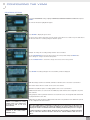
AREA SETUP: Choosing this option allows the operator to define which areas of the image are monitored
for motion detection.
Light blue grid squares represent detection areas, grey grid squares are ignored. The area on the right
shows that motion will be detected across the entire image
To quickly select or deselect the entire grid, press RETURN to bring up the motion menu.
Highlight SELECT ALL or DESELECT ALL as appropriate and press ENTER
15
CONFIGURING THE VXM4
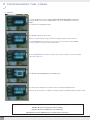
To select or deselect specific areas, press ENTER to bring up the green cursor square in the top left of
the display.
Move the cursor using the CURSOR KEYS to the first corner of the area to be set and press ENTER –
the cursor turns orange
Use the CURSOR KEYS to increase the size of the motion cursor as required.
Press ENTER to change from selected to deselected (or vice versa). Repeat the above sequence as
necessary to mask off or include other areas of the image.
Once the detection area has been defined, press RETURN and choose SAVE & EXIT
to save the area and return to the motion setup menu
Please note: a motion detection recording schedule must be defined in the RECORD MENU
described on page 23
16
CONFIGURING THE VXM4
SOUND
To setup the various sound options, highlight SOUND and press ENTER
SOUND: AUDIO
LIVE AUDIO: When set to ON, the selected audio channel can be monitored on the AUDIO OUTPUT
AUDIO MONITORING CHANNEL: Specify which one of the 4 AUDIO INPUTS is routed to the AUDIO
OUTPUT
NETWORK AUDIO TX: When set to ON, live and playback audio is transmitted to a remote PC connection
NETWORK AUDIO RX: When set to ON, allows a remote PC connection to send audio back to the VXM4
SOUND: BUZZER
KEYPAD: When set to ON, each front panel button press is confirmed by a beep
IR REMOTE: When set to ON, each command received from the IR remote is confirmed by a beep
17
CONFIGURING THE VXM4
SYSTEM
To setup the various system options, highlight SYSTEM and press ENTER
SYSTEM: DATE/TIME
DATE TIME: Allows the operator to set or modify the current date & time
DATE FORMAT: Determines how the date is displayed
TIME FORMAT: Determines how the time is displayed
NETWORK TIME SERVER: If the VXM4 is connected to the Internet, the time and date can be accurately
set by selecting SYNC and pressing ENTER
TIME ZONE: should be set according to the region that the VXM4 is used in.
D.S.T.: When set to ON, the VXM4 will automatically adjust the time by one hour on the relevant date in
spring and autumn
SYSTEM: NETWORK
DHCP: When enabled, the VXM4 will obtain an IP address automatically if connected to a DHCP server
or router
DDNS: When enabled, the VXM4 can be accessed through a Dynamic DNS server. Commonly used if a
broadband connection does not have a static IP address
WEB SERVER: When enabled, allows remote connections using Internet Explorer or other web browsers.
NETWORK SPEED: Specifies the maximum bandwidth that the VXM4 can use during a remote
connection.
WEB SERVER PORT: The port number that the VXM4 uses to support remote connection from Internet
Explorer or other web browsers
Please note: If any network settings
are modified, the VXM4 will need to
be restarted for changes to take
effect
Please note: for further information
on network settings and remote
connections please refer to page 27
& page 39
CLIENT SERVICE PORT: The port number that the VXM4 uses to support remote connection from the
client software
DDNS SERVER: If DDNS is enabled, the host DDNS server is specified here
IP ADDRESS: If DHCP is not being used, the IP address can be manually set
GATEWAY: If DHCP is not being used, the gateway IP address can be manually set
SUBNET MASK: If DHCP is not being used, the subnet mask can be manually set
1ST DNS SERVER: If DHCP is not being used, the first DNS server can be manually set
2ND DNS SERVER: If DHCP is not being used, the second DNS server can be manually set
18
CONFIGURING THE VXM4
SYSTEM: MAIL
SERVER: The SMTP outbound email server that should be used to send email notifications
PORT: The outbound email port number
SECURITY: Set to OFF if the SERVER does not require a username and password to connect
USER: Enter a username to identify the VXM4 in email messages.
PASSWORD: If SECURITY is set to ON, enter the password here
Please note: A USER must be entered for the mail function to operate correctly. The username
must not contain spaces.
SYSTEM: USER MANAGEMENT
By default, the VXM4 is configured with a user ID of ADMIN, belonging to the ADMIN group and with a
password of 1234.
As well as the ability to add new users, existing user details can be modified
To modify user details, highlight the user with the green cursor and press ENTER
USER ID: Edit the user ID using the virtual keyboard
PASSWORD: Change the password using the virtual keyboard
NOTE: To delete the existing password use the tt key
GROUP: Users can belong to one of three groups: ADMIN, MANAGER or USER
E-MAIL: Enter the users email address if email notification is required
E-MAIL NOTIFICATION: Enable or disable email notifications for this particular user.
Please note: For security reasons, it is recommended that the ADMIN user password is changed as
soon as possible
To add users, highlight ADD and press ENTER. The new user details can be added using the steps
outlined above.
More Information about user management
Up to eight individual users can be created, and each user can belong to one of three user groups:
USER: Members of this group can only adjust live view settings. Playback and VXM4 setup is not
available
MANAGER: Members of this group can adjust live view settings and playback recorded footage
(including covert cameras)
ADMIN: Members of this group have full control over the VXM4 including setup
Please note: Any user can be deleted except the default ADMIN user
19
CONFIGURING THE VXM4
SYSTEM: SYSTEM MANAGEMENT
F/W version: Shows the firmware version of the VXM4
H/W version: Shows the hardware version of the VXM4
VIDEO SIGNAL TYPE: The video input type is determined by the PAL/NTSC switch on the rear panel.
DISK CAPACITY: The first value shows the amount of hard drive capacity used by recorded footage,
the second value shows the total hard drive capacity installed.
IP ADDRESS: Shows either the manual IP address entered in NETWORK setup or the IP address
assigned by a DHCP server if enabled
MAC ADDRESS: Shows the MAC (Media Access Control) address of the VXM4. It is unique – no other
network device has this MAC address
SYSTEM NAME: A system name of up to 10 characters can be defined. It is used so that notification
emails can be identified.
F/W UPDATE: Firmware updates may be released periodically to enhance system performance and
add extra features. The operator can upgrade the firmware using a USB memory stick
FACTORY DEFAULT: If settings have been changed which cause erratic behaviour, the factory default
settings can be loaded
BACKUP USER DATA: System settings can be saved to a USB memory stick. The settings can be
reloaded in case of accidental factory reset or can be transferred to another VXM4 if multiple units
need to be installed with the same settings. All information is saved apart from network settings and
system name.
SYSTEM: CONTROL DEVICE
Although not yet supported, the VXM4 is currently being developed for use with a VA-KBDPRO
controller. This will allow up to 254 VXM4s to be controlled from the same keyboard
SYSTEM ID: If more than one VXM4 is connected on the same RS485 bus, each one must have a
unique ID
KEYCONTROLLER PROTOCOL: Must be set to VA-KBDPRO
KEYCONTROLLER BAUD RATE: Must be set to match the baud rate of the VA-KBDPRO PTZ
controller
20
CONFIGURING THE VXM4
EVENT / SENSOR
To setup the various event handling options, highlight EVENT/SENSOR and press ENTER
EVENT / SENSOR: HDD EVENT
The VXM4 can monitor the hard drives and detect problems that may be developing.
DRIVE: Selects which hard drive to configure for monitoring.
SMART ALARM: Enables SMART disk monitoring.
CHECK INTERVAL: Can be adjusted as desired
EVENT / SENSOR: ALARM INPUT
Determines the behaviour of each of the 4 alarm inputs.
OPERATION: Alarm inputs can be enabled or disabled
TYPE: Alarm inputs can be set as normally open or normally closed
EVENT / SENSOR: ALARM OUT
Determines the behaviour and actions that will trigger the relay output.
Behaviour settings
OPERATION: The selected alarm output can be enabled or disabled
TYPE: Can be set to high (Relay turns on) or low (Relay turns off)
MODE: Can be either TRANSPARENT (the output is active only when the trigger criteria is present) or
LATCHED (the output is active for a set period of time after a trigger)
DURATION: In LATCHED mode, the time that the alarm output remains active after it has been triggered
Action settings
ALARM: Determines whether alarm inputs will trigger the alarm output
VIDEO LOSS: Determines whether video loss on any of the selected channels will trigger the alarm
output
Remember to select APPLY and
press ENTER to save all settings
before exiting these menus
MOTION: Determines whether motion detection on any of the selected channels will trigger the alarm
output
HDD EVENT: Determines whether a hard drive event triggers the alarm output
21
CONFIGURING THE VXM4
EVENT / SENSOR: BUZZER OUT
Determines the behaviour and actions that will trigger the internal buzzer
Behaviour settings
OPERATION: The internal buzzer can be enabled or disabled
MODE: Can be either TRANSPARENT (the buzzer sounds only when the trigger criteria is present) or
LATCHED (the buzzer sounds for a set period of time after the trigger)
DURATION: In LATCHED mode, the time that the buzzer sounds after it has been triggered
Action settings
ALARM: Determines whether alarm inputs will sound the buzzer
Remember to select APPLY and
press ENTER to save all settings
before exiting these menus
VIDEO LOSS: Determines whether video loss on any of the selected channels will sound the buzzer
MOTION: Determines whether motion detection on any of the selected channels will sound the buzzer
HDD EVENT: Determines whether a hard drive event sounds the buzzer
EVENT / SENSOR: EMAIL NOTIFICATION
Determines the behaviour and actions that will send an email to a remote user.
Behaviour settings
NOTIFICATION: Email notification can be turned ON or OFF
Action settings
ALARM: Determines whether alarm inputs will send an email
VIDEO LOSS: Determines whether video loss on any of the selected channels will send an email
MOTION: Determines whether motion detection on any of the selected channels will send an email
HDD EVENT: Determines whether a hard drive event sends an email
Email settings must also be
configured in MAIL and USER
MANAGEMENT settings described
on page 19
22
CONFIGURING THE VXM4
DISK MANAGE
To manage the internal hard drives, highlight DISK MANAGE and press ENTER.
RECORD TIME LIMIT: In certain circumstances, it may be necessary to limit the amount of footage stored
on the VXM4 (to comply with data protection laws for example).
Recording can be limited to 12 hours, 1 day, 2 days, 3 days, 1 week or one month. Once the VXM4 has
this amount of footage stored, it will start to overwrite the earliest recorded footage.
OVERWRITE: When set ON, the VXM4 will start overwriting the earliest recorded footage once the hard
drive becomes full. In this case, the percentage of hard drive used shown in live display will always be
99%. When set to OFF, the VXM4 will stop recording when the disk becomes full.
FORMAT: If necessary, all footage can be erased from the VXM4 using this option
Please note: When a RECORD
TIME LIMIT is set, the OVERWRITE
option cannot be changed
Please note: When RECORD TIME LIMIT is set, the percentage of HDD used shown in live
display mode may never reach 99%.
For example, if the total HDD capacity of the VXM4 allows for a recording time of 4 days
under normal operation, if the RECORD TIME LIMIT is set to 2 days, the percentage of HDD
used will never exceed 50%
RECORD MENU
To setup the recording behaviour of the VXM4, highlight RECORD MENU and press ENTER.
RECORDING OPERATIONS
SCHEDULE MODE: Either DAILY (one schedule will apply to every day of the week) or WEEKLY (each
day of the week has its own schedule)
PRE EVENT RECORDING TIME: When the VXM4 is not in continuous recording mode, this setting
determines the amount of footage that is always recorded before an event occurs (motion detection,
alarm input etc.)
POST EVENT RECORDING TIME: When the VXM4 is not in continuous recording mode, this setting
determines the amount of footage that is always recorded after an event occurs (motion detection, alarm
input etc.)
CONTINUOUS / MOTION RECORD SCHEDULE
This setup screen allows the operator to configure scheduled and motion detection recording. There are
2 sections:
PARAMETER: Recording settings for each channel can be defined across a 24 hour period, in blocks (for
example between 09:00 and 18:00) or for each individual hour. Note that when SCHEDULE MODE is set
to WEEKLY, each day of the week can also be selected
SCHEDULE: This section determines at what times the VXM4 will record and whether it is continuous
recording or motion detection.
23
CONFIGURING THE VXM4
RECORDING SETTINGS
To change RECORDING settings, highlight CONTINUOUS/MOTION RECORD SCHEDULE and press
ENTER.
The 24 hour time bar is highlighted in purple.
Press ENTER to display the green cursor
The green cursor shown represents one hour (in this case between 00:00 and 01:00). The table above
the time bar shows the recording settings for this time period.
Example: To change the recording settings between 09:00 and 18:00
Use the CURSOR KEYS to move the green cursor to the 09:00 position and press ENTER. The
cursor changes to orange to show the start position.
Use the CURSOR KEYS to stretch the orange cursor across to the 18:00 position
Press ENTER. Recording settings for the selected time period are displayed.
SIZE: Recording resolutions of 352x288, 704x288 or 704x576 can be selected for each channel
FPS: Frame rates between 1 and 25 can be set for each channel
QUALITY: Four different picture recording qualities can be set for each channel
AUDIO: If audio devices are connected to the VXM4, any audio channel can be assigned to any of the
video channels
During playback, when a particular channel is selected in full screen, the assigned audio channel will
be played back at the same time
Remember that if SCHEDULE
MODE is set to WEEKLY, recording
settings need to be changed for
each day as well as for each
particular time
The default settings for all
channels is 352 x 288, 25FPS,
HIGHEST quality
Adjust values as desired, and select OK to finish and return to the parameter menu. Other time periods
can be configured in the same manner.
Note: The VXM4 supports a maximum recording rate across all channels of 100 frames per
second at 352x288 resolution. As settings are adjusted, the ‘frames available’ at bottom left
displays the number of available frames still remaining and must always be zero or higher.
If, whilst changing recording settings, this figure becomes negative, recording resolutions
and / or frame rates must be lowered to increase the ‘frames available’ value to zero or
above.
24
CONFIGURING THE VXM4
SCHEDULE
To change SCHEDULE settings, highlight CONTINUOUS/MOTION RECORD SCHEDULE
and press ENTER. Use the down CURSOR KEY to select the SCHEDULE box and press
ENTER.
The schedule box is highlighted in purple
Press ENTER to display the green cursor.
Example: To set all channels to motion detection recording only between 18:00 and 00:00
Use the CURSOR KEYS to move the green cursor to the 18:00 position and press ENTER.
The cursor changes to orange to show the start position.
Use the CURSOR KEYS to stretch the orange cursor across and down to select all channels
between 18:00 and 00:00
Press ENTER, highlight MOTION and press ENTER again
The selected area now displays the symbol for motion recording (half light blue block)
Repeat the above procedure to set different recording schedules for individual channels and time periods
The schedule screen has 3 symbols to show the different recording modes.
Dark blue blocks: No scheduled or motion recording
Light blue blocks: The VXM4 will record continuously
Half light blue block: The VXM4 will only record when motion is detected
25
CONFIGURING THE VXM4
ALARM SETUP
This setup screen allows the operator to configure alarm input activated recording
Please refer to continuous/motion record setup on page 23 for details on
setting up PARAMETER and SCHEDULE
Alarm activated recording can be used in conjunction with continuous /
motion recording. For example, the VXM4 could be configured to record
continuously at a low frame rate (set in timer / motion setup) and then
increase to a higher frame rate during an alarm input (set in alarm setup)
26
CONNECTING TO THE VXM4 REMOTELY
The VXM4 is supplied with software to allow remote connections either on a direct LAN connection
or over the Internet.
The remote client allows full live viewing of the VXM4 including telemetry control of PTZ cameras. In
addition, playback, remote setup, audio talkback, local backup and remote alarm triggering can all be
achieved.
INSTALL THE SOFTWARE
Insert the CD supplied with the VXM4 into your PC’s CD-ROM drive. The install process will begin
automatically and display the following screen.
Click ‘Next>’ to continue
Click ‘Next>’ to begin installation
The VXM4 remote client software is installed
A final install screen is displayed confirming that installation is successful.
Two icons are created on the PC desktop. ‘VXM4 RemoteClient’ is the main software package. ‘VXM4
BackupPlayer’ is the software to view archive footage from the VXM4
To begin using the remote client software, double click the icon on the desktop or click:
Start – Programs –Concept Pro – VXM4 RemoteClient.
The main remote client window is displayed
27
CONNECTING TO THE VXM4 REMOTELY
REMOTE CLIENT CONTROLS
SEARCH button to access
remote playback
SETUP button to configure
VXM4 connections
VXM4 SETUP button to
adjust VXM4 settings
remotely
DROP DOWN LIST to
select a VXM4 connection
CONNECT button
DISCONNECT button
DISPLAY buttons to choose
1,4,9 or 16 screen display
SEQUENCE button
MANUAL SWITCH button
FULL SCREEN button
SAVE TO AVI button
EVENT VIEWER button
TELEMETRY controls
CHANNEL SELECTION buttons
STATUS button
ALARM button
TALKBACK button
AUDIO button
28
REMOTE CLIENT SETUP
CREATE A CONNECTION GROUP
The VXM4 remote client software can be configured with any number of connection groups. Each
connection group can consist of up to 4 VXM4s.
To create a connection group, click the SETUP button to display the Local configuration screen
In the ‘Group’ window on the left, right click ‘Site’ and choose ‘Add Group’
Enter a name to easily identify the connection group and click OK
The new group is created
ENTER VXM4 DETAILS
Details for up to 4 VXM4s can be added to the ‘Factory 7’ group.
Click ‘Factory 7’ to highlight it and then enter the following information in the ‘VXM4
Information’ window:
Name: Any name that will easily identify the VXM4
IP / Domain Name: The IP or DDNS address of the VXM4
Port: The network port of the VXM4
User ID: A valid user ID already setup on the VXM4 (NOTE: Case Sensitive)
Password: The password assigned to the user ID
29
REMOTE CLIENT SETUP
In the ‘Camera Assignment’ window, specific channels of the VXM4 can be allocated to the
remote client display channels.
Using the drop down lists under VXM4, select which channels are displayed and in what
position. To ignore certain channels, leave the drop down as ‘x’
In this case, only channels 1-4 from the selected VXM4 will be displayed.
Note, only one instance of each channel can be selected.
Each connection group can display a total of 16 channels
from one or more VXM4s. For example, a connection group
could consist of one 16ch VXM4 and display all 16 channels.
Or, it might consist of two 16 channel VXM4s and display 7
channels from one and 9 channels from another
To complete the details for the selected VXM4:
-Tick the event occurences that the VXM4 will send to the remote client system log
-Tick ‘Audio out’ to enable or disable the audio talkback function
-Tick ‘Alarm out’ to enable the remote alarm trigger function
-In ‘Monitoring audio’ choose which VXM4 audio input is transmitted to the remote client
software during live display
-In ‘Connection retries’ choose the number of times the remote client will attempt to connect
before giving an error
Finally, click ADD to save all the details.
To add up to three more VXM4s to this group – simply repeat the steps from the previous
page in ‘Enter VXM4 details’
To create another connection group, repeat the steps from the previous page in ‘Create a
connection group’
During operation, only one group can be connected at once. For example, ‘Factory 7’
must be disconnected before connecting to ‘Head Office’
ADDITIONAL CONFIGURATION
Click the ‘Configuration’ tab to setup various remote client program options.
Video OSD
Select or deselect the information that is displayed for each channel when a VXM4 is
connected
Video Output
For best results, leave set at the default of ‘Video Renderer’. Overlay mixer and GDI are
provided only for backwards compatibility with older PCs
Video Mode
Define the sequence time between each channel when in sequence mode. Also, determines
the full screen popup time when an alarm is triggered on the VXM4
Video Display
For best results, leave ‘Quality improve’ selected
Saving directory
Specify the location where AVI files and snapshots will be saved to the local PC
30
USING THE REMOTE CLIENT
CONNECT TO A VXM4 GROUP
From the DROP DOWN LIST on the remote client main screen, choose the required connection and click
CONNECT
After successful connection, the remote client displays the current live view from the VXM4.
For each channel, title, time / date and resolution are displayed.
LIVE DISPLAY MODES
Use the DISPLAY buttons to switch from single, quad, 9 split or 16 split display.
To run a sequence, select single screen mode and click the SEQUENCE button. Click SEQUENCE again
to return to normal viewing mode.
The MANUAL SWITCH button shifts the positions of all channels by one place. For example, the
following displays shows a 4 channel VXM4 in 16 screen mode.
Clicking MANUAL SWITCH has moved all channels back by one position.
By clicking the FULL SCREEN button, the live display is shown in full screen without any of the remote
client controls.
To return to normal viewing, double click anywhere on the screen.
To quickly select a particular channel, click the appropriate CHANNEL SELECTION button
31
USING THE REMOTE CLIENT
SAVING TO AVI FILE
The operator can choose to record all channels currently being displayed on the live view directly to the
local PC hard drive.
Click the SAVE TO AVI button to immediately start recording.
Click the stop button to end recording. The remote client displays a summary of the files created on the
hard disk
For best results, local AVI files
should be viewed using the VXM4
backup player software (Page 35).
VIEWING EVENTS
During a remote client session, any events detected on the VXM4 are sent to the remote client event log.
To display this, click the EVENT VIEWER button
TELEMETRY CONTROL
The TELEMETRY controls allow remote control of any telemetry devices attached to the VXM4.
Click the appropriate channel display and use the on screen directional buttons to control pan and
tilt movement. To control focus, click
. To control zoom, click
. Use the + and – buttons to
adjust.
Additional telemetry controls can be accessed by clicking the PTZ button.
Telemetry presets can now be programmed and called remotely.
Example: To start pattern tour 1 running on a VHSD-870EXT speed dome, select preset 131 from the
drop down list and click RUN.
Example: To program preset position 85, position the speed dome using the TELEMETRY controls,
select preset 85 and click SET
If necessary pan & tilt speed speed can be adjusted by dragging the speed bar left or right.
Click PTZ again to return to the basic control buttons.
Telemetry control also allows remote setup of many telemetry devices. For example, to access the setup menu of the VHSD-870EXT
speed dome, RUN preset 95 and then use the telemetry and focus + and – controls to navigate the speed dome menu.
Telemetry controls can also be displayed when the remote client is in full screen mode. To do this click the PTZ button and, using
the mouse, drag the PTZ controls away from the remote client window. Then click the full screen icon. The PTZ controls are still
displayed and can be moved around the display to suit the operator.
32
USING THE REMOTE CLIENT
ALARM TRIGGERING
AUDIO MONITORING
During a remote client session, the operator can
monitor audio connected to the VXM4.
Alarm outputs at the rear of the VXM4 can be
triggered remotely by the operator.
On the 4 channel VXM4. Click any of the channel
displays and click the ALARM button. ‘A’ is
displayed on all 4 displays and the relay output on
the VXM4 is activated. Click ALARM again to
deactivate the relay.
Click the AUDIO button to toggle live audio on or off
Suitable speakers must be connected to
the PC for audio monitoring to function.
On the 8 & 16 channel VXM4. Click the appropriate
channel display and click the ALARM button. ‘A’ is
displayed on the selected channel display and the
corresponding alarm output on the VXM4 is
activated. Click ALARM again to deactivate.
AUDIO TALKBACK
During a remote client session, the operator can
‘talkback’ to the VXM4. During talkback, audio is
routed through the AUDIO OUT connector on the
rear of the VXM4
CONNECTION STATUS
During a remote client
session, the operator can
check the connection status
of the entire group by
clicking the STATUS button
To talkback, click and hold the TALKBACK button
and speak normally in to the microphone
A suitable microphone must be connected
to the PC for audio talkback to function.
REMOTE CLIENT PLAYBACK
REMOTE CLIENT PLAYBACK CONTROLS
LIVE button to switch to live
view
SETUP button to configure
VXM4 connections
VXM4 SETUP button to
adjust VXM4 settings
remotely
DROP DOWN LIST to
select a VXM4 connection
CONNECT button
DISCONNECT button
DISPLAY buttons to choose
1,4,9 or 16 screen display
ARCHIVE button
SNAPSHOT button
EVENT SEARCH button
BACKUP PLAYER button
PRINT button
CURRENT EVENT LOG
button
TIMELINE display
33
CURSOR
AUDIO control
PLAYBACK control
REMOTE CLIENT PLAYBACK CONTROLS
SEARCHING FOR THE FOOTAGE
Click the SEARCH button in live display mode to switch to search mode.
The TIMELINE at the bottom of the display shows a graphical overview of recorded
footage for a particular day. White blocks indicate footage for a particular time
segment, whilst blue blocks indicate no footage.
Choose the required date by selecting and then adjusting the date
value using the up and down arrows.
As different dates are selected, the TIMELINE changes to show the status of recorded
footage for that particular date.
Use the mouse to drag the CURSOR to the required time.
The exact time selected is displayed under the date.
Click
to begin playback from the selected date and time.
CONTROLLING PLAYBACK
During playback, use the DISPLAY buttons to switch from single, quad, 9 split or 16 split display.
To select reverse play, click
Use + and – to increase or decrease playback speed.
Click
to stop playback and choose another time / date if required
AUDIO MONITORING
During playback, click the AUDIO button to toggle audio on or off. By clicking a channel display window, audio associated with that
channel can be heard.
34
REMOTE CLIENT PLAYBACK CONTROLS
ARCHIVING FOOTAGE
Pre-recorded footage on a VXM4 can be archived to the local PC hard disk.
Click the ARCHIVE button to show the archiving screen.
Choose start time, end time, which channels to archive and whether to include audio.
For convenience, choosing ‘Select All’ will highlight all available channels (including audio) for
archiving.
Click OK to begin archiving data to the PC hard drive
The remote client shows the current status of the
archiving process.
BACKUP PLAYER
To view archives already created on the local PC hard drive, click the BACKUP PLAYER button.
Click
to choose which archive file to playback.
The controls under the display can be used to adjust playback direction and speed.
TAKING A SNAPSHOT
During playback, a still image can be save to the local PC hard disk by clicking the SNAPSHOT
button.
Specify the file location, file name and choose BMP or JPG format. Click ‘Save’.
The snapshot image is saved in the same style as the currently selected screen display, for
example, quad screen, single screen etc.
35
REMOTE CLIENT PLAYBACK CONTROLS
EVENT SEARCH
To search for an event and playback the recorded footage, press the EVENT SEARCH button.
Choose the ‘Start time’ and ‘End time’. Select which events to include in the search and click ‘Search’
The event log for the selected time period is displayed.
Select an event, click ‘Go to timeline’ and then click OK
Click u to begin playback from the selected date and time.
PRINT AN IMAGE
During playback, a still image can be printed on the local PC printer by clicking the PRINT button
The printed image is in the same style as the currently selected screen display, for example, quad screen
VIEWING EVENTS
During playback, any live events detected on the VXM4 are sent to the remote client event log. To display
this, click the CURRENT EVENT LOG button
36
REMOTE VXM4 SETUP
Only the ADMIN user can configure a VXM4 remotely. With the exception of network settings
and certain display options, any of the VXM4 settings can be changed.
ENTERING SETUP
Click the SETUP button, enter the correct password for the ADMIN user and click OK
The remote setup screen is displayed and the VXM4 settings can be changed as necessary.
Click OK to save all changes and return to the main remote client screen. Any changes made
will take effect immediately
LOADING AND SAVING
To backup a VXM4 setup to a local file, click ‘Backup setup’. A backup file is saved on the local PC.
To restore a VXM4 setup, click ‘Restoration setup’ and select the required file to upload from the browser window
37
APPENDIX A: THE ARCHIVE SET
After footage has been archived from a VXM4, it can be reviewed on a PC system.
Insert the backup CD or USB stick in the PC and view the contents using Windows
Explorer.
The following files are included in the backup:
Backup_info: This file contains detailed information about the archive set. Double click
to view it.
Player: This is the playback software necessary to view the archive files correctly.
US_ch01….: An AVI video file containing the archive footage for a single channel.
Depending on the archive, there will be up to 16 AVI files listed.
US_log-….: The event log containing all events that occurred in the archive period.
Double click to view it.
Setup: Installs the IMM4 codec. This is required if the user chooses to play back
archive files using Windows Media Player.
BACKUP PLAYER
To view archives backed up from a VXM4, double click the player file
Click
to choose which archive file to playback.
Playback of the archive file begins.
The controls under the display can be used to adjust playback direction and speed.
Note: VXM4 archive files can also be viewed using Windows Media player but no on screen information (such as time and date) is displayed.
For this reason, it is always recommended that ‘player’ is used to view archive files
Archive set file names
When a backup is created on the VXM4, a folder is first created on the backup device so that the operator can easily identify the archive
set at a later stage.
For example the folder, F:\ARCHIVE_070205_120226 is an archive set that was created on 5th February 2007 at 12:02:26
Each individual archive file is also named for easy identification.
For example, US_ch01_0702051201_0702051202_00.AVI is a backup of channel 1 from 12:01 on 5th February 2007 to 12:02 on 5th
February 2007
38
APPENDIX B: CONFIGURING A NETGEAR
DG834 ROUTER FOR USE WITH THE VXM4
REQUIREMENTS
1. Netgear DG834 router
2. A Laptop or PC to configure the DG834
3. An Internet connection and all required login details (username and password provided by your ISP)
SETUP STEPS FOR INTERNET CONNECTION
1. The DG834 has a default IP address of 192.168.0.1, so configure your laptop or PC with an IP address of 192.168.0.2 and gateway of
192.168.0.1 and connect to the DG834 using the standard CAT-5 patch lead supplied with the router.
2. Open Internet Explorer and enter http://192.168.0.1 to connect to the router. When prompted, enter user name of ‘admin’ and password ‘password’
3. If the DG834 has never been setup before, it will prompt whether you wish to use the setup wizard – do not do this.
4. Choose ‘Basic Settings’ from the menu on the left. Select yes for ‘Does your internet connection require a login’ and enter your username and
password as provided by your ISP. Other information required on this screen can be left at defaults. Apply these settings and then verify that you
now have internet access from the PC / Laptop
SETUP STEPS FOR CONNECTING A VXM4 LOCALLY
1. Configure the VXM4 (refer to page 18 for details) so that it has a unique IP address which is in the same range as the router and PC/laptop. For
example, in this case choose 192.168.0.3. Set the gateway IP on the DVR to the router’s IP address of 192.168.0.1. Note that the default port
number is 6100.
2. Connect the VXM4 to the router using a standard CAT-5 patch lead and verify that it can be ‘pinged’ from the PC as follows
a) Open a command prompt with the following sequence: START – RUN – type in ‘CMD’ – OK
b) At the command prompt, type ‘PING 192.168.0.3’. If you see 4 lines saying ‘reply from 192.168.0.3: ………..’ then the VXM4 is recognised on
the local network. If not, work through the above steps again, but also check that the CAT-5 patch lead is OK.
3. At this point, the connection to the VXM4 can be tested locally. Install the remote agent software (page 27) and follow the steps to create a
connection group, entering IP address, username and password for the VXM4 and port number as noted in step 1 above. The remote agent should
successfully connect to the VXM4 allowing you to view images remotely on the PC/laptop
SETUP STEPS TO ALLOW REMOTE VIEWING OVER BROADBAND
BASIC PRINCIPLES
Imagine the Netgear DG834 is split in to two halves - one half is the private side which serves the local network. This ‘half’ of the router has its own
IP address (typically 192.168.0.1) and other devices (PCs, laptops, VXM4 etc.) that are connected to it will all have a unique IP address of the form
192.168.0.XXX.
Because this is a private network, it cannot be accessed directly from the outside world.
The other imaginary half of the DG834G is the public side - it also has its own IP address which is allocated to you by your ISP and can either be
static (it never changes) or dynamic (your ISP could change it at any time). Because this is a public network, in theory, anyone from the outside world
who knows your public IP address can access the router and your private network. But, because the router has a security firewall built in, incoming
traffic is severely limited to prevent this.
For this reason, you need to configure the DG834 so that incoming traffic intended for the VXM4 is correctly routed instead of being blocked - this
is known as port forwarding.
You will notice on the VXM4 that in the network setup section, there is also a port number. This could technically be any value but you must avoid
common Internet ports such as 80, 110, 25, 21 etc. In general, the default value on the VXM4 is acceptable.
In this case, the VXM4 default port value is 6100 so a rule needs creating on the DG834 that channels all traffic coming in on port 6100 to the VXM4
39
APPENDIX B: CONFIGURING A NETGEAR DG834
ROUTER FOR USE WITH THE VXM4
SETTING UP PORT FORWARDING
This section assumes that you have already established a successful connection locally. Logon to the DG834 and select ‘Services’ from the menu.
Click ‘Add Custom Service’ and enter the following values:
Name: VXM4 (or any other name of your choice)
Type: TCP
Start Port: 6100
Finish port: 6100
And click ‘Apply’
Then, create a firewall rule as follows:
Select ‘Firewall Rules’ from the menu. Under the inbound services, click ‘Add’ and enter the following:
Service: VXM4(TCP:6100) – This is the service you created earlier
Action: Leave at ‘ALLOW always’
Send to LAN server: 192.168.0.3 - This is the IP address of the VXM4
Wan Users and Log settings can be left unchanged.
And click ‘apply’ to add the new rule
Once the firewall rule is setup, anybody should be able to access the VXM4 from the outside world, as long as they are using the correct software.
To configure the software, the IP address is the public static IP address of your router and the port number in this case will be 6100. The username
and password must match those set up on the VXM4
SETTING UP MULTIPLE VXM4s ON ONE ROUTER
The setup steps in this case are identical but you will need to create a separate service and firewall rule for each VXM4 connected. Note also that
each VXM4 must have a unique port setting as well as a unique IP address.
Example – 2 VXM4s connected to a router
1st VXM4 settings
IP address: 192.168.0.3
Port: 6100
Gateway: 192.168.0.1
On the DG834, configure a service on port 6100 and a firewall rule to direct this service to 192.168.0.3
2nd VXM4 settings:
IP address: 192.168.0.4
Port: 6101
Gateway: 192.168.0.1
On the DG834, configure a service on port 6101 and a firewall rule to direct this service to 192.168.0.4
The remote client software can then be configured with one connection group containing two VXM4 connections to match the above and then both
VXM4s can be accessed remotely at the same time.
Note: If connecting locally over a LAN, the unique 192.168.0.XXX IP address for each VXM4 has to be entered. If connecting over broadband, the
same public IP address is entered for both VXM4s – port forwarding on the router takes care of the rest.
40
APPENDIX B: CONFIGURING A NETGEAR
DG834 ROUTER FOR USE WITH THE VXM4
USING DDNS TO CONNECT
DDNS (Dynamic Domain Name Server) is generally used when your ISP provides you with a dynamic public IP address. The problem with a dynamic
IP address, because it can change regularly, is that any remote users that need to connect to the VXM4 do not know what IP address to enter in the
remote client!
Using DDNS solves this problem. When a VXM4 is correctly configured to use DDNS, it regularly interrogates the router and sends the current public
IP address to a 3rd party database. The VXM4 also sends its MAC address, which is unique.
Before using DDNS, the VXM4 must be set up correctly by following the steps on page 39 and verifying that a local connection can be made.
In addition, the following must be configured in the VXM4 NETWORK setup menu (page 18)
DHCP - disabled
DDNS - enabled
1st DNS server - must be the IP address of the ISP's 1st DNS server
2nd DNS server - must be the IP address of the ISP's 2nd DNS server
DDNS server - leave set as DDNS.DVRLINK.NET
Note: if the ISP's DNS servers are not known, they can be identified as follows:
A) Open a command prompt with the following sequence: START - RUN - type in 'CMD' - OK
B) At the command prompt, type 'IPCONFIG /ALL' and press ENTER. The ISP's DNS servers are listed at the bottom of the information screen. If
only one server is listed, enter this in the VXM4 1st DNS server, and leave the 2nd DNS server as default
Finally, make a note of the VXM4's unique MAC address - this can be found in the SYSTEM MANAGEMENT section of the VXM4 setup (page 20).
For example, if the MAC address is 00-11-5F-00-9A-33, the following should be entered instead of an IP address when configuring a VXM4
connection group:
00115f009a33.dvrlink.net
Note: the entry should be MAC address.dvrlink.net, not MAC address.ddns.dvrlink.net
When the remote client initiates a connection, it interrogates dvrlink.net for the actual public IP address that corresponds to the MAC address. It then
uses the resulting IP address to connect to the VXM4
41
APPENDIX C: CONNECTING
EXTERNAL DEVICES
TELEMETRY
Connect RS485D+ to the ‘+’ or ‘A’ terminal of any attached
telemetry devices. Connect RS485D- to the ‘-’ or ‘B’
terminals
ALARM INPUTS
Connect voltage free contacts from PIRs, beam break
detectors etc. to the ‘GND’ terminal and ‘INX’ terminals of
choice
RELAY OUTPUT
Connect the ‘COM’ terminal and ‘NO’ or ‘NC’ terminal of
choice to activate low voltage sounders, strobes etc
42
APPENDIX D: SPECIFICATIONS
MODEL
VXM4-4
Operation
Genuine triplex
Video in
Channels
Simultaneous recording, playback, network live view, network playback,
network remote setup. Frame rate unaffected.
Connection
Loop through
Audio in
Channels
Connection
Main displays
1.0Vpp composite 75ohm unbalanced
15 pin D-SUB 1024 x 768 @ 60Hz
Sequence
Digital zoom
Channels
4 pin mini din Y/C
1, 4
Adjustable Dwell Time
N/A
1
Connection
BNC, 1.0Vpp composite 75ohm unbalanced
Display mode
Full screen sequence, adjustable dwell time
Channels
Connection
External alarm Inputs
Outputs
User interface On screen display
Control
Recording
4
RCA, line level unbalanced
VGA
Screen display modes
Audio out
BNC, 1.0Vpp composite 75ohm unbalanced, auto termination
BNC
S-Video
Spot displays
4
BNC, 1.0Vpp composite 75ohm unbalanced
Video CODEC
Resolution options for each channel
1
RCA, line level unbalanced
4, NO or NC common ground
1, SPDT relay
GUI, alpha blending
Front panel or IR Remote
MPEG-4
SIF (352 x 288), 2 SIF (704 x 288),
D1 (704 x 576)
Maximum total frame rate
Image quality
Pre-event recording
Recording modes
Frame rate options for each channel
Schedule
Configurable recording time limits
Audio
Yes, selectable by channel
Speed
Split screen display modes
Audio synchronization
Storage
Format
Archive data
Time zone
DST
Time synchronisation
PTZ
RS-485
System
Watchdog
Abnormal shutdown detection
HDD Error detection
System data backup / restore
Network
Connection
Simultaneous connections
CD-RW (DVD±RW option), USB Memory stick, Network
Watermarked AVI
Independent channel selection (video / audio), backup log, event log
Worldwide, selectable
Yes
Internet time server
Multi protocol, baud rate and speed control for each channel
Yes
Yes, with system auto recovery
Yes, SMART monitoring
Yes, USB memory stick or via remote client
RJ45, 10/100 Ethernet
4 (max)
Yes
Two way network audio
Yes
Yes
Yes, included
Remote configuration
Yes
Remote PTZ control
Yes
Maximum Capacity
Storage
Recording options
Event handling Source
Action
User levels
Key Lock
Dimensions
Weight
43
1,4
Yes, any frame rate
Yes
Email event notification
Physical
Front panel buttons and Jog / Shuttle ring
Calendar / timeline, event log, instant playback
DDNS
Remote client Client software
Security
11 characters (max)
Forward / reverse. 1x, 2x, 4x, 8x, 16x, 32x, 64x
DHCP
Bandwidth management
Storage
12 hours, 1 day, 2 days, 3 days, 1 week, 1 month
Audio inputs independently assigned to each channel
16 x 16 selectable grid with 10 levels of sensitivity
Search method
Time
25 - 13 - 8 - 6 - 3 - 2 - 1
Per channel, per hour, per day / week
Covert recording
Control
Archiving
5 seconds max
Schedule / motion detection / alarm
Motion detection
Camera title
Playback
100 FPS (SIF)
Highest, High, Standard, Low
Yes
Currently 1TB
2x HDD maximum
Stop when full / overwrite
Alarm in, motion detection, video loss, HDD error
Record, alarm out, email notification, log, remote client popup, buzzer, full screen popup
ADMIN, MANAGER, USER
Yes, password protected
360mm(w) x 400mm(d) x 68mm (h)
4.5kg (without HDD)
NOTES
44