1
Table of Contents
Section
Name
Page
1
1.1
1.2
2
3
4
4.1
5
5.1
5.2
6
6.1
7
8
8.1
8.1.1
8.1.2
8.1.3
8.1.4
8.1.5
8.1.6
8.1.7
8.2
9
10
10.1
10.2
INTRODUCTION
A Word on Switchers
Factors Affecting Quality of Results
SPECIFICATIONS
HOW DO I GET STARTED?
UNPACKING AND CONTENTS
Optional Accessories
VS SERIES SWITCHERS/SCANNERS
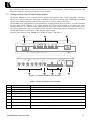
Getting to Know Your VS-16N Switcher/Scanner
Getting to Know Your VS-16A Switcher/Scanner
INSTALLATION
Rack Mounting
CONNECTING TO VIDEO and AUDIO DEVICES
USING the VIDEO/AUDIO SWITCHERS/SCANNERS
Controlling the Switcher
Start/Stop Switch
Dwell Time Switch
Enable/Disable Switch
Self Address
UP and Down Switches
ENTER Switch
Remote Connectors (rear)
RS-485
TAKING CARE OF YOUR SWITCHER
TROUBLESHOOTING
Video and other High Frequency Signals
Audio Signal
Limited Warranty
2
2
2
3
3
3
4
5
5
6
7
7
7
7
7
7
7
7
8
8
8
8
8
9
9
9
10
10
List of Illustrations
Figure
1
2
VS-16N Front/Rear Panel Features
VS-16A Front/Rear Panel Features
5
6
List of Tables
Table
1
2
VS-16N Front/Rear Panel Features
VS-16A Front/Rear Panel Features
KRAMER ELECTRONICS LTD.
5
6
P/N: 2900-002006