1
Helpful Hints:
-
In order for the transmitter to begin broadcasting your position, altitude, heading,
speed, etc. to the ADS-B ground station towers which will trigger these towers to
begin sending the full traffic messages (TIS-B) back to the transceiver, the
transceiver must have a valid position fix from it’s internal GPS and you must
have configured a valid N-Number and ICAO code into the transceiver. You can
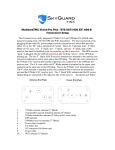
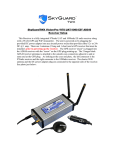
verify the GPS is locked by looking at the small red LED on the side of the GPS
puck antenna. This light should be flashing red on and off at once per second. If
it is solid red, then the GPS is not locked. If it takes more than 15 minutes for the
GPS to receive a valid position fix, then try locating the GPS puck antenna to
another location inside the aircraft. Sometimes avionics equipment can emit RF
noise that will affect the GPS’s ability to receive a sufficient signal. Also ensure
that the transmitter is enabled by using the SkyGuardTWX app. or the iFly
720/iFly GPS app. to show the status of the transmitter.
-
If not receiving any FIS-B (weather) or TIS-B (traffic) messages from the ADS-B
ground station tower and you are sure you are in range of a tower, check that FISB and TIS-B are enabled in the SkyGuardTWX app. Typically in order to
receive any messages from the ground station tower, you need to be in-flight at an
altitude of > 1000 ft. AGL with a clear line of site to your local ADS-B
tower. The SkyGuardTWX Transceivers have a transmit/receive range of up to
60 miles.
-
Always take care to position the receivers and transmitter antennas in the vertical
position with a clear view out the windows of the aircraft. It is best to keep these
antennas away from any metal panels or metal structural supports of the aircraft.
-
Make sure you snug the transmitter coax cable connectors securely with a small
wrench and that the receiver antennas are tightened securely with your fingers.