1
smart BASIC
User Manual
BL600 smart BASIC Module
User Manual
Release 1.1.50.0r3
Americas: +1-800-492-2320 Option 3
Europe: +44-1628-858-940
Hong Kong: +852-2923-0610
www.lairdtech.com/wireless
www.lairdtech.com
1
Laird Technologies
smart BASIC
User Manual
© 2013 Laird Technologies
All Rights Reserved. No part of this document may be photocopied, reproduced, stored in a
retrieval system, or transmitted, in any form or by any means whether, electronic, mechanical, or
otherwise without the prior written permission of Company Name.
No warranty of accuracy is given concerning the contents of the information contained in this
publication. To the extent permitted by law no liability (including liability to any person by reason
of negligence) will be accepted by Company Name, its subsidiaries or employees for any direct
or indirect loss or damage caused by omissions from or inaccuracies in this document.
Company Name reserves the right to change details in this publication without notice.
Windows is a trademark and Microsoft, MS-DOS, and Windows NT are registered trademarks of
Microsoft Corporation. BLUETOOTH is a trademark owned by Bluetooth SIG, Inc., U.S.A. and
licensed to Laird Technologies and its subsidiaries.
Other product and company names herein may be the trademarks of their respective owners.
Laird Technologies
Saturn House,
Mercury Park,
Wooburn Green,
Bucks HP10 0HH,
UK.
Tel: +44 (0) 1628 858 940
Fax: +44 (0) 1628 528 382
www.lairdtech.com
2
Laird Technologies
smart BASIC
User Manual
REVISION HISTORY
Version
Revisions Date
1.0
1.1.50.0r3
1 Feb 2013
3 Apr 2013
www.lairdtech.com
Change History
Initial Release
Production Release
3
Laird Technologies
smart BASIC
User Manual
CONTENTS
Revision History ......................................................................................................................... 3
Contents .................................................................................................................................... 4
1. Introduction ........................................................................................................................... 6
Why Do We Need Another Language?................................................................................................................ 7
What Are the Reasons for Writing Applications? ................................................................................................ 7
What is in a BLE Module? ................................................................................................................................... 7
smart BASIC Essentials ....................................................................................................................................... 8
Developing with smart BASIC ............................................................................................................................. 9
Operating Modes of a smart BASIC module ........................................................................................................ 9
Types of Applications ....................................................................................................................................... 11
Non Volatile Memory ....................................................................................................................................... 11
Using the Module’s Flash File System ............................................................................................................... 12
2. Getting Started ..................................................................................................................... 13
What You Need................................................................................................................................................ 13
Connecting Things Up ...................................................................................................................................... 13
UWTerminal .................................................................................................................................................... 13
Writing a smart BASIC Application.................................................................................................................... 20
3. Interactive Mode Commands ................................................................................................ 32
4 smart BASIC Commands ........................................................................................................ 52
Syntax.............................................................................................................................................................. 52
Functions ......................................................................................................................................................... 52
Subroutines ..................................................................................................................................................... 54
Statements ...................................................................................................................................................... 55
Exceptions ....................................................................................................................................................... 55
Language Definitions........................................................................................................................................ 55
Command ........................................................................................................................................................ 55
Variables.......................................................................................................................................................... 56
Constants ........................................................................................................................................................ 59
Compiler related Commands and Directives ..................................................................................................... 60
Arithmetic Expressions..................................................................................................................................... 61
Conditionals..................................................................................................................................................... 63
Error Handling ................................................................................................................................................. 69
Event Handling................................................................................................................................................. 72
Miscellaneous Commands................................................................................................................................ 75
5. Core Language Built-in Routines .......................................................................................... 80
Information Routines ....................................................................................................................................... 80
Event & Messaging Routines ............................................................................................................................ 82
Arithmetic Routines ......................................................................................................................................... 83
String Routines ................................................................................................................................................ 85
Table Routines ............................................................................................................................................... 107
Random Number Generation Routines........................................................................................................... 111
Timer Routines .............................................................................................................................................. 114
Serial Communications Routines .................................................................................................................... 119
Non-Volatile Memory Management Routines ................................................................................................ 151
Input/Output Interface Routines .................................................................................................................... 154
User Routines ................................................................................................................................................ 159
6. BLE Extensions Built-in Routines ........................................................................................ 162
www.lairdtech.com
4
Laird Technologies
smart BASIC
User Manual
Events and Messages ..................................................................................................................................... 162
Miscellaneous Functions ................................................................................................................................ 165
Adverting Functions ....................................................................................................................................... 165
Connection Functions .................................................................................................................................... 173
Security Manager Functions ........................................................................................................................... 174
GATT Server Functions ................................................................................................................................... 179
7. Other Extension Built-in Routines ...................................................................................... 201
System Configuration Routines ...................................................................................................................... 201
Miscellaneous Routines ................................................................................................................................. 201
8. Events & Messages ............................................................................................................. 202
Index ...................................................................................................................................... 203
www.lairdtech.com
5
Laird Technologies
smart BASIC
User Manual
1. INTRODUCTION
This user manual provides detailed information on Laird Technologies smart BASIC language
which is embedded inside the BL600-series Bluetooth Low Energy (BLE) modules. This manual is
designed to make BLE-enabled end products into a straightforward process and includes the
following:
An explanation of the language’s core and extension functions
Instructions on how to start using the tools
A detailed description of all language components and examples of their use
The Laird website contains many complex examples which demonstrate complete applications.
For those with programming experience, smart BASIC is easy to use because it is derived from
BASIC language.
BASIC, which stands for Beginners All-Purpose Symbolic Instruction Code, was developed in the
early 1960s as a tool for teaching computer programming to undergraduates at Dartmouth
College in the United States. From the early 70s to the mid-80s, BASIC, in various forms, was one
of the most popular programming languages and the only user programming language in the
first IBM PC to be sold in the early 80s. Prior to that, the first Apple computers were also deployed
with BASIC.
Both BASIC and smart BASIC are interpreted languages – but in the interest of run-time speed on
an embedded platform which has limited resources, smart BASIC’s program text is parsed and
saved as bytecodes which are subsequently interpreted by the a run-time engine to execute
the application. On the BL600 module platform, the parsing from code test to bytecode is done
on a Windows PC using a free cross-compiler. Other platforms with more firmware code space
also offer on-board compiling capabilities.
The early BASIC implementations were based on source code statements which, because they
were line numbered, resulted in applications which were not structured and liberally used
‘GOTO’ statements.
At the outset, smart BASIC was developed by Laird to offer structured programming constructs
and, because of this, is not line numbers based; it offers the usual modern constructs line
subroutines, functions, while, if and for loops.
smart BASIC offers further enhancement which acknowledges the fact that user applications will
always be in unattended use cases. It forces the development of applications that have an
event driven structure, as opposed to the classical sequential processing for which many BASIC
applications were written. This means that a typical smart BASIC application source code
consists of the following:
1.
Variable declarations and initialisations
2.
Subroutine definitions
3.
Event handler routines
4.
Startup code
The source code ends with a final statement called WAITEVENT, which never returns. Once the
run-time engine reaches the WAITEVENT statement, it waits for events to happen and, when they
do, the appropriate handlers written by the user are called to service them.
www.lairdtech.com
6
Laird Technologies
smart BASIC
User Manual
Why Do We Need Another Language?
Programming languages are designed predominantly for arithmetic operations, data
processing, string manipulation, and flow control. Where a program needs to interact with the
outside world, line in a Bluetooth Low Energy device, it inevitably becomes more complex due
to the diversity of different input and output options. When wireless connections are involved,
the complexity increases. To compound the problem, almost all wireless standards are different,
requiring a deep knowledge of the specification and silicon implementations in order to make
them work.
We believe that if wireless connectivity is going to be widely accepted, there must be an easier
way to manage it. smart BASIC was developed and designed to extend a simple BASIC-like
programming language with all of the tokens that control a wireless connection.
smart BASIC differs from an object oriented language in that the order of execution is generally
the same as the order of the text commands. That makes it simpler to construct and understand,
particularly if you’re not using it every day.
Our other aim in developing smart BASIC is to make wireless design of products simple and
contain a common look and feel for all platforms. To do this we’re embedding smart BASIC
within our wireless modules along with all of the embedded drivers and protocol stacks that are
needed to connect and transfer data. A run-time engine interprets the customer applications
that are stored there, allowing a complete product design to be implemented without the need
for any additional external processing capability.
What Are the Reasons for Writing Applications?
smart BASIC for BLE has been designed to make wireless development quick and simple, vastly
cutting down time to market. There are three good reasons for writing applications in smart
BASIC:
Since the module can auto launch the application every time it powers up, you can
implement a complete design within the module. At one end, the radio connect and
communicates while at the other end, external interactions are available through the
physical interfaces like GPIO, ADCs, I2C, SPI, and UART.
If you want to add a range of different wireless options to an existing product, you can
load applications into a range of modules with different wireless functionality. These
present a consistent API interface defined to your host system and allow you to select the
wireless standard at the final stage of production.
If you already have a product with a wired communications link, such as a modem, you
can write a smart BASIC application for one of our wireless modules that copies the
interface for your wired module. This provides a fast way for you to upgrade your product
range with the minimum number of changes to any existing end user firmware.
In many cases, the example applications on our website and in the applications manual can be
modified to further speed up the development process.
What is in a BLE Module?
Our smart BASIC based BLE modules are designed to provide a complete wireless processing
solution. Each one contains:
www.lairdtech.com
7
Laird Technologies
smart BASIC
User Manual
A highly integrated radio with an integrated antenna (external antenna options are
available)
Bluetooth Low Energy Physical and Link Layer
Higher level stack
Multiple GPIO and ADC
Wired communications interfaces like UART, I2C, and SPI
A smart BASIC run-time engine.
Program accessible Flash Memory which contains a robust flash file system exposing a
conventional file system and a database for storing user configuration data
Voltage regulators and Brown-out detectors
For simple end devices, these modules can completely replace an embedded processing
system.
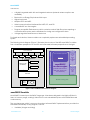
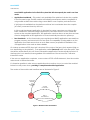
The following block diagram (Figure 1) illustrates the structure of the BLE smart BASIC modules
from a hardware perspective on the left and a firmware/software perspective on the right:
44 connection pads
User smartBASIC Application
GPIO
ADC
I2C
SPI
I/O, UART,I2C,SPI Drivers
UART
256K Flash
ARM Cortex M0
(smartBASIC)
16K RAM
Example App
PRINT "Laird BL600 Module"
WaitEvent
Non-Vol
File
System
for
smartBASIC
Apps
smartBASIC
run-time engine
(provides safe access to
BLE stack, drivers and
non-vol stores)
Non-Vol
Data
Store
BLE Radio
Bluetooth Low Energy Stack
Internal
Antenna
OR
UFL
Figure 1: BLE smartBASIC Module block diagram
smart BASIC Essentials
smart BASIC is based upon the BASIC language. It has been designed to be highly efficient in
terms of memory usage, making it ideal for low cost embedded systems with limited RAM and
code memory.
The core language, which is common throughout all smart BASIC implementations, provides the
standard functionality of any program, such as:
Variables (integer and string)
www.lairdtech.com
8
Laird Technologies
smart BASIC
User Manual
Arithmetic Functions
Binary Operators
Conditionals
Looping
Functions and Subroutines
String Processing Functions
Arrays (single dimension only)
I/O Functions
Memory Management
Event Handling
The language on the various platforms differs by having a sophisticated set of target specific
extensions like BLE for the module described in this manual.
These extensions have been implemented as additional program functions that control the
wireless connectivity of the module, including, but not limited to the following:
Advertising
Connecting
Security – Encryption and Authentication
Power Management
Wireless Status
Developing with smart BASIC
smart BASIC is one of the simplest embedded environment to develop on because a lot of
functionality comes prepackaged for you. The compiler which can be internal or external on a
Windows PC compiles source text on a line-by-line basis into a stream of bytes, which will be
referred to as bytecode, that can be stored to a custom designed flash file system, and then the
run-time engine is interprets the application bytecode in-situ from flash.
To simplify development further, Laird provides its own custom developed application called
UWTerminal which is a full blown customised terminal emulator for Windows, available on request
for free. Chapter 2 – UWTerminal provides a Quick Start Guide to writing BASIC applications using
UWTerminal.
UWTerminal also embeds smart BASIC to automate its own functionality and in that case the
extension
smart BASIC functions facilitate the automation of terminal emulation functionality.
Operating Modes of a smart BASIC module
Any platform running smart BASIC has up to three different modes of operation:
Interactive Mode – In this mode, commands are sent via a streaming interface which is
usually a UART and are executed immediately. This is analogous to the behavior of a
modem using AT commands. Interactive Mode can be used by a host processor to
directly configure the module. It is also used to manage the download and storage of
www.lairdtech.com
9
Laird Technologies
smart BASIC
User Manual
smart BASIC applications in the flash file system that will subsequently be used in run-time
mode.
Application Load Mode – This mode is only available if the platform includes the compiler
in the firmware image. The BLE module has limited firmware space and so compilation is
only possible outside the module using a smart BASIC cross-compiler, provided for free.
If this feature is available then the platform switches into Load Mode when the compile
(AT+CMP) command is sent by the host.
In this mode the relevant application is checked for syntax correctness on a line-by-line
basis, tokenised to minimise storage requirements, and then stored in a non-volatile file
system as the compiled application. This application can then be run at any time and can
even be designated as the application to be automatically launched on power up.
Run-time Mode – In Run-time Mode, pre-compiled smart BASIC applications are read from
program memory and executed in-situ from flash. The capability of being able to run the
application from flash ensures that as much RAM memory as possible is available to the
user application to be used as data variables.
On startup an external GPIO input pin is checked. If the state of the input pin is asserted (high or
low, depending on the platform) , if an application called $autorun$ exists in the file system, then
the device enters directly into run-time mode and the application is automatically launched. If
that input pin is not asserted, then regardless of the existence of the autorun file, it will enter
Interactive mode.
If the auto-run application completes, or encounters a STOP or END statement, then the module
returns back to Interactive Mode.
It is therefore possible to write autorun applications that continue to run to control the module’s
behaviour until power-down, providing a complete embedded application.
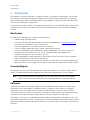
The modes of the module and transitions are as illustrated in Figure 2.
Power Up/Start
autorun input
deasserted
OR
$autorun$ app
missing
command
' AT+RUN "file" '
Interactive
mode
autorun input
asserted
AND
$autorun$ app
exists
STOP or
END statement or
runtime error and no ONERROR handler
Run mode
Figure 2: Module modes & transitions
www.lairdtech.com
10
Laird Technologies
smart BASIC
User Manual
Types of Applications
There are two types of applications used within a smart BASIC module. In terms of composition,
both are the same but run at different times.
Autorun Application – This is a normal application that is given the specific name
“$autorun$” and is case insensitive. When a smart BASIC module powers up, it looks for an
application called “$autorun$”. If it finds this application it executes it. Autorun
applications may be used to initialise the module to a customer’s desired state, make a
wireless connection, or provide a complete application program. At the completion of the
autorun application, which is when the last statement returns or a STOP or END statement is
encountered, a smart BASIC module reverts to interactive mode.
In unattended usage cases, it is expected that the autorun application never terminates
and so it will be typical that the last statement in an application will be the WAITEVENT
statement.
Developers should be aware that an autorun application does not need to “complete”
and exit to Interactive Mode. The application can be a complete program for an
application that runs within the smart BASIC module, removing the requirement for an
external processor.
Applications can access the GPIO and ADCs and use ports such as UART, I2C and SPI to
interface with peripherals such as displays and sensors.
NOTE: When the autorun application starts up, by default, if the STDOUT is the UART, then it
will be in a closed state. If a PRINT statement is encountered which results in output, then
the UART will be automatically opened using default comms paramaters.
Other Applications – Applications can be loaded into the BASIC module and be run under
the control of an external host processor using the ‘AT+RUN’ command. The flash memory
supports the storage of multiple applications. Note that the storage space is module
dependent. Check the individual module data sheet.
Non Volatile Memory
All smart BASIC modules contain user accessible flash memory. The quantity of memory varies
between modules; check the relevant datasheet.
The flash memory is available for three purposes:
File Storage – Files which are not applications can be stored in flash memory too, for
example X.501 certificates. The most common non-application files are data files for use by
applications.
Application Storage – Storage of user applications and the ‘AT+RUN’ command is used to
select which application runs.
Non-volatile record s – Individual blocks of data can be stored in non-volatile memory in a
flat database, where each record consists of a 16 bit user defined ID and data consisting
of variable length. This is useful for cases where program specific data needs to be
preserved across power cycles. For example, passwords.
www.lairdtech.com
11
Laird Technologies
smart BASIC
User Manual
Using the Module’s Flash File System
All smart BASIC modules hold data and application files in a simple flash file system which was
developed by Laird and has some similarity to a DOS file system. Unlike DOS, it consists of a single
directory in which all of the files are stored. When files are deleted from the flash file system, the
flash memory used by that file is not released. Therefore, repeated downloads and deletions
eventually fill the file system, requiring it to be completely emptied.
The command AT I 6 returns statistics related to the flash file system when in command mode
and from within a smartBASIC application the function SYSINFO(x) where x is 601 to 606 inclusive
returns similar information.
Note that the ‘Non-volatile records’ are stored in a special flash segment and is capable of
coping with cases where there is no free unwritten flash but there are many deleted records.
www.lairdtech.com
12
Laird Technologies
smart BASIC
User Manual
2. GETTING STARTED
This chapter is a quick start guide to using smart BASIC to program an application. It shows the
key elements of the BASIC language as implemented in the module and guides you through
using UWTerminal (a Laird Terminal Emulation utility available for free) and Laird’s Development
Kit to test and debug your application.
For the purpose of this chapter, the examples are based upon Laird’s BL600 series module which
is a Bluetooth Low Energy module. However the principles apply to any smart BASIC enabled
module.
What You Need
To replicate this example, you need the following items:
A BL600 series development kit
A copy of the latest UWTerminal application (downloadable from www.lairdtech.com).
The version of UWTerninal must be at least v6.21.
Save the application to a suitable directory on your PC.
A cross-compiler application with a name typically formatted as
“XComp_dddddddd_aaaa_bbbb.exe”, where ‘dddddddd’ is the first non-space 8
characters from the response to the “AT I 0” command and aaaa/bbbb is the
hexadecimal output to the command “AT I 13”.
Note aaaa/bbbb is a hash signature of the module so that the correct cross-compiler is
used to generate the bytecode for download.
When an application is launched in the module, the hash value is compared against the
signature in the run-time engine and if there is a mismatch the application will be aborted.
Connecting Things Up
The simplest way to power the development board and module is to connect a USB cable to
the PC. The development board regulates the USB power rail and feeds it to the module.
Note: The current requirement is typically a few mA with peak currents not exceeding
20mA. We recommend connecting to a powered USB hub or a primary USB port.
UWTerminal
UWTerminal is a terminal emulation application with additional GUI extensions to allow easy
interactions with a smart BASIC -enabled module. It is similar to other well-known terminal
applications such as Hyperterminal. As well as a serial interface, it can also open a TCP/IP
connection either as a client or as a server. This aspect of UWTerminal is more advanced and is
covered in the UWTerminal User’s Guide. The focus of this chapter is its serial mode.
In addition to its function as a terminal emulator it also has smart BASIC embedded so you can
smart BASIC applications locally. This allows you to write smart BASIC applications which use the
terminal emulation extensions that will enable you to automate the functionality of the terminal
emulator.
www.lairdtech.com
13
Laird Technologies
smart BASIC
User Manual
It may be possible in the future to add BLE extensions so that when UWTerminal is running on a
Windows 8 PC which has a Bluetooth 4.0 hardware, then it is planned that an application that
runs on a BLE module will also run in the UwTerminal environment.
Before starting UWTerminal, make a note of the serial port number to which the development kit
is connected.
Note: The driver for the USB to Serial chipset on the development kit generates a virtual
COM port. You can check what this is by selecting My Computer > Properties >
Hardware > Device Manager > Ports (COM & LPT).
To use UWTerminal, follow the steps below and note that the screen shots may differ slightly as it
is a continually evolving Windows application:
1.
Switch on the development board, if applicable.
2.
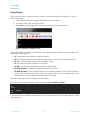
Start the UWTerminal application on your PC to access the opening screen (Figure 3).
Figure 3: UWTerminal opening screen
3.
Click Accept to open the configuration screen:
Figure 4: UWTerminal Configuration screen
4.
Enter the COM port that you have used to connect the Development Board. The other
default parameters should be correct:
www.lairdtech.com
14
Laird Technologies
smart BASIC
User Manual
Baudrate
9600
Parity
None
Stop Bits
Data Bits
1
8
Handshaking
CTS/RTS
Please note: Comport should be selected on the left and not ‘Tcp Socket’.
5.
Check Poll for port to enable a feature in UWTerminal that attempts to re-open the
comport in the event that the devkit is unplugged from the PC and causes the virtual
comport to disappear.
6.
In Line Terminator, select the characters that will be sent when you type ENTER.
7.
Once these settings are correct, click OK to bring up the main terminal screen.
Getting around UWTerminal
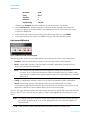
Figure 5: UWTerminal tabs and status lights
The following tabs (with four status lights below) are located at the top of the UWTerminal:
Terminal – Main terminal window. Used to communicate with the serial module.
BASIC – smart BASIC window. Can be used to run BASIC applications locally without a
device connected to the serial port.
Note: You can use any text editor, such as notepad for writing your smart BASICs.
However, if you use an advanced text editor or word processor you need to take
care that non-standard formatting characters are not incorporated into your BASIC
application.
Config – Configuration window. Used to set up various parameters within UWTerminal.
About – Information window that displays when you start UWTerminal. It contains
command line arguments information that can facilitate the creation of a shortcut to the
application and launch the emulator directly into the terminal screen.
The four ‘led’ type indicators below the tabs display the status of the RS-232 control lines that are
inputs to the PC. The colour will be red, green or white. White signifies that the serial port is not
open.
Note: According to RS-232 convention, these are inverted from the logic levels at the GPIO
pin outputs on the module. A 0v on the appropriate pin at the module signifies an
asserted state
CTS – Clear to Send. Green indicates that the module is ready to receive data.
www.lairdtech.com
15
Laird Technologies
smart BASIC
User Manual
DSR – Data Sense Ready. Typically connected to the DTR output of a peripheral.
DCD – Data Carrier Detect.
RI – Ring Indicate.
If the module is operating correctly and there is no radio activity then CTS should be asserted
(green), while DSR, DCD and RI are deasserted (red). Again note that if all 4 are white, it means
that the serial port of the PC has not been opened as shown below and the button labelled
“OpenPort” can be used to open the port.
Please note on the BL600 Development kit, at the time of this manual being written, the DSR line
is connected to the SIO25 signal on the module which has to be configured as an output in a
smart BASIC application so that it drives the PC’s DSR line. The DCD line (input on a PC) is
connected to SIO29 and should be configured as an output in an application and finally the RI
line (again an input on a PC) is connected to SIO30. Please request a schematic of the BL600
development kit to ensure that these SIO lines on the modules are correct.
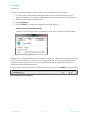
Figure 6: Control options
Next to the indicators are a number of control options (Error! Reference source not found.) which
can be used to set the signals that appear on inputs to the module.
RTS and DTR – The two additional control lines for the RS-232 interface.
Note: If CTS/RTS handshaking is enabled, the RTS checkbox has no effect on the actual
physical RTS output pin as it is automatically controlled via the underlying windows
driver. To gain manual control of the RTS output, disable ‘Handshaking’ in the
Configuration window.
BREAK – Used to assert a break condition over the RX line at the module. It must be
deasserted after use. A TX pin is normally at logic high (< 3v for RS232 voltage levels) when
idle; a BREAK condition is where the TX output pin is held low for more than the time it takes
to transmit 10 bits.
If the BREAK checkbox is ticked then the TX output is at non-idle state and no
communication is possible with the uart device connected to the serial port.
LocalEcho – Enables local echoing of any characters typed at the terminal. In default
operation, this option box should be selected because modules do not reflect back
commands entered in the terminal emulator.
LineMode – Delays transmission of characters entered into UWTerminal until you press Enter.
Enabling LineMode means that Backspace can be used to correct mistakes; we
recommend that you select this option.
www.lairdtech.com
16
Laird Technologies
smart BASIC
User Manual
Clear – Removes all characters from the terminal screen.
ClosePort – Close the serial port. This is useful when a USB to serial adaptor is being used to
drive the development board which has been briefly disconnected from the PC.
OpenPort – Re-open the serial port after it has been manually closed.
Useful Shortcuts
There are a number of shortcuts that help speed up the use of UWTerminal.
Each time UWTerminal starts, it asks you to acknowledge the Accept screen and to enter the
COM port details. If you are not going to change these, you can skip these screens by entering
the applicable command line parameters in a shortcut link.
www.lairdtech.com
17
Laird Technologies
smart BASIC
User Manual
To do this, follow these steps to create a shortcut to UWTerminal on your desktop:
1.
Locate the file UwTerminal.exe and right click and then drag and drop onto your
desktop, whereupon you will get a dialog box and from there select “Create Shortcut”
2.
Right-click the newly created shortcut.
3.
Select Properties.
4.
Edit the Target line to add the following commands (Figure 7):
accept com=n baud=bbb linemode
(Where n is the COM port that is connected to the dev kit and bbb is the baudrate)
Figure 7: Shortcut properties
Subsequently, starting UWTerminal from this shortcut launches it directly into the terminal screen.
At any time, the status bar on the bottom left (Figure 8) shows the comms parameters being
used at that time. The two counts on the bottom right (Tx and Rx) display the number of
characters transmitted and received.
The information within { } denotes the characters sent when you hit the ENTER on the keyboard.
Figure 8: Terminal screen status bar
www.lairdtech.com
18
Laird Technologies
smart BASIC
User Manual
Using UWTerminal
The first thing to do is to check that the module is communicating with UWTerminal. To do this,
follow these steps:
1.
Check that the CTS ‘led’ is green (DSR,DCD,RI should be red).
2.
Type ‘at’ (without the quotation marks).
3.
Press Enter. You should get a 00 response as per the following screenshot :-
Figure 9: Interactive command access
UWTerminal supports a range of interactive commands to interact directly with the module. The
following ones are typical:
AT – Returns 00 if the module is working correctly.
AT I 3 – Shows the revision of module firmware. Check to see that it is the latest version.
AT I 13 – Shows the hash value of the smart BASIC build
AT I 4 – Shows the MAC address of the module
AT+DIR – Lists all of the applications loaded on the module.
AT+DEL “filename” – Deletes an application from the module.
AT+RUN “filename” – Runs an application that is already loaded on the module. Please be
aware that if a filename does not contain any spaces, then it is even possible to launch an
application by just entering the filename as the command.
The next chapter lists all of the Interactive commands.
First, check to see what is loaded on the module by typing AT+DIR and Enter:
00
at+dir
06
00
$factory$
If the module has not been used before then you should not see any lines starting with the 2 digit
‘06’ sequence.
www.lairdtech.com
19
Laird Technologies
smart BASIC
User Manual
Writing a smart BASIC Application
Let’s start where every other programming manual starts… with a simple program to display
“Hello World” on the screen. We use Notepad to write the smart BASIC application.
Tip: if you use TextPad and mark files with .sb extensions as C/C++ files then you should be able
to see your application with syntax colour highlighting. It is planned in the future to supply a
configuration file for TextPad which will contain syntax highlighting information specifically for
smart BASIC.
To write this ‘Hello World’ smart BASIC application, follow these steps:
1.
Open Notepad.
2.
Enter the following text:
print "\nHello World\n"
3.
Save the file with this single line as test1.sb.
Note: smart BASIC files can have any extension, as UWTerminal which is used to download
an application to the module will strip the extension when the file is downloaded to
the module.
Laird recommends always using the extension ‘.sb’ as this makes it easy to distinguish
between smart BASIC files and other files. You can also associate this extension with
your favourite editor and enable appropriate syntax highlighting.
As you start to develop more complex applications, you may want to use a more
fully-featured editor such as TextPad (trial version downloadable from
www.textpad.com ) or Notepad++ (free and downloadable from http://notepadplus.sourceforge.net. )
Tip: if you use TextPad and mark files with .sb extensions as C/C++ files (via Configure
| Preferences ) then you should be able to see your application with syntax colour
highlighting. It is planned in the future to supply a configuration file for TextPad which
will contain syntax highlighting information specifically for smart BASIC.
You must now load the compiled output of this file into the smart BASIC module’s File
System so that you can run it.
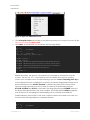
To manage file downloads, right click on any part of the black UWTerminal screen to
display the drop-down menu (Figure 10).
www.lairdtech.com
20
Laird Technologies
smart BASIC
User Manual
Figure 10: Right-click UWTerminal screen
4.
Click XCompile+Load and navigate to the directory where you’ve stored your test1.sb file.
Note: do not select Compile+Load
5.
Click Open. In UWTerminal, you should see the following display:
AT I 0
10
0
Bl600Med
AT I 13
10
13
9E56 5F81
<<Cross Compiling [test1.sb]>>
AT+DEL "test1" +
AT+FOW "test1"
AT+FWRH "FE900002250000000000FFFFFFFF569E815FFC10"
AT+FWRH "FB70090054455354312E555743000110CE211000"
AT+FWRH "FB0009000D000A48656C6C6F20576F726C640A00"
AT+FWRH "CC211400A52000000110FD10F510"
AT+FCL
+++ DONE +++
Behind the scenes, the shortcut uses Interactive Commands to load the file onto the
module. The first two “AT I” commands are used to identify the module so that the
correct cross compiler can be invoked resulting in the text <<Cross Compiling [test1.sb]>>.
In this example since the compilation is successful, the binary file generated needs to be
downloaded and so the AT+DEL “filename” + deletes any previous file with the same
name that might already be on the module. The new file is downloaded using he
AT+FOW, AT+FWRH and AT+FCL commands. The strings following the AT+FWRH consists of
the binary data generated by the cross compiler. And finally the +++ DONE +++ signifies
that the process of compiling and downloading was successfully accomplished.
Possible failures in this process is if the cross compiler cannot be located. In this case you
should see the following display in a separate window:
AT I 0
10
0
AT I 13
www.lairdtech.com
Bl600Med
21
Laird Technologies
smart BASIC
User Manual
10
13
9E56 5F81
??? Cross Compiler [XComp_Bl600Med_9E56_5F81.exe] not found ???
??? Please save a copy to the same folder as UwTerminal.exe ???
??? If you cannot locate the file, please contact the supplier ???
The solution is to locate the cross compiler application mentioned in between the []
brackets and saving it to either the folder containing UWTerminal.exe or the folder that
contains the smart BASIC application test1.sb
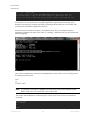
Another cause of a failure is if there is compilation error. Say, for example, the print
statement contained an error in the form of a missing “ delimiter, then you should see the
following display:-
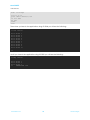
Now that the application has been downloaded into the module, run it by issuing one of
the following commands:
test1
or
AT+RUN “test1”
Note:
smart BASIC commands, variables, and filename are not case sensitive; smart
BASIC treats Test1, test1 and TEST1 as the same files.
The screen should display the following result (when both forms of the command are
entered):
at+run "test1"
Hello World
00
Test1
www.lairdtech.com
22
Laird Technologies
smart BASIC
User Manual
Hello World
00
You can check the file system on the module by typing AT+DIR and Enter and you should
see:
00
at+dir
06
00
test1
You have just written and run your first smart BASIC program.
To make it a little more complex, try printing “Hello World” ten times. For this we can use the
conditional functions within smart BASIC. We also introduce the concept of variables and print
formatting. Later chapters goes into much more detail, but this gives a flavour of the way they
work.
Before we do that, it’s worth laying out the rules of the application source syntax.
smart BASIC Statement Format
The format of any line of smart BASIC is defined in the following manner:
{ COMMENT | COMMAND | STATEMENT | DIRECTIVE } < COMMENT > { TERMINATOR }
Where anything in { } is mandatory and < > is optional and within each set of { } or < > brackets
the character | is used to denote a choice of values.
The various elements of each line are:
COMMENT – A COMMENT token is a ‘ or // followed by any sequence of characters. Any
text after the token is ignored by the parser. A comment can occupy its own line or be
placed at the end of a STATEMENT or COMMAND.
COMMAND – An Interactive Command which is one of the commands that can be
executed from Interactive Mode.
STATEMENT – A valid BASIC statement(s) separated by the ‘:’ character if there are more
than one statement.
Note:
When compiling an application, a line can be made of several statements which
are separated by the ':' character.
DIRECTIVE – A line starting with the ‘#’ character. It is used as an instruction to the parser to
modify its behaviour, e.g. with #DEFINE and #INCLUDE.
TERMINATOR – The ‘\r’ character which corresponds to the Enter key on the keyboard.
www.lairdtech.com
23
Laird Technologies
smart BASIC
User Manual
The smart BASIC implementation consists of a command parser and a single line/single pass
compiler. It takes each line of text (a series of tokens and depending on their content and its
operating mode) and does one of the following:
Act on them immediately (such as with AT commands).
Optionally, if the build includes the compiler, generate a compiled output which is stored
and processed at a later time by the run-time engine. This capability is not present in the
BL600 due to flash memory constraint.
smart BASIC has been designed to work on embedded systems where there is often a very
limited amount of RAM. To make it efficient, you need to declare every variable that you intend
to use by using the DIM statement; the compiler can then allocate the appropriate amount of
memory space. In the following example program, we are using the variable “i” to count how
many times we print “Hello World”.
smart BASIC allows a couple of different variables types, numbers (32 bit signed integers) and
strings.
Our program (stored in a file called HelloWorld.sb’) looks like this:
'Example Script "helloworld"
DIM i as integer
'declare our variable
for i=1 to 10
print "Hello World \n"
next
'Perform the print ten times
'The \n forces a new line each time
'Increment the value of i
We have introduced a few new things, the first being comments. Any line that starts with an
apostrophe ‘ is ignored by the compiler from the token onwards and treated as a comment, so
the opening line is ignored. You can also add comments to a program line by adding an
apostrophe proceeded by a space to start the comment.
If you have ‘C++’ language experience, you can also use the // token to indicate that the rest
of the line is a comment.
The second item of interest is the line feed character ‘\n’ which we’ve added after Hello World
in the print statement. This tells the print command to start a new line. If left out, the ten Hello
World’s would have been concatenated together on the screen. You can try removing it to see
what would happen.
Compile and download the file HelloWorld.sb to the module (using XCompile+Load in
UwTerminal) and then run the application in the usual way:
AT+RUN “helloworld”
You’ll see the following screen output:
at+run "helloworld"
Hello
Hello
Hello
Hello
Hello
Hello
World
World
World
World
World
World
www.lairdtech.com
24
Laird Technologies
smart BASIC
User Manual
Hello
Hello
Hello
Hello
World
World
World
World
00
If you now change the print statement in the application to
print "Hello World “;I;\n"
'The \n forces a new line each time
You’ll see the following screen output:
at+run "helloworld"
Hello
Hello
Hello
Hello
Hello
Hello
Hello
Hello
Hello
Hello
World
World
World
World
World
World
World
World
World
World
1
2
3
4
5
6
7
8
9
10
00
If you run AT+DIR, you will see that both of these programs are now loaded in memory. They
remain there until you remove them with AT+DEL.
at+dir
06
06
00
test1
HelloWorld
Note: All responses to interactive commands are of the format
\nNN\tOptionalText1\tOptionalText2…\r
where NN is always a two digit number and \t is the tab character and is terminated
by \r.
This format has been provided to assist with developing host algorithms that can
parse these responses in a stateless fashion. The NN will always allow the host to
attach meaning to any response from the module.
Autorun
One of the major features of a smart BASIC module is its ability to launch an application
autonomously when power is applied. To demonstrate this we will use the last HelloWorld
example.
An autorun application is identical to any other BASIC application except for its name, which
must be called $autorun$. Whenever a smart BASIC module is powered up it checks its
www.lairdtech.com
25
Laird Technologies
smart BASIC
User Manual
nAutoRUN input line (see pinout for the BL600 module) and, if it is asserted (that is, at 0v), it looks
for and executes the autorun application.
In the BL600 development kit, the nAutoRUN input pin of the module is connected to the DTR
output pin of the USB to UART chip. This means the DTR checkbox in UWTerminal can be used to
affect the state of that pin on the BL600 module. The DTR checkbox is always ticked by default
hence asserted state which will translate to a 0v at the nAutoRUN input of the module. This
means if an autorun application exists in the module’s file system it will be automatically
launched on power up.
Copy the smart BASIC source file “HelloWorld.sb” to “$autorun$.sb” and then cross-compile and
download to the module. After it is downloaded if you enter the AT+DIR command you should
see:at+dir
06
06
06
00
test1
HelloWorld
$autorun$
TIP: A useful feature of UWTerminal is that the download function strips off the filename
extension when it downloads a file into the module file system. This means that you can store
a number of different autorun applications on your PC by giving them longer, more
descriptive extension names. For example:
$autorun$.HelloWorld
By doing this, each $autorun$ file on your PC is unique and the list is simpler to manage.
Note: If Windows adds a text extension, rename the file to remove it. Do not use multiple
extensions in filenames (such as filename.ext1.ext2). The resulting files (after being
stripped) may overwrite other files.
Now clear the UWTerminal screen by clicking the ‘Clear’ button on the toolbar and then enter
the command ATZ which forces the module to reset itself. You could also hit the ‘reset’ button
on the development kit to achieve the same.
Warning: If the JLINK debugger is connected to the development kit via the ribbon, then the
reset button has no effect.
You’ll see the following screen output:
www.lairdtech.com
26
Laird Technologies
smart BASIC
User Manual
Hello
Hello
Hello
Hello
Hello
Hello
Hello
Hello
Hello
Hello
World
World
World
World
World
World
World
World
World
World
1
2
3
4
5
6
7
8
9
10
Next, in UWTerminal clear the screen using the ‘Clear’ button and then untick the checkbox
labelled DTR so that the nAutoRUN input of the module is not asserted, and you will see that after
a reset (ATZ or the button), the screen remains blank, which signifies that the autorun application
was NOT invoked automatically.
The reason for providing this capability to suppress the launching of the autorun application is
purely to ensure that if your autorun application has the WAITEVENT as the last statement then
you can still regain control of the module’s command interpreter for further development work.
Debugging Applications
One difference with smart BASIC is that it does not have program labels (or line numbers for the
die-hard senior coders). Because it is designed for a single line compilation in a memory
constrained embedded environment, it is more efficient to work without them.
Because of the absence of labels, smart BASIC provides facilities for debugging an application
by inserting breakpoints into the source code prior to compilation and execution. Multiple
breakpoints can be inserted and each breakpoint can have a unique identifier associated with
it. These can be used to aid the developer in locating which breakpoint resulted in the break. It
is up to the programmer to ensure that all the IDs are unique. The compiler will not check for
repeated values.
Each breakpoint statement has syntax:
BP nnnn
where nnnn should be a unique number which is echoed back when the breakpoint is
encountered at runtime. It is up to the developer to keep all the nnnn’s unique as they are not
validated when the source is compiled.
Breakpoints are ignored if the application is launched using the command AT+RUN (or name
alone). This allows the application to be run at full speed with breaks if required. However, if the
command AT+DBG is used to run the application, then all of the debugging commands are
enabled.
When the breakpoint is encountered, the runtime engine is halted and the command line
interface becomes active. At this point, the response seen in UWTerminal is in the following form:
<linefeed>21 BREAKPOINT nnnn<carriage return>
where nnnn is the identifier associated with the BP nnnn statement that caused the halt in
execution. As the nnnn identifier is unique, this allows you to locate the breakpoint line in the
source code.
For example, if you create an application called test2.sb with the following content:www.lairdtech.com
27
Laird Technologies
smart BASIC
User Manual
DIM i as integer
for i=1 to 10
print "Hello World”;i;”\n"
if i==3 then
bp 3333
endif
next
Then when you launch the application using AT+RUN you will see the following:at+run "test2"
Hello
Hello
Hello
Hello
Hello
Hello
Hello
Hello
Hello
Hello
World
World
World
World
World
World
World
World
World
World
1
2
3
4
5
6
7
8
9
10
00
And if you launch the application using AT+DBG you will see the following:at+dbg "test2"
Hello
Hello
Hello
21
World 1
World 2
World 3
BREAKPOINT 3333
www.lairdtech.com
28
Laird Technologies
smart BASIC
User Manual
Having been returned to Interactive mode, the command ? varname can be used to
interrogate the value of any of the application variables, which are preserved during the break
from execution. The command = varname newvalue can then be used to change the value of
a variable, if required. For example:
? i
08
3
00
= I 42
? i
08
42
00
The single step command SO (Step Over) can then be invoked to step through the next
statements individually (note the first SO will rerun the BP statement).
When required, the command RESUME can be used to resume the run-time engine from the
current application position as shown below:at+dbg "test2"
Hello World 1
Hello World 2
Hello World 3
21
BREAKPOINT 3333
= I 8
resume
Hello World 8
Hello World 9
Hello World 10
00
Structuring an Application
Applications must follow smart BASIC syntax rules. However, the single pass compiler places
some restrictions on how the application needs to be arranged. This section explains these rules
and suggests a structure for writing applications which should adhere to the event driven
paradigm.
Typically, do something only when something happens. This smart BASIC implementation has
been designed from the outset to ‘feed’ events into the user application to facilitate that
architecture, and while waiting for events, the module has been designed to remain in the
lowest power state.
smart BASIC uses a single pass compiler which can be extremely efficient in systems with limited
memory. They are called “single pass” as the source application is only passed through the
parser line by line once. That means that it has no knowledge of any line which it has not yet
encountered and it will forget any previous line as soon as the first character of the next line
arrives. The implication is that variables and subroutines need to be placed in position before
they are first referenced by any function which dictates the structure of a typical application.
In practice, this results in the following structure for most applications:
Opening Comments – Any initial text comments to help document the application.
www.lairdtech.com
29
Laird Technologies
smart BASIC
User Manual
Includes – The cross compiler which is automatically invoked by UWTerminal allows the use
of #DEFINE and #INCLUDE directives to bring in additional source files and data elements.
Variable Declarations – Declare any global variables. Local variables can be declared
within subroutines and functions.
Subroutines and Functions – These should be cited here, prior to any program references. If
any of them refer to other subroutines or functions these referred ones should be placed
first. The golden rule is that nothing on any line of the application should be “new”. Either it
should be an inbuilt
smart BASIC function, or it should have been defined higher up within the application.
Event and error handlers – Normally these reference subroutines, so they should be placed
here.
Main program – The final part of the application is the main program. In many cases this
may be as simple as an invocation of one of the user functions or subroutines and then
finally the WAITEVENT statement.
An example of an application which monitors button presses and reflects them to leds on the
BLE development kit is as follows:'//**********************************************************************************
'// Laird Technologies (c) 2013
'//
'// Simple development board button and LED test
'// Tests the functionality of button 0, button 1, LED 0 and LED 1 on the
'// development board
'// DVK-BL600-V01
'//
'// 24/01/2013 Initial version
'//
'//**********************************************************************************
'//**********************************************************************************
'// Global Variable Declarations
'//**********************************************************************************
dim rc '// declare rc as integer variable
'//**********************************************************************************
'// Function and Subroutine definitions
'//**********************************************************************************
'//==================================================================================
'// This handler is called when button 0 is released
'//==================================================================================
function button0release()
gpiowrite(18,0) '// turns LED 0 off
print "Button 0 has been released \n"
print "LED 0 should now go out \n\n"
endfunc 1
'//==================================================================================
'// This handler is called when button 0 is pressed
'//==================================================================================
function button0press()
gpiowrite(18,1)
print "Button 0 has been pressed \n"
print "LED 0 will light while the button is pressed \n"
endfunc 1
www.lairdtech.com
30
Laird Technologies
smart BASIC
User Manual
'//==================================================================================
'// This handler is called when button 1 is released
'//==================================================================================
function button1release()
gpiowrite(19,0)
print "Button 1 has been released \n"
print "LED 1 should now go out \n\n"
endfunc 1
'//==================================================================================
'// This handler is called when button 1 is pressed
'//==================================================================================
function button1press()
gpiowrite(19,1)
print "Button 1 has been pressed \n"
print "LED 1 will light while the button is pressed \n"
endfunc 1
'//**********************************************************************************
'// Startup code : equivalent to main() in C
'//**********************************************************************************
rc = gpiosetfunc(18,2,2) '//sets sio18 (LED0) as a digital out with a weak pull up
rc = gpiosetfunc(19,2,2) '//sets sio19 (LED1) as a digital out with a weak pull up
rc = gpiobindevent(0,16,0) '//binds a gpio high event to an event. sio16 (button 0)
rc = gpiobindevent(1,16,1) '//binds a gpio low event to an event. sio16 (button 0)
rc = gpiobindevent(2,17,0) '//binds a gpio high event to an event. sio17 (button 1)
rc = gpiobindevent(3,17,1) '//binds a gpio low event to an event. sio17 (button 1)
'//==================================================================================
'//Bind events to handler functions
'//==================================================================================
onevent evgpiochan0 call button0release '//handler for button 0 release
onevent evgpiochan1 call button0press
'//handler for button 0 press
onevent evgpiochan2 call button1release '//handler for button 1 release
onevent evgpiochan3 call button1press
'//handler for button 1 press
print "Ready to begin button and LED test \n"
print "Please press button 0 or button 1 \n\n"
waitevent
'//when program is run it waits here until an event is detected
When this application is launched and appropriate buttons are pressed and released, the
output is as follows:-
AT+RUN “sampleapp”
Ready to begin button and LED test
Please press button 0 or button 1
Button 0 has been pressed
LED 0 will light while the button is pressed
Button 0 has been released
LED 0 should now go out
Button 1 has been pressed
www.lairdtech.com
31
Laird Technologies
smart BASIC
User Manual
LED 1 will light while the button is pressed
Button 1 has been released
LED 1 should now go out
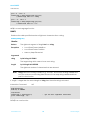
3. INTERACTIVE MODE COMMANDS
Interactive mode commands allow a host processor or terminal emulator to interrogate and
control the operation of a smart BASIC based module. Many of these emulate the functionality
of AT commands. Others add extra functionality for controlling the filing system and compilation
process.
Syntax Unlike commands for AT modems, a space character must be inserted between the
“AT”, the command, and subsequent parameters. This allows the smart BASIC tokeniser
to efficiently distinguish between AT commands and other tokens or variables starting
with the letters “at”.
‘Example:
AT I 3
The response to every interactive mode command has the following form:
<linefeed character> response text <carriage return>
This format simplifies the parsing within the host processor. The response may be one or multiple
lines. Where more than one line is returned, the last line has one of the following formats:
<lf>00<cr> for a successful outcome, or
<lf>01<tab> hex number <tab> optional verbose explanation <cr> for failure.
Note that in the case of the 01 response the
“<tab>optional_verbose_explanation” will be missing in resource
constrained platforms like the BL600 modules. The ‘verbose
explanation’ is a constant string and since there are over 1000 error
codes, these verbose strings can occupy more than 10 kilobytes of
flash memory.
The hex number in the response is the error result code consisting of two digits which can be
used to help investigate the problem causing the failure. Rather than provide a list of all the error
codes in this manual, you can use UWTerminal to obtain a verbose description of an error when
it is not provided on a platform.
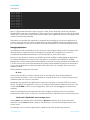
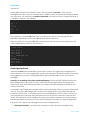
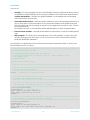
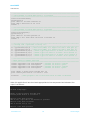
To get the verbose description, in UWTerminal, click on the BASIC tab and then if the error value
is hhhh, enter the command “ER 0xhhhh” and note the 0x prefix to ‘hhhh’. This is illustrated in
the following screenshot.
www.lairdtech.com
32
Laird Technologies
smart BASIC
User Manual
If you get the text “UNKNOWN RESULT CODE 0xHHHH”, please contact Laird for the latest version
of UWterminal.
AT
An Interactive mode command. Must be terminated by a carriage return for it to be processed.
It performs no action other than to respond with “\n00\r”. It exists to emulate the behaviour of a
device which is controlled using the 'AT' protocol. This is a good command to use to check if the
UART has been correctly configured and connected to the host.
AT I or ATI
Provided to give compatibility with the AT command set of Laird’s standard Bluetooth modules.
AT i num
Command
Returns
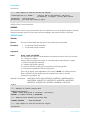
\n10\tMM\tInformation\r
\n00\r
Where
\n = linefeed character 0x0A
\t = horizontal tab character 0x09
MM = a number (see below)
Information = sting consisting of information requested associated with MM
\r = carriage return character 0x0D
Arguments
num
Integer Constant - A number in the range 0 to 65,535. Currently defined numbers
are:
0
3
4
5
6
7
12
13
33
www.lairdtech.com
Name of device
Version number of Module Firmware
MAC address in the form TT AAAAAAAAAAAA
Chipset name
Flash File System size stats (data segment): Total/Free/Deleted
Flash File System size stats (FAT segment) : Total/Free/Deleted
Last error code
Language hash value
BASIC core version number
33
Laird Technologies
smart BASIC
User Manual
601
602
603
604
605
606
1000..1999
2000..2999
Flash File System: Data Segment: Total Space
Flash File System: Data Segment: Free Space
Flash File System: Data Segment: Deleted Space
Flash File System: FAT Segment: Total Space
Flash File System: FAT Segment: Free Space
Flash File System: FAT Segment: Deleted Space
See SYSINFO() function definition
See SYSINFO() function definition
Any other number currently returns the manufacturer’s name.
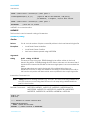
For ATi4 the TT in the response is the type of address as follows:00
01
02
03
Public IEEE format address
Random static address (default as shipped)
Random Private Resolvable (used with bonded devices)
Random Private Non-Resolvable (used for reconnections)
Please refer to the Bluetooth specification for a further description of the types.
This is an Interactive mode command and must be terminated by a carriage return for it to be
processed.
Interactive Command:
Yes
‘Example:
AT i 3
10
3
00
AT I 4
10
4
2.0.1.2
01 D31A920731B0
AT i is a core command.
The information returned by this Interactive command can also be useful from within a running
application and so a builtin function called SYSINFO(cmdId) can be used to return exactly the
same information and cmdid is the same value as used in the list above.
AT+DIR
List all application or data files in the module’s flash filing system.
AT+DIR <“string”>
Command
Returns
www.lairdtech.com
\n06\tFILENAME1\r
\n06\tFILENAME2\r
\n06\tFILENAMEn\r
\n00\r
34
Laird Technologies
smart BASIC
User Manual
If there are no files within the module memory, then only \n00\r is sent.
Arguments
string_constant
An optional pattern match string.
If included AT+DIR will only return application names which include this string.
string
The match string is not case sensitive.
This is an Interactive Mode command and MUST be terminated by a carriage return for it to be
processed.
Interactive Command: YES
Examples:
AT+DIR
AT+DIR “new”
AT+DIR is a core command.
AT+DEL
This command is used to delete a file from the module’s flash file system.
When the file is deleted the space it used to occupy does not get marked as free for use again,
Hence eventually after many deletions the file system will not have any free space for new files.
When that happens the module will respond with an appropriate error code when a new file
write is attempted. Use the command AT&F 1 to completely erase and reformat the file system.
At any time you can use the command AT I 6 to get information about the file system. It will
respond as follows:10
6
aaaa,bbbb,cccc
Where aaaa is the total size of the file system, bbbb is the free space available and cccc is the
deleted space.
From within a smart BASIC application you can get aaaa by calling SYSINFO(601), bbbb by
calling SYSINFO(602) and cccc by calling SYSINFO(603).
Note that after AT&F 1 has been process, the file system manager context is unstable so there
will be an automatic self-reboot.
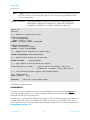
AT+DEL “filename” (+)
Command
Returns
OK
If the file does not exist or if it was successfully erased, it will respond with \n00\r.
Arguments
filename
string_constant.
www.lairdtech.com
35
Laird Technologies
smart BASIC
User Manual
The name of the file to be deleted. The maximum length of filename is 24
characters and should not include the following characters :*?"<>|
This is an Interactive Mode command and must be terminated by a carriage return for it to be
processed.
Adding the “+” sign to an AT+DEL command can be used to force the deletion of an open file.
For example, use AT+DEL “filename” + to delete an application which you have just exited after
running it.
Interactive Command: YES
Examples:
AT+DEL “data”
AT+DEL “myapp” +
AT+DEL is a core command.
www.lairdtech.com
36
Laird Technologies
smart BASIC
User Manual
AT+RUN
AT+RUN runs a precompiled application that is stored in the module’s flash file system.
Debugging statements in the application are disabled when it is launched using AT+RUN.
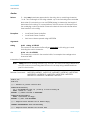
AT+RUN “filename”
Command
Returns
If the filename does not exists the AT+RUN will respond with an error response starting
with a 01 and a hex value describing the type of error. When the application aborts
or if the application reaches its end, a deferred \n00\r response is sent.
If the compiled file was generated with a non-matching language hash then it will
not run with an error value of 0707 or 070C
Arguments
string_constant.
The name of the file to be deleted. The maximum length of filename is 24 characters
and should not include the following characters :*?"<>|
filename
This is an Interactive Mode command and must be terminated by a carriage return for it to be
processed.
Note:
Debugging is disabled when using AT+RUN, hence all BP nnnn statements will be
inactive. To run an application with debugging active, use AT+DBG.
If any variables exist from a previous run, they are destroyed before the specified application is
serviced.
Note: the application “filename” can also be invoked by just entering the name if it does not
contain any spaces.
Interactive Command: YES
Examples:
AT+RUN “NewApp”
or
NewApp
AT+RUN is a core command.
AT+DBG
AT+DBG runs a precompiled application that is stored in the flash file system. In contrast to
AT+RUN, debugging is enabled.
AT+DBG “filename”
Command
www.lairdtech.com
37
Laird Technologies
smart BASIC
User Manual
Returns
If the filename does not exists the AT+DBG will respond with an error response. When
the application aborts or if the application reaches its end, a deferred \n00\r
response is sent.
www.lairdtech.com
38
Laird Technologies
smart BASIC
User Manual
Arguments
filename
string_constant.
The name of the file to be deleted. The maximum length of filename is 24 characters
and should not include the following characters :*?"<>|
This is an Interactive mode command and must be terminated by a carriage return for it to be
processed.
Debugging is enabled when using AT+DBG, which means that all BP nnnn statements are active.
To launch an application without the debugging capability, use AT+RUN. You do not need to
recompile the application, but this is at the expense of using more memory to store the
application.
If any variables exist from a previous run, they are destroyed before the specified application is
serviced.
Interactive Command: YES
Examples:
AT+DBG “NewApp”
AT+DBG is a core command.
AT+SET
AT+SET is used to set a run-time configuration key. Configuration keys are user definable, nonvolatile memory storage areas, which are analogous to S registers in modems. Their values are
kept over a power cycle but will be deleted if the AT&F* command is used to clear the file
system.
AT+SET num = string
Command
Returns
If the config key is successfully set or updated, the response is \n00\r.
Arguments
num
Integer Constant
The ID of the required configuration key. All of the configuration keys are stored as
an array of 16 bit words.
String
String_constant
The entire value array is written to the configuration ID and is specified in a single
command (in contrast to the returned values of AT+GET). The new value array is
specified as fixed format 4 digit hex numbers (with optional H' prefixes).
This is an Interactive Mode command and MUST be terminated by a carriage return for it to be
processed.
The following Configuration Key IDs are defined.
40
Maximum size of locals simple variables
41
Maximum size of locals complex variables
www.lairdtech.com
39
Laird Technologies
smart BASIC
User Manual
42
Maximum depth of nested user defined functions and subroutines
43
The size of stack for storing user functions simple variables
44
The size of stack for storing user functions complex variables
45
The size of the message argument queue length
Interactive Command: YES
‘Example:
AT+SET 40 = "0x0040"
AT+SET 40 = "H'0040"
AT+SET is a core command.
Note: These values revert to factory default values if the flash file system is deleted using the
“AT & F *” interactive command.
AT+GET
AT+GET is used to read a run-time configuration key. Configuration keys are user definable, nonvolatile memory storage areas, which are analogous to S registers in modems. Their values are
kept over a power cycle.
AT+GET num
Command
Returns
The response to this command is
\n07\tiiii oooo hhhh hhhh hhhh hhhh\r
\n00\r
where each line starting with 07 will have up to 8 words. If the configuration key
contains more data words, then more of these 07 lines are displayed.
In each 07 line the oooo value (hexadecimal) specifies the start offset of the data in
the key. The value iiii (hexadecimal) is an echo of the config key ID specified in the
command line. The config key data is hhhh again in hexadecimal.
Arguments
num
Integer Constant
The ID of the required configuration key. All of the configuration keys are stored as
an array of 16 bit words.
This is an Interactive Mode command and MUST be terminated by a carriage return for it to be
processed.
See the definition of the AT+SET command for a list of all the predefined configuration keys.
Interactive Command: YES
www.lairdtech.com
40
Laird Technologies
smart BASIC
User Manual
‘Example:
AT+GET 40
07
0028 0000 0014
00
AT+GET is a core command.
AT+FOW
AT+FOW opens a file to allow it to be written to with raw data. AT+FWR (or AT+FWRH) to write
data to it and finally AT+FCL to close it, are typically used for downloading data and
precompiled files to the module’s flash filing system. For example, data files could be web pages
or x.509 certificates or default values for BLE attributes.
AT+FOW “filename”
Command
Returns
If the filename is valid, AT+FOW will respond with \n00\r.
Arguments
filename
string_constant.
The name of the file to be deleted. The maximum length of
filename is 24 characters and should not include the following characters :*?"<>|
This is an Interactive Mode command and MUST be terminated by a carriage return for it to be
processed.
Interactive Command: YES
Examples:
AT+FOW “myapp”
AT+FOW is a core command.
AT+FWR
AT+FWR writes a string to a file that has previously been opened for writing using AT+FOW. The
group of commands (AT+FOW, AT+FWR, AT+FWRH and AT+FCL) are typically used for
downloading files to the module’s flash filing system. For example, web pages or x.509
certificates or BLE data.
AT+FWR “string”
Command
Returns
If the string is successfully written, AT+FWR will respond with \n00\r.
Arguments
string
string_constant – A string that is appended to a previously opened file. Any \NN or \r
or \n characters present within the string will get de-escaped before they are
written to the file.
www.lairdtech.com
41
Laird Technologies
smart BASIC
User Manual
This is an Interactive Mode command and MUST be terminated by a carriage return for it to be
processed.
Interactive Command: YES
Examples:
AT+FWR “\nhelloworld\r”
AT+FWR “\00\01\02”
AT+FWR is a core command.
AT+FWRH
AT+FWRH writes a string to a file that has previously been opened for writing using AT+FOW. The
group of commands (AT+FOW, AT+FWR, AT+FWRH and AT+FCL) are typically used for
downloading files to the module’s flash filing system. For example, web pages or x.509
certificates or BLE data.
AT+FWRH “string”
Command
Returns
If the string is successfully written, AT+FWRH will respond with \n00\r.
Arguments
string
string_constant – A string that is appended to a previously opened file. Only
hexadecimal characters are allowed and the string is first converted to binary and
then appended to the file.
This is an Interactive Mode command and MUST be terminated by a carriage return for it to be
processed.
Interactive Command: YES
Examples:
AT+FWRH “FE900002250DEDBEEF”
AT+FWRH “000102”
Invalid example
AT+FWRH “hello world”
‘because not a valid hex string
AT+FWRH is a core command.
AT+FCL
AT+FCL closes a file that has previously been opened for writing using AT+FOW. The group of
commands; AT+FOW, AT+FWR, AT+FWRH and AT+FCL are typically used for downloading files to
the module’s flash filing system.
AT+FCL
www.lairdtech.com
42
Laird Technologies
smart BASIC
User Manual
Command
Returns
If the filename exists, AT+FCL will respond with \n00\r.
Arguments
None
This is an Interactive Mode command and MUST be terminated by a carriage return for it to be
processed.
Interactive Command: YES
Examples:
AT+FCL
AT+FCL is a core command.
? (Read Variable)
When an application encounters a STOP, BPnnn, or END statement, it will fall into the Interactive
Mode of operation and will not discard any global variables created by the application. This
allows them to be referenced in Interactive mode.
? var <[index]>
Command
Returns
Displays the value of the variable if it had been created by the application. If the
variable is an array then the element index MUST be specified using the [n] syntax.
If the variable exists and it is a simple type then the response to this command is
\n08\tnnnnnn\r
\n00\r
If the variable is a string type, then the response is
\n08\t"Hello World"\r
\n00\r
If the variable does not exist then the response to this command is
\n01\tE023\r
Where \n = linefeed, \t = horizontal tab and \r = carriage return
Note:
If the optional type prefix is present, the output value, when it is an
integer constant is displayed in that base. For example:
? h’ var
returns
\n08\tH'nnnnnn\r
www.lairdtech.com
43
Laird Technologies
smart BASIC
User Manual
\n00\r
Arguments
Var <[n]>
Any valid variable with mandatory [n] if the variable is an array.
For integer variables, the display format can be selected by prefixing the variable
with one of the integer type prefixes:
D' := Decimal
H' := Hexadecimal
O' := Octal
B' := Binary
This is an Interactive Mode command and MUST be terminated by a carriage return for it to be
processed.
Interactive Command: YES
www.lairdtech.com
44
Laird Technologies
smart BASIC
User Manual
Examples:
? argc
08
11
00
? h’argc
08
H’0000000B
00
? B’argc
08
B’000000000000000000000001011
? argv[0]
08
“hello”
00
? is a core command.
= (Set Variable)
When an application encounters a STOP, BPnnn, or END statement, it will fall into the Interactive
mode of operation and will not discard the global variables so that they can be referenced in
Interactive mode. The = command is used to change the content of a known variable. When
the application is RESUMEd, the variable will contain the new value. It is useful when debugging
applications.
= var<[n]> value
Command
Returns
If the variable exists and the value is of a compatible type then the variable value is
overwritten and the response to this command is:
\n00\r
If the variable exists and it is NOT of compatible type then the response to this
command is
\n01\tE027\r
If the variable does not exist then the response to this command is
\n01\tE023\r
If the variable exists but the new value is missing, then the response to this
command is
\n01\tE26\r
Where \n = linefeed, \t = horizontal tab and \r = carriage return
Arguments
Var<[n]>
The variable whose value is to be changed
value
A string_constant or integer_constant of appropriate form for the variable.
This is an Interactive Mode command and MUST be terminated by a carriage return for it to be
processed.
Interactive Command: YES
www.lairdtech.com
45
Laird Technologies
smart BASIC
User Manual
www.lairdtech.com
46
Laird Technologies
smart BASIC
User Manual
Examples: (after an app exits which had DIM’d a global variable called ‘argc’)
? argc
08
11
00
= argc 23
00
? argc
08
23
00
= is a core command.
SO
SO (Step Over) is used to execute the next line of code in Interactive Mode after a break point
has been encountered when an application had been launched using the AT+DBG command.
Use this command after a breakpoint is encountered in an application to process the next
statement. SO can then be used repeatedly for single line execution
SO is normally used as part of the debugging process after examining variables using the ?
Interactive Command and possibly the = command to change the value of a variable.
See also the BP nnnn, AT+DBG, ABORT, and RESUME commands for more details to aid
debugging.
SO is a core function.
RESUME
RESUME is used to continue operation of an application from Interactive Mode which had been
previously halted. Normally this occurs as a result of execution of a STOP or BP statement within
the application. On execution of RESUME, application operation continues at the next statement
after the STEP or BP statement.
If used after a SO command, application execution commences at the next statement.
RESUME
Command
Returns
If there is nothing to resume (e.g. immediately after reset or if there are no more
statements within the application), then an error response is sent.
\n01\tE029\r
This is an Interactive Mode command and MUST be terminated by a carriage return for it to be
processed
Interactive Command: YES
Examples:
RESUME
www.lairdtech.com
47
Laird Technologies
smart BASIC
User Manual
RESUME is a core function.
www.lairdtech.com
48
Laird Technologies
smart BASIC
User Manual
ABORT
Abort is an Interactive Mode command which is used to abandon an application, whose
execution has halted because it has processed a STOP or BP statement.
ABORT
Command
Returns
Abort is an Interactive Mode command which is used to abandon an application,
whose execution has halted because it had processed a STOP or BP statement. It
there is nothing to abort then it will return a success 00 response.
This is an Interactive Mode command and MUST be terminated by a carriage return for it to be
processed.
Interactive Command: YES
Examples:
(Assume the application someapp.sb has a STOP statement somewhere which will invoke command mode)
AT+RUN “someapp”
ABORT
ABORT is a core command.
AT+REN
Renames an existing file.
AT+REN “oldname” “newname”
Command
Returns
OK if the file is successfully renamed.
Arguments
oldname
string_constant.
The name of the file to be renamed.
Newname
string_constant.
The new name for the file.
The maximum length of filename is 24 characters.
oldname and newname must contain a valid filename, which cannot contain the following
seven characters
:*?"<>|
This is an Interactive Mode command and MUST be terminated by a carriage return for it to be
processed.
Interactive Command: YES
Examples:
www.lairdtech.com
49
Laird Technologies
smart BASIC
User Manual
AT+REN “oldscript.txt” “newscript.txt”
AT+REN is a core command.
AT&F
AT&F provides facilities for erasing various portions of the module’s non-volatile memory.
AT&F integermask
Command
Returns
OK if file successfully erased.
Arguments
Integermask
Integer corresponding to a bit mask or the “*” character
The mask is an additive integer mask, with the following meaning:
1
Erases normal file system and system config keys
(see AT+GET and AT+SET for examples of config keys)
2
Not applicable to current modules
4
Not applicable to current modules
8
Not applicable to current modules
16
Erases the User config keys only
32
Not applicable to current modules
*
Erases all data segments
If an asterisk is used in place of a number, then the module is configured back to the factory
default state by erasing all flash file segments.
This is an Interactive Mode command and MUST be terminated by a carriage return for it to be
processed.
Interactive Command: YES
Examples:
AT&F 1
AT&F 16
AT&F *
‘delete the file system
‘delete the user config keys
‘delete all data segments
AT&F is a core command.
AT Z or ATZ
Resets the cpu.
AT Z
Command
www.lairdtech.com
50
Laird Technologies
smart BASIC
User Manual
Returns
\n00\r
Arguments
None
This is an Interactive Mode command and MUST be terminated by a carriage return for it to be
processed.
Interactive Command: YES
Examples:
AT Z
AT Z is a core command.
AT + BTD *
Deletes the bonded device database from the flash.
AT + BTD*
Command
Returns
\n00\r
Arguments
None
This is an Interactive Mode command and MUST be terminated by a carriage return for it to be
processed.
Note that the module will self-reboot so that the bonding manager context is reset too.
Interactive Command: YES
Examples:
AT+BTD*
AT+BTD* is an extension command
AT + MAC “12 hex digit mac address”
This is a command that will be successful one time only as it writes a IEEE mac address to nonvolatile memory. This address is then used instead of the random static mac address that comes
preprogrammed in the module.
Notes
* If the module has an invalid licence then this address will not be visible.
* If the address “000000000000” is written then it will be treated as invalid and prevent a new
address from being entered.
www.lairdtech.com
51
Laird Technologies
smart BASIC
User Manual
AT + MAC “12 hex digits”
Command
Returns
\n00\r
or
\n01 192A\r
Where the error code 192A is “NVO_NVWORM_EXISTS” meaning a IEEE mac address
already exists, which can be read using the command AT I 24
Arguments
A string delimited by “” which shall be a valid 12 hex digit mac address that is
written to non-volatile memory.
This is an Interactive Mode command and MUST be terminated by a carriage return for it to be
processed.
Note that the module will self-reboot if the write is successful. Subsequent invocations of this
command will generate an error.
Interactive Command: YES
Examples:
AT+MAC “008098010203”
AT+MAC is an extension command
4 SMART BASIC COMMANDS
smart BASIC contains a wide variety of commands and statements. These include a core set of
programming commands found in most languages and extension commands that are designed
to expose specific functionality of the platform; for example, Bluetooth Low Energy’s GATT, GAP,
and security functions.
Because smart BASIC is designed to be a very efficient embedded language, users need to take
care of the syntax of these commands.
Syntax
smart BASIC commands are classified as one of the following:
Functions
Subroutines
Statements
Functions
www.lairdtech.com
52
Laird Technologies
smart BASIC
User Manual
A function is a command that generates a return value and is normally used in an expression.
For example:
newstr$ = LEFT$ (oldstring$, num)
In other words, functions cannot appear on the left hand side of an assignment statement
(which has the equals sign). However, a function may affect the value of variables used as
parameters if it accepts them as references rather than as values. This subtle difference is
described further in the next section.
www.lairdtech.com
53
Laird Technologies
smart BASIC
User Manual
Subroutines
A subroutine does not generate a return value and is generally used as the only command on a
line. Like a function, it may affect the value of variables used as parameters if it accepts them as
references rather than values. For example:
STRSHIFTLEFT (string$, num)
This brings us to the definition of the different forms an argument can take, both for a function
and a subroutine. When a function is defined, its arguments are also defined in the form of
how they are passed – either as byVal (by their value) or byRef (by reference). For byVal, a
copy of the original is passed to the routine; changes to that variable within the block of the
routine do not get reflected back to the variable in the caller block of code.
Passing Arguments as byVal
If an argument is passed as byVal, then the function or subroutine only sees a copy of the
value. While it is able to change the copy of the variable, on exit, any changes are lost.
Passing Arguments as byRef
If an argument is passed as byRef, then the function or subroutine can modify the variable
and, on exit, the variable that was passed to the routine contains the new value.
To understand it, look at the smart BASIC subroutine STRSHIFTLEFT. It takes a string and shifts the
characters to the left by a specified number of places:
STRSHIFTLEFT (string$, num)
It is used as a command on string$, which is defined as being passed as byRef. This means that
when the rotation is complete, string$ is returned with its new value. num defines the number of
places that the string is shifted and passed as byVal; the original variable num is unchanged by
this subroutine.
Note: Throughout the definition of the following commands, arguments are explicitly stated as
being byVal or byRef.
A characteristic of functions, as opposed to subroutines, is that they always return a value.
Arguments may be either byVal or byRef. In general and by default, string arguments are
passed byRef. The reason for this is twofold:
It saves valuable memory space because a copy of the string (which may be long) does
not need to be copied to the stack.
A string copy operation is lengthy in terms of cpu execution time. However, in some cases
the valuables are passed byVal and in that case, when the function or subroutine is
invoked, a constant string in the form “string” can be passed to it.
Note: For arguments specified as byRef, it is not possible to pass a constant value – whether
number or string.
www.lairdtech.com
54
Laird Technologies
smart BASIC
User Manual
Statements
Statements do not take arguments, but instead take arithmetic or string expression lists. The only
Statements in smart BASIC are PRINT and SPRINT.
Exceptions
Developing a software application that is error free is virtually an impossible task. All functions
and subroutines act on the data that is passed to them and there are occasions when the
values do not make sense. For example, when a divide operation is requested and the divisor
passed to the function is the value 0. In these types of cases it is impossible to generate a return
of meaningful value, but the event needs to be trapped so that the effects of doing that
operation can be mitigated.
The mitigation process is via the inclusion of an ONERROR handler as explained in detail later in
this manual. If the application does NOT provide an ONERROR handler and if an exception is
encountered at run-time, then the application will abort to the Interactive Mode. This WILL be
disastrous for unattended use cases. A good catchall ONERROR is to invoke a handler in which
the module is reset, then at least the module will reset from a known condition.
Language Definitions
Throughout the rest of this manual, the following convention is used to describe smart BASIC
commands and statements:
Command
Description of the command.
COMMAND (<byRef | byval> arg1 <AS type>,..)
FUNCTION / SUBROUTINE / STATEMENT
Returns
TYPE
Description. Value that a function returns (always byVal).
Exceptions
ERRVAL
Description of the error.
Arguments (a list of the arguments for the command)
arg1
byRef
TYPE
A description, with type, of the variable.
argn
byVal
TYPE
A description, with type, of the variable.
Interactive
Command
Whether the command can be run in Interactive mode
using the ! token.
‘Examples
Examples using the command.
www.lairdtech.com
55
Laird Technologies
smart BASIC
User Manual
Always consult the release notes for a particular firmware release when using this manual. Due to
continual firmware development, there may be limitations or known bugs in some commands
that cause them to differ from the descriptions given in the following chapters.
Variables
One of the important rules is that variables used within an application MUST be declared before
they are referenced within the application. In most cases the best place is at the start of the
application. Declaring a variable can be thought of as reserving a portion of memory for it.
smart BASIC does not support forward declarations. If an application references a variable that
has not been declared, then the parser reports an ERROR aborts the compilation.
Variables are characterised by two attributes:
Variable Scope
Variable Class
DIM
The Declare statement is used to declare a number of variables of assorted types to be defined
in a single statement.
If it is used within a FUNCTION or SUB block of code, then those variables will only have local
scope. Otherwise they will have validity throughout the application. If a variable is declared
within a FUNCTION or SUB and a variable of the same name already exists with global scope,
then this declaration will take over whilst inside the FUNCTION or SUB. However, this practice
should be avoided.
DIM var<,var<,…>>
Arguments:
Var – A complete variable definition with the syntax varname <AS type>. Multiple variables
can be defined in any order, with each definition being separated by a comma.
Each variable (var) consists of one mandatory element varname and one optional
element AS type separated by whitespaces and described as follows:
Vaname – A valid variable name.
AS type – Where ‘type’ is INTEGER or STRING. If this element is missing, then varname is used
to define the type of the variable so that if the name ends with a $ character, then it
defaults to a STRING; otherwise an INTEGER .
A variable can be declared as an array, although only one dimension is allowed. Arrays
must always be defined with their size, e.g.
array [20] – The (20) with round brackets is also allowed.
The size of an array cannot be changed after it is declared.
Interactive Command: NO
‘Example:
DIM temp1 AS INTEGER
DIM temp2
www.lairdtech.com
‘will be an INTEGER by default
56
Laird Technologies
smart BASIC
User Manual
DIM temp3$ AS STRING
DIM temp4$
DIM temp5$ AS INTEGER
DIM temp6 AS STRING
DIM a1,a2,a3$,a4
‘will be a STRING by default
‘allowed but not recommended practice as there
‘is a $ at end of name
‘allowed but not recommended practice as no $
‘at end of name
‘3 INTEGER variables and 1 STRING variable
Variable Scope
The scope of a variable defines where it can be used within an application.
Local Variable – The most restricted scope. These are used within functions or subroutines
and are only valid within the function or subroutine. They are declared within the function
or subroutine.
Global Variable – Any variables not declared in the body of a subroutine or a function and
are valid from the place they are declared within an application. Global Variables remain
in scope at the end of an application, which allows the user or host processor to
interrogate and modify them using the ? and = commands respectively.
As soon as a new application is run, they are discarded.
Note: If a local variable has the same name as a global variable, then within a function or
a subroutine, that global variable cannot be accessed.
Variable Class
smart BASIC supports two generic classes of variables:
Simple Variables – Numeric variables. There are currently two types of simple variables:
INTEGER, which is a signed 32 bit variable (which also has the alias LONG), and ULONG,
which is an unsigned 32 bit variable.
Simple variables are scalar and can be used within arithmetic expressions as described
later.
Complex Variables – Non-numeric variables. There is currently only one type STRING.
STRING is an object of concatenated byte characters of any length up to a maximum of
65280 bytes, but for platforms with limited memory, it is further limited and that value can
be obtained by submitting the AT I 1004 command when in Interactive mode and using
the SYSINFO(1004) function from within an application.
For example, in the BLE module the limit is 512 bytes since it is always the largest data
length for any attribute.
Complex variables can be used in expressions which are dedicated for that type of
variable. In the current implementation of smart BASIC, the only general purpose operator
that can be used with strings is the '+' operator which is used to concatenate strings.
‘Example:
DIM i$ as STRING
DIM a$ as STRING
a$ = “Laird”
www.lairdtech.com
57
Laird Technologies
smart BASIC
User Manual
i$ = a$ + “Rocks!”
Note:
To preserve memory, smart BASIC only allocates memory to string variables when
they are first used and not when they are allocated. If too many variables and strings
are declared in a limited memory environment it is possible to run out of memory at
run time. If this occurs an ERROR is generated and the module will return to
Interactive Mode. The point at which this happens depends on the free memory so
will vary between different modules.
This return to Interactive Mode is NOT desirable for unattended embedded systems.
To prevent this, every application MUST have an ONERROR handler which is
described later in this user manual.
Note:
Unlike in the “C” programming language, strings are not null terminated.
Arrays
Variables can be created as arrays of single dimensions; their size (number of elements) must be
explicitly stated when they are first declared using the nomenclature [x] or (x) after the variable
name, e.g.
DIM array1 [10] AS STRING
DIM array2(10) AS STRING
‘Example:
DIM nCmds AS INTEGER
DIM stCmds[20] AS STRING
stCmds[0]="ATS0=1\r"
stCmds[1]="ATS512=4\r"
stCmds[2]="ATS501=1\r"
stCmds[3]="ATS502=1\r"
stCmds[4]="ATS503=1\r"
stCmds[5]="ATS504=1\r"
stCmds[6]="AT&W\r"
nCmds=6
‘declare an array as a string with 20 elements
DIM i AS INTEGER
for i 0 to nCmds step 1
SendData(stCmds[i])
WaitForOkResp()
Next
General Comments on Variables
Variable Names begin with 'A' to 'Z' or '_' and then can have any combination of 'A' to 'Z', '0' to '9'
‘$’ and '_'.
Note: Variables names are not case sensitive, i.e test$ and TEST$ are the same variable.
www.lairdtech.com
58
Laird Technologies
smart BASIC
User Manual
smart BASIC is a strongly typed language and so if the compiler encounters an incorrect variable
type then the compilation will fail.
Declaring Variables
Variables are normally declared individually at the start of an application or within a function or
subroutine.
DIM string$ AS STRING
DIM str1$
‘// the $ at the end of the name implies a string
‘// so AS STRING not necessary
DIM temp1 AS INTEGER
DIM alarmstate ‘// no $ at the of the name implies an integer
‘// so AS INTEGER not necessary
DIM array [10] AS STRING
Constants
Numeric Constants
Numeric Constants can be defined in Decimal, Hexadecimal, Octal, or Binary using the following
nomenclature:
Decimal
D’1234
or
1234
(default)
Hex
H’1234
or
0x1234
Octal
O’1234
Binary
B’01010101
Note: By default, all numbers are assumed to be in decimal format.
The maximum decimal signed constant that can be entered in an application is 2147483647 and
the minimum is -2147483648.
A hexadecimal constant consists of a string consisting of characters 0 to 9, and A to F or a to f. It
must be prefixed by the two character token H' or h' or 0x.
H'1234
h'DEADBEEF
0x1234
An octal constant consists of a string consisting of characters 0 to 7. It must be prefixed by the
two character token O' or o'.
O'1234
o'5643
A binary constant consists of a string consisting of characters 0 and 1. It must be prefixed by the
two character token B' or b'.
B'11011100
www.lairdtech.com
59
Laird Technologies
smart BASIC
User Manual
b'11101001
A binary constant can consist of 1 to 32 bits and is left padded with 0s.
String Constants
A string constant is any sequence of characters starting and ending with the " character. To
embed the " character inside a string constant specify it twice.
"Hello World"
"Laird_""Rocks"""
-- in this case the string is stored as Laird_”Rocks”
Non-printable characters and print format instructions can be inserted within a constant string by
escaping using a starting ‘\’ character and two hexadecimal digits. Some characters are
treated specially and only require a single character after the ‘\’ character.
The table below lists the supported characters and the corresponding string.
Character
Escaped
String
Linefeed
\n
Carriage
return
\r
Horizontal Tab
\t
\
\5C
“
\22 or “”
A
\41
B
\42
etc…
Compiler related Commands and Directives
#SET
The smart BASIC complier converts applications into an internally compiled program on a line by
line basis. It has strict rules regarding how it interprets commands and variable types. In some
cases it is useful to modify this default behaviour, particularly within user defined functions and
subroutines. To allow this, a special directive is provided - #SET.
#SET is a special directive which instructs the complier to modify the way that it interprets
commands and variable types. In normal usage you should never have to modify any of the
values.
#SET must be asserted before the source code that it affects, or the compiler behaviour will not
be altered.
#SET can be used multiple times to change the tokeniser behaviour throughout a compilation.
#SET commandID, commandValue
www.lairdtech.com
60
Laird Technologies
smart BASIC
User Manual
Arguments
cmdID
Command ID and valid range is 0..10000
cmdValue
Any valid integer value
Currently smart BASIC supports the following cmdIDs:
CmdID
MinVal
MaxVal
Default
Comments
1
0
1
0
Default Simple Arguments type for routines. 0 =
ByRef, 1=ByVal
2
0
1
1
Default Complex Arguments type for routines. 0
= ByRef, 1=ByVal
3
8
256
32
Stack length for Arithmetic expression operands
4
4
256
8
Stack length for Arithmetic expression constants
5
16
65535
1024
Maximum number of simple global variables
per application
6
16
65535
1024
Maximum number of complex global variables
per application
7
2
65535
32
Maximum number of simple local variables per
routine in an application
8
2
65535
32
Maximum number of complex local variables
per routine in an application
9
2
32767
256
Max array size for simple variables in DIM
10
2
32767
256
Max array size for complex variables in DIM
Note: Unlike other commands, #SET may not be combined with any other commands on a
line.
‘Example
#set 1 1 ‘change default simple args to byRef
#set 2 0 ‘change default complex args to byVal
Arithmetic Expressions
Arithmetic expressions are a sequence of integer constants, variables, and operators. At runtime
the arithmetic expression, which is normally the right hand side of an “=” sign, is evaluated.
Where it is set to a variable, then the variable takes the value and class of the expression (e.g
INTEGER).
If the arithmetic expression is invoked in a conditional statement, its default type is an INTEGER.
Variable types should not be mixed.
Examples:
DIM Sum1,bit1,bit2
DIM Volume,height,area
www.lairdtech.com
61
Laird Technologies
smart BASIC
User Manual
Sum1 = bit1 + bit2
Volume = height * area
Arithmetic Operators can be unitary or binary. A unitary operator acts on a variable or constant
which follows it, whereas a binary operator acts on the two entities on either side.
Operators in an expression observe a precedence which is used to evaluate the final result using
reverse polish notation. An explicit precedence order can be forced by using the '(' and ')'
brackets in the usual manner.
The following is the order of precedence within operators:
Unitary operators have the highest precedence
!
logical NOT
~
bit complement
-
negative (negate the variable or number – multiplies it by -1)
+
positive (make positive – multiplies it by +1)
Precedence then devolves to the binary operators in the following order:
*
Multiply
/
Divide
%
Modulus
+
Addition
-
Substraction
<<
Arithmetic Shift Left
>>
Arithmetic Shift Right
<
<=
>
Less Than (results in a 0 or 1 value in the expression)
Less Than Or Equal (results in a 0 or 1 value in the expression)
Greater Than (results in a 0 or 1 value in the expression)
>=
Greater Than Or Equal (results in a 0 or 1 value in the expression)
==
Equal To (results in a 0 or 1 value in the expression)
!=
Not Equal To (results in a 0 or 1 value in the expression)
&
Bitwise AND
^
Bitwise XOR (exclusive OR)
|
Bitwise OR
&&
Logical AND (results in a 0 or 1 value in the expression)
^^
Logical XOR (results in a 0 or 1 value in the expression)
||
Logical OR (results in a 0 or 1 value in the expression)
www.lairdtech.com
62
Laird Technologies
smart BASIC
User Manual
Conditionals
Conditional functions are used to alter the sequence of program flow by providing a range of
operations based on checking conditions.
Note that smart BASIC does not support program flow functionality based on unconditional
statements, such as JUMP or GOTO. In most cases where a GOTO or JUMP might be employed,
ONERROR conditions are likely to be more appropriate.
Conditional blocks can be nested. This applies to combinations of DO, UNTIL, DOWHILE, FOR, IF,
WHILE, and SELECT. The depth of nesting depends on the build of smart BASIC, but in general,
nesting up to 16 levels is allowed and can be modified using the AT+SET command.
DO / UNTIL
This DO / UNTIL construct allows a block of statements, consisting of one or more statements, to
be processed UNTIL a condition becomes true.
DO
statement block
UNTIL arithmetic expr
statement block – A valid set of program statements. Typically several lines of application
Arithmetic expression – A valid arithmetic or logical expression. Arithmetic precedence, is
as defined in the section ‘Arithmetic Expressions’.
For DO / UNTIL, if the arithmetic expression evaluates to zero, then the statement block is
executed again. Care should be taken to ensure this does not result in infinite loops.
Interactive Command:
DIM A AS INTEGER
A=1
DO
A = A+1
PRINT A
UNTIL A==10
NO
‘don’t really need to supply AS INTEGER
‘loop will end when A gets to the value 10
DO / UNTIL is a core function.
DO / DOWHILE
This DO / DOWHILE construct allows a block of statements, consisting of one or more statements,
to be processed the expression in the DOWHILE statement evaluates to a true condition.
DO
statement block
DOWHILE arithmetic expr
statement block – A valid set of program statements. Typically several lines of application
www.lairdtech.com
63
Laird Technologies
smart BASIC
User Manual
Arithmetic expression – A valid arithmetic or logical expression. Arithmetic precedence, is
as defined in the section ‘Arithmetic Expressions’.
For DO / DOWHILE, if the arithmetic expression does not evaluate to zero, then the statement
block is executed again. Care should be taken to ensure this does not result in infinite loops.
Interactive Command:
DIM A AS INTEGER
A=1
DO
A = A+1
PRINT A
DOWHILE A<10
NO
‘don’t really need to supply AS INTEGER
‘loop will end when A gets to the value 10
DO / DOWHILE is a core function.
FOR / NEXT
The FOR / NEXT composite statement block allows program execution to be controlled by the
evaluation of a number of variables. Use of the tokens TO or DOWNTO determines the order of
execution. An optional STEP condition allows the conditional function to step at other than unity
steps. Given the choice of either TO/DOWNTO and the optional STEP, there are 4 variants as
follows:
FOR var = arithexpr1 TO arithexpr2
statement block
NEXT
FOR var = arithexpr1 TO arithexpr2 STEP arithexpr3
statement block
NEXT
FOR var = arithexpr1 DOWNTO arithexpr2
statement block
NEXT
FOR var = arithexpr1 DOWNTO arithexpr2 STEP arithexpr3
statement block
NEXT
statement block – A valid set of program statements. Typically several lines of application
which can include nested conditional statement blocks.
var – A valid INTEGER variable which can be referenced in the statement block
Arithexpr1 – A valid arithmetic or logical expression. arithexpr1 is enumerated as the
starting point for the FOR NEXT loop.
Arithexpr2 – A valid arithmetic or logical expression. arithexpr2 is enumerated as the
finishing point for the FOR NEXT loop.
Arithexpr3 – A valid arithmetic or logical expression. arithexpr3 is enumerated as the step
in variable values in processing the FOR NEXT loop. If STEP and arithexpr3 are omitted, then
a unity step is assumed.
www.lairdtech.com
64
Laird Technologies
smart BASIC
User Manual
Note: Arithmetic precedence, is as defined in the section ‘Arithmetic Expressions’
The lines of code comprising the statement block are processed with var starting with the value
calculated or defined by arithexpr1. When the NEXT command is reached and processed, the
STEP value resulting from arithexpr3 is added to var if TO is specified, or subtracted from var if
DOWNTO is specified.
The function continues to loop until the variable var contains a value less than or equal to
arithexpr2 in the case where TO is specified, or greater than or equal to arithexpr2 in the
alternative case where DOWNTO is specified.
Note: In smart BASIC the Statement Block is ALWAYS executed at least once.
Interactive Command:
DIM A
FOR A=1
PRINT
NEXT
FOR A=2
PRINT
NEXT
FOR A=1
PRINT
NEXT
NO
TO 2
“Hello”
‘output
-HelloHello
DOWNTO 1
“Hello”
‘output
-HelloHello
TO 4 STEP 2
“Hello”
‘output
-HelloHello
FOR / NEXT is a core function.
www.lairdtech.com
65
Laird Technologies
smart BASIC
User Manual
IF THEN / ELSEIF / ELSE / ENDIF
The IF statement construct allows a block of code to be processed depending on the
evaluation of a condition expression. If the statement is true (equates to non-zero), then the
following block of application is processed, until an ENDIF, ELSE, or ELSEIF command is reached.
Each ELSEIF allows an alternate statement block of application to be executed if that
conditional expression is true and any preceding conditional expressions were untrue.
Multiple ELSEIF commands may be added, but only the statement block immediately following
the first true conditional expression encountered is processed within each IF command.
The final block of statements is of the form ELSE and is optional.
IF arithexpr_1 THEN
statement block A
ENDIF
IF arithexpr_1 THEN
statement block A
ELSE
statement block B
ENDIF
IF arithexpr_1 THEN
statement block A
ELSEIF arithexpr_2 THEN
statement block B
ELSE
statement block C
ENDIF
statement block A|B|C – A valid set of program zero or many statements.
Arithexpr_n – A valid arithmetic or logical expression. – A valid arithmetic or logical
expression. Arithmetic precedence, is as defined in the section ‘Arithmetic Expressions’.
All IF constructions must be terminated with an ENDIF statement.
Note: As the arithmetic expression in an IF statement is making a comparison, rather than
setting a variable, the double == operator MUST be used, e.g.
IF i==3 THEN : SLEEP(200)
See the Arithmetic Expressions section for more options.
Interactive Command:
NO
DIM N
N=1
IF N>0 THEN
PRINT “Laird Rocks”
ENDIF
IF N==0 THEN
www.lairdtech.com
66
Laird Technologies
smart BASIC
User Manual
PRINT “N is 0”
ELSEIF N==1 THEN
PRINT “N is 1”
ELSE
PRINT “N is not 0 nor 1”
ENDIF
IF is a core function.
WHILE / ENDWHILE
WHILE tests the arithmetic expression that follows it. If it equates to non-zero then the following
block of statements is executed until an ENDWHILE command is reached. If it is zero, then
execution continues after the next ENDWHILE.
WHILE arithexpr
statement block
ENDWHILE
statement block – A valid set of zero or more program statements.
Arithexpr – A valid arithmetic or logical expression. Arithmetic precedence, is as defined in
the section ‘Arithmetic Expressions’.
All WHILE commands must be terminated with an ENDWHILE statement.
Interactive Command:
NO
DIM N
N=0
‘now print “Hello” ten times
WHILE N<10
PRINT “Hello ” ;N
N=N+1
ENDWHILE
WHILE is a core function.
SELECT / CASE / CASE ELSE / ENDSELECT
SELECT is a conditional command that uses the value of an arithmetic expression to pass
execution to one of a number of blocks of statements which are identified by an appropriate
CASE nnn statement, where nnn is an integer constant. After completion of the code, which is
marked by a CASE nnn or CASE ELSE statement, execution of application moves to the line
following the ENDSELECT command. In a sense it is a more efficient implementation of an IF
block with many ELSEIF statements.
An initial block of code can be included after the SELECT statement. This will always be
processed. When the first CASE statement is encountered, execution will move to the CASE
statement corresponding to the computed value of the arithmetic expression in the SELECT
command.
www.lairdtech.com
67
Laird Technologies
smart BASIC
User Manual
After selection of the appropriate CASE, the relevant statement block is executed, until a CASE,
BREAK or ENDSELECT command is encountered. If a match is not found, then the CASE ELSE
statement block is run.
It is MANDATORY to include a final CASE ELSE statement as the final CASE in a SELECT operation.
SELECT arithexpr
unconditional statement block
CASE integerconstA
statement block A
CASE integerconstB
statement block B
CASE integerconstc,integerconstd, integerconste, integerconstf, …
statement block C
CASE ELSE
statement block
ENDSELECT
unconditional statement block – An optional set of program statements, which are always
executed.
statement block – A valid set of zero or more program statements.
Arithexpr – A valid arithmetic or logical expression. Arithmetic precedence, is as defined in
the section ‘Arithmetic Expressions’.
integerconstX – One or more comma seperated integer constants corresponding to one of
the possible values of arithexpr which identifies the block that will get processed.
Interactive Command:
NO
DIM A,B,C
A=3 : B=4
SELECT A*B
CASE 10
C=10
CASE 12
‘ this block will get processed
C=12
CASE 14,156,789,1022
C=-1
CASE ELSE
C=0
ENDSELECT
PRINT C
SELECT is a core function.
BREAK
Break is relevant in a WHILE/ENDWHILE, DO/UNTIL, DO/DOWHILE, FOR/NEXT, or SELECT/ENDSELECT
compound construct. It forces the program counter to exit the currently processing block of
statements.
www.lairdtech.com
68
Laird Technologies
smart BASIC
User Manual
For example, in a WHILE/ENDWHILE loop the statement BREAK stops the loop and forces the
command immediately after the ENDWHILE to be processed. Similarly, in a DO/UNTIL, the
statement immediately after the UNTIL is processed.
BREAK
Interactive Command:
NO
DIM N
N=0
‘now print “Hello” ten times
WHILE N<10
PRINT “Hello ” ;N
N=N+1
IF N==5 THEN
BREAK
ENDIF
ENDWHILE
‘Only 5 Hello will be printed
BREAK is a core function.
CONTINUE
CONTINUE is used within a WHILE/ENDWHILE, DO/UNTIL, DO/DOWHILE, or FOR/NEXT compound
construct, where it forces the counter to jump to the beginning of the loop.
CONTINUE
Interactive Command:
WHILE N<10
N=N+1
IF N==5 THEN
CONTINUE
ENDIF
PRINT “Hello ” ;N
ENDWHILE
YES
‘The 5th Hello will not get printed
CONTINUE is a core function.
Error Handling
Error handling functions are provided to allow program control for instances where exception
are generated for errors. These allow graceful continuation after an error condition is
encountered and are recommended for robust operation in an unattended embedded use
case scenario.
In an embedded environment, it is recommended to include at least one ONERROR and one
ONFATALERROR statement within each application. This ensures that if the module is running
unattended then it can reset itself and restart itself without the need for operator intervention.
ONERROR
www.lairdtech.com
69
Laird Technologies
smart BASIC
User Manual
ONERROR is used to redirect program flow to a handler function that can attempt to modify
operation or correct the cause of the error. Three different options are provided in conjunction
with ONERROR and they are REDO, NEXT, and EXIT.
The GETLASTERROR() command should be used in the handler routine to determine the type of
error that was generated.
ONERROR REDO routine
On return from the routine, the statement that originally caused the error is reprocessed.
www.lairdtech.com
70
Laird Technologies
smart BASIC
User Manual
ONERROR NEXT routine
On return from the routine, the statement that originally caused the error is skipped and
the following statement is processed.
ONERROR EXIT
If an error is encountered, the application will exit and return operation to Interactive
Mode.
Arguments:
routine – The handler SUB that is called when the error is detected. This must be a SUB
routine which takes no parameters. It must not be a function. It must exist within the
application PRIOR to this ONERROR command being compiled.
Interactive Command:
NO
DIM A,B,C
SUB HandlerOnErr()
PRINT “Divide by 0 error”
ENDSUB
A=100 : B=0
ONERROR NEXT HandlerOnErr
C=A/B
ONERROR is a core function.
ONFATALERROR
ONFATALERROR is used to redirect program flow to a subroutine that can attempt or modify
operation or correct the cause of a fatal error. Three different options are provided – REDO,
NEXT, and EXIT.
The GETLASTERROR() command should be used in the subroutine to determine the
type of error that was generated.
ONFATALERROR REDO routine
On return from the routine, the statement that originally caused the error is reprocessed.
ONFATALERROR NEXT routine
On return from the routine, the statement that originally caused the error is skipped and
the following statement is processed.
ONFATALNERROR EXIT
If an error is encountered, the application will exit and return the operation to Interactive
mode.
Arguments:
www.lairdtech.com
71
Laird Technologies
smart BASIC
User Manual
Routine – The handler SUB that is called when the error is detected. This must be a SUB
routine which takes no parameters. It must not be a function. It must exist within the
application PRIOR to this ONFATALERROR command being compiled.
Interactive Command:
NO
DIM A,B,C
SUB HandlerOnErr()
PRINT “Divide by 0 error”
ENDSUB
A=100 : B=0
ONFATALERROR NEXT HandlerOnErr
C=A/B
ONFATALERROR is a core function.
Event Handling
An application written for an embedded platform is left unattended and in most cases waits for
something to happen in the real world, which it detects via an appropriate interface. When
something happens it needs to react to that event. This is unlike sequential processing where the
program code order is written in the expectation of a series of preordained events. Real world
interaction is not like that and so this implementation of smart BASIC has been optimised to force
the developer of an application to write applications as a group of handlers used to process
events in the order as and when those events occur.
This section describes the statements used to detect and manage those events.
WAITEVENT
WAITEVENT is used to wait for an event, at which point an event handler is called. The event
handler must be a function that takes no arguments and returns an INTEGER.
If the event handler returns a zero value, then the next statement after WAITEVENT is processed.
Otherwise WAITEVENT will continue to wait for another event.
WAITEVENT
Interactive Command:
NO
FUNCTION Func0()
PRINT “\nEV0”
ENDFUNC 1
FUNCTION Func1()
PRINT “\nEV1”
ENDFUNC 0
ONEVENT EV0 CALL Func0
ONEVENT EV1 CALL Func1
WAITEVENT
‘wait
for an event
to occur
PRINT “\n Got here because EV0 happened”
www.lairdtech.com
72
Laird Technologies
smart BASIC
User Manual
WAITEVENT is a core function.
www.lairdtech.com
73
Laird Technologies
smart BASIC
User Manual
ONEVENT
ONEVENT is used to redirect program flow to a predefined FUNCTION that can respond to a
specific event when that event occurs. This is commonly an external event, such as an I/O pin
change or a received data packet, but can be a software generated event too.
ONEVENT symbolic_name CALL routine
When a particular event is detected, program execution is directed to the specified subroutine.
ONEVENT symbolic_name DISABLE
A previously declared ONEVENT for an event is unbound from the specified subroutine. This
allows for complex applications that need to optimise runtime processing by allowing an
alternative to using a SELECT statement.
Events are detected from within the run-time engine – in most cases via interrupts - and will only
be processed by an application when a WAITEVENT statement is processed.
Until the WAITEVENT all events are held in a queue.
Note:
When WAITEVENT services an event handler, if the return value from that routine is
non-zero, then it will continue to wait for more events. A zero value will force the next
statement after WAITEVENT to be processed
Arguments:
Routine – The FUNCTION that is called when the error is detected. This must be a function
which returns an INTEGER and takes no parameters. It must not be a SUB routine. It must
exist within the application PRIOR to this ONEVENT command.
Symbolic_Name – A symbolic event name which is predefined for a specific smart BASIC
module.
Some Symbolic Event Names:
A partial list of symbolic event names are as follows:EVTMRn
EVUARTRX
EVUARTTXEMPTY
Timer n has expired (see Timer Events)
Data has arrived in UART interface
The UART TX ring buffer is empty
Note: Some symbolic names are specific to a particular hardware implementation.
Interactive Command:
NO
FUNCTION Func0()
PRINT “\nTimer 0”
ENDFUNC 1
FUNCTION Func1()
PRINT “\nTimer 1”
ENDFUNC 1
www.lairdtech.com
74
Laird Technologies
smart BASIC
User Manual
ONEVENT EVTMR0 CALL Func0
ONEVENT EVTMR1 CALL Func1
TIMERSTART(0,500,0)
TIMERSTART(1,1500,0)
WAITEVENT
‘wait
for an event
to occur
ONEVENT is a core function.
Miscellaneous Commands
RESET
This routine is used to force a reset of the module.
RESET ()
Subroutine
Exceptions
Arguments
Local Stack Frame Underflow
Local Stack Frame Overflow
None
Interactive Command:
RESET()
NO
‘force a reset of the module
RESET is a core function.
PRINT
The PRINT statement directs output to an output channel which may be the result of multiple
comma or semicolon separated arithmetic or a string expression. The output channel is in most
platforms a UART interface.
PRINT exprlist
Arguments:
exprlist
An expression list which defines the data to be printed consisting of comma or
semicolon separated arithmetic or string expressions.
Formatting with PRINT – Expression Lists
Expression Lists are used for outputting data – principally with the PRINT command and the
SPRINT command. Two types of Expression List are allowed – arithmetic and string. Multiple valid
Expression Lists may be concatenated with a comma or a semicolon to form a complex
Expression List.
www.lairdtech.com
75
Laird Technologies
smart BASIC
User Manual
The use of a comma forces a TAB character between the Expression Lists it separates and a
semicolon generates no output. The latter will result in the output of two expressions being
concatenated without any whitespace.
Numeric Expression Lists
Numeric variables are formatted in the following form:
<type.base> arithexpr <separator>
Where,
Type – Must be INTEGER for integer variables
base – Integers can be forced to print in Decimal, Octal, Binary, or Hexadecimal by
prefixing with D’, O’, B’, or H’ respectively.
For example, INTEGER.h’ somevar will result in the content of somevar being output as a
hexadecimal string.
Arithexpr – A valid arithmetic or logical expression. .
Separator – One of the characters , or ; which have the following meaning:
,
;
insert tab before next variable
print next variable without any intervening whitespace
String Expression Lists
String variables are formatted in the following form:
<type . minchar> strexpr< separator>
Type – Must be STRING for string variables. The type must be followed by a full stop to
delineate it from the width field that follows.
minchar - An optional parameter which specifies the number of characters to be printed
for a string variable or expression. If necessary, leading spaces will be filled with spaces.
strexpr – A valid string or string expression.
separator – One of the characters , or ; which have the following meaning:
,
;
Insert tab before next variable
Print next variable without a space
Interactive Command:
PRINT
DIM A
A=100
PRINT
PRINT
PRINT
PRINT
YES
“Hello”
A
h’A
o’A
b’A
‘print
‘print
‘print
‘print
as
as
as
as
decimal
hex
octal
binary
PRINT is a core function.
www.lairdtech.com
76
Laird Technologies
smart BASIC
User Manual
SPRINT
The SPRINT statement directs output to a string variable, which may be the result of multiple
comma or semicolon separated arithmetic or a string expression.
It is very useful for creating strings with formatted data.
SPRINT #stringvar, exprlist
Arguments:
stringvar
A pre-declared string variable
exprlist
An expression list which defines the data to be printed consisting of
comma or semicolon separated arithmetic or string expressions.
Formatting with SPRINT – Expression Lists
Expression Lists are used for outputting data – principally with the PRINT command and the
SPRINT command. Two types of Expression List are allowed – arithmetic and string. Multiple valid
Expression Lists may be concatenated with a comma or a semicolon to form a complex
Expression List.
The use of a comma forces a TAB character between the Expression Lists it separates and a
semicolon generates no output. The latter will result in the output of two expressions being
concatenated without any whitespace.
Numeric Expression Lists
Numeric variables are formatted in the following form:
<type.base> arithexpr <separator>
Where,
Type – Must be INTEGER for integer variables
base – Integers can be forced to print in Decimal, Octal, Binary, or Hexadecimal by
prefixing with D’, O’, B’, or H’ respectively.
For example, INTEGER.h’ somevar will result in the content of somevar being output as a
hexadecimal string.
Arithexpr – A valid arithmetic or logical expression. .
Separator – One of the characters , or ; which have the following meaning:
,
;
insert tab before next variable
print next variable without any intervening whitespace
String Expression Lists
String variables are formatted in the following form:
<type . minchar> strexpr< separator>
Type – Must be STRING for string variables. The type must be followed by a full stop to
delineate it from the width field that follows.
www.lairdtech.com
77
Laird Technologies
smart BASIC
User Manual
minchar - An optional parameter which specifies the number of characters to be printed
for a string variable or expression. If necessary, leading spaces will be filled with spaces.
strexpr – A valid string or string expression.
separator – One of the characters , or ; which have the following meaning:
,
;
Insert tab before next variable
Print next variable without a space
Interactive Command:
DIM A, S$
A=100
SPRINT #S$,A
PRINT S$
SPRINT #S$,h’A
SPRINT #S$,o’A
SPRINT #S$,b’A
YES
‘S$ var will contain 100
‘S$ var will contain 64
‘S$ var will contain 144
‘S$ var will contain 1100100
SPRINT is a core function.
STOP
STOP is used within an application to stop it running so that the device falls back into Interactive
Command line mode.
STOP
It is normally limited to use in the prototyping and debugging phases.
Once in Interactive Mode the command RESUME is used to restart the application from the next
statement after the STOP statement.
Interactive Command: NO
Examples:
STOP
STOP is a core function.
BP
The BP (Breakpoint) statement is used to place a BREAKPOINT in the body of an application. The
integer constant that is associated with each breakpoint is just a developer supplied identifier
which will get echoed to the standard output when that breakpoint is encountered. This allows
the application developer to locate which breakpoint resulted in the output. Execution of the
application will then be paused and operation passed back to Interactive Mode.
BP nnnn
After execution is returned to Interactive Mode, either RESUME can be used to continue
execution or the Interactive Mode command SO can be used to step through the next
www.lairdtech.com
78
Laird Technologies
smart BASIC
User Manual
statements. Note that the next state will be the BP statement itself, hence multiple SO
commands may need to be issued.
www.lairdtech.com
79
Laird Technologies
smart BASIC
User Manual
Command
Arguments
A constant integer identifier for each breakpoint in the range 0 to 65535. The
integers should normally be unique to allow the breakpoint to be determined, but
this is the responsibility of the programmer. There is no limit to the number of
breakpoints that can be inserted into an application other than ensuring that the
maximum size of the compiled code does not exceed the 64Kword limit.
nnnn
Note:
It is helpful to make the integer identifiers relevant to the program structure to help
the debugging process. A useful tip is to set them to the program line.
Interactive Command: NO
Examples:
PRINT “hello”
BP 1234
PRINT “world”
BP 5678
BP is a core function.
5. CORE LANGUAGE BUILT-IN ROUTINES
Core Language builtin routines are present in every implementation of smart BASIC. These
routines provide the basic programming functionality. They are augmented with target specific
routines for different platforms which are described in the next chapter.
Information Routines
GETLASTERROR
GETLASTERROR is used to find the value of the most recent error and is most useful in an error
handler associated with ONERROR and the ONFATALERROR statements which are described
later in this manual.
GETLASTERROR ()
Function
Returns
Last error that was generated.
Exceptions
Arguments
Local Stack Frame Underflow
Local Stack Frame Overflow
None
Interactive Command:
NO
DIM err
err = GETLASTERROR()
print “\nerror = 0x“ ; h’err
‘print it as a hex value
www.lairdtech.com
80
Laird Technologies
smart BASIC
User Manual
GETLASTERROR is a core function.
RESETLASTERROR
Resets the last error, so that calling GETLASTERROR() will return a success.
RESETLASTERROR ()
Function
Returns
Does not have a return value.
Exceptions
Arguments
Local Stack Frame Underflow
Local Stack Frame Overflow
None
Interactive Command:
NO
RESETLASTERROR()
RESETLASTERROR is a core function.
SYSINFO
Returns an informational integer value depending on the value of varId argument.
SYSINFO(varId)
Function
Returns
Absolute value of var as an INTEGER.
Exceptions
Local Stack Frame Underflow
Local Stack Frame Overflow
Arguments
varId
byVal var AS INTEGER
An integer ID which is used to determine which information is to be returned as
described below.
0
3
33
601
602
603
611
612
613
www.lairdtech.com
ID of device, for the BL600 module the value will be 0x42460600
Version number of Module Firmware. For example W.X.Y.Z will be returned
as a 32 bit value made up as follows:(W<<26) + (X<<20) + (Y<<6) + (Z)
where Y is the Build number and Z is the ‘Sub-Build’ number
BASIC core version number
Flash File System: Data Segment: Total Space
Flash File System: Data Segment: Free Space
Flash File System: Data Segment: Deleted Space
Flash File System: FAT Segment: Total Space
Flash File System: FAT Segment: Free Space
Flash File System: FAT Segment: Deleted Space
81
Laird Technologies
smart BASIC
User Manual
1000
1001
1002
1003
1004
1005
BASIC compiler HASH value as a 32 bit decimal value
How RAND() generates values: 0 for PRNG and 1 for hardware assist
Minimum baudrate
Maximum baudrate
Maximum STRING size
Will be 1 for run-time only implementation, 3 for compiler included
2000
Reset Reason
8 : Self-Reset due to Flash Erase
9 : ATZ
10 : Self-Reset due to smart BASIC app invoking function RESET()
Timer resolution in microseconds
Number of timers available in a smart BASIC Application
Tick timer resolution in microseconds
LMP Version number for BT 4.0 spec
LMP Sub Version number
Chipset Company ID allocated by BT SIG
2002
2003
2004
2005
2006
2007
Interactive Command: No
PRINT “\nSysInfo 1000 = “;SYSINFO(1000)
PRINT “\nSysInfo 2003 = “;SYSINFO(2003)
‘// BASIC compiler HASH value
‘// Number of timers
SYSINFO is a core language function.
Event & Messaging Routines
SENDMSGAPP
This function is used to send a EVMSGAPP message to your application so that it can be
processed by a handler from the WAITEVENT framework. It is useful for serialised processing.
For messages to be processed the following statement must be processed so that a handler is
associated with the message.
ONEVENT EVMSGAPP CALL HandlerMsgApp
Where a handler such as the following has been defined prior to the ONEVENT statement as
follows:FUNCTION HandlerMsgApp(BYVAL nMsgId AS INTEGER, BYVAL nMsgCtx AS INTEGER) AS INTEGER
‘//do something with nMsgId and nMsgCtx
ENDFUNC 1
SENDMSGAPP(msgId, msgCtx)
Function
www.lairdtech.com
82
Laird Technologies
smart BASIC
User Manual
Returns
A 0000 if successfully sent.
Exceptions
Local Stack Frame Underflow
Local Stack Frame Overflow
Arguments
msgId
byVal msgId AS INTEGER
Will be presented to the EVMSGAPP handler in the msgId field
msgCtx
byVal msgCtx AS INTEGER
Will be presented to the EVMSGAPP handler in the msgCtx field.
Interactive Command:
NO
DIM rc
FUNCTION HandlerMsgApp(BYVAL nMsgId AS INTEGER, BYVAL nMsgCtx AS INTEGER) AS INTEGER
PRINT “\nId=”;nMsgId;” Ctx=”;nMsgCtx ‘//output will be 100,200
ENDFUNC 1
ONEVENT EVMSGAPP CALL HandlerMsgApp
rc = SendMsgApp(100,200)
WAITEVENT
SENDMSGAPP is a core function.
Arithmetic Routines
ABS
Returns the absolute value of its INTEGER argument.
ABS (var)
Function
Returns
Absolute value of var as an INTEGER.
Exceptions
Local Stack Frame Underflow
Local Stack Frame Overflow
If the value of var is 0x80000000 (decimal -2,147,483,648) then an exception is
thrown as the absolute value for that value will cause an overflow as 33 bits are
required to convey the value.
Arguments
var
byVal var AS INTEGER
The variable whose absolute value is required.
www.lairdtech.com
83
Laird Technologies
smart BASIC
User Manual
Interactive Command: No
DIM s1 as INTEGER,s2 as INTEGER
S1 = -2 : s2 = 4
PRINT S1, ABS(S1);”\n”;s2, ANS(s2)
ABS is a core language function.
MAX
Returns the maximum of two integer values.
MAX (var1, var2)
Function
Returns
The returned variable is the arithmetically larger of var1 and var2.
Exceptions
Local Stack Frame Underflow
Local Stack Frame Overflow
Arguments
var1
byVal var1 AS INTEGER
The first of two variables to be compared.
var2
byVal var2 AS INTEGER
The second of two variables to be compared.
Interactive Command: No
DIM s1 as INTEGER,s2 as INTEGER
S1 = -2 : s2 = 4
PRINT s1, MAX(s1,s2)
MAX is a core language function.
MIN
Returns the minimum of two integer values.
MIN (var1, var2)
Function
Returns
The returned variable is the arithmetically smaller of var1 and var2.
Exceptions
Local Stack Frame Underflow
Local Stack Frame Overflow
Arguments
var1
byVal var1 AS INTEGER
The first of two variables to be compared.
var2
byVal var2 AS INTEGER
www.lairdtech.com
84
Laird Technologies
smart BASIC
User Manual
The second of two variables to be compared.
Interactive Command: No
DIM s1 as INTEGER,s2 as INTEGER
S1 = -2 : s2 = 4
PRINT s1, MIN(s1,s2)
MIN is a core language function.
String Routines
When data is displayed to a user, or a collection of octets need to be managed as a set, it is
useful to represent them as strings. For example, in Bluetooth Low Energy modules there is a
concept of a database of ‘attributes’ which are just a collection of octets of data up to 512
bytes in length.
To provide the ability to deal with strings, smart BASIC contains a number of commands that can
operate on STRING variables.
LEFT$
Retrieves the leftmost n characters of a string.
LEFT$(string,length)
Function
Returns
The leftmost ‘length’ characters of string as a STRING object.
Exceptions
Local Stack Frame Underflow
Local Stack Frame Overflow
Memory Heap Exhausted
Arguments
string
byRef string AS STRING
The target string which cannot be a const string.
length
byVal length AS INTEGER
The number of leftmost characters that are returned.
If ‘length’ is larger than the actual length of string then then entire string is returned
Notes: string cannot be a string constant, e.g. “the cat”, but must be a string variable and
so if you must use a const string then first save it to a temp string variable and then
pass it to the function
Interactive Command:
DIM newstring$
DIM ss as STRING
NO
' declare strings
‘ should really append a $ to the name
ss="Arsenic"
www.lairdtech.com
85
Laird Technologies
smart BASIC
User Manual
newstring$ = left$(ss,4)
print newstring$; "\n"
'get the four leftmost characters
LEFT$ is a core language function.
www.lairdtech.com
86
Laird Technologies
smart BASIC
User Manual
MID$
Retrieves a string of characters from an existing string. The starting position of the extracted
characters and the length of the string are supplied as arguments.
If ‘pos’ is positive then the extracted string starts from offet ‘pos’. It it is negative then the
extracted string starts from offset ‘length of string – abs(pos)’
MID$(string, pos, length)
Function
Returns
‘length’ characters starting at ‘pos’ of string as a STRING object.
Exceptions
Local Stack Frame Underflow
Local Stack Frame Overflow
Memory Heap Exhausted
Arguments
string
byRef string AS STRING
The target string which cannot be a const string.
pos
byVal pos AS INTEGER
The position of the first character to be extracted. The leftmost character position is
0 (see examples).
length
byVal length AS INTEGER
The number of characters that are returned.
If ‘length’ is larger than the actual length of string then the entire string is returned from the
position specified. Hence pos=0,length=65535 will return a copy of string.
Note:
string cannot be a string constant, e.g. “the cat”, but must be a string variable and
so if you must use a const string then first save it to a temp string variable and then
pass it to the function.
Interactive Command:
NO
DIM newstring$ AS STRING
DIM ss$
Ss$="Arsenic"
Newstring$ = mid$(ss$,0,4)
print newstring; "\n"
'get the four leftmost characters
DIM longstring$ AS STRING
DIM len AS INTEGER 'the Length variable must be an integer
DIM pos AS INTEGER
Longstring$ = "abcdefghijkl"
pos=0 : len = 6
newstring$ = mid$(longstring$,pos,len)
‘//newstring$ will be – abcdef
www.lairdtech.com
87
Laird Technologies
smart BASIC
User Manual
pos = 2 : len = 5
newstring$ = mid$(longstring$,pos,len)
‘//newstring$ will be - cdefg
pos = -5 : len = 3
newstring$ = mid$(longstring$,pos,len)
‘//newstring$ will be - hij
MID$ is a core language function.
RIGHT$
Retrieves the caller specified number of rightmost characters from a string.
RIGHT$(string, len)
Function
The rightmost segment of length len from string.
Returns
Exceptions
Local Stack Frame Underflow
Local Stack Frame Overflow
Memory Heap Exhausted
Arguments
string
byRef string AS STRING
The target string which cannot be a const string.
length
byVal length AS INTEGER
The rightmost number of characters that are returned.
Note:
string cannot be a string constant, e.g. “the cat”, but must be a string variable and
so if you must use a const string then first save it to a temp string variable and then
pass it to the function
If ‘length’ is larger than the actual length of string then the entire string is returned.
Interactive Command:
NO
DIM newstring$
DIM ss$ as STRING
ss$="Parse"
newstring$ = right$(ss$,4)
print newstring$; "\n"
: 'get the four rightmost characters
RIGHT$ is a core function.
www.lairdtech.com
88
Laird Technologies
smart BASIC
User Manual
STRLEN
STRLEN returns the number of characters within a string.
STRLEN (string)
Function
Returns
The number of characters within the string.
Exceptions
Local Stack Frame Underflow
Local Stack Frame Overflow
Arguments
string
byRef string AS STRING
The target string which cannot be a const string.
Interactive Command:
NO
DIM s$
S$=”HelloWorld”
PRINT “\n”;S$;” is “;STRLEN(S$);” bytes long”
STRLEN is a core function.
STRPOS
STRPOS is used to determine the position of the first instance of a string within another string. If the
string is not found within the target string a value of -1 is returned.
STRPOS (string1, string2, startpos)
Function
Returns
Zero indexed position of string2 within string1
>=0
-1
Exceptions
If string2 is found within string and specifies the location where found
If string2 is not found within string1
Local Stack Frame Underflow
Local Stack Frame Overflow
Arguments
string1
byRef string AS STRING
The target string in which string2 is to be searched for.
string2
byRef string AS STRING
The string that is being searched for within string1. This may be a single character
string.
startpos
byVAL startpos AS INTEGER
www.lairdtech.com
89
Laird Technologies
smart BASIC
User Manual
Where to start the position search.
Note:
STRPOS does a case sensitive search.
Note:
string1and string2 cannot be a string constant, e.g. “the cat”, but must be a string
variable and so if you must use a const string then first save it to a temp string variable
and then pass it to the function
Interactive Command:
NO
DIM s1$,s2$
S1$=”Are you there”
S2$=”there”
PRINT “\nIn “;S1$;” the word “;S2$;” occurs at position “;STRPOS(S1$,S2$,0)
STRPOS is a core function.
STRSETCHR
STRSETCHR allows a single character within a string to be replaced by a specified value.
STRSETCHR can also be used to append characters to an existing string by filling it up to a
defined index.
If the nIndex is larger than the existing string then it is extended.
The use of STRSETCHR and STRGETCHR, in conjunction with a string variable allows an array of
bytes to be created and manipulated.
STRSETCHR (string, nChr, nIndex)
Function
Returns
Represents command execution status.
0 If the block is successfully updated
-1 If nChr is greater than 255 or less than 0
-2 If the string length cannot be extended to accommodate nIndex
-3 If the resultant string is longer than allowed.
Exceptions
Local Stack Frame Underflow
Local Stack Frame Overflow
Memory Heap Exhausted
Arguments
string
byRef string AS STRING
The target string.
nChr
byVal nCHr AS INTEGER
The character that will overwrite the existing characters. nChr must be within the
range 0 and 255.
www.lairdtech.com
90
Laird Technologies
smart BASIC
User Manual
nindex
byVal nIndex AS INTEGER
The position in the string of the character that will be overwritten, referenced to a
zero index.
Note:
string cannot be a string constant, e.g. “the cat”, but must be a string variable and
so if you must use a const string then first save it to a temp string variable and then
pass it to the function
Interactive Command:
NO
DIM s$
S$=”Hello”
PRINT strsetchr(s$,64,0)
PRINT strsetchr(s$,64,5)
PRINT strsetchr(s$,64,8)
‘output will be @ello
‘output will be Hello@
‘output will be Hello@@@@
STRSETCHR is a core function.
STRGETCHR
STRGETCHR is used to return the single character at position nIndex within an existing string.
STRGETCHR (string, nIndex)
Function
The ASCII value of the character at position nIndex within string, where nIndex is
zero based. If nIndex is greater than the number of characters in the string or <=0
then an error value of -1 is returned.
Returns
Exceptions
Local Stack Frame Underflow
Local Stack Frame Overflow
Arguments
string
byRef string AS STRING
The string from which the character is to be extracted.
nindex
byVal nIndex AS INTEGER
The position of the character within the string (zero based – see example).
Note:
string cannot be a string constant, e.g. “the cat”, but must be a string variable and
so if you must use a const string then first save it to a temp string variable and then
pass it to the function
Interactive Command:
NO
DIM s$
S$=”Hello”
www.lairdtech.com
91
Laird Technologies
smart BASIC
User Manual
PRINT
PRINT
PRINT
PRINT
length
strgetchr(s$,0)
strgetchr(s$,1)
strgetchr(s$,-100)
strgetchr(s$,6)
‘output
‘output
‘output
‘output
will
will
will
will
be
be
be
be
72 which is the ascii value for ‘H’
101 which is the ascii value for ‘e’
-1 because index is negative
-1 because index is larger than the string
STRGETCHR is a core function.
STRSETBLOCK
STRSETBLOCK allows a specified number of characters within a string to be filled or overwritten
with a single character. The fill character, starting position and the length of the block are
specified.
STRSETBLOCK (string, nChr, nIndex, nBlocklen)
Function
Returns
0
-1
-2
-3
-4
-5
Exceptions
If the block is successfully updated
If nChr is greater than 255
If the string length cannot be extended to accommodate nBlocklen
if the resultant string will be longer than allowed
If nChr is greater than 255 or less than 0
if the nBlockLen values is negative
Local Stack Frame Underflow
Local Stack Frame Overflow
Arguments
string
byRef string AS STRING
The target string to be modified
nChr
byVal nChr AS INTEGER
The character that will overwrite the existing characters.
nChr must be within the range 0 – 255
nindex
byVal nIndex AS INTEGER
The starting point for the filling block, referenced to a zero index.
nBlocklen
byVal nBlocklen AS INTEGER
The number of characters to be overwritten
Note:
string cannot be a string constant, e.g. “the cat”, but must be a string variable and
so if you must use a const string then first save it to a temp string variable and then
pass it to the function
Interactive Command:
NO
DIM s$
S$=”HelloWorld”
PRINT strsetblock(S$,64,4,2)
www.lairdtech.com
‘output will be 0
92
Laird Technologies
smart BASIC
User Manual
PRINT S$
‘output will be Hell@@orld
PRINT strsetblock(S$,64,4,200) ‘output will be -1
STRSETBLOCK is a core function.
www.lairdtech.com
93
Laird Technologies
smart BASIC
User Manual
STRFILL
STRFILL is used to erase a string and then fill it with a number of identical characters.
STRFILL (string, nChr, nCount)
Function
Returns
SWORD
0
-1
-2
-3
Represents command execution status.
If successful
If nChr is greater than 255 or less than 0
If the string length cannot be extended due to lack of memory
If the resultant string is longer than allowed or nCount is <0.
STRING string contains the modified string
Exceptions
Local Stack Frame Underflow
Local Stack Frame Overflow
Memory Heap Exhausted
Arguments
string
byRef string AS STRING
The target string to be filled
nChr
byVal nChr AS INTEGER
ASCII value of the character to be inserted. The value of nChr should be between
0 and 255 inclusive.
nCount
byVal nCount AS INTEGER
The number of occurrences of nChr to be added.
The total number of characters in the resulting string must be less than the maximum allowable
string length for that platform.
Note:
string cannot be a string constant, e.g. “the cat”, but must be a string variable and
so if you must use a const string then first save it to a temp string variable and then
pass it to the function
Interactive Command:
DIM s$
S$=”hello”
PRINT strfill(s$,64,7)
PRINT s$
PRINT strfill(s$,-23,7)
NO
‘will output 0
‘will output @@@@@@@
‘will output -1
STRFILL is a core function.
www.lairdtech.com
94
Laird Technologies
smart BASIC
User Manual
STRSHIFTLEFT
STRSHIFTLEFT shifts the characters of a string to the left by a specified number of characters and
dropping the leftmost characters. It is a useful function to have when managing a stream of
incoming data, as for example, a UART, I2C or SPI and a string variable is used as a cache and
the oldest N characters need to be dropped.
STRSHIFTLEFT (string, numChars)
Function
SUBROUTINE
Exceptions
Local Stack Frame Underflow
Local Stack Frame Overflow
Arguments
string
byRef string AS STRING
The string to be shifted left.
numChrs
byVal numChrs AS INTEGER
The number of characters that the string is shifted to the left.
If numChrs is greater than the length of the string, then the returned string will be
empty.
Note:
string cannot be a string constant, e.g. “the cat”, but must be a string variable and
so if you must use a const string then first save it to a temp string variable and then
pass it to the function
Interactive Command:
NO
DIM s$
S$=”123456789”
Strshiftleft(s$,4)
‘drop leftmost 4 characters
PRINT s$
‘output will be 56789
STRROTLEFT is a core function.
STRCMP
Compares two string variables.
STRCMP(string1, string2)
Function
Returns
A value indicating the comparison result:
0 – if string1 exactly matches string2 (the comparison is case sensitive)
1 – if the ASCII value of string1 is greater than string2
-1 - if the ASCII value of string1 is less than string2
www.lairdtech.com
95
Laird Technologies
smart BASIC
User Manual
Exceptions
Local Stack Frame Underflow
Local Stack Frame Overflow
Arguments
string1
byRef string1 AS STRING
The first string to be compared.
string2
byRef string2 AS STRING
The second string to be compared.
Note:
string1and string2 cannot be a string constant, e.g. “the cat”, but must be a string
variable and so if you must use a const string then first save it to a temp string variable
and then pass it to the function
Interactive Command:
DIM s1$,s2$
s1$=”hello”
s2$=”world”
print strcmp(s1$,s2$)
print strcmp(s2$,s1$)
print strcmp(s1$,s1$)
NO
‘outputs
‘outputs
‘outputs
-1
1
0
STRCMP is a core function.
STRHEXIZE$
This function is used to convert a string variable into a string which contains all the bytes in the
input string converted to 2 hex characters. It will therefore result in a string which is exactly
double the length of the original string.
STRHEXIZE$ (string)
Function
Returns
Exceptions
A printable version of string which contains only hexadecimal characters and
exactly double in length of the input string.
Local Stack Frame Underflow
Local Stack Frame Overflow
Memory Heap Exhausted
Arguments
String
byRef string AS STRING
The string to be converted into hex characters.
Interactive Command:
www.lairdtech.com
NO
96
Laird Technologies
smart BASIC
User Manual
Note:
string cannot be a string constant, e.g. “the cat”, but must be a string variable and
so if you must use a const string then first save it to a temp string variable and then
pass it to the function
Associated Commands:
STRHEX2BIN
DIM S$,T$
S$=”\01\02\03\04\05”
T$=strhexize$(S$)
PRINT strlen(S$)
PRINT strlen(T$)
‘outputs
‘outputs
‘
5
10
and will contain “0102030405”
STRHEXIZE$ is a core function.
STRDEHEXIZE$
STRDEHEXISE$ is used to convert a string consisting of hex digits to a binary form. The conversion
stops at the first non hex digit character encountered
STRDEHEXIZE$ (string)
Function
Returns
A dehexed version of the string
Exceptions
Local Stack Frame Underflow
Local Stack Frame Overflow
Arguments
string
byRef string AS STRING
The string to be converted in-situ.
If a parsing error is encountered a nonfatal error is generated which needs to be handled
otherwise the application will abort.
Note:
string cannot be a string constant, e.g. “the cat”, but must be a string variable and
so if you must use a const string then first save it to a temp string variable and then
pass it to the function
Interactive Command:
DIM S$,T$
S$=”40414243”
PRINT strlen(S$)
T$ = strdehexize$(S$)
PRINT strlen(T$)
S$=”4041hello4243”
PRINT strlen(S$)
www.lairdtech.com
NO
‘outputs 8
‘outputs 4
S$=”@ABC”
‘outputs 13
97
Laird Technologies
smart BASIC
User Manual
T$ = strdehexize$(S$)
PRINT strlen(T$)
‘outputs 2
S$=”@A”
STRDEHEXISE$ is a core function.
www.lairdtech.com
98
Laird Technologies
smart BASIC
User Manual
STRHEX2BIN
This function is used to convert up to 2 hexadecimal characters at an offset in the input string
into an integer value in the range 0 to 255.
STRHEX2BIN (string,offset)
Function
Returns
A value in the range 0 to 255 which corresponds to the (up to) 2 hex characters at
the specified in the input string.
Exceptions
Local Stack Frame Underflow
Local Stack Frame Overflow
Arguments
string
byRef string AS STRING
The string to be converted into hex characters.
offset
byVal offset AS INTEGER
This is the offset from where up to 2 hex characters will be converted
into a binary number.
Interactive Command:
Note:
NO
string cannot be a string constant, e.g. “the cat”, but must be a string variable and
so if you must use a const string then first save it to a temp string variable and then
pass it to the function
Associated Commands:
DIM S$,B
S$=”0102030405”
B=strhex2bin(S$,4)
PRINT B
STRHEXIZE
‘outputs
3
STRHEX2BIN is a core function.
STRESCAPE$
STRESCAPE$ is used to convert a string variable into a string which contains only printable
characters using a 2 or 3 byte sequence of escape characters using the \NN format.
STRESCAPE$ (string)
Function
Returns
A printable version of string which means at best the returned string is of the same
length and at worst not more than three times the length of the input string.
The following input characters are escaped as follows:
carriage return
www.lairdtech.com
\r
99
Laird Technologies
smart BASIC
User Manual
linefeed
horizontal tab
\
"
chr < ' '
chr >= 0x7F
Exceptions
\n
\t
\\
\"
\HH
\HH
Local Stack Frame Underflow
Local Stack Frame Overflow
Memory Heap Exhausted
Arguments
string
byRef string AS STRING
The string to be converted.
If a parsing error is encountered a nonfatal error will be generated which needs to be handled
otherwise the script will abort.
Interactive Command:
Note:
NO
string cannot be a string constant, e.g. “the cat”, but must be a string variable and
so if you must use a const string then first save it to a temp string variable and then
pass it to the function
Associated Commands:
STRDEESCAPE
DIM S$,T$
S$=”Hello\00world”
T$=strescape$(S$)
PRINT strlen(S$)
PRINT strlen(T$)
‘outputs
‘outputs
11
13
STRESCAPE$ is a core function.
STRDEESCAPE
STRDEESCAPE is used to convert an escaped string variable in the same memory space that the
string exists in. Given all 3 byte escape sequences are reduced to a single byte, the result will
never be a string longer than the original.
STRDEESCAPE (string)
Function
SUBROUTINE
Returns
None
The following input characters are escaped:
www.lairdtech.com
100
Laird Technologies
smart BASIC
User Manual
\r
\n
\t
\\
“”
\HH
Exceptions
carriage return
linefeed
horizontal tab
\
“
ascii byte HH
Local Stack Frame Underflow
Local Stack Frame Overflow
String De-Escape Error (E.g chrs after the \ are not recognized)
Arguments
string
byRef string AS STRING
The string to be converted in-situ.
If a parsing error is encountered a nonfatal error is generated which needs to be handled
otherwise the application will abort.
Note:
string cannot be a string constant, e.g. “the cat”, but must be a string variable and
so if you must use a const string then first save it to a temp string variable and then
pass it to the function
Interactive Command:
NO
DIM S$,T$
S$=”Hello\5C40world”
PRINT strlen(S$)
strdeescape(S$)
PRINT strlen(S$)
strdeescape(S$)
PRINT strlen(S$)
‘outputs 15
‘outputs 13 S$=”Hello\40world”
‘outputs 11 S$=”Hello@world”
STRDEESCAPE is a core function.
STRVALDEC
STRVALDEC converts a string of decimal numbers into the corresponding INTEGER signed value.
All leading whitespaces are ignored and then conversion stops at the first non-digit character
STRVALDEC (string)
Function
Returns
Exceptions
An integer that represents the decimal value that was contained within string.
Local Stack Frame Underflow
Local Stack Frame Overflow
Arguments
string
www.lairdtech.com
byRef string AS STRING
101
Laird Technologies
smart BASIC
User Manual
The target string
If STRVALDEC encounters a non-numeric character within the string it will return the value of the
digits encountered before the non-decimal character.
Any leading whitespace within the string is ignored.
Note:
string cannot be a string constant, e.g. “the cat”, but must be a string variable and
so if you must use a const string then first save it to a temp string variable and then
pass it to the function
Interactive Command:
NO
DIM S$
S$=” 1234”
PRINT “\n”;strvaldec(S$)
S$=” -1234”
PRINT “\n”;strvaldec(S$)
S$=” +1234”
PRINT “\n”;strvaldec(S$)
S$=” 2345hello”
PRINT “\n”;strvaldec(S$)
S$=” hello”
PRINT “\n”;strvaldec(S$)
‘outputs
1234
‘outputs
-1234
‘outputs
1234
‘outputs
2345
‘outputs
0
STRVALDEC is a core function.
STRSPLITLEFT$
STRSPLITLEFT$ returns a string which consists of the leftmost n characters of a string object and
then drops those characters from the input string.
STRSPLITLEFT$ (string, length)
Function
Returns
Exceptions
The leftmost ‘length’ characters are returned, and then those characters are
dropped from the argument list.
Local Stack Frame Underflow
Local Stack Frame Overflow
Memory Heap Exhausted
Arguments
string
byRef string AS STRING
The target string which cannot be a const string.
length
byVal length AS INTEGER
The number of leftmost characters that are returned before being
dropped from the target string.
www.lairdtech.com
102
Laird Technologies
smart BASIC
User Manual
Note:
string cannot be a string constant, e.g. “the cat”, but must be a string variable and
so if you must use a const string then first save it to a temp string variable and then
pass it to the function
Interactive Command:
www.lairdtech.com
NO
103
Laird Technologies
smart BASIC
User Manual
DIM OriginalString$, OriginalString$
OriginalString$ = “12345678”
NewString$ = stringsplitleft$ (OrigianlString$, 3)
print NewString$
print “\n”
print OriginalString$
‘ The printed value will be 123
‘ The printed value will be 45678
STRSPLITLEFT$ is a core function.
STRSUM
This function identifies the substring starting from a specified offset and specified length and then
does an arithmetic sum of all the unsigned bytes in that substring and then finally adds the
signed initial value supplied.
For example, if the string is “\01\02\03\04\05” and offset is 1 and length is 2 and initial value is
1000, then the output will be 1000+2+3=1005.
STRSUM (string, nIndex, nBytes, initVal)
Function
Returns
The integer result of the arithmetic sum operation over the bytes in the substring. If
nIndex or nBytes are negative, then the initVal will be returned.
Exceptions
Local Stack Frame Underflow
Local Stack Frame Overflow
Arguments
string
byRef string AS STRING
String that contain the unsigned bytes which need to be arithmetically added
nIndex
byVal nIndex AS INTEGER
Index of first byte into the string
nBytes
ByVal nBytes AS INTEGER
Number of bytes to process
initVal
ByVal initVal AS INTEGER
Initial value of the sum
Note:
string cannot be a string constant, e.g. “the cat”, but must be a string variable and
so if you must use a const string then first save it to a temp string variable and then
pass it to the function
Interactive Command:
NO
DIM Number$, Result1, Result2
Number$="01234"
Result1 = strsum(number$,0,5,0)
print Result1
Result2 = strsum(number$,0,5,10)
www.lairdtech.com
‘ The printed result will be 250
104
Laird Technologies
smart BASIC
User Manual
print Result2
‘ The printed result will be 260
STRSUM is a core function.
STRXOR
This function identifies the substring starting from a specified offset and specified length and then
does an arithmetic exclusive-or (XOR) of all the unsigned bytes in that substring and then finally
XORs the signed initial value supplied.
For example, if the string is “\01\02\03\04\05” and offset is 1 and length is 2 and initial value is
1000, then the output will be 1000 ^ 2 ^ 3=1001.
STRSUM (string, nIndex, nBytes, initVal)
Function
Returns
The integer result of the xor operation over the bytes in the substring. If nIndex or
nBytes are negative, then the initVal will be returned.
Exceptions
Local Stack Frame Underflow
Local Stack Frame Overflow
Arguments
string
byRef string AS STRING
String that contain the unsigned bytes which need to be arithmetically added
nIndex
byVal nIndex AS INTEGER
Index of first byte into the string
nBytes
ByVal nBytes AS INTEGER
Number of bytes to process
initVal
ByVal initVal AS INTEGER
Initial value of the sum
Note:
string cannot be a string constant, e.g. “the cat”, but must be a string variable and
so if you must use a const string then first save it to a temp string variable and then
pass it to the function
Interactive Command:
NO
DIM Number$, Result1, Result2
Number$="01234"
Result1 = strxor(number$,0,5,0)
print Result1
‘ The printed result will be 52
Result2 = strxor(number$,0,5,10)
print Result2
‘ The printed result will be 62
Result2 = strxor(number$,0,5,1000)
print Result2
‘ The printed result will be 988
www.lairdtech.com
105
Laird Technologies
smart BASIC
User Manual
STRXOR is a core function.
www.lairdtech.com
106
Laird Technologies
smart BASIC
User Manual
Table Routines
Tables provide associative array (or in other word lookup type) functionality within smart BASIC
programs. They are typically used to allow lookup features to be implemented efficiently so that,
for example, parsers can be implemented.
Tables are one dimensional string variables, which are configured by using the TABLEINIT
command.
Tables should not be confused with Arrays. Tables provide the ability to perform pattern
matching in a highly optimised manner. As a general rule, use tables where you want to perform
efficient pattern matching and arrays where you want to automate setup strings or send data
using looping variables.
TABLEINIT
TABLEINIT initialises a string variable so that it can be used for storage of multiple TLV tokens,
allowing a lookup table to be created.
TLV = Tag, Length, Value
TABLEINIT (string)
Function
Returns
INTEGER Indicates success of command:
0
Successful initialisation
<>0 Failure
Exceptions
Local Stack Frame Underflow
Local Stack Frame Overflow
Arguments
string
byRef string AS STRING
string variable to be used for the Table and given it is a byRef the compiler will not
allow a constant string to be passed as an argument. On entry the string can be
non-empty, on exit the string will be empty.
Interactive Command:
Note:
NO
string cannot be a string constant, e.g. “the cat”, but must be a string variable and
so if you must use a const string then first save it to a temp string variable and then
pass it to the function
Associated Commands:
DIM T$
T$=”Hello”
PRINT “\n”;”[“;T$;”]”
PRINT “\n”;TABLEINIT(T$)
PRINT “\n”;”[“;T$;”]”
www.lairdtech.com
TABLEADD, TABLELOOKUP
‘output will be [Hello]
‘output will be
0
‘output will be []
107
Laird Technologies
smart BASIC
User Manual
TABLEINIT is a core function.
www.lairdtech.com
108
Laird Technologies
smart BASIC
User Manual
TABLEADD
TABLEADD adds the token specified to the lookup table in the string variable and associates the
index specified with it. There is no validation to check if nIndex has been duplicated as it is
entirely valid that more than one token generate the same iD value
TABLEADD (string, strtok, nID)
Function
Returns
INTEGER
Indicates success of command:
0 Signifies that the token was successfully added
1 Indicates an error if nID > 255 or < 0
2 Indicates no memory is available to store token
3 Indicates that the token is too large
4 Indicates the token is empty
Exceptions
Local Stack Frame Underflow
Local Stack Frame Overflow
Arguments
string
byRef string AS STRING
A String variable that has been initialised as a table using TABLEINIT.
strtok
byVal strtok AS STRING
The string token to be added to the table.
nID
byVal nID AS INTEGER
The identifier number that is associated with the token and should be in the range
0 to 255.
Note:
string cannot be a string constant, e.g. “the cat”, but must be a string variable and
so if you must use a const string then first save it to a temp string variable and then
pass it to the function
Interactive Command:
NO
Associated Commands:
TABLEINIT, TABLELOOKUP
DIM T$
DIM resCode
resCode = TABLEINIT(T$)
PRINT TABLEADD(T$,”Hello”,1)
PRINT TABLEADD(T$,”world”,2)
PRINT TABLEADD(T$,”to”,300)
PRINT TABLEADD(T$,””,3)
‘outputs
‘outputs
‘outputs
‘outputs
0
0
1
4
TABLEADD is a core function.
www.lairdtech.com
109
Laird Technologies
smart BASIC
User Manual
TABLELOOKUP
TABLELOOKUP searches for the specified token within an existing lookup table which was
created using TABLEINIT and multiple TABLEADDs and returns the ID value associated with it.
It is especially useful for creating a parser, for example, to create an AT style protocol over a uart
interface.
TABLELOOKUP (string, strtok)
Function
Returns
Indicates success of command:
>=0 signifies that the token was successfully found and the value is the ID
-1
if the token is not found within the table
Exceptions
-2
if the specified table is invalid
-3
if the token is empty or > 255 characters
Local Stack Frame Underflow
Local Stack Frame Overflow
Arguments
string
byRef string AS STRING
The lookup table that is being searched
strtok
byRef strtok AS STRING
The token whose position is being found
Note:
string cannot be a string constant, e.g. “the cat”, but must be a string variable and
so if you must use a const string then first save it to a temp string variable and then
pass it to the function
Interactive Command:
NO
Associated Commands:
TABLEINIT, TABLEADD
DIM T$
DIM resCode
resCode = TABLEINIT(T$)
PRINT TABLEADD(T$,”Hello”,100)
PRINT TABLEADD(T$,”world”,2)
PRINT TABLEADD(T$,”to”,3)
PRINT TABLEADD(T$,”you”,4)
‘outputs
‘outputs
‘outputs
‘outputs
0
0
0
0
PRINT TABLELOOKUP(T$”to”)
PRINT TABLELOOKUP(T$”Hello”)
‘outputs
‘outputs
3
100
TABLELOOKUP is a core function
www.lairdtech.com
110
Laird Technologies
smart BASIC
User Manual
Random Number Generation Routines
Random numbers are either generated using pseudo random number generator algorithms or
using thermal noise or equivalent in hardware. The routines listed in this section provide the
developer with the capability of generating random numbers.
The immediate mode command “AT I 1001” or at runtime SYSINFO(1001) will return 1 if the system
generates random numbers using hardware noise or 0 if a pseudo random number generator.
RAND
The RAND function returns a random 32 bit integer. Use the command ‘AT I 1001’ or from within
an application the function SYSINFO(1001), to determine whether the random number is pseudo
random or generated in hardware via a thermal noise generator. If 1001 returns 0 then it is
pseudo random and 1 if generated using hardware.
RAND ()
Function
Returns
A 32 bit integer.
Exceptions
Arguments
Local Stack Frame Underflow
Local Stack Frame Overflow
None
Depending on the platform, the RAND function can be seeded using the RANDSEED function to
seed the pseudorandom-number generator. If used, RANDSEED must be called before using
RAND. If the platform has a hardware Random Number Generator, then RANDSEED has no
effect.
Interactive Command: NO
Associated Commands: RANDSEED
PRINT “\nRandom number is “;RAND()
RAND is a core language function.
RANDEX
The RANDEX function returns a random 32 bit positive integer in the range 0 to X where X is the
input argument. Use the command ‘AT I 1001’ or from within an application the function
SYSINFO(1001) to determine whether the random number is pseudo random or generated in
hardware via a thermal noise generator. If 1001 returns 0 then it is pseudo random and 1 if
generated using hardware.
RANDEX (maxval)
Function
Returns
A 32 bit integer.
www.lairdtech.com
111
Laird Technologies
smart BASIC
User Manual
Exceptions
Local Stack Frame Underflow
Local Stack Frame Overflow
Arguments
maxval
byVal seed AS INTEGER
The return value will not exceed the absolute value of this variable
Depending on the platform, the RANDEX function can be seeded using the RANDSEED function
to seed the pseudorandom-number generator. If used, RANDSEED must be called before using
RANDEX. If the platform has a hardware Random Number Generator, then RANDSEED has no
effect.
Interactive Command: NO
Associated Commands: RANDSEED
PRINT “\nRandom number is “;RAND()
RAND is a core language function.
RANDSEED
On platforms without a hardware random number generator, the RANDSEED function sets the
starting point for generating a series of pseudorandom integers. To reinitialize the generator, use
1 as the seed argument. Any other value for seed sets the generator to a random starting point.
RAND retrieves the pseudorandom numbers that are generated.
It has no effect on platforms with hardware random number generator.
RANDSEED (seed)
SUBROUTINE
Returns
Does not have a return value.
Exceptions
Local Stack Frame Underflow
Local Stack Frame Overflow
Arguments
Seed
byVal seed AS INTEGER
The starting seed value for the random number generator function RAND.
Interactive Command: No
Associated Commands: RAND
RANDSEED(1234)
RANDSEED is a core language subroutine.
www.lairdtech.com
112
Laird Technologies
smart BASIC
User Manual
www.lairdtech.com
113
Laird Technologies
smart BASIC
User Manual
Timer Routines
In keeping with the event driven paradigm of smart BASIC, the timer subsystem enables smart
BASIC applications to be written which allow future events to be generated based on timeouts.
To make use of this feature up to N timers, where N is platform dependent, are made available
and that many event handlers can be written and then enabled using the ONEVENT statement
so that those handlers are automatically invoked. ONEVENT statement is described in detail
elsewhere in this manual.
Briefly the usage is, select a timer, register a handler for it, start it with a timeout value and a flag
to specify whether it is recurring or single shot. Then when the timeout occurs AND when the
application is processing a WAITEVENT statement, the handler will be automatically called.
It is important to understand the significance of the WAITEVENT statement. In a nutshell, a timer
handler callback will NOT happen if the runtime engine does not encounter a WAITEVENT
statement. Events are synchronous not asynchronous like say interrupts.
All this is illustrated in the sample code fragment below where timer 0 is started so that it will recur
automatically every 500 milliseconds and timer 1 is a single shot 1000ms later.
Note, as explained in the WAITEVENT section of this manual, if a handler functions returns a nonzero value then the WAITEVENT statement is reprocessed, otherwise the smart BASIC runtime
engine will proceed to process the next statement after the WAITEVENT statement – not after the
handlers ENDFUNC or EXISTFUNC statement. This means that if the WAITEVENT is the very last
statement in an application and a timer handler returns a 0 value, then the application will exit
the module from Run mode into Interactive mode which will be disastrous for unattended
operation.
Timer Events
EVTMRn
where n=0 to N where N is platform dependent and is generated when timer n
expires. The number of timers (that is, N+1) is returned by the command AT I 2003 or
at runtime by SYSINFO(2003)
FUNCTION handlerTimer0()
PRINT “\nTimer 0 has expired”
ENDFUNC 1 //remain blocked in WAITEVENT
FUNCTION handlerTimer1()
PRINT “\nTimer 1 has expired”
ENDFUNC 0 //exit from WAITEVENT
ONEVENT EVTMR0 CALL handlerTimer0
ONEVENT EVTMR1 CALL handlerTimer1
TIMERSTART(0,500,1) //start a 500 millisecond recurring timer
PRINT “\nWaiting for Timer 0”
TIMERSTART(0,1000,0) //start a 1000 millisecond timer
PRINT “\nWaiting for Timer 1”
WAITEVENT
PRINT “\nGot here because TIMER 1 expired and handler returned 0”
www.lairdtech.com
114
Laird Technologies
smart BASIC
User Manual
TIMERSTART
This subroutine starts one of the in-built timers.
The command AT I 2003 will return the number of timers and AT I 2002 will return the resolution of
the timer in microseconds.
When the timer expires, an appropriate event is generated, which can be acted upon by a
handler registered using the ONEVENT command.
TIMERSTART (number,interval_ms,recurring)
SUBROUTINE:
Arguments:
number
byVal number AS INTEGER
The number of the timer. 0 to N where N can be determined by submitting the
command AT I 2003 or at runtime returned via SYSINFO(2003).
If the value is not valid, then a runtime error will be thrown with code
INVALID_TIMER.
Interval_ms
byVal interval AS INTEGER
A valid time in milliseconds, between 1 and 2,147,493,647 (24.8 days). Note
although the time is specified in milliseconds, the resolution of the hardware timer
may have more granularity than that. Submit the command AT I 2002 or at
runtime SYSINFO(2002) to determine the actual granularity in microseconds.
If longer timeouts are required, start one of the timers with 1000 and make it
repeating and then implement the longer timeout using smart BASIC code.
If the interval is negative or > 2,147,493,647 then a runtime error will be thrown with
code INVALID_INTERVAL
If the recurring argument is set to non-zero, then the minimum value of the interval
cannot be less than 10ms
recurring
byVal recurring AS INTEGER
Set to 0 for a once-only timer, or non-0 for a recurring timer.
When the timer expires, it will set the corresponding EVTMRn event. That is, timer number 0 sets
EVTMR0, timer number 3 sets EVTMR3. The ONEVENT statement should be used to register
handlers that will capture and process these events.
If the timer is already running, calling TIMERSTART will reset it to count down from the new value,
which may be greater or smaller than the remaining time.
If either number or interval is invalid an Error is thrown.
Interactive Command: No
Related Commands: ONEVENT, TIMERCANCEL
www.lairdtech.com
115
Laird Technologies
smart BASIC
User Manual
SUB HandlerOnErr()
PRINT “Timer Error ”;getlasterror()
ENDSUB
FUNCTION handlerTimer0()
PRINT “\nTimer 0 has expired”
ENDFUNC 1 //remain blocked in WAITEVENT
FUNCTION handlerTimer1()
PRINT “\nTimer 1 has expired”
ENDFUNC 0 //exit from WAITEVENT
ONERROR NEXT HandlerOnErr
ONEVENT EVTMR0 CALL handlerTimer0
ONEVENT EVTMR1 CALL handlerTimer1
TIMERSTART(0,-500,1) //start a -500 millisecond recurring timer
PRINT “\nStarted Timer 0 with invalid inerval”
TIMERSTART(0,500,1) //start a 500 millisecond recurring timer
PRINT “\nWaiting for Timer 0”
TIMERSTART(0,1000,0) //start a 1000 millisecond timer
PRINT “\nWaiting for Timer 1”
WAITEVENT
PRINT “\nGot here because TIMER 1 expired and handler returned 0”
TIMERSTART is a core subroutine.
TIMERRUNNING
This function is used to determine if a timer identified by an index number is still running. The
command AT I 2003 will return the valid range of Timer index numbers. It returns 0 to signify that
the timer is not running and a non-zero value to signify that it is still running and the value is the
number of milliseconds left for it to expire
TIMERRUNNING (number)
Function
Returns:
0 if the timer has expired, otherwise the time in milliseconds left to expire.
Arguments:
number
byVal number AS INTEGER
The number of the timer. 0 to N where N can be determined by submitting the
command AT I 2003 or at runtime returned via SYSINFO(2003).
If the value is not valid, then a runtime error will be thrown with code
INVALID_TIMER.
Interactive Command: No
Related Commands: ONEVENT, TIMERCANCEL
www.lairdtech.com
116
Laird Technologies
smart BASIC
User Manual
SUB HandlerOnErr()
PRINT “Timer Error ”;getlasterror()
ENDSUB
FUNCTION handlerTimer0()
PRINT “\nTimer 0 has expired”
PRINT “\nTimer 1 has “;TIMERRUNNING(1);” milliseconds to go”
ENDFUNC 1 //remain blocked in WAITEVENT
FUNCTION handlerTimer1()
PRINT “\nTimer 1 has expired”
ENDFUNC 0 //exit from WAITEVENT
ONERROR NEXT HandlerOnErr
ONEVENT EVTMR0 CALL handlerTimer0
ONEVENT EVTMR1 CALL handlerTimer1
TIMERSTART(0,500,1) //start a 500 millisecond recurring timer
PRINT “\nWaiting for Timer 0”
TIMERSTART(0,2000,0) //start a 1000 millisecond timer
PRINT “\nWaiting for Timer 1”
WAITEVENT
TIMERRUNNING is a core function.
TIMERCANCEL
This subroutine stops one of the inbuilt timers so that it will not generate a timeout event.
TIMERCANCEL (number)
SUBROUTINE:
Arguments:
number
byVal number AS INTEGER
The number of the timer. 0 to N where N can be determined by submitting the
command AT I 2003 or at runtime returned via SYSINFO(2003).
If the value is not valid, then a runtime error will be thrown with code
INVALID_TIMER.
Interactive Command: NO
Related Commands: ONEVENT, TIMERCANCEL,TIMERRUNNING
FUNCTION handlerTimer0()
PRINT “\nTimer 0 has expired”
PRINT “\nCancelling Timer 1”
TIMERCANCEL(1)
ENDFUNC 1 //remain blocked in WAITEVENT
FUNCTION handlerTimer1()
PRINT “\nTimer 1 has expired”
www.lairdtech.com
117
Laird Technologies
smart BASIC
User Manual
ENDFUNC 0 //exit from WAITEVENT
ONEVENT EVTMR0 CALL handlerTimer0
ONEVENT EVTMR1 CALL handlerTimer1
TIMERSTART(0,500,1) //start a 500 millisecond recurring timer
PRINT “\nWaiting for Timer 0”
TIMERSTART(0,1000,0) //start a 1000 millisecond timer
PRINT “\nWaiting for Timer 1, but will never happen because cancelled in 0”
WAITEVENT
TIMERCANCEL is a core subroutine.
GETTICKCOUNT
There is a 31 bit free running counter that increments every 1 millisecond (use SYSINFO(2004) or
the AT I 2004 command) to determine the actual resolution in microseconds.
This function returns that free running counter. It wraps to 0 when the counter reaches
0x7FFFFFFF.
GETTICKCOUNT ()
Function
Returns:
A value in the range 0 to 0x7FFFFFFF (2,147,483,647) in units of milliseconds.
Arguments:
None
Interactive Command: No
Related Commands: GETTICKSINCE
DIM startTick,endTick,elapseMs
startTick = GETTICKCOUNT()
… do something
endTick = GETTICKCOUNT()
‘Following
IF endTick
elapseMs
ELSE
elapseMs
ENDIF
code is an illustration – more efficient to use GETTICKSINCE() function
> startTick THEN
= endTick – startTick
= (0x7FFFFFF – startTick) + endTick
PRINT “\nsomthing took “;elapseMS; “msec to process”
GETTICKCOUNT is a core subroutine.
GETTICKSINCE
www.lairdtech.com
118
Laird Technologies
smart BASIC
User Manual
This function returns the time elapsed since the ‘startTick’ variable was updated with the return
value of GETTICKCOUNT(). It signifies the time in milliseconds.
If ‘startTick’ is less than 0 which is a value that GETTICKCOUNT() will never return, then a 0 will be
returned.
GETTICKSINCE (startTick)
Function
Returns:
A value in the range 0 to 0x7FFFFFFF (2,147,483,647) in units of milliseconds.
startTickr
byVal startTick AS INTEGER
This is a variable that was updated using the return value from GETTICKCOUNT()
and it is used to calculate the time elapsed since that update.
Interactive Command: No
Related Commands: GETTICKCOUNT
DIM startTick, elapseMs
startTick = GETTICKCOUNT()
… do something
elapseMs = GETTICKSINCE(startTick)
PRINT “\nsomthing took “;elapseMS; “msec to process”
GETTICKCOUNT is a core subroutine.
Serial Communications Routines
In keeping with the event driven architecture of smart BASIC, the serial communications
subsystem enables smart BASIC applications to be written which allow communication events to
trigger the processing of user smart BASIC code.
Note that if a handler functions returns a non-zero value then the WAITEVENT statement is
reprocessed, otherwise the smart BASIC runtime engine will proceed to process the next
statement after the WAITEVENT statement – not after the handlers ENDFUNC or EXISTFUNC
statement. Please refer to the detailed description of the WAITEVENT statement for further
information.
UART (Universal Asynchronous Receive Transmit)
This section describes all the events and routines used to interact with the UART peripheral
available on the platform. Depending on the platform, at a minimum, the UART will consist of a
transmit, a receive, a CTS (Clear To Send) and RTS (Ready to Send) line. The CTS and RTS lines are
used for hardware handshaking to ensure that buffers do not overrun.
If there is a need for the following low bandwidth status and control lines found on many
peripherals, then the user is able to create those using the GPIO lines of the module and
interface with those control/status lines using smart BASIC code.
Output
Input
www.lairdtech.com
DTR
DSR
Data Terminal Ready
Data Set Ready
119
Laird Technologies
smart BASIC
User Manual
Output/Input DCD
Output/Input RI
Data Carrier Detect
Ring Indicate
The lines DCD and RI are marked as Output or Input because it is possible, unlike a device like a
PC where they are always inputs and modems where they are always outputs, to configure the
pins to be either so that the device can adopt a DTE (Data Terminal Equipment) or DCE (Data
Communications Equipment) role. Please note that both DCD and RI have to be BOTH outputs
or BOTH inputs, one cannot be an output and the other an input.
www.lairdtech.com
120
Laird Technologies
smart BASIC
User Manual
UART Events
In addition to the routines for manipulating the UART interface, when data arrives via the receive
line it is stored locally in an underlying ring buffer and then an event is generated.
Similarly when the transmit buffer is emptied, events are thrown from the underlying drivers so
that user smart BASIC code in handlers can perform user defined actions.
The following is a detailed list of all events generated by the UART subsystem which can be
handled by user code.
EVUARTRX
This event is generated when one or more new characters have arrived
and have been stored the local ring buffer.
EVUARTTXEMPTY
This event is generated when the last character is transferred from the
local transmit ring buffer to the hardware shift register.
FUNCTION hdlrUartRx()
PRINT “\nData has arrived”
ENDFUNC 1 //remain blocked in WAITEVENT
FUNCTION hdlrUartTxEty()
PRINT “\nTx buffer is empty”
ENDFUNC 0 //exit from WAITEVENT
ONEVENT EVUARTRX
CALL hdlrUartRx
ONEVENT EVUARTTXEMPTY CALL hdlrUartTxEty
PRINT “\nSend this via uart”
WAITEVENT
//wait for rx, tx and modem status events
UARTOPEN
This function is used to open the main default uart peripheral using the parameters specified.
If the uart is already open then this function will fail.
If this function is used to alter the communications parameters, like say the baudrate and the
application exits to command mode, then those settings will be inherited by the command
mode parser. Hence this is the only way to alter the communications parameters for command
mode.
UARTOPEN (baudrate,txbuflen,rxbuflen,stOptions)
Function
Returns:
www.lairdtech.com
0
0x5208
0x5209
0x520A
0x520B
0x520C
Opened successfully
Invalid baudrate
Invalid parity
Invalid databits
Invalid stopbits
Cannot be DTE (because DCD and RI cannot be inputs)
121
Laird Technologies
smart BASIC
User Manual
0x520D
0x520E
0x520F
0x5210
0x5211
0x5212
Exceptions
Cannot be DCE (because DCD and RI cannot be outputs)
Invalid flow control request
Invalid DTE/DCE role request
Invalid length of stOptions parameter (must be 5 chrs)
Invalid tx buffer length
Invalid rx buffer length
Local Stack Frame Underflow
Local Stack Frame Overflow
Arguments:
baudrate
byVal baudrate AS INTEGER
The baudrate for the uart. Note that, the higher the baudrate, the more power
will be drawn from the supply pins.
AT I 1002 or SYSINFO(1002) returns the minimum valid baudrate
AT I 1003 or SYSINFO(1003) returns the maximum valid baudrate
txbuflen
byVal txbuflen AS INTEGER
Set the transmit ring buffer size to this value. If set to 0 then a default value will be
used by the underlying driver
rxbuflen
byVal rxbuflen AS INTEGER
Set the receive ring buffer size to this value. If set to 0 then a default value will be
used by the underlying driver
stOptions
byVal stOptions AS STRING
This string (can be a constant) MUST be exactly 5 characters long where each
character is used to specify further comms parameters as follows:Character Offset :
0: DTE/DCE role request - ‘T’ for DTE and ‘C’ for DCE
1: Parity – ‘N’ for none, ‘O’ for odd and ‘E’ for even
2: Databits – ‘5’,’6’,’7’,’8’,9’
3: Stopbits – ‘1’,’2’
4: Flow Control – ‘N’ for none, ‘H’ for CTS/RTS hardware, ‘X’ for xon/xof
Please note: there will be further restrictions on the options based on the
hardware as for example a PC implementation cannot be configured as a DCE
role. Likewise many microcontroller uart peripherals are not capable of 5 bits per
character – but a PC is.
Note: In a DTE equipment DCD and RI are inputs, while in DCE they are outputs.
Interactive Command: No
Related Commands:
UARTINFO, UARTCLOSE, UARTWRITE, UARTREAD, UARTREADMATCH
UARTGETDSR, UARTGETCTS, UARTGETDCD, UARTGETRI, UARTSETDTR,
UARTSETRTS, UARTSETDCD, UARTSETRI, UARTBREAK, UARTFLUSH
DIM rc
//--- Handler to process receive data
www.lairdtech.com
122
Laird Technologies
smart BASIC
User Manual
FUNCTION hdlrUartRx()
PRINT “\nData has arrived”
ENDFUNC 1 //remain blocked in WAITEVENT
//--- Register event handler for receive data
ONEVENT EVUARTRX
CALL hdlrUartRx
//--- Open comport so that DCD and RI are inputs
rc=UartOpen(9600,0,0,”CN81H”)
//open as DCE at 9600 baudrate, no parity
//8 databits, 1 stopbits, cts/rts flow control
if rc!= 0 then
print “\nFailed to open UART interface with error code “;interger.h’ rc
else
print “\nUART open success”
endif
WAITEVENT
//wait for rx, events
UARTOPEN is a core function.
UARTCLOSE
This subroutine is used to close a uart port which had been opened with UARTOPEN.
If after the uart is closed, a print statement is encountered, the uart will be automatically reopened at the default rate (9600N81) so that the data generated by the PRINT statement is sent.
This routine is safe to call if it is already closed.
When this subroutine is invoked, the receive and transmit buffers are both flushed. If there is any
data in either of these buffers when the UART is closed, it will be lost. This is because the
execution of UARTCLOSE takes a very short amount of time, while the transfer of data from the
buffers will take much longer.
In addition please note that when a smart BASIC application completes execution with the UART
closed, it will automatically be reopened in order to allow continued communication with the
module in command mode using the default communications settings.
UARTCLOSE()
Subroutine
Exceptions
Arguments:
Local Stack Frame Underflow
Local Stack Frame Overflow
None
Interactive Command: No
Related Commands:
UARTOPEN,UARTINFO, UARTWRITE, UARTREAD, UARTREADMATCH,
UARTGETCTS, UARTGETDCD, UARTGETRI, UARTSETDTR, UARTSETRTS,
UARTSETDCD, UARTSETRI, UARTBREAK, UARTFLUSH
DIM rv
DIM mdm
www.lairdtech.com
123
Laird Technologies
smart BASIC
User Manual
//--- Open comport so that DCD and RI are outputs
rv=UartOpen(300,0,0,”TO81H”)
UartClose()
UartClose()
//open as DTE at 300 baudrate, odd parity
//8 databits, 1 stopbits, cts/rts flow control
//close the port
//no harm done doing it again
UARTCLOSE is a core subroutine.
UARTINFO
This function is used to query information about the default uart, such as buffer lengths, whether
the port is already open or how many bytes are waiting in the receive buffer to be read.
UARTINFO (infoId)
Function
Returns:
Exceptions
The value associated with the type of uart information requested
Local Stack Frame Underflow
Local Stack Frame Overflow
Arguments:
infoId
byVal infoId AS INTEGER
This specifies the type of uart information requested as follows if the uart is open:0 := 1 (the port is open)
And the following specify the type of uart information when the port is open:1 := Receive ring buffer capacity
2 := Transmit ring buffer capacity
3 := Number of bytes waiting to be read from receive ring buffer
4 := Free space available in transmit ring buffer
If the uart is closed, then regardless of the value of infoId, a 0 will be returned.
Note: UARTINFO(0) will always return the open/close state of the uart.
Interactive Command: No
Related Commands:
UARTOPEN, UARTCLOSE, UARTWRITE, UARTREAD, UARTREADMATCH
UARTGETDSR, UARTGETCTS, UARTGETDCD, UARTGETRI, UARTSETDTR,
UARTSETRTS, UARTSETDCD, UARTSETRI, UARTBREAK, UARTFLUSH
DIM rv
//--- Handler to process receive data
FUNCTION hdlrUartRx()
PRINT “\nThis many bytes in rx buffer ”;uartinfo(3)
ENDFUNC 1 //remain blocked in WAITEVENT
//--- Register event handler for receive data
ONEVENT EVUARTRX
CALL hdlrUartRx
//--- Open comport so that DCD and RI are outputs
UartClose()
www.lairdtech.com
124
Laird Technologies
smart BASIC
User Manual
PRINT “\nUart State “;uartinfo(0) //will print 0
rv=UartOpenDce(300,1,8,1,1)
//open as DTE at 300 baudrate, odd parity
//8 databits, 1 stopbits, cts/rts flow control
PRINT “\nUart State “;uartinfo(0) //will print 1
WAITEVENT
//wait for rx, events
UARTINFO is a core subroutine.
UARTWRITE
This function is used to transmit a string of characters.
UARTWRITE (strMsg)
Function
Returns:
0 to N : Actual number of bytes successfully written to the local transmit ring buffer
Exceptions
Local Stack Frame Underflow
Local Stack Frame Overflow
Uart has not been opened using UARTOPEN
Arguments:
strMsg
byRef strMsg AS STRING
The array of bytes to be sent. STRLEN(strMsg) bytes will be written to the local
transmit ring buffer. If STRLEN(strMsg) and the return value are not the same then it
implies that the transmit buffer did not have enough space to accommodate the
data.
If return value does not match the length of the original string, then use
STRSHIFTLEFT function to drop the data from the string, so that subsequent calls to
this function only retries with data which was not placed in the output ring buffer.
Interactive Command: No
Note:
strMsg cannot be a string constant, e.g. “the cat”, but must be a string variable and
so if you must use a const string then first save it to a temp string variable and then
pass it to the function
Related Commands:
UARTOPEN,UARTINFO, UARTCLOSE, UARTREAD, UARTREADMATCH
UARTGETDSR, UARTGETCTS, UARTGETDCD, UARTGETRI, UARTSETDTR,
UARTSETRTS, UARTSETDCD, UARTSETRI, UARTBREAK, UARTFLUSH
DIM rv,cnt
DIM str$
//--- Handler to process receive data
FUNCTION hdlrUartRx()
PRINT “\nData has arrived”
ENDFUNC 1 //remain blocked in WAITEVENT
www.lairdtech.com
125
Laird Technologies
smart BASIC
User Manual
FUNCTION hdlrUartTxEty()
PRINT “\nTx buffer is empty”
ENDFUNC 0 //exit from WAITEVENT
//--- Register event handler for tx buffer empty
ONEVENT EVUARTTXEMPTY CALL hdlrUartTxEty
//--- Register event handler for receive data
ONEVENT EVUARTRX
CALL hdlrUartRx
//--- Open comport so that DCD and RI are outputs
rv=UartOpen(300,0,0,”TO81H”)
//open as DTE at 300 baudrate, odd parity
//8 databits, 1 stopbits, cts/rts flow control
IF rv==0 THEN
str$=”Hello World”
cnt = UartWrite(str$)
if cnt > 0 then
strshiftleft(str$,cnt)
endif
ENDIF
WAITEVENT
//wait for rx and txempty events
UARTWRITE is a core subroutine.
UARTREAD
This function is used to read the content of the receive buffer and append it to the string
variable supplied.
UARTREAD(strMsg)
Function
Returns:
Exceptions
0 to N : The total length of the string variable – not just what got appended. This
means the caller does not need to call strlen() function to determine how many
bytes in the string that needs to be processed.
Local Stack Frame Underflow
Local Stack Frame Overflow
Uart has not been opened using UARTOPENxxx
Arguments:
strMsg
byRef strMsg AS STRING
The content of the receive buffer will get appended to this string.
Interactive Command: No
www.lairdtech.com
126
Laird Technologies
smart BASIC
User Manual
Note:
strMsg cannot be a string constant, e.g. “the cat”, but must be a string variable and
so if you must use a const string then first save it to a temp string variable and then
pass it to the function
Related Commands:
UARTOPEN,UARTINFO, UARTCLOSE, UARTWRITE, UARTREADMATCH,
UARTGETDSR, UARTGETCTS, UARTGETDCD, UARTGETRI, UARTSETDTR,
UARTSETRTS, UARTSETDCD, UARTSETRI, UARTBREAK, UARTFLUSH
DIM rv,cnt
DIM str$
//--- Handler to process receive data
FUNCTION hdlrUartRx()
cnt = UartRead(str$)
PRINT “\nData is ”;str$
ENDFUNC 1 //remain blocked in WAITEVENT
FUNCTION hdlrUartTxEty()
PRINT “\nTx buffer is empty”
ENDFUNC 0 //exit from WAITEVENT
//--- Register event handler for tx buffer empty
ONEVENT EVUARTTXEMPTY CALL hdlrUartTxEty
//--- Register event handler for receive data
ONEVENT EVUARTRX
CALL hdlrUartRx
//--- Open comport so that DCD and RI are outputs
rv=UartOpen(300,0,0,”TO81H”)
//open as DTE at 300 baudrate, odd parity
//8 databits, 1 stopbits, cts/rts flow control
//--- Can read from rx buffer anytime, even outside handler
cnt = UartRead(str$)
PRINT “\nData is ”;str$
WAITEVENT
//wait for rx and txempty events
UARTREAD is a core subroutine.
UARTREADMATCH
This function is used to read the content of the underlying receive ring buffer and append it to
the string variable supplied, up to and including the first instance of the specified matching
character OR the end of the ring buffer.
This function is very useful when interfacing with a peer which is sends messages terminated by a
constant character such as a carriage return (0x0D). In that case, in the handler, if the return
value is greater than 0, it implies a terminated message arrived and so can be processed further
UARTREADMATCH(strMsg , chr)
www.lairdtech.com
127
Laird Technologies
smart BASIC
User Manual
Function
Returns:
0 : data may have been appended to the string, but no matching character.
1 to N : The total length of the string variable up to and including the match chr.
Note when 0 is returned you can use STRLEN(strMsg) to determine the length of
data stored in the string. On some platforms with low amount of RAM resources,
the underlying code may decide to leave the data in the receive buffer rather
than transfer it to the string.
Exceptions
Local Stack Frame Underflow
Local Stack Frame Overflow
Uart has not been opened using UARTOPEN
Arguments:
strMsg
byRef strMsg AS STRING
The content of the receive buffer will get appended to this string up to and
including the match character.
chr
byVal chr AS INTEGER
The character to match in the receive buffer, for example the carriage return
character 0x0D
Interactive Command: No
Note:
strMsg cannot be a string constant, e.g. “the cat”, but must be a string variable and
so if you must use a const string then first save it to a temp string variable and then
pass it to the function
Related Commands:
UARTOPEN,UARTINFO, UARTCLOSE, UARTWRITE, UARTREAD, UARTGETDSR,
UARTGETCTS, UARTGETDCD, UARTGETRI, UARTSETDTR, UARTSETRTS,
UARTSETDCD, UARTSETRI, UARTBREAK, UARTFLUSH
DIM rv,cnt
DIM str$
//--- Handler to process receive data
FUNCTION hdlrUartRx()
cnt = UartReadMatch(str$,13) //read up to and including CR
PRINT “\nData is ”;str$
ENDFUNC 1 //remain blocked in WAITEVENT
FUNCTION hdlrUartTxEty()
PRINT “\nTx buffer is empty”
ENDFUNC 0 //exit from WAITEVENT
//--- Register event handler for tx buffer empty
ONEVENT EVUARTTXEMPTY CALL hdlrUartTxEty
//--- Register event handler for receive data
www.lairdtech.com
128
Laird Technologies
smart BASIC
User Manual
ONEVENT EVUARTRX
CALL hdlrUartRx
//--- Open comport so that DCD and RI are outputs
rv=UartOpen(300,0,0,”TO81H”)
//open as DTE at 300 baudrate, odd parity
//8 databits, 1 stopbits, cts/rts flow control
//--- Can read from rx buffer anytime, even outside handler
cnt = UartRead(str$)
PRINT “\nData is ”;str$
WAITEVENT
//wait for rx and txempty events
UARTREADMATCH is a core subroutine.
www.lairdtech.com
129
Laird Technologies
smart BASIC
User Manual
UARTFLUSH
This subroutne is used to flush either or both receive and transmit ring buffers.
This is useful when, for example, you have a character terminated messaging system and the
peer sends a very long message and the input buffer fills up. In that case, there is no more space
for an incoming termination character and the RTS handshaking line would have been asserted
so the message system will stall. A flush of the receive buffer is the best approach to recover
from that situation.
UARTSETFLUSH(bitMask)
Subroutine
Exceptions
Local Stack Frame Underflow
Local Stack Frame Overflow
Uart has not been opened using UARTOPEN
Arguments:
bitMask
byVal bitMask AS INTEGER
Bit 0 is set to flush the rx buffer and Bit 1 to flush the tx buffer.
Interactive Command: No
Related Commands:
UARTOPEN,UARTINFO, UARTCLOSE, UARTWRITE, UARTREAD,
UARTREADMATCH, UARTGETCTS, UARTGETDCD, UARTGETRI, UARTGETDSR,
UARTSETRTS, UARTSETDCD, UARTBREAK, UARTFLUSH
DIM rv
//--- Open comport so that DCD and RI are inputs
rv=UartOpen(300,0,0,”TO81H”)
If rv==0 then
UartFLUSH(1)
endif
//open as DTE at 300 baudrate, odd parity
//8 databits, 1 stopbits, cts/rts flow control
//flush the receive buffer
UARTFLUSH is a core subroutine.
UARTGETCTS
This function is used to read the current state of the CTS modem status input line.
If the device does not expose a CTS input line, then this function will return a value that signifies
an asserted line.
UARTGETCTS()
Function
www.lairdtech.com
130
Laird Technologies
smart BASIC
User Manual
Returns:
Exceptions
Arguments:
0 : CTS line is NOT asserted
1 : CTS line is asserted
Local Stack Frame Underflow
Local Stack Frame Overflow
Uart has not been opened using UARTOPEN
None
Interactive Command: No
Related Commands:
UARTOPEN,UARTINFO, UARTCLOSE, UARTWRITE, UARTREAD,
UARTREADMATCH, UARTGETDSR, UARTGETDCD, UARTGETRI, UARTSETDTR,
UARTSETRTS, UARTSETDCD, UARTSETRI, UARTBREAK, UARTFLUSH
DIM rv
DIM mdm
//--- Open comport so that DCD and RI are outputs
rv=UartOpen(300,0,0,”TO81H”)
//open as DTE at 300 baudrate, odd parity
//8 databits, 1 stopbits, cts/rts flow control
If rv==0 then
mdm = UartGetCts()
PRINT “\nCTS is ”;mdm
endif
UARTGETCTS is a core subroutine.
UARTSETRTS
This function is used to set the state of the RTS modem control line. When the UART port is closed,
the RTS line can be configured as an input or an output and can be available for use a general
purpose input/output line.
When the uart port is opened, the RTS output is automatically defaulted to the asserted state. If
flow control was enabled when the port was opened then the RTS cannot be manipulated as it
is owned by the underlying driver.
UARTSETRTS(newState)
Subroutine
Exceptions
Local Stack Frame Underflow
Local Stack Frame Overflow
Uart has not been opened using UARTOPEN
Arguments:
newState
byVal newState AS INTEGER
0 to deassert and non-zero to assert
Interactive Command: No
www.lairdtech.com
131
Laird Technologies
smart BASIC
User Manual
Related Commands:
UARTOPEN,UARTINFO, UARTCLOSE, UARTWRITE, UARTREAD,
UARTREADMATCH, UARTGETCTS, UARTGETDCD, UARTGETRI, UARTGETDSR,
UARTSETDTR, UARTSETDCD, UARTSETRI, UARTBREAK, UARTFLUSH
DIM rv
//--- Open comport so that DCD and RI are outputs
rv=UartOpen(300,0,0,”TO81H”)
//open as DTE at 300 baudrate, odd parity
//8 databits, 1 stopbits, cts/rts flow control
// RTS output has automatically been asserted
If rv==0 then
UartSetRts(0)
UartSetRts(1)
endif
//has no effect because flow control was enabled
//has no effect because flow control was enabled
UartClose()
rv=UartOpenDce(300,1,8,1,0)
//open as DTE at 300 baudrate, odd parity
//8 databits, 1 stopbits, no cts/rts flow control
// RTS output has automatically been asserted
If rv==0 then
UartSetRts(0)
UartSetRts(1)
endif
//RTS will be deasserted
//RTS will be asserted
UARTSETRTS is a core subroutine.
UARTBREAK
This function is used to assert/deassert a BREAK on the transmit output line. A BREAK is condition
where the line is in non idle state (that is 0v) for more than 10 to 13 bit times depending on
whether parity has been enabled and the number of stopbits.
On certain platforms the hardware may not allow this functionality, contact Laird to determine if
your device has the capability. On platforms that do not have this capability, this routine has no
effect.
The BL600 module currently does not offer the capability to send a break signal.
UARTBREAK(state)
Subroutine
Exceptions
www.lairdtech.com
Local Stack Frame Underflow
Local Stack Frame Overflow
Uart has not been opened using UARTOPEN
132
Laird Technologies
smart BASIC
User Manual
www.lairdtech.com
133
Laird Technologies
smart BASIC
User Manual
Arguments:
newState
byVal newState AS INTEGER
0 to deassert and non-zero to assert
Interactive Command: No
Related Commands:
UARTOPEN, UARTINFO, UARTCLOSE, UARTWRITE, UARTREAD,
UARTREADMATCH, UARTGETCTS, UARTGETDCD, UARTGETRI, UARTGETDSR,
UARTSETRTS, UARTSETDCD, UARTFLUSH
DIM rv
//--- Open comport so that DCD and RI are outputs
rv=UartOpen(300,0,0,”TO81H”)
//open as DTE at 300 baudrate, odd parity
//8 databits, 1 stopbits, cts/rts flow control
// RI output has automatically been de-asserted
If rv==0 then
UartBREAK(1)
PRINT “\nBREAK has been asserted”
UartBREAK(0)
PRINT “\nBREAK has been deasserted”
endif
UARTBREAK is a core subroutine.
I2C - Also known as Two Wire Interface (TWI)
This section describes all the events and routines used to interact with the I2C peripheral
available on the platform. An I2C interface is also known as a Two Wire Interface (TWI) and has a
master/slave topology.
An I2C interface allows multiple masters and slaves to communicate over a shared wired-OR
type bus consisting of two lines which normally sit at 5 or 3.3v.
The BL600 module can only be configured as an I2C master with the additional constraint that it
be the only master on the bus.
The two signal lines are called SCL and SDA. The former is the clock line which is always sourced
by the master and the latter is a bi-directional data line which can be driven by any device on
the bus.
It is essential to remember that pull up resistors on both SCL and SDA lines are not provided in the
module and MUST be provided external to the module.
A very good introduction to I2C can be found at http://www.i2c-bus.org/i2c-primer/ and the
reader is encouraged to refer to it before using the api described in this section.
I2C Events
The api provided in the module is synchronous and so there is no requirement for events.
www.lairdtech.com
134
Laird Technologies
smart BASIC
User Manual
www.lairdtech.com
135
Laird Technologies
smart BASIC
User Manual
I2COPEN
This function is used to open the main I2C peripheral using the parameters specified.
I2COPEN (nSclSigNo, nSdaSigNo, nClockHz, nCfgFlags, nHande)
Function
Returns:
Exceptions
0
0x5200
0x5207
0x5225
0x521D
0x5226
0x5202
0x5219
Opened successfully
Driver not found
Driver already open
Invalid Clock Frequency Requested
Driver resource unavailable
No free PPI channel
Invalid Signal Pins
I2C not allowed on pins specified
Local Stack Frame Underflow
Local Stack Frame Overflow
Arguments:
nSclSigNo
byVal nSclSigNo AS INTEGER
This is the signal number, as detailed in the module pinout table, that must be
used as the I2C clock line – SCL.
nSdaSigNo
byVal nSdaSigNo AS INTEGER
This is the signal number, as detailed in the module pinout table, that must be
used as the I2C data line – SDA.
nClockHz
byVal nClockHz AS INTEGER
This is the clock frequency to use, and can be one of 100000, 250000 or 400000.
nCfgFlags
byVal nCfgFlags AS INTEGER
This is a bit mask used to configure the I2C interface. All unused bits are allocated
as for future use and MUST be set to 0. Used bits are as follows:Bit
Description
0
If set then a 500 microsecond low pulse will NOT be sent on open.
This low pulse is used to create a start and stop condition on the bus
so that any signal transitions on these lines prior to this open which may
have confused a slave can initialise that slave to a known state. The STOP
condition should be detected by the slave.
1-31
Unused and MUST be set to 0
nHandle
byRef nHandle AS INTEGER
The handle for this interface will be returned in this variable if it was successfully
opened. This handle is subsequently used to read/write and close the interface.
Related Commands:
I2CCLOSE, I2CWRITEREAD$, I2CWRITEREG8, I2CWRITEREG16,
I2CWRITEREG32, I2CREADREG8, I2CREADREG16, I2CREADREG32
DIM rc
DIM handle
www.lairdtech.com
136
Laird Technologies
smart BASIC
User Manual
rc=I2cOpen(9,8,100000,0,handle)
if rc!= 0 then
print “\nFailed to open I2C interface with error code “;interger.h’ rc
else
print “\nI2C open success”
endif
I2COPEN is a core function.
I2CCLOSE
This subroutine is used to close a I2C port which had been opened with I2COPEN.
This routine is safe to call if it is already closed.
I2CCLOSE(handle)
Subroutine
Exceptions
Local Stack Frame Underflow
Local Stack Frame Overflow
Arguments:
handle
byVal handle AS INTEGER
This is the handle value that was returned when I2COPEN was called which
identifies the I2C interface to close.
Interactive Command: No
Related Commands:
I2COPEN, I2CWRITEREAD$, I2CWRITEREG8, I2CWRITEREG16,
I2CWRITEREG32, I2CREADREG8, I2CREADREG16, I2CREADREG32
DIM rc
DIM handle
rc=I2cOpen(9,8,100000,0,handle)
if rc!= 0 then
print “\nFailed to open I2C interface with error code “;interger.h’ rc
else
print “\nI2C open success”
endif
I2cClose(handle)
I2cClose(handle)
//close the port
//no harm done doing it again
I2CCLOSE is a core subroutine.
www.lairdtech.com
137
Laird Technologies
smart BASIC
User Manual
I2CWRITEREG8
This function is used to write an 8 bit value to a register inside a slave which is identified by an 8
bit register address.
Note a ‘handle’ parameter is NOT required as this function is used to interact with the main
interface. In future an _Ex version of this function will be made available if more than one I2C
interface is made available. Most likely made available by bit-bashing gpio.
I2CWRITEREG8(nSlaveAddr, nRegAddr, nRegValue)
Subroutine
Exceptions
Local Stack Frame Underflow
Local Stack Frame Overflow
Arguments:
nSlaveAddr
byVal nSlaveAddr AS INTEGER
This is the address of the slave in range 0 to 127.
nRegAddr
byVal nRegAddr AS INTEGER
This is the 8 bit register address in the addressed slave in range 0 to 255.
nRegValue
byVal nRegValue AS INTEGER
This is the 8 bit value to written to the register in the addressed slave.
Please not only the lowest 8 bits of this variable are written.
Interactive Command: No
Related Commands:
I2COPEN, I2CCLOSE, I2CWRITEREAD$, I2CWRITEREG8, I2CWRITEREG16,
I2CWRITEREG32, I2CREADREG8, I2CREADREG16, I2CREADREG32
DIM rc
DIM handle
DIM nSlaveAddr, nRegAddr,nRegVal
rc=I2cOpen(9,8,100000,0,handle)
if rc!= 0 then
print “\nFailed to open I2C interface with error code “;interger.h’ rc
else
print “\nI2C open success”
endif
nSlaveAddr=0x68 : nRegAddr = 0x34 : nRegVal = 0x42
rc = I2cWriteReg8(nSlaveAddr, nRegAddr, nRegVal)
if rc!= 0 then
print “\nFailed to Write to slave/register”
endif
I2cClose(handle)
//close the port
I2CWRITEREG8 is a core function.
www.lairdtech.com
138
Laird Technologies
smart BASIC
User Manual
I2CREADREG8
This function is used to read an 8 bit value from a register inside a slave which is identified by an 8
bit register address.
Note a ‘handle’ parameter is NOT required as this function is used to interact with the main
interface. In future an _Ex version of this function will be made available if more than one I2C
interface is made available. Most likely made available by bit-bashing gpio.
I2CREADREG8(nSlaveAddr, nRegAddr, nRegValue)
Subroutine
Exceptions
Local Stack Frame Underflow
Local Stack Frame Overflow
Arguments:
nSlaveAddr
byVal nSlaveAddr AS INTEGER
This is the address of the slave in range 0 to 127.
nRegAddr
byVal nRegAddr AS INTEGER
This is the 8 bit register address in the addressed slave in range 0 to 255.
nRegValue
byRef nRegValue AS INTEGER
The 8 bit value from the register in the addressed slave will be returned in this var.
Interactive Command: No
Related Commands:
I2COPEN, I2CCLOSE, I2CWRITEREAD$, I2CWRITEREG8, I2CWRITEREG16,
I2CWRITEREG32, I2CREADREG8, I2CREADREG16, I2CREADREG32
DIM rc
DIM handle
DIM nSlaveAddr, nRegAddr,nRegVal
rc=I2cOpen(9,8,100000,0,handle)
if rc!= 0 then
print “\nFailed to open I2C interface with error code “;interger.h’ rc
else
print “\nI2C open success”
endif
nSlaveAddr=0x68 : nRegAddr = 0x34
rc = I2cReadReg8(nSlaveAddr, nRegAddr, nRegVal)
if rc!= 0 then
print “\nFailed to Write to slave/register”
else
print “\nValue read from register is “; integer.h’ nRegVal
endif
I2cClose(handle)
//close the port
I2CREADREG8 is a core function.
www.lairdtech.com
139
Laird Technologies
smart BASIC
User Manual
I2CWRITEREG16
This function is used to write a 16 bit value to 2 registers inside a slave and the first register is
identified by an 8 bit register address supplied.
Note a ‘handle’ parameter is NOT required as this function is used to interact with the main
interface. In future an _Ex version of this function will be made available if more than one I2C
interface is made available. Most likely made available by bit-bashing gpio.
I2CWRITEREG16(nSlaveAddr, nRegAddr, nRegValue)
Subroutine
Exceptions
Local Stack Frame Underflow
Local Stack Frame Overflow
Arguments:
nSlaveAddr
byVal nSlaveAddr AS INTEGER
This is the address of the slave in range 0 to 127.
nRegAddr
byVal nRegAddr AS INTEGER
This is the 8 bit start register address in the addressed slave in range 0 to 255.
nRegValue
byVal nRegValue AS INTEGER
This is the 16 bit value to written to the register in the addressed slave.
Please note only the lowest 16 bits of this variable are written.
Interactive Command: No
Related Commands:
I2COPEN, I2CCLOSE, I2CWRITEREAD$, I2CWRITEREG8, I2CWRITEREG16,
I2CWRITEREG32, I2CREADREG8, I2CREADREG16, I2CREADREG32
DIM rc
DIM handle
DIM nSlaveAddr, nRegAddr,nRegVal
rc=I2cOpen(9,8,100000,0,handle)
if rc!= 0 then
print “\nFailed to open I2C interface with error code “;interger.h’ rc
else
print “\nI2C open success”
endif
nSlaveAddr=0x68 : nRegAddr = 0x34 : nRegVal = 0x4210
rc = I2cWriteReg16(nSlaveAddr, nRegAddr, nRegVal)
if rc!= 0 then
print “\nFailed to Write to slave/register”
endif
I2cClose(handle)
//close the port
I2CWRITEREG16 is a core function.
www.lairdtech.com
140
Laird Technologies
smart BASIC
User Manual
I2CREADREG16
This function is used to read a 16 bit value from two registers inside a slave which is identified by
an 8 bit register address.
Note a ‘handle’ parameter is NOT required as this function is used to interact with the main
interface. In future an _Ex version of this function will be made available if more than one I2C
interface is made available. Most likely made available by bit-bashing gpio.
I2CREADREG16(nSlaveAddr, nRegAddr, nRegValue)
Subroutine
Exceptions
Local Stack Frame Underflow
Local Stack Frame Overflow
Arguments:
nSlaveAddr
byVal nSlaveAddr AS INTEGER
This is the address of the slave in range 0 to 127.
nRegAddr
byVal nRegAddr AS INTEGER
This is the 8 bit register address in the addressed slave in range 0 to 255.
nRegValue
byRef nRegValue AS INTEGER
The 16 bit value from two registers in the addressed slave will be returned in this
variable.
Interactive Command: No
Related Commands:
I2COPEN, I2CCLOSE, I2CWRITEREAD$, I2CWRITEREG8, I2CWRITEREG16,
I2CWRITEREG32, I2CREADREG8, I2CREADREG16, I2CREADREG32
DIM rc
DIM handle
DIM nSlaveAddr, nRegAddr,nRegVal
rc=I2cOpen(9,8,100000,0,handle)
if rc!= 0 then
print “\nFailed to open I2C interface with error code “;interger.h’ rc
else
print “\nI2C open success”
endif
nSlaveAddr=0x68 : nRegAddr = 0x34
rc = I2cReadReg16(nSlaveAddr, nRegAddr, nRegVal)
if rc!= 0 then
print “\nFailed to Write to slave/register”
else
print “\nValue read from register is “; integer.h’ nRegVal
endif
I2cClose(handle)
//close the port
I2CREADREG16 is a core function.
www.lairdtech.com
141
Laird Technologies
smart BASIC
User Manual
I2CWRITEREG32
This function is used to write a 32 bit value to 4 registers inside a slave and the first register is
identified by an 8 bit register address supplied.
Note a ‘handle’ parameter is NOT required as this function is used to interact with the main
interface. In future an _Ex version of this function will be made available if more than one I2C
interface is made available. Most likely made available by bit-bashing gpio.
I2CWRITEREG32(nSlaveAddr, nRegAddr, nRegValue)
Subroutine
Exceptions
Local Stack Frame Underflow
Local Stack Frame Overflow
Arguments:
nSlaveAddr
byVal nSlaveAddr AS INTEGER
This is the address of the slave in range 0 to 127.
nRegAddr
byVal nRegAddr AS INTEGER
This is the 8 bit start register address in the addressed slave in range 0 to 255.
nRegValue
byVal nRegValue AS INTEGER
This is the 32 bit value to written to the register in the addressed slave.
Interactive Command: No
Related Commands:
I2COPEN, I2CCLOSE, I2CWRITEREAD$, I2CWRITEREG8, I2CWRITEREG16,
I2CWRITEREG32, I2CREADREG8, I2CREADREG16, I2CREADREG32
DIM rc
DIM handle
DIM nSlaveAddr, nRegAddr,nRegVal
rc=I2cOpen(9,8,100000,0,handle)
if rc!= 0 then
print “\nFailed to open I2C interface with error code “;interger.h’ rc
else
print “\nI2C open success”
endif
nSlaveAddr=0x68 : nRegAddr = 0x34 : nRegVal = 0x4210FEDC
rc = I2cWriteReg32(nSlaveAddr, nRegAddr, nRegVal)
if rc!= 0 then
print “\nFailed to Write to slave/register”
endif
I2cClose(handle)
//close the port
I2CWRITEREG32 is a core function.
www.lairdtech.com
142
Laird Technologies
smart BASIC
User Manual
I2CREADREG32
This function is used to read a 32 bit value from four registers inside a slave which is identified by
a starting 8 bit register address.
Note a ‘handle’ parameter is NOT required as this function is used to interact with the main
interface. In future an _Ex version of this function will be made available if more than one I2C
interface is made available. Most likely made available by bit-bashing gpio.
I2CREADREG32(nSlaveAddr, nRegAddr, nRegValue)
Subroutine
Exceptions
Local Stack Frame Underflow
Local Stack Frame Overflow
Arguments:
nSlaveAddr
byVal nSlaveAddr AS INTEGER
This is the address of the slave in range 0 to 127.
nRegAddr
byVal nRegAddr AS INTEGER
This is the 8 bit register address in the addressed slave in range 0 to 255.
nRegValue
byRef nRegValue AS INTEGER
The 32 bit value from four registers in the addressed slave will be returned in this
variable.
Interactive Command: No
Related Commands:
I2COPEN, I2CCLOSE, I2CWRITEREAD$, I2CWRITEREG8, I2CWRITEREG16,
I2CWRITEREG32, I2CREADREG8, I2CREADREG16, I2CREADREG32
DIM rc
DIM handle
DIM nSlaveAddr, nRegAddr,nRegVal
rc=I2cOpen(9,8,100000,0,handle)
if rc!= 0 then
print “\nFailed to open I2C interface with error code “;interger.h’ rc
else
print “\nI2C open success”
endif
nSlaveAddr=0x68 : nRegAddr = 0x34
rc = I2cReadReg32(nSlaveAddr, nRegAddr, nRegVal)
if rc!= 0 then
print “\nFailed to Write to slave/register”
else
print “\nValue read from register is “; integer.h’ nRegVal
endif
I2cClose(handle)
//close the port
I2CREADREG16 is a core function.
www.lairdtech.com
143
Laird Technologies
smart BASIC
User Manual
I2CWRITEREAD
This function is used to write from 0 to 255 bytes and then immediately after that read 0 to 255
bytes in a single transaction from the addressed slave. It is a ‘free-form’ function that allows
communication with a slave which has a 10 bit address.
Note a ‘handle’ parameter is NOT required as this function is used to interact with the main
interface. In future an _Ex version of this function will be made available if more than one I2C
interface is made available. Most likely made available by bit-bashing gpio.
I2CWRITEREAD(nSlaveAddr, stWrite$, stRead$, nReadLen)
Subroutine
Exceptions
Local Stack Frame Underflow
Local Stack Frame Overflow
Arguments:
nSlaveAddr
byVal nSlaveAddr AS INTEGER
This is the address of the slave in range 0 to 127.
stWrite$
byRef stWrite$ AS STRING
This string contains the data that must be written first. If the length of this string is 0
then the write phase is bypassed.
stRead$
byRef stRead$ AS STRING
This string will be written to with data read from the slave if and only if nReadLen is
not 0.
nReadLen
byRef nReadLen AS INTEGER
On entry this variable contains the number of bytes to be read from the slave
and on exit will contain the actual number that were actually read. If the entry
value is 0, then the read phase will be skipped.
Interactive Command: No
Related Commands:
DIM
DIM
DIM
DIM
I2COPEN, I2CCLOSE, I2CWRITEREAD$, I2CWRITEREG8, I2CWRITEREG16,
I2CWRITEREG32, I2CREADREG8, I2CREADREG16, I2CREADREG32
rc
handle
nSlaveAddr
stWrite$, stRead$, nReadLen
rc=I2cOpen(9,8,100000,0,handle)
if rc!= 0 then
print “\nFailed to open I2C interface with error code “;interger.h’ rc
else
print “\nI2C open success”
endif
//Write 2 bytes and read 0
nSlaveAddr=0x68 : stWrite = “\34\35” : stRead$=”” : nReadLen = 0
rc = I2cWriteRead(nSlaveAddr, stWrite$, stRead$, nReadLen)
if rc!= 0 then
print “\nFailed to WriteRead”
else
www.lairdtech.com
144
Laird Technologies
smart BASIC
User Manual
print “\nWrite = “;strhexize$(stWrite$);” Read = “;strhexize$(stRead$)
endif
//Write 3 bytes and read 4
nSlaveAddr=0x68 : stWrite = “\34\35\43” : stRead$=”” : nReadLen = 4
rc = I2cWriteRead(nSlaveAddr, stWrite$, stRead$, nReadLen)
if rc!= 0 then
print “\nFailed to WriteRead”
else
print “\nWrite = “;strhexize$(stWrite$);” Read = “;strhexize$(stRead$)
endif
//Write 0 bytes and read 8
nSlaveAddr=0x68 : stWrite = “” : stRead$=”” : nReadLen = 8
rc = I2cWriteRead(nSlaveAddr, stWrite$, stRead$, nReadLen)
if rc!= 0 then
print “\nFailed to WriteRead”
else
print “\nWrite = “;strhexize$(stWrite$);” Read = “;strhexize$(stRead$)
endif
I2cClose(handle)
//close the port
I2CWRITEREAD is a core function.
SPI Interface
This section describes all the events and routines used to interact with the SPI peripheral
available on the platform.
The BL600 module can only be configured as a SPI master.
The three signal lines are called SCK, MOSI and MISO, where the first two are outputs and the last
is an input.
A very good introduction to SPI can be found at
http://en.wikipedia.org/wiki/Serial_Peripheral_Interface_Bus and the reader is encouraged to
refer to it before using the api described in this section.
It is possible to configure the interface to operate in any one of the 4 modes defined for the SPI
bus which relate to the phase and polarity of the SCK clock line in relation to the data lines MISO
and MOSI. In addition the clock frequency can be configured from 125,000 to 8000000 and it
can be configured so that it shifts data in/out most significant bit first or last.
Note a dedicated SPI Chip Select (CS) line is not provided and it is up to the developer to
dedicate any spare gpio line for that function if more than one SPI slave is connected to the bus.
The SPI interface in this module assumes that prior to calling SPIREADWRITE, SPIREAD or SPIWRITE
functions the slave device has been selected via the appropriate gpio line.
SPI Events
The api provided in the module is synchronous and so there is no requirement for events.
www.lairdtech.com
145
Laird Technologies
smart BASIC
User Manual
SPIOPEN
This function is used to open the main SPI peripheral using the parameters specified.
SPIOPEN (nMode, nClockHz, nCfgFlags, nHande)
Function
Returns:
Exceptions
0
0x5200
0x5207
0x5225
0x521D
0x522B
Opened successfully
Driver not found
Driver already open
Invalid Clock Frequency Requested
Driver resource unavailable
Invalid mode
Local Stack Frame Underflow
Local Stack Frame Overflow
Arguments:
nMode
byVal nMode AS INTEGER
This is the mode, as in phase and polarity of the clock line, that the interface shall
operate at. Valid values are 0 to 3 inclusive
nClockHz
byVal nClockHz AS INTEGER
This is the clock frequency to use, and can be one of 125000, 250000, 500000,
1000000, 2000000, 4000000 or 8000000.
nCfgFlags
byVal nCfgFlags AS INTEGER
This is a bit mask used to configure the SPI interface. All unused bits are allocated
as for future use and MUST be set to 0. Used bits are as follows:Bit
Description
0
If set then the least significant bit is clocked in/out first.
1-31
Unused and MUST be set to 0
nHandle
byRef nHandle AS INTEGER
The handle for this interface will be returned in this variable if it was successfully
opened. This handle is subsequently used to read/write and close the interface.
Related Commands:
SPICLOSE, SPIREADWRITE, SPIWRITE, SPIREAD
DIM rc
DIM handle
rc=SpiOpen(0,1000000,0,handle)
if rc!= 0 then
print “\nFailed to open SPI interface with error code “;interger.h’ rc
else
print “\nSPI open success”
endif
www.lairdtech.com
146
Laird Technologies
smart BASIC
User Manual
SPIOPEN is a core function.
SPICLOSE
This subroutine is used to close a SPI port which had been opened with SPIOPEN.
This routine is safe to call if it is already closed.
SPICLOSE(handle)
Subroutine
Exceptions
Local Stack Frame Underflow
Local Stack Frame Overflow
Arguments:
handle
byVal handle AS INTEGER
This is the handle value that was returned when SPIOPEN was called which
identifies the SPI interface to close.
Interactive Command: No
Related Commands:
SPICLOSE, SPIREADWRITE, SPIWRITE, SPIREAD
DIM rc
DIM handle
rc=SpiOpen(0,1000000,0,handle)
if rc!= 0 then
print “\nFailed to open SSPI interface with error code “;interger.h’ rc
else
print “\nSPI open success”
endif
SpiClose(handle)
SpiClose(handle)
//close the port
//no harm done doing it again
SPICLOSE is a core subroutine.
SPIREADWRITE
This function is used to write data to a SPI slave and at the same time read the same number of
bytes back. Each 8 clock pulses results in one byte being written and one being read.
Note a ‘handle’ parameter is NOT required as this function is used to interact with the main
interface. In future an _Ex version of this function will be made available if more than one SPI
interface is made available.
SPIREADWRITE(stWrite$, stRead$)
Subroutine
Exceptions
www.lairdtech.com
Local Stack Frame Underflow
147
Laird Technologies
smart BASIC
User Manual
Local Stack Frame Overflow
Arguments:
stWrite$
byRef stWrite$ AS STRING
This string contains the data that must be written.
stRead$
byRef stRead$ AS STRING
While the data in stWrite$ is being written, the slave sends data back and that
data is stored in this variable. Note that on exit this variable will contain the same
number of bytes as stWrite$.
Interactive Command: No
Related Commands:
SPICLOSE, SPIREADWRITE, SPIWRITE, SPIREAD
DIM rc
DIM handle
DIM stWrite$, stRead$
DIM cs_pin
Cs_pin = 14
rc=SpiOpen(0,1000000,0,handle)
if rc!= 0 then
print “\nFailed to open SPI interface with error code “;interger.h’ rc
else
print “\nSPI open success”
endif
//enable the chip select to the slave
Gpiowrite(cs_pin,0)
//Write 2 bytes and read 2 at the same time
stWrite = “\34\35” : stRead$=””
rc = SpiReadWrite(stWrite$, stRead$)
if rc!= 0 then
print “\nFailed to ReadWrite”
else
print “\nWrite = “;strhexize$(stWrite$);” Read = “;strhexize$(stRead$)
endif
//disable the chip select to the slave
Gpiowrite(cs_pin,1)
SpiClose(handle)
//close the port
SPIWRITEREAD is a core function.
www.lairdtech.com
148
Laird Technologies
smart BASIC
User Manual
SPIWRITE
This function is used to write data to a SPI slave and any incoming data to be ignored.
Note a ‘handle’ parameter is NOT required as this function is used to interact with the main
interface. In future an _Ex version of this function will be made available if more than one SPI
interface is made available.
SPIWRITE(stWrite$)
Subroutine
Exceptions
Local Stack Frame Underflow
Local Stack Frame Overflow
Arguments:
stWrite$
byRef stWrite$ AS STRING
This string contains the data that must be written.
Interactive Command: No
Related Commands:
SPICLOSE, SPIREADWRITE, SPIWRITE, SPIREAD
DIM rc
DIM handle
DIM stWrite$
DIM cs_pin
Cs_pin = 14
rc=SpiOpen(0,1000000,0,handle)
if rc!= 0 then
print “\nFailed to open SPI interface with error code “;interger.h’ rc
else
print “\nSPI open success”
endif
//enable the chip select to the slave
Gpiowrite(cs_pin,0)
//Write 2 bytes
stWrite = “\34\35”
rc = SpiWrite(stWrite$)
if rc!= 0 then
print “\nFailed to Write”
else
print “\nWrite = “;strhexize$(stWrite$)
endif
//disable the chip select to the slave
Gpiowrite(cs_pin,1)
SpiClose(handle)
//close the port
SPIWRITE is a core function.
www.lairdtech.com
149
Laird Technologies
smart BASIC
User Manual
SPIREAD
This function is used to read data from a SPI slave.
Note a ‘handle’ parameter is NOT required as this function is used to interact with the main
interface. In future an _Ex version of this function will be made available if more than one SPI
interface is made available.
SPIREAD(stRead$, nReadLen)
Subroutine
Exceptions
Local Stack Frame Underflow
Local Stack Frame Overflow
Arguments:
stRead$
byRef stRead$ AS STRING
This string will contain the data that is read from the slave.
nReadLen
byVal nReadLen AS INTEGER
This specifies the number of bytes to be read from the slave.
Interactive Command: No
Related Commands:
SPICLOSE, SPIREADWRITE, SPIWRITE, SPIREAD
DIM rc
DIM handle
DIM stRead$
DIM cs_pin
cs_pin = 14
rc=SpiOpen(0,1000000,0,handle)
if rc!= 0 then
print “\nFailed to open SPI interface with error code “;interger.h’ rc
else
print “\nSPI open success”
endif
//enable the chip select to the slave
Gpiowrite(cs_pin,0)
//Read 2 bytes
rc = SpiRead(stRead$)
if rc!= 0 then
print “\nFailed to Write”
else
print “\nRead = “;strhexize$(stRead$)
endif
//disable the chip select to the slave
Gpiowrite(cs_pin,1)
www.lairdtech.com
150
Laird Technologies
smart BASIC
User Manual
SpiClose(handle)
//close the port
SPIREAD is a core function.
Non-Volatile Memory Management Routines
These commands provide access to the non-volatile memory of the module, as well as providing
the ability to use non-volatile storage for individual records.
NVRECORDGET
NVRECORDGET is used to read the value of a user record as a string from non-volatile memory.
NVRECORDGET (recnum, strvar)
FUNCTION
Returns:
Returns the number of bytes that were read into strvar.
A negative value is returned if an error was encountered as follows:-1
-2
-3
-4
-5
recnum is not in valid range or unrecognised
failed to determine the size of the record
The raw record is less than 2 bytes long – suspect flash corruption
insuffucient RAM memory
failed to read the data record
Exceptions:
Local Stack Frame Underflow
Local Stack Frame Overflow
Arguments:
recnum
byVal recnum AS INTEGER
The record number that is to be read, in the range 1 to n, where n depends on
the specific module.
strvar
byRef strvar AS STRING
The string variable that will contain the data read from the record.
Interactive Command: NO
DIM R$
PRINT NVRECORDGET(100,R$)
PRINT R$
‘print result of operation
‘print content of record
NVRECORDGET is a module function.
www.lairdtech.com
151
Laird Technologies
smart BASIC
User Manual
NVRECORDGETEX
NVRECORDGETX is used to read the value of a user record as a string from non-volatile memory
and if it does not exist or an error occurred, then the specified default string is returned.
NVRECORDGETEX (recnum, strvar, strdef)
FUNCTION
Returns:
Returns the number of bytes that are read into strvar.
Exceptions:
Local Stack Frame Underflow
Local Stack Frame Overflow
Out of memory
Arguments:
recnum
byVal recnum AS INTEGER
The record number that is to be read, in the range 1 to n, where n depends on
the specific module.
strvar
byRef strvar AS STRING
The string variable that will contain the data read from the record.
strdef
byVal strdef AS STRING
The string variable that will supply the default data if the record does not exist.
Interactive Command: NO
DIM R$
PRINT NVRECORDGETEX(100,R$,”hello”)
PRINT R$
‘print result of operation
‘print content of record
NVRECORDGETEX is a module function.
NVRECORDSET
NVRECORDSET is used to write a value to a user record in non-volatile memory.
NVRECORDSET (recnum, strvar)
FUNCTION
Returns:
Returns the number of bytes written.
If an invalid record number is specified then -1 is returned. There are a limited number of user
records which can be written to, depending on the specific module.
www.lairdtech.com
152
Laird Technologies
smart BASIC
User Manual
www.lairdtech.com
153
Laird Technologies
smart BASIC
User Manual
Exceptions:
Local Stack Frame Underflow
Local Stack Frame Overflow
Arguments:
recnum
byVal recnum AS INTEGER
The record number that is to be read, in the range 1 to n, where n depends on
the specific module.
strvar
byRef strvar AS STRING
The string variable that will contain the data to be written to the record.
WARNING: Programmers should minimise the number of writes as each time a record is
changed, flash is used up. The flash filing system does not overwrite previously
used locations. At some point there will be no more free flash memory and an
automatic defragment operation will occur and this operation will take much longer
than normal as a lot of data may need to be re-written to a new flash segment.
This sector erase operation could affect the operation of the radio and result in a
connection loss.
Interactive Command: NO
DIM W$,R$
DIM RC
W$=”HelloWorld”
RC=NVRECORDET(500,W$)
PRINT NVRECORDGETEX(500,R$,”hello”)
‘print result of operation
NVRECORDSET is a module function.
Input/Output Interface Routines
I/O and interface commands allow access to the physical interface pins and ports of the smart
BASIC modules. Most of these commands are applicable to the range of modules. However,
some are dependent on the actual I/O availability of each module.
GPIOSETFUNC
This routine is used to set the function of the gpio pin identified by the nSigNum argument.
The module datasheet will contain a pinout table which will mention SIO (Special I/O) pins and
the number designated for that special i/o pin corresponds to the nSigNum argument.
GPIOSETFUN (nSigNum, nFunction, nSubFunc)
FUNCTION
Returns:
Returns a result code. The most typical value is 0x0000, which indicates a successful operation.
www.lairdtech.com
154
Laird Technologies
smart BASIC
User Manual
Arguments:
nSigNum
byVal nSigNum AS INTEGER.
The signal number as stated on the pinout of the module.
nFunction
byVal nFunction ASINTEGER.
Specifies the configuration of the GPIO pin as follows:
1 := DIGITAL_IN
2 := DIGITAL_OUT
3 := ANALOG_IN
4 := ANALOG_REF
5 := ANALOG_OUT
nSubFunc
byVal nSubFunc INTEGER.
Configures the pin as follows:
If nFunction := DIGITAL_IN then it consists of 2 bitfields as follows:Bits 0..3
1 :- pull down resistor (weak)
2 :- pull up resistor (weak)
3 :- pull down resistor (strong)
4 :- pull up resistor (strong)
Else :- No pull resistors
Bits 4..7
1 :- Wake on high to low transition when in deep sleep mode
2 :- Wake on low to high transition when in deep sleep mode
Else :- No effect in deep sleep mode.
Bits 8..31
Must be 0s
if nFuncType == DIGITAL_OUT
0 := Init output to LOW
1 := Init output to HIGH
if nFuncType == ANALOG_IN
0 := Use Default for system
For BL600 : 10 bit adc and 2/3rd scaling
0x13 := For BL600 : 10 bit adc, 1/3rd scaling
0x11 := For BL600 : 10 bit adc, unity scaling
WARNING:
This subfunc value is ‘global’ and once changed will apply to all ADC inputs.
Interactive Command:
NO
DIM number
number = gpiosetfunc(3,1,2)
//remove the pull resistor the DIGITAL_IN pin3
number = gpiosetfunc(4,3,0)
//set gpio pin4 as analog in
number = gpiosetfunc(5,1,0x12) //internal pull up on gpio5 and wake from deep sleep
//when there is transition from high to low
GPIOSETFUNC is a Module function.
www.lairdtech.com
155
Laird Technologies
smart BASIC
User Manual
www.lairdtech.com
156
Laird Technologies
smart BASIC
User Manual
GPIOREAD
This routine is used to read the value from a SIO (special purpose I/O) pin.
The module datasheet will contain a pinout table which will mention SIO (Special I/O) pins and
the number designated for that special i/o pin corresponds to the nSigNum argument.
GPIOREAD (nSigNum)
FUNCTION
Returns:
Returns the value from the signal. If the signal number is invalid, then it will still return a value and
it will be 0. For digital pins, the value will be 0 or 1. For ADC pins it will be a value in the range 0 to
M where M is the max value based on the bit resolution of the analogue to digital converter.
Arguments:
nSigNum
byVal nSigNum INTEGER.
The signal number as stated on the pinout of the module.
Interactive Command:
NO
DIM signal
signal = gpioread(5)
print signal
‘ the value on gpio pin 3 will be printed.
GPIOREAD is a Module function.
GPIOWRITE
This routine is used to write a new value to the GPIO pin. If the pin number is invalid, nothing
happens.
GPIOWRITE (nSigNum, nNewValue)
SUBROUTINE
Arguments:
nSigNum
byVal nSigNum INTEGER.
The signal number as stated on the pinout of the module.
nNewValue
byVal nNewValue INTEGER.
The value to be written to the port. If the pin is configured as digital then 0 will
clear the pin and a non-zero value will set it.
If the pin is configured as analog, then the value is written to the pin.
Interactive Command:
NO
DIM signal
gpiowrite(5,1)
signal = gpioread(5)
www.lairdtech.com
157
Laird Technologies
smart BASIC
User Manual
print signal
‘ the value on gpio pin 3 will be printed.
GPIOWRITE is a Module function.
GPIO Events
EVGPIOCHANn
where n=0 to N where N is platform dependent and an event is generated
when a preconfigured digital input transition occurs. The number of digital
inputs that can auto-generate is hardware dependent and in the case of the
BL600 module, N can be 0,1,2 or 3.
GPIOBINDEVENT
This routine is used to bind an event to a level transition on a specified special i/o line configured
as a digital input so that changes in the input line can invoke a handler in smart BASIC user code
GPIOBINDEVENT (nEventNum, nSigNum, nPolarity)
FUNCTION
Returns:
Returns a result code. The most typical value is 0x0000, which indicates a successful operation.
Arguments:
nEventNum
byVal nEventNum INTEGER.
The GPIO event number (in the range of 0 - N) which will result in the events
EVGPIOCHANn being thrown to the smart BASIC runtime engine.
nSigNum
byVal nSigNum INTEGER.
The signal number as stated on the pinout of the module.
nPolarity
byVal nPolarity INTEGER.
States the transition as follows:
0
1
2
Low to high transition
High to low transition
Either a low to high or high to low transition
Interactive Command:
NO
DIM RC
RC = GpioBindEvent(0,20,0)
GPIOBINDEVENT is a Module function.
www.lairdtech.com
158
Laird Technologies
smart BASIC
User Manual
GPIOUNBINDEVENT
This routine is used to unbind the runtime engine event from a level transition.
GPIOUNBINDEVENT (nEventNum)
FUNCTION
Returns:
Returns a result code. The most typical value is 0x0000, which indicates a successful operation.
Arguments:
nEventNum
byVal nEventNum INTEGER.
The GPIO event number (in the range of 0 - N) which will be disabled so that it no
longer generates run-time events in smart BASIC.
Interactive Command:
NO
DIM RC
RC = GpioUnBindEvent(0)
GPIOUNBINDEVENT is a Module function.
User Routines
As well as providing a comprehensive range of inbuilt functions and subroutines, smart BASIC
provides the ability for users to write their own, which are referred to as ‘user’ routines as
opposed to ‘builtin’ routines.
These are typically used to perform frequently repeated tasks within an application and to write
event & message handler functions. An application with user routines has optimal modularity
enabling reuse of functionality.
SUB
A subroutine is a block of statements which constitute a user routine which does not return a
value but takes arguments.
SUB routinename (arglist)
EXITSUB
ENDSUB
A SUB routine MUST be defined before the first instance of its being called. It is good practice to
define SUB routines and functions at the beginning of an application, immediately after global
variable declarations.
A typical example of a subroutine block would be
SUB somename(arg1 AS INTEGER arg2 AS STRING)
www.lairdtech.com
159
Laird Technologies
smart BASIC
User Manual
DIM S AS INTEGER
S = arg1
IF arg1 == 0 THEN
EXITSUB
ENDIF
ENDSUB
Defining the routine name
The function name can be any valid name that is not already in use as a routine or global
variable.
Defining the arglist
The arguments of the subroutine may be any valid variable types, i.e. INTEGER or STRING.
Each argument can be individually specified to be passed either as byVal or byRef. By default
simple variables (INTEGER) are passed by value (byVal) and complex variables (STRING) are
passed by reference (byRef).
However, this default behaviour can be varied by using the #SET directive during compilation of
an application.
#SET 1,0
#SET 1,1
#SET 2,0
#SET 2,1
‘Default Simple arguments are BYVAL
‘Default Simple arguments are BYREF
‘Default Complex arguments are BYVAL
‘Default Complex arguments are BYREF
When a value is passed by value to a routine, any modifications to that variable will not reflect
back to the calling routine. However, if a variable is passed by reference then any changes in
the variable will be reflected back to the caller on exit.
The SUB statement marks the beginning of a block of statement which will consist of the body of
a user routine. The end of the routine is marked by the ENDSUB statement.
ENDSUB
This statement marks the end of a block of statement belonging to a subroutine. It MUST be
included as the last statement of a SUB routine, as it instructs the compiler that there is no more
code for the SUB routine.
Note that any variables declared within the subroutine lose their scope once ENDSUB is
processed.
EXITSUB
This statement provides an early run-time exit from the subroutine.
FUNCTION
A statement beginning with this token marks the beginning of a block of statement which will
consist of the body of a user routine. The end of the routine is marked by the ENDFUNC
statement.
www.lairdtech.com
160
Laird Technologies
smart BASIC
User Manual
A function is a block of statements which constitute a user routine that returns a value. A
function takes arguments, and can return a value of type simple or complex.
FUNCTION routinename (arglist) AS vartype
EXITFUNC arithemetic_expression_or_string_expression
ENDFUNC arithemetic_expression_or_string_expression
A Function MUST be defined before the first instance of its being called. It is good practice to
define subroutines and functions at the beginning of an application, immediately after variable
declarations.
A typical example of a function block would be
FUNCTION somename(arg1 AS INTEGER arg2 AS STRING) AS INTEGER
DIM S AS INTEGER
S = arg1
IF arg1 == 0 THEN
EXITFUNC arg1*2
ENDIF
ENDFUNC arg1 * 4
Defining the routine name
The function name can be any valid name that is not already in use. The return variable is
always passed as byVal and shall be of type varType.
Return values are defined within zero or more optional EXITFUNC statements and ENDFUNC is
used to mark the end of the block of statements belonging to the function.
Defining the return value
The variable type AS varType for the function may be explicitly stated as one of INTEGER or
STRING prior to the routine name. If it is omitted, then the type is derived in the same manner as
in the DIM statement for declaring variables. Hence, if function name ends with the $ character
then the type will be a STRING otherwise an INTEGER.
Since functions return a value, when used, they must appear on the right hand side of an
expression statement or within a [ ] index for a variable. This is because the value has to be 'used
up' so that the underlying expression evaluation stack does not have 'orphaned' values left on it.
Defining the arglist
The arguments of the function may be any valid variable types, i.e. INTEGER or STRING.
Each argument can be individually specified to be passed either as byVal or byRef. By default,
simple variables (INTEGER) are passed byVal and complex variables (STRING) are passed byRef.
However, this default behaviour can be varied by using the #SET directive.
# SET 1,0
# SET 1,1
# SET 2,0
# SET 2,1
Default Simple arguments are BYVAL
Default Simple arguments are BYREF
Default Complex arguments are BYVAL
Default Complex arguments are BYREF
Interactive Command:
www.lairdtech.com
NO
161
Laird Technologies
smart BASIC
User Manual
ENDFUNC
This statement marks the end of a function declaration. Every function must include an ENDFUNC
statement, as it instructs the compiler that here is no more code for the routine.
ENDFUNC arithemetic_expression_or_string_expression
This statement marks the end of a block of statement belonging to a function. It also marks the
end of scope on any variables declared within that block.
ENDFUNC must be used to provide a return value, through the use of a simple or complex
expression.
FUNCTION doThis$( byRef s$ as string) AS STRING
S$=S$+” World”
ENDFUNC S$ + “world”
FUNCTION doThis( byRef v as integer) AS INTEGER
v=v+100
ENDFUNC v * 3
EXITFUNC
Provides a run-time exit point for a function before reaching the ENDFUNC statement.
EXITFUNC arithemetic_expression or string expression
EXITFUNC can be used to provide a return value, through the use of a simple or complex
expression. It is usually invoked in a conditional statement to facilitate an early exit from the
function.
FUNCTION doThis$( byRef s$ as string) AS STRING
S$=S$+” World”
IF a==0 THEN
EXITFUNC S$ + “earth”
ENDIF
ENDFUNC S$ + “world”
6. BLE EXTENSIONS BUILT-IN ROUTINES
Bluetooth Low Energy (BLE) extensions are specific to the BT600 smart BASIC BLE module and
provide a high level managed interface to the underlying Bluetooth stack.
Events and Messages
EVBLE_ADV_TIMEOUT This event is thrown when adverts started using BleAdvertStart() time out
and the usage is as per the example below.
EVBLEMSG
The BLE subsystem is capable of informing a smart BASIC application when a
significant BLE related event has occurred and it does so by throwing this message
(as opposed to an EVENT, which is akin to an interrupt and has no context or queue
associated with it) which contains 2 parameters. The first parameter, to be called
www.lairdtech.com
162
Laird Technologies
smart BASIC
User Manual
msgID subsequently, identifies what event got triggered and the second
parameter, to be called msgCtx subsequestly, conveys some context data
associated with that event. The smart BASIC application will have to register a
handler function which takes two integer arguments to be able to receive and
process this message.
Note that the messaging subsystem, unlike the event subsystem, has a queue
associated with it and unless that queue is full will pend all messages until they are
handled. Only messages that have handlers associated with them will get inserted
into the queue. This is to prevent messages that will not get handled from filling that
queue.
The list of all triggers and the associated context parameter is as follows:MsgId Description
0
A connection has been established and msgCtx is the connection handle
1
A disconnection event and msgCtx identifies the handle
2
Immediate Alert Service Alert. The 2nd parameter contains new alert level
3
Link Loss Alert. The 2nd parameter contains new alert level
4
A BLE Service Error. The 2nd parameter contains the error code.
5
Thermometer Client Characteristic Descriptor value has changed
6
Thermometer measurement indication has been acknowledged
7
Blood Pressure Client Characteristic Descriptor value has changed
8
Blood Pressure measurement indication has been acknowledged
9
Pairing in progress and display Passkey supplied in msgCtx.
10
A new bond has been successfully created
11
Pairing in progress and authentication key requested. msgCtx is key type.
12
Heart Rate Client Characteristic Descriptor value has changed
An example of how this message can be used is as follows:DIM connHndl
DIM addr$
'//global variable to store connection handle
addr$=””
'//==============================================================================
'// This handler is called when there is a BLE message
'//==============================================================================
function HandlerBleMsg(BYVAL nMsgId AS INTEGER, BYVAL nCtx AS INTEGER) as integer
select nMsgId
case 0
'//print "\nBle Connection ";integer.h' nCtx
rc = BleAuthenticate(nCtx)
connHndl = nCtx
case 1
'//print "\nBle Disonnection ";integer.h' nCtx
inconn = 0
'// restart advertising
rc = BleAdvertStart(ADV_IND,addr$,ADV_INTERVAL_MS,ADV_TIMEOUT_MS,0)
case else
print "\nUnknown Ble Msg"
endselect
endfunc 1
'//==============================================================================
www.lairdtech.com
163
Laird Technologies
smart BASIC
User Manual
'// This handler is called when data has arrived at the serial port
'//==============================================================================
function HandlerBlrAdvTimOut() as integer
print "\nAdvert stoped via timeout"
'//-----------------------------------------------------------'// Switch off the system - requires a power cycle to recover
'//-----------------------------------------------------------rc = SystemStateSet(0)
endfunc 1
'// register the handler for all BLE messages
OnEvent EVBLEMSG call HandlerBleMsg
‘// register the handler for adv timeouts
OnEvent EVBLE_ADV_TIMEOUT call HandlerBlrAdvTimOut
'// start adverts
rc = BleAdvertStart(ADV_IND,addr$,ADV_INTERVAL_MS,ADV_TIMEOUT_MS,0)
'//wait for event and messages
WaitEvent
www.lairdtech.com
164
Laird Technologies
smart BASIC
User Manual
Miscellaneous Functions
This section describes all BLE related functions that are not related to advertising, connection,
security manager or GATT.
BLETXPOWERSET
This function is used to set the power of all packets that are transmitted subsequently, it is
advisable to recreate the advert packet if this new tx power is to be reflected in advertisement
packets.
This function is also very useful to temporarily set the power to the lowest value possible so that a
pairing is expedited in the smallest bubble of space.
BLETXPOWERSET(nTxPower)
FUNCTION
Returns:
An integer result code. The most typical value is 0x0000, which indicates a successful operation.
Arguments:
nTxPower
byVal nTxPower AS INTEGER.
Specifies the new transmit power in dBm units to be used for all subsequent tx
packets and valid values are :4
0
-4
-8
-12
-16
-20
-40
-65
Maximum
Whisper Mode
Interactive Command:
NO
DIM RC
RC = bletxpowerset(0)
‘The transmitted power is set to 0 dBm
//CHECK//--the function does not work on the module
BLETXPOWERSET is an extension function.
Adverting Functions
This section describes all the advertising related routines.
www.lairdtech.com
165
Laird Technologies
smart BASIC
User Manual
An advertisement consists of a packet of information with a header identifying it as one of 4
types along with an optional payload that consists of multiple advertising records, referred to as
AD in the rest of this manual.
Each AD record consists of up to 3 fields. The first field is 1 octet in length and contains the
number of octets that follow it that belong to that record. The second field is again a single
octet and is a tag value which identifies the type of payload that starts at the next octet. Hence
the payload data is ‘length – 1’. A special NULL AD record consists of only one field , that is, the
length field, when it contains just the 00 value.
The specification also allows custom AD records to be created using the ‘Manufacturer Specific
Data’ AD record.
The reader is encouraged to refer to the “Supplement to the Bluetooth Core Specification,
Version 1, Part A” which has the latest list of all AD records. You will need to register as at least an
Adopter, which is free, to be able to get access to this information. It is available at
https://www.bluetooth.org/docman/handlers/downloaddoc.ashx?doc_id=245130
BLEADVERTSTART
This function causes a BLE advertisement events as per the Bluetooth Specification. An
advertisement event consists of an advertising packet in each of the three advertising channels.
The type of advertisement packet is determined by the nAdvType argument and the data in
the packet is initialised, created and submitted by the BLEADVRPTINIT, BLEADVRPTADDxxx and
BLEADVRPTCOMMIT functions respectively.
If the Advert packet type (nAdvType) is specified as 1 (ADV_DIRECT_IND) then the peerAddr$
string must not be empty and should be a valid address.
When filter policy is enabled, the a whitelist consisting of all bonded masters is submitted to the
underlying stack so that only those bonded masters will result in scan and connections requests
being serviced.
BLEADVERTSTART (nAdvType,peerAddr$,nAdvInterval, nAdvTimeout, nFilterPolicy)
FUNCTION
Returns:
An integer result code. The most typical value is 0x0000, which indicates a successful operation.
Arguments:
nAdvType
byVal nAdvType AS INTEGER.
Specifies the advertisement type as follows:
0
1
2
3
www.lairdtech.com
ADV_IND
ADV_DIRECT_IND
ADV_SCAN_IND
ADV_NONCONN_IND
166
invites connection requests
invites connection from addressed device
invites scan request for more advert data
will not accept connections or active scans
Laird Technologies
smart BASIC
User Manual
peerAddr$
byRef peerAddr$ AS STRING
It can be an empty string that is omitted if the advertisement type is
not ADV_DITRECT_IND.
This parameter is only required when nAdvType == 1
nAdvInterval
byVal nAdvInterval AS INTEGER.
The interval between two advertisement events (in milliseconds).
An advertisement event consists of a total of 3 packets being transmitted in
the 3 advertising channels.
The range of this interval is between 20 and 10240 milliseconds.
nAdvTimeout
byVal nAdvTimeout AS INTEGER.
The time after which the module stops advertising (in milliseconds). The range
of this value is between 0 and 16383000 milliseconds.
nFilterPolicy
byVal nFilterPolicy AS INTEGER.
Specifies the filter policy as follows:
0
1
2
3
Filter Policy
Filter Policy
Filter Policy
Filter Policy
Any
Filter Scan Request
Filter Connection Request
Both
If the filter policy is not 0, then the whitelist is filled with all the addresses of all
the devices in the trusted device database.
Interactive Command:
NO
DIM ReturnCode
DIM Adr$
Adr$=””
ReturnCode = bleadvertstart(0,Adr$,25,60000,0) ‘The advertising interval is set to 25
‘milliseconds. The module will stop
‘advertising after 60000 ms (1 minute)
BLEADVERTSTART is an extension function.
BLEADVERTSTOP
This function causes the BLE module to stop advertising.
BLEADVERTSTOP ()
FUNCTION
Returns:
An integer result code. The most typical value is 0x0000, which indicates a successful operation.
Arguments
www.lairdtech.com
None
167
Laird Technologies
smart BASIC
User Manual
Interactive Command:
NO
DIM ReturnCode
ReturnCode = bleadvertstop()
‘Causes the BLE module to stop advertising
BLEADVERTSTOP is an extension function.
www.lairdtech.com
168
Laird Technologies
smart BASIC
User Manual
BLEADVRPTINIT
This function is used to create and initialise an advert report with a minimal set of ADs
(advertising records) and store it the string specified. It will not be advertised until
BLEADVRPTSCOMMIT is called.
This report is used for use with advertisement packets.
BLEADVRPTINIT(advRpt, nDiscoverableMode, nAdvAppearance, nMaxDevName)
FUNCTION
Returns:
An integer result code. The most typical value is 0x0000, which indicates a successful operation.
Arguments:
advRpt
byRef advRpt ASSTRING.
This will contain an advertisement report.
nDiscoverableMode
byVal nDiscoverableMode AS INTEGER.
Specifies the discovery mode of the device as follows:
0
1
nAdvAppearance
byVal nAdvAppearance AS INTEGER.
Determines whether the appearance advert should be added or omitted
as follows:
0
1
nMaxDevName
General mode
Limited mode
Omit appearance advert
Add appearance advert as specified in the Gap service
byVal nMaxDevName AS INTEGER.
The n leftmost characters of the device name specified in The Gap
service. If this value is set to 0 then the device name will not be included.
Interactive Command:
NO
DIM RC,advRpt$,scnRpt$,discoverableMode, advAppearance,MaxDevName
ad$=””
scnRpt$=””
discoverableMode = 0
advAppearance = 1
nMaxDevName = 10
RC = bleadvrptinit(advRpt$, discoverableMode, advAppearance, MaxDevName)
RC = bleadvrptscommit(advRpt$,scnRpt$)
BLEADVRPTINIT is an extension function.
www.lairdtech.com
169
Laird Technologies
smart BASIC
User Manual
BLESCANRPTINIT
This function is used to create and initialise a scan report which will be sent in a SCAN_RSP
message. It will not be used until BLEADVRPTSCOMMIT is called.
This report is used for use with SCAN_RESPONSE packets.
BLESCANRPTINIT(scanRpt)
FUNCTION
Returns:
An integer result code. The most typical value is 0x0000, which indicates a successful operation.
Arguments:
scanRpt
byRef scanRpt ASSTRING.
This will contain a scan report.
Interactive Command:
NO
DIM RC,advRpt$,scnRpt$,discoverableMode, advAppearance,MaxDevName
ad$=””
scnRpt$=””
discoverableMode = 0
advAppearance = 1
nMaxDevName = 10
RC = bleadvrptinit(advRpt$, discoverableMode, advAppearance, MaxDevName)
RC = blescanrptinit(scnRpt$)
RC = bleadvrptscommit(advRpt$,scnRpt$)
BLESCANRPTINIT is an extension function.
BLEADVRPTADDUUID16
This function is used to add a 16 bit uuid service list AD (Advertising record) to the advert report.
This consists of all the 16 bit service UUIDs that the device supports as a server.
BLEADVRPTADDUUID16 (advRpt, nUuid1, nUuid2, nUuid3, nUuid4, nUuid5, nUuid6)
FUNCTION
Returns:
An integer result code. The most typical value is 0x0000, which indicates a successful operation.
Arguments:
AdvRpt
www.lairdtech.com
byRef AdvRpt AS STRING.
The advert report onto which the 16 bit uuids AD record is added.
170
Laird Technologies
smart BASIC
User Manual
Uuid1
byVal uuid1 AS INTEGER
Uuid in the range 0 to FFFF, if value is outside that range it will be
ignored, so set the value to -1 to have it be ignored and then all further
UUID arguments will also be ignored.
Uuid2
byVal uuid2 AS INTEGER
Uuid in the range 0 to FFFF, if value is outside that range it will be
ignored, so set the value to -1 to have it be ignored and then all further
UUID arguments will also be ignored.
Uuid3
byVal uuid3 AS INTEGER
Uuid in the range 0 to FFFF, if value is outside that range it will be
ignored, so set the value to -1 to have it be ignored and then all further
UUID arguments will also be ignored.
Uuid4
byVal uuid4 AS INTEGER
Uuid in the range 0 to FFFF, if value is outside that range it will be
ignored, so set the value to -1 to have it be ignored and then all further
UUID arguments will also be ignored.
Uuid5
byVal uuid5 AS INTEGER
Uuid in the range 0 to FFFF, if value is outside that range it will be
ignored, so set the value to -1 to have it be ignored and then all further
UUID arguments will also be ignored.
Uuid6
byVal uuid6 AS INTEGER
Uuid in the range 0 to FFFF, if value is outside that range it will be
ignored, so set the value to -1 to have it be ignored.
Interactive Command:
NO
DIM RC,advRpt$,discoverableMode, advAppearance,MaxDevName
discoverableMode = 0
advAppearance = 1
nMaxDevName = 10
RC = bleadvrptinit(advRpt$, discoverableMode, advAppearance, MaxDevName)
‘//BatteryService = 0x180F
‘//DeviceInfoService = 0x180A
RC = bleadvrptadduuid(advRpt$,0x180F,0x180A, -1, -1, -1, -1)
‘Only the battery and device information services are included in the advert report
BLEADVRPTADDUUID is an extension function.
www.lairdtech.com
171
Laird Technologies
smart BASIC
User Manual
BLEADVRPTSCOMMIT
This function is used to commit one or both advert reports. If the string is empty then that report
type is not updated. Both strings can be empty and in that case this call will have no effect.
The advertisements will not happen until they are started using BleAdvertStart() function.
BLEADVRPTSCOMMIT(advRpt, scanRpt)
FUNCTION
Returns:
An integer result code. The most typical value is 0x0000, which indicates a successful operation.
Arguments:
advRpt
byRef advRpt AS STRING.
The most recent advert report.
scanRpt
byRef scanRpt AS STRING.
The most recent scan report.
Note:
If the any one of the two strings is not valid then the call will be aborted without
updating the other report even if this other report is valid.
Interactive Command:
NO
DIM RC,advRpt$,discoverableMode,advAppearance,MaxDevName
DIM UuidBatteryService, UuidDeviceInfoService
ad$=””
scRpt$=””
discoverableMode = 0
advAppearance = 1
nMaxDevName = 10
UuidBatteryService = 0x180F
UuidDeviceInfoService = 0x180A
RC = bleadvrptinit(advRpt$, discoverableMode, advAppearance, MaxDevName)
RC = bleadvrptadduuid(UuidBatteryService,UuidDeviceInfoService, -1, -1, -1, -1)
RC = bleadvrptscommit(ad$, scRpt$)
‘// Only the advert report will be updated.
BLEADVRPTSCOMMIT is an extension function.
www.lairdtech.com
172
Laird Technologies
smart BASIC
User Manual
Connection Functions
This section describes all the connection manager related routines.
The Bluetooth specification stipulates that a peripheral cannot initiate a connection, but can
perform disconnections. Only Central Role devices are allowed to connect when an
appropriate advertising packet is received from a peripheral.
Events & Messages
See also Events & Messages for BLE related messages that are thrown to the application when
there is a connection or disconnection. The message ids that are relevant are (0) and (1) as
follows:MsgId Description
0
1
There is a connection and the context parameter contains the connection handle
There is a disconnection and the context parameter contain the connection handle
BLEDISCONNECT
This function causes an existing connection identified by a handle to be disconnected from the
peer.
When the disconnection is complete a EVBLEMSG message with msgId = 1 and context
containing the handle will be thrown to the smart BASIC runtime engine.
BLEDISCONNECT (nConnHandle)
FUNCTION
Returns:
An integer result code. The most typical value is 0x0000, which indicates a successful operation.
Arguments:
nConnHandle
byVal nConnHandle
AS INTEGER.
Specifies the handle of the connection that needs to be dropped.
Interactive Command:
NO
DIM RC,connHandle
ReturnCode = bledisconnect(connHandle)
BLEDISCONNECT is an extension function.
www.lairdtech.com
173
Laird Technologies
smart BASIC
User Manual
Security Manager Functions
This section describes routines which are used to manage all aspects related to BLE security such
as saving, retrieving and deleting link keys and creation of those keys using pairing and bonding
procedures.
Events & Messages
The following security manager messages are thrown to the run-time engine using the EVBLEMSG
message with the msgID :MsgId
9
10
11
Description
Pairing in progress and display Passkey supplied in msgCtx.
A new bond has been successfully created
Pairing in progress and authentication key requested. Type of key is in msgCtx.
msgCtx is 1 for passkey_type which will be a number in the range 0 to 999999
and 2 for OOB key which is a 16 byte key.
When msgId 9 is sent the msgCtx parameter contains the passkey to display which will be a
value in the range 0 to 999999. It is advisable to display the number with leading 0’s so that the
passkey is always displayed as a 6 digit decimal number.
To submit a passkey, use the function BLESECMNGRPASSKEY.
BLESECMNGRPASSKEY
This function is used to submit a passkey to the underlying stack during a pairing procedure
when prompted by the EVBLEMSG with msgId set to 11. See Events & Messages.
BLESECMNGRPASSKEY(connHandle, nPassKey)
FUNCTION
Returns:
An integer result code. The most typical value is 0x0000, which indicates a successful operation.
Arguments:
connHandle
byVal connHandle AS INTEGER.
This is the connection handle as received via the EVBLEMSG event with
msgId set to 0.
nPassKey
byVal nPassKey AS INTEGER.
This is the passkey to submit to the stack. Submit a value outside the range
0 to 999999 to reject the pairing.
Interactive Command:
NO
DIM rc
DIM connHandle
www.lairdtech.com
174
Laird Technologies
smart BASIC
User Manual
function HandlerBleMsg(BYVAL nMsgId AS INTEGER, BYVAL nCtx AS INTEGER) as integer
select nMsgId
case BLE_EVBLEMSGID_CONNECT
connHandle =nCtx
DbgMsgVal("Ble Connection ",nCtx)
case BLE_EVBLEMSGID_AUTH_KEY_REQUEST
DbgMsgVal(" +++ Auth Key Request, type=",nCtx)
rc=BleSecMngrPassKey(connHandle,123456) ‘//key is 123456
case else
DbgMsg("Unknown Ble Msg" )
endselect
endfunc 1
OnEvent
EVBLEMSG
call HandlerBleMsg
waitevent
BLESECMNGRPASSKEY is an extension function.
BLESECMNGRKEYSIZES
This function is used to set the minimum and maximum key size requirement for subsequent
pairings.
BLESECMNGRKEYSIZES(nMinKeysize, nMaxKeysize)
FUNCTION
Returns:
An integer result code. The most typical value is 0x0000, which indicates a successful operation.
Arguments:
nMinKeysiz
byVal nMinKeysiz AS INTEGER.
The minimum key size (in seconds). The range of this value is between 7
and 16.
nMaxKeysize
byVal nMaxKeysize AS INTEGER.
The maximum key size (in seconds). The range of this value is between
nMinKeysize and 16.
Interactive Command:
NO
DIM RC
RC = blemngrkeysizes(8,15)
‘The key size requirement is set between
‘8 and 15 seconds
BLESECMNGRKEYSIZES is an extension function.
www.lairdtech.com
175
Laird Technologies
smart BASIC
User Manual
www.lairdtech.com
176
Laird Technologies
smart BASIC
User Manual
BLESECMNGRIOCAP
This function is used to set the user i/o capability for subsequent pairings and is used to
determine if the pairing is authenticated or not. This is related to Simple Secure Pairing as
described in the following whitepapers:https://www.bluetooth.org/docman/handlers/DownloadDoc.ashx?doc_id=86174
https://www.bluetooth.org/docman/handlers/DownloadDoc.ashx?doc_id=86173
In addition the “Security Manager Specification” in the core 4.0 specification Part H provides a
full description.
You will need to be registered with the Bluetooth SIG (www.bluetooth.org) to get access to all
these documents.
And authenticated pairing is deemed to be one with less than 1 in a million probability that the
pairing was comprised by a MITM (Man in the middle) security attack.
The valid user i/o capabilities are as described below.
BLESECMNGRIOCAP (nIoCap)
FUNCTION
Returns:
An integer result code. The most typical value is 0x0000, which indicates a successful operation.
Arguments:
nIoCap
byVal nIoCap AS INTEGER.
The user i/o capability for all subsequent pairings.
0
None also known as ‘Just Works’ (unauthenticated pairing)
1
Display with Yes/No input capability (authenticated pairing)
2
Keyboard Only (authenticated pairing)
3
Display Only (authenticated pairing – if other end has input cap)
4
Keyboard only (authenticated pairing)
Interactive Command:
NO
DIM RC
RC = blesecmngriocap(0)
‘Select ‘just works’ pairing
BLESECMNGRIOCAP is an extension function.
BLESECMNGRBONDREQ
This function is used to enable or disable bonding when pairing.
www.lairdtech.com
177
Laird Technologies
smart BASIC
User Manual
Note this function will be deprecated in future releases. It is recommended it is invoked before
calling BleAuthenticate() with the parameter set to 0.
BLESECMNGRBONDREQ (nBondReq)
FUNCTION
Returns:
An integer result code. The most typical value is 0x0000, which indicates a successful operation.
Arguments:
nBondReq
byVal nBondReq AS INTEGER.
0
Disable
1
Enable
Interactive Command:
NO
DIM RC,ConnHndl
RC = BleSecMngrBondReq(0)
‘Disable
RC = BleAuthenticate(ConnHndl)
BLESECMNGRBONDREQ is an extension function.
BLEAUTHENTICATE
This routine is used to induce the device to authenticate the peer. This will be deprecated in
future releases of the firmware.
BLEAUTHENTICATE (nConnCtx)
FUNCTION
Returns:
An integer result code. The most typical value is 0x0000, which indicates a successful operation.
Arguments:
nConnCtx
Interactive Command:
byVal nConnCtx AS INTEGER.
This is the context value provided in the BLEMSG(0) message which
informed the stack that a connection had been established.
NO
DIM RC, conhndl
RC = bleAuthenticate(conhndl)
‘Request the master to initiate a pairing.
BLEAUTHENTICATE is an extension function.
www.lairdtech.com
178
Laird Technologies
smart BASIC
User Manual
GATT Server Functions
This section describes all functions related to managing services and profiles from a GATT server
perspective.
BLEGAPSVCINIT
This function updates the GAP service, which is mandatory for all approved devices to expose,
with the information provided. If it is not called before adverts are started then default values will
be exposed. Given this is a mandatory service, unlike other services which need to be registered,
this one just needs to be initialised as the underlying BLE stack unconditionally registers it when
starting up.
The GAP service contains five characteristics as listed at
http://developer.bluetooth.org/gatt/services/Pages/ServiceViewer.aspx?u=org.bluetooth.servic
e.generic_access.xml
BLEGAPSVCINIT (deviceName, nameWritable, nAppearance, nMinConnInterval,
nMaxConnInterval, nSupervisionTout, nSlaveLatency )
FUNCTION
Returns:
An integer result code. The most typical value is 0x0000, which indicates a successful operation.
Arguments:
deviceName
byRef deviceName AS STRING
The name of the device (e.g. Laird_Thermometer) that will be stored in the
‘Device Name’ characteristic of the GAP service.
Note when an advert report is created using BLEADCRPTINIT() this field will be
read from the service and an attempt will be made to append it in the
DeviceName AD. If this name is too long then that function to initialise the
advert report will fail and so a default name will be transmitted. It is
recommended that the device name submitted in this call be as short as
possible.
nameWritable
byVal nameWritable AS INTEGER
If this is non-zero, then the peer device is allowed to write the name of the
device. Some profiles allow this to be optionally doable.
nAppearance
byVal nAppearance AS INTEGER
The external appearance of the device and updates the Appearance
characteristic of the GAP service. The full list of possible device appearance
can be found at
org.bluetooth.characteristic.gap.appearance.
nMinConnInterval
byVal nMinConnInterval AS INTEGER
The minimum connection interval and updates the ‘Peripheral Preferred
www.lairdtech.com
179
Laird Technologies
smart BASIC
User Manual
Connection Parameters’ characteristic of the GAP service. The range of this
value is between 7500 and 4000000 microseconds (rounded to the nearest
multiple of 1250 microseconds). This value must be smaller than
nMaxConnInterval.
nMaxConnInterval
byVal nMaxConnInterval AS INTEGER
The maximum connection interval and updates the ‘Peripheral Preferred
Connection Parameters’ characteristic of the GAP service. The range of this
value is between 7500 and 4000000 microseconds (rounded to the nearest
multiple of 1250 microseconds). This value must be larger than
nMinConnInterval.
nSupervisionTimeout byVal nSupervisionTimeout AS INTEGER
The link supervision timeout and updates the ‘Peripheral Preferred
Connection Parameters’ characteristic of the GAP service. The range of this
value is between 100000 to 32000000 microseconds (rounded to the nearest
multiple of 10000 microseconds).
nSlaveLatency
byVal nSlaveLatency AS INTEGER
The slave latency is the number of communication intervals that a slave may
ignore without losing the connection and updates the ‘Peripheral Preferred
Connection Parameters’ characteristic of the GAP service. This value must
be smaller than (nSupervisionTimeout/ nMaxConnInterval) -1. i.e.
nSlaveLatency
< (nSupervisionTimeout /
nMaxConnInterval) -1
Interactive Command:
NO
DIM rc,deviceName$, appearance, MinConnInt, MaxConnInt, ConnSupTimeout, SL
deviceName$ = “Laird_TS”
appearance = 768
MinConnInt = 500000
MaxConnInt = 1000000
ConnSupTimeout = 4000000
SL = 0
‘The device will appear as a Generic Thermometer
‘Minimum acceptable connection interval is 0.5 seconds
‘Maximum acceptable connection interval is 1 second
‘Connection supervisory timeout is 4 seconds
‘Slave latency--number of conn events that can be missed
rc = blegapsvcinit(deviceName$,appearance,MinConnInt,MaxConnInt,ConnSupTimeout,SL)
BLEGAPSVCINIT is an extension function.
BLESVCREGDEVINFO
This function is used to register the device information service with the GATT server.
The ‘Device Information’ service contains nine characteristics as listed at
http://developer.bluetooth.org/gatt/services/Pages/ServiceViewer.aspx?u=org.bluetooth.servic
e.device_information.xml
The firmware revision string will always be set to “BL600:vW.X.Y.Z” where W,X,Y,Z are as per the
revision information which is returned to the command AT I 4.
www.lairdtech.com
180
Laird Technologies
smart BASIC
User Manual
BLESVCREGDEVINFO ( manfName$, modelNum$, serialNum$, hwRev$,
swRev$, sysId$, regDataList$, pnpId$)
FUNCTION
Returns:
An integer result code. The most typical value is 0x0000, which indicates a successful operation.
www.lairdtech.com
181
Laird Technologies
smart BASIC
User Manual
Arguments:
manfName$
modelNum$
serialNum$
hwRev$
swRev$
sysId$
byVal manfName$ AS STRING
The device’s manufacturer name. It can be set as an empty string to
omit submission.
byVal modelNum$ AS STRING
The device’s model number. It can be set as an empty string to omit
submission.
byVal serialNum$ AS STRING
The device’s serial number. It can be set as an empty string to omit
submission.
byVal hwRev$ AS STRING
The device’s hardware revision string. It can be set as an empty string to
omit submission.
byVal swRev$ AS STRING
The device’s software revision string. It can be set as an empty string to
omit submission.
byVal sysId$ AS STRING
The device’s system Id as defined in the specifications. It can be set as
an empty string to omit submission otherwise it shall be a string exactly 8
octets long, where:Byte 0..4 := Manufacturer Identifier
Byte 5..7 := Organisationally Unique Identifier
Note: for the special case of the string being exactly 1 character long
and containing “@” then the system ID will be created from the mac
address if (and only if) an IEEE public address has been set. If the address
is the random static variety then this characteristic will be omitted.
regDataList$
pnpId$
Interactive Command:
byVal regDataList$ AS STRING
The device’s regulatory certification data list as defined in the
specification. It can be set as an empty string to omit submission.
byVal pnpId$ AS STRING
The device’s plug and play ID as defined in the specification. It can be
set as an empty string to omit submission otherwise it shall be exactly 7
octets long, where :Byte 0 := Vendor Id Source
Byte 1,2 := Vendor Id (Byte 1 is LSB)
Byte 3,4 := Product Id (Byte 3 is LSB)
Byte 5,6 := Product Version (Byte 5 is LSB)
NO
DIM RC, manfName$
manfName$ = "Laird Technologies"
RC = blesvcregdevinfo(manfName$)
BLESVCREGDEVINFO is an extension function.
www.lairdtech.com
182
Laird Technologies
smart BASIC
User Manual
BLESVCREGBATTERY
This function is used to register a Battery service with the GATT server.
The ‘Battery’ service contains one characteristic as listed at
http://developer.bluetooth.org/gatt/services/Pages/ServiceViewer.aspx?u=org.bluetooth.servic
e.battery_service.xml which allows a battery level value as a percentage to be exposed.
The battery level value can be updated in the characteristic at any time using the
BLESVCSETBATTLEVEL function after the service has been registered.
BLESVCREGBATTERY (nInitLevel, fEnableNotify)
FUNCTION
Returns:
An integer result code. The most typical value is 0x0000, which indicates a successful operation.
Arguments
nInitLevel
byVal nInitLevel AS INTEGER
specifies the initial value of the battery in percentage. The range of this
value is between 0 and 100 which corresponds to 0 to 100%. Value
outside this range will result in this function failing.
fEnableNotify
byVal fEnableNotify AS INTEGER
If this is non-zero then the battery level characteristic will have READ and
NOTIFY attributes.
Interactive Command:
NO
DIM RC
RC = blesvcregbattery(80,0) ‘the battery service is now registered with GATT with an
‘initial battery level of 80% - No notification
BLESVCREGBATTERY is an extension function.
BLESVCSETBATTLEVEL
This function is used to set the battery level in percentage as reported in the battery service after
it has been registered with the GATT server using the function BLESVCREGBATTERY.
BLESVCSETBATTLEVEL(nNewLevel)
FUNCTION
www.lairdtech.com
183
Laird Technologies
smart BASIC
User Manual
Returns:
An integer result code. The most typical value is 0x0000, which indicates a successful operation.
www.lairdtech.com
184
Laird Technologies
smart BASIC
User Manual
Arguments:
nNewLevel
byVal nNewLevel AS INTEGER
pecifies the value of the battery in percentage. The range of this
value is between 0 and 100 which corresponds to 0 to 100%
Interactive Command:
NO
DIM RC
RC = blesvcregbattery()
RC = blesvcsetbattlevel(50)
‘the battery service is now registered with GATT
‘The battery value that will be reported
‘in the battery service is 50 percent.
BLESVCSETBATTLEVEL is an extension function.
BLESVCREGHEARTRATE
This function is used to register a heart rate service with the GATT server.
The ‘Heart Rate’ service contains three characteristics as listed at
http://developer.bluetooth.org/gatt/services/Pages/ServiceViewer.aspx?u=org.bluetooth.servic
e.heart_rate.xml
The heart rate value can be updated in the characteristic at any time using the
BLESVCSETHEARTRATE function after the service has been registered.
Events & Messages
See also Events & Messages for BLE related messages that are thrown to the application when
the client configuration descriptor value is changed by a gatt client. The message id that is
relevant is (12) as follows:MsgId Description
12
Heart Rate Characteristic notification state has changed. 0 is off and 1 is on.
BLESVCREGHEARTRATE (nBodySensorLoc)
FUNCTION
Returns:
An integer result code. The most typical value is 0x0000, which indicates a successful operation.
Arguments:
nBodySensorLoc
byVal nBodySensorLoc AS INTEGER
Specifies the position of the heart rate sensor as follows:
0
1
www.lairdtech.com
Other
Chest
185
Laird Technologies
smart BASIC
User Manual
2
3
4
5
6
Interactive Command:
Wrist
Finger
Hand
Ear Lobe
Foot
NO
DIM RC
RC = blesvcregheartrate(1)
‘The position of the heart rate sensor is on the chest
BLESVCREGHEARTRATE is an extension function.
BLESVCSETHEARTRATE
This function is used to set the heart rate in beats per minute as reported in the heart rate service
after the heart rate service has been registered using BLESVCREGHEARTRATE.
BLESVCSETHEARTRATE (nHeartRate)
FUNCTION
Returns:
An integer result code. The most typical value is 0x0000, which indicates a successful operation.
Arguments:
nHeartRate
byVal nHeartRate AS INTEGER
Specifies the value of the heart rate in beats per minute. The valid range
of this parameter is between 0 and 1000.
Interactive Command:
NO
DIM RC
RC = blesvcsetheartrate(99)
reported
‘The heart rate value that will be
‘in the heart rate service is 99
BLESVCSETHEARTRATE is an extension function.
BLESVCADDHEARTRATERR
This function is used to add an RR interval to an array in the heart rate context so that the array
will be sent along with the heart rate next time BLESVSETHEARTRATE is called.
According to the specification at
http://developer.bluetooth.org/gatt/characteristics/Pages/CharacteristicViewer.aspx?u=org.blu
etooth.characteristic.heart_rate_measurement.xml the units for RR interval shall be 1/1024
seconds which equates to slightly less than a millisecond.
www.lairdtech.com
186
Laird Technologies
smart BASIC
User Manual
BLESVCADDHEARTRATERR (rrInterval)
FUNCTION
www.lairdtech.com
187
Laird Technologies
smart BASIC
User Manual
Returns:
An integer result code. The most typical value is 0x0000, which indicates a successful operation.
Arguments:
rrINterval
byVal rrInterval AS INTEGER
A value in the range 0 to 65535 in units of 1/1024 milliseconds.
Interactive Command:
NO
DIM RC
RC
RC
RC
RC
=
=
=
=
blesvcaddheartraterr(100)
blesvcaddheartraterr(110)
blesvcaddheartraterr(105)
blesvcsetheartrate(99)
‘send a heart rate of 99 and 3 RR intervals
BLESVCADDHEARTRATERR is an extension function.
BLESVCHEARTRATECONTACT
This function is used to modify the sensor contact status in the heart rate context so that the
Boolean information will be sent along with the heart rate next time BLESVSETHEARTRATE is called.
BLESVCHEARTRATECONTACT (newStatus)
FUNCTION
Returns:
An integer result code. The most typical value is 0x0000, which indicates a successful operation.
Arguments:
newStatus
Interactive Command:
byVal newStatus AS INTEGER
0 for no contact and 1 for contact
NO
DIM RC
RC = blesvcheartratecontact(1)
RC = blesvcsetheartrate(99)
‘send a heart rate of 99 and 3 RR intervals
BLESVCHEARTRATECONTACT is an extension function.
www.lairdtech.com
188
Laird Technologies
smart BASIC
User Manual
BLESVCREGTHERM
This function is used to register a Health Thermometer service with the GATT server.
The ‘Health Thermometer’ service contains four characteristics as listed at
http://developer.bluetooth.org/gatt/services/Pages/ServiceViewer.aspx?u=org.bluetooth.servic
e.health_thermometer.xml
The temperature value can be updated in the characteristic at any time using the
BLESVCREGTHERMfunction after the service has been registered.
Events & Messages
See also Events & Messages for BLE related messages that are thrown to the application when
the client configuration descriptor value is changed by a gatt client and when the characteristic
value is acknowledged by the client. The message id’s that are relevant are (5) and (6)
respectively as follows:MsgId Description
5
6
Thermometer Client Characteristic Descriptor value has changed, msgCtx = 0 or 1
Thermometer measurement indication has been acknowledged
BLESVCREGTHERM(nTemperatureType)
FUNCTION
Returns:
An integer result code. The most typical value is 0x0000, which indicates a successful operation.
Arguments
nTemperatureType
byVal nTemperatureType AS INTEGER
The value must be set between 0 and 255 and currently BT SIG allocated
values, as of Feb 2013 are:1
2
3
4
5
6
7
8
9
Armpit
Body (General)
Ear (Usually ear lobe)
Finger
Gastro-intestinal Tract
Mouth
Rectum
Toe
Tympanum (ear drum)
See
http://developer.bluetooth.org/gatt/characteristics/Pages/Characteristi
cViewer.aspx?u=org.bluetooth.characteristic.temperature_type.xml for
the list of most current values.
www.lairdtech.com
189
Laird Technologies
smart BASIC
User Manual
Interactive Command:
NO
DIM rc
rc = blesvcregtherm(2)
‘the thermometer service is now registered with GATT
BLESVCREGTHERM is an extension function.
BLESVCSETTHERM
This function is used to set the temperature in centigrade as reported in the temperature service
which has been registered in the GATT server using the function BLESVCREGTHERM.
The value is supplied as two integers, a mantissa and the exponent, which will be stored and
transmitted as a 4 byte IEEE floating point value where the mantissa occupies 3 bytes and the
exponent the last byte. The two integer values (mantissa and exponent) are interpreted so that
the actual temperature value is mantissa times ten to the power of exponent. The following
examples should make it clearer:Temperature
37.3
37300
37
1063
1063.45
Mantissa
373
373
37
1063
106345
Exponent
-1
2
0
0
-2
After this function is called wait for the EVBLEMSG message to arrive with msgId set to 6 which
confirms that the measurement data has been confirmed by the gatt client.
BLESVCSETTHERM (nMantissa, nExponent, nUnits, dateTime$)
FUNCTION
Returns:
An integer result code. The most typical value is 0x0000, which indicates a successful operation.
Arguments:
nMantissa
nExponent
nUnits
dateTime$
www.lairdtech.com
byVal nMantissa AS INTEGER
The value must be set between -9,000,000 and +9,000,000
byVal nExponent AS INTEGER
The value must be set between -128 and +127
byVal nUnits AS INTEGER
Set to 0 for Centigrade and 1 for Fahrenheit
byRef dateTime$ AS STRING
The string contains a date and time stamp which can be optionally
provided. It shall be presented to this function in a strict format and if the
validation fails, then the information is omitted.
To omit this information just provide an empty string. Otherwise the string
SHALL consist of exactly 7 characters made up as follows:Character 1: Century e.g 0x14
190
Laird Technologies
smart BASIC
User Manual
Character 2:
Character 3:
Character 4:
Character 5:
Character 6:
Character 7:
Year e.g 0x0D
Month e.g 0x03
Day e.g 0x10
Hour in the range 0 to 23
Minute in the range 0 to 59
Seconds in the range 0 to 59
Note: Century/Year =00/00 will be accepted and treated as unknown
Month=00 will be accepted and treated as unknown
Day=00 will be accepted and treated as unknown
For example, 15:36:18pm on 14 March 2013 shall be encoded as a string
as follows:- “\14\0D\03\0E\10\24\12”
Interactive Command:
NO
DIM rc
'//==============================================================================
function HandlerBleMsg(BYVAL nMsgId AS INTEGER, BYVAL nCtx AS INTEGER) as integer
select nMsgId
case 0
DbgMsgVal("Ble Connection ",nCtx)
inconn = 1
case 1
DbgMsgVal("Ble Disonnection ",nCtx)
inconn = 0
'// restart advertising
StartAdverts()
case 5
DbgMsgVal(" +++ Indication State ",nCtx)
indst = nCtx
case 6
DbgMsg(" === Indication Cnf")
indcnt = indcnt + 1
case else
DbgMsg("Unknown Ble Msg" )
endselect
endfunc 1
OnEvent
EVBLEMSG
rc = blesvcregtherm(2)
call HandlerBleMsg
‘the thermometer service is now registered with GATT
rc = blesvcsettherm(364,-1)
‘the temperature value that will be reported in
‘the temperature service is 36.4°C
‘// when the gatt client acknowledges the data the application will get a EVBLEMSG
‘// message with msgId set to (6)
www.lairdtech.com
191
Laird Technologies
smart BASIC
User Manual
‘// Please refer to the Thermometer sample app provided
BleSvcSetTherm is an extension function.
www.lairdtech.com
192
Laird Technologies
smart BASIC
User Manual
BLESVCREGTXPOWER
This function is used to register a Tx Power service with the GATT server so that a client can
determine the transmit power level.
The ‘Tx Power’ service contains a single characteristic as listed at
http://developer.bluetooth.org/gatt/services/Pages/ServiceViewer.aspx?u=org.bluetooth.servic
e.tx_power.xml
The tx power level value is assumed to not change while there is a connection and so the
transmit level is supplied as parameter to this function and before this service is registered with
the underlying stack, the transmit power will be set to the value requested.
BLESVCREGTXPOWER(nTxLevel)
FUNCTION
Returns:
An integer result code. The most typical value is 0x0000, which indicates a successful operation.
Arguments
nTxLevel
byVal nTxLevel AS INTEGER
The value must be set as one of the following :+4, 0, -4, -8, -12, -16, -20 and -40
Interactive Command:
NO
DIM rc
rc = blesvcregtxpower(-8)
‘the tx power service is now registered with GATT and
‘trasnmit power is set to -8dBm
BLESVCREGTXPOWER is an extension function.
BLESVCREGIMMALERT
This function is used to register an Immediate Alert service with the GATT server to implement an
optional service for the Proximity Profile.
The ‘Immediate Alert’ service contains a single characteristic as listed at
http://developer.bluetooth.org/gatt/services/Pages/ServiceViewer.aspx?u=org.bluetooth.servic
e.immediate_alert.xml
It contains a characteristic which can only be written to by a gatt client.
BLESVCREGIMMALERT()
FUNCTION
Returns:
An integer result code. The most typical value is 0x0000, which indicates a successful operation.
www.lairdtech.com
193
Laird Technologies
smart BASIC
User Manual
Arguments
None
Interactive Command:
NO
DIM rc
rc = blesvcregimmalert()
BLESVCREGIMMALERT is an extension function.
BLESVCGETIMMALERT
This function is used to read the current Alert Level in the Immediate Alert service within the GATT
server when the optional service for the Proximity Profile has been registered.
When the value is changed by the Gatt Client, an EVBLEMSG message is sent to the smart BASIC
runtime engine which means this value does not need to be polled if a handler for EVBLEMSG is
registered. This is shown in the example below.
BLESVCGETIMMALERT()
FUNCTION
Returns:
An integer result code. The most typical value is 0x0000, which indicates a successful operation.
Arguments
nAlertLevel
Interactive Command:
byRef nAlertLevel AS INTEGER
The value will be 0,1 or 2
NO
DIM rc, alertlvl
Function HandlerBleMsg(byVal msgid as integer, byVal ctx as integer) as integer
Select msgid
Case 0
Print “\n BLE Connection with handle “; integer.h’ ctx
Case 1
Print “\n BLE Disconnection of handle “; integer.h’ ctx
Case 2
Print “\n Immediate Alert Service Alert – new level = “; ctx
Case 3
Print “\n Link Loss Service Alert – new level = “; ctx
Case 4
Print “\n Service error = ”; integer.h’ ctx
Case else
Print “\n Unknown msg id”
EndSelect
Endfunc 1
OnEvent EVBLEMSG
call HandlerBleMsg
. . .
rc = blesvcregimmalert()
. . .
rc = blesvcgetimmalert(alertlvl)
. . .
rc = BleAdvertStart( . . . )
www.lairdtech.com
194
Laird Technologies
smart BASIC
User Manual
waitevent
BLESVCGETIMMALERT is an extension function.
BLESVCREGLINKLOSS
This function is used to register a Link Loss service with the GATT server to implement an optional
service for the Proximity Profile.
The ‘Link Loss’ service contains a single characteristic as listed at
http://developer.bluetooth.org/gatt/services/Pages/ServiceViewer.aspx?u=org.bluetooth.servic
e.link_loss.xml
It contains a characteristic which can only be written to by a gatt client.
BLESVCREGLINKLOSS(nInitAlertLevel)
FUNCTION
Returns:
An integer result code. The most typical value is 0x0000, which indicates a successful operation.
Arguments
None
Interactive Command:
NO
DIM rc
rc = blesvcreglinkloss(1)
‘register link loss service with initial medium alert
BLESVCREGLINKLOSS is an extension function.
BLESVCGETLLOSSLERT
This function is used to read the current Alert Level in the Link Loss Alert service within the GATT
server after the service for the Proximity Profile has been registered.
When the value is changed by the Gatt Client, an EVBLEMSG message is sent to the smart BASIC
runtime engine which means this value does not need to be polled if a handler for EVBLEMSG is
registered. This is shown in the example below.
BLESVCGETLLOSSALERT()
FUNCTION
Returns:
An integer result code. The most typical value is 0x0000, which indicates a successful operation.
Arguments
nAlertLevel
www.lairdtech.com
byRef nAlertLevel AS INTEGER
The value will be 0,1 or 2
195
Laird Technologies
smart BASIC
User Manual
Interactive Command:
NO
DIM rc, alertlvl
Function HandlerBleMsg(byVal msgid as integer, byVal ctx as integer) as integer
Select msgid
Case 0
Print “\n BLE Connection with handle “; integer.h’ ctx
Case 1
Print “\n BLE Disconnection of handle “; integer.h’ ctx
Case 2
Print “\n Immediate Alert Service Alert – new level = “; ctx
Case 3
Print “\n Link Loss Service Alert – new level = “; ctx
Case 4
Print “\n Service error = ”; integer.h’ ctx
Case else
Print “\n Unknown msg id”
EndSelect
Endfunc 1
OnEvent EVBLEMSG
call HandlerBleMsg
. . .
rc = blesvcregimmalert()
. . .
rc = blesvcgetimmalert(alertlvl)
. . .
rc = BleAdvertStart( . . . )
waitevent
BLESVCGETIMMALERT is an extension function.
BLESVCREGBLOODPRESS
This function is used to register a Blood Pressure service with the GATT server.
The ‘Blood Pressure’ service contains two mandatory characteristics and a single optional
characteristic for ‘intermediate cuff pressure’ as listed at
http://developer.bluetooth.org/gatt/services/Pages/ServiceViewer.aspx?u=org.bluetooth.servic
e.blood_pressure.xml
The optional ‘intermediate cuff pressure’ characteristic is not implemented but will be provided
in a future release if there is a demand.
The blood pressure information can be updated in the characteristics at any time using the
BLESVCSETBLOODPRESS function after the service has been registered.
Events & Messages
See also Events & Messages for BLE related messages that are thrown to the application when
the client configuration descriptor value is changed by a gatt client and when the characteristic
value is acknowledged by the client. The message id’s that are relevant are (7) and (8)
respectively as follows:MsgId Description
5
Blood Pressure Client Characteristic Descriptor value has changed, msgCtx = 0 or 1
www.lairdtech.com
196
Laird Technologies
smart BASIC
User Manual
6
Blood Pressure measurement indication has been acknowledged
BLESVCREGBLOODPRESS(nFeature, nUserId, nUnits)
FUNCTION
www.lairdtech.com
197
Laird Technologies
smart BASIC
User Manual
Returns:
An integer result code. The most typical value is 0x0000, which indicates a successful operation.
Arguments
nFeature
byVal nFeature AS INTEGER
The value is made up of a bit mask and must be set between 0 and
0xFFFF and the BT SIG allocated bit masks, as of Mar 2013 are:0001
0002
0004
0008
0010
0020
Body Movement Detection Support Bit
Cuff Fit Detection Support Bit
Irregular Pulse Detection Support Bit
Pulse Rate Range Detection Support Bit
Measurement Position Detection Support Bit
Multiple Bond Support Bit
See
http://developer.bluetooth.org/gatt/characteristics/Pages/Characteristi
cViewer.aspx?u=org.bluetooth.characteristic.blood_pressure_feature.xml
for the list of most current values.
nUserId
byVal nUserId AS INTEGER
The value shall be in the range 0 to 255, where 255 is ‘Unknown User’ and
0 to 254 is defined by the service specification.
If a value outside this range is provided, then this field in the blood
pressure measurement will be omitted.
nUnits
byVal nUnits AS INTEGER
The value shall be 0 for mmHg and 1 for Pascal. Any other values will
result in this function returning with an error code and the service will NOT
get registered in the GATT table.
Interactive Command:
NO
DIM rc
rc = blesvcregbloodpress(2,3,0) ‘the thermometer service is now registered with GATT
BLESVCREGBLOODPRESS is an extension function.
BLESVCSETBLOODPRESS
When connected to a master device and indications have been enabled, this function is used
to send new blood pressure measurement data via the blood pressure service which has been
registered in the GATT server using the function BLESVCREGBLOODPRESS.
The measurement data consists of many fields which map to arguments of this function. These
parameters are simple integers or strings and the intermediate code translates those to
appropriate formats as stipulated in the specification at
www.lairdtech.com
198
Laird Technologies
smart BASIC
User Manual
http://developer.bluetooth.org/gatt/characteristics/Pages/CharacteristicViewer.aspx?u=org.blu
etooth.characteristic.blood_pressure_measurement.xml
After this function is called wait for the EVBLEMSG message to arrive with msgId set to 8 which
confirms that the measurement data has been confirmed by the gatt client.
BLESVCSETBLOODPRESS (nSysPress, nDiasPress, nMeanArtPress,
nPulseRate, nMeasStatus, dateTime$)
FUNCTION
Returns:
An integer result code. The most typical value is 0x0000, which indicates a successful operation.
Arguments:
nSysPress
byVal nSysPress AS INTEGER
The value is the systolic pressure in the units as specified using the nUnits
parameter in the BLESVCREGBLOODPRESS function.
nDiasPress
byVal nDiasPress AS INTEGER
The value is the diastolic pressure in the units as specified using the nUnits
parameter in the BLESVCREGBLOODPRESS function.
nMeanArtPress
byVal nMeanArtPress AS INTEGER
The value is the mean arterial pressure in the units as specified using the
nUnits parameter in the BLESVCREGBLOODPRESS function.
nPulseRate
byVal nPulseRate AS INTEGER
The value is the pulse rate in beats per minute and it can be omitted
from the report to the peer by specifying a negative value.
nMeasStat
byVal nMeasStat AS INTEGER
The value is made up of a bit mask and must be set between 0 and
0xFFFF and the BT SIG allocated bit masks, as of Mar 2013 are:0001
0002
0004
0008
0010
0010
dateTime$
www.lairdtech.com
Body Movement Detection Flag
Cuff Fit Detection Flag
Irregular Pulse Detection Flag
Pulse Rate Range Detection Flag: Exceeds Upper Limit
Pulse Rate Range Detection Flag: Below Lower Limit
Measurement Position Detection Flag
Please refer to
http://developer.bluetooth.org/gatt/characteristics/Pages/Characteristi
cViewer.aspx?u=org.bluetooth.characteristic.blood_pressure_measurem
ent.xml for latest information.
byRef dateTime$ AS STRING
The string contains a date and time stamp which can be optionally
provided. It shall be presented to this function in a strict format and if the
validation fails, then the information is omitted.
To omit this information just provide an empty string. Otherwise the string
199
Laird Technologies
smart BASIC
User Manual
SHALL consist of exactly 7 characters made up as follows:Character 1: Century e.g 0x14
Character 2: Year e.g 0x0D
Character 3: Month e.g 0x03
Character 4: Day e.g 0x10
Character 5: Hour in the range 0 to 23
Character 6: Minute in the range 0 to 59
Character 7: Seconds in the range 0 to 59
Note: Century/Year =00/00 will be accepted and treated as unknown
Month=00 will be accepted and treated as unknown
Day=00 will be accepted and treated as unknown
For example, 15:36:18pm on 14 March 2013 shall be encoded as a string
as follows:- “\14\0D\03\0E\10\24\12”
Interactive Command:
NO
DIM rc,dt$
'//==============================================================================
function HandlerBleMsg(BYVAL nMsgId AS INTEGER, BYVAL nCtx AS INTEGER) as integer
select nMsgId
case 0
DbgMsgVal("Ble Connection ",nCtx)
inconn = 1
adv=0
case 1
DbgMsgVal("Ble Disonnection ",nCtx)
inconn = 0
'// restart advertising
StartAdverts()
case 5
DbgMsgVal(" +++ Indication State ",nCtx)
indst = nCtx
case 6
DbgMsg(" === Indication Cnf")
indcnt = indcnt + 1
case else
DbgMsg("Unknown Ble Msg" )
endselect
endfunc 1
OnEvent
EVBLEMSG
call HandlerBleMsg
dt$=”\14\0D\03\0E\10\24\12”
rc = blesvcsetbloodpress(120,80,100,72,0,dt$)
‘//where systolic pressure = 120, diastolic pressure = 80
‘//means arterial pressure = 100, pulse rate = 72, measurement status = 0
‘// when the gatt client acknowledges the data the application will get a EVBLEMSG
‘// message with msgId set to (8)
www.lairdtech.com
200
Laird Technologies
smart BASIC
User Manual
‘// Please refer to the blood pressure sample app provided
BLESVCSETBLOODPRESS is an extension function.
7. OTHER EXTENSION BUILT-IN ROUTINES
This chapter describes non BLE related extension routines that are not part of the core smart
BASIC language.
System Configuration Routines
SYSTEMSTATESET
This function is used to alter the power state of the module as per the input parameter.
SYSTEMSTATESET (nNewState)
FUNCTION
Returns:
An integer result code. The most typical value is 0x0000, which indicates a successful operation.
Arguments:
nNewState
byVal nNewState AS INTEGER
New state of the module as follows:0
System OFF (Deep Sleep Mode)
Interactive Command:
NO
DIM rc
rc = SystemStateSet(0)
‘Put module in deep sleep
SYSTEMSTATESET is an extension function.
Miscellaneous Routines
READPWRSUPPLYMV
This function is used to read the power supply voltage and the value will be returned in milliVolts.
READPWRSUPPLYMV ()
FUNCTION
Returns:
The power supply voltage in millivolts.
www.lairdtech.com
201
Laird Technologies
smart BASIC
User Manual
Arguments:
None
Interactive Command:
NO
DIM supplyMV
supplyMV = ReadPwrSupplyMv()
‘Read supply volts
print “\nSupply voltage is “;supplyMV;”mV”
READPWRSUPPLYMV is an extension function.
8. EVENTS & MESSAGES
smart BASIC has been architected so that it is event driven which makes it suitable for
embedded platforms where it is normal to wait for something to happen and then respond to
that.
To ensure that access to variables and resources end up in race conditions, the event handling
is done synchronously which means the smart BASIC runtime engine has to process a WAITEVENT
statement for any events or messages to be processed. This mechanism guarantees that the
code smart BASIC will never need the complexity of locking variables and objects.
There are many subsystems which generate events and messages as follows:
Timer events, which generate timer expiry events and are described here.
Messages thrown from with the user’s BASIC application as described here.
Events related to the UART interface as described here.
GPIO input level change events as described here.
BLE events and messages as described here.
www.lairdtech.com
202
Laird Technologies
smart BASIC
User Manual
INDEX
Module specific functions appear in the index with their prefixing underscore.
#SET ...................................................................... 60
? (Read Variable) ................................................... 43
= (Set Variable) ...................................................... 45
ABORT................................................................... 49
ABS ....................................................................... 83
Arrays ................................................................... 58
AT + BTD *............................................................. 51
AT + MAC .............................................................. 51
AT I ....................................................................... 33
AT Z....................................................................... 50
AT&F ..................................................................... 50
AT+DBG................................................................. 37
AT+DEL.................................................................. 35
AT+DIR .................................................................. 34
AT+FCL .................................................................. 42
AT+FOW ................................................................ 41
AT+FWR ................................................................ 41
AT+FWRH .............................................................. 42
AT+GET ................................................................. 40
AT+REN ................................................................. 49
AT+RUN ................................................................ 37
AT+SET .................................................................. 39
ATI ........................................................................ 33
ATZ ....................................................................... 50
BASIC ......................................................................6
BLEADVERTSTART................................................ 166
BLEADVERTSTOP ................................................. 167
BLEADVRPTADDUUID16 ...................................... 170
BLEADVRPTINIT ................................................... 169
BLEADVRPTSCOMMIT.......................................... 172
BLEAUTHENTICATE .............................................. 178
BLEDISCONNECT.................................................. 173
BLEGAPSVCINIT ................................................... 179
BLESCANRPTINIT ................................................. 170
BLESECMNGRBONDREQ ...................................... 177
BLESECMNGRIOCAP ............................................ 177
BLESECMNGRKEYSIZES .. 173, 174, 175, 185, 189, 196
BLESECMNGRPASSKEY......................................... 174
BLESVCGETIMMALERT ......................................... 194
BLESVCGETLLOSSLERT ......................................... 195
BLESVCHEARTRATE.............................................. 188
BLESVCREGBATTERY ............................................ 183
BLESVCREGBLOODPRESS ..................................... 196
BLESVCREGDEVINFO............................................ 180
BLESVCREGHEARTRATE ....................................... 185
BLESVCREGIMMALERT......................................... 193
BLESVCREGLINKLOSS ........................................... 195
BLESVCREGTHERM .............................................. 189
www.lairdtech.com
BLESVCREGTXPOWER.......................................... 193
BLESVCSETBATTLEVEL ......................................... 183
BLESVCSETBLOODPRESS...................................... 198
BLESVCSETHEARTRATE ........................................ 186
BLESVCSETTHERM............................................... 190
BLETXPOWERSET ................................................ 165
BP ......................................................................... 78
BREAK ................................................................... 68
byRef .................................................................... 54
byVal .................................................................... 54
Complex Variables................................................ 57
CONTINUE ............................................................ 69
Declaring Variables ............................................... 59
DIM ...................................................................... 56
DO / DOWHILE ...................................................... 63
DO / UNTIL............................................................ 63
ENDFUNC............................................................ 162
ENDSUB .............................................................. 160
EVBLE_ADV_TIMEOUT........................................ 162
EVBLEMSG.......................................................... 162
Exceptions ............................................................ 55
EXITFUNC............................................................ 162
EXITSUB .............................................................. 160
FOR / NEXT ........................................................... 64
FUNCTION .......................................................... 160
GETLASTERROR ..................................................... 80
GETTICKCOUNT................................................... 118
GETTICKSINCE ..................................................... 118
GPIO Events ........................................................ 158
GPIOBINDEVENT ................................................. 158
GPIOREAD........................................................... 157
GPIOSETFUNC ..................................................... 154
GPIOUNBINDEVENT ............................................ 159
GPIOWRITE ......................................................... 157
I2C Events ........................................................... 134
I2CCLOSE ............................................................ 137
I2COPEN ............................................................. 136
I2CREADREG16 ................................................... 141
I2CREADREG32 ................................................... 143
I2CREADREG8 ..................................................... 139
I2CWRITEREAD ................................................... 144
I2CWRITEREG16.................................................. 140
I2CWRITEREG32.................................................. 142
I2CWRITEREG8.................................................... 138
IF THEN / ELSEIF / ELSE / ENDIF ............................. 66
LEFT$ .................................................................... 85
MAX ..................................................................... 84
MID$ .................................................................... 87
203
Laird Technologies
smart BASIC
User Manual
MIN....................................................................... 84
Numeric Constants ................................................ 59
NVRECORDGET .................................................... 151
NVRECORDGETEX ................................................ 152
NVRECORDSET .................................................... 152
ONERROR .............................................................. 69
ONEVENT .............................................................. 74
ONFATALERROR .................................................... 71
PRINT .................................................................... 75
RAND .................................................................. 111
RANDEX .............................................................. 111
RANDSEED .......................................................... 112
READPWRSUPPLYMV........................................... 201
RESET .................................................................... 75
RESETLASTERROR .................................................. 81
RESUME ................................................................ 47
RIGHT$ .................................................................. 88
SELECT / CASE / CASE ELSE / ENDSELECT ................ 67
SENDMSGAPP ....................................................... 82
Simple Variables ................................................... 57
SO ......................................................................... 47
SPI Events............................................................ 145
SPICLOSE ............................................................. 147
SPIOPEN .............................................................. 146
SPIREAD .............................................................. 150
SPIREADWRITE .................................................... 147
SPIWRITE............................................................. 149
SPRINT .................................................................. 77
STOP ..................................................................... 78
STRCMP ................................................................ 95
STRDEESCAPE ...................................................... 100
STRDEHEXIZE$ ....................................................... 97
STRESCAPE$ .......................................................... 99
STRFILL .................................................................. 94
STRGETCHR ........................................................... 91
STRHEX2BIN .......................................................... 99
www.lairdtech.com
STRHEXIZE ............................................................ 96
String Constants.................................................... 60
STRLEN ................................................................. 89
STRPOS ................................................................. 89
STRSETBLOCK........................................................ 92
STRSETCHR ........................................................... 90
STRSHIFTLEFT........................................................ 95
STRSPLITLEFT$ .................................................... 102
STRSUM .............................................................. 104
STRVALDEC ......................................................... 101
STRXOR............................................................... 105
SUB..................................................................... 159
Syntax................................................................... 52
SYSINFO ................................................................ 81
SYSTEMSTATESET................................................ 201
TABLEADD .......................................................... 109
TABLEINIT ........................................................... 107
TABLELOOKUP .................................................... 110
Timer Events ....................................................... 114
TIMERCANCEL ..................................................... 117
TIMERRUNNING .................................................. 116
TIMERSTART ....................................................... 115
UART Events ....................................................... 121
UARTBREAK ........................................................ 132
UARTCLOSE......................................................... 123
UARTFLUSH ........................................................ 130
UARTGETCTS....................................................... 130
UARTINFO........................................................... 124
UARTOPEN.......................................................... 121
UARTREAD .......................................................... 126
UARTREADMATCH .............................................. 127
UARTSETRTS ....................................................... 131
UARTWRITE ........................................................ 125
Variables............................................................... 56
WAITEVENT .......................................................... 72
WHILE / ENDWHILE ............................................... 67
204
Laird Technologies