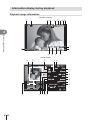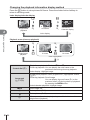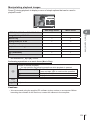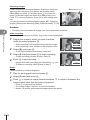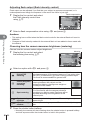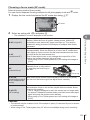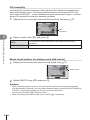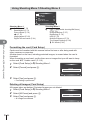
1
Table of Contents
Quick task index
DIGITAL CAMERA
Instruction Manual
1.
Preparing the camera and flow of
operations
2.
Shooting
3.
Viewing photographs and movies
4.
Basic operations
5.
Using shooting options
6.
Menu functions
7.
Connecting the camera to a
smartphone
8.
Connecting the camera to a
computer and a printer
9.
Battery, battery charger, and card
10.
Interchangeable lenses
11.
Using separately sold accessories
12.
Information
13.
SAFETY PRECAUTIONS
Thank you for purchasing an Olympus digital camera. Before you start to use your new camera,
please read these instructions carefully to enjoy optimum performance and a longer service life.
Keep this manual in a safe place for future reference.
We recommend that you take test shots to get accustomed to your camera before taking important
photographs.
The screen and camera illustrations shown in this manual were produced during the development
stages and may differ from the actual product.
If there are additions and/or modifications of functions due to firmware update for the camera, the
contents will differ. For the latest information, please visit the Olympus website.
This notice concerns the supplied flash unit and is chiefly directed to users in
North America.
Information for Your Safety
IMPORTANT SAFETY
INSTRUCTIONS
When using your photographic equipment, basic safety precautions should always be
followed, including the following:
• Read and understand all instructions before using.
• Close supervision is necessary when any flash is used by or near children. Do not leave
flash unattended while in use.
• Care must be taken as burns can occur from touching hot parts.
• Do not operate if the flash has been dropped or damaged - until it has been examined by
qualified service personnel.
• Let flash cool completely before putting away.
• To reduce the risk of electric shock, do not immerse this flash in water or other liquids.
• To reduce the risk of electric shock, do not disassemble this flash, but take it to qualified
service personnel when service or repair work is required. Incorrect reassembly can
cause electric shock when the flash is used subsequently.
• The use of an accessory attachment not recommended by the manufacturer may cause a
risk of fire, electric shock, or injury to persons.
SAVE THESE INSTRUCTIONS
Indications used in this manual
The following symbols are used throughout this manual.
Cautions
$
Notes
Points to note when using the camera.
%
Tips
Useful information and hints that will help you get the most out of
your camera.
g
2 EN
Important information on factors which may lead to a malfunction
or operational problems. Also warns of operations that should be
absolutely avoided.
Reference pages describing details or related information.
Table of Contents
7
Unpack the box contents.............9
Preparing the camera and flow
of operations
10
Names of parts ...........................10
Charging and inserting the
battery .........................................12
Inserting the card .......................13
Removing the card ...................13
Attaching a lens to the
camera .........................................14
Power on .....................................15
Setting the date/time ..................16
Selecting a shooting mode........17
Shooting
18
Shooting still pictures................18
Self-portraits .............................19
Recording movies .....................20
Using the touch screen..............22
Selecting a focusing method ....22
Using the wireless LAN
function .....................................23
Setting shooting functions ........24
Using live guides ......................24
Viewing photographs and
movies
26
Viewing photographs and
movies .........................................26
Index display/Calendar
display ......................................26
Viewing still images ..................27
Watching movies ......................27
Volume......................................27
Protecting images .....................27
Erasing images .........................28
Setting a transfer order on
images ([Share Order]) .............28
Selecting images
([Share Order Selected],
[0], [Erase Selected]) ...........28
Using the touch screen..............29
Selecting and protecting
images ......................................29
Basic operations
Table of Contents
Quick task index
30
Information displays while
shooting ......................................30
Monitor display when
shooting ....................................30
Switching the information
display ......................................31
Using the shooting modes ........32
“Point-and-shoot” photography
(P program mode) ....................32
Choosing aperture
(A aperture-priority mode) .......33
Choosing shutter speed
(S shutter-priority mode) ..........34
Choosing aperture and shutter
speed (M manual mode) ..........35
Comparative bright composites
(live composite photography) ...36
Using movie mode (n) ............37
Adding effects to a movie
[Movie Effect] ............................37
Using PHOTO STORY .............39
Shooting in scene mode ...........42
Using art filters..........................44
Commonly used shooting
options ........................................46
Controlling exposure
(exposure compensation) .........46
EN 3
Table of Contents
Changing the brightness of
highlights and shadows ............46
Choosing a focus target
(AF Area) ..................................47
Setting the AF target .................47
Face priority AF/
pupil detection AF .....................48
Zoom frame AF/zoom AF..........49
Information display during
playback ......................................50
Playback image information .....50
Switching the information
display ......................................51
Changing the playback
information display method.......52
Manipulating playback
images ......................................53
Using shooting options
56
Adjusting settings while
shooting ......................................56
Reducing camera shake
(image stabilizer) ......................57
Adjusting color
(white balance) .........................58
Processing options
(picture mode) ..........................60
Sequential shooting/
using the self timer ...................61
Setting the image aspect ..........62
Adding effects to a movie .........62
Image quality (record mode).....63
Using a flash
(flash photography)...................65
Adjusting flash output
(flash intensity control)..............68
Choosing how the camera
measures brightness
(metering) .................................68
Choosing a focus mode
(AF mode).................................69
ISO sensitivity ...........................70
4 EN
Movie sound options
(recording sound with movies)..70
Menu functions
71
Basic menu operations ..............71
Using Shooting Menu 1/
Shooting Menu 2 ........................72
Formatting the card
(Card Setup) .............................72
Deleting all images
(Card Setup) .............................72
Returning to default settings
(Reset) ......................................73
Registering Favorites settings
(Myset)......................................73
Processing options
(Picture Mode) ..........................74
Image quality (K) ...................75
Setting the self timer
(j/Y) .....................................75
Varying settings over a series of
photographs (bracketing)..........76
Taking HDR (High Dynamic
Range) images .........................78
Recording multiple exposures
in a single image
(multiple exposure) ...................79
Shooting automatically with a
fixed interval
(time lapse shooting) ................80
Wireless remote control flash
photography..............................81
Digital Zoom
(Digital Tele-converter) .............81
Using the playback menu ..........81
Displaying images rotated
(R) ..........................................81
Editing still images ....................82
Canceling all protections ..........83
Using the setup menu ................84
X (Date/time setting) ...............84
W (Changing the display
language)..................................84
Using the custom menus...........85
R AF/MF ..................................85
S Button/Dial ...........................86
T Release/j .........................86
U Disp/8/PC ..........................87
V Exp/p/ISO..........................88
W # Custom ............................89
X K/Color/WB .......................90
Y Record/Erase .......................91
Z Movie ...................................92
b K Utility ..............................92
AEL/AFL ...................................93
MF Assist ..................................93
Button Function ........................94
Viewing camera images on
TV .............................................96
Choosing the control panel
displays.....................................97
Adding information displays......99
Shutter speeds when the flash
fires automatically ...................100
Accessory Port Menu...............101
Using OLYMPUS PENPAL .....101
A OLYMPUS PENPAL
Share ......................................102
B OLYMPUS PENPAL
Album .....................................103
C Electronic Viewfinder .........103
Connecting the camera to a
smartphone
104
Connecting to a smartphone...105
Transferring images to a
smartphone ...............................105
Shooting remotely with a
smartphone ...............................106
Adding position information to
images .......................................106
Setting up your camera for
wireless LAN connection
(Wi-Fi settings) .........................107
Connecting the camera to a
computer and a printer
108
Installing OLYMPUS Viewer 3..108
Table of Contents
i (Monitor brightness
adjustment) ...............................84
Rec View ..................................84
Wi-Fi Settings ...........................84
c/# Menu Display .................. 84
Firmware...................................84
Copying pictures to a computer
without OLYMPUS Viewer 3..... 110
Direct printing (PictBridge) ..... 111
Easy printing ........................... 111
Custom printing ...................... 112
Print reservation (DPOF) ......... 113
Creating a print order.............. 113
Removing all or selected pictures
from the print order ................. 114
Battery, battery charger, and
card
115
Battery and charger ................. 115
Using your charger abroad ..... 115
Usable cards ............................. 116
Record mode and file size/number
of storable still pictures ........... 117
Interchangeable lenses
118
M.ZUIKO DIGITAL lens
specifications .......................... 118
Using separately sold
accessories
122
Electronic Viewfinder (VF-4)....122
External flash units designated
for use with this camera ..........124
Wireless remote control flash
photography............................124
EN 5
Other external flash units ........126
Principal Accessories ..............127
System chart .............................128
Table of Contents
Information
130
Shooting tips and
information................................130
Error codes ...............................132
Cleaning and storing the
camera .......................................134
Cleaning the camera ..............134
Storage ...................................134
Cleaning and checking the
image pickup device ...............134
Pixel Mapping - Checking the
image processing functions ....135
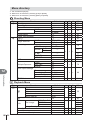
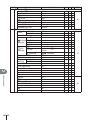
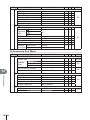
Menu directory..........................136
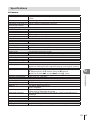
Specifications ...........................141
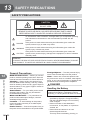
SAFETY PRECAUTIONS
144
SAFETY PRECAUTIONS ..........144
Index
6 EN
154
Quick task index
Taking pictures with automatic settings
iAUTO (A)
Easy photography with special effects
Art filter (ART)
44
Choosing an aspect ratio
Aspect ratio
62
Quickly matching settings to the scene
Scene mode (SCN)
42
Pro-level photography made simple
Live Guide
24
Adjusting the brightness of a photograph
Exposure compensation
46
Taking pictures with a blurred background
Taking pictures that stop the subject in
motion or convey a sense of motion
Taking pictures with the correct color
Processing pictures to match the subject/
Taking monotone pictures
17
Live Guide
24
Aperture priority shooting
33
Live Guide
24
Shutter priority shooting
34
Scene mode (SCN)
42
White balance
58
One-touch white balance
59
Picture Mode
60
Art filter (ART)
44
Using the touch screen
22
AF Area
47
Zoom frame AF/zoom AF
49
Focusing on a small spot in the frame/
confirming focus before shooting
Zoom frame AF/zoom AF
49
Recomposing photographs after focusing
C-AF+TR (AF tracking)
69
Taking photos without the flash
DIS Mode/ISO
42/70
Image Stabilizer/Anti-Shock z
57/89
When the camera will not focus on your
subject/Focusing on one area
Reducing camera shake
Taking pictures of a subject against
backlight
Photographing fireworks
Taking pictures without white subjects
appearing too white or black subjects
appearing too dark
Self-timer
61
Remote cable
127
Flash shooting
65
Gradation (Picture Mode)
74
Bulb/time photography
35
Live composite photography
36
Scene mode (SCN)
42
Gradation (Picture Mode)
74
Histogram/
Exposure compensation
31/46
Highlight & Shadow Control
46
Reducing image noise (mottling)
Noise Reduct.
88
Optimizing the monitor/
adjusting monitor hue
Monitor brightness
adjustment/Live View Boost
Quick task index
g
Shooting
84/87
EN 7
Preview function
94
Test Picture
94
Checking horizontal or vertical orientation
before shooting
Level gauge
31
Shooting with deliberate composition
Displayed Grid
87
Autoq (Rec View)
84
Checking set effect before taking a
picture
Quick task index
Zooming in on photos to check focus
Self-portraits
mode2 (q Close Up Mode)
88
Self-timer
61
Scene mode (SCN)
42
Sequential shooting
Sequential shooting
61
Extending the useful life of the battery
Sleep
88
Increasing the number of pictures that
can be taken
Record mode
63
Shooting remotely with a smartphone
(wireless LAN function)
Shooting remotely with a
smartphone
106
g
Playback/Retouch
Viewing images on a TV
HDMI/Video Out
96
Viewing slideshows with background
music
Slideshow
55
Brightening shadows
Shadow Adj (JPEG Edit)
82
Dealing with red-eye
Redeye Fix (JPEG Edit)
82
Printing made easy
Direct printing
111
Commercial prints
Creating a print order
113
Sharing images easily
OLYMPUS PENPAL
101
Transferring images to a smartphone
(wireless LAN function)
Transferring images to a
smartphone
105
Adding location data to images (wireless
LAN function)
Adding location data to images
106
g
Camera Settings
8 EN
87
Playback on TV
Synchronizing the date and time
Setting the date/time
16
Restoring default settings
Reset
73
Saving the settings
Myset
73
Changing the menu display language
W
84
Turning off the auto focus sound
8 (Beep sound)
88
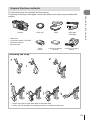
Unpack the box contents
Camera
•
•
•
•
Body cap
Strap
USB cable
CB-USB6
Flash case
Computer software CD-ROM
Instruction manual
Warranty card
Flash
FL-LM1
Lithium ion battery
BLS-50
Unpack the box contents
The following items are included with the camera.
If anything is missing or damaged, contact the dealer from whom you purchased the
camera.
Lithium ion charger
BCS-5
Attaching the strap
1
2
3
• Attach the strap on the other side in the same way.
• Lastly, pull the strap firmly, making sure that it is fastened securely.
EN 9
1
Preparing the camera and flow of
operations
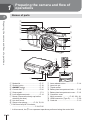
Names of parts
1
Preparing the camera and flow of operations
1
2
3
4
5
8
9
0
5
6
a
7
b
f
g
h
i
c
d
1
2
3
4
5
6
7
8
9
0
*
10 EN
e
a Lens release button ........................P. 14
Mode dial ........................................P. 17
b Lens lock pin
Shutter button .................................P. 18
c Tripod socket
ON/OFF button ..............................P. 15
d Battery/card compartment lock .......P. 12
Control dial* P ...............................P. 26
e Battery/card compartment cover.....P. 12
Strap eyelet.......................................P. 9
f Connector cover
Lens attachment mark ....................P. 14
g Multi-connector ............... P. 96, 108, 111
Mount (Remove the body cap before
attaching the lens.)
h HDMI connector (Type D) ...............P. 96
Hot shoe cover
i Card slot .........................................P. 13
Stereo microphone .............P. 54, 70, 83
Self-timer lamp/AF illuminator
...............................................P. 61/P. 85
In this manual, the P icon represent operations performed using the control dial.
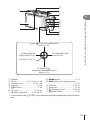
4
5
1
6
2
3
b
c
a
F (Up) / F (Exposure compensation)
button (P. 46)
H (Left) / P (AF
target) button (P. 47)
I (Right) /# (Flash)
button (P. 65)
Q button (P. 56, 71)
1
Preparing the camera and flow of operations
7
8
9
0
G (Down) / jY
(Sequential shooting/Self-timer)
button (P. 61)
1
2
3
4
5
6
7
Speaker
Monitor ....................P. 15, 22, 29, 31, 50
Accessory port ......................P. 101, 140
Hot shoe .......................................P. 124
G/Fn button ..................................P. 24
U button...................................P. 38, 49
R (Movie)/H button ...........P. 20, 28, 37
8 MENU button .................................P. 71
9 INFO (Information display) button
........................................................P. 31
0 Q button ..................................P. 56, 71
a Arrow pad* ......................................P. 26
b q (Playback) button................P. 26, 52
c D (Erase) button ............................P. 28
* In this manual, the FGHI icons represent operations performed using the arrow
pad.
EN 11
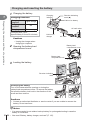
Charging and inserting the battery
1
1
Charging the battery.
Charging
indicator
Charging indicator
Preparing the camera and flow of operations
Charging in
progress
Charging
complete
Charging error
Direction indicating
mark (S)
3
Lithium ion battery
Lights orange
Off
Blinks orange
(Charging time: Up to
approximately 3 hours 30 minutes)
AC wall outlet
1
Lithium ion
charger
2
AC cable
Cautions
• Unplug the charger when
charging is complete.
2
Battery/card
compartment cover
Opening the battery/card
compartment cover.
2
Battery/card
compartment lock
3
Loading the battery.
Direction indicating
mark
Removing the battery
Turn off the camera before opening or closing the
battery/card compartment cover. To remove the battery,
first push the battery lock knob in the direction of the
arrow and then remove.
Cautions
• Contact an authorized distributor or service center if you are unable to remove the
battery. Do not use force.
$ Notes
• It is recommended to set aside a backup battery for prolonged shooting in case the
battery in use drains.
12 EN • Also read “Battery, battery charger, and card” (P. 115).
1
Inserting the card
1
Loading the card.
1
Eye-Fi Cards
Read “Usable cards” (P. 116) before use.
Cautions
• Turn off the camera before loading or
removing the battery or card.
2
Closing the battery/card
compartment cover.
• Close the cover and slide the battery/
card compartment lock in the direction
shown by the arrow.
1
2
Cautions
• Be sure the battery/card compartment cover is closed before using the camera.
Preparing the camera and flow of operations
• Open the battery/card compartment
cover.
• Slide the card in until it is locked into
place.
g “Usable cards” (P. 116)
Removing the card
Press the inserted card lightly and it will be ejected. Pull
out the card.
Cautions
• Do not remove the battery or card while the card
write indicator (P. 30) is displayed.
EN 13
Attaching a lens to the camera
1
1
Attach a lens to the camera.
3
1
Preparing the camera and flow of operations
1
2
Rear cap
2
• Remove the rear cap of the lens and the body cap of the camera.
• Align the lens attachment mark (red) on the camera with the alignment mark (red) on
the lens, then insert the lens into the camera’s body.
• Rotate the lens clockwise until you hear it click (direction indicated by arrow 3).
Cautions
• Make sure the camera is turned off when attaching or removing the lens.
• Do not press the lens release button.
• Do not touch internal portions of the camera.
2
Remove the lens cap.
1
1
2
Using lenses with an UNLOCK switch
Retractable lenses with an UNLOCK switch cannot
be used while retracted. Turn the zoom ring in the
direction of arrow (1) to extend the lens (2).
To store, turn the zoom ring in the direction of arrow
(4) while sliding the UNLOCK switch (3).
1
4
3
2
Removing the lens from the camera
Make sure the camera is turned off when removing
the lens.
While pressing the lens release button, rotate the
lens in the direction of the arrow.
Lens release button
2
1
Interchangeable lenses
Read “Interchangeable lenses” (P. 118).
14 EN
Power on
1
Press the ON/OFF button to turn on the camera.
1
• When the camera is turned on, the monitor will turn on.
• To turn off the camera, press the ON/OFF button again.
Monitor
Battery level
; (green): Camera ready to shoot.
: (green): Low battery
] (blinks red): Charge the battery.
Wi-Fi
ISO-A
200
01:02:03
250 F5.6
38
Using the monitor
1 Press the monitor down.
2 Adjust the angle of the monitor according to the hinge axis.
Lower angle
Upper angle
1
1
1
Self portrait
Preparing the camera and flow of operations
ON/OFF button
1
2
2
For information on self portraits, read “Self-portraits” (P. 19).
Camera sleep operation
If no operations are performed for a minute, the camera enters “sleep” (stand-by) mode to
turn off the monitor and to cancel all actions. The camera activates again when you touch
any button (the shutter button, q button, etc.). The camera will turn off automatically if
left in sleep mode for 5 minutes. Turn the camera on again before use.
EN 15
Setting the date/time
1
Date and time information is recorded on the card together with the images. The file
name is also included with the date and time information. Be sure to set the correct
date and time before using the camera. Some functions cannot be used if the date and
time have not been set.
Preparing the camera and flow of operations
1
Display the menus.
• Press the MENU button to display the menus.
Shooting Menu 1
1
2
MENU button
Card Setup
Reset/Myset
Picture Mode
h
Image Aspect
Digital Tele-converter
Back
2
Set
Setup Menu
Select [X] in the [d] (setup) tab.
’--.--.-- --:--
1
• Use FG on the arrow pad to select
[d] and press I.
• Select [X] and press I.
English
2
Rec View
Wi-Fi Settings
Menu Display
Firmware
[d] tab
Back
3
0.5sec
Set
X
Set the date and time.
• Use HI to select items.
• Use FG to change the selected item.
• Use FG to select the date format.
4:3
Off
Y
2014
M
D
Time
Y/M/D
Cancel
The time is displayed using a
24-hour clock.
4
Save settings and exit.
• Press Q to set the camera clock and exit to the main menu.
• Press the MENU button to exit the menus.
Cautions
• If the battery is removed from the camera and the camera is left for a while, the date and
time may reset to the factory default setting.
$ Notes
• You can synchronize the time correctly by pressing Q at a time signal of 0 seconds while
setting [min].
16 EN
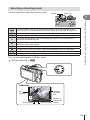
Selecting a shooting mode
Use the mode dial to select the shooting mode.
Indicator
Mode icon
1
S
You control shutter speed. You can express the motion of moving subjects, or
freeze motion without any blur.
M
You control aperture and shutter speed. You can shoot with long exposures for
fireworks or other dark scenes.
n
J
SCN
ART
Shoot movies using shutter speed and aperture effects and movie special effects.
You can shoot a PHOTO STORY. Shoot with selected PHOTO STORY type.
Select a scene according to the subject.
Select an art filter.
First, try taking photographs in full auto mode.
1
Set the mode dial to A.
Preparing the camera and flow of operations
A full auto mode in which the camera automatically optimizes settings for the
A current scene. The camera does all the work, which is convenient for beginners.
Aperture and shutter speed are automatically adjusted for optimal results.
P
You control aperture. You can sharpen or soften background details.
A
Monitor
Wi-Fi
ISO
sensitivity
Available
recording
time
ISO-A
200
250 F5.6
Shutter speed
01:02:03
38
Aperture value
Number of
storable still
pictures
EN 17
2
Shooting
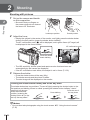
Shooting still pictures
1
2
Set up the camera and decide
on the composition.
Shooting
• Be careful that your fingers or
the camera strap do not obstruct
the lens or AF illuminator.
Landscape position
2
Portrait position
Adjust the focus.
• Display the subject in the center of the monitor, and lightly press the shutter button
down to the first position (press the shutter button halfway).
The AF confirmation mark (() will be displayed, and a green frame (AF target) will
be displayed in the focus location.
AF confirmation mark
Wi-Fi
28mm
ISO-A
Press the shutter
button halfway.
200
250 F5.6
01:02:03
38
AF target
• The ISO sensitivity, shutter speed and aperture value that have been set
automatically by the camera are displayed.
• If the AF confirmation mark blinks, the subject is not in focus. (P. 130)
3
Release the shutter.
• Press the shutter button all the way (fully).
• The shutter sounds and the picture is taken.
• The shot image will be displayed on the monitor.
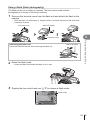
Pressing the shutter button halfway and all the way down
The shutter button has two positions. The act of lightly pressing the shutter button to the
first position and holding it there is called “pressing the shutter button halfway,” that of
pressing it all the way
Press the rest of
down to the second
the way down
Press halfway
position “pressing the
shutter button all (or the
rest of) the way down.”
$ Notes
• You can also take photographs using the touch screen. g “Using the touch screen”
(P. 22)
18 EN
Self-portraits
Inverting the monitor allows you to take pictures of yourself while you preview the
frame.
1
Lower the monitor slightly and invert it.
1
1
2
Shooting
2
• If a power zoom lens is attached, the camera
automatically switches to wide angle.
• The self portrait menu is displayed in the
monitor.
• The monitor displays a mirror image (flipped
horizontally).
4:3
LN
FullHD
F
45:67:89
2341
A
One Touch
e-Portrait
C Shutter Touch
Turning this on makes skin look smooth and
translucent.
Valid only during iAUTO mode (A).
When the icon is touched, the shutter is released
about 1 second later.
Shoot 3 frames using the self timer. You can set
One Touch
the number of times the shutter is released and the
D
Custom Self Timer interval between each release using Custom Self
Timer (P.61).
2
Frame the shot.
3
Touch C and shoot.
• Be careful that your fingers or the camera strap do not obstruct the lens.
• The shot image will be displayed on the monitor.
• You can also shoot by touching the subject displayed in the monitor, or by pressing
the shutter button.
$ Notes
You can shoot by operating the camera with a smartphone. g “Shooting remotely with a
smartphone” (P. 106)
EN 19
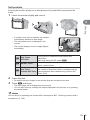
Recording movies
You can record movies when the mode dial is on any mode except J (PHOTO
STORY). Try recording in full auto mode first.
2
1
Set the mode dial to A.
2
Press the R button to begin recording.
3
Press the R button again to end recording.
R button
• You can change the focus location by touching
the screen while recording (P. 22).
Shooting
42mm
00:02:18
Displayed during
recording
Recording time
Cautions
• When using a camera with a CMOS image sensor, moving objects may appear distorted
due to the rolling shutter phenomenon. This is a physical phenomenon whereby distortion
occurs in the filmed image when shooting a fast-moving subject or due to camera shaking.
In particular, this phenomenon becomes more noticeable when using a long focal length.
• If the camera is used for extended periods, the temperature of the image pickup device
will rise and noise and colored fog may appear in images. Turn off the camera for a short
time. Noise and colored fog may also appear in images recorded at high ISO sensitivity
settings. If the temperature rises further, the camera will turn off automatically.
• When using a Four Thirds system lens, the AF will not operate while recording movies.
• The R button cannot be used to record movies in the following instances:
Multiple exposure (still photography also ends.)/shutter button pressed halfway/during
bulb, time or composite photography/sequential shooting/Panorama/SCN mode
(e-Portrait, Hand-Held Starlight, 3D)/time lapse shooting
20 EN
Taking photographs during movie recording (Movie+Photo Mode)
• Press the shutter button during movie recording to record one of the frames of the movie
as a photograph (mode1). To end movie recording, press the R button. The photograph
and movie files will be recorded separately to the memory card. The record mode of the
photographs will be XN (16:9).
• There is also a way of recording a photograph of a higher quality (mode2). In mode2, the
movie footage from before and after the photograph is recorded in separate files.
g [Movie+Photo Mode] (P. 92)
Cautions
Shooting
• In mode2 and certain shooting modes, it is only possible to capture a single-frame as a
picture during recording. Other shooting functions may also be limited.
• The autofocus and metering used in movie mode may differ from that used to take
photographs.
• If the record mode for the movie is Motion JPEG (H or I), the camera is set to mode2.
2
EN 21
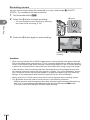
Using the touch screen
You can use the touch screen during playback or when framing pictures in the monitor.
Cautions
2
Shooting
• The situations in which touch screen operations are not available include the following.
Panorama/3D/e-portrait/multiple exposure/during bulb, time or live composite
photography/one-touch white balance dialog/when buttons or dials are in use
• Do not touch the display with your fingernails or other sharp objects.
• Gloves or monitor covers may interfere with touch screen operation.
• Also available in the ART, SCN or J menu screens. Tap an icon to select it.
Selecting a focusing method
You can focus and shoot by tapping the monitor.
Tap T to cycle through touch screen settings.
T
U
V
Tap a subject to focus and automatically
release the shutter. This function is not
available in n mode.
Touch screen operations disabled.
Tap to display an AF target and focus on the
subject in the selected area. You can use the
touch screen to choose the position and size of
the focus frame. Photographs can be taken by
pressing the shutter button.
Wi-Fi
ISO-A
200
250 F5.6
01:02:03
30
Previewing Your Subject ( V )
1
S-IS AUTO
Tap the subject in the display.
• An AF target will be displayed.
• Use the slider to choose the size of the frame.
• Touch S to turn off the display of the AF target.
14
10
ISO-A
200
7
Off
5x
250 F5.6
2
Use the slider to adjust the size of the AF
target, and then tap Y to zoom in at the
frame position.
• Use your finger to scroll the display when the picture
is zoomed in.
• Tap Z to cancel the zoom display.
22 EN
Using the wireless LAN function
You can connect the camera to a smartphone and
control the camera over Wi-Fi. You must have the
specified app installed on the smartphone in advance.
g “Connecting the camera to a smartphone” (P. 104)
Wi-Fi
Wi-Fi
2
ISO-A
200
01:02:03
30
Shooting
250 F5.6
EN 23
Setting shooting functions
Using live guides
Live guides are available in iAUTO (A) mode. While iAUTO is a full auto mode, live
guides make it easy to access a variety of advanced photographic techniques.
2
Shooting
1
2
Set the mode dial to A.
Touch the tab or press the Fn button to display live guides.
• Touch a guide item and press Q after selecting to display the slider of the level bar.
Guide item
Tab
Wi-Fi
Change Color Saturation
ISO-A
200
250 F5.6
3
24 EN
01:02:03
38
Use your finger to position the sliders.
Level bar/selection
• Tap a to enter the setting.
• To cancel the live guide setting, tap k on the
screen.
• When [Shooting Tips] is selected, select an item and
touch a to display a description.
• The effect of the selected level is visible in the
display. If [Blur Background] or [Express Motions]
is selected, the display will return to normal, but the
selected effect will be visible in the final photograph.
4
To set multiple live guides, repeat Steps 2 and 3.
5
Shoot.
Clear & Vivid
0
Flat & Muted
Change Color Saturation
• A check is displayed on the guide item for live
guides that are already set.
• To clear the live guide from the display, press the MENU button.
Cautions
• [Blur Background] and [Express Motions] cannot be set at the same time.
2
Shooting
• If [RAW] is currently selected for image quality, image quality will automatically be set to
[YN+RAW].
• Live guide settings are not applied to the RAW copy.
• Pictures may appear grainy at some live guide setting levels.
• Changes to live guide setting levels may not be visible in the monitor.
• Frame rates drop when [Blurred Motion] is selected.
• The flash cannot be used with the live guide.
• Choosing live guide settings that exceed the limits of the camera exposure meters may
result in pictures that are over or underexposed.
EN 25
3
Viewing photographs and movies
Viewing photographs and movies
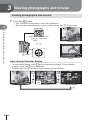
1
Press the q button.
• Your most recent photograph or movie will be displayed.
• Select the desired photograph or movie using the control dial (P) or arrow pad.
control dial
3
Wi-Fi
Viewing photographs and movies
Displays the
previous
frame
Displays the
next frame
L N 100-0020
2014.07.01 12:30
20
Still image
Wi-Fi
q button
100-0004
4
Movie
Index display/Calendar display
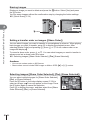
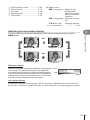
• To view multiple frames, press G during single-frame playback. To start calendar
playback, press the G button repeatedly.
• Press the Q button to view the currently selected picture full frame.
G
Wi-Fi
L N 100-0020
2014.07.01 12:30
20
U
G
2014.07.01 12:30
Index display
21
U
2014.7
Sun
Mon
Tue
Wed
Thu
Fri
Sat
29
30
1
2
3
4
5
6
7
8
9
10
11
12
13
14
15
16
17
18
19
20
21
22
23
24
25
26
27
28
29
30
31
1
2
3
4
5
6
7
Calendar display
Q
26 EN
WB
AUTO
P
HD
2014.07.01 12:30
Viewing still images
Close-up playback
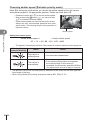
In single-frame playback, press U to zoom in; press G to return to single-frame playback.
Wi-Fi
L N 100-0020
2014.07.01 12:30
20
3
2x
Viewing photographs and movies
Watching movies
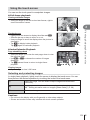
Select a movie and press the Q button to display the
playback menu. Select [Movie Play] and press the Q
button to begin playback. Press it again to pause playback.
Press the MENU button to end playback.
Movie
Movie Play
Share Order
m
Erase
Back
Set
Volume
Volume can be adjusted by pressing F or G during singleframe and movie playback.
00:00:02/00:00:14
Protecting images
Protect images from accidental deletion. Display an image
you wish to protect and press Q to display the playback
menu. Select [0] and press Q, and then press F or G
to protect the image. Protected images are shown by a 0
(protect) icon. Press F or G to remove protection.
You can also protect multiple selected images.
g “Selecting images ([Share Order Selected], [0],
[Erase Selected])” (P. 28)
0 (protect) icon
Wi-Fi
4:3
2014.07.01 12:30
L N 100-0020
20
Cautions
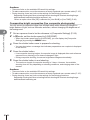
• Formatting the card erases all images even if they have been protected.
EN 27
Erasing images
Display an image you want to delete and press the D button. Select [Yes] and press
the Q button.
You can erase images without the confirmation step by changing the button settings.
g [Quick Erase] (P. 91)
Erase
3
Yes
No
Viewing photographs and movies
D button
Back
Set
Setting a transfer order on images ([Share Order])
You can select images you want to transfer to a smartphone in advance. When playing
back images you want to transfer, press Q to display the playback menu. After
selecting [Share Order] and pressing Q, press F or G to set a share order on an
image and display h.
To cancel a share order, press F or G. You can select images you want to transfer in
advance and set a share order all at once.
g Selecting images ([Share Order Selected], [0], [Erase Selected])
Cautions
• You can set a share order on 200 frames.
• Share orders cannot include RAW images or Motion JPEG (H or I) movies.
Selecting images ([Share Order Selected], [0], [Erase Selected])
You can select multiple images for [Share Order Selected],
[0], or [Erase Selected].
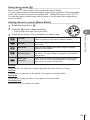
Press the H button in the index display screen (P. 29) to
select an image; a v icon will appear on the image. Press
the H button again to cancel the selection.
Press Q to display the menu, and then select from [Share
Order Selected], [0], or [Erase Selected].
28 EN
2014.07.01 12:30
21
Using the touch screen
You can use the touch panel to manipulate images.
Full-frame playback
Viewing additional images
• Slide your finger to the left to view later frames, right to
scroll view earlier frames.
3
Index/Calendar Playback
Page ahead/Page back
• Slide your finger up to view the next page, down to view
the previous page.
• Use Q or R to choose the number of images
displayed.
• Tap R several times to return to single-frame
playback.
S
Viewing photographs and movies
Playback zoom
• Lightly touch the screen to display the slider and P.
• Slide the bar up or down to zoom in or out.
• Use your finger to scroll the display when the picture is
zoomed in.
• Tap P to display index playback.
Tap Q again for calendar playback.
Viewing images
• Tap an image to view it full frame.
Selecting and protecting images
In single-frame playback, lightly touch the screen to display the touch menu. You can
then perform the desired operation by touching the icons in the touch menu.
H
Select an image. You can select multiple images and delete them
collectively.
h
Images you want to share with a smartphone can be set.
g “Setting a transfer order on images ([Share Order])” (P. 28)
0
Protects an image.
Cautions
• Do not touch the display with your fingernails or other sharp objects.
• Gloves and monitor covers may interfere with touch screen operation.
EN 29
4
Basic operations
Information displays while shooting
Monitor display when shooting
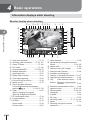
1 2 3 4 5 6 7 8 9 0a
D
4
Basic operations
C
B
A
z
y
Wi-Fi FP RC BKT
off
cd
28mm
S-IS AUTO
WB
AUTO
S-AF
ISO-A
400
-2.0
4:3
LN
x
w
v
-3
AEL
P
250 F5.6
utsr
1
2
3
4
5
6
7
8
9
0
a
b
c
d
e
f
30 EN
FPS
b
q
Card write indicator .........................P. 13
Wireless LAN connection........P. 23, 107
Super FP flash ..............................P. 124
RC mode.......................................P. 124
Auto bracket/HDR ..................P. 76/P. 78
Multiple exposure............................P. 79
High frame rate ...............................P. 87
Digital Tele-converter ......................P. 81
Time lapse shooting........................P. 80
Face priority/Eye priority .................P. 48
Movie sound ...................................P. 70
Zoom operation direction/
Focal length/Internal temperature
warning m ................P. 121/P. 133
Flash ...............................................P. 65
(blinks: charging in progress,
lights up: charging completed)
AF confirmation mark......................P. 18
Image stabilizer...............................P. 57
Art filter ...........................................P. 44
Scene mode....................................P. 42
Picture mode...................................P. 60
FullHD
F
01:02:03
+2.0
p
+7
1023
o
e UTO1
f
B
g TO
h
i 3
j N
k
E
l
m
n
g White balance .................................P. 58
h Sequential shooting/self-timer/AntiShock ........................................P. 61, 89
i Aspect ratio .....................................P. 62
j Record mode (still images) .............P. 63
k Record mode (movies) ...................P. 64
l Available recording time
m Number of storable still pictures ...P. 117
n Highlight and shadow control..........P. 46
o Top:
Flash intensity control ......P. 68
Bottom: Exposure compensation
indicator............................P. 46
p Exposure compensation value........P. 46
q Aperture value .........................P. 32 – 35
r Shutter speed ..........................P. 32 – 35
s Histogram .......................................P. 31
t Preview ...........................................P. 94
u AE Lock ..........................................P. 93
v Shooting mode...................P. 17, 32 – 44
w Myset ..............................................P. 73
x Shooting using touch screen
operations .......................................P. 22
y
z
A
B
C
Flash intensity control .....................P. 68
ISO sensitivity .................................P. 70
AF mode .........................................P. 69
Metering mode ................................P. 68
Flash mode .....................................P. 65
D Battery check
; Lit up (green): Ready for use.
(Displayed for
about ten seconds
after the camera is
turned on.)
: Lit up (green): Battery is running
low.
] Blinks (red):
Charging required.
E Live guide recall ..............................P. 24
Switching the information display
4
Wi-Fi
S-IS AUTO
Wi-Fi
INFO
ISO-A
S-IS AUTO
ISO-A
200
200
LN
LN
FullHD
FullHD
F
250 F5.6
INFO
Basic operations
You can switch the information displayed in the monitor during shooting using the
INFO button.
0.0
01:02:03
P
38
Information display on
250 F5.6
01:02:03
0.0
38
Histogram display
INFO
INFO
P
250 F5.6
0.0
Level gauge display
Image only
Histogram display
Display a histogram showing the distribution of brightness
in the image. The horizontal axis gives the brightness,
the vertical axis the number of pixels of each brightness
in the image. Areas above the upper limit at shooting are
displayed in red, those below the lower limit in blue, and
the area metered using spot metering in green.
More
Less
Dark
Bright
Level gauge display
Indicate the orientation of the camera. The “tilt” direction is indicated on the vertical bar and
the “horizon” direction on the horizontal bar. Use the indicators on the level gauge as a guide.
EN 31
Using the shooting modes
“Point-and-shoot” photography (P program mode)
P mode is a shooting mode where the camera automatically sets the optimal aperture
and shutter speed according to subject brightness. Set the mode dial to P.
Wi-Fi
S-IS AUTO
ISO-A
Shutter speed
200
LN
4
FullHD
F
Basic operations
Shooting
mode
P
250 F5.6
0.0
Aperture value
01:02:03
38
• The shutter speed and aperture selected by the camera are displayed.
• The shutter speed and aperture displays will blink if the camera is unable to achieve
correct exposure.
Warning display
example (blinking)
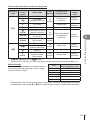
Status
Action
60" F2.8
The subject is too
dark.
• Use the flash.
4000 F22
The subject is too
bright.
• The metered range of the camera is
exceeded. A commercially available ND
filter (for adjusting the amount of light) is
required.
• The aperture value at the moment when its indication blinks varies with the lens type and
focal length of the lens.
• When using a fixed [ISO] setting, change the setting. g [ISO] (P. 70)
Program shift (%)
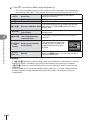
In P and ART modes, you can choose different
combinations of aperture and shutter speed without altering
exposure. Change the combination by pressing the F
button (F), and then using the control dial (P) or FG.
An “s” appears next to the shooting mode during program
shift. To cancel program shift, press FG until “s” is no
longer displayed.
Cautions
• Program shift is not available when you are using a
flash.
32 EN
Wi-Fi
S-IS AUTO
ISO-A
200
LN
FullHD
F
Ps
250 F5.6
Program shift
0.0
01:02:03
38
Choosing aperture (A aperture-priority mode)
Mode A is a shooting mode where you choose the aperture and let the camera
automatically adjust to the appropriate shutter speed. Rotale the mode dial to A.
• You can adjust the aperture by rotating the control dial
(P).
• After pressing the F button (F), you can also use
FG to choose the aperture.
• Larger apertures (lower F-numbers) decrease depth of
field (the area in front of or behind the focus point that
appears to be in focus), softening background details.
Smaller apertures (higher F-numbers) increase depth
of field.
Wi-Fi
S-IS AUTO
ISO
400
LN
FullHD
F
A
250 F5.6
0.0
01:02:03
38
Aperture value
Decreasing aperture value I
J Increasing aperture value
F2.8I F4.0I F5.6 JF8.0 JF11
• The shutter speed display will blink if the camera is unable to achieve correct
exposure.
Warning display
example (blinking)
60" F5.6
4000 F5.6
Status
Action
The subject is
underexposed.
• Decrease the aperture value.
The subject is
overexposed.
• Increase the aperture value.
• If the warning display does not disappear,
the metered range of the camera is
exceeded. A commercially available ND
filter (for adjusting the amount of light) is
required.
Basic operations
Setting the aperture value
4
• The aperture value at the moment when its indication blinks varies with the lens type and
focal length of the lens.
• When using a fixed [ISO] setting, change the setting. g [ISO] (P. 70)
EN 33
Choosing shutter speed (S shutter-priority mode)
Mode S is a shooting mode where you choose the shutter speed and let the camera
automatically adjust to the appropriate aperture. Rotate the mode dial to S.
• Rotate the control dial (P) to set the shutter speed.
• After pressing the F button (F), you can also use
FG to choose the shutter speed.
• A fast shutter speed can freeze a fast action scene
without any blur. A slow shutter speed will blur a fast
action scene. This blurring will give the impression of
dynamic motion.
4
Wi-Fi
S-IS AUTO
ISO
400
LN
FullHD
F
S
250 F5.6
0.0
01:02:03
38
Shutter speed
Basic operations
Setting the shutter speed
Slower shutter speed I
J Faster shutter speed
60" I 15 I 30I 60 J125 J250 J4000
• The aperture value display will blink if the camera is unable to achieve correct exposure.
Warning display
example (blinking)
Status
Action
2000 F2.8
The subject is
underexposed.
• Set the shutter speed slower.
125 F22
The subject is
overexposed.
• Set the shutter speed faster.
• If the warning display does not disappear,
the metered range of the camera is
exceeded. A commercially available ND filter
(for adjusting the amount of light) is required.
• The aperture value at the moment when its indication blinks varies with the lens type and
focal length of the lens.
• When using a fixed [ISO] setting, change the setting. g [ISO] (P. 70)
34 EN
Choosing aperture and shutter speed (M manual mode)
Mode M is a shooting mode where you choose both the aperture and shutter speed. They
can be set even in bulb, time, and live composite photography, where the shutter remains
open while the shutter button is pressed. Set the mode dial to M, rotate the control dial (P)
to adjust the shutter speed, and after presssing the F button (F), rotate the control dial (P)
to adjust the aperture.
Wi-Fi
S-IS AUTO
ISO
400
LN
FullHD
F
M
250 F5.6
0.0
01:02:03
38
Difference from correct
exposure
Cautions
• Even when you have set [Noise Reduct.], noise and/or light spots may still be noticeable
in the image displayed on the monitor and shot images under certain environmental
conditions (temperature etc.) and camera settings.
4
Basic operations
• You can adjust the aperture value and shutter speed
using the difference from a correct exposure (measured
by the camera) as guidance.
• When the difference from the correct exposure is
negative (underexposure) reduce the aperture value or
slow the shutter speed.
• When the difference from the correct exposure is
positive (overexposure), increase the aperture value or
increase the shutter speed.
• Shutter speed can be set to values between 1/4000
and 60 seconds or to [BULB] or [LIVE TIME], or
[LIVECOMP].
Noise in images
While shooting at slow shutter speeds, noise may appear on screen. These phenomena
occur when the temperature rises in the image pickup device or image pickup device
internal drive circuit, causing current to be generated in those sections of the image pickup
device that are not normally exposed to light. This can also occur when shooting with a
high ISO setting in a high-temperature environment. To reduce this noise, the camera
activates the noise reduction function. g [Noise Reduct.] (P. 88)
Choosing long exposures (bulb/time photography)
Use for night landscapes and fireworks. In M mode, set the shutter speed to [BULB] or
[LIVE TIME].
Bulb photography (BULB): The shutter remains open while the shutter button is pressed.
The exposure ends when the shutter button is released.
Time photography (TIME):
The exposure begins when the shutter button is pressed all
the way down. To end the exposure, press the shutter button
all the way down again.
• During bulb, time, or live composite photography, the screen brightness changes
automatically. g “BULB/TIME Monitor” (P. 89)
• When using [LIVE TIME], the progress of the exposure will be displayed in the monitor
during shooting. The display can also be refreshed by pressing the shutter button halfway.
• [Live BULB] (P. 89) can be used to display the image exposure during bulb photography.
EN 35
Cautions
• There are limits on the available ISO sensitivity settings.
• To reduce camera blur, mount the camera on a sturdy tripod and use a remote cable (P. 127).
• During shooting, there are limits on the settings for the following functions.
Sequential shooting/self-timer shooting/interval shooting/AE bracket shooting/image
stabilizer/flash bracketing/multiple exposure* etc.
*When an option other than [Off] is selected for [Live BULB] or [Live TIME] (P. 89)
Comparative bright composites (live composite photography)
4
You can record a composite image from multiple shots while observing changes in
bright flashes of light, such as fireworks and stars, without changing the brightness of
the background.
Basic operations
1
2
Set an exposure time to be the reference in [Composite Settings] (P. 89).
3
Press the shutter button once to prepare for shooting.
4
Press the shutter button.
5
Press the shutter button to end shooting.
In M mode, set the shutter speed to [LIVECOMP].
• When the shutter speed is set to [LIVECOMP], you can display the [Composite
Settings] by pressing the MENU button.
• You can shoot when a message that indicates preparations are complete is displayed
in the monitor.
• Live composite shooting begins. A composite image is displayed after each reference
exposure time, allowing you to observe changes in light.
• During composite shooting, the screen brightness changes automatically.
• The maximum length of composite shooting is 3 hours. However, the available
shooting time will vary depending on shooting conditions, and charging state of the
camera.
Cautions
• There are limits on the available ISO sensitivity settings.
• To reduce camera blur, mount the camera on a sturdy tripod and use a remote cable (P. 127).
• During shooting, there are limits on the settings for the following functions.
Sequential shooting/self-timer shooting/interval shooting/AE bracket shooting/image
stabilizer/flash bracketing etc.
36 EN
Using movie mode (n)
Movie mode (n) can be used to film movies with special effects.
You can create movies that take advantage of the effects available in still photography
mode. Use live control to select the settings. g “Adding effects to a movie” (P. 62)
You can also apply an after-image effect or zoom in on an area of the image during
movie recording.
Adding effects to a movie [Movie Effect]
Rotate the mode dial to n.
3
Touch the on-screen icon of the effect you wish to use.
Press the R button to begin recording.
• Press the R button again to end recording.
W
Art Fade
Film with the selected picture mode effect. The fade
effect is applied to the transition between scenes.
M
Old Film
Randomly apply damage and dust-like noise similar to
old movies.
U
Multi Echo
Apply an after-image effect. After-images will appear
behind moving objects.
T
One Shot Echo
An after-image will appear for a short time after you press
the button. The after-image will disappear automatically
after a while.
X
Movie Teleconverter
Zoom in on an area of the image without using the lens
zoom. Zoom in on the selected position of the image
even while the camera is kept fixed.
4
Basic operations
1
2
Art Fade
Touch the icon. The effect will be applied gradually when you release your finger.
Old Film
Touch the icon for the effect to be applied. Touch again to cancel the effect.
Multi Echo
Touch the icon to apply the effect. Touch again to cancel the effect.
One Shot Echo
Each touch of the icon adds to the effect.
EN 37
Movie Tele-converter
4
Basic operations
38 EN
1
Touch the icon to display the zoom frame.
2
Touch M or press the U button to zoom in on the area in the zoom frame.
3
Touch O or press Q to cancel the zoom frame and exit Movie teleconverter mode.
• You can change the position of the zoom frame by touching the screen or using
FGHI.
• Press and hold Q to return the zoom frame to a central position.
• Touch N or press the U button to return to the zoom frame display.
Cautions
• The frame rate will drop slightly during recording.
• The 2 effects cannot be applied simultaneously.
• Use a memory card with an SD speed class of 6 or better. Movie recording may end
unexpectedly if a slower card is used.
• When mode1 has been set for taking photographs during movie recording (P. 21, 92), you
cannot take photographs while using movie effects.
• [e-Portrait] and [Diorama] cannot be used at the same time as Art Fade.
• The sound of touch operations and button operations may be recorded.
Using PHOTO STORY
1
Rotate the mode dial to J.
1
• A PHOTO STORY menu will be displayed.
A
Standard
B
Speed
C
Zoom In/Out
D
Layout
F
Fun Frames
Q
Works in progress
Standard
1
2
3
4
Use FG to choose the theme of the PHOTO STORY.
• You can display a detailed screen where you choose the variation or number of
frames by using I.
• You can choose different effects, number of frames and aspect ratios for each theme.
You can also change the aspect ratio, the division pattern and the frame effect of
individual images.
Changing between variations
Basic operations
2
4
After pressing I, use FG to change the variation.
Original PHOTO STORY
E
PHOTO STORY with effects and aspect ratios changed from the original
PHOTO STORY.
FGH
The number of images and arrangement of image regions can be altered for
each theme of the PHOTO STORY.
• You can change the frame color and frame surrounding effect in each variation.
• Every theme and variation provides a different PHOTO STORY.
3
After finishing the settings, press Q.
4
Shoot an image for the first frame.
•
•
•
•
The monitor switches to PHOTO STORY display.
The subject of current frame is displayed.
Touch any of the frames not containing an image to set that frame as the current frame.
Press the MENU button to change the theme.
• The image you have shot is displayed in the first
frame.
ISO-A
200
1
250 F5.0
0.0
1023
• To end shooting before taking all the frames, press the MENU button, and select an
image saving method.
[Save]: Save images to an SD card and end shooting.
[Finish later]: Save images to an SD card and temporarily end shooting. Saved data
can be called and shooting can be resumed later. (P. 41)
[Discard]: End shooting without saving images.
EN 39
5
Shoot an image for the next frame.
• View and shoot the subject for the next frame.
• Press D to cancel the image in the directly preceding
frame and retake the shot.
• Touch any frame to cancel the image in it and retake
the shot. Touch the frame, and then touch O.
ISO-A
200
1
250 F5.0
Shot image
6
4
Basic operations
40 EN
0.0
1023
Next frame
Once you have shot all the frames, press Q to save the image.
$ Notes
• During the shooting of a PHOTO STORY, the following operations are available.
Exposure compensation/Program shift/Flash shooting (except when the theme is
[Speed])/Live control settings
Cautions
• If the camera is turned off during shooting, all the data for images up to that point is
cancelled and nothing is recorded on the memory card.
• If [RAW] is currently selected for image quality, image quality will automatically be set to
[YN+RAW]. The PHOTO STORY image is saved as JPEG and the images in the frames
as RAW. RAW images are saved in [4:3].
• From among the [AF Mode], [S-AF], [MF] and [S-AF+MF] can be set.
Also, the AF target is fixed to a single central point.
• The metering mode is fixed to digital ESP metering.
• The following operations are not available in PHOTO STORY mode.
Movie/Sequential shooting (except when the theme is [Speed])/Self timer/INFO display/
Face priority AF/Digital Tele-converter/Picture mode
• The following button operations are disabled.
Fn/INFO etc.
• During the shooting of a PHOTO STORY, the camera will not go into sleep mode.
If you temporarily saved partway through shooting, recording space for frames not yet
taken is reserved on the SD card.
Resuming shooting of works in progress
1
2
Set the mode dial to J.
3
Select the data with which you want to resume
shooting using the arrow pad, and press the Q
button.
Use FG to select Works in progress Q.
2014.07.01 12:30
• Partially saved data is displayed in the index.
• Q appears on partially saved data.
• Shooting resumes from the previous session.
4
Basic operations
EN 41
Shooting in scene mode
1
Rotate the mode dial to SCN.
• A menu of scene menu will be displayed. Select a scene
using FG.
• On the scene menu screen, press I to display details
of the scene mode on the camera monitor.
• Press Q or press the shutter button halfway to select
the highlighted item and exit the scene menu.
1
Portrait
Types of scene modes
4
Basic operations
O
P
L
K
J
i
G
U
G
2
Portrait
e-Portrait
Landscape
Landscape+Portrait
Sport
Hand-Held Starlight
Night Scene
Night+Portrait
Children
H
I
q
J
r
Q
R
T
s
High Key
Low Key
DIS Mode
Macro
Nature Macro
Candle
Sunset
Documents
Panorama (P. 43)
(
g
f
w
m
T
J
Fireworks
Beach & Snow
n Fisheye Effect
n Wide-Angle
n Macro
3D Photo
Panning
Shoot.
• To choose a different setting, press Q to display the scene menu.
Cautions
• To maximize the benefits of the scene modes, some of the shooting function settings are
disabled.
• In [e-Portrait] mode, two images are recorded: an unmodified image and a second
image to which [e-Portrait] effects have been applied. Recording may take some time. In
addition, when the image quality mode is [RAW], the image is recorded in RAW+JPEG.
• [n Fisheye Effect], [n Wide-Angle], and [n Macro] are for use with optional converter
lenses.
• Movies cannot be recorded in [e-Portrait], [Hand-Held Starlight], [Panorama], or [3D
Photo] mode.
• In [Hand-Held Starlight], 8 frames are shot at one time and then combined. When the
image quality mode is [RAW], a JPEG image is combined with the first RAW image and
recorded in RAW+JPEG.
• [3D Photo] is subject to the following limitations.
[3D Photo] can be used only with a 3D lens.
The camera monitor cannot be used to playback images in 3D. Use a device that
supports 3D display.
Focus is locked. In addition, flash and self-timer also cannot be used.
Image size is fixed at 1824 × 1024.
RAW photography is not available.
Frame coverage is not 100%.
42 EN
• In [Panning], camera movement is detected and the optimal shutter speed is controlled
when moving the camera to track a moving subject. It is convenient for shooting moving
subjects as if the background is flowing.
In [Panning], J is displayed during panning detection, and I is displayed when
nothing is detected.
When using a lens with an image stabilizer switch in [Panning], turn the image stabilizer
switch off.
Sufficient panning effects may not be obtained in bright conditions. Use a commercially
available ND filter to obtain effects more easily.
Taking panoramas
If you have installed the supplied computer software, you can use it to join pictures together
to form a panorama. g “Connecting the camera to a computer and a printer” (P. 108)
2
3
4
Select [Panorama] and press Q.
Use FGHI to choose a pan direction.
Take a picture, using the guides to frame the shot.
• Focus, exposure, and other settings are fixed at the
values for the first shot.
M
5
4
Basic operations
1
Rotate the mode dial to SCN.
250 F5.6
38
Take the remaining images, framing each shot so that the guides overlap with
the previous picture.
M
250 F5.6
38
[2]
Exit
[3]
Exit
• A panorama may include up to 10 images. A warning indicator (g) is displayed after
the tenth shot.
6
After taking the last shot, press Q to end the series.
Cautions
• During panorama shooting, the image previously taken for position alignment will not be
displayed. With the frames or other markers for display in the images as a guide, set the
composition such that the edges of the overlapping images overlap within the frames.
$ Notes
• Pressing Q before shooting the first frame returns to the scene mode selection menu.
Pressing Q in the midst of shooting ends the sequence of panorama shooting, and allows
you to continue with the next one.
EN 43
Using art filters
Rotate the mode dial to ART.
1
4
Basic operations
44 EN
• A menu of art filters will be displayed. Select a filter
using FG.
• Press Q or press the shutter button halfway to select
the highlighted item and exit the art filter menu.
1
Pop Art
Types of art filters
j
Pop Art
Creates an image that emphasizes the beauty of color.
k
Soft Focus
Creates an image that expresses a soft tone atmosphere.
l
Pale&Light Color overall light and slightly overexposing the image.
m
Light Tone
Creates a high-quality image by softening both shadows and
highlights.
n
Grainy Film
Creates an image that expresses the roughness of black and
white images.
o
Pin Hole
Creates an image that looks as if it was taken using an old or
toy camera by dimming the image perimeter.
s
Diorama
Creates a miniature-like image by emphasizing saturation and
contrast, and blurring unfocused areas.
t
Cross Process
Creates an image that expresses a surreal atmosphere.
Cross Process II creates an image that emphasizes magenta.
u
Gentle Sepia
Creates a high-quality image by drawing out shadows and
softening the overall image.
v
Dramatic Tone
Creates an image that emphasizes the difference between
brightness and darkness by partially increasing contrast.
Y
Key Line
Creates an image that emphasizes edges and adds an
illustrative style.
Z
Watercolor
Creates a soft, bright image by removing dark areas, blending
pale colors on a white canvas, and further softening contours.
G
Vintage
Expresses an everyday shot in a nostalgic, vintage tone using
printed film discoloration and fading.
H
Partial Color
Impressively expresses a subject by extracting colors you
want to emphasize and keeping everything else monotone.
u
ART BKT
(Art Filter
Bracket)
Each time the shutter is released, the camera creates copies
for all selected art filters.
Creates an image that expresses warm light by scattering
2
Shoot.
• To choose a different setting, press Q to display the art filter menu.
ART bracketing
When one shot is taken, images are recorded for each selected art filter. Press I to
choose filters.
Art effects
Art filters can be modified and effects can be added. Pressing I in the art filter menu
displays additional options.
Modifying filters
Option I is the original filter, while options II and on add effects that modify the original
filter.
Cautions
• To maximize the benefits of the art filters, some of the shooting function settings are
disabled.
• If [RAW] is currently selected for image quality, image quality will automatically be set to
[YN+RAW]. The art filter will be applied to the JPEG copy only.
• Depending on the subject, tone transitions may be ragged, the effect may be less
noticeable, or the image may become more “grainy.”
• Some effects may not be visible in live view or during movie recording.
• Playback may differ according to the filters, effects, or movie quality settings applied.
Basic operations
Adding effects*
Soft focus, pin-hole, frames, white edges, starlight, filter, tone, blur, shade effect
* The effects available vary with the selected filter.
4
Setting and taking partial color images
You can create images that extract only the colors that you
selected using the color ring. Rotate the control dial (P)
to select a color to extract. The effects will be displayed in
live view.
COLOR
EN 45
Commonly used shooting options
Controlling exposure (exposure compensation)
After pressing the F button (F), use the control dial (P) or HI to adjust the
exposure compensation. Choose positive (“+”) values to make pictures brighter,
negative (“–”) values to make pictures darker. Exposure can be adjusted by ±5.0 EV.
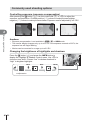
4
Basic operations
Negative (–)
No compensation (0)
Positive (+)
Cautions
• Exposure compensation is not available in A, M, or SCN mode.
• The monitor display changes only up to ±3.0 EV. If the exposure exceeds ±3.0 EV, the
exposure bar will begin flashing.
• Movies can be corrected in a range up to ±3.0 EV.
Changing the brightness of highlights and shadows
Press the F button (F) and press the INFO button to
display the Highlight & Shadow Control menu. Use HI to
choose a tone level. Choose “low” to darken shadows or
“high” to brighten highlights.
S-IS
ISO
200
LN
0
INFO
INFO
0
Exposure
compensation
46 EN
Low tone
INFO
0
High tone
P
250 F5.6 +2.0
HD
01:02:03
1234
Choosing a focus target (AF Area)
Choose which of the 81 autofocus targets will be used for autofocus.
1
2
Press the P button (H) to display the AF target.
Use FGHI to change to single target display and select the AF position.
• “All targets” mode is restored if you move the cursor off the screen.
Single Target
The camera automatically
chooses from the full set of
focus targets.
Select the focus target
manually.
All Targets
4
Cautions
• When using a Four Thirds system lens, the camera automatically switches to single target
mode.
• The size and number of the AF target changes depending on the [Digital Tele-converter],
[Image Aspect], and group target settings.
Setting the AF target
Basic operations
All Targets
You can change the target selection method and target size. You can also select Face
priority AF (P. 48).
1
2
Press the P button (H) to display the AF target.
Press the INFO button during AF target selection and choose a selection
method using FG.
INFO
FG
i
i
o
o (All Targets)
The camera selects automatically from among all the AF
targets.
I (Single Target)
You select a single AF target.
K (Small Target)
The AF target can be reduced in size.
J (Group Target)
The camera automatically chooses from the targets in the
selected group.
Cautions
• When shooting movies, the camera automatically switches to single target mode.
• When using a Four Thirds system lens, the camera automatically switches to single target
mode.
EN 47
Face priority AF/pupil detection AF
The camera detects faces and adjusts focus and digital ESP.
1
2
Press H to display the AF target.
3
Use HI to select an option and press Q.
Press the INFO button.
• You can change the AF target selection method.
i
o
Selection method
4
Basic operations
J
Face Priority Off
Face priority off.
I
Face Priority On
Face priority on.
K
Face & Eye Priority On
The autofocus system selects the pupil of the eye
closest to the camera for face-priority AF.
L
Face & R. Eye Priority On
The autofocus system selects the pupil of the eye on
the right for face-priority AF.
M
Face & L. Eye Priority On
The autofocus system selects the pupil of the eye on
the left for face-priority AF.
4
5
6
Point the camera at your subject.
• If a face is detected, it will be indicated by a white
border.
Wi-Fi
S-IS AUTO
ISO-A
200
Press the shutter button halfway to focus.
• When the camera focuses on the face in the white
border, the border will turn green.
• If the camera is able to detect the subject’s eyes, it will
display a green frame over the selected eye.
(pupil detection AF)
Press the shutter button the rest of the way down to
shoot.
LN
FullHD
F
P
250 F5.6
0.0
01:02:03
1023
Wi-Fi
S-IS AUTO
ISO-A
200
LN
FullHD
F
P
250 F5.6
0.0
01:02:03
1023
Cautions
• Face priority applies only to the first shot in each sequence taken during sequential
shooting.
• Pupil detection is not available in [C-AF].
• Depending on the subject and the art filter setting, the camera may not be able to correctly
detect the face.
• When set to [p (Digital ESP metering)], metering is performed with priority given to
faces.
$ Notes
• Face priority is also available in [MF]. Faces detected by the camera are indicated by
white frames.
48 EN
Zoom frame AF/zoom AF
You can zoom in on a portion of the frame when adjusting focus. Choosing a high
zoom ratio allows you to use autofocus to focus on a smaller area than is normally
covered by the AF target. You can also position the focus target more precisely.
Wi-Fi
Wi-Fi
S-IS AUTO
U
S-IS AUTO
ISO-A
ISO-A
200
200
LN
LN
Off
FullHD
FullHD
F
F
250 F5.6
0.0
Shooting display
01:02:03
30
250 F5.6
0.0
01:02:03
30
Zoom frame AF
U
Zoom AF
4
(Press and hold)
Press the U button to display the zoom frame.
• If the camera was focused using autofocus just before the button was pressed, the
zoom frame will be displayed at the current focus position.
• Use FGHI to position the zoom frame.
• Press the INFO button and use FG to choose the zoom ratio.
Basic operations
Q/U
1
U
5×
7×
10×
14×
Comparison of AF and zoom frames
2
Press the U button again to zoom in on the zoom frame.
3
Press the shutter button halfway to initiate autofocus.
• Use FGHI to position the zoom frame.
• You can change the zoom ratio by rotating the control dial (P).
• The camera will focus using the subject in the frame at the center of the screen. To
change the focus position, move it by touching the screen.
$ Notes
• You can also display and move the zoom frame using touch screen operations.
Cautions
• Zoom is visible only in the monitor and has no effect on the resulting photographs.
• When you are using a Four Thirds system lens, the AF will not operate with during zoom
display.
• While zoomed in, a sound is made by the IS (Image Stabilizer).
EN 49
Information display during playback
Playback image information
Simplified display
1
2
34
5 6 7 89
Wi-Fi
×10
4
Basic operations
3D
f
4:3
L N 100-0015
2014.07.01 12:30
15
e d c
0
a
b
Overall display
g
h
i
jk
Wi-Fi
×10
250
P
+2.0
F5.6
45mm
+1.0
WB
AUTO
A+4
ISO 400
G+4
Adobe
Natural
4608×3456
3D
2014.07.01 12:30
w
50 EN
4:3
1/8
L N 100-0015
SD
v uts
15
l
m
n
o
p
q
r
1
2
3
4
5
f
g
h
i
j
k
l
m
n
o
p
q
r
s
t
u
v
w
Date and time .................................P. 16
Aspect border .................................P. 62
AF target .........................................P. 47
Shooting mode...................P. 17, 32 – 44
Exposure compensation .................P. 46
Shutter speed ..........................P. 32 – 35
Aperture value .........................P. 32 – 35
Focal length ..................................P. 121
Flash intensity control .....................P. 68
White balance compensation
Color space.....................................P. 90
Picture mode...................................P. 60
Compression rate ...........................P. 63
Pixel count ......................................P. 63
ISO sensitivity .................................P. 70
White balance .................................P. 58
Metering mode ................................P. 68
Histogram .......................................P. 31
Switching the information display
You can switch the information displayed during playback by pressing the INFO
button.
4
Basic operations
6
7
8
9
0
a
b
c
d
e
Battery check ..................................P. 15
Wireless LAN connection........P. 23, 104
Including GPS information ............P. 106
Eye-Fi upload complete ..................P. 92
Print reservation
Number of prints ...........................P. 113
Share order .....................................P. 28
Sound record ..................................P. 54
Protect ............................................P. 54
Image selected ...............................P. 28
File number .....................................P. 91
Frame number
Storage device
Record mode ..................................P. 63
Aspect ratio .....................................P. 62
3D image ........................................P. 42
Temporarily saved image for PHOTO
STORY............................................P. 41
×10
INFO
4:3
2014.07.01 12:30
L N 100-0015
15
INFO
Simplified display
×10
250
P
+2.0
F5.6
45mm
±0.0
WB
AUTO
A±10
ISO 400
INFO
Image only
G±10
Adobe
Natural
4032×3024
4:3
1/8
L N 100-0015
2014.07.01 12:30
15
Overall display
EN 51
Changing the playback information display method
Press the q button to view pictures full frame. Press the shutter button halfway to
return to shooting mode.
Index display/calendar display
G
G
2014.7
Wi-Fi
Sun
L N 100-0020
2014.07.01 12:30
4
2014.07.01 12:30
20
Single-frame
playback
U
21
25 frames
U
Mon
Tue
Wed
Thu
Fri
Sat
29
30
1
2
3
4
5
6
7
8
9
10
11
12
13
14
15
16
17
18
19
20
21
22
23
24
25
26
27
28
29
30
31
1
2
3
4
5
6
7
Calendar display
Q
Index display
Basic operations
Playback zoom (close-up playback)
U
U
Wi-Fi
L N 100-0020
2014.07.01 12:30
Single-frame
playback
2x
20
G
14x
2× zoom
G
14× zoom
close-up playback
Q
Control dial (P)
Arrow pad
(FGHI)
INFO
52 EN
Single-frame playback: Previous t/Next s
Close-up playback: You can display the next frame or the
previous frame during close-up playback.
Index display: Highlight image
Single-frame playback: Next (I)/previous (H)/playback volume
(FG)
Close-up playback: Scroll image
You can display the next frame (I) or the
previous frame (H) during close-up playback
by pressing the INFO button.
Index/calendar playback: Highlight image
View image info
H
Select picture (P. 28)
D
Delete picture (P. 28)
Q
View menus (in calendar playback, press this button to exit to
single-frame playback)
Manipulating playback images
Press Q during playback to display a menu of simple options that can be used in
playback mode.
JPEG
JPEG Edit
Share Order
R
Rotate
m
Back
Still image frame
Movie frame
JPEG Edit, RAW Data Edit g P. 82
D
—
Image Overlay g P. 83
D
—
Movie Play
—
D
Share Order gP. 28
D
D*
0 (Protect)
D
D
R (Audio recording)
D
—
Rotate
D
—
m (Slideshow)
D
D
Erase
D
D
4
Basic operations
*
Set
Not available for H or I movies.
Performing operations on a movie frame (Movie Play)
Q
Pause or resume playback.
• You can perform the following operations while playback is paused.
HIor Control dial (P) Previous/Next
Press and hold HI to continue the operation.
Display the first frame.
F
Display the last frame.
G
H/I
Advance or rewind a movie.
F/G
Adjust volume.
Cautions
• We recommend using the supplied PC software to play movies on a computer. Before
launching the software for the first time, connect the camera to the computer.
EN 53
Protecting images
0 (protect) icon
Protect images from accidental deletion. Display an image you
wish to protect and press Q to display the playback menu.
Select [0] and press Q, and then press F to protect the
image. Protected images are shown by a 0 (protect) icon.
Press G to remove protection. Press Q to save settings and
exit.
You can also protect multiple selected images. g “Selecting
images ([Share Order Selected], [0], [Erase Selected])” (P. 28)
Wi-Fi
4:3
L N 100-0020
2014.07.01 12:30
20
Cautions
4
• Formatting the card erases all images even if they have been protected.
Basic operations
Audio recording
Add an audio recording (up to 30 sec. long) to the current photograph.
1
JPEG
Display the image to which you want to add an
audio recording and press Q.
JPEG Edit
Share Order
• Audio recording is not available with protected images.
• Audio recording is also available in the playback menu.
2
Select [R] and press Q.
R
Rotate
m
Set
Back
• To exit without adding a recording, select [No].
3
Select [R Start] and press Q to begin recording.
4
Press Q to end recording.
R
• To stop recording part-way through, press Q.
• Images with audio recordings are indicated by a H icon.
• To delete a recording, select [Erase] in Step 2.
No
R Start
Erase
Back
Set
Rotate
Choose whether to rotate photographs.
1
2
3
Play the photograph back and press Q.
Select [Rotate] and press Q.
Press F to rotate the image counterclockwise, G to rotate it clockwise; the
image rotates each time the button is pressed.
• Press Q to save settings and exit.
• The rotated image is saved in its current orientation.
• Movies, 3D photos, and protected images cannot be rotated.
54 EN
Slideshow
This function displays images stored on the card one after another.
1
Press Q during playback and select [m].
JPEG
JPEG Edit
Share Order
R
Rotate
m
Back
2
Set
Adjust settings.
Start the slideshow. Images are displayed in order, starting with the
current picture.
BGM
Set [Joy] or turn BGM [Off].
Slide
Set type of slideshow to execute.
Slide Interval
Choose the length of time each slide is displayed from 2 to 10
seconds.
Movie Interval
Select [Full] to include full-length movie clips in the slideshow,
[Short] to include only the opening portion of each clip.
3
Select [Start] and press Q.
• The slideshow will start.
• Press Q to stop the slideshow.
4
Basic operations
Start
Volume
Press FG during the slideshow to adjust the overall volume of the camera speaker.
Press HI while the volume adjustment indicator is displayed to adjust the balance
between the sound recorded with the image or movie and background music.
$ Notes
• You can change [Joy] to different BGM. Record the data downloaded from the Olympus
website onto the card, select [Joy] from [BGM] in step 2, and press I. Visit the following
website for the download.
http://support.olympus-imaging.com/bgmdownload/
EN 55
5
Using shooting options
Adjusting settings while shooting
The live control allows you to preview the effects of different settings in the monitor in
P, A, S, M, n, and J modes.
When the controls in KControl Settings is set to [Live Control], you can use live
control even in ART and SCN. (P. 97)
Live control screen
S-IS AUTO
5
WB
WB
AUTO
AUTO
Functions
4:3
Using shooting options
LN
WB Auto
P
FullHD
F
Settings
AUTO
AUTO
Available settings
Image stabilizer ....................................P. 57
Picture mode ........................................P. 60
Scene mode .........................................P. 42
Art filter mode .......................................P. 44
White balance .......................................P. 58
Sequential shooting/self-timer ..............P. 61
Aspect ratio...........................................P. 62
Record mode ........................................P. 63
1
Press Q to display the live control.
2
Use FG to select the settings,
use HI to change the selected
setting.
3
n mode ...............................................P. 62
Flash mode ...........................................P. 65
Flash intensity control ...........................P. 68
Metering mode......................................P. 68
AF mode ...............................................P. 69
ISO sensitivity .......................................P. 70
Face priority ..........................................P. 48
Movie sound record ..............................P. 70
• To hide the live control, press Q again.
Displays
the selected
function
name
S-IS AUTO
WB
WB
AUTO
AUTO
Press the Q button.
4:3
• The selected settings take effect
automatically if no operations are
performed for about 8 seconds.
LN
WB Auto
Cursor
Cautions
• Some items are not available in some shooting modes.
56 EN
Cursor
P
FullHD
AUTO
AUTO
Control dial (P) or HI
F
F
G
Reducing camera shake (image stabilizer)
You can reduce the amount of camera shake that can occur when shooting in low light
situations or shooting with high magnification. The image stabilizer starts when you
press the shutter button halfway.
1
Display the live control and select
the image stabilizer item using
FG.
S-IS AUTO
j
WB
AUTO
Image
stabilizer
4:3
LN
Focal Length
Auto I.S.
P
2
OFF S-IS
S-IS
S-IS
FullHD
F
S-IS AUTO 50
mm
Select an option with HI and press Q.
Still-I.S. Off
Image stabilizer is off.
S-IS1
All Direction
Shake I.S.
Image stabilizer is on.
S-IS2
Vertical Shake
I.S.
Image stabilization applies only to vertical
(Y) camera shake.
S-IS3
Horizontal
Shake I.S.
Image stabilization applies only to horizontal
(Z) camera shake. Use when panning the
camera horizontally with the camera held in
portrait orientation.
S-IS AUTO
Auto I.S.
The camera detects the panning direction and
applies the appropriate image stabilization.
OFF
Movie-I.S. Off
Image stabilizer is off.
ON
Movie-I.S. On
In addition to applying image stabilization in
all directions, the camera compensates for the
camera shake that occurs when you walk.
Still
picture
Movie
5
Using shooting options
OFF
Choosing a focal length (Micro Four Thirds/Four Thirds System lenses excluded)
Use focal length information to reduce camera shake when shooting with lenses that are not
Micro Four Thirds or Four Thirds system lenses.
• Select [Image Stabilizer], press the INFO button, use HI to select a focal length, and
press Q.
• Choose a focal length between 8 mm and 1000 mm.
• Choose the value that most closely matches to the one that is printed on the lens.
Cautions
• The image stabilizer cannot correct excessive camera shake or camera shake that occurs
when the shutter speed is set to the slowest speed. In these cases, it is recommended
that you use a tripod.
• When using a tripod, set [Image Stabilizer] to [OFF].
• When using a lens with an image stabilization function switch, priority is given to the lens
side setting.
• When priority is being given to the lens side image stabilization and the camera side is set
to [S-IS AUTO], [S-IS1] is used instead of [S-IS AUTO].
• You may notice an operating sound or vibration when the image stabilizer is activated.
EN 57
Adjusting color (white balance)
White balance (WB) ensures that white objects in images recorded by the camera
appear white. [AUTO] is suitable in most circumstances, but other values can be
selected according to the light source when [AUTO] fails to produce the desired results
or you wish to introduce a deliberate color cast into your images.
1
Display the live control and select the white balance item using FG.
S-IS AUTO
WB
WB
AUTO
AUTO
White balance
4:3
LN
WB Auto
P
5
Using shooting options
58 EN
2
FullHD
F
AUTO
AUTO
Select an option with HI and press Q.
Color
temperature
WB mode
Light conditions
AUTO
k
Used for most light conditions (when there is a
white portion framed on the monitor). Use this
mode for general use.
5
5300K
For shooting outdoors on a clear day, or to
capture the reds in a sunset or the colors in a
fireworks display
N
7500K
For shooting outdoors in the shadows on a clear
day
O
6000K
For shooting outdoors on a cloudy day
1
3000K
For shooting under a tungsten light
>
4000K
For subjects lit by fluorescent lights
U
k
n
5500K
One-touch
white balance
(P. 59)
P/Q/
W/X
Color
temperature
set by onetouch WB.
Custom white
balance
CWB
2000K –
14000K
Auto white
balance
Preset white
balance
For underwater photography
For flash shooting
Choose when a white or gray subject can be
used to measure white balance and the subject
is under mixed lighting or lit by an unknown type
of flash or other light source.
After pressing the INFO button, use HI
buttons to select a color temperature and then
press Q.
One-touch white balance
Measure white balance by framing a piece of paper or other white object under the lighting
that will be used in the final photograph. This is useful when shooting a subject under natural
light, as well as under various light sources with different color temperatures.
1
Select [P], [Q], [W] or [X] (one-touch white balance 1, 2, 3 or 4) and
press the INFO button.
2
Photograph a piece of colorless (white or gray) paper.
3
Select [Yes] and press Q.
• Frame the object so that it fills the display and no shadows fall it.
• The one-touch white balance screen appears.
• The new value is saved as a preset white balance option.
• The new value is stored until one-touch white balance is measured again. Turning the
power off does not erase the data.
• If the subject is too bright or too dark or visibly tinted, the message [WB NG Retry] will be
displayed and no value will be recorded. Correct the problem and repeat the process from
Step 1.
5
Using shooting options
% Tips
EN 59
Processing options (picture mode)
Select a picture mode and make individual adjustments to contrast, sharpness, and
other parameters (P. 74). Changes to each picture mode are stored separately.
1
Display the live control and select picture mode.
S-IS AUTO
j
Picture mode
WB
AUTO
4:3
LN
FullHD
Natural
P
2
5
h
i
j
j
4
F
j
5
M
C
Select an option with HI and press Q.
Using shooting options
h
i-Enhance
i
Vivid
Produces vivid colors.
j
Natural
Produces natural colors.
Z
Muted
Produces flat tones.
a
Portrait
Produces beautiful skin tones.
J
Monotone
Produces black and white tone.
K
Custom
Select one picture mode, set the parameters, and register the
setting.
v
e-Portrait
Produces smooth skin textures. Cannot be used with bracket
photography or when shooting movies.
Produces more impressive-looking results suited to the scene.
j Pop Art
k Soft Focus
l Pale&Light Color
m Light Tone
n Grainy Film
o Pin Hole
s Diorama
t Cross Process
Choose an art filter and select the desired effect.
g “Types of art filters” (P. 44)
u Gentle Sepia
v Dramatic Tone
Y Key Line
Z Watercolor
G Vintage
H Partial Color*
*
60 EN
After choosing Partial Color using HI, press the INFO button to display the color ring.
Sequential shooting/using the self timer
Keep the shutter button pressed all the way down to take a series of photos.
Alternatively, you can take pictures using the self timer.
1
Display the live control and select sequential shooting/self timer using FG.
S-IS AUTO
WB
AUTO
4:3
LN
FullHD
Single
P
2
o
T
S
Y12s Y2s
F
Sequential
shooting/
self timer
Yc
Select an option using HI and press Q.
Single-frame
shooting
Shoots 1 frame at a time when the shutter button is pressed
(normal shooting mode, single-frame shooting).
T
Sequential H
Photographs are taken at about 8 frames per second (fps) while the
shutter button is pressed all the way down. Focus, exposure, and
white balance are fixed at the values for the first shot in each series.
S
Sequential L
Photographs are taken at about 3.5 frames per second (fps)
while the shutter button is pressed all the way down. Focus and
exposure are fixed according to the options selected for [AF
Mode] (P. 69) and [AEL/AFL] (P. 93).
Y12s
Self-timer
12 SEC
Press the shutter button halfway to focus, the rest of the way
down to start the timer. First, the self-timer lamp lights up for
approximately 10 seconds, then it blinks for approximately 2
seconds and the picture is taken.
Y2s
Self-timer
2 SEC
Press the shutter button halfway to focus, the rest of the
way down to start the timer. The self-timer lamp blinks for
approximately 2 seconds, and then the picture is taken.
Custom Selftimer
Press the INFO button to set [Y Timer], [Frame], [Interval Time],
and [Every Frame AF].
Select a setting using HI, and adjust the setting by using the
control dial (P).
If [Every Frame AF] is set to [ON], each frame is automatically
focused before shooting.
YC
5
Using shooting options
o
$ Notes
• To cancel the activated self-timer, press G.
Cautions
• When you are using S, no confirmation image is displayed during shooting. The
image is displayed again after shooting ends. When you are using T, the image shot
immediately before is displayed.
• The speed of sequential shooting varies depending on the lens you are using and the
focus of the zoom lens.
• During sequential shooting, if the battery check blinks due to low battery, the camera
stops shooting and starts saving the pictures you have taken on the card. The camera
may not save all of the pictures depending on how much battery power remains.
• Fix the camera securely on a tripod for self-timer shooting.
• If you stand in front of the camera to press the shutter button halfway when using the selftimer, the photograph may be out of focus.
EN 61
Setting the image aspect
You can change the aspect ratio (horizontal-to-vertical ratio) when taking pictures.
Depending on your preference, you can set the aspect ratio to [4:3] (standard), [16:9],
[3:2], [1:1], or [3:4].
1
2
Display the live control and select the aspect ratio item using FG.
Use HI to select an aspect ratio and press Q.
Cautions
• JPEG images are cropped to the selected aspect ratio; RAW images, however, are not
cropped but are instead saved with information on the selected aspect ratio.
• When RAW images are played back, the selected aspect ratio is shown by a frame.
5
Adding effects to a movie
You can create movies that take advantage of the effects available in still photography
mode. Set the mode dial to n to enable the settings.
Using shooting options
1
After selecting n mode, display the live control and
use FG to highlight the shooting mode.
M-IS ON
j
P
WB
AUTO
S-AF
P
FullHD
Program Auto
n
P
P
A
S
F
M
Shooting mode
2
Use HI to choose a shooting mode and press the Q button.
P
Optimal aperture is set automatically according to the brightness of the subject. You
can adjust the exposure by using the control dial (P).
After pressing the F button, you can also set it by using HI.
A
Depiction of background is changed by setting the aperture. You can set the
aperture by using the control dial (P).
After pressing the F button, you can also set it by using FG.
After pressing the F button, you can adjust the exposure by using HI.
S
Shutter speed affects how the subject appears. You can set the shutter speed by
using the control dial (P).
After pressing the F button, you can also set it by using FG.
After pressing the F button, you can adjust the exposure by using HI.
The shutter speed can be set to values between 1/30 s and 1/4000 s.
M
You control both aperture and shutter speed. You can set the shutter speed by using
the control dial (P). After pressing the F button, you can also set it by using FG.
After pressing the F button, you can set the aperture by using the control dial (P)
or HI.
The shutter speed can be set to values between 1/30 s and 1/4000 s.
The sensitivity can only be set manually to values between ISO 200 and 3200.
Cautions
• When recording a movie, you cannot change the settings for exposure compensation,
aperture value, and shutter speed.
• If [Image Stabilizer] is activated while recording a movie, the recorded image is enlarged slightly.
• Stabilization is not possible when the camera shake is excessive.
• When the inside of the camera becomes hot, shooting is automatically stopped to protect
the camera.
• With some art filters, [C-AF] operation is limited.
62 EN • Cards with an SD speed class of 6 or above are recommended for movie recording.
Image quality (record mode)
Select an image quality for photographs and movies according their intended use, for
example retouching on a computer or display on the web.
1
Display the live control and use FG to choose a record mode for
photographs or movies.
S-IS AUTO
WB
AUTO
4:3
N
FullHD
4608x3456
P
RAW
L
L
F N
MN
F
SN
L F+
RAW
38
Record mode
2
5
Select an option using HI and press Q.
Image size
Name
Y (Large)
Compression rate
Pixel count
SF
(Super
Fine)
F
(Fine)
N
(Normal)
B
(Basic)
4608×3456*
YSF
YF*
YN*
YB
XSF
XF
XN*
XB
WSF
WF
WN*
WB
3200×2400*
X (Middle)
2560×1920
1920×1440
Application
Using shooting options
Record modes (still images)
Choose from JPEG (YF, YN, XN, and WN) and RAW modes. Choose a JPEG+RAW option
to record both a JPEG and a RAW image with each shot. JPEG modes combine image size
(Y, X, and W) and compression ratio (SF, F, N, and B).
When you want to select a combination other than YF/YN/XN/WN, change the [K Set]
(P. 90) settings in Custom Menu.
Select for the
print size
1600×1200
1280×960*
W (Small)
1024×768
640×480
For small prints
and use on a
website
* Default
RAW image data
This format (extension “.ORF”) stores unprocessed image data for later processing. RAW
image data cannot be viewed using other cameras or software, and RAW images cannot
be selected for printing. JPEG copies of RAW images can be created using this camera.
g “Editing still images” (P. 82)
EN 63
Record modes (movies)
Record mode
5
Using shooting options
64 EN
Pixel count
Full HD Fine 1920×1080
Full HD Normal
1920×1080
HD Fine
1280×720
HD Normal
1280×720
H
1280×720
I
640×480
File format
Application
MPEG-4 AVC/
H.264*1
Display on TVs and other
devices
Motion JPEG*2
For computer playback or
editing
• Depending on the type of card used, recording may end before the maximum length is
reached.
*1 Individual movies can be up to 29 minutes long.
*2 Files may be up to 2GB in size.
Using a flash (flash photography)
The flash can be set manually as required. The flash can be used for flash
photography in a variety of shooting conditions.
1
Remove the terminal cover from the flash unit and attach the flash to the
camera.
• Slide the flash unit all the way in, stopping when it contacts the back of the shoe and
is securely in place.
Hot shoe cover
UNLOCK switch
1
2
5
Connector cover
UNLOCK switch
Press the UNLOCK switch while removing the flash unit.
2
1
2
Raise the flash head.
3
Display the live control and use FG to choose a flash mode.
Using shooting options
Removing the flash unit
• Lower the flash head when the flash is not in use.
Flash mode
WB
AUTO
S-AF
ISO
AUTO
i
Flash Auto
P
R
AUTO
AUTO
EN 65
4
Use HI to choose a flash mode and press Q.
• The options available and the order in which they are displayed vary depending on
the shooting mode. g “Flash modes that can be set by shooting mode” (P. 67)
AUTO
Auto flash
#
Fill-in flash
Flash off
$
!/#!
#SLOW
5
Using shooting options
66 EN
!SLOW
#SLOW2/
2nd
Curtain
#FULL,
#1/4 etc.
The flash fires automatically in low light or
backlight conditions.
The flash fires regardless of the light conditions.
The flash does not fire.
This function allows you to reduce the red-eye
Red-eye reduction flash phenomenon. In S and M modes, the flash
always fires.
Slow synchronization
(1st curtain)
Slow synchronization
(1st curtain)/Red-eye
reduction flash
Slow shutter speeds are used to brighten dimly-lit
backgrounds.
Combines slow synchronization with red-eye
reduction.
Slow synchronization
(2nd curtain)
The flash fires just before the
shutter closes to create trails
of light behind moving light
sources.
Manual
For users who prefer manual operation. If you
press the INFO button, you can use the dial to
adjust the flash level.
Cautions
• In [!/#!(Red-eye reduction flash)], after the pre-flashes, it takes about 1 second
before the shutter is released. Do not move the camera until shooting is complete.
• [!/#!(Red-eye reduction flash)] may not work effectively under some shooting
conditions.
• When the flash fires, the shutter speed is set to 1/250 sec. or slower. When shooting
a subject against a bright background with the fill-in flash, the background may be
overexposed.
Flash modes that can be set by shooting mode
Shooting
mode
P/A
Flash mode
#AUTO
Auto flash
!
Auto flash
(red-eye reduction)
#
Fill-in flash
Shutter
speed
limit
Fires automatically
in dark/backlit
conditions
1/30 sec. –
1/250 sec.*
Always fires
30 sec. –
1/250 sec.*
k
k
Fires automatically
in dark/backlit
conditions
60 sec. –
1/250 sec.*
1st
curtain
Always fires
60 sec. –
1/250 sec.*
Flash off
k
k
k
Fill-in flash/Slow
synchronization
(2nd curtain)
2nd
curtain
Always fires
60 sec. –
1/250 sec.*
$
Flash off
!
SLOW
Slow synchronization
(red-eye reduction)
#SLOW
Slow synchronization
(1st curtain)
SLOW2
#
Slow synchronization
(2nd curtain)
#
Fill-in flash
#!
Fill-in flash
(red-eye reduction)
$
#
2nd-C
*
Conditions for
firing the flash
Flash
timing
1st
curtain
k
1st
curtain
2nd
curtain
• #AUTO, $ can be set in A mode.
1/200 sec. or 1/180 sec. (FL-50R only) when using a separately sold external flash unit
Minimum range
The lens may cast shadows over objects close to
the camera, causing vignetting, or be too bright
even at minimum output.
Lens
17mm f1.8
25mm f1.8
45mm f1.8
14 – 42mm IIR
14 – 42mm EZ
40 – 150mm
Approximate distance at
which vignetting occurs
0.25 m
0.25m
0.5m
0.55m
0.25m
5
Using shooting options
S/M
LV super
control
panel
0.9m
• External flash units can be used to prevent vignetting. To prevent photographs from being
overexposed, select mode A or M and choose a high f-number, or reduce ISO sensitivity.
EN 67
Adjusting flash output (flash intensity control)
Flash output can be adjusted if you find that your subject to appears overexposed, or is
underexposed even though the exposure in the rest of the frame is just right.
1
Flash compensation
Display the live control and select
the Flash intensity control item
using FG.
AUTO
WB
AUTO
S-AF
ISO
AUTO
i
R
0.0
P
2
5
Select a flash compensation value using HI and press Q.
Cautions
Using shooting options
• This setting has no effect when the flash control mode for the external flash unit is set to
MANUAL.
• Changes to flash intensity made with the external flash unit are added to those made with
the camera.
Choosing how the camera measures brightness (metering)
Choose how the camera meters subject brightness.
1
Metering
Display the live control and select
the metering item using FG.
AUTO
S-AF
ISO
AUTO
i
ESP
P
2
R
HI
SH
Select an option with HI and press Q.
p
Digital ESP
metering
The camera meters exposure in 324 areas of the frame and
optimizes exposure for the current scene or (if an option other
than [OFF] is selected for [I Face Priority]) portrait subject.
This mode is recommended for general use.
H
Center weighted
averaging
metering
This metering mode provides the average
metering between the subject and the
background lighting, placing more weight on
the subject at the center.
Spot metering
Choose this option to meter a small area (about
2% of the frame) with the camera pointed at
the object you wish to meter. Exposure will be
adjusted according to the brightness at the
metered point.
IHI
Spot metering highlight
Increases spot metering exposure. Ensures bright subjects
appear bright.
ISH
Spot metering shadow
Lowers spot metering exposure. Ensures dark subjects appear
dark.
I
3
68 EN
0
Press the shutter button halfway.
• Normally, the camera will start metering when the shutter button is pressed halfway
and lock exposure while the shutter button is held in this position.
Choosing a focus mode (AF mode)
Select a focusing method (focus mode).
You can choose separate focusing methods for still photography mode and n mode.
1
Display the live control and select the AF mode item using FG.
AUTO
S-AF
S-AF
ISO
AUTO
AF mode
i
Single AF
P
2
S-AF
C-AF
MF
R
S-AF
MF
C-AF
TR
Select an option with HI and press Q.
• The selected AF mode is displayed on the monitor.
C-AF
(continuous AF)
The camera repeats focusing while the shutter button remains
pressed halfway. When the subject is in focus, the AF confirmation
mark lights up on the monitor and the beep sounds when the focus
is locked at the first and second time.
Even if the subject moves or you change the composition of the
picture, the camera continues trying to focus.
• When using a Four Thirds system lens, this setting will change to
[S-AF].
MF
(manual focus)
This function allows you to
manually focus on any position
by operating the focus ring on
the lens.
)
5
Using shooting options
S-AF (single AF)
The camera focuses once when the shutter button is pressed
halfway. When the focus is locked, a beep sounds, and the AF
confirmation mark and the AF target mark light up. This mode is
suitable for taking pictures of still subjects or subjects with limited
movement.
Near
Focus ring
S-AF+MF
After pressing the shutter button halfway to focus in [S-AF] mode,
(simultaneous use of you can turn the focus ring to fine-adjust focus manually.
S-AF mode and MF
mode)
C-AF+TR
(AF tracking)
Press the shutter button halfway to focus; the camera then tracks
and maintains focus on the current subject while the shutter button
is held in this position.
• The AF target is displayed in red if the camera can no longer track
the subject. Release the shutter button and then frame the subject
again and press the shutter button halfway.
• When using a Four Thirds system lens, this setting will change to
[S-AF].
Cautions
• The camera may be unable to focus if the subject is poorly lit, obscured by mist or smoke,
or lacks contrast.
• When using a Four Thirds system lens, AF will not be available during movie recording.
EN 69
ISO sensitivity
Increasing ISO sensitivity increases noise (graininess) but allows photographs to be
taken when lighting is poor. The setting recommended in most situations is [AUTO],
which starts at ISO 200 — a value that balances noise and dynamic range — and then
adjusts ISO sensitivity according to shooting conditions.
1
Display the live control and select the ISO sensitivity item using FG.
AUTO
S-AF
ISO
AUTO
ISO-A
200
i
Recommended
250 F5.6
P
5
2
AUTO LOW 200
AUTO
R
0.0
250
320
400
ISO
sensitivity
500
Select an option with HI and press Q.
Using shooting options
AUTO
The sensitivity is set automatically according to the shooting
conditions.
LOW, 200 – 25600
Sensitivity is set to the selected value.
Movie sound options (recording sound with movies)
1
Display the live control and select a movie sound using FG.
ISO
R
AUTO
i
R
Movie sound
Movie R On
n
2
OFF ON
ON
Switch ON/OFF using HI and press Q.
Cautions
• When recording sound in a movie, the sound made by the lens and camera operating
may be recorded. If desired, you can reduce these sounds by shooting with [AF Mode] set
to [S-AF], or by limiting the amount of times you press the buttons.
• No sound is recorded in s (Diorama) mode.
• When recording sound with movies is set to [OFF], O is displayed.
70 EN
6
Menu functions
Basic menu operations
The menus contain shooting and playback options that are not displayed by the live
control, and let you customize the camera settings for easier use.
W
X
q
c
#
d
Preliminary and basic shooting options
Advanced shooting options
Playback and retouch options
Customizing camera settings (P. 85)*
Accessory port menu options for accessory port devices such as EVF and
OLYMPUS PENPAL (P. 101)*
Camera setup (e.g., date and language)
6
* Not displayed at default settings.
Press the MENU button to display the menus.
Menu functions (Basic operations)
1
Shooting Menu 1
1
Tab
2
Card Setup
Reset/Myset
Picture Mode
j
4:3
Off
Image Aspect
Operation guide
Digital Tele-converter
Back
Set
Press the MENU button
to go back one screen
Press Q to confirm the
setting
• A guide is displayed for about 2 seconds after you select an option.
• Press the INFO button to view or hide guides.
2
3
Use FG to select a tab and press Q.
Select an item using FG and press Q to display options for the
selected item.
The current setting is displayed
Shooting Menu 2
Shooting Menu 2
Function
1
2
Back
4
j /Y
o
Image Stabilizer
Bracketing
HDR
Multiple Exposure
Time Lapse Settings
# RC Mode
Off
Off
Off
Off
Off
Q
Set
1
2
j/Y
Image Stabilizer
Bracketing
HDR
Multiple Exposure
Time Lapse Settings
# RC Mode
Back
o
T
S
Y12s
Y2s
YC
Off
Off
Off
Off
Off
Set
Use FG to highlight an option and press Q to select.
• Press the MENU button repeatedly to exit the menu.
$ Notes
• For the default settings of each option, refer to “Menu directory” (P. 136).
EN 71
Using Shooting Menu 1/Shooting Menu 2
Shooting Menu 1
1
2
Card Setup
Reset/Myset
Picture Mode
j
4:3
Off
Image Aspect
Digital Tele-converter
Back
Shooting Menu 1
Card Setup (P. 72)
W
Reset/Myset (P. 73)
Picture Mode (P. 74)
K (P. 75)
Image Aspect (P. 62)
Digital Tele-converter (P. 81)
6
Set
Shooting Menu 2
X
j/Y (Sequential shooting/Self-timer)
(P. 61, 75)
Image Stabilizer (P. 57)
Bracketing (P. 76)
HDR (P. 78)
Multiple Exposure (P. 79)
Time Lapse Settings (P. 80)
# RC Mode (P. 81)
Menu functions (Shooting menus)
Formatting the card (Card Setup)
Cards must be formatted with this camera before first use or after being used with
other cameras or computers.
All data stored on the card, including protected images, is erased when the card is
formatted.
When formatting a used card, confirm there are no images that you still want to keep
on the card. g “Usable cards” (P. 116)
1
2
Select [Card Setup] in W Shooting Menu 1.
Card Setup
Select [Format] and press Q.
All Erase
Format
Set
Back
3
Select [Yes] and press Q.
• Formatting is performed.
Deleting all images (Card Setup)
All images taken are deleted. Protected images are not deleted.
1
2
3
Select [Card Setup] in W Shooting Menu 1.
Card Setup
Select [All Erase] and press Q.
All Erase
Format
Select [Yes] and press Q.
• All images are deleted.
Back
72 EN
Set
Returning to default settings (Reset)
Camera settings can be easily restored to default settings.
1
2
Select [Reset/Myset] in W Shooting Menu 1.
3
Select [Yes] and press Q.
Select [Reset] and press Q.
• Highlight [Reset] and press I to choose the reset type.
To reset all settings except the time, date, and a few
others, highlight [Full] and press Q.
g “Menu directory” (P. 136)
Reset/Myset
Reset
Myset1
Myset2
Myset3
Myset4
Basic
No Data
No Data
No Data
No Data
Back
Set
Registering Favorites settings (Myset)
6
1
2
3
Adjust settings in order to save.
4
Select [Set] and press Q.
Select [Reset/Myset] in W Shooting Menu 1.
Select the desired destination ([Myset1]–[Myset4]) and press I.
• [Set] appears next to destinations ([Myset1]–[Myset4]) to which settings have already
been saved. Selecting [Set] again overwrites the registered setting.
• To cancel the registration, select [Reset].
• Settings that can be saved to Myset g “Menu directory” (P. 136)
Using Myset
Sets the camera to the settings selected for Myset.
1
2
Select [Reset/Myset] in W Shooting Menu 1.
3
Select [Yes] and press Q.
Select the desired settings ([Myset1]–[Myset4]) and
press Q.
Menu functions (Shooting menus)
Saving Myset
You can save the current camera settings for modes other than shooting mode. Saved
settings can be called up in P, A, S, and M modes.
Reset/Myset
Reset
Myset1
Myset2
Myset3
Myset4
Back
Basic
Set
Set
Set
Set
Set
EN 73
Processing options (Picture Mode)
You can make individual adjustments to contrast, sharpness and other parameters in
[Picture Mode] (P. 60) settings. Changes to each picture mode are stored separately.
1
Select [Picture Mode] in W Shooting Menu 1.
Shooting Menu 1
Card Setup
Reset/Myset
Picture Mode
1
2
j
Image Aspect
Digital Tele-converter
Back
2
3
6
Menu functions (Shooting menus)
74 EN
4:3
Off
Set
Select an option with FG and press Q.
Press I to display settings for the selected option.
h
i-a
J
Contrast
Distinction between light and dark
D
D
D
D
Sharpness
Sharpness of the image
D
D
D
D
Saturation
Vividness of the color
D
D
k
D
Gradation
Adjust tone (gradation).
D
D
D
D
D
k
k
D
k
k
D
D
Auto
Divides the image into detailed
regions and adjusts the brightness
separately for each region. This is
effective for images with areas of
large contrast in which the whites
appear too bright or the blacks
appear too dark.
Normal
Use [Normal] mode for general uses.
High Key
Gradation for a bright subject.
Low Key
K
Gradation for a dark subject.
Effect
(i-Enhance)
Sets the extent that the effect will be
applied.
B&W Filter
(Monotone)
Creates a black and white image.
The filter color is brightened and the
complementary color is darkened.
N:Neutral
Creates a normal black and white
image.
Ye:Yellow
Reproduces clearly defined white
cloud with natural blue sky.
Or:Orange
Slightly emphasizes colors in blue
skies and sunsets.
R:Red
Strongly emphasizes colors in blue
skies and brightness of crimson
foliage.
G:Green
Strongly emphasizes colors in red lips
and green leaves.
Pict. Tone
(Monotone)
h
i-a
J
K
k
k
D
D
Colors the black and white image.
N:Neutral
Creates a normal black and white
image.
S:Sepia
Sepia
B:Blue
Bluish
P:Purple
Purplish
G:Green
Greenish
Cautions
• Changes to contrast have no effect at settings other than [Normal].
6
Image quality (K)
• You can change the JPEG image size and compression ratio combination, and [X] and
[W] pixel counts. [K Set], [Pixel Count] g “Image quality (record mode)” (P. 63)
Setting the self timer (j/Y)
You can customize the self timer operation.
1
Select [j/Y] in X Shooting Menu 2.
Shooting Menu 2
1
2
j/Y
o
Image Stabilizer
Bracketing
HDR
Multiple Exposure
Time Lapse Settings
# RC Mode
Off
Off
Off
Off
Off
Back
2
3
Menu functions (Shooting menus)
Select an image quality. You can select a separate image quality for photographs and
movies. This is the same as the [K] item in live control.
Set
Select [YC] (custom) and press I.
Use FG to select the item and press I.
• Use FG to select the setting and press Q.
Frame
Sets the number of frames to be shot.
Y Timer
Sets the time after the shutter button is pressed until the picture
is taken.
Interval Time
Sets the shooting interval for the second and subsequent
frames.
Every Frame AF
Sets whether or not to perform AF right before a picture is taken
with self timer.
EN 75
Varying settings over a series of photographs (bracketing)
“Bracketing” refers to the act of varying settings automatically over a series of shots
or a series of images to “bracket” the current value. You can store bracket shooting
settings and turn bracket shooting off.
1
Select [Bracketing] in X Shooting Menu 2 and
press Q.
Shooting Menu 2
1
2
j/Y
o
Image Stabilizer
Bracketing
HDR
Multiple Exposure
Time Lapse Settings
# RC Mode
Off
Off
Off
Off
Off
Back
2
After selecting [On], press I and select a bracket
shooting type.
• When you select bracket shooting, t appears on the
screen.
6
Menu functions (Shooting menus)
76 EN
AE BKT
WB BKT
FL BKT
ISO BKT
ART BKT
Back
3
Set
Bracketing
-A-- G-----
Set
Press I, select settings for parameters such as the number of shots, and
then press the Q button.
• Continue to press the Q button until you return to the screen in step 1.
• If you select [Off] in step 2, bracket shooting settings will be saved and you can shoot
normally.
Cautions
• Cannot be used during HDR photography.
• Cannot be used at the same time as time lapse shooting.
• You cannot shoot during bracket shooting if there is not enough space on the camera’s
memory card for the selected number of frames.
AE BKT (AE bracketing)
The camera varies the exposure of each shot. The modification amount can be selected from
0.3 EV, 0.7 EV, or 1.0 EV. In single-frame shooting mode, one photograph is taken each time
the shutter button is pressed all the way down, while in sequential shooting mode the camera
continues to take shots in the following order while the shutter button is pressed all the way
down: no modification, negative, positive. Number of shots: 2, 3, 5, or 7
Bracketing
• The t indicator turns green during bracketing.
-AE BKT
Off
• The camera modifies exposure by varying aperture and
A-- G-WB BKT
2f 0.3EV
shutter speed (mode P), shutter speed (modes A and M),
FL BKT
2f 0.7EV -ISO BKT
2f 1.0EV -or aperture (mode S).
ART BKT
3f 0.3EV -• The camera brackets the value currently selected for
3f 0.7EV -3f 1.0EV
exposure compensation.
Set
• The size of the bracketing increment changes with the value Back
selected for [EV Step]. g “Using the custom menus” (P. 85)
WB BKT (WB bracketing)
Three images with different white balances (adjusted in specified color directions) are
automatically created from one shot, starting with the value currently selected for white
balance. WB bracketing is available in P, A, S and M modes.
• White balance can be varied by 2, 4, or 6 steps on each of
WB BKT
the A – B (Amber – Blue) and G – M (Green – Magenta) axes.
A-B
G-M
• The camera brackets the value currently selected for white
3f 4Step
3f 4Step
balance compensation.
Back
Set
ISO BKT
ART BKT
3f 1.0EV ---
Back
Set
ISO BKT (ISO bracketing)
The camera varies the sensitivity over three shots while keeping the shutter speed and
aperture fixed. The modification amount can be selected from 0.3 EV, 0.7 EV, or 1.0 EV. Each
time the shutter button is pressed, the camera shoots three frames with the set sensitivity
(or if auto sensitivity is selected, the optimal sensitivity setting) on the first shot, negative
modification on the second shot, and positive modification on the third shot.
• The size of the bracketing increment does not change with
Bracketing
-AE BKT
Off
the value selected for [ISO Step]. g “Using the custom
A-- G-WB BKT
3f 0.3EV
menus” (P. 85)
FL BKT
3f 0.7EV -ISO BKT
3f 1.0EV -• Bracketing is performed regardless of the upper limit set with
-ART BKT
[ISO-Auto Set]. g “Using the custom menus” (P. 85)
Back
6
Menu functions (Shooting menus)
FL BKT (FL bracketing)
The camera varies flash level over three shots (no modification on the first shot, negative on
the second, and positive on the third). In single-frame shooting, one shot is taken each time
the shutter button is pressed; in sequential shooting, all shots are taken while the shutter
button is pressed.
Bracketing
• The t indicator turns green during bracketing.
-AE BKT
Off
• The size of the bracketing increment changes with the value
A-- G-WB BKT
3f 0.3EV
selected for [EV Step]. g “Using the custom menus” (P. 85)
FL BKT
3f 0.7EV --
Set
ART BKT (ART bracketing)
Each time the shutter is released, the camera records multiple
images, each with a different art filter setting. You can turn art
filter bracketing on or off separately for each picture mode.
• Recording may take some time.
• ART BKT cannot be combined with WB BKT or ISO BKT.
ART BKT
Pop Art
Soft Focus
Pale&Light Color
Light Tone
Grainy Film
Pin Hole
Diorama
Back
EN 77
Taking HDR (High Dynamic Range) images
The camera shoots several images and automatically combines them into an HDR
image. You can also shoot several images and perform HDR imaging on a computer
(HDR bracketing photography).
1
Select [HDR] in X Shooting Menu 2 and press Q.
Shooting Menu 2
1
2
j/Y
o
Image Stabilizer
Bracketing
HDR
Multiple Exposure
Time Lapse Settings
# RC Mode
Off
Off
Off
Off
Off
Back
2
Select a type of HDR photography and press the Q button.
HDR1
6
HDR2
Menu functions (Shooting menus)
3F 2.0EV
5F 2.0EV
Four shots are taken, each with a different exposure, and the
shots are combined into one HDR image inside the camera.
HDR2 provides a more impressive image than HDR1. ISO
sensitivity is fixed to 200. Also, the slowest available shutter
speed is 1 second and the longest available exposure is 4
seconds.
HDR bracketing is performed. Select the number of images and
the exposure difference.
HDR imaging processing is not performed.
7F 2.0EV
3F 3.0EV
5F 3.0EV
3
Shoot.
• When you press the shutter button, the camera automatically shoots the set number
of images.
• If you assign HDR to a button using the [Button Function] (P. 94), you can press the
button to call up the HDR shooting screen.
Cautions
•
•
•
•
•
•
•
•
78 EN
Set
In the case of HDR1 and HDR2, exposure compensation is not available.
If you shoot with a slower shutter speed, there may be more noticeable noise.
Attach the camera to a tripod or other stabilizing item and then shoot.
The image displayed on the monitor while shooting will differ from the HDR-processed
image.
In the case of HDR1 and HDR2, the HDR-processed image will be saved as a JPEG file.
When the image quality mode is set to [RAW], the image is recorded in RAW+JPEG. The
only image recorded in RAW is the image with suitable exposure.
If set to HDR1/HDR2, the picture mode is fixed to [Natural] and the color setting is fixed to
[sRGB]. [Full-time AF] does not operate.
Flash photography, bracketing, multiple exposure and time lapse shooting cannot be used
at the same time as HDR photography.
You cannot shoot during HDR photography if there is not enough space on the camera’s
memory card for the selected number of frames.
Recording multiple exposures in a single image (multiple exposure)
Record multiple exposures in a single image, using the option currently selected for
image quality.
1
2
Select [Multiple Exposure] in X Shooting Menu 2.
Adjust settings.
Frame
Select [2f].
Auto Gain
When set to [On], the brightness of each
frame is set to 1/2 and the images are
overlaid. When set to [Off], the images are
overlaid with the original brightness of each
frame.
Overlay
When set to [On], a RAW image recorded
on a card can be overlaid with multiple
exposures and stored as a separate image.
The number of pictures taken is one.
3
Off
Off
Off
Set
Back
ISO
400
6
P
250 F5.6
0.0
01:02:03
38
Shoot.
• a is displayed in green when shooting starts.
• Press D to delete the last shot.
• The previous shot is superimposed on the view through the lens as a guide to
framing the next shot.
% Tips
• To overlay 3 or more frames: Select RAW for [K] and use the [Overlay] option to make
repeated multiple exposures.
• For more information on overlaying RAW images: g “Image overlay” (P. 83)
Cautions
• The camera will not go to sleep while multiple exposure is in effect.
• Photographs taken with other cameras cannot be included in a multiple exposure.
• When [Overlay] is set to [On], the images displayed when a RAW image is selected are
developed with the settings at the time of shooting.
• To set the shooting functions, cancel multiple exposure shooting first. Some functions
cannot be set.
• Multiple exposure is cancelled automatically from the first picture in the following
situations.
The camera is turned off/The q button is pressed/The MENU button is pressed/The
shooting mode is set to a mode other than P, A, S, M/The battery power runs out/
Any cable is connected to the camera /You switch between the monitor and electronic
viewfinder
• When a RAW image is selected using [Overlay], the JPEG image for the image recorded
in RAW+JPEG is displayed.
• When shooting multiple exposures using bracketing, priority is given to multiple exposure
shooting. While the overlay image is being saved, bracketing is reset to the factory default
setting.
Menu functions (Shooting menus)
• a is displayed in the monitor while multiple exposure
is in effect.
Multiple Exposure
Frame
Auto Gain
Overlay
EN 79
Shooting automatically with a fixed interval (time lapse shooting)
You can set the camera to shoot automatically with a set time lapse. The shot frames
can also be recorded as into a single movie. This setting is only available in P/A/S/M
modes.
1
6
Frame
Sets the number of frames to be shot.
Start Waiting Time
Sets waiting time before starting to shot.
Interval Time
Sets interval between shots after shooting starts.
Time Lapse Movie
Sets recording format of frame sequence.
[Off]: Records each frame as a still picture.
[On]: Records each frame as a still picture and generates and
records a single movie from the frame sequence.
• The image quality of the movie is [Motion JPEG (HD)] and the frame rate 10fps.
2
Shoot.
Menu functions (Shooting menus)
• Frames are shot even if the image is not in focus after AF. If you wish to fix the focus
position, shoot in MF.
• [Rec View] operates for 0.5 seconds.
• If either of the time before shooting, or shooting interval is set to 1 minute 31 seconds
or longer, the monitor and camera power will turn off after 1 minute. 10 seconds before
shooting, the power will automatically turn on again. When the monitor is off, press the
shutter button to turn it on again.
Cautions
•
•
•
•
•
•
•
•
•
•
•
80 EN
Perform the following settings under [Time Lapse Settings] in X Shooting
Menu 2.
If the AF mode is set to [C-AF] or [C-AF+TR], it is automatically changed to [S-AF].
Touch operations are disabled during time lapse shooting.
Cannot be used with HDR photography.
It is not possible to combine time lapse shooting with bracketing, multiple exposure, and
bulb, time or composite photography.
The flash will not work if the flash charging time is longer than the interval between shots.
If the camera automatically turns off in interval between shots, it will turn on in time for the
next shot.
If the any of the still pictures are not recorded correctly, the time lapse movie will not be
generated.
If there is insufficient space on the card, the time lapse movie will not be recorded.
Time lapse shooting will cancelled if any of the following is operated: Mode dial, MENU
button, q button, lens release button, or connecting the USB cable.
If you turn off the camera, time lapse shooting will be cancelled.
If there is not enough charge left on the battery, the shooting may end partway through.
Make sure the battery is suitably charged before starting.
Wireless remote control flash photography
The supplied flash unit and external flash units that offer a remote control mode and
are designated for use with this camera can be used for wireless flash photography.
g “Wireless remote control flash photography” (P. 124)
Digital Zoom (Digital Tele-converter)
Digital Tele-converter is used to zoom in beyond the current zoom ratio. The camera
saves the center crop. Zoom is increased by about 2×.
1
2
Select [On] for [Digital Tele-converter] in W Shooting Menu 1.
The view in the monitor will be enlarged by a factor of two.
• The subject will be recorded as it appears in the monitor.
6
Cautions
Using the playback menu
Playback Menu
m (P. 55)
R (P. 81)
Edit (P. 82)
Print Order (P. 113)
Reset Protect (P. 83)
Connection to Smartphone (P. 104)
Playback Menu
1
2
Back
m
R
Edit
Print Order
Reset Protect
Connection to Smartphone
Menu functions (Shooting menus)
• Digital zoom is not available with multiple exposures, in J mode, or when T, s, f,
w, or m is selected in SCN mode.
• This function is not available when [Movie Effect] is [On] in n mode.
• When a RAW image is displayed, the area visible in the monitor is indicated by a frame.
• AF target drops.
Set
Displaying images rotated (R)
When set to [On], photographs taken with the camera rotated in portrait orientation are
automatically rotated and displayed in portrait orientation.
EN 81
Editing still images
Recorded images can be edited and saved as new images.
1
2
3
Select [Edit] in the q Playback Menu and press Q.
4
Select [RAW Data Edit] or [JPEG Edit] and press Q.
Use FG to select [Sel. Image] and press Q.
Use HI to select the image to be edited and press Q.
• [RAW Data Edit] is displayed if the picture is a RAW image, [JPEG Edit] if it is a JPEG
image. If the image was recorded in RAW+JPEG format, both [RAW Data Edit] and
[JPEG Edit] will be displayed. Select the menu for the image to be edited.
Create a JPEG copy of a RAW image edited according to the settings.
[Current]
6
Menu functions (Playback menus)
82 EN
RAW Data
Edit
[Custom1]
[Custom2]
ART BKT
The JPEG copy is processed using the current camera
settings. Adjust the camera settings before choosing this
option.
Editing can be performed while changing the settings on
the monitor. You can save the settings used.
The image is edited using settings for the selected art
filter.
Choose from the following options:
[Shadow Adj]: Brightens a dark backlit subject.
[Redeye Fix]: Reduces the red-eye phenomenon during flash shooting.
[P]: Use the control dial (P) to choose the
size of the crop and FGHI to specify the
crop position.
O
JPEG Edit
Set
[Aspect]: Changes the aspect ratio of images from 4:3 (standard) to [3:2],
[16:9], [1:1], or [3:4]. After changing the aspect ratio, use FGHI to
specify the trimming position.
[Black & White]: Creates black and white images.
[Sepia]: Creates sepia-toned images.
[Saturation]: Sets the color depth. Adjust the color saturation checking the
picture on the screen.
[Q]: Converts the image file size to 1280 × 960, 640 × 480, or 320 × 240.
Images with an aspect ratio other than 4:3 (standard) are converted to the
closest image file size.
[e-Portrait]: Makes skin look smooth and translucent.
You may not be able to compensate depending on the image if face
detection fails.
5
When the settings are complete, press Q.
6
Select [Yes] and press Q.
• The settings will be applied to the image.
• The edited image is stored in the card.
Cautions
• 3D photos, movies, and temporarily saved files for PHOTO STORY cannot be edited.
• Red-eye correction may not work depending on the image.
• Editing of a JPEG image is not possible in the following cases:
When an image is processed on a PC, when there is not enough space in the card
memory, when an image is recorded on another camera
• When resizing ([Q]) an image, you cannot select a larger number of pixels than was
originally recorded.
• [P] and [Aspect] can only be used to edit images with an aspect ratio of 4:3 (standard).
• When [Picture Mode] is set to [ART], [Color Space] is locked to [sRGB].
Image overlay
Up to 3 frames of RAW images taken with the camera can be overlaid and saved as a
separate image.
The image is saved with the record mode set at the time the image is saved. (If [RAW]
is selected, the copy will be saved in [YN+RAW] format.)
Select [Edit] in the q Playback Menu and press Q.
6
Use FG to select [Image Overlay] and press Q.
Select the number of images in the overlay and press Q.
Use FGHI to select the RAW images that will
be used in the overlay.
• When you have selected the number of images
specified in Step 3, the overlay will be displayed.
Image Overlay
RAW
RAW
RAW
RAW
RAW
RAW
RAW
Back
5
Adjust gain.
Set
Image Overlay
• Use HI to select an image and use FG to adjust
gain.
• Gain can be adjusted in the range 0.1 – 2.0. Check the
results in the monitor.
×0.3
Back
6
×1.5
×0.5
Set
Press Q. A confirmation dialog will be displayed; select [Yes] and press Q.
Menu functions (Playback menus)
1
2
3
4
% Tips
• To overlay 4 or more frames, save the overlay image as a RAW file and use
[Image Overlay] repeatedly.
Audio recording
Add an audio recording (up to 30 sec. long) to the current photograph.
This is the same function as [R] during playback. (P. 54)
Canceling all protections
This function lets you cancel the protection of several images at one time.
1
2
Select [Reset Protect] in the q Playback Menu.
Select [Yes] and press Q.
EN 83
Using the setup menu
Use the d Setup Menu to set the basic camera functions.
Setup Menu
’--.--.-- --:--
1
English
2
Rec View
Wi-Fi Settings
Menu Display
Firmware
0.5sec
Back
Option
6
Menu functions (Setup menus)
84 EN
Set
g
Description
X
(Date/time
setting)
Set the camera clock.
W
(Changing
the display
language)
You can change the language used for the on-screen display and
error messages from English to another language.
i
(Monitor
brightness
adjustment)
You can adjust the brightness and
color temperature of the monitor. Color
temperature adjustment will affect only
the monitor display during playback.
Use HI to highlight j (color
temperature) or k (brightness) and
FG to adjust the value.
Press the INFO button to switch
between [Natural] and [Vivid] monitor
color display.
Rec View
16
j
-2
—
k
+1
—
Vivid
Natural
Back
Set
Choose whether pictures are displayed immediately after shooting
and for how long. This is useful for making a brief check of the
picture you have just taken. Pressing the shutter button halfway
while checking the picture lets you resume shooting immediately.
[0.3sec] – [20sec]: Selects the number of seconds to display each
picture.
[Off]: The picture being recorded to the card is not displayed.
[Autoq]: Displays the image being recorded, and then switches to
playback mode. This is useful for erasing a picture after checking it.
—
Wi-Fi
Settings
Set up the camera to connect to a smartphone with wireless LAN
connectivity using the wireless function on the camera.
104
c/# Menu
Display
Choose whether to display the custom menus or accessory port
menu.
—
Firmware
Your product’s firmware version will be displayed. When you make
inquiries about your camera or accessories or when you want to
download software, you will need to state which version of each of
the products you are using.
—
Using the custom menus
Camera settings can be customized using the c Custom Menu.
Custom Menu
R
S
T
U
V
W
X
Y
Z
b
AF/MF (P. 85)
Button/Dial (P. 86)
Custom Menu
1
2
Release/j (P. 86)
Disp/8/PC (P. 87)
Exp/p/ISO (P. 88)
# Custom (P. 89)
K/Color/WB (P. 90)
Record/Erase (P. 91)
Movie (P. 92)
R
S
T
U
V
W
X
AF/MF
Button/Dial
Release/j
Disp/8/PC
Exp/p/ISO
# Custom
K/Color/WB
Back
Set
K Utility (P. 92)
Option
AF Mode
Full-time AF
AEL/AFL
Reset Lens
BULB/TIME
Focusing
Focus Ring
MF Assist
P Set Home
AF Illuminat.
I Face Priority
AF Area Pointer
MENU
c
Description
Choose the AF mode. This is the same as the live control
setting. You can set separate focusing methods for still
photography mode and n mode.
If [On] is selected, the camera will continue to focus even
when the shutter button is not pressed halfway. Cannot be
used when using a Four Thirds system lens.
Customize AF and AE lock.
When set to [Off], the focus position of the lens is not reset
even when the power is turned off. The focus of power
zoom lenses is also reset.
You can change the focus position during exposure by using
manual focus (MF). When set to [Off], rotation of the focus
ring is disabled.
You can customize how the lens adjusts to the focal point by
selecting the rotational direction of the focus ring.
When set to [On], you can automatically switch to zoom or
peaking in manual focus mode by rotating the focus ring.
Choose the AF target position that will be saved as the
home position. p appears in the AF target selection
display while you choose a home position.
Select [Off] to disable the AF illuminator.
You can select the face priority or eye priority AF mode. This
is the same as the live control setting.
If you select [Off], the AF target frame will not be displayed
during confirmation.
R
g
69
—
93
—
—
—
6
Menu functions (Custom menus)
R AF/MF
93
—
—
48
—
EN 85
S Button/Dial
MENU
Option
Button Function
c
Description
g
Choose the function assigned to the selected button.
[FnFunction], [UFunction], [RFunction], [IFunction],
[GFunction], [nFunction], [lFunction]
Dial Function
6
Dial Direction
Menu functions (Custom menus)
Mode Dial
Function
Rls Priority S
Rls Priority C
j L fps
j H fps
j Image
Stabilization
Half Way Rls
With IS
Lens I.S. Priority
Release Lag-Time
94
You can change the function of the control dial (P).
P
F /%
A
Aperture value / F
S
Shutter speed / F
M
Shutter speed / Aperture value
q
[Prev/Next] / [G / Magnify]
—
In P, A, S, and M modes, the roles played before and after
F button is pressed are reversed.
Choose the direction in which the dial is rotated to adjust
shutter speed or aperture. Change the program shift direction.
You can assign registered Myset settings to any position
on the mode dial. [Myset1] - [Myset4] (P. 73) can be selected
when the settings are registered.
T Release/j
Option
S
MENU
c
—
—
T
Description
g
If [On] is selected, the shutter can be released even when
the camera is not in focus. This option can be set separately
for S-AF (P. 69) and C-AF (P. 69) modes.
—
Choose the frame advance rates for [S] and [T]. Figures
are the approximate maximums.
61
Activates/deactivates image stabilization for continuous
shooting.
—
When set to [Off], the IS (Image Stabilization) function while
the shutter button is pressed halfway will not be activated.
If [On] is selected, priority is given to the lens function operation
when using a lens with an image stabilization function.
If [Short] is selected, the time lag between fully pressing the
shutter button and the shot being taken can be shortened.*
—
—
—
* This will shorten the battery life. Also make sure that the camera is not subject to sharp
impacts while in use. Such impacts may cause the monitor to stop displaying subjects. If
this happens, turn the power off and on again.
86 EN
U Disp/8/PC
HDMI
Video Out
KControl
Settings
c
MENU
Option
Description
U
g
[HDMI Out]: Selecting the digital video signal format for
connecting to a TV via an HDMI cable.
[HDMI Control]: Select [On] to allow the camera to be
operated using remotes for TVs that support HDMI control.
Choose the video standard ([NTSC] or [PAL]) used in your
country or region.
Choose the controls displayed in each shooting mode.
96
96
Shooting mode
Controls
A
P/A/
S/M
ART
SCN
Live Control (P. 56)
97
Live SCP (P. 98)
Live Guide (P.24)
Displayed Grid
Picture Mode
Settings
Histogram
Settings
Mode Guide
Live View Boost
Frame Rate
Art LV Mode
LV Close Up Mode
Flicker reduction
–
–
Scene Menu
–
–
–
–
–
6
–
Choose the information displayed when the INFO button is
pressed.
[q Info]: Choose the information displayed in full frame
playback.
[LV-Info]: Choose the information displayed when the
camera is in shooting mode.
[G Settings]: Choose the information displayed in index
and calendar playback.
Select [w], [x], [y], [X] or [x] to display a grid on the
monitor.
Display only the selected picture mode when a picture
mode is selected.
[Highlight]: Choose the lower bound for the highlight display.
[Shadow]: Choose the upper bound for the shadow display.
Choose [Off] to not display help for the selected mode when
the mode dial is rotated to a new setting.
If [On] is selected, priority will be given to making images
clearly visible; the effects exposure compensation and other
settings will not be visible in the monitor.
Select [High] to reduce frame lag. However, the image
quality may drop.
[mode1]: The filter effect is always displayed.
[mode2]: Filter effects are not visible in the monitor while
the shutter button is pressed halfway. Choose for a smooth
display.
[mode1]: Pressing the shutter button halfway cancels zoom.
[mode2]: Zoom is not cancelled when the shutter button is
pressed halfway.
Reduce the effects of flicker under some kinds of lighting,
including fluorescent lamps. When flicker is not reduced by
the [Auto] setting, set to [50Hz] or [60Hz] in accordance with
the commercial power frequency of the region where the
camera is used.
99,
100
—
—
99
17
Menu functions (Custom menus)
G/Info Settings
–
Art Menu
—
—
—
49
—
EN 87
MENU
U Disp/8/PC
Option
z lock
6
Description
Menu functions (Custom menus)
V Exp/p/ISO
Option
EV Step
Noise Reduct.
ISO
ISO Step
ISO-Auto Set
U
g
If [On] is selected, the preview switches between lock and
release every time the button registered for preview is
pressed.
—
q Close Up Mode [mode1]: Press U to zoom in (to a maximum of 14 ×) and
press G to zoom out.
[mode2]: Press U to display the zoom frame for the
specified zoom ratio. Press U again to zoom in.
Peaking Settings
You can switch the edge enhancement color between white
and black.
Backlit LCD
If no operations are performed for the selected period, the
backlight will dim to save battery power. The backlight will
not dim if [Hold] is selected.
Sleep
The camera will enter sleep (energy saving) mode if no
operations are performed for the selected period. The
camera can be reactivated by pressing the shutter button
halfway.
When set to [Off], you can turn off the beep sound that is
8 (Beep sound)
emitted when the focus locks by pressing the shutter button.
USB Mode
Choose a mode for connecting the camera to a computer or
printer. Choose [Auto] to display USB mode options every
time the camera is connected.
Noise Filter
88 EN
c
MENU
c
Description
Choose the size of the increments used when selecting
shutter speed, aperture, exposure compensation, and other
exposure parameters.
This function reduces the noise that is generated during
long exposures.
[Auto]: Noise reduction is performed at slow shutter speeds,
or when the internal temperature of the camera has risen.
[On]: Noise reduction is performed with every shot.
[Off]: Noise reduction off.
• After shooting, processing time takes about the same
amount of time as shooting time.
• Noise reduction turns off automatically during sequential
shooting.
• This function may not work effectively with some shooting
conditions or subjects.
Choose the amount of noise reduction performed at high
ISO sensitivities.
Set ISO sensitivity.
Select the increments available for choosing ISO sensitivity.
Choose the upper limit and default value used for ISO
sensitivity when [Auto] is selected for ISO.
[High Limit]: Choose the upper limit for auto ISO sensitivity
selection.
[Default]: Choose the default value for auto ISO sensitivity
selection.
—
—
—
—
—
—
V
g
—
35
—
70
—
—
MENU
V Exp/p/ISO
Option
ISO-Auto
Metering
AEL Metering
BULB/TIME Timer
BULB/TIME
Monitor
Live BULB
Live TIME
Composite
Settings
Description
Option
g
Choose the shooting modes in which [Auto] ISO sensitivity
is available.
[P/A/S]: Auto ISO sensitivity selection is available in all
modes except M. ISO sensitivity is fixed at ISO200 in mode
M.
[All]: Auto ISO sensitivity selection is available in all modes.
Choose a metering mode according to the scene.
Choose the metering method used for AE lock (P. 93).
[Auto]: Use the currently selected metering method.
Choose the maximum exposure for bulb and time
photography.
Set the monitor brightness when [BULB], [TIME], or [COMP]
is used.
Choose the display interval during shooting. Some
restrictions apply. The frequency drops at high ISO
sensitivities. Choose [Off] to disable the display. Tap the
monitor or press the shutter button halfway to refresh the
display.
Choose the delay between the shutter button being
pressed and the shutter being released. This diminishes
camera shake caused by vibrations. This feature is
useful in situations such as microscope photography and
astrophotography.
Choose 0 seconds when you want to reduce slight blurring
due to shutter operation.
It is also useful for sequential shooting (P. 61) and self timer
photography (P. 61). However, sequential shooting is not
available when this setting is set to 0 seconds.
Set an exposure time to be the reference in composite
photography (P. 36).
W # Custom
MENU
Description
# X-Sync.
Choose the shutter speed used when the flash fires.
# Slow Limit
Choose the slowest shutter speed available when a flash
is used.
When set to [On], the exposure compensation value is
added to the flash compensation value.
w+F
V
c
—
68
—
—
—
—
—
—
—
W
g
6
Menu functions (Custom menus)
Anti-Shock z
c
100
100
46, 68
EN 89
X K/Color/WB
K Set
Description
g
D Set
1
2
Y SF
X
F
3
W N
Pixel Count
2) Press Q.
Set
Compression
rate
Pixel Count
Xiddle
Wmall
2560×1920
1280×960
Menu functions (Custom menus)
63
2) Choose a pixel count
and press Q.
Back
Shading Comp.
WB
All >
#+WB
Color Space
63
Choose the pixel count for [X]- and [W]-size images.
1) Select [Xiddle] or
[Wmall] and press I.
W Keep Warm
Color
90 EN
4
W SF
F
Back
Image size
6
X
You can select the JPEG image quality mode from
combinations of three image sizes and four compression
rates.
1) Use HI to select a
combination ([K1] –
[K4]) and use FG to
change.
Pixel Count
c
MENU
Option
Set
Choose [On] to correct peripheral illumination according to
the type of lens.
• Compensation is not available for teleconverters or
extension tubes.
• Noise may be visible at the edges of photographs taken at
high ISO sensitivities.
Set the white balance. This is the same as the live control
setting. You can also fine-tune the white balance for each
mode.
[All Set]: Use the same white balance compensation in all
modes except [CWB].
[All Reset]: Set white balance compensation for all modes
except [CWB] to 0.
Select [Off] to eliminate “warm” colors from pictures taken
under incandescent lighting.
58
Adjust white balance for use with a flash.
—
You can select how colors are reproduced on the monitor
or printer.
—
—
—
—
Y Record/Erase
Option
Quick Erase
RAW+JPEG Erase
File Name
Priority Set
dpi Settings
Copyright
Settings*
c
Y
g
If [On] is selected, pressing the D button in the playback
display will immediately delete the current image.
Choose the action performed when a photograph recorded
at a setting of RAW+JPEG is erased in single-frame
playback (P. 28).
[JPEG]: Only the JPEG copy is erased.
[RAW]: Only the RAW copy is erased.
[RAW+JPEG]: Both copies are erased.
• Both the RAW and JPEG copies are deleted when selected
images are deleted or when [All Erase] (P. 72) is selected.
[Auto]: Even when a new card is inserted, the file numbers
are retained from the previous card. File numbering
continues from the last number used or from the highest
number available on the card.
[Reset]: When you insert a new card, the folder numbers
starts at 100 and the file name starts at 0001. If a card
containing images is inserted, the file numbers start at the
number following the highest file number on the card.
Choose how image files are named by editing the portion of
the filename highlighted below in gray.
sRGB: Pmdd0000.jpg
Pmdd
Adobe RGB: _mdd0000.jpg
mdd
Choose the default selection ([Yes] or [No]) for confirmation
dialogs.
Choose the print resolution.
Add the names of the photographer and copyright holder to
new photographs. Names can be up to 63 characters long.
[Copyright Info.]: Select [On] to include the names of the
photographer and copyright holder in the Exif data for new
photographs.
[Artist Name]: Enter the name of the photographer.
[Copyright Name]: Enter the name of the copyright holder.
—
63
—
—
—
—
1) Highlight a character 1 and press Q to add the
highlighted character to the name 2.
2) Repeat Step 1 to complete the name, then highlight
[END] and press Q.
• To delete a character, press the INFO button to
place the cursor in the name area 2, highlight the
character, and press D.
Copyright Name
2
1
6
Menu functions (Custom menus)
Edit Filename
MENU
Description
—
05/63
ABCDE
! ” #
0 1 2 3
A B C
P Q R S
a b c d
o p q r
@
Cancel
$
4
D
T
e
s
%
5
E
U
f
t
&
6
F
V
g
u
’
7
G
W
h
v
(
8
H
X
i
w
Delete
)
9
I
Y
j
x
*
:
J
Z
k
y
+
;
K
[
l
z
,
<
L
]
m
{
=
M
_
n
}
. /
> ?
N O
END
Set
* OLYMPUS does not accept liability for damages arising from disputes involving the use of
[Copyright Settings]. Use at your own risk.
EN 91
Z Movie
Option
nMode
Movie R
Movie Effect
6
MENU
c
Description
g
Choose a movie record mode. This option can also be
selected using the live control.
Choose [Off] to record silent movies. This option can also
be selected using the live control.
62
70
37
Choose [On] to enable movie effects in n mode.
Reduce wind noise during recording.
Menu functions (Custom menus)
Wind Noise
Reduction
Recording Volume Adjust sensitivity separately for each microphone of the
camera. Adjust the sensitivity using FG while checking
the peak sound level picked up by the microphone over the
previous few seconds.
If [On] is selected, the volume is automatically regulated
K Volume
when the volume picked up by the microphone is louder
Limiter
than normal.
Movie+Photo
Choose the way in which photographs are taken during
Mode
movie recording.
[mode1]: Take photographs during movie recording without
stopping recording.
[mode2]: Stop recording to take photographs. Recording will
resume after the photograph is taken.
b K Utility
MENU
c
Option
Description
Pixel Mapping
The pixel mapping feature allows the camera to check and
adjust the image pickup device and image processing functions.
Adjust correct exposure separately for each metering mode.
• This reduces the number of exposure compensation options
available in the selected direction.
• The effects are not visible in the monitor. To make normal
adjustments to the exposure, perform exposure compensation
(P. 46).
Exposure Shift
: Warning
Level
Level Adjust
Touch Screen
Settings
Eye-Fi*
Electronic
Zoom Speed
Z
Choose the battery level at which the 8 warning is displayed.
You can calibrate the angle of the level gauge.
[Reset]: Resets adjusted values to the default settings.
[Adjust]: Sets the current camera orientation as the 0 position.
Activate the touch screen. Choose [Off] to disable the touch
screen.
Enable or disable upload when using an Eye-Fi card. Displayed
when an Eye-Fi card is inserted.
You can change the zoom speed used when operating the power
zoom lens with the zoom ring.
—
—
—
21
b
g
135
—
15
—
—
—
119
* Use in accordance with local regulations. Onboard airplanes and in other locations in
which the use of wireless devices is prohibited, remove the Eye-Fi card from the camera,
or select [Off] for [Eye-Fi]. The camera does not support the “endless” Eye-Fi mode.
92 EN
AEL/AFL
c
MENU
R
[AEL/AFL]
S-AF AEL/AFL
Autofocus and metering can be performed by pressing the
button to which AEL/AFL has been assigned. Choose a
mode for each focus mode.
mode1
Half Way
Fully
AEL
AFL
Back
AEL/S-AF
Exposure
AEL
Set
AEL/AFL
Shutter button function
Mode
S-AF
MF
mode1
mode2
mode3
mode1
mode2
mode3
mode4
mode1
mode2
mode3
Exposure
Locked
–
Locked
Locked
–
Locked
–
Locked
–
Locked
Full press
Focus
–
–
–
Locked
Locked
Locked
Locked
–
–
–
Exposure
–
Locked
–
–
Locked
–
Locked
–
Locked
–
MF Assist
MENU
c
R
[MF Assist]
This is a focus assist function for MF. When the focus ring is rotated, the edge of the
subject is enhanced or a portion of the screen display is magnified. When you stop
operating the focus ring, the screen returns to the original display.
Magnify
Peaking
Magnifies a portion of the screen. The portion to be magnified
can be set in advance using AF target. g [AF Area] (P.47)
Displays clearly defined outlines with edge enhancement. You
can select the enhancement color. g [Peaking Settings] (P.88)
6
Menu functions (Custom menus)
C-AF
Half-press
Focus
S-AF
S-AF
–
C-AF start
C-AF start
–
–
–
–
–
AEL/AFL Button
function
When holding down
AEL/AFL
Focus
Exposure
–
Locked
–
Locked
S-AF
–
–
Locked
–
Locked
C-AF start
–
C-AF start
–
–
Locked
–
Locked
S-AF
–
$ Notes
• [Peaking] can be displayed using button operations. The display is switched every time
the button is pressed. Assign the switching function to one of the buttons in advance using
[Button Function] (P. 94).
Cautions
• When Peaking is in use, the edges of small subjects tend to be enhanced more strongly.
This is no guarantee of accurate focusing.
EN 93
Button Function
MENU
c
S
[Button Function]
See the table below for the functions that can be assigned. The options available vary from
button to button.
Button function items
[FnFunction] / [UFunction] / [RFunction]*1 / [IFunction] / [GFunction] / [nFunction] /
([Direct Function]*2 / [P]*3) / [lFunction]*4
*1 Not available in n mode.
*2 Assign the function to each of FGHI.
*3 Choose the AF target.
*4 Choose the function assigned to the button on some lenses.
6
Menu functions (Custom menus)
94 EN
F
Adjust exposure compensation.
ISO
Adjust ISO sensitivity.
WB
Adjust white balance.
AEL/AFL
AE lock or AF lock. The function changes according to the
[AEL/AFL] setting. When AEL is selected, press the button
once to lock the exposure and display u on the monitor.
Press the button again to cancel the lock.
R REC
Press the button to record a movie.
z (Preview)
Aperture is stopped down to the selected value while the
button is pressed.
If [On] is selected for [z Lock] in Custom Menu, the aperture
is held at the selected value even when releasing the button.
k (One-touch white
balance)
The camera measures white balance when the button is
pressed (P. 59).
P (AF area)
Choose the AF target.
P Home
Pressing the button selects the AF target position saved with
[P Set Home] (P. 85). Press the button again to return to
AF target mode. If the camera is turned off when the home
position is selected, the home position will be reset.
MF
Press the button to select manual focus mode. Press the
button again to restore the previously selected AF mode.
RAWK
Press the button to toggle between JPEG and RAW+JPEG
record modes.
K TEST (Test Picture)
Pictures taken while the button is pressed are displayed in the
monitor but are not recorded to the memory card.
Myset1 – Myset4
Switches among the registered Myset settings when the
button is pressed. Press the button again to return.
u
Turn the monitor backlight on and off.
I/H
The button can be used to choose between I and H while
the underwater case is attached. Press and hold the button
to return to the previous mode. If you assign this function to
a button, switching between I and H while using a lens
with power zoom functionality will automatically set lens to the
WIDE end or TELE end.
Live Guide
Press the button to display live guides.
b (Digital Teleconverter)
Press the button to turn digital zoom on or off.
a (Magnify)
Press the button to display the zoom frame. Press again to
magnify the image. Press and hold the button to turn off the
zoom frame.
Peaking
Each press of the button switches the monitor between
display/non-display. When Peaking is displayed, histogram
and highlight/shadow display are not available.
AF Stop
Stops autofocus.
j/Y
Choose a sequential shooting or self timer option.
#
Choose a flash mode.
HDR
Switches to HDR shooting with the saved settings.
BKT
Turns on BKT shooting using stored settings.
GLock (Touch panel
lock)
Press and hold the button to enable and disable touch panel
operation.
Electronic Zoom
When using a lens with a power zoom function, after pressing
the button, use the arrow pad for zooming operations.
6
Menu functions (Custom menus)
EN 95
Viewing camera images on TV
MENU
c
U
[HDMI], [Video Out]
Use the separately sold cable with the camera to playback recorded images on your
TV. Connect the camera to an HD TV using an HDMI cable to view high-quality images
on a TV screen. When connecting TVs using an AV cable, first set the camera’s [Video
Out] settings (P. 87).
AV cable (optional: CB-AVC3)
(Connect to the TV video input jack
(yellow) and audio input jack (white).)
Multi-connector
6
Type A
Menu functions (Custom menus)
HDMI connector
(type D)
1
HDMI cable
(Connect to the HDMI connector on the TV.)
Connect the TV and camera and switch the input source of the TV.
• The camera monitor turns off when the cable is connected.
• Press the q button when connecting via an AV cable.
Cautions
• For details on changing the input source of the TV, refer to the TV’s instruction manual.
• Depending on the TV’s settings, the displayed images and information may become
cropped.
• If the camera is connected using both an AV and HDMI cables, it will assign priority to
HDMI.
• If the camera is connected via an HDMI cable, you will be able to choose the digital video
signal type. Choose a format that matches the input format selected with the TV.
1080i
Priority is given to 1080i HDMI output.
720p
Priority is given to 720p HDMI output.
480p/576p
480p/576p HDMI output. 576p is used when [PAL] is selected for
[Video Out] (P. 87).
• You cannot shoot pictures or movies when the HDMI cable is connected.
• Do not connect the camera to other HDMI output devices. Doing so may damage the
camera.
• HDMI output is not performed while connected via USB to a computer or printer.
96 EN
Using the TV remote control
The camera can be operated by a TV remote control when connected to a TV that
supports HDMI control. g [HDMI] (P. 87)
$ Notes
• You can operate the camera by following the operation guide displayed on the TV.
• During single-frame playback, you can display or hide the information display by
pressing the “Red” button, and display or hide the index display by pressing the
“Green” button.
• Some televisions may not support all features.
Choosing the control panel displays
MENU
c
U
[KControl Settings]
Sets whether or not to display control panels for option selection in each shooting
mode.
In each shooting mode, press Q to insert a check in the control panel you want to
display.
Q
INFO
Change Color Saturation
S-IS AUTO
A
INFO
WB
WB
WB
AUTO
AUTO
ISO
AUTO
4:3
AUTO
WB
AUTO
NORM
i
LN
4:3
FullHD
WB Auto
F
AUTO
AUTO
Live guide
01:02:03
250 F5.6
Live control
1023
LV super control
panel (P. 98)
INFO
Q
S-IS AUTO
P/A/S/M
INFO
WB
WB
WB
AUTO
AUTO
ISO
AUTO
4:3
AUTO
WB
AUTO
NORM
i
LN
4:3
FullHD
WB Auto
P
Menu functions (Custom menus)
How to display control panels
• Press the Q button while the control panel is displayed, then press the INFO
button to switch the display.
6
F
AUTO
AUTO
01:02:03
250 F5.6
Live control
1023
LV super control
panel (P. 98)
INFO
Art filter menu
Q
1
Pop Art
1
Portrait
INFO
S-IS AUTO
ART/SCN
INFO
WB
WB
WB
AUTO
AUTO
ISO
AUTO
4:3
AUTO
WB
AUTO
NORM
i
LN
WB Auto
AUTO
AUTO
Scene menu
Live control
4:3
FullHD
F
250 F5.6
01:02:03
1023
LV super control
panel (P. 98)
INFO
EN 97
LV super control panel
The LV super control panel displays the current status of the shooting settings. You can
use it to set different options. Select options using the arrow pad or touch operations to
change the settings.
1
6
Recommended ISO
ISO
AUTO
2
3
7
WB
AUTO
NORM
AUTO
4
5
0
4:3
P
250 F5.6
f
e d
8
9
i
01:02:03
0.0
1023
c ba
Settings that can be modified using LV super control panel
6
Menu functions (Custom menus)
Currently selected option
ISO sensitivity .................................P. 70
Flash mode .....................................P. 65
Flash intensity control .....................P. 68
Sequential shooting/self-timer ........P. 61
White balance .................................P. 58
White balance compensation
7 Picture mode...................................P. 60
8 Sharpness N..................................P. 74
Contrast J .....................................P. 74
Saturation T .................................P. 74
1
2
3
4
5
6
9
0
a
b
c
d
e
f
Gradation z...................................P. 74
B&W Filter x .................................P. 74
Picture tone y ...............................P. 75
Color space.....................................P. 90
Button function assignment ............P. 94
Face priority ....................................P. 48
Metering mode ................................P. 68
Aspect ratio .....................................P. 62
Record mode ..................................P. 63
AF mode .........................................P. 69
AF target .........................................P. 47
Image stabilizer...............................P. 57
Cautions
• Not displayed in movie record mode.
1
After displaying the live control, press the
INFO button.
S-IS AUTO
WB
WB
AUTO
AUTO
• The LV super control panel is displayed.
• Each time you press the INFO button, the
display switches.
2
Tap the desired item.
3
Press the Q button, and select a settings
option.
4:3
LN
P
• The item will be highlighted.
F
AUTO
AUTO
Recommended ISO
Cursor
ISO
AUTO
WB
AUTO
NORM
AUTO
i
4:3
$ Notes
• Also available in the ART or SCN menu screens.
Touch the icon of the function you wish to select.
FullHD
WB Auto
01:02:03
250 F5.6
1023
WB
ISO
AUTO
WB
AUTO
NORM
AUTO
i
4:3
250 F5.6
98 EN
01:02:03
1023
Adding information displays
MENU
c
U
[G/Info Settings]
LV-Info (Shooting information displays)
Use [LV-Info] to add the following shooting information displays. The added displays are
displayed by repeatedly pressing the INFO button during shooting. You can also choose to
not show displays that appear at the default setting.
ISO
200
LN
HD
P
250 F5.6
0.0
01:02:03
38
Highlight & Shadow
display
Highlight & Shadow display
Areas above the upper limit of brightness for the image are shown in red, those below the
lower limit in blue. g [Histogram Settings] (P. 87)
×10
15
Histogram display
Shadow Highlight
15
15
Highlight & Shadow display
16
Light box display
Light box display
[q Close Up Mode] in the custom menu must be set to [mode2] to show this display.
Compare two images side-by-side. You can move the selected image on the right to the
reference image on the left by pressing Q.
• The base image is displayed on the right. Using the control dial (P) or HI to select an
image and pressing Q moves that image to the left screen. The image to be compared
to the image on the left can be selected on the right. To choose a different base image,
highlight the right frame and press Q.
• To zoom in, choose the image to be zoomed by using the U button, press the INFO
button, and then use FG or the control dial (P) to change the zoom ratio.
• Use FGHI to view other areas of the picture. The image to be zoomed changes each
time U is pressed.
U
2x
U
2x
6
Menu functions (Custom menus)
q Info (Playback information displays)
Use [q Info] to add the following playback information displays. The added displays are
displayed by repeatedly pressing the INFO button during playback. You can also choose to
not show displays that appear at the default setting.
U
2x
53
54
EN 99
G Settings (Index/calendar display)
You can add an index display with a different number of frames and calendar display
using [G Settings]. The additional screens are displayed by pressing the G button
during playback.
G
G
G
2014.7
Wi-Fi
Sun
2014.07.01 12:30
20
L N 100-0020
2014.07.01 12:30
20
U
Single-frame
playback
2014.07.01 12:30
20
U
2014.07.01 12:30
4 frames
20
9–100 frames
Index display
U
Mon
Tue
Wed
Thu
Fri
Sat
29
30
1
2
3
4
5
6
7
8
9
10
11
12
13
14
15
16
17
18
19
20
21
22
23
24
25
26
27
28
29
30
31
1
2
3
4
5
6
7
Calendar display
Q
Shutter speeds when the flash fires automatically
6
Menu functions (Custom menus)
100 EN
MENU
c
W
[# X-Sync.] [# Slow Limit]
You can set shutter speed conditions for when the flash fires.
Shooting
mode
Flash timing
(synchronous)
P
The slower of 1/(lens focal
length×2) and the
[# X-Sync.] settings
A
S
M
The set shutter speed
Upper limit
Lower limit
[# Slow Limit] setting
[# X-Sync.] setting*
No lower limit
* 1/200 seconds or 1/180 seconds (FL-50R only) when using a separately sold external
flash.
Accessory Port Menu
Using OLYMPUS PENPAL
The optional OLYMPUS PENPAL can be used to upload pictures to, and receive
pictures from, Bluetooth devices or other cameras connected to an OLYMPUS
PENPAL. Visit the OLYMPUS website for more information on Bluetooth devices.
Display the # Accessory Port Menu in advance (P. 84).
Sending images
Resize and upload JPEG images to another device. Before sending images, make
sure that the receiving device is set to the mode for receiving data.
1
Display the picture you wish to send full frame and
press Q.
2
Select [Send A Picture] and press Q.
Send A Picture
z
Erase
Back
Select the destination and press Q.
Set
Send Picture
• The image will be uploaded to the receiving device.
• If prompted to provide a PIN code, enter 0000 and
press Q.
Sending
Cancel
Receiving images/adding a host
Connect to the transmitting device and download JPEG images.
1
Select [AOLYMPUS PENPAL Share] in #
Accessory Port Menu (P. 101).
2
Select [Please Wait] and press Q.
3
• Perform operations for sending images on the sending
device.
• Transmission will start and a [Receive Picture Request]
dialog will be displayed.
Accessory Port Menu
1
2
OLYMPUS PENPAL Share
OLYMPUS PENPAL Album
Electronic Viewfinder
c
#
Back
6
Menu functions (Custom menus)
3
• Select [Search] and press Q in the next dialog. The
camera searches for and displays Bluetooth devices
in range.
JPEG
Set
Receive Picture
Select [Accept] and press Q.
• The image will be downloaded to the camera.
• If prompted to provide a PIN code, enter 0000 and
press Q.
Receiving
Cancel
EN 101
Editing the address book
The OLYMPUS PENPAL can store host information. You can assign names to hosts or
delete host information.
1
Select [AOLYMPUS PENPAL Share] in #
Accessory Port Menu (P. 101).
2
3
Select [Address Book] and press Q.
4
Select the host you wish to edit and press Q.
A. OLYMPUS PENPAL Share
Please Wait
Address Book
My OLYMPUS PENPAL
Picture Send Size
1
Select [Address List] and press Q.
• The names of existing hosts are listed.
Back
Set
Deleting hosts
Select [Yes] and press Q.
Editing host information
Press Q to display host information. To change the host name, press Q again and edit
the current name in the rename dialog.
6
Menu functions (Custom menus)
Creating albums
Your favorite JPEG pictures can be resized and copied to an OLYMPUS PENPAL.
1
Display the picture you wish to copy full frame and
press Q.
2
Select [z] and press Q.
Send A Picture
z
Erase
• To copy images from an OLYMPUS PENPAL to the
memory card, select [y] and press Q.
Back
Set
Cautions
• The OLYMPUS PENPAL can be used only in the region in which it was purchased.
Depending on the areas, the usage may infringe the wave regulations and may be subject
to its penalty.
MENU
A OLYMPUS PENPAL Share
Option
Please Wait
Address Book
102 EN
JPEG
#
Description
Receive images and add hosts to the address book.
[Address List]: View the hosts that have been saved to the
address book.
[New Pairing]: Add a host to the address book.
[Search Timer]: Choose how long the camera searches for
a host.
A
g
101
102
MENU
A OLYMPUS PENPAL Share
Option
My OLYMPUS
PENPAL
Picture Send Size
Description
Option
MENU
Album Mem. Usage
Album Mem. Setup
Picture Copy Size
Description
EVF Adjust
EVF Auto Switch
101
B
g
All images and sound files are copied between the SD
card and OLYMPUS PENPAL. Copied images are resized
according to the option selected for picture copy size.
Temporarily saved files for PHOTO STORY cannot be
copied.
Remove protection from all pictures in the OLYMPUS
PENPAL album.
Show the number of pictures currently in the album and the
number of additional pictures that can be stored at [Size 2:
Medium].
[All Erase]: Delete all pictures in the album.
[Format Album]: Format the album.
Choose the size at which images are copied.
[Size 1: Large]: Copied images are not resized.
[Size 2: Medium]: Images are copied at a size equivalent to
1920 × 1440.
MENU
C Electronic Viewfinder
Option
#
102
#
Description
Adjust the brightness and the
EVF Adjust
color temperature of optional
j k
-5 +2
external viewfinders. The
selected color temperature
is also used in the monitor
during playback. Use HI to
select color temperature (j) or Back
Set
brightness (k) and use FG
to choose from values between
[+7] and [–7].
Sets whether to automatically switch the display away
from the monitor when using the VF-4 external electronic
viewfinder.
When set to [Off], pressing the u button on the external
viewfinder switches the display between the viewfinder and
the monitor. When set to [On], the display automatically
switches to VF-4 when you look through it. Automatic
switching is disabled while the monitor is pulled out.
102
102
102
102
102
C
g
6
Menu functions (Custom menus)
Reset Protect
A
g
Display information for your OLYMPUS PENPAL, including
the name, address, and supported services. Press Q to edit
the device name.
Choose the size at which images are transmitted.
[Size 1: Small]: Images are sent at a size equivalent to
640 × 480.
[Size 2: Large]: Images are sent at a size equivalent to
1920 × 1440.
[Size 3: Medium]: Images are sent at a size equivalent to
1280 × 960.
B OLYMPUS PENPAL Album
Copy All
#
—
123
EN 103
7
Connecting the camera to a
smartphone
By connecting to a smartphone through this camera’s wireless LAN function and using
the specified app, you can enjoy even more features during and after shooting.
Things you can do with the specified app, OLYMPUS Image Share (OI.Share)
• Camera image transfer to a smartphone
You can load images in the camera to a smartphone.
• Remote shooting from a smartphone
You can remotely operate the camera and shoot using a smartphone.
• Beautiful image processing
You can apply art filters and add stamps on images loaded to a smartphone.
• Addition of GPS tags to camera images
You can add GPS tags to images simply by transferring the GPS log saved on the
smartphone to the camera.
For details, visit the address below:
http://oishare.olympus-imaging.com/
7
Connecting the camera to a smartphone
104 EN
Cautions
• Before using the wireless LAN function, read “Using the wireless LAN function” (P. 145).
• If using the wireless LAN function in a country outside the region where the camera was
purchased, there is a risk that the camera will not conform to the wireless communication
regulations of that country. Olympus will not be held responsible for any failure to meet
such regulations.
• As with any wireless communication, there is always a risk of interception by a third party.
• The wireless LAN function on the camera cannot be used to connect to a home or public
access point.
• The wireless LAN antenna is contained in the camera grip. Keep the antenna away from
metal objects whenever possible.
• During wireless LAN connection, the battery will run down faster. If the battery is running
low, the connection may be lost during a transfer.
• Connection may be difficult or slow in proximity to devices that generate magnetic fields,
static electricity or radio waves, such as near microwaves, cordless telephone.
Connecting to a smartphone
Connect to a smartphone. Start the OI.Share App installed on your smartphone.
1
Select [Connection to Smartphone] in the q Playback Menu and press
Q.
• Depending on the [Wi-Fi Connect Settings], the camera will operate as follows.
For private connection
You can connect to a smartphone using the same SSID and password every
time you connect.
Only when connecting for the first time, configure the smartphone using the
SSID and password displayed in the monitor.
OI.Share can also configure settings automatically by reading the QR code
displayed in the monitor.
When connecting for the second time onwards, you can connect without
configuring the SSID and password.
For one-time connection
When selecting every time
Select a connection method and begin connection.
2
To end the connection, press MENU on the camera or touch [End Wi-Fi]
on the monitor screen.
• You can also end the connection with OI.Share or by turning off your camera.
• The connection ends.
Transferring images to a smartphone
You can select images in the camera and load them to a smartphone. You can also
use the camera to select images you want to share in advance. g “Setting a transfer
order on images ([Share Order])” (P. 28)
1
Start [Connection to Smartphone] on the camera.
2
Launch OI.Share and tap the Image Transfer button.
3
Select the pictures you want to transfer and tap the Save button.
• You can also connect by touching w in the monitor.
7
Connecting the camera to a smartphone
Configure and connect the smartphone using a different SSID and password
every time.
OI.Share can also configure settings automatically by reading the QR code
displayed in the monitor.
• The images in the camera are displayed in a list.
• When saving is completed, you can turn off the camera from the smartphone.
EN 105
Shooting remotely with a smartphone
You can shoot remotely by operating the camera with a smartphone.
This is available only in [Private].
1
Start [Connection to Smartphone] on the camera.
2
3
Launch OI.Share and tap the Remote button.
• You can also connect by touching w in the monitor.
Tap the shutter button to shoot.
• The image taken is saved on the memory card in the camera.
Cautions
• Available shooting options are partially limited.
Adding position information to images
7
Connecting the camera to a smartphone
106 EN
You can add GPS tags to images that were taken while the GPS log was saving by
transferring the GPS log saved on the smartphone to the camera.
This is available only in [Private].
1
Before beginning to shoot, launch OI.Share and turn on the switch on the
Add Location button to begin saving the GPS log.
• Before beginning to save the GPS log, the camera must be connected to OI.Share
once to synchronize the time.
• You can use the phone or other apps while the GPS log is saving. Do not terminate
OI.Share.
2
When shooting is complete, turn off the switch on the Add Location
button. Saving the GPS log is complete.
3
Start [Connection to Smartphone] on the camera.
4
Transfer the saved GPS log to the camera using OI.Share.
• You can also connect by touching w in the monitor.
• GPS tags are added to the images in the memory card based on the transferred GPS
log.
• g is displayed on images to which position information has been added.
Cautions
• Addition of location information can only be used with smartphones that have a GPS
function.
• Position information cannot be added to movies.
Setting up your camera for wireless LAN connection
(Wi-Fi settings)
You can change settings such as the password used when connecting using this
camera’s wireless LAN function.
Setting the connection method
There are two connection methods: [Private], which uses the same settings every time
you connect, and [One-Time], which is limited to a one-time connection.
1
2
3
Select [Wi-Fi Settings] in the d Setup Menu and press Q.
Select [Wi-Fi Connect Settings] and press I.
Select the wireless LAN connection method and press Q.
• [Private]: Connect to one smartphone (connects automatically using the settings after
the initial connection). All OI.Share functions are available.
• [One-Time]: Connect to multiple smartphones (connects using different connection
settings each time). Only OI.Share’s image transfer function is available. You can
view only images that are set for share order using the camera.
• [Select]: Select which method to use each time.
• [Off]: The Wi-Fi function is turned off.
Change the password used for [Private].
1
2
3
Select [Wi-Fi Settings] in the d Setup Menu and press Q.
Select [Private Password] and press I.
Follow the operation guide and press the R button.
• A new password will be set.
Cancelling a share order
Cancel share orders that are set on images.
1
2
3
Select [Wi-Fi Settings] in the d Setup Menu and press Q.
Select [Reset share Order] and press I.
Select [Yes] and press Q.
Initializing wireless LAN settings
Initializes content of [Wi-Fi Settings].
1
2
3
Select [Wi-Fi Settings] in the d Setup Menu and press Q.
Connecting the camera to a smartphone
Changing private connection password
7
Select [Reset Wi-Fi Settings] and press I.
Select [Yes] and press Q.
EN 107
8
Connecting the camera to a computer
and a printer
Installing OLYMPUS Viewer 3
OLYMPUS Viewer 3 is software for importing to your computer, and then viewing,
editing and managing the photographs and movies you have shot on your camera.
• You can also download OLYMPUS Viewer 3 from “http://support.olympus-imaging.com/
ov3download/”. You must enter the product’s serial number to download OLYMPUS
Viewer 3.
Windows
1
Insert the supplied CD in a CD-ROM drive.
Windows XP
• A “Setup” dialog will be displayed.
• Microsoft has ended support for Windows XP. Use at
your own risk, as security problems may occur.
Windows Vista/Windows 7/Windows 8/Windows 8.1
• An Autorun dialog will be displayed. Click “OLYMPUS
Setup” to display the “Setup” dialog.
8
Connecting the camera to a computer and a printer
108 EN
Cautions
• If the “Setup” dialog is not displayed, open CD-ROM (OLYMPUS Setup) in Windows
Explorer and double-click “LAUNCHER.EXE”.
• If a “User Account Control” dialog is displayed, click “Yes” or “Continue”.
2
Connect the camera to your computer.
Cautions
• If nothing is displayed on the camera screen even after connecting the camera to the
computer, the battery may be exhausted. Use a full-charged battery.
Multi-connector
Look for this
mark.
Smaller terminal
USB port
USB cable
Cautions
• When the camera is connected to another device via USB, a message will be
displayed prompting you to choose a connection type. Select [Storage].
3
Register your Olympus product.
4
Install OLYMPUS Viewer 3.
• Click the “Registration” button and follow the on-screen instructions.
• Check the system requirements before beginning installation.
Operating Environment
Operating
System
Windows XP SP3/Windows Vista SP2/
Windows 7 SP1/Windows 8/Windows 8.1
Processor
Pentium 4 1.3 GHz or better
(Core2Duo 2.13 GHz or better required for movies)
RAM
1 GB or more (2 GB or more recommended)
Free Hard
Drive Space
3 GB or more
Monitor
Settings
1024 × 768 pixels or more
Minimum 65,536 colors (16,770,000 colors recommended)
• Click the “OLYMPUS Viewer 3” button and follow the on-screen instructions to install
the software.
• For details on how to use the software, please see the help function in the software.
Macintosh
Insert the supplied CD in a CD-ROM drive.
2
Install OLYMPUS Viewer 3.
• The disk contents should automatically be displayed in
the Finder. If they are not, double-click the CD icon on
the desktop.
• Double-click the “Setup” icon to display the “Setup”
dialog.
• Check the system requirements before beginning
installation.
• Click the “OLYMPUS Viewer 3” button and follow the
on-screen instructions to install the software.
Operating Environment
Operating
System
Mac OS X v10.5–v10.9
Processor
Intel Core Solo/Duo 1.5 GHz or better
(Core2Duo 2 GHz or better required for movies)
RAM
1 GB or more (2 GB or more recommended)
Free Hard
Drive Space
3 GB or more
Monitor
Settings
1024 × 768 pixels or more
Minimum 32,000 colors (16,770,000 colors recommended)
8
Connecting the camera to a computer and a printer
1
• To change language, select the language you wish to use from the language combo
box. For details on how to use the software, please see the help function in the
software.
EN 109
Copying pictures to a computer without
OLYMPUS Viewer 3
Your camera supports the USB Mass Storage Class. You can transfer images to a
computer by connecting the camera to the computer with the provided USB cable. The
following operating systems are compatible with the USB connection:
Windows:
Macintosh:
Windows XP SP3/
Windows Vista SP2/Windows 7 SP1/Windows 8/Windows 8.1
Mac OS X 10.5 - v.10.9
1
Turn the camera off and connect it to the computer.
2
Turn on the camera.
3
• The location of the USB port varies with the computer. For details, refer to your
computer’s manual.
• The selection screen for the USB connection is
displayed.
Press FG to select [Storage]. Press Q.
USB
Storage
MTP
Print
Exit
Set
8
Connecting the camera to a computer and a printer
110 EN
4
The computer recognizes the camera as a new device.
Cautions
• If you are using Windows Photo Gallery for Windows Vista, Windows 7, Windows 8 or
Windows 8.1, choose [MTP] in Step 3.
• Data transfer is not guaranteed in the following environments, even if your computer is
equipped with a USB port.
Computers with a USB port added by means of an extension card, etc.
Computers without a factory-installed OS
Home-built computers
• Camera controls cannot be used while the camera is connected to a computer.
• If the dialog shown in Step 2 is not displayed when the camera is connected to a
computer, select [Auto] for [USB Mode] (P. 88) in the camera custom menus.
Direct printing (PictBridge)
By connecting the camera to a PictBridge-compatible printer with the USB cable, you
can print out recorded pictures directly.
1
Connect the camera to the printer using the supplied USB cable and turn
the camera on.
Multi-connector
Look for this
mark.
Smaller terminal
USB port
USB cable
• Use a fully charged battery for printing.
• When the camera is turned on, a dialog should be displayed in the monitor prompting
you to choose a host. If it is not, select [Auto] for [USB Mode] (P. 88) in the camera
custom menus.
• [One Moment] will be displayed, followed by a printmode selection dialog.
• If the screen is not displayed after a few minutes,
disconnect the USB cable and start again from Step 1.
Storage
MTP
Print
Exit
Set
Proceed to “Custom printing” (P. 112).
Cautions
• 3D photos, RAW images, and movies cannot be printed.
Easy printing
Use the camera to display the picture you wish to print before connecting the printer
via the USB cable.
1
Use HI to display the pictures you want to print
on the camera.
2
Press I.
• The picture selection screen appears when printing is
completed. To print another picture, use HI to select
the image and press Q.
• To exit, unplug the USB cable from the camera while the
picture selection screen is displayed.
Easy Print Start
PC/Custom Print
Connecting the camera to a computer and a printer
2
8
USB
Use FG to select [Print].
EN 111
Custom printing
1
Follow the operation guide to set a print option.
Selecting the print mode
Select the type of printing (print mode). The available print modes are as shown below.
Print
Prints selected pictures.
All Print
Prints all the pictures stored in the card and makes one print for
each picture.
Multi Print
Prints multiple copies of one image in separate frames on a single
sheet.
All Index
Prints an index of all the pictures stored in the card.
Print Order
Prints according to the print reservation you made. If there is no
picture with print reservation, this is not available.
Setting the print paper items
This setting varies with the type of printer. If only the printer’s STANDARD setting is
available, you cannot change the setting.
8
Connecting the camera to a computer and a printer
112 EN
Size
Sets the paper size that the printer supports.
Borderless
Selects whether the picture is printed on the entire page or inside a
blank frame.
Pics/Sheet
Selects the number of pictures per sheet. Displayed when you have
selected [Multi Print].
Selecting pictures you want to print
Select pictures you want to print. The selected pictures can
be printed later (single-frame reservation) or the picture
you are displaying can be printed right away.
123-3456
2014.07.01 12:30
Select
Single Print
15
Print
More
Print (f)
Prints the currently displayed picture. If there is a picture that [Single
Print] reservation has already been applied to, only that reserved
picture will be printed.
Single Print
(t)
Applies print reservation to the currently displayed picture. If you
want to apply reservation to other pictures after applying [Single
Print], use HI to select them.
More (u)
Sets the number of prints and other items for the currently displayed
picture, and whether or not to print it. For operation, refer to “Setting
printing data” in the next section.
Setting printing data
Select whether to print printing data such as the date and time or file name on the picture
when printing. When the print mode is set to [All Print] and [Option Set] is selected, the
following options appears.
2
<×
Sets the number of prints.
Date
Prints the date and time recorded on the picture.
File Name
Prints the file name recorded on the picture.
P
Trims the picture for printing. Use the control dial (P) to choose the
crop size and FGHI to specify the crop position.
Once you have set the pictures for printing and printing data, select [Print],
then press Q.
• To stop and cancel printing, press Q. To resume printing, select [Continue].
Cancelling printing
To cancel printing, highlight [Cancel] and press Q. Note that any changes to the print order
will be lost; to cancel printing and return to the previous step, where you can make changes
to the current print order, press MENU.
Print reservation (DPOF)
Creating a print order
1
2
Press Q during playback and select [<].
Select [<] or [U] and press Q.
Individual picture
Press HI to select the frame that you want to set as print
reservation, then press FG to set the number of prints.
• To set print reservation for several pictures, repeat this
step. Press Q when all the desired pictures have been
selected.
Print Order
<
ALL
Back
All pictures
Select [U] and press Q.
Set
8
Connecting the camera to a computer and a printer
You can save digital “print orders” to the memory card listing the pictures to be printed
and the number of copies of each print. You can then have the pictures printed at a
print shop that supports DPOF or print the pictures yourself by connecting the camera
directly to a DPOF printer. A memory card is required when creating a print order.
EN 113
3
Select the date and time format and press Q.
No
The pictures are printed without the date
and time.
Date
The pictures are printed with the shooting
date.
Time
The pictures are printed with the shooting
time.
X
No
Date
Time
Back
Set
• When printing images, the setting cannot be changed between the images.
4
Select [Set] and press Q.
Cautions
• The camera cannot be used to modify print orders created with other devices. Creating a
new print order deletes any existing print orders created with other devices.
• Print orders cannot include 3D photos, RAW images, or movies.
Removing all or selected pictures from the print order
You can reset all print reservation data or just the data for selected pictures.
8
Connecting the camera to a computer and a printer
114 EN
1
2
Press Q during playback and select [<].
3
Press HI to select images you wish to remove from the print order.
4
Select the date and time format and press Q.
5
Select [Set] and press Q.
Select [<] and press Q.
• To remove all pictures from the print order, select [Reset] and press Q. To exit
without removing all pictures, select [Keep] and press Q.
• Use G to set the number of prints to 0. Press Q once you have removed all the
desired pictures from the print order.
• This setting is applied to all frames with print reservation data.
9
Battery, battery charger, and card
Battery and charger
• The camera uses a single Olympus lithium-ion battery. Never use any battery other than
genuine OLYMPUS batteries.
• The camera’s power consumption varies widely with usage and other conditions.
• As the following consume a lot of power even without shooting, the battery will be drained
quickly.
• Performing auto focus repeatedly by pressing the shutter button halfway in shooting
mode.
• Displaying images on the monitor for a prolonged period.
• When [Release Lag-Time] (P. 86) is set to [Short].
• When connected to a computer or printer.
• When using a drained battery, the camera may turn off without the low battery warning
being displayed.
• The battery will not be fully charged at the time of purchase. Charge the battery using the
provided charger before use.
• The normal charging time using the provided charger is approximately 3 hours 30 minutes
(estimated).
• Do not attempt to use chargers not specifically designated for use with the supplied
battery, or to use batteries not specifically designated for use with the supplied charger.
Cautions
Using your charger abroad
• The charger can be used in most home electrical sources within the range of 100 V to
240 V AC (50/60 Hz) around the world. However, depending on the country or area you
are in, the AC wall outlet may be shaped differently and the charger may require a plug
adapter to match the wall outlet. For details, ask at your local electrical shop or travel
agent.
• Do not use commercially available travel adapters as the charger may malfunction.
9
Battery, battery charger, and card
• There is a risk of explosion if the battery is replaced with the incorrect battery type.
• Dispose of the used battery following the instructions “Handling the Battery” (P. 147).
EN 115
Usable cards
In this manual, all storage devices are referred to as “cards.” The
following types of SD memory card (commercially available) can be
used with this camera: SD, SDHC, SDXC, and Eye-Fi. For the latest
information, please visit the Olympus website.
SD card write protect switch
The SD card body has a write protect switch. If you set the switch to
the “LOCK” side, you will not be able to write to the card, delete data or
format. Return the switch to the unlock position enable writing.
LOCK
Cautions
• The data in the card will not be erased completely even after formatting the card or
deleting the data. When discarding, destroy the card to prevent leakage of personal
information.
• Use the Eye-Fi card in compliance with the laws and regulations of the country where the
camera is used. Remove the Eye-Fi card from the camera or disable the card functions in
airplanes and other locations where use is prohibited. g [Eye-Fi] (P. 92)
• The Eye-Fi card may become hot during use.
• When using an Eye-Fi card, the battery may run out faster.
• When using an Eye-Fi card, the camera may function more slowly.
9
Battery, battery charger, and card
116 EN
Record mode and file size/number of storable still pictures
The file size in the table is approximate for files with a 4:3 aspect ratio.
Record Number of pixels
mode
(Pixel Count)
4608×3456
3200×2400
2560×1920
1920×1440
1600×1200
1280×960
1024×768
640×480
Loss-less compression
1/2.7
1/4
1/8
1/12
1/2.7
1/4
1/8
1/12
1/2.7
1/4
1/8
1/12
1/2.7
1/4
1/8
1/12
1/2.7
1/4
1/8
1/12
1/2.7
1/4
1/8
1/12
1/2.7
1/4
1/8
1/12
1/2.7
1/4
1/8
1/12
File
format
File size
(MB)
ORF
Approx. 17
Approx. 11
Approx. 7.5
Approx. 3.5
Approx. 2.4
Approx. 5.6
Approx. 3.4
Approx. 1.7
Approx. 1.2
Approx. 3.2
Approx. 2.2
Approx. 1.1
Approx. 0.8
Approx. 1.8
Approx. 1.3
Approx. 0.7
Approx. 0.5
Approx. 1.3
Approx. 0.9
Approx. 0.5
Approx. 0.4
Approx. 0.9
Approx. 0.6
Approx. 0.4
Approx. 0.3
Approx. 0.6
Approx. 0.4
Approx. 0.3
Approx. 0.2
Approx. 0.3
Approx. 0.2
Approx. 0.2
Approx. 0.1
JPEG
Number of
storable still
pictures*
41
79
114
248
369
155
257
508
753
271
398
782
1151
476
701
1356
1968
678
984
1906
2653
1034
1488
2773
3813
1564
2260
4068
5547
3589
5085
7627
10170
*Assumes a 1GB SD card.
Cautions
• The number of storable still pictures may change according to the subject, whether or not
print reservations have been made, and other factors. In certain instances, the number
of storable still pictures displayed on the monitor will not change even when you take
pictures or erase stored images.
• The actual file size varies according to the subject.
• The maximum number of storable still pictures displayed on the monitor is 9999.
• For the available recording time for movies, see the Olympus website.
9
Battery, battery charger, and card
RAW
YSF
YF
YN
YB
XSF
XF
XN
XB
XSF
XF
XN
XB
XSF
XF
XN
XB
XSF
XF
XN
XB
WSF
WF
WN
WB
WSF
WF
WN
WB
WSF
WF
WN
WB
Compression
EN 117
10
Interchangeable lenses
Choose a lens according to the scene and your creative intent. Use
lenses designed exclusively for the Micro Four Thirds system and
bearing the M.ZUIKO DIGITAL label or the symbol shown at right.
With an adapter, you can also use Four Thirds System and OM System
lenses.
Cautions
• When you attach or remove the body cap and lens from the camera, keep the lens mount
on the camera pointed downward. This helps prevent dust and other foreign matter from
getting inside the camera.
• Do not remove the body cap or attach the lens in dusty places.
• Do not point the lens attached to the camera toward the sun. This may cause the camera
to malfunction or even ignite due to the magnifying effect of sunlight focusing through the
lens.
• Be careful not to lose the body cap and rear cap.
• Attach the body cap to the camera to prevent dust from getting inside when no lens is
attached.
M.ZUIKO DIGITAL lens specifications
Names of parts
10
Interchangeable lenses
118 EN
1 Front cap
2 Filter mount thread
3 Focus ring
4 Zoom ring (zoom lenses only)
5 Mount index
6 Rear cap
7 Electrical contacts
8 UNLOCK switch (only retractable
lenses)
9 Decoration ring (only some lenses,
remove when attaching a lens hood)
Using the power zoom lens
(ED14-42mm f3.5-5.6EZ)
The power zoom lens is automatically extended when you turn on the camera.
When the camera is
turned off
When the camera is
turned on
Zoom ring
Wide side
Focus ring
Focus on nearby
subject
Tele side
Focus on far-away
subject
• You can use the camera custom menu to increase or decrease the zoom speed of zoom
ring operations. g [Electronic Zoom Speed] (P. 92)
• The automatic lens cap (optional: LC-37C) can be attached to the lens.
When you attach to the lens, the cap opens or closes automatically according whether the
camera is on/off. There is no need to remove the cap every time you take a photograph.
Cannot be used with a filter.
Cautions
• Turn off the camera before attaching or removing the lens.
• Do not apply any pressure to the lens during lens operations, such as extending the lens.
Lens operation is determined by the position of the zoom ring.
MACRO button
MACRO
Zoom ring
+
While pressing
E-ZOOM (Power Zoom)
Rotate the zoom ring for power zoom.
Zoom speed is determined by the amount of rotation.
M-ZOOM (Manual Zoom)
Rotate the zoom ring to zoom in and out.
MACRO (Macro Photography)
To photography subjects at a range of 0.2 to 0.5 m,
press the MACRO button and slide the zoom ring
forward. Zoom is not available.
Interchangeable lenses
Using power zoom lenses with macro functions
(ED12-50mm f3.5-6.3EZ)
10
• The role of the l button can be selected in the camera custom menu.
EN 119
MF (manual focus) control
(17mm f1.8, ED12mm f2.0 (Snapshot focus), ED12-40mm f2.8PRO)
Slide the focus ring in the direction of the arrow to change the focus method.
AF/MF
MF, Snapshot focus
Focus ring
With snapshot focus, a distance is set using the focus ring based on the shooting
distance. The camera focuses over a depth of field corresponding to the set aperture
value.
• We recommend setting the aperture to F5.6 or above with a 17mm f1.8 or an ED12mm
f2.0.
• You can shoot at the selected distance irrespective of the AF mode on the camera.
• When the lens is set to MF, the camera is set to manual focus regardless of the camera’s
settings.
• Use the distance scale only as a guide.
Cap lens control (BCL-0980 Fisheye, BCL-1580)
Use the MF lever to open and close the lens barrier, and adjust the focus between
infinity and close-up.
• There is no data communication between camera and lens.
• Some functions of the camera cannot be used.
• Set the focal distance for the image stabilization function (P. 57) to 9 mm for the BCL-0980
Fisheye and 15 mm for the BCL-1580.
10
Interchangeable lenses
MF lever
Closing the
lens barrier
Infinity focus
Lens and camera combinations
Lens
Micro Four Thirds
system lens
Four Thirds system
lens
Camera
Micro Four Thirds
system camera
OM System lenses
Micro Four Thirds
system lens
Four Thirds System
Camera
*1 AF is not operational when recording movies.
*2 Accurate metering is not possible.
120 EN
Close focus
Distant focus
Attachment
AF
Metering
Yes
Yes
Yes
Attachment
possible with
mount adapter
Yes*1
Yes
No
Yes*2
No
No
No
Main lens specifications
Items
ED14-42mm
f3.5-5.6 EZ
Mount
14-42mm
f3.5-5.6 II R
ED40-150mm
f4.0-5.6R
Micro Four Thirds mount
Focal length
14 – 42 mm
14 – 42 mm
Max. aperture
f/3.5 – 5.6
f/3.5 – 5.6
f/4.0 – 5.6
Image angle
75° – 29°
75° – 29°
30.3° – 8.2°
Lens configuration
7 groups,
8 lenses
7 groups,
8 lenses
10 groups,
13 lenses
f/3.5 – 22
f/3.5 – 22
f/4.0 – 22
0.2 m – )
(14 mm)
0.25 m – )
(42 mm)
0.25 m – )
(14 – 19 mm)
0.3 m – )
(20 – 42 mm)
0.9 m – )
Iris control
Shooting range
(Focal length)
Focus adjustment
Weight (excluding hood and
cap)
Dimensions
(Max. diameter × length)
Filter mount thread diameter
Lens hood
Items
AF/MF switching
93 g
113 g
190 g
l60.8×22.5 mm
l56.5×50 mm
l63.5×83 mm
37 mm
37 mm
58 mm
–
LH-40D
LH-61D
25mm f1.8
45mm f1.8
BCL-0980
Fisheye
Mount
Micro Four Thirds mount
25 mm
45 mm
Max. aperture
f/1.8
f/1.8
f/8
Image angle
49.5°
27°
140°
Lens configuration
7 groups,
9 lenses
8 groups,
9 lenses
4 groups,
5 lenses
Iris control
f/1.8 – 22
f/1.8 – 22
Fixed to f/8
0.25 m – )
0.5 m – )
0.2 m – )
Shooting range
(Focal length)
Focus adjustment
Weight (excluding hood and
cap)
Dimensions
(Max. diameter × length)
AF/MF switching
9 mm
MF
137 g
116 g
28 g
l56×12.8 mm
l57.8×42 mm
l56×46 mm
Filter mount thread diameter
46 mm
37 mm
–
Lens hood
LH-49B
LH-40B
–
10
Interchangeable lenses
Focal length
40 – 150 mm
Cautions
• Edges of pictures may be cut off if more than one filter is used or if a thick filter is used.
EN 121
11
Using separately sold accessories
Electronic Viewfinder (VF-4)
The VF-4 electronic viewfinder switches on automatically when you look through it.
While the viewfinder is on, the camera monitor display is switched off. You can select
whether to automatically switch the display between the viewfinder and monitor using
the menu settings. Note that menus and other settings information are still displayed
on the camera monitor when the viewfinder is switched on.
Cautions
• Automatic switching is disabled while the monitor is pulled out.
• In the following situations, the viewfinder may not switch off automatically.
When in sleep mode/when shooting using movie, 3D, multiple exposure, live bulb, live
time etc./when the shutter button is pressed halfway
• The viewfinder may also fail to turn on automatically when viewed in certain situations,
such as when wearing glasses, or under strong sunlight. Switch manually.
Attaching and removing an electronic viewfinder
Remove the connector cover while pressing down on the lock release button, and then
keep pressing into the camera hot shoe until it will go no further.
• To remove, turn off the camera, and remove while pressing down on the lock release
button.
Attaching
Lock release button
Connector cover
11
Using separately sold accessories
122 EN
Hot shoe
cover
Removing
Using a diopter adjustment dial
Turn on the camera power, and then set the diopter adjustment dial to a position at
which an image is visible in the view finder.
• The angle can be changed up to a maximum 90°.
Diopter adjustment dial
Eye-sensor
u button
Manually switching between the viewfinder and monitor
Set the automatic switch to off, and control the switching using the u button on the
external viewfinder.
1
2
In the # Accessory Port Menu, select [CEVF] and press the Q button.
3
Select [Off] and press the Q button.
Select [EVF Auto Switch] and press the Q button.
• The same menu can also be displayed by pressing and holding the u button on the
VF-4.
• Press the u button on the external viewfinder to switch between the display
between the viewfinder and monitor.
Main Specifications (VF-4)
Approx. 2,360,000 dots
100 %
Approx 1.48 (-1 m-1 50 mm lens/infinity)
Approx. 21 mm (-1 m ) (from the back of eyepiece lens)
-4.0 to +2.0 m-1
11
-1
42 g (0.09 lb) (without connector cover)
30.4 mm (W) × 48.2 mm (H) × 47.8 mm (D)
(1.2” × 1.9” × 1.9”)
Cautions
• When carrying the camera, do not hold it by the viewfinder.
• Do not allow direct sunlight to pass into the viewfinder through the eyepiece lens. Doing
so will cause damage to the viewfinder interior and the LCD screen.
Using separately sold accessories
Display pixels
Field of view
Viewfinder
magnification
Eye point
Diopter adjustment
range
Weight
Dimensions
EN 123
External flash units designated for use with this camera
With this camera, you can use one of the separately sold external flash units to
achieve a flash suited to your needs. The external flashes communicate with the
camera, allowing you to control the camera’s flash modes with various available flash
control modes, such as TTL-AUTO and Super FP flash. An external flash unit specified
for use with this camera can be mounted on the camera by attaching it to the camera’s
hot shoe. You can also attach the flash to the flash bracket on the camera using the
bracket cable (optional). Refer to the documentation provided with the external flash
units as well.
The upper limit of the shutter speed is 1/200 sec. when using a flash*.
* FL-50R only: 1/180 sec.
Functions available with external flash units
Optional flash
FL-600R
FL-300R
FL-14
RF-11
TF-22
Flash control mode
TTL-AUTO, AUTO, MANUAL,
FP TTL AUTO, FP MANUAL
TTL-AUTO, MANUAL
TTL-AUTO, AUTO, MANUAL
TTL-AUTO, MANUAL
GN (Guide number) (ISO100)
RC mode
GN36 (85 mm*1) GN20 (24 mm*1)
D
GN20 (28 mm* )
GN14 (28 mm*1)
GN11
GN22
D
–
–
–
1
*1 The focal length of the lens that can be used (Calculated based on 35 mm film camera).
Wireless remote control flash photography
11
Using separately sold accessories
124 EN
External flash units that are designated for use with this camera and have a remote
control mode can be used for wireless flash photography. The camera can control
the supplied flash unit and remote flash units in up to three separate groups. See the
instruction manuals provided with the external flash units for details.
1
Set the remote flash units to RC mode and place them as desired.
2
Select [On] for [# RC Mode] in X Shooting Menu 2 (P. 72).
• Turn the external flash units on, press the MODE button, and select RC mode.
• Select a channel and group for each external flash unit.
• The LV super control panel switches to RC mode.
• You can choose an LV super control panel display by repeatedly pressing the INFO
button.
• Select a flash mode (note that red-eye reduction is not available in RC mode).
3
Adjust the settings for each group in the LV super control panel.
Group
• Select the flash control
mode and adjust the flash
intensity separately for
each group. For MANUAL,
select the flash intensity.
Adjust settings for the camera
flash unit.
Flash intensity value
Normal flash/Super FP flash
• Switch between normal
flash and Super FP flash.
A Mode
TTL
M
Off
TTL
P
+5.0
1/8
–
+3.0
Ch
Communication light level
• Set the communication
light level to [HI], [MID],
or [LO].
LO
1
250 F5.6
38
Channel
• Set the communication
channel to the same
channel used on the flash.
Flash control Flash intensity
mode
4
Attach the supplied flash unit and raise the flash head.
• After confirming that the built-in and remote flash units have charged, take a test shot.
Wireless flash control range
Position the wireless flash units with
their remote sensors facing the camera.
The following illustration shows the
approximate ranges at which the flash
units can be positioned. The actual control
range varies with local conditions.
30°
60°
30°
7m
50°
100°
50°
5m
Cautions
11
Using separately sold accessories
• We recommend using a single group of up to three remote flash units.
• Remote flash units cannot be used for second curtain slow synchronization or anti-shock
exposures longer than 4 seconds.
• If the subject is too close to the camera, the control flashes emitted by the camera flash
may affect exposure (this effect can be reduced by reducing the output of the camera
flash by, for example, using a diffuser).
• The upper limit of flash synchronization timing is 1/160 sec. when using the flash in RC
mode.
EN 125
Other external flash units
Note the following when using a third-party flash unit mounted on the camera hot shoe:
• Using obsolete flash units that apply currents of more than about 24 V to the X-contact will
damage the camera.
• Connecting flash units with signal contacts that do not conform to Olympus specifications
may damage the camera.
• Set the Shooting mode to M, set the shutter speed to a value no higher than flash
synchronous speed, and set ISO sensitivity to a setting other than [AUTO].
• Flash control can only be performed by manually setting the flash to the ISO sensitivity
and aperture values selected with the camera. Flash brightness can be adjusted by
adjusting either ISO sensitivity or aperture.
• Use a flash with an angle of illumination suited to the lens. Angle of illumination is usually
expressed using 35-mm format equivalent focal lengths.
11
Using separately sold accessories
126 EN
Principal Accessories
Four Thirds lens adapter (MMF–2/MMF–3)
The camera requires a Four Thirds lens adapter to attach Four Thirds lenses. Some
features, such as autofocus, may not be available.
Remote cable (RM–UC1)
Use when the slightest camera movement can result in blurred pictures, for example
for macro or bulb photography. The remote cable attaches via the camera multiconnector. (P. 10)
Converter lenses
Converter lenses attach to the camera lens for quick and easy fish-eye or macro
photography. See the OLYMPUS website for information on the lenses that can be
used.
• Use the appropriate lens attachment for SCN mode (f, w, or m).
Macro arm light (MAL–1)
Use to illuminate subjects for macro photography, even at ranges at which vignetting
would occur with the flash.
Microphone set (SEMA–1)
The microphone can be placed at a distance from the camera to avoid recording
ambient sounds or wind noise. Third-party commercial microphones can also be used
depending on your creative intent. We recommend that you use the supplied extension
cord. (power supplied via l3.5 mm stereo mini-plug)
11
Using separately sold accessories
EN 127
System chart
Viewfinder
Power Supply
BLS-50
BCS-5
Li-ion Battery
Li-ion Battery Charger
VF-1
VF-4
Optical View Finder
Electronic View Finder
Remote Operation
RM-UC1
Remote Cable
USB Cable/
Connection Cable AV Cable/
HDMI Cable
11
Case / Strap
Shoulder Strap
Camera Case
Using separately sold accessories
Accessory port devices
Underwater
System
Memory Card*4
Underwater
case
SD/SDHC/
SDXC/Eye-Fi
OLYMPUS PENPAL PP-1*3
SEMA-1
Communication Unit
Microphone Set 1
Software
MAL-1
OLYMPUS Viewer 3
Digital Photo Managing Software
MACRO ARM
LIGHT
*1 Not all lenses can be used with adapter. For details, refer to the Olympus Official Web Site. Also, please
note that manufacture of OM System Lenses has been discontinued.
*2 For compatible lens, refer to the Olympus Official Web Site.
128 EN
: E-PL7 compatible products
: Commercially available products
For the latest information, please visit the Olympus website.
Lens
Converter
Lens*2
M.ZUIKO DIGITAL ED 12mm f2.0
M.ZUIKO DIGITAL 17mm f1.8
M.ZUIKO DIGITAL 17mm f2.8
M.ZUIKO DIGITAL 25mm f1.8
M.ZUIKO DIGITAL 45mm f1.8
M.ZUIKO DIGITAL ED 60mm f2.8 Macro
M.ZUIKO DIGITAL ED 75mm f1.8
M.ZUIKO DIGITAL ED 9-18mm f4.0-5.6
M.ZUIKO DIGITAL ED 12-40mm f2.8 PRO
M.ZUIKO DIGITAL ED 12-50mm f3.5-6.3 EZ
M.ZUIKO DIGITAL ED 14-42mm f3.5-6.3 EZ
M.ZUIKO DIGITAL 14-42mm f3.5-5.6 II R
M.ZUIKO DIGITAL ED 14-150mm f4.0-5.6
M.ZUIKO DIGITAL ED 40-150mm f4.0-5.6 R
M.ZUIKO DIGITAL 75-300mm f4.8-6.7 II
MMF-2/MMF-3 *1
FCON-P01
Fisheye
WCON-P01
Wide
MCON-P01
Macro
MCON-P02
Macro
Four Thirds System Lenses
Four Thirds Adapter
OM System Lenses
MF-2 *1
OM Adapter 2
11
FL-300R
FL-14
FL-600R
Electronic Flash
Electronic Flash
SRF-11
Electronic Flash
STF-22
Ring Flash Set
Twin Flash Set
RF-11*2
TF-22 *2
Ring Flash
Twin Flash
FC-1
Macro Flash Controller
*3 The OLYMPUS PENPAL can be used only in the region in which it was purchased. Depending on the
areas, the usage may infringe the wave regulations and may be subject to its penalty.
*4 Use the SD card with wireless LAN function or Eye-Fi card in compliance with the laws and regulations of
the country where the camera is used.
Using separately sold accessories
Flash
EN 129
12
Information
Shooting tips and information
The camera does not turn on even when a battery is loaded
The battery is not fully charged
• Charge the battery with the charger.
The battery is temporarily unable to function because of the cold
• Battery performance drops at low temperatures. Remove the battery and warm it by
putting it in your pocket for a while.
No picture is taken when the shutter button is pressed
The camera has turned off automatically
• The camera automatically enters sleep mode to reduce the drain on the battery if no
operations are performed for a set period of time. g [Sleep] (P. 88)
If no operations are performed for a set time (about 5 minutes) after the camera has
entered sleep mode, the camera will turn off automatically.
The flash is charging
• On the monitor, the # mark blinks when charging is in progress. Wait for the blinking to
stop, then press the shutter button.
Unable to focus
12
• The camera cannot focus on subjects that are too close to the camera or that are not
suited to autofocus (the AF confirmation mark will blink in the monitor). Increase the
distance to the subject or focus on a high contrast object at the same distance from the
camera as your main subject, compose the shot, and shoot.
Information
Subjects that are difficult to focus on
It may be difficult to focus with auto focus in the following situations.
AF confirmation
mark is blinking.
These subjects
are not focused.
Subject with low
contrast
Excessively bright
light in center of
frame
Subject containing no
vertical lines
Subjects at different
distances
Fast-moving subject
Subject not inside
AF area
AF confirmation
mark lights up but
the subject is not
focused.
130 EN
Noise reduction is activated
• When shooting night scenes, shutter speeds are slower and noise tends to appear in
images. The camera activates the noise-reduction process after shooting at slow shutter
speeds. During which, shooting is not allowed. You can set [Noise Reduct.] to [Off].
g [Noise Reduct.] (P. 88)
The number of AF targets is reduced
The number and size of AF targets varies with group target settings and the option selected
for [Digital Tele-converter] and [Image Aspect].
The date and time has not been set
The camera is used with the settings at the time of purchase
• The date and time of the camera is not set when purchased. Set the date and time before
using the camera. g “Setting the date/time” (P. 16)
The battery has been removed from the camera
• The date and time settings will be returned to the factory default settings if the camera is
left without the battery for approximately 1 day. The settings will be cancelled more quickly
if the battery was only loaded in the camera for a short time before being removed. Before
taking important pictures, check that the date and time settings are correct.
Set functions are restored to their factory default settings
When you rotate the mode dial or turn off the power in a shooting mode other than P, A,
S, or M, functions with changes made to their settings are restored to the factory default
settings.
Image taken appears whitish
Unknown bright dot(s) appear on the subject in the picture taken
This may be due to stuck pixel(s) on the image pickup device. Perform [Pixel Mapping].
If the problem persists, repeat pixel mapping a few times. g “Pixel Mapping - Checking the
image processing functions” (P. 135)
12
Information
This may occur when the picture is taken in backlight or semi-backlight conditions. This is
due to a phenomenon called flare or ghosting. As far as possible, consider a composition
where strong light source is not taken in the picture. Flare may occur even when a light
source is not present in the picture. Use a lens hood to shade the lens from the light source.
If a lens hood does not have effect, use your hand to shade the lens from the light.
g “Interchangeable lenses” (P. 118)
Functions that cannot be selected from menus
Some items may not be selectable from the menus when using the arrow pad.
• Items that cannot be set with the current shooting mode.
• Items that cannot be set because of an item that has already been set:
Combination of [T] and [Noise Reduct.], etc.
EN 131
Error codes
Monitor
indication
Possible cause
Corrective action
The card is not inserted, or it
cannot be recognized.
Insert a card or insert a different
card.
There is a problem with the card.
Insert the card again. If the
problem persists, format the card.
If the card cannot be formatted, it
cannot be used.
Writing to the card is prohibited.
The card write-protect switch is
set to the “LOCK” side. Release
the switch. (P. 116)
• The card is full. No more
pictures can be taken or no
more information such as print
reservation can be recorded.
• There is no space in the card
and print reservation or new
images cannot be recorded.
Replace the card or erase
unwanted pictures.
Before erasing, download
important images to a PC.
Card cannot be read. Card may
not have been formatted.
• Select [Clean Card], press
Q and turn off the camera.
Remove the card and wipe the
metallic surface with a soft, dry
cloth.
• Select [Format][Yes], and then
press Q to format the card.
Formatting the card erases all
data on the card.
There are no pictures on the
card.
The card contains no pictures.
Record pictures and play back.
The selected picture cannot be
displayed for playback due to
a problem with this picture. Or
the picture cannot be used for
playback on this camera.
Use image processing software to
view the picture on a PC.
If that cannot be done, the image
file is damaged.
No Card
Card Error
Write Protect
Card Full
Card Setup
Clean the contact area of
the card with a dry cloth.
Clean Card
Format
Set
12
Information
No Picture
Picture Error
Pictures taken with another
camera cannot be edited on this
The Image Cannot camera.
Be Edited
Picture Error
132 EN
Images cannot be transferred
between devices that are
currently receiving or transmitting
data.
Use image processing software to
edit the picture.
Increase the amount of memory
available on the card, for example
by deleting unwanted images,
or choose a smaller size for the
images being transmitted.
Monitor
indication
Possible cause
Corrective action
Turn off the camera and wait for
the internal temperature to cool.
m
The internal temperature of
the camera has risen due to
sequential shooting.
Wait a moment for the camera to
turn off automatically.
Allow the internal temperature
of the camera to cool before
resuming operations.
The battery is drained.
Charge the battery.
The camera is not correctly
connected to a computer, printer,
HDMI display, or other device.
Reconnect the camera.
There is no paper in the printer.
Load some paper in the printer.
The printer has run out of ink.
Replace the ink cartridge in the
printer.
The paper is jammed.
Remove the jammed paper.
The printer’s paper cassette has
been removed or the printer has
been manipulated while making
settings on the camera.
Do not manipulate the printer
while making settings on the
camera.
There is a problem with the
printer and/or camera.
Turn off camera and printer.
Check the printer and remedy any
problems before turning the power
on again.
Pictures recorded on other
cameras may not be printed on
this camera.
Use a personal computer to print.
The lens is locked.
Please extend the
lens.
The lens of the retractable lens
stays retracted.
Extend the lens. (P. 14)
Please check the
status of a lens.
An abnormality has occurred
between the camera and the
lens.
Turn off the camera, check the
connection with the lens, and turn
the power on again.
Internal camera
temperature is too
high. Please wait
for cooling before
camera use.
Battery Empty
No Connection
No Paper
No Ink
Jammed
Settings Changed
Cannot Print
Information
Print Error
12
EN 133
Cleaning and storing the camera
Cleaning the camera
Turn off the camera and remove the battery before cleaning the camera.
Exterior:
• Wipe gently with a soft cloth. If the camera is very dirty, soak the cloth in mild soapy water
and wring well. Wipe the camera with the damp cloth and then dry it with a dry cloth. If you
have used the camera at the beach, use a cloth soaked in clean water and well wrung.
Monitor:
• Wipe gently with a soft cloth.
Lens:
• Blow dust off the lens with a commercially available blower. For the lens, wipe gently with
a lens cleaning paper.
Storage
• When not using the camera for a prolonged period, remove the battery and card. Store
the camera in a cool, dry place that is well ventilated.
• Insert the battery periodically and test the camera’s functions.
• Remove dust and other foreign matter from the body and rear caps before attaching them.
• Attach the body cap to the camera to prevent dust from getting inside when no lens is
attached. Be sure to replace the front and rear lens caps before putting the lens away.
• Clean the camera after use.
• Do not store with insect repellent.
Cleaning and checking the image pickup device
12
Information
134 EN
This camera incorporates a dust reduction function to keep dust from getting on the
image pickup device and to remove any dust or dirt from the image pickup device
surface with ultrasonic vibrations. The dust reduction function operates when the
camera is turned on.
The dust reduction function operates at the same time as the pixel mapping, which
checks the image pickup device and image processing circuitry. Since dust reduction
is activated every time the camera’s power is turned on, the camera should be held
upright for the dust reduction function to be effective.
Cautions
• Do not use strong solvents such as benzene or alcohol, or a chemically treated cloth.
• Avoid storing the camera in places where chemicals are treated, in order to protect the
camera from corrosion.
• Mold may form on the lens surface if the lens is left dirty.
• Check each part of the camera before use if it has not been used for a long time. Before
taking important pictures, be sure to take a test shot and check that the camera works
properly.
Pixel Mapping - Checking the image processing functions
The pixel mapping feature allows the camera to check and adjust the image pickup
device and image processing functions. After using the monitor or taking continuous
shots, wait for at least one minute before using the pixel mapping function to ensure
that it operates correctly.
1
2
Select [Pixel Mapping] in c Custom Menu (P. 92) tab b.
Press I, then press Q.
• The [Busy] bar is displayed when pixel mapping is in progress. When pixel mapping
is finished, the menu is restored.
Cautions
• If you accidentally turn the camera off during pixel mapping, start again from Step 1.
12
Information
EN 135
Menu directory
*1: Can be added to [Myset].
*2: Default can be restored by selecting [Full] for [Reset].
*3: Default can be restored by selecting [Basic] for [Reset].
K Shooting Menu
Tab
W
Function
Card Setup
Reset/Myset
Picture Mode
Still Picture
Movie
K
X
Image Aspect
Digital Tele-converter
j/Y
Image Stabilizer
Still Picture
Movie
Bracketing
AE BKT
Default
―
―
jNatural
YN
X
4:3
Off
o
S-IS AUTO
M-IS On
Off
3f 1.0EV
A– B
WB BKT
G–M
FL BKT
ISO BKT
ART BKT
HDR
Multiple Exposure
Frame
Auto Gain
Overlay
Time Lapse Settings
Frame
Start Waiting Time
Interval Time
Time Lapse Movie
12
Information
# RC Mode
―
―
―
Off
Off
Off
Off
Off
99
00:00:01
00:00:01
Off
Off
*2
*3
D
D
D
D
g
72
73
60
D
D
D
63
D
D
D
D
D
D
D
D
D
D
D
D
D
D
D
62
81
61
57
76
77
D
D
D
D
D
D
77
77
77
78
D
D
79
D
D
80
D
D
D
124
*1
*2
*3
g
D
D
D
D
D
D
D
55
q Playback Menu
Tab
q
m
Function
Start
BGM
Slide
Slide Interval
Movie Interval
Default
―
Joy
All
3 sec
Short
On
R
Edit
Sel. Image
Image Overlay
Print Order
Reset Protect
Connection to Smartphone
136 EN
―
*1
RAW Data Edit
JPEG Edit
R
―
―
―
―
―
―
―
D
81
82
82
83
83
113
83
105
d Setup Menu
Tab
d
Function
Default
―
―
j ±0, k ±0, Vivid
0.5 sec
X
W*
i
Rec View
*1
*2
D
D
D
Wi-Fi Connect
Private
Settings
Private Password
―
Wi-Fi Settings
Reset share
―
Order
Reset Wi-Fi
―
Settings
c Menu Display Off
c/# Menu Display
# Menu Display Off
Firmware
―
*3
g
16
84
84
84
D
107
84
D
84
* Settings differ depending on the region where the camera is purchased.
c Custom Menu
Tab
c R AF/MF
Function
AF Mode
Still Picture
Movie
Full-time AF
AEL/AFL
Dial Direction
Mode Dial Function
S-AF
C-AF
Off
S-AF
C-AF
MF
On
On
b
Off
Off
o
On
K
On
mode1
mode2
mode1
*1
*2
*3
D
D
D
D
D
D
D
D
D
D
D
D
D
D
D
D
D
D
D
D
D
D
D
D
D
D
g
85
12
D
D
Information
Reset Lens
BULB/TIME Focusing
Focus Ring
Magnify
MF Assist
Peaking
P Set Home
AF Illuminat.
I Face Priority
AF Area Pointer
S Button/Dial
;Function
UFunction
RFunction
Button
IFunction
Function
GFunction
nFunction
lFunction
P
A
Dial
S
Function
M
q
Default
D
L
U
RREC
#
j/Y
Direct Function
AF Stop
F
FNo.
Shutter
Shutter
Prev/Next
Exposure
Dial1
Ps
Dial1
Off
D
D
D
D
86
D
D
D
D
D
EN 137
12
Information
138 EN
Tab
Function
T Release/j
Rls Priority S
Rls Priority C
j L fps
j H fps
j Image Stabilization
Half Way Rls With IS
Lens I.S. Priority
Release Lag-Time
c U Disp/8/PC
HDMI Out
HDMI
HDMI Control
Video Out
iAUTO
KControl P/A/S/M
Settings
ART
SCN
q Info
G/Info
LV-Info
Settings
G Settings
Displayed Grid
Picture Mode Settings
Histogram Highlight
Settings
Shadow
Mode Guide
Live View Boost
Frame Rate
Art LV Mode
LV Close Up Mode
Flicker reduction
zLock
qClose Up Mode
Peaking Settings
Backlit LCD
Sleep
8
USB Mode
Default
Off
On
3.5 fps
8 fps
Off
On
Off
Normal
*1
*2
*3
D
D
D
D
D
D
D
D
D
D
D
D
D
D
D
D
D
1080i
Off
―
Live Guide
Live Control
Art Menu
Scene Menu
Image Only, Overall
Image Only, u, Level
Gauge
O, Calendar
Off
All On
255
0
On
Off
Normal
mode1
mode2
Auto
Off
mode1
White
Hold
1 min
On
Auto
g
86
D
D
D
D
D
D
D
D
D
D
D
D
D
D
D
D
D
D
87
D
D
D
D
D
D
D
D
D
D
D
D
D
D
D
D
D
D
D
D
D
D
D
D
D
D
D
88
Tab
Function
c V Exp/p/ISO
EV Step
Noise Reduct.
Noise Filter
ISO
ISO Step
*1
*2
*3
1/3EV
Auto
Standard
Auto
1/3EV
High Limit: 1600
Default: 200
P/A/S
p
Auto
8 min
-7
Off
0.5 sec
Off
1 sec
D
D
D
D
D
D
D
D
D
D
D
D
D
D
D
D
D
D
D
D
D
D
D
D
D
D
D
D
D
D
D
D
D
D
D
D
# X-Sync.
1/250
D
D
D
# Slow Limit
1/60
D
D
D
Off
D
D
D
K1 YF, K2 YN, K3 XN,
K4 WN
D
D
D
D
D
D
D
D
D
D
D
ISO-Auto Set
ISO-Auto
Metering
AEL Metering
BULB/TIME Timer
BULB/TIME Monitor
Live BULB
Live TIME
Anti-Shock z
Composite Settings
W # Custom
w+F
X K/Color/WB
K Set
3200×2400
1280×960
Off
Auto
88
D
D
D
89
D
On
D
D
D
D
D
D
WB AUTO
sRGB
D
D
D
D
D
Off
RAW+JPEG
Reset
Off
No
350dpi
Off
D
D
D
D
D
D
D
D
D
D
D
A : 0, G : 0
—
—
g
89
90
D
D
12
Information
Xiddle
Pixel
Count
Wmall
Shading Comp.
WB
All Set
All >
All Reset
W Keep Warm Color
#+WB
Color Space
Y Record/Erase
Quick Erase
RAW+JPEG Erase
File Name
Edit Filename
Priority Set
dpi Settings
Copyright Info.
Copyright
Artist Name
Settings
Copyright Name
Default
91
—
—
EN 139
Tab
Function
c Z Movie
nMode
Movie R
Movie Effect
Wind Noise Reduction
Recording Volume
KVolume Limiter
Movie+Photo Mode
b K Utility
Pixel Mapping
p
Exposure
J
Shift
5
: Warning Level
Level Adjust
Touch Screen Settings
Eye-Fi
Still Picture
Electronic
Zoom Speed Movie
Default
P
On
On
Off
±0
On
mode1
*1
D
*2
D
D
D
D
D
D
D
*3
g
D
92
—
±0
D
±0
D
D
D
D
D
—
On
On
Normal
Normal
92
D
# Accessory Port Menu
Tab
Function
# A OLYMPUS PENPAL Share
Please Wait
Address List
Address
Search Timer
Book
New Pairing
My OLYMPUS PENPAL
12
Information
140 EN
Picture Send Size
B OLYMPUS PENPAL Album
Copy All
Reset Protect
Album Mem. Usage
Album Mem. Setup
Picture Copy Size
C Electronic Viewfinder
EVF Adjust
EVF Auto Switch
Default
*1
*2
—
—
30 sec
g
101,102
D
—
—
Size 1: Small
*3
D
—
—
—
—
Size 2: Medium
D
j ±0, k ±0
On
D
D
102
103
103
103
Specifications
Camera
Product type
Product type
Lens
Lens mount
Equivalent focal length on
a 35 mm film camera
Image pickup device
Product type
No. of total pixels
No. of effective pixels
Screen size
Aspect ratio
Live view
Sensor
Field of view
Monitor
Product type
Total no. of pixels
Shutter
Product type
Shutter
Auto focus
Product type
Focusing points
Selection of focusing point
Exposure control
Metering system
Metered range
Shooting modes
Recording system
Applicable standards
Sound with still pictures
Movie
Audio
Playback
Display format
4/3" Live MOS sensor
Approx. 17,200,000 pixels
Approx. 16,050,000 pixels
17.3 mm (H) × 13.0 mm (V)
1.33 (4:3)
Uses Live MOS sensor
100%
3.0" TFT color LCD, Vari-angle, touch screen
Approx. 1,040,000 dots (aspect ratio 3 : 2)
Computerized focal-plane shutter
1/4000 - 60 sec., bulb photography, time photography
Hi-Speed Imager AF
81 points
Auto, Optional
TTL metering system (imager metering)
Digital ESP metering/Center weighted averaging metering/Spot metering
EV -2 - 20 (Equivalent to M.ZUIKO DIGITAL 17mm f2.8, ISO100)
A: iAUTO/P: Program AE (Program shift can be performed)/
A: Aperture priority AE/S: Shutter priority AE/M: Manual/
J: PHOTO STORY/ART: Art filter/SCN: Scene/n: Movie
LOW, 200 - 25600 (1/3, 1 EV step)
±5 EV (1/3, 1/2, 1 EV step)
Image pickup device
Auto/Preset WB (7 settings)/Customized WB/One-touch WB
SD, SDHC, SDXC and Eye-Fi
UHS-I compatible
Digital recording, JPEG (in accordance with Design rule for Camera File
system (DCF)), RAW Data, MP format
Exif 2.3, Digital Print Order Format (DPOF), PRINT Image Matching III,
PictBridge
Wave format
MPEG-4 AVC/H.264 / Motion JPEG
Stereo, PCM 48kHz
12
Information
ISO sensitivity
Exposure compensation
White balance
Product type
Mode setting
Recording
Memory
Digital camera with interchangeable Micro Four Thirds Standard lens
system
M.Zuiko Digital, Micro Four Thirds System Lens
Micro Four Thirds mount
Approx. twice the focal length of the lens
Single-frame playback/Close-up playback/Index display/Calendar display
EN 141
Drive
Drive mode
Sequential shooting
Self-timer
Energy saving function
Single-frame shooting/Sequential shooting/Self-timer
Up to 8 fps (T)
Operation time: 12 sec./2 sec./Customized
Switch to sleep mode: 1 minute, Power OFF: 5 minutes
(This function can be customized.)
Flash
Flash control mode
TTL-AUTO (TTL pre-flash mode)/MANUAL
Sync speed
1/250 s or slower
Wireless LAN
Compatible standard
IEEE 802.11b/g/n
External connector
Multi-connector (USB connector, AV connector)/HDMI micro-connector (type D)/Accessory port
Power supply
Battery
Li-ion Battery ×1
Dimensions/weight
Dimensions
114.9 mm (W) × 67 mm (H) × 38.4 mm (D) (4.5" × 2.6" × 1.5")
(excluding protrusions)
Weight
Approx. 357 g (0.8 lb.) (including battery and memory card)
Operating environment
Temperature
0 °C - 40 °C (32 °F - 104 °F) (operation)/–20 °C - 60 °C (–4 °F - 140 °F)
(storage)
Humidity
30% - 90% (operation)/10% - 90% (storage)
FL-LM1 Flash
Guide number
Firing angle
Dimensions
Weight
12
Information
142 EN
7 (ISO100•m) (10 (ISO200•m))
Covers the picture angle of a 14 mm lens (equivalent to 28 mm
in 35 mm format)
Approx. 39.2 mm (W) × 32.2 mm (H) × 43.4 mm (D)
(1.5" × 1.3" × 1.7")
Approx. 25 g (0.06 Ib.)
HDMI, the HDMI logo and High-Definition
Multimedia Interface are trademarks or registered
trademarks of HDMI Licensing LLC.
Lithium ion battery
MODEL NO.
Product type
Nominal voltage
Nominal capacity
No. of charge and discharge times
Ambient temperature
Dimensions
Weight
BLS-50
Rechargeable Lithium ion battery
DC 7.2 V
1210 mAh
Approx. 500 times (varies with usage conditions)
0 °C - 40 °C (32 °F - 104 °F) (charging)
Approx. 35.5 mm (W) × 12.8 mm (H) × 55 mm (D) (1.4" × 0.5" × 2.2")
Approx. 46 g (0.1 Ib.)
Lithium ion charger
MODEL NO.
Rated input
Rated output
Charging time
Ambient temperature
Dimensions
Weight (without AC cable)
BCS-5
AC 100 V - 240 V (50/60 Hz)
DC 8.35 V, 400 mA
Approx. 3 hours 30 minutes (room temperature)
0 °C - 40 °C (32 °F - 104 °F) (operation)/
–20 °C - 60 °C (–4 °F - 140 °F) (storage)
Approx. 62 mm (W) × 38 mm (H) × 83 mm (D) (2.4" × 1.5" × 3.3")
Approx. 70 g (0.15 Ib.)
• The AC cable supplied with this device is for use only with this device and should not be
used with other devices. Do not use cables for other devices with this device.
SPECIFICATIONS ARE SUBJECT TO CHANGE WITHOUT ANY NOTICE OR
OBLIGATION ON THE PART OF THE MANUFACTURER.
12
Information
EN 143
13
SAFETY PRECAUTIONS
SAFETY PRECAUTIONS
CAUTION
RISK OF ELECTRIC SHOCK
DO NOT OPEN
CAUTION: TO REDUCE THE RISK OF ELECTRICAL SHOCK, DO NOT
REMOVE COVER (OR BACK). NO USER-SERVICEABLE PARTS INSIDE.
REFER SERVICING TO QUALIFIED OLYMPUS SERVICE PERSONNEL.
An exclamation mark enclosed in a triangle alerts you to important operating
and maintenance instructions in the documentation provided with the
product.
DANGER
If the product is used without observing the information given under this
symbol, serious injury or death may result.
WARNING
If the product is used without observing the information given under this
symbol, injury or death may result.
CAUTION
If the product is used without observing the information given under this
symbol, minor personal injury, damage to the equipment, or loss of valuable
data may result.
WARNING!
TO AVOID THE RISK OF FIRE OR ELECTRICAL SHOCK, NEVER DISASSEMBLE, EXPOSE
THIS PRODUCT TO WATER OR OPERATE IN A HIGH HUMIDITY ENVIRONMENT.
General Precautions
13
SAFETY PRECAUTIONS
144 EN
Read All Instructions — Before you use the
product, read all operating instructions. Save all
manuals and documentation for future reference.
Cleaning — Always unplug this product from
the wall outlet before cleaning. Use only a damp
cloth for cleaning. Never use any type of liquid or
aerosol cleaner, or any type of organic solvent to
clean this product.
Attachments — For your safety, and to avoid
damaging the product, use only accessories
recommended by Olympus.
Water and Moisture — For precautions on
products with weatherproof designs, read the
weatherproofing sections.
Location — To avoid damage to the product,
mount the product securely on a stable tripod,
stand, or bracket.
Power Source — Connect this product only to
the power source described on the product label.
Foreign Objects — To avoid personal injury,
never insert a metal object into the product.
Heat — Never use or store this product near
any heat source such as a radiator, heat register,
stove, or any type of equipment or appliance that
generates heat, including stereo amplifiers.
DANGER
Handling the Battery
Follow these important guidelines to prevent
batteries from leaking, overheating, burning,
exploding, or causing electrical shocks or burns.
• The camera uses a lithium ion battery
specified by Olympus. Charge the battery
with the specified charger. Do not use any
other chargers.
• Never incinerate or heat batteries in
microwaves, on hot plates, or in pressure
vessels, etc.
• Never leave the camera on or near
electromagnetic devices.
This may cause overheating, burning, or
exploding.
• Do not connect terminals with any metallic
objects.
• Take precautions when carrying or storing
batteries to prevent them from coming into
contact with any metal objects such as
jewelry, pins, fasteners, keys, etc.
The short circuit may cause overheating,
exploding, or burning, which burn or damage
you.
• Never store batteries where they will be
exposed to direct sunlight, or subjected to
high temperatures in a hot vehicle, near a
heat source, etc.
• To prevent causing battery leaks or damaging
their terminals, carefully follow all instructions
regarding the use of batteries. Never attempt
to disassemble a battery or modify it in any
way, solder, etc.
• If battery fluid gets into your eyes, flush
your eyes immediately with clear, cold
running water and seek medical attention
immediately.
• If you cannot remove the battery from the
camera, contact an authorized distributor
or service center. Do not try to remove the
battery by force.
Damage to the battery exterior (scratches,
etc.) may produce heat or an explosion.
• Always store batteries out of the reach of
small children and pets. If they accidentally
swallow a battery, seek medical attention
immediately.
WARNING
Handling the Camera
Handling the Battery
• Keep batteries dry at all times.
• To prevent batteries from leaking,
overheating, or causing a fire or explosion,
use only batteries recommended for use with
this product.
• Insert the battery carefully as described in the
operating instructions.
• If rechargeable batteries have not been
recharged within the specified time, stop
charging them and do not use them.
• Do not use batteries with scratches or
damage to the casing, and do not scratch
the battery.
• Never subject batteries to strong shocks or
continuous vibration by dropping or hitting.
This may cause exploding, overheating, or
burning.
• If a battery leaks, has unusual odor, becomes
discolored or deformed, or becomes
abnormal in any other way during operation,
stop using the camera, and keep away from
fire immediately.
• If a battery leaks fluid onto your clothing
or skin, remove the clothing and flush the
affected area with clean, running cold water
immediately. If the fluid burns your skin, seek
medical attention immediately.
Using the wireless LAN function
• Turn off the camera in hospitals and other
locations where medical equipment is
present.
The radio waves from the camera may
adversely affect medical equipment, causing
a malfunction that results in an accident.
• Turn off the camera when onboard
aircraft.
13
SAFETY PRECAUTIONS
• Do not use the camera near flammable or
explosive gases.
• Do not use or store the camera in dusty or
humid places.
• Do not use the flash and LED (including
AF illuminator) on people (infants, small
children, etc.) at close range.
• You must be at least 1 m (3 ft.) away
from the faces of your subjects. Firing the
flash too close to the subject’s eyes could
cause a momentary loss of vision.
• Do not look at the sun or strong lights
with the camera.
• Keep young children, infants away from
the camera.
• Always use and store the camera out of
the reach of young children and infants to
prevent the following dangerous situations
which could cause serious injury:
• Becoming entangled in the camera
strap, causing strangulation.
• Accidentally swallowing the battery,
cards or other small parts.
• Accidentally firing the flash into their
own eyes or those of another child.
• Accidentally being injured by the
moving parts of the camera.
• Use SD/SDHC/SDXC memory cards or
Eye-Fi cards only. Never use other types
of cards.
If you accidently insert another type of card
into the camera, contact an authorized
distributor or service center. Do not try to
remove the card by force.
• Should you notice that the charger is
emitting smoke, heat, or an unusual noise
or smell, immediately cease use and
unplug the charger from the power outlet,
and then contact an authorized distributor
or service center.
• Do not cover the flash with a hand while
firing.
EN 145
Using wireless devices onboard may hinder
safe operation of the aircraft.
CAUTION
Handling the Camera
13
SAFETY PRECAUTIONS
146 EN
• Stop using the camera immediately if
you notice any unusual odors, noise, or
smoke around it.
• Never remove the batteries with bare
hands, which may cause a fire or burn
your hands.
• Never hold or operate the camera with wet
hands.
This may cause overheating, exploding,
burning, electrical shocks, or malfunctions.
• Be careful with the strap when you carry the
camera. It could easily catch on stray objects
and cause serious damage.
• Do not leave the camera in places where
it may be subject to extremely high
temperatures.
• Doing so may cause parts to deteriorate
and, in some circumstances, cause
the camera to catch fire. Do not use
the charger if it is covered (such as a
blanket). This could cause overheating,
resulting in fire.
• Handle the camera with care to avoid
getting a low temperature burn.
• When the camera contains metal
parts, overheating can result in a lowtemperature burn. Pay attention to the
following:
• When used for a long period, the
camera will get hot. If you hold on
to the camera in this state, a lowtemperature burn may be caused.
• In places subject to extremely cold
temperatures, the temperature of the
camera’s body may be lower than the
environmental temperature. If possible,
wear gloves when handling the camera
in cold temperatures.
• To protect the high-precision technology
contained in this product, never leave the
camera in the places listed below, no matter if
in use or storage:
• Places where temperatures and/or
humidity are high or go through extreme
changes. Direct sunlight, beaches, locked
cars, or near other heat sources (stove,
radiator, etc.) or humidifiers.
• In sandy or dusty environments.
• Near flammable items or explosives.
• In wet places, such as bathrooms or
in the rain. When using products with
weatherproof designs, read their manuals
as well.
• In places prone to strong vibrations.
• Never drop the camera or subject it to severe
shocks or vibrations.
• When attaching the camera to or removing
it from a tripod, rotate the tripod screw, not
the camera.
• Before transporting the camera, remove
a tripod and all other non-OLYMPUS
accessories.
• Do not touch electric contacts on cameras.
• Do not leave the camera pointed directly
at the sun. This may cause lens or shutter
curtain damage, color failure, ghosting on
the image pickup device, or may possibly
cause fires.
• Do not push or pull severely on the lens.
• Before storing the camera for a long period,
remove the batteries. Select a cool, dry
location for storage to prevent condensation
or mold from forming inside the camera. After
storage, test the camera by turning it on and
pressing the shutter button to make sure that
it is operating normally.
• The camera may malfunction if it is used in
a location where it is subject to a magnetic/
electromagnetic field, radio waves, or high
voltage, such as near a TV set, microwave,
video game, loud speakers, large monitor
unit, TV/radio tower, or transmission towers.
In such cases, turn the camera off and on
again before further operation.
• Always observe the operating environment
restrictions described in the camera’s
manual.
Handling the Battery
• Before loading, always inspect the battery
carefully for leaks, discoloration, warping, or
any other abnormality.
• The battery may become hot during
prolonged use. To avoid minor burns, do not
remove it immediately after using the camera.
• Always unload the battery from the camera
before storing the camera for a long period.
• When storing the battery for a long period,
select a cool location for storage.
• This camera uses one Olympus lithium ion
battery. Use the specified genuine battery.
There is a risk of explosion if the battery is
replaced with the incorrect battery type.
• Power consumption by the camera varies
depending on which functions are used.
During the conditions described below, power
is consumed continuously and the battery
becomes exhausted quickly.
• The zoom is used repeatedly.
• The shutter button is pressed halfway
repeatedly in shooting mode, activating
the auto focus.
•
•
•
•
•
•
•
•
• A picture is displayed on the monitor for
an extended period of time.
• The camera is connected to a printer.
Using an exhausted battery may cause the
camera to turn off without displaying the
battery level warning.
The Olympus lithium ion battery is designed
to be used only for the Olympus digital
camera. Do not use the battery to other
devices.
If the battery’s terminals get wet or greasy,
camera contact failure may result. Wipe the
battery well with a dry cloth before use.
Always charge a battery when using it for
the first time, or if it has not been used for a
long period.
When operating the camera with battery
power at low temperatures, try to keep
the camera and spare battery as warm as
possible. A battery that has run down at
low temperatures may be restored after it is
warmed at room temperature.
Before going on a long trip, and especially
before traveling abroad, purchase extra
batteries. A recommended battery may be
difficult to obtain while traveling.
Please recycle batteries to help save our
planet’s resources. When you throw away
dead batteries, be sure to cover their
terminals and always observe local laws and
regulations.
Do not allow children or animals/pets to
handle or transport batteries (prevent
dangerous behaviour such as licking,
putting in mouth or chewing).
Use Only Dedicated
Rechargeable Battery and
Battery Charger
Monitor
• Do not push the monitor forcibly; otherwise
the image may become vague, resulting in
a playback mode failure or damage to the
monitor.
• A strip of light may appear on the top/bottom
of the monitor, but this is not a malfunction.
• When a subject is viewed diagonally in the
camera, the edges may appear zigzagged on
Legal and Other Notices
• Olympus makes no representations or
warranties regarding any damages, or
benefit expected by using this unit lawfully,
or any request from a third person, which
are caused by the inappropriate use of this
product.
• Olympus makes no representations or
warranties regarding any damages or any
benefit expected by using this unit lawfully
which are caused by erasing picture data.
Disclaimer of Warranty
• Olympus makes no representations or
warranties, either expressed or implied, by
or concerning any content of these written
materials or software, and in no event
shall be liable for any implied warranty of
merchantability or fitness for any particular
purpose or for any consequential, incidental
or indirect damages (including but not limited
to damages for loss of business profits,
business interruption and loss of business
information) arising from the use or inability
to use these written materials or software
or equipment. Some countries do not allow
the exclusion or limitation of liability for
consequential or incidental damages or of
the implied warranty, so the above limitations
may not apply to you.
• Olympus reserves all rights to this manual.
Warning
Unauthorized photographing or use of
copyrighted material may violate applicable
copyright laws. Olympus assumes no
responsibility for unauthorized photographing,
use or other acts that infringe upon the rights of
copyright owners.
13
SAFETY PRECAUTIONS
We strongly recommend that you use only the
genuine Olympus dedicated rechargeable battery
and battery charger with this camera.
Using a non-genuine rechargeable battery and/
or battery charger may result in fire or personal
injury due to leakage, heating, ignition or damage
to the battery. Olympus does not assume any
liability for accidents or damage that may result
from the use of a battery and/or battery charger
that are not genuine Olympus accessories.
the monitor. This is not a malfunction; it will
be less noticeable in playback mode.
• In places subject to low temperatures, the
monitor may take a long time to turn on or its
color may change temporarily.
When using the camera in extremely cold
places, it is a good idea to occasionally place
it in a warm place. The monitor exhibiting
poor performance due to low temperatures
will recover in normal temperatures.
• The monitor of this product is manufactured
with high-quality accuracy, however, there
may be a stuck or dead pixel on the monitor.
These pixels do not have any influence
on the image to be saved. Because of the
characteristics, the unevenness of the color
or brightness may also be found depending
on the angle, but this is due to the structure
of the monitor. This is not a malfunction.
EN 147
Copyright Notice
FCC Caution
All rights reserved. No part of these written
materials or this software may be reproduced
or used in any form or by any means, electronic
or mechanical, including photocopying and
recording or the use of any type of information
storage and retrieval system, without the prior
written permission of Olympus. No liability
is assumed with respect to the use of the
information contained in these written materials
or software, or for damages resulting from
the use of the information contained therein.
Olympus reserves the right to alter the features
and contents of this publication or software
without obligation or advance notice.
Changes or modifications not expressly
approved by the party responsible for compliance
could void the user’s authority to operate the
equipment.
This transmitter must not be co-located or
operated in conjunction with any other antenna
or transmitter.
This equipment complies with FCC/IC radiation
exposure limits set forth for an uncontrolled
environment and meets the FCC radio frequency
(RF) Exposure Guidelines in Supplement C to
OET65 and RSS-102 of the IC radio frequency
(RF) Exposure rules. This equipment has very
low levels of RF energy that are deemed to
comply without testing of specific absorption
ratio (SAR).
FCC Notice
13
SAFETY PRECAUTIONS
148 EN
This equipment has been tested and found
to comply with the limits for a Class B digital
device, pursuant to part 15 of the FCC Rules.
These limits are designed to provide reasonable
protection against harmful interference in
a residential installation. This equipment
generates, uses and can radiate radio frequency
energy and, if not installed and used in
accordance with the instructions, may cause
harmful interference to radio communications.
However, there is no guarantee that interference
will not occur in a particular installation. If this
equipment does cause harmful interference
to radio or television reception, which can be
determined by turning the equipment off and
on, the user is encouraged to try to correct the
interference by one or more of the following
measures:
• Reorient or relocate the receiving antenna.
• Increase the separation between the
equipment and receiver.
• Connect the equipment into an outlet on a
circuit different from that to which the receiver
is connected.
• Consult the dealer or an experienced radio/
TV technician for help.
• Only the OLYMPUS-supplied USB cable
should be used to connect the camera to
USB enabled personal computers.
For customers in North America, Central America, South America
and the Caribbean
Declaration of Conformity
Model Number
: E-PL7
Trade Name
: OLYMPUS
Responsible Party :
Address
: 3500 Corporate Parkway, P. O. Box 610, Center Valley, PA 18034-0610, USA
Telephone Number : 484-896-5000
Tested To Comply With FCC Standards
FOR HOME OR OFFICE USE
This device complies with Part 15 of FCC Rules and Industry Canada licence-exempt RSS standard(s).
Operation is subject to the following two conditions:
(1) This device may not cause harmful interference.
(2) This device must accept any interference received, including interference that may cause
undesired operation.
This Class B digital apparatus complies with Canadian ICES-003. CAN ICES-3(B)/NMB-3(B)
repairs and (ii) make any internal or external
design and/or feature changes on or to its
products without any liability to incorporate such
changes on or to the Products.
WHAT IS NOT COVERED BY THIS LIMITED
WARRANTY
Excluded from this limited warranty and not
warranted by Olympus in any fashion, either
express, implied, or by statute, are:
(a) products and accessories not manufactured
by Olympus and/or not bearing the
“OLYMPUS” brand label (the warranty
coverage for products and accessories
of other manufacturers, which may be
distributed by Olympus, is the responsibility
of the respective manufacturer of such
products and accessories in accordance
with the terms and duration of such
manufacturers’ warranties);
(b) any Product which has been disassembled,
repaired, tampered with, altered, changed,
or modified by persons other than Olympus’s
own authorized service personnel unless
repair by others is made with the written
consent of Olympus;
(c) defects or damage to the Products resulting
from wear, tear, misuse, abuse, negligence,
sand, liquids, impact, improper storage,
nonperformance of scheduled operator
and maintenance items, battery leakage,
use of non-“OLYMPUS” brand accessories,
consumables, or supplies, or use of the
Products in combination with non-compatible
devices;
(d) software programs;
(e) supplies and consumables (including but
not limited to lamps, ink, paper, film, prints,
negatives, cables and batteries); and/or
13
SAFETY PRECAUTIONS
OLYMPUS AMERICAS LIMITED WARRANTY OLYMPUS IMAGING AMERICA INC. PRODUCTS
Olympus warrants that the enclosed Olympus®
imaging product(s) and related Olympus®
accessories (individually a “Product” and
collectively the “Products”) will be free from
defects in materials and workmanship under
normal use and service for a period of one (1)
year from the date of purchase.
If any Product proves to be defective within the
one-year warranty period, the customer must
return the defective Product to the authorized
Olympus Repair Service Center designated
by Olympus, following the procedure set forth
below (See “WHAT TO DO WHEN SERVICE IS
NEEDED”).
Olympus, at its sole discretion, will repair,
replace, or adjust the defective Product at
Olympus’s cost, provided that an Olympus
investigation and factory inspection disclose that
(a) such defect developed under normal and
proper use and (b) the Product is covered under
this limited warranty.
Repair, replacement, or adjustment of defective
Products shall be Olympus’s sole obligation and
the customer’s sole remedy hereunder. Repair
or replacement of a Product shall not extend the
warranty period provided herein, unless required
by law.
Except where prohibited by law, the customer
is liable and shall pay for shipment of the
Products to the designated Olympus Repair
Service Center. Olympus shall not be obligated
to perform preventive maintenance, installation,
deinstallation, or maintenance.
Olympus reserves the right to (i) use
reconditioned, refurbished, and/or serviceable
used parts (that meet Olympus’s quality
assurance standards) for warranty or any other
EN 149
(f) Products which do not contain a validly
placed and recorded Olympus serial number,
unless they are a model on which Olympus
does not place and record serial numbers.
(g) Products shipped, delivered, purchased, or
sold from dealers located outside of North
America, Central America, South America
and the Caribbean; and/or
(h) Products that are not intended or authorized
to be sold in North America, South America,
Central America, or the Caribbean (ie. Gray
Market Goods).
13
SAFETY PRECAUTIONS
150 EN
WARRANTY DISCLAIMER; LIMITATION
OF DAMAGES; AFFIRMATION OF ENTIRE
WARRANTY AGREEMENT; INTENDED
BENEFICIALY
EXCEPT FOR THE LIMITED WARRANTY SET
FORTH ABOVE, OLYMPUS MAKES NO AND
DISCLAIMS ALL OTHER REPRESENTATIONS,
GUARANTIES, CONDITIONS, AND
WARRANTIES CONCERNING THE
PRODUCTS, WHETHER DIRECT OR
INDIRECT, EXPRESS OR IMPLIED, OR
ARISING UNDER ANY STATUTE, ORDINANCE,
COMMERCIAL USAGE OR OTHERWISE,
INCLUDING BUT NOT LIMITED TO ANY
WARRANTY OR REPRESENTATION AS TO
THE SUITABILITY, DURABILITY, DESIGN,
OPERATION, OR CONDITION OF THE
PRODUCTS (OR ANY PART THEREOF)
OR THE MERCHANTABILITY OF THE
PRODUCTS OR THEIR FITNESS FOR A
PARTICULAR PURPOSE, OR RELATING
TO THE INFRINGEMENT OF ANY PATENT,
COPYRIGHT, OR OTHER PROPRIETARY
RIGHT USED OR INCLUDED THEREIN.
IF ANY IMPLIED WARRANTIES APPLY AS
A MATTER OF LAW, THEY ARE LIMITED IN
DURATION TO THE LENGTH OF THIS LIMITED
WARRANTY.
SOME STATES MAY NOT RECOGNIZE
A DISCLAIMER OR LIMITATION OF
WARRANTIES AND/OR LIMITATION OF
LIABILITY SO THE ABOVE DISCLAIMERS AND
EXCLUSIONS MAY NOT APPLY.
THE CUSTOMER MAY ALSO HAVE
DIFFERENT AND/OR ADDITIONAL RIGHTS
AND REMEDIES THAT VARY FROM STATE
TO STATE.
THE CUSTOMER ACKNOWLEDGES AND
AGREES THAT OLYMPUS SHALL NOT BE
RESPONSIBLE FOR ANY DAMAGES THAT
THE CUSTOMER MAY INCUR FROM DELAYED
SHIPMENT, PRODUCT FAILURE, PRODUCT
DESIGN, SELECTION, OR PRODUCTION,
IMAGE OR DATA LOSS OR IMPAIRMENT
OR FROM ANY OTHER CAUSE, WHETHER
LIABILITY IS ASSERTED IN CONTRACT, TORT
(INCLUDING NEGLIGENCE AND STRICT
PRODUCT LIABILITY) OR OTHERWISE. IN NO
EVENT SHALL OLYMPUS BE LIABLE FOR ANY
INDIRECT, INCIDENTAL, CONSEQUENTIAL
OR SPECIAL DAMAGES OF ANY KIND
(INCLUDING WITHOUT LIMITATION LOSS
OF PROFITS OR LOSS OF USE), WHETHER
OR NOT OLYMPUS SHALL BE OR SHOULD
BE AWARE OF THE POSSIBILITY OF SUCH
POTENTIAL LOSS OR DAMAGE.
Representations and warranties made by any
person, including but not limited to dealers,
representatives, salespersons, or agents of
Olympus, which are inconsistent or in conflict
with or in addition to the terms of this limited
warranty, shall not be binding upon Olympus
unless reduced to writing and approved by an
expressly authorized officer of Olympus.
This limited warranty is the complete and
exclusive statement of warranty which
Olympus agrees to provide with respect to the
Products and it shall supersede all prior and
contemporaneous oral or written agreements,
understandings, proposals, and communications
pertaining to the subject matter hereof.
This limited warranty is exclusively for the
benefit of the original customer and cannot be
transferred or assigned.
WHAT TO DO WHEN SERVICE IS NEEDED
The customer must contact the designated
Olympus Consumer Support Team for your
region to coordinate the submission of your
Product for repair service. To contact your
Olympus Consumer Support Team in your region
please visit or call the following:
Canada:
www.olympuscanada.com/repair / 1-800-6226372
United States:
www.olympusamerica.com/repair / 1-800-6226372
Latin America:
www.olympusamericalatina.com
The customer must copy or transfer any image or
other data saved on a Product to another image
or data storage medium prior to sending the
Product to Olympus for for repair service.
IN NO EVENT SHALL OLYMPUS BE
RESPONSIBLE FOR SAVING, KEEPING OR
MAINTAINING ANY IMAGE OR DATA SAVED
ON A PRODUCT RECEIVED BY IT FOR
SERVICE, OR ON ANY FILM CONTAINED
WITHIN A PRODUCT RECEIVED BY IT
FOR SERVICE, NOR SHALL OLYMPUS BE
RESPONSIBLE FOR ANY DAMAGES IN
THE EVENT ANY IMAGE OR DATA IS LOST
OR IMPAIRED WHILE SERVICE IS BEING
PERFORMED (INCLUDING, WITHOUT
LIMITATION, DIRECT, INDIRECT, INCIDENTAL,
CONSEQUENTIAL OR SPECIAL DAMAGES,
LOSS OF PROFITS OR LOSS OF USE),
WHETHER OR NOT OLYMPUS SHALL BE OR
SHOULD BE AWARE OF THE POSSIBILITY OF
SUCH POTENTIAL LOSS OR IMPAIRMENT.
The customer should package the Product
carefully using ample padding material to prevent
damage in transit. Once the Product is properly
packaged, ship the package to Olympus or the
Olympus Authorized Repair Service Center
location as instructed by the respective Olympus
Consumer Support Team.
When sending Products for repair service, your
package should include the following:
1) Sales receipt showing date and place of
purchase. Handwritten receipts will not be
accepted;
2) Copy of this limited warranty bearing the
Product serial number corresponding to
the serial number on the Product (unless it
is a model on which Olympus does not place
and record serial numbers);
3) A detailed description of the problem; and
4) Sample prints, negatives, digital prints (or
files on disk) if available and related to the
problem.
KEEP COPIES OF ALL DOCUMENTS. Neither
Olympus nor an Olympus Authorized Repair
Service Center will be responsible for documents
that are lost or destroyed in transit.
When service is completed, the Product will be
returned to you postage prepaid.
PRIVACY
Any information provided by you to process your
warranty claim shall be kept confidential and
will only be used and disclosed for the purposes
of processing and performing warranty repair
services.
For customers in Europe
“CE” mark indicates that this
product complies with the
European requirements for safety,
health, environment and customer
protection. “CE” mark cameras
are intended for sales in Europe.
Hereby, Olympus Imaging Corp.
and Olympus Europa SE & Co.
KG declare that this E-PL7 is in
compliance with the essential
requirements and other relevant
provisions of Directive 1999/5/EC.
For details visit: http://www.
olympus-europa.com/
This symbol [crossed-out
wheeled bin WEEE Annex IV]
indicates separate collection of
waste electrical and electronic
equipment in the EU countries.
Please do not throw the
equipment into the domestic
refuse.
Please use the return and
collection systems available in
your country for the disposal of
this product.
This symbol [crossed-out wheeled
bin Directive 2006/66/EC Annex
II] indicates separate collection
of waste batteries in the EU
countries.
Please do not throw the batteries
into the domestic refuse.
Please use the return and
collection systems available in
your country for the disposal of
the waste batteries.
13
SAFETY PRECAUTIONS
EN 151
13
SAFETY PRECAUTIONS
152 EN
Provisions of warranty
In the unlikely event that your product proves
to be defective, although it has been used
properly (in accordance with the written
Instruction Manual supplied with it), during the
applicable national warranty period and has
been purchased from an authorized Olympus
distributor within the business area of OLYMPUS
EUROPA SE & Co. KG as stipulated on the
website: http://www.olympus-europa.com, it will
be repaired, or at Olympus’s option replaced,
free of charge. In order to enable Olympus to
provide you with the requested warranty services
to your full satisfaction and as fast as possible,
please note the information and instructions
listed below:
1. To claim under this warranty please follow
the instructions on http://consumer-service.
olympus-europa.com for registration and
tracking (this service is not available in
all countries) or take the product, the
corresponding original invoice or purchase
receipt and the completed Warranty
Certificate to the dealer where it was
purchased or any other Olympus service
station within the business area of OLYMPUS
EUROPA SE & Co. KG as stipulated on the
website: http://www.olympus-europa.com,
before the end of the applicable national
warranty period.
2. Please make sure your Warranty Certificate is
duly completed by Olympus or an authorized
dealer or Service center. Therefore, please
make sure that your name, the name of the
dealer, the serial number and the year, month
and date of purchase are all completed or the
original invoice or the sales receipt (indicating
the dealer’s name, the date of purchase and
product type) is attached to your Warranty
Certificate.
3. Since this Warranty Certificate will not be
re-issued, keep it in a safe place.
4. Please note that Olympus will not assume
any risks or bear any costs incurred in
transporting the product to the dealer or
Olympus authorized service station.
5. This Warranty does not cover the following
and you will be required to pay a repair
charge, even for defects occurring within the
warranty period referred to above.
a. Any defect that occurs due to mishandling
(such as an operation performed that is
not mentioned in the Instruction Manual,
etc.)
b. Any defect that occurs due to repair,
modification, cleaning, etc. performed
by anyone other than Olympus or an
Olympus authorized service station.
c. Any defect or damage that occurs due to
transport, a fall, shock, etc. after purchase
of the product.
d. Any defect or damage that occurs due
to fire, earthquake, flood damage,
thunderbolt, other natural disasters,
environmental pollution and irregular
voltage sources.
e. Any defect that occurs due to careless
or improper storage (such as keeping
the product under conditions of high
temperature and humidity, near insect
repellents such as naphthalene or harmful
drugs, etc.), improper maintenance, etc.
f. Any defect that occurs due to exhausted
batteries, etc.
g. Any defect that occurs due to sand,
mud, water etc. entering the inside of the
product casing.
6. Olympus’s sole liability under this Warranty
shall be limited to repairing or replacing the
product. Any liability under the Warranty for
indirect or consequential loss or damage of
any kind incurred or suffered by the customer
due to a defect of the product, and in
particular any loss or damage caused to any
lenses, films, other equipment or accessories
used with the product or for any loss resulting
from a delay in repair or loss of data, is
excluded. Compelling regulations by law
remain unaffected by this.
For customers in Thailand
This telecommunication equipment conforms to
NTC technical requirement.
For customers in Mexico
The operation of this equipment is subject to the
following two conditions:
(1) it is possible that this equipment or device
may not cause harmful interference, and (2)
this equipment or device must accept any
interference, including interference that may
cause undesired operation.
For customer in Singapore
Trademarks
• Microsoft and Windows are registered
trademarks of Microsoft Corporation.
• Macintosh is a trademark of Apple Inc.
• SDXC Logo is a trademark of SD-3C, LLC.
• Eye-Fi is a trademark of Eye-Fi,
Inc.
• “Shadow Adjustment
Technology” function contains
patented technologies from
Apical Limited.
• Micro Four Thirds, Four Thirds,
and the Micro Four Thirds
and Four Thirds logos are trademarks or
registered trademarks of the OLYMPUS
IMAGING Corporation in Japan, the United
States, the countries of the European Union,
and other countries.
• “PENPAL” is used in reference to the
OLYMPUS PENPAL.
• Wi-Fi is a registered trademark of the Wi-Fi
Alliance.
• The Wi-Fi CERTIFIED
logo is a certification mark
of the Wi-Fi Alliance.
• The standards for camera
file systems referred to in this manual are the
“Design Rule for Camera File System/DCF”
standards stipulated by the Japan Electronics
and Information Technology Industries
Association (JEITA).
• All other company and product names are
registered trademarks and/or trademarks of
their respective owners.
13
SAFETY PRECAUTIONS
THIS PRODUCT IS LICENSED UNDER THE
AVC PATENT PORTFOLIO LICENSE FOR THE
PERSONAL AND NONCOMMERCIAL USE
OF A CONSUMER TO (i) ENCODE VIDEO IN
COMPLIANCE WITH THE AVC STANDARD (“AVC
VIDEO”) AND/OR (ii) DECODE AVC VIDEO THAT
WAS ENCODED BY A CONSUMER ENGAGED
IN A PERSONAL AND NON-COMMERCIAL
ACTIVITY AND/OR WAS OBTAINED FROM A
VIDEO PROVIDER LICENSED TO PROVIDE
AVC VIDEO. NO LICENSE IS GRANTED OR
SHALL BE IMPLIED FOR ANY OTHER USE.
ADDITIONAL INFORMATION MAY BE OBTAINED
FROM MPEG LA, L.L.C. SEE HTTP://WWW.
MPEGLA.COM
The software in this camera may include third
party software. Any third party software is subject
to the terms and conditions, imposed by the
owners or licensors of that software, under which
software is provided to you.
Those terms and other third party software
notices, if any, may be found in the software
notice PDF file stored within the accompanying
CD-ROM or at
http://www.olympus.co.jp/en/support/imsg/
digicamera/download/notice/notice.cfm
EN 153
Index
Symbols
# RC Mode .......................................124
W ...................................................84
c/# Menu Display .............................84
P Set Home .....................................85
I (Face Priority AF) ......................48, 85
j H fps..............................................86
j L fps ..............................................86
G/Info Settings ..................................87
K Control Settings .............................87
zPreview lock.....................................88
q Close Up Mode..............................88
# Slow Limit........................................89
# X-Sync. ...........................................89
w+F .................................................89
#+WB .................................................90
8 Warning Level .............................92
I/H ................................................94
G (Index display) .........................26, 52
U (Close-up playback) .................27, 52
n Mode ..............................................92
D (Single-frame erase) .......................28
v (Picture selection) ..........................28
0 (Protecting).............................27, 54
W Keep Warm Color .........................90
R (Image rotation) .............................81
K Set ................................................90
8 (Beep sound) .................................88
R (Audio recording) .............................54
i (Monitor brightness adjustment)....84
m (Slideshow) ...................................55
A
A (Aperture-priority mode) ..................33
Accessory Port Menu ........................101
Address Book ....................................102
AdobeRGB ..........................................90
AEL/AFL ........................................85, 93
AEL Metering .......................................89
AE Lock ...................................30, 93, 94
AF Area (P)......................................47
154 EN
AF Illuminat.(AF illuminator) ................85
AF Mode ........................................69, 85
AF Tracking .........................................69
Album Mem. Usage ...........................103
All > ...............................................90
Anti-Shock ...........................................89
ART (Art filter) ......................................44
Art Effects ............................................45
Art Fade ...............................................37
Art Filter ...............................................44
Art LV Mode .........................................87
Aspect ratio..........................................51
Audio Recording ..................................54
Auto Focus Sound (Beep sound) ........88
B
Backlit LCD ..........................................88
Battery level .........................................15
BKT (Bracketing) .................................76
Black and White (Monotone) ...............60
(Grainy Film) ...............................44, 60
Bracketing............................................76
BULB ...................................................35
Bulb Photography ................................35
BULB/TIME Focusing ..........................85
BULB/TIME Monitor.............................89
BULB/TIME Timer................................89
Button Function ...................................86
C
C-AF ....................................................69
C-AF+TR .............................................69
Calendar Display .............26, 29, 52, 100
Card ............................................. 13, 116
Card Setup ..........................................72
Charging ..............................................12
Close-up Playback...............................52
Color Space .........................................90
Composite Photography ......................36
Composite Settings .............................89
Compression ............................... 63, 117
Connection to Smartphone ................105
Continuous AF .....................................69
Copy All .............................................103
Copyright Settings ...............................91
Custom Menu (c) ...............................85
D
Date/time setting X.............................16
Dial Direction .......................................86
Dial Function........................................86
Digital Tele-converter .....................81, 95
Displayed Grid .....................................87
Display Interval ....................................30
During Playback................................50
While Shooting..................................30
dpi Settings ..........................................91
E
Edit Filename.......................................91
Editing Still Images ..............................82
Electronic Zoom Speed .......................92
Erase ...................................................28
All Erase ...........................................72
Erase ..........................................28, 72
Erase Selected .................................28
EVF....................................................103
EV Step ...............................................88
Exposure Compensation .....................46
Exposure Shift .....................................92
Eye-Fi ..................................................92
F
Face Priority AF .............................48, 85
File Name ............................................91
Firmware..............................................84
Flash Compensation............................68
Flash intensity control w ....................68
Flicker reduction ..................................87
Fn ........................................................ 11
Focus Mode (AF mode) .......................69
Focus Ring ..........................................85
Format (Card setup) ............................72
Full-time AF .........................................85
H
Half Way Rls With IS ...........................86
HDMI ...................................................87
HDR .....................................................78
Highlight&Shadow Control...................46
Histogram Display ...............................31
Histogram Settings ..............................87
I
iAUTO (A) .........................17, 20, 24
Image Aspect .......................................62
Image Overlay .....................................83
Image Size............................. 63, 64, 117
Movie ................................................64
Still Picture ........................................63
Image Stabilizer ...................................57
Index Display ...................26, 29, 52, 100
INFO button .............................31, 47, 51
Info Settings (G/Info Settings) ...........87
ISO ................................................70, 88
ISO-Auto ..............................................89
ISO-Auto Set .......................................88
ISO Step ..............................................88
J
JPEG Edit ............................................82
L
Lens I.S. Priority ..................................86
Level Adjust .........................................92
Level Gauge ........................................31
Light Box..............................................99
Live BULB............................................89
Live Composite Photography ..............36
Live Control .........................................56
Live Guide .....................................24, 94
Live TIME ............................................89
LIVE TIME ...........................................35
Live View Boost ...................................87
Location Information ..........................106
Long Time Exposure (BULB/TIME) .....35
LV super control panel .........................97
EN 155
M
M (Manual mode) ................................35
Manual Focus (MF) .....................69, 120
Menu Display (c/# Menu Display)....84
Metering...............................................68
MF .......................................................94
MF Assist .......................................85, 93
MF (Manual focus).......................69, 120
Mode Dial Function..............................86
Mode Guide .........................................87
Movie R .........................................70, 92
Movie Effect .........................................37
Movie+Photo Mode .............................92
Movie Play ...........................................53
Movie Tele-converter ...........................38
MTP ................................................... 110
Multi Echo ............................................37
Multiple Exposure ................................79
My OLYMPUS PENPAL.....................103
Myset ...................................................73
N
Noise Filter ..........................................88
Noise Reduct. ......................................88
O
OLYMPUS PENPAL ..................101, 102
One Shot Echo ....................................37
P
P (Program mode) ..............................32
Panning ...............................................42
Panorama ............................................43
Peaking Settings..................................88
PHOTO STORY...................................39
Picture Copy Size ..............................103
Picture Mode .................................60, 74
Picture Mode Settings .........................87
Picture Selection (v) .........................28
Pixel Count ..........................................90
Pixel Mapping ....................................135
Playback ..............................................26
Movie Playback...........................26, 27
Still Image Playback ...................26, 27
156 EN
Playback Menu ....................................81
Preview ................................................94
Preview Lock .......................................88
Print ................................................... 111
Print reservation < ........................... 113
Priority Set ...........................................91
Program shift (%) ...............................32
Pupil Detection AF ...............................48
Q
Quick Erase .........................................91
R
RAW ....................................................63
RAW Data Edit ....................................82
RAW+JPEG Erase ..............................91
RC Mode (# RC Mode) ....................124
Recording Volume ...............................92
Rec View .............................................84
Registration .......................................109
Release Lag-Time ...............................86
Reset ...................................................73
Reset Lens ..........................................85
Reset/Myset.........................................73
Reset Protect ...............................83, 103
Rls Priority C/S ....................................86
Rotate ..................................................54
S
S (shutter-priority mode) .....................34
S-AF ....................................................69
S-AF+MF .............................................69
Scene Mode ........................................42
SCN (Scene mode) .............................42
SD card.............................................. 116
Format SD card ................................72
Self-portraits ........................................19
Self Timer ............................................61
Sequential shooting .............................61
Set Home (P Set Home)..................85
Setup Menu .........................................84
Shading Comp. ....................................90
Share Order .........................................28
Shooting ..............................................18
Movie Recording ...............................37
Still Photography...............................18
Shooting Menu ....................................72
single AF ..............................................69
Sleep .............................................15, 88
Slideshow ............................................55
Slow Synchronization ..........................66
Small Target (Small AF target).............47
sRGB ...................................................90
Storage .............................................. 110
Super Spot AF (Zoom frame AF) .........49
T
Test Picture ..........................................94
Time Lapse Movie ...............................80
Time Lapse Shooting ...........................80
Time Photography ...............................35
Touch AF..............................................22
Touch Screen Settings.........................92
TV ........................................................96
U
USB Mode ...........................................88
V
Video Out.............................................87
Volume Adjustment ........................27, 55
W
WB .................................................58, 90
Wi-Fi settings .....................................107
Wind Noise Reduction .........................92
Wireless LAN .....................................107
Wireless Remote Control Flash .........124
Z
Zoom frame AF ....................................49
Zoom Playback (Close-up playback) ...52
EN 157
E-mail: [email protected]
OLYMPUS (Thailand) CO., LTD.
23/112 Sorachai Building ,27th Floor,Soi Sukhumvit 63 (Ekamai)
Sukhumvit road Klongton Nua,Wattana , Bangkok 10110 Thailand
Tel: 662 787 8200
date of issue 2014.07.
Unit A301, Mingyuan Business Center,
No.1199 Middle Fuxing Road, Shanghai
E-mail: [email protected]
WC626901