1
Getting Started: Using the Motif Interface of the POLYCENTER Software Installation Utility
2.2 Opening the POLYCENTER Software Installation Utility Window
2.2 Opening the POLYCENTER Software Installation Utility Window
After you enter the PRODUCT command at the DCL prompt ( $ ), the
POLYCENTER Software Installation utility main window opens and displays the
Show Product List. The Show Product List includes all products known to the
POLYCENTER Software Installation utility database. If no products are found
(for example, when you use the POLYCENTER Software Installation utility on
your system for the first time), the Show Product List is empty.
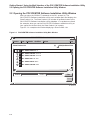
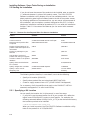
Figure 2–1 is a sample main window displaying a Show Product List.
Figure 2–1 POLYCENTER Software Installation Utility Main Window
POLYCENTER Software Installation
Session
Mode
Customize
Qualifiers
Options
Help
(6)
Show Product List
Multiple Select Hold
DEC VAXVMS ACMB V3.2
DEC VAXVMS DECRTX V1.1−2
DEC VAXVMS DECXYZ V1.1−A
DEC VAXVMS MPL V1.4−5
DEC VAXVMS RELAY V4.1
DEC VAXVMS SECURE V6.1
Product *
Version
*
Filter
Reset
ZK−6650A−GE
2–2