1
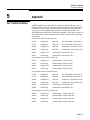
Chapter 1: Allen-Bradley RIO Option Card
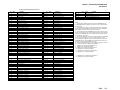
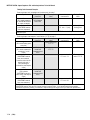
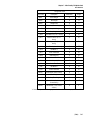
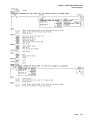
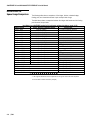
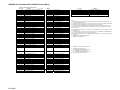
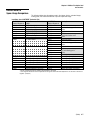
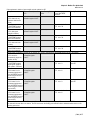
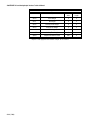
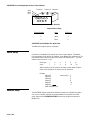
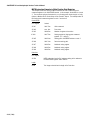
Data Definition
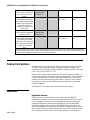
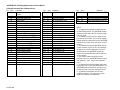
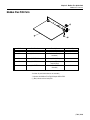
String Data Fields
Field Code
Description
Read/Write
Length
wtn01
Gross Weight
R
12
wtn02
Net Weight
R
12
wtn03
Weight Units
R
2
wtn04
Auxiliary Gross Weight
R
12
wtn05
Auxiliary Net Weight
R
12
wtn06
Auxiliary Weight Units
R
2
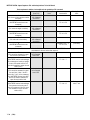
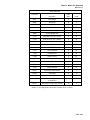
s_200
Scale Motion A (0 or 1 binary)
R
1B1
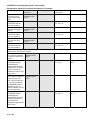
s_201
Center of Zero A (0 or 1
binary)
R
1B1
s_202
Over Capacity A (0 or 1
binary)
R
1B1
s_203
Under Zero A (0 or 1 binary)
R
1B1
s_204
Net Mode A
R
1B1
s_207
Scale A Selected
R
1B1
s_208
Scale Motion B
R
1B1
s_209
Center of Zero B
R
1B1
s_20a
Over Capacity B
R
1B1
s_20b
Under Zero B
R
1B1
s_20c
Net Mode B
R
1B1
s_20f
Scale B Selected
R
1B1
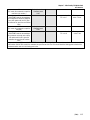
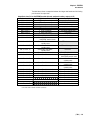
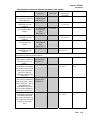
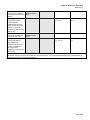
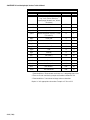
wsn01
Scale Mode (Gross or Net)
R
1
wsn02
Tare Weight
R
12
wsn03
Auxiliary Tare Weight
R
12
wsn06
Current Units (1=primary,
2=secondary)
R
1I3
wsn07
Tare Source (1=PB, 2=KB,
3=auto)
R
1I3
“n” must be replaced with the appropriate scale number. For example, wt101 or wt201.
(1/03)
1-21