1
1
CONTENTS
CHAPTER 1
INTRODUCTION ................................................................................................................... 5
1.1 Features....................................................................................................................................................... 5
1.2 About the KIT ............................................................................................................................................. 7
1.3 Getting Help ............................................................................................................................................... 7
CHAPTER 2
DE0-NANO BOARD ARCHITECTURE .............................................................................. 8
2.1 Layout and Components ............................................................................................................................. 8
2.2 Block Diagram of the DE0-Nano Board .................................................................................................... 9
2.3 Power-up the DE0-Nano Board ................................................................................................................ 10
CHAPTER 3
USING THE DE0-NANO BOARD .......................................................................................11
3.1 Configuring the Cyclone IV FPGA .......................................................................................................... 11
3.2 General User Input/Output ....................................................................................................................... 12
3.3 SDRAM Memory ..................................................................................................................................... 15
3.4 I2C Serial EEPROM................................................................................................................................. 16
3.5 Expansion Headers ................................................................................................................................... 17
3.6 A/D Converter and 2x13 Header .............................................................................................................. 20
3.7 Digital Accelerometer ............................................................................................................................... 23
3.8 Clock Circuitry ......................................................................................................................................... 23
3.9 Power Supply............................................................................................................................................ 24
CHAPTER 4
DE0-NANO CONTROL PANEL ......................................................................................... 26
4.1 Control Panel Setup .................................................................................................................................. 26
4.2 Controlling the LEDs ............................................................................................................................... 28
4.3 Switches and Pushbuttons ........................................................................................................................ 28
4.4 Memory Controller ................................................................................................................................... 29
4.5 Digital Accelerometer ............................................................................................................................... 31
4.6 ADC .......................................................................................................................................................... 32
4.7 Overall Structure of the DE0-Nano Control Panel ................................................................................... 33
CHAPTER 5
DE0-NANO SYSTEM BUILDER ........................................................................................ 34
5.1 Introduction .............................................................................................................................................. 34
2
5.2 General Design Flow ................................................................................................................................ 34
5.3 Using DE0-Nano System Builder............................................................................................................. 36
CHAPTER 6
TUTORIAL: CREATING AN FPGA PROJECT ............................................................... 40
6.1 Design Flow.............................................................................................................................................. 40
6.2 Before You Begin ..................................................................................................................................... 41
6.3 What You Will Learn ................................................................................................................................ 45
6.4 Assign The Device .................................................................................................................................... 45
6.5 Creating an FPGA design ......................................................................................................................... 49
6.6 Assign the Pins ......................................................................................................................................... 71
6.7 Create a Default TimeQuest SDC File ..................................................................................................... 73
6.8 Compile Your Design ............................................................................................................................... 74
6.9 Program the FPGA Device ....................................................................................................................... 76
6.10 Verify The Hardware .............................................................................................................................. 79
CHAPTER 7
TUTORIAL: CREATING A NIOS II PROJECT ............................................................... 82
7.1 Required Features ..................................................................................................................................... 82
7.2 Creation of Hardware Design ................................................................................................................... 82
7.3 Download the Hardware Design............................................................................................................. 117
7.4 Create a hello_world Example Project ................................................................................................... 120
7.5 Build and Run the Program .................................................................................................................... 123
7.6 Edit and Re-Run the Program................................................................................................................. 124
7.7 Why the LED Blinks .............................................................................................................................. 126
7.8 Debugging the Application ..................................................................................................................... 127
7.9 Configure System Library ...................................................................................................................... 128
CHAPTER 8
DE0-NANO DEMONSTRATIONS ................................................................................... 130
8.1 System Requirements ............................................................................................................................. 130
8.2 Breathing LEDs ...................................................................................................................................... 130
8.3 ADC Reading.......................................................................................................................................... 132
8.4 SOPC Demo ........................................................................................................................................... 136
8.5 G-Sensor ................................................................................................................................................. 142
8.6 SDRAM Test by Nios II ......................................................................................................................... 143
CHAPTER 9
APPENDIX .......................................................................................................................... 146
9.1 Programming the Serial Configuration Device ...................................................................................... 146
9.2 EPCS Programming via nios-2-flash-programmer ................................................................................. 154
3
9.3 Revision History ..................................................................................................................................... 154
9.4 Copyright Statement ............................................................................................................................... 154
4
Chapter 1
Introduction
The DE0-Nano board introduces a compact-sized FPGA development platform suited for to a wide
range of portable design projects, such as robots and mobile projects.
The DE0-Nano is ideal for use with embedded soft processors—it features a powerful Altera Cyclone
IV FPGA (with 22,320 logic elements), 32 MB of SDRAM, 2 Kb EEPROM, and a 64 Mb serial
configuration memory device. For connecting to real-world sensors the DE0-Nano includes a
National Semiconductor 8-channel 12-bit A/D converter, and it also features an Analog Devices
13-bit, 3-axis accelerometer device.
The DE0-Nano board includes a built-in USB Blaster for FPGA programming, and the board can be
powered either from this USB port or by an external power source. The board includes expansion
headers that can be used to attach various Terasic daughter cards or other devices, such as motors
and actuators. Inputs and outputs include 2 pushbuttons, 8 user LEDs and a set of 4 dip-switches.
1.1 Features
Figure 1-1 shows a photograph of the DE0-Nano Board.
Figure 1-1
The DE0-Nano Board
5
The key features of the board are listed below:
• Featured device
o Altera Cyclone® IV EP4CE22F17C6N FPGA
o 153 maximum FPGA I/O pins
• Configuration status and set-up elements
o On-board USB-Blaster circuit for programming
o Spansion EPCS64
• Expansion header
o Two 40-pin Headers (GPIOs) provide 72 I/O pins, 5V power pins, two 3.3V power pins and
four ground pins
• Memory devices
o 32MB SDRAM
o 2Kb I2C EEPROM
• General user input/output
o 8 green LEDs
o 2 debounced pushbuttons
o 4-position DIP switch
• G-Sensor
o ADI ADXL345, 3-axis accelerometer with high resolution (13-bit)
• A/D Converter
o NS ADC128S022, 8-Channel, 12-bit A/D Converter
o 50 Ksps to 200 Ksps
• Clock system
o On-board 50MHz clock oscillator
• Power Supply
o USB Type mini-AB port (5V)
o DC 5V pin for each GPIO header (2 DC 5V pins)
o 2-pin external power header (3.6-5.7V)
6
1.2 About the KIT
The kit comes with the following contents:
• DE0-Nano board
• System CD-ROM.
• USB Cable
The system CD contains technical documents for the DE0-Nano board, which includes component
datasheets, demonstrations, schematic, and user manual.
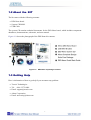
Figure 1-2 shows the photograph of the DE0-Nano kit contents.
Figure 1-2
DE0-Nano kit package contents
1.3 Getting Help
Here is information of how to get help if you encounter any problem:
• Terasic Technologies
• Tel: +886-3-575-0880
• Email: [email protected]
• Altera Corporation
• Email: [email protected]
7
Chapter 2
DE0DE0-Nano Board Architecture
This chapter describes the architecture of the DE0-Nano board including block diagram and
components.
2.1 Layout and Components
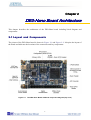
The picture of the DE0-Nano board is shown in Figure 2-1 and Figure 2-2. It depicts the layout of
the board and indicates the locations of the connectors and key components.
Figure 2-1
The DE0-Nano Board PCB and component diagram (top view)
8
Figure 2-2 The DE0-Nano Board PCB and component diagram (bottom view)
2.2 Block Diagram of the DE0-Nano Board
Figure 2-3 shows the block diagram of the DE0-Nano board. To provide maximum flexibility for
the user, all connections are made through the Cyclone IV FPGA device. Thus, the user can
configure the FPGA to implement any system design.
Figure 2-3 Block diagram of DE0-Nano Board
9
2.3 Power-up the DE0-Nano Board
The DE0-Nano board comes with a preloaded configuration bit stream to demonstrate some
features of the board. This allows users to see quickly if the board is working properly. To power-up
the board two options are available which are described below:
1. Connect a USB Mini-B cable between a USB (Type A) host port and the board. For
communication between the host and the DE0-Nano board, it is necessary to install the Altera USB
Blaster driver software.
2. Alternatively, users can power-up the DE0-Nano board by supplying 5V to the two DC +5
(VCC5) pins of the GPIO headers or supplying (3.6-5.7V) to the 2-pin header.
At this point you should observe flashing LEDs on the board.
10
Chapter 3
Using the DE0DE0-Nano Board
This chapter gives instructions for using the DE0-Nano board and describes in detail its components
and connectors, along with the required pin assignments.
3.1 Configuring the Cyclone IV FPGA
The DE0-Nano board contains a Cyclone IV E FPGA which can be programmed using JTAG
programming. This allows users to configure the FPGA with a specified design using Quartus II
software. The programmed design will remain functional on the FPGA as long as the board is
powered on, or until the device is reprogrammed. The configuration information will be lost when
the power is turned off.
To download a configuration bit stream file using JTAG Programming into the Cyclone IV FPGA,
perform the following steps:
1.
Connect a USB Mini-B cable between a host computer and the DE0-Nano.
2. The FPGA can now be programmed through the Quartus II Programmer by selecting a
configuration bit stream file with the .sof filename extension.
Configuring the Spansion EPCS64 device
The DE0-Nano board contains a Spansion EPCS64 serial configuration device. This device
provides non-volatile storage of the configuration bit-stream, so that the information is retained
even when the power supply to the DE0-Nano board is turned off. When the board’s power is
turned on, the configuration data in the EPCS64 device is automatically loaded into the Cyclone IV
E FPGA.
The Cyclone IV E device supports in-system programming of a serial configuration device using
the JTAG interface via the serial flash loader design. The serial flash loader is a bridge design for
the Cyclone IV E device that uses its JTAG interface to access the EPCS .jic file and then uses the
AS interface to program the EPCS device. Figure 3-1 illustrates the programming method when
adopting a serial flash loader solution. Chapter 9 of this document describes how to load a circuit to
the serial configuration device.
11
Figure 3-1 Programming a serial configuration device with serial flash loader solution
JTAG Chain on DE0-Nano Board
The JTAG Chain on the DE0-Nano board is connected to a host computer using an on-board
USB-blaster. The USB-blaster consists of a USB Mini-B connector, a FTDI USB 2.0 Controller,
and an Altera MAX II CPLD.
Figure 3-2 illustrates the JTAG configuration setup.
Figure 3-2 JTAG Chain
3.2 General User Input/Output
Pushbuttons
The DE0-Nano board contains two pushbuttons shown in Figure 3-3. Each pushbutton is
debounced using a Schmitt Trigger circuit, as indicated in Figure 3-4. The two outputs called KEY0,
and KEY1 of the Schmitt Trigger devices are connected directly to the Cyclone IV E FPGA. Each
pushbutton provides a high logic level when it is not pressed, and provides a low logic level when
pressed. Since the pushbuttons are debounced, they are appropriate for using as clock or reset
inputs.
12
Figure 3-3
Connections between the push-buttons and Cyclone IV FPGA
Pushbutton depressed
Pushbutton released
Before
Debouncing
Schmitt Trigger
Debounced
Figure 3-4
Pushbuttons debouncing
LEDs
There are 8 green user-controllable LEDs on the DE0-Nano board. The eight LEDs, which are
presented in Figure 3-4, allow users to display status and debugging information. Each LED is
driven directly by the Cyclone IV E FPGA. Each LED is driven directly by a pin on the Cyclone IV
E FPGA; driving its associated pin to a high logic level turns the LED on, and driving the pin low
turns it off.
13
Figure 3-5 Connections between the LEDs and Cyclone IV FPGA
DIP Switch
The DE0-Nano board contains a 4 dip switches. A DIP switch provides, to the FPGA, a high logic
level when it is in the DOWN position, and a low logic level when in the UPPER position.
Table 3-1
Signal Name
KEY[0]
KEY[1]
Pin Assignments for Push-buttons
FPGA Pin No.
PIN_J15
PIN_E1
Description
Push-button[0]
Push-button[1]
I/O Standard
3.3V
3.3V
Table 3-2 Pin Assignments for LEDs
Signal Name
LED[0]
LED[1]
LED[2]
LED[3]
LED[4]
LED[5]
LED[6]
LED[7]
FPGA Pin No.
PIN_A15
PIN_A13
PIN_B13
PIN_A11
PIN_D1
PIN_F3
PIN_B1
PIN_L3
Description
LED Green[0]
LED Green[1]
LED Green[2]
LED Green[3]
LED Green[4]
LED Green[5]
LED Green[6]
LED Green[7]
14
I/O Standard
3.3V
3.3V
3.3V
3.3V
3.3V
3.3V
3.3V
3.3V
Table 3-3 Pin Assignments for DIP Switches
Signal Name
DIP Switch[0]
DIP Switch[1]
DIP Switch[2]
DIP Switch[3]
FPGA Pin No.
PIN_M1
PIN_T8
PIN_B9
PIN_M15
Description
DIP Switch[0]
DIP Switch[1]
DIP Switch[2]
DIP Switch[3]
I/O Standard
3.3V
3.3V
3.3V
3.3V
3.3 SDRAM Memor y
The board features a Synchronous Dynamic Random Access Memory (SDRAM) device providing
32MB with a 16-bit data lines connected to the FPGA. The chip uses 3.3V LVCMOS signaling
standard. All signals are registered on the positive edge of the clock signal, DRAM_CLK.
Connections between the FPGA and SDRAM chips are shown in Figure 3-6.
Figure 3-6
Connections between FPGA and SDRAM
Table 3-4 SDRAM Pin Assignments
Signal Name
DRAM_ADDR[0]
DRAM_ADDR[1]
DRAM_ADDR[2]
DRAM_ADDR[3]
DRAM_ADDR[4]
DRAM_ADDR[5]
DRAM_ADDR[6]
DRAM_ADDR[7]
DRAM_ADDR[8]
DRAM_ADDR[9]
DRAM_ADDR[10]
DRAM_ADDR[11]
FPGA Pin No.
PIN_P2
PIN_N5
PIN_N6
PIN_M8
PIN_P8
PIN_T7
PIN_N8
PIN_T6
PIN_R1
PIN_P1
PIN_N2
PIN_N1
Description
SDRAM Address[0]
SDRAM Address[1]
SDRAM Address[2]
SDRAM Address[3]
SDRAM Address[4]
SDRAM Address[5]
SDRAM Address[6]
SDRAM Address[7]
SDRAM Address[8]
SDRAM Address[9]
SDRAM Address[10]
SDRAM Address[11]
15
I/O Standard
3.3V
3.3V
3.3V
3.3V
3.3V
3.3V
3.3V
3.3V
3.3V
3.3V
3.3V
3.3V
DRAM_ADDR[12]
DRAM_DQ[0]
DRAM_DQ[1]
DRAM_DQ[2]
DRAM_DQ[3]
DRAM_DQ[4]
DRAM_DQ[5]
DRAM_DQ[6]
DRAM_DQ[7]
DRAM_DQ[8]
DRAM_DQ[9]
DRAM_DQ[10]
DRAM_DQ[11]
DRAM_DQ[12]
DRAM_DQ[13]
DRAM_DQ[14]
DRAM_DQ[15]
DRAM_BA[0]
DRAM_BA[1]
DRAM_DQM[0]
DRAM_DQM[1]
DRAM_RAS_N
DRAM_CAS_N
DRAM_CKE
DRAM_CLK
DRAM_WE_N
DRAM_CS_N
PIN_L4
PIN_G2
PIN_G1
PIN_L8
PIN_K5
PIN_K2
PIN_J2
PIN_J1
PIN_R7
PIN_T4
PIN_T2
PIN_T3
PIN_R3
PIN_R5
PIN_P3
PIN_N3
PIN_K1
PIN_M7
PIN_M6
PIN_R6
PIN_T5
PIN_L2
PIN_L1
PIN_L7
PIN_R4
PIN_C2
PIN_P6
SDRAM Address[12]
SDRAM Data[0]
SDRAM Data[1]
SDRAM Data[2]
SDRAM Data[3]
SDRAM Data[4]
SDRAM Data[5]
SDRAM Data[6]
SDRAM Data[7]
SDRAM Data[8]
SDRAM Data[9]
SDRAM Data[10]
SDRAM Data[11]
SDRAM Data[12]
SDRAM Data[13]
SDRAM Data[14]
SDRAM Data[15]
SDRAM Bank Address[0]
SDRAM Bank Address[1]
SDRAM byte Data Mask[0]
SDRAM byte Data Mask[1]
SDRAM Row Address Strobe
SDRAM Column Address Strobe
SDRAM Clock Enable
SDRAM Clock
SDRAM Write Enable
SDRAM Chip Select
3.3V
3.3V
3.3V
3.3V
3.3V
3.3V
3.3V
3.3V
3.3V
3.3V
3.3V
3.3V
3.3V
3.3V
3.3V
3.3V
3.3V
3.3V
3.3V
3.3V
3.3V
3.3V
3.3V
3.3V
3.3V
3.3V
3.3V
3.4 I2C Serial EEPROM
The DE0-Nano contains a 2Kbit Electrically Erasable PROM (EEPROM). The EEPROM is
configured through a 2-wire I2C serial interface. The device is organized as one block of 256 x 8-bit
memory. The I2C write and read address are 0xA0 and 0xA1, respectively. Figure 3-7 illustrates its
connections with the Cyclone IV FPGA.
16
Figure 3-7
Connections between FPGA and EEPROM
Table 3-5 Pin Assignments for I2C Serial EEPROM
Signal Name
I2C_SCLK
I2C_SDAT
FPGA Pin No.
PIN_F2
PIN_F1
Description
EEPROM clock
EEPROM data
I/O Standard
3.3V
3.3V
3.5 Expansion Headers
The DE0-Nano board provides two 40-pin expansion headers. Each header connects directly to 36
pins of the Cyclone IV E FPGA, and also provides DC +5V (VCC5), DC +3.3V (VCC33), and two
GND pins. Figure 3-8 shows the I/O distribution of the GPIO connectors.
17
Figure 3-8
Pin arrangement of the GPIO expansion headers
The pictures below indicate the pin 1 location of the expansion headers.
Figure 3-9
Pin1 locations of the GPIO expansion headers
Table 3-6 GPIO-0 Pin Assignments
Signal Name
FPGA Pin No.
Description
GPIO_0_IN0
PIN_A8
GPIO Connection DATA
I/O Standard
3.3V
GPIO_00
PIN_D3
GPIO Connection DATA
3.3V
GPIO_0_IN1
PIN_B8
GPIO Connection DATA
3.3V
GPIO_01
PIN_C3
GPIO Connection DATA
3.3V
18
GPIO_02
PIN_A2
GPIO Connection DATA
3.3V
GPIO_03
PIN_A3
GPIO Connection DATA
3.3V
GPIO_04
PIN_B3
GPIO Connection DATA
3.3V
GPIO_05
PIN_B4
GPIO Connection DATA
3.3V
GPIO_06
PIN_A4
GPIO Connection DATA
3.3V
GPIO_07
PIN_B5
GPIO Connection DATA
3.3V
GPIO_08
PIN_A5
GPIO Connection DATA
3.3V
GPIO_09
PIN_D5
GPIO Connection DATA
3.3V
GPIO_010
PIN_B6
GPIO Connection DATA
3.3V
GPIO_011
PIN_A6
GPIO Connection DATA
3.3V
GPIO_012
PIN_B7
GPIO Connection DATA
3.3V
GPIO_013
PIN_D6
GPIO Connection DATA
3.3V
GPIO_014
PIN_A7
GPIO Connection DATA
3.3V
GPIO_015
PIN_C6
GPIO Connection DATA
3.3V
GPIO_016
PIN_C8
GPIO Connection DATA
3.3V
GPIO_017
PIN_E6
GPIO Connection DATA
3.3V
GPIO_018
PIN_E7
GPIO Connection DATA
3.3V
GPIO_019
PIN_D8
GPIO Connection DATA
3.3V
GPIO_020
PIN_E8
GPIO Connection DATA
3.3V
GPIO_021
PIN_F8
GPIO Connection DATA
3.3V
GPIO_022
PIN_F9
GPIO Connection DATA
3.3V
GPIO_023
PIN_E9
GPIO Connection DATA
3.3V
GPIO_024
PIN_C9
GPIO Connection DATA
3.3V
GPIO_025
PIN_D9
GPIO Connection DATA
3.3V
GPIO_026
PIN_E11
GPIO Connection DATA
3.3V
GPIO_027
PIN_E10
GPIO Connection DATA
3.3V
GPIO_028
PIN_C11
GPIO Connection DATA
3.3V
GPIO_029
PIN_B11
GPIO Connection DATA
3.3V
GPIO_030
PIN_A12
GPIO Connection DATA
3.3V
GPIO_031
PIN_D11
GPIO Connection DATA
3.3V
GPIO_032
PIN_D12
GPIO Connection DATA
3.3V
GPIO_033
PIN_B12
GPIO Connection DATA
3.3V
Table 3-7 GPIO-1 Pin Assignments
Signal Name
FPGA Pin No.
Description
GPIO_1_IN0
PIN_T9
GPIO Connection DATA
I/O Standard
3.3V
GPIO_10
PIN_F13
GPIO Connection DATA
3.3V
GPIO_1_IN1
PIN_R9
GPIO Connection DATA
3.3V
GPIO_11
PIN_T15
GPIO Connection DATA
3.3V
GPIO_12
PIN_T14
GPIO Connection DATA
3.3V
GPIO_13
PIN_T13
GPIO Connection DATA
3.3V
GPIO_14
PIN_R13
GPIO Connection DATA
3.3V
GPIO_15
PIN_T12
GPIO Connection DATA
3.3V
19
GPIO_16
PIN_R12
GPIO Connection DATA
3.3V
GPIO_17
PIN_T11
GPIO Connection DATA
3.3V
GPIO_18
PIN_T10
GPIO Connection DATA
3.3V
GPIO_19
PIN_R11
GPIO Connection DATA
3.3V
GPIO_110
PIN_P11
GPIO Connection DATA
3.3V
GPIO_111
PIN_R10
GPIO Connection DATA
3.3V
GPIO_112
PIN_N12
GPIO Connection DATA
3.3V
GPIO_113
PIN_P9
GPIO Connection DATA
3.3V
GPIO_114
PIN_N9
GPIO Connection DATA
3.3V
GPIO_115
PIN_N11
GPIO Connection DATA
3.3V
GPIO_116
PIN_L16
GPIO Connection DATA
3.3V
GPIO_117
PIN_K16
GPIO Connection DATA
3.3V
GPIO_118
PIN_R16
GPIO Connection DATA
3.3V
GPIO_119
PIN_L15
GPIO Connection DATA
3.3V
GPIO_120
PIN_P15
GPIO Connection DATA
3.3V
GPIO_121
PIN_P16
GPIO Connection DATA
3.3V
GPIO_122
PIN_R14
GPIO Connection DATA
3.3V
GPIO_123
PIN_N16
GPIO Connection DATA
3.3V
GPIO_124
PIN_N15
GPIO Connection DATA
3.3V
GPIO_125
PIN_P14
GPIO Connection DATA
3.3V
GPIO_126
PIN_L14
GPIO Connection DATA
3.3V
GPIO_127
PIN_N14
GPIO Connection DATA
3.3V
GPIO_128
PIN_M10
GPIO Connection DATA
3.3V
GPIO_129
PIN_L13
GPIO Connection DATA
3.3V
GPIO_130
PIN_J16
GPIO Connection DATA
3.3V
GPIO_131
PIN_K15
GPIO Connection DATA
3.3V
GPIO_132
PIN_J13
GPIO Connection DATA
3.3V
GPIO_133
PIN_J14
GPIO Connection DATA
3.3V
3.6 A/D Conver ter and 2x13 Header
The DE0-Nano contains an ADC128S022 lower power, eight-channel CMOS 12-bit
analog-to-digital converter. This A-to-D provides conversion throughput rates of 50 ksps to 200
ksps. It can be configured to accept up to eight input signals at inputs IN0 through IN7. This eight
input signals are connected to the 2x13 header, as shown in Figure 3-10. The remaining I/Os of the
2x13 header are a DC +3.3V (VCC33), a GND and 13 pins, which are connect directly to the
Cyclone IV E device.
For more detailed information on the A/D converter chip, please refer to its datasheet which is
available on manufacturer’s website or under the /datasheet folder of the system CD.
20
Figure 3-10
Pin distribution of the 2x13 Header
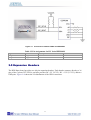
Figure 3-11 shows the connections on the 2x13 header, A/D converter and Cyclone IV device.
Figure 3-11
Wiring for 2x13 header and A/D converter
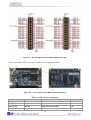
The pictures below indicate the pin 1 location of the 2x13 header.
21
Figure 3-12
Pin1 locations of the 2x13 header
Table 3-8 Pin Assignments for 2x13 Header
Signal Name
GPIO_2[0]
GPIO_2[1]
GPIO_2[2]
GPIO_2[3]
GPIO_2[4]
GPIO_2[5]
GPIO_2[6]
GPIO_2[7]
GPIO_2[8]
GPIO_2[9]
GPIO_2[10]
GPIO_2[11]
GPIO_2[12]
GPIO_2_IN[0]
GPIO_2_IN[1]
FPGA Pin No.
PIN_A14
PIN_B16
PIN_C14
PIN_C16
PIN_C15
PIN_D16
PIN_D15
PIN_D14
PIN_F15
PIN_F16
PIN_F14
PIN_G16
PIN_G15
PIN_E15
PIN_E16
Description
GPIO Connection DATA[0]
GPIO Connection DATA[1]
GPIO Connection DATA[2]
GPIO Connection DATA[3]
GPIO Connection DATA[4]
GPIO Connection DATA[5]
GPIO Connection DATA[6]
GPIO Connection DATA[7]
GPIO Connection DATA[8]
GPIO Connection DATA[9]
GPIO Connection DATA[10]
GPIO Connection DATA[11]
GPIO Connection DATA[12]
GPIO Input
GPIO Input
I/O Standard
3.3V
3.3V
3.3V
3.3V
3.3V
3.3V
3.3V
3.3V
3.3V
3.3V
3.3V
3.3V
3.3V
3.3V
3.3V
GPIO_2_IN[2]
PIN_M16
GPIO Input
3.3V
Table 3-9 Pin Assignments for ADC
Signal Name
ADC_CS_N
ADC_SADDR
ADC_SDAT
ADC_SCLK
FPGA Pin No.
PIN_A10
PIN_B10
PIN_A9
PIN_B14
Description
Chip select
Digital data input
Digital data output
Digital clock input
22
I/O Standard
3.3V
3.3V
3.3V
3.3V
3.7 Digital Accelerometer
The ADXL345 is a small, thin, ultralow power, 3-axis accelerometer with high resolution
measurement. This digital accelerometer can be accessed through a SPI 3-wire digital interface or
I2C 2-wire digital interface. Main applications include medical instrumentation, industrial
instrumentation, personal electronic aid and hard disk drive protection etc. Some of the key features
of this device are listed below. For more detailed information, please refer to its datasheet which is
available on manufacturer’s website or under the /datasheet folder of the system CD.
•
•
•
Up to 13-bit resolution at +/- 16g
SPI (3- wire) or I2C (2-wire) digital interface
Flexible interrupts modes
Figure 3-13 shows the connections between the ADXL345 and the Cyclone IV E device.
Figure 3-13
Wiring between the ADXL345 and the Cyclone IV E device
Table 3-10 Pin Assignments for Digital Accelerometer
Signal Name
I2C_SCLK
I2C_SDAT
G_SENSOR_INT
G_SENSOR_CS_N
FPGA Pin No.
PIN_F2
PIN_F1
PIN_M2
PIN_G5
Description
EEPROM clock
EEPROM data
G_Sensor Interrupt
G_Sensor chip select
I/O Standard
3.3V
3.3V
3.3V
3.3V
3.8 Clock Circuitr y
The DE0-Nano board includes a 50 MHz oscillator. The oscillator is connected directly to a
dedicated clock input pin of the Cyclone IV E FPGA. The 50MHz clock input can be used as a
source clock to drive the phase lock loops (PLL) circuit. The clock distribution on the DE0-Nano
board is shown in Figure 3-14.
23
Figure 3-14
Block diagram of the clock distribution
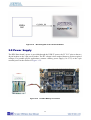
3.9 Power Supply
The DE0-Nano board’s power is provided through the USB 5V power, the 5V VCC pins on the two
40-pin headers or the 2-pin power header. The DC voltage is then stepped down to various required
voltages. For portable project applications, connect a battery power supply (3.6~5.7V) to the 2-pin
external power header shown in Figure 3-15.
Figure 3-15
Portable Battery Connection
24
Power Distribution System
Figure 3-16 shows the power distribution system on the DE0-Nano board.
Figure 3-16
DE0-Nano Power Distribution System
25
Chapter 4
DE0DE0-Nano Control Panel
The DE0-Nano board comes with a Control Panel facility that allows users to access various
components on the board from a host computer. The host computer communicates with the board
through a USB connection. The facility can be used to verify the functionality of components on the
board or be used as a debug tool while developing RTL code.
This chapter first presents some basic functions of the Control Panel, then describes its structure in
block diagram form, and finally describes its capabilities.
4.1 Control Panel Setup
The Control Panel Software Utility is located in the directory “tools/DE0_NANO_ControlPanel” in
the DE0-Nano System CD. It's free of installation, just copy the whole folder to your host computer
and launch the control panel by executing the “DE0_NANO_ControlPanel.exe”.
When Control Panel starts it will attempt to download a configuration file onto the DE0-Nano board.
The configuration file contains a design that communicates with the peripheral devices on the board
that are attached to the FPGA device. Perform the following steps to ensure that the control panel
starts up successfully:
1.
Make sure Quartus II 10.0 or later version is installed successfully on your PC.
2.
Connect a USB A to Mini-B cable to a USB (Type A) host port and to the board.
3. Start the executable DE0_NANO_ControlPanel.exe on the host computer. The Control Panel
user interface shown in Figure 4-1 will appear.
5. The DE0_NANO_ControlPanel.sof bit stream is loaded automatically as soon as the
DE0_NANO_ControlPanel.exe is launched.
6. In case the connection is disconnected, click on CONNECT where the .sof will be re-loaded
onto the board.
Note: the Control Panel will occupy the USB port until you choose to close the program or
disconnect it from the board by clicking the Disconnect button. While the Control Panel is
connected to the board, you will be unable to use Quartus II to download a configuration file into
the FPGA.
26
8. The Control Panel is now ready for use; experience it by setting the ON/OFF status for some
LEDs and observing the result on the DE0-Nano board.
Figure 4-1 The DE0-Nano Control Panel
The concept of the DE0-Nano Control Panel is illustrated in Figure 4-2. The “Control Circuit” that
performs the control functions is implemented in the FPGA board. It communicates with the
Control Panel window, which is active on the host computer, via the USB Blaster link. The
graphical interface is used to issue commands to the control circuit. It handles all requests and
performs data transfers between the computer and the DE0-Nano board.
Figure 4-2 The DE0-Nano Control Panel concept
27
The DE0-Nano Control Panel can be used to light up LEDs, change the buttons/switches status,
read/write to SDRAM Memory, read ADC channels, and display the Accelerometer information.
4.2 Controlling the LEDs
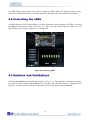
A simple function of the Control Panel is to allow setting the values displayed on LEDs. Choosing
the LED tab displays the window in Figure 4-3. Here, you can directly turn the LEDs on or off
individually or by clicking “Light All” or “Unlight All”.
Figure 4-3 Controlling LEDs
4.3 Switches and Pushbuttons
Choosing the Switches tab displays the window in Figure 4-4. The function is designed to monitor
the status of slide switches and pushbuttons in real time and show the status in a graphical user
interface. It can be used to verify the functionality of the slide switches and pushbuttons.
28
Figure 4-4 Monitoring switches and buttons
The ability to check the status of pushbutton and slider switches is not needed in typical design
activities. However, it provides a simple mechanism for verifying if the buttons and switches are
functioning correctly. Thus, it can be used for troubleshooting purposes.
4.4 Memor y Controller
The Control Panel can be used to write/read data to/from the SDRAM/EEPROM/EPCS on the
DE0-Nano board. As an example, we will describe how the SDRAM may be accessed; the same
approach is used to access the EEPROM and EPCS. Click on the Memory tab and select “SDRAM”
to reach the window in Figure 4-5.
29
Figure 4-5 Accessing the SDRAM
A 16-bit word can be written into the SDRAM by entering the address of the desired location,
specifying the data to be written, and pressing the Write button. Contents of the location can be read
by pressing the Read button. Figure 4-5 depicts the result of writing the hexadecimal value 06CA
into offset address 200, followed by reading the same location.
The Sequential Write function of the Control Panel is used to write the contents of a file into the
SDRAM as follows:
1.
Specify the starting address in the Address box.
2. Specify the number of bytes to be written in the Length box. If the entire file is to be loaded,
then a checkmark may be placed in the File Length box instead of giving the number of bytes.
3.
To initiate the writing process, click on the Write a File to Memory button.
4. When the Control Panel responds with the standard Windows dialog box asking for the source
file, specify the desired file in the usual manner.
The Control Panel also supports loading files with a .hex extension. Files with a .hex extension are
ASCII text files that specify memory values using ASCII characters to represent hexadecimal
values. For example, a file containing the line
0123456789ABCDEF
defines eight 8-bit values: 01, 23, 45, 67, 89, AB, CD, EF. These values will be loaded
consecutively into the memory.
The Sequential Read function is used to read the contents of the SDRAM and fill them into a file as
follows:
30
1.
Specify the starting address in the Address box.
2. Specify the number of bytes to be copied into the file in the Length box. If the entire contents
of the SDRAM are to be copied (which involves all 32 Mbytes), then place a checkmark in the
Entire Memory box.
3.
Press Load Memory Content to a File button.
4. When the Control Panel responds with the standard Windows dialog box asking for the
destination file, specify the desired file in the usual manner.
Users can use the similar way to access the EEPROM and EPCS. Please note that users need to
erase the EPCS before writing data to it.
4.5 Digital Accelerometer
The Control Panel can be used to display the status of the Digital Accelerometer where it measures
the output of its 3-axis (X, Y, Z). The measurement range and resolution is set to default value ±2g
(acceleration of gravity) and 10bit twos complement respectively. Figure 4-6 shows the current
digital accelerometer status of the DE0-Nano when Accelerometer tab is clicked. The units that are
displayed are the raw register values converted to decimal. The value in parentheses is the
gravitational acceleration values (mg) calculated from the register values according the formula.
Table 4-1 shows the rule.
Table 4-1 acceleration values convert rule
Register Value
*Formula
Result (mg)
0
0/511*2
0
1
1/511*2
3.9
2
2/511*2
6.8
17
17/511*2
66.4
511
511/511*2
2000
31
Figure 4-6 Digital Accelerometer status
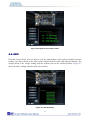
4.6 ADC
From the Control Panel, users are able to view the eight-channel 12-bit analog-to-digital converter
reading. The values shown are the ADC register outputs from all of the eight separate channels. The
voltage shown is the voltage reading from the separate pins on the extension header. Figure 4-7
shows the ADC readings when the ADC tab is chosen.
Figure 4-7 ADC Readings
32
4.7 Overall Structure of the DE0-Nano Control Panel
The DE0-Nano Control Panel is based on a Nios II SOPC system instantiated in the Cyclone IV E
FPGA with software running on the on-chip memory. The software part is implemented in C code;
the hardware part is implemented in Verilog HDL code with SOPC builder. The source code is not
available on the DE0-Nano System CD.
To run the Control Panel, users should make the configuration according to Section 4.1. Figure 4-8
depicts the structure of the Control Panel. Each input/output device is controlled by the Nios II
Processor instantiated in the FPGA chip. The communication with the PC is done via the USB
Blaster link. The Nios II interprets the commands sent from the PC and performs the corresponding
actions.
Figure 4-8 The block diagram of the DE0-Nano Control Panel
33
Chapter 5
DE0DE0-Nano System Builder
This chapter describes how users can create a custom design project on the DE0-Nano board by
using DE0-Nano Tool – DE0-Nano System Builder.
5.1 Introduction
The DE0-Nano System Builder is a Windows based software utility, designed to assist users in
creating a Quartus II project for the DE0-Nano board within minutes. The generated Quartus II
project files include:
•
•
•
•
•
Quartus II Project File (.qpf)
Quartus II Setting File (.qsf)
Top-Level Design File (.v)
Synopsys Design Constraints file (.sdc)
Pin Assignment Document (.htm)
By providing the above files, DE0-Nano System Builder helps to prevents occurrence of situations
that are prone to errors when users manually edit the top-level design file or place pin assignments.
The common mistakes that users encounter are the following:
1.
Board damaged for wrong pin/bank voltage assignments.
2. Board malfunction caused by wrong device connections or missing pin counts for connected
ends.
3.
Performance degeneration because of improper pin assignments.
5.2 General Design Flow
This section will introduce the general design flow to build a project for the DE0-Nano board via
the DE0-Nano System Builder. The general design flow is illustrated in Figure 5-1.
To create a new system using the DE0-Nano System Builder, begin by launching the DE0-Nano
System Builder software. The software will then prompt you to specify the name of the project you
wish to create, as well as the components on the DE0-Nano board you wish to you. Once your
specification is complete, you can generate the system.
34
The generated system is described using several files. In particular, there is the project file (.qpf),
the top-level Verilog wrapper file (.v) that describes the I/O pins you will use in your design, and
the Quartus II settings file (.qsf) that specifies which pin on the FPGA each I/O in your design
should connect to. A Synopsys Design Constraints (.sdc) file with timing constraints and an HTML
file with pin descriptions will be generated as well.
To proceed with your design, open the Quartus II CAD software and open your newly-created
project. You will now be able to implement the logic of your design by describing your design in a
hardware description language, and connecting it to I/Os in the top-level wrapper file. Once your
design is complete, compile the design using Quartus II, and then use the Quartus II Programmer
tool to configure the FPGA on the DE0-Nano board, using the JTAG programming mode.
Figure 5-1
The general design flow of building a design
35
5.3 Using DE0-Nano System Builder
This section provides the detailed procedures on how the to use the DE0-Nano System Builder.
Install and launch the DE0-Nano System Builder
The DE0-Nano System Builder is located in the directory: "Tools\DE0_NANO_SystemBuilder" on
the DE0-Nano System CD. Users can copy the whole folder to a host computer without installing
the utility. Launch the DE0-Nano System Builder by executing the DE0_NANO_SystemBuilder.exe
on the host computer and the GUI window will appear as shown in Figure 5-2.
Figure 5-2
The DE0-Nano System Builder window
Input Project Name
Input project name as show in Figure 5-3.
Project Name: Type in an appropriate name here, it will automatically be assigned as the name of
your top-level design entity.
36
Figure 5-3
The DE0-Nano Board Type and Project Name
System Configuration
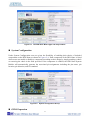
Under System Configuration users are given the flexibility of enabling their choice of included
components on the DE0-Nano as shown in Figure 5-4. Each component of the DE0-Nano is listed
where users can enable or disable a component according to their design by simply marking a check
or removing the check in the field provided. If the component is enabled, the DE0-Nano System
Builder will automatically generate the associated pin assignments including the pin name, pin
location, pin direction, and I/O standard.
Figure 5-4
System Configuration Group
GPIO Expansion
37
Users can connect GPIO expansion card onto GPIO header located on the DE0-Nano board as
shown in Figure 5-5. Select the appropriate daughter card you wish to include in your design from
the drop-down menu. The system builder will automatically generate the associated pin assignments
including the pin name, pin location, pin direction, and IO standard.
If a customized daughter board is used, users can select “GPIO Default” followed by changing the
pin name and pin direction according to the specification of the customized daughter board.
Figure 5-5
GPIO Expansion Group
The “Prefix Name” is an optional feature which denotes the prefix pin name of the daughter card
assigned in your design. Users may leave this field empty.
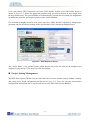
Project Setting Management
The DE0-Nano System Builder also provides functions to restore default setting, loading a setting,
and saving users’ board configuration file shown in Figure 5-6. Users can save the current board
configuration information into a .cfg file and load it to the DE0-Nano System Builder.
38
Figure 5-6
Project Settings
Project Generation
When users press the Generate button, the DE0-Nano System Builder will generate the
corresponding Quartus II files and documents as listed in the Table 5-1:
Table 5-1
The files generated by DE0-Nano System Builder
No.
1
Filename
<Project name>.v
Description
Top level Verilog HDL file for Quartus II
2
<Project name>.qpf
Quartus II Project File
3
<Project name>.qsf
Quartus II Setting File
4
<Project name>.sdc
Synopsys Design Constraints file for Quartus II
5
<Project name>.htm
Pin Assignment Document
Users can use Quartus II software to add custom logic into the project and compile the project to
generate the SRAM Object File (.sof).
39
Chapter 6
Tutorial: Creating an FPGA Project
This tutorial provides comprehensive information for understanding how to create a FPGA design
and run it on the DE0-Nano development and education board. The following sections provide a
quick overview of the design flow, explaining what is needed to get started, and describe what is
taught in this tutorial.
6.1 Design Flow
Figure 6-1shows a block diagram of the FPGA design flow.
The first step in the FPGA design flow starts is design entry. The standard design entry methods are
using schematics or a hardware description language (HDL), such as Verilog HDL or VHDL. The
design entry step is where the designer creates the digital circuit to be implemented inside the
FPGA. The flow then proceeds through compilation, simulation, programming, and verification in
the FPGA hardware.
Figure 6-1 Design Flow
This tutorial describes all of the steps except for simulation. Although it is not covered in this
document, simulation is very important to learn. There are two types of simulation, Functional and
Timing Functional simulation allows you to verify that your hardware is performing the desired
functionality. Timing (or post place-and-route) simulation verifies that the design meets timing and
functions appropriately in the device. Simulation tutorials can be found on the Altera University
Program website at http://university.altera.com.
40
6.2 Before You Begin
This tutorial assumes the following prerequisites
■ You have a general understanding of FPGAs. This tutorial does not explain the basic concepts
of programmable logic.
■ You are somewhat familiar with digital circuit design and electronic design automation (EDA)
tools.
■ You have installed the Altera Quartus II 10.1 software on your computer. If you do not have the
Quartus II software, you can download it from the Altera web site at www.altera.com/download.
■ You have a DE0-Nano Development Board on which you will test your project. Using a
development board helps you to verify whether your design is really working.
■ You have gone through the quick start guide and/or the getting started user guide for your
development kit. These documents ensure that you have:
• Installed the required software.
• Determined that the development board functions properly and is connected to your computer.
Next step is to install the USB-Blaster driver, if not already done. To install the driver, connect a
USB cable between the DE0-Nano board and a USB port on a computer that is running the Quartus
II software.
The computer will recognize the new hardware connected to its USB port, but it will be unable to
proceed if it does not have the required driver already installed. If the USB-Blaster driver is not
already installed, the New Hardware Wizard in Figure 6-2 will appear.
41
Figure 6-2 Found New Hardware Wizard
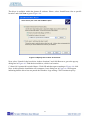
The desired driver is not available on the Windows Update Web site, therefore select “No, not this
time” and click Next. This leads to the window in Figure 6-3.
Figure 6-3 The driver is found in a specific location
42
The driver is available within the Quartus II software. Hence, select “Install from a list or specific
location” and click Next to get to Figure 6-4.
Figure 6-4 Specify the location of the driver
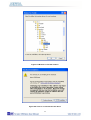
Now, select “Search for the best driver in these locations” and click Browse to get to the pop-up
dialog box in Figure 6-5 Find the desired driver, which is at location
C:\altera\10.1\quartus\drivers\usb-blaster. Click OK and then upon returning to Figure 6-4 click
Next. At this point the installation will commence, but a dialog box in Figure 6-6 will appear
indicating that the driver has not passed the Windows Logo testing. Click Continue Anyway.
43
Figure 6-5 Browse to find the location
Figure 6-6 There is no need to test the driver
44
The driver will now be installed as indicated in Figure 6-7. Click Finish and you can start using the
DE0-Nano board.
Figure 6-7 The driver is installed
6.3 W hat You W ill Lear n
In this tutorial you will perform the following tasks:
Create a design that causes LEDs on the development board to blink at two distinct rates. This
design is easy to create and gives you visual feedback that the design works. Of course, you can use
your DE0-Nano board to run other designs as well. For the LED design, you will write Verilog HDL
code for a simple 32-bit counter, add a phase-locked loop (PLL) megafunction as the clock source,
and add a 2-input multiplexer megafunction. When the design is running on the board, you can
press an input switch to multiplex the counter bits that drive the output LEDs.
6.4 Assign T he Device
Begin this tutorial by creating a new Quartus II project. A project is a set of files that maintain
information about your FPGA design. The Quartus II Settings File (.qsf) and Quartus II Project File
(.qpf) files are the primary files in a Quartus II project. To compile a design or make pin
assignments, you must first create a project. The steps used to create a project are:
45
1. In the Quartus II software, select File > New Project Wizard. The Introduction page opens, as
shown in Figure 6-8.
Figure 6-8 New Project Wizard introduction
2.
Click Next.
3. Enter the following information about your project: (Note: File names, project names, and
directories in the Quartus II software cannot contain spaces.)
a. What is the working directory for this project? Enter a directory in which you will store your
Quartus II project files for this design. For example, E:\My_design\my_first_fpga.
b.
What is the name of this project? Type my_first_fpga.
c. What is the name of the top-level design entity for this project? Type my_first_fpga. See
Figure 6-9.
46
Figure 6-9 Project information
d.
Click Next.
e. In the next dialog box, you will assign a specific FPGA device to the design. Select the
EP4CE22F17C6 device, as it is the FPGA on the DE0-Nano, as shown in Figure 6-10.
47
Figure 6-10 Specify the Device Example
f.
Click Finish.
4. When prompted, select Yes to create the my_first_fpga project directory. You just created your
Quartus II FPGA project. Your project is now open in Quartus II, as shown in Figure 6-11.
48
Figure 6-11 my_first_fpga project
6.5 Creating an FPGA design
This section describes how to create an FPGA design. This includes creating the top-level design,
adding components (in Verilog HDL and using the megafunctions), adding pins and interconnecting
all the components and pins.
First, create a top-level module. In this tutorial, you will use schematic entry, via a Block Design
File (.bdf). Alternatively, you could use Verilog HDL or VHDL for the top-level module. The
following steps describe how to create the top-level schematic.
1. Select File > New > Block Diagram/Schematic File (see Figure 6-12 to create a new file,
Block1.bdf, which you will save as the top-level design.
49
Figure 6-12 New BDF
2.
Click OK.
3.
Select File > Save As and enter the following information.
• File name: my_first_fpga
• Save as type: Block Diagram/Schematic File (*.bdf)
4.
Click Save. The new design file appears in the Block Editor (see Figure 6-13).
50
Figure 6-13 Bank BDF
Adding a Verilog HDL to the Schematic
1.
Add HDL code to the blank block diagram by choosing File > New > Verilog HDL File.
2.
Select Verilog HDL File in the tree and Click OK.
3. Save the newly created file, by selecting File > Save As and entering the following information
(see Figure 6-14).
• File name: simple_counter.v
• Save as type: Verilog HDL File (*.v, *.vlg, *.verilog)
51
Figure 6-14 Saving the Verilog HDL file
The resulting empty file is ready for you to enter the Verilog HDL code.
4. Type the following Verilog HDL code into the blank simple_counter.v file, as shown in Figure
6-15.
//It has a single clock input and a 32-bit output port
module simple_counter (
CLOCK_5,
counter_out
);
input
CLOCK_5 ;
output [31:0] counter_out;
reg
[31:0] counter_out;
52
always @ (posedge CLOCK_5)
// on positive clock edge
begin
counter_out <= counter_out + 1;// increment counter
end
endmodule
// end of module counter
Figure 6-15 The Verilog File of simple_counter.v
5.
Save the file by choosing File > Save, pressing Ctrl + S, or by clicking the floppy disk icon.
6. Select File > Create/Update > Create Symbol Files for Current File to convert the
simple_counter.v file to a Symbol File (.sym). You will use this Symbol File to add the HDL code
to your schematic.
The Quartus II software creates a Symbol File and displays a message (see Figure 6-16).
Figure 6-16 Create Symbol File was Successful
7.
Click OK.
8.
To add the simple_counter.v symbol to the top-level design, click the my_first_fpga.bdf tab.
53
9.
Right click in the blank area of the BDF file, and select Insert > Symbol.
10. Double-click the Project directory to expand it.
11. Select the newly created simple_counter symbol by clicking its icon.
Figure 6-17 Adding the Symbol to the BDF
12.
Click OK.
13. Move the cursor to the BDF grid; the symbol image moves with the cursor. Click to place the
simple_counter symbol onto the BDF. You can move the block after placing it by simply clicking
and dragging it to where you want it and releasing the mouse button to place it. See Figure 6-18.
Figure 6-18 Placing the simple_counter symbol
54
14.
Press the Esc key or click an empty place on the schematic grid to cancel placing further
instances of this symbol.
15.
Save your project regularly.
Adding a Megafunction to the Schematic
Megafunctions, such as the ones available in the LPM, are pre-designed modules that you can use in
FPGA designs. These Altera-provided megafunctions are optimized for speed, area, and device
family. You can increase efficiency by using a megafunction instead of writing the function yourself.
Altera also provides more complex functions, called MegaCore functions, which you can evaluate
for free but require a license file for use in production designs. This tutorial design uses a PLL clock
source to drive a simple counter. A PLL uses the on-board oscillator (DE0-Nano Board is 50 MHz)
to create a constant clock frequency as the input to the counter. To create the clock source, you will
add a pre-built LPM megafunction named ALTPLL.
1. Right click in the blank space in the BDF and select Insert > Symbol or click the Add Symbol
icon on the toolbar.
2. Click the Megawizard Plug-in Manager button. The MegaWizard® Plug-In Manager appears,
as shown in Figure 6-19.
Figure 6-19 Mega Wizard Plug-In Manager
55
3.
Click Next.
4.
In MegaWizard Plug-In Manager [page 2a], specify the following selections (see Figure 6-20):
a.
Select I/O > ALTPLL.
b. Under “Which device family will you be using?” select the Cyclone IV E for DE0-Nano
development board.
c.
Under “Which type of output file do you want to create?” select Verilog HDL.
d. Under “What name do you want for the output file?” type pll at the end of the already created
directory name.
e.
Click Next.
Figure 6-20 MegaWizard Plug-In Manager [page 2a] Selections
5. In the MegaWizard Plug-In Manager [page 3 of 14] window, make the following selections
(see Figure 6-21).
a.
Confirm that the currently selected device family option is set to Cyclone IV E.
b.
For device speed grade choose 6 for DE0-Nano.
c.
Set the frequency of the inclock0 input 50 MHz.
56
d.
Click Next.
Figure 6-21 MegaWizard Plug-In Manager [page 3 of 14] Selections
6. Unselect all options on MegaWizard page 4. As you turn them off, pins disappear from the PLL
block’s graphical preview. See Figure 6-22 for an example.
57
Figure 6-22 MegaWizard Plug-In Manager [page 4 of 14] Selections
7.
Click Next four times to get to page 8.
8.
Set the Clock division factor to 10, as shown in Figure 6-23.
58
Figure 6-23 MegaWizard Plug-In Manager [page 8 of 14] Selections
9.
Click Next and then click Finish.
10. The wizard displays a summary of the files it creates (see Figure 6-24). Select the pll.bsf
option and click Finish again.
59
Figure 6-24 Wizard-Created Files
The Symbol window opens, showing the newly created PLL megafunction,a s shown in Figure
6-25.
60
Figure 6-25 PLL Symbol
11. Click OK and place the pll symbol onto the BDF to the left of the simple_counter symbol. You
can drag and drop the symbols, if you need to rearrange them. See Figure 6-26.
Figure 6-26 Place the PLL Symbol
12. Move the mouse so that the cursor (also called the selection tool) is over the pll symbol’s c0
output pin. The orthogonal node tool (cross-hair) icon appears.
13. Click and drag a bus line from the c0 output to the simple_counter clock input. This action ties
the pll output to the simple_counter input (see Figure 6-27).
61
Figure 6-27 Draw a Bus Line connect pll c0 port to simple_counter CLOCK_5 port
Adding an Input pin to the Schematic
The following steps describe how to add an input pin to the schematic.
1.
Right click in the blank area of the BDF and select Insert > Symbol.
2.
Under Libraries, select quartus/libraries > primitives > pin >input. See Figure 6-28
3.
Click OK
If you need more room to place symbols, you can use the vertical and horizontal scroll bars at the
edges of the BDF window to view more drawing space.
Figure 6-28 Input pin symbol
62
4.
Place the new pin onto the BDF so that it is touching the input to the pll symbol.
5. Use the mouse to click and drag the new input pin to the left; notice that the ports remain
connected as shown in Figure 6-29.
Figure 6-29 Connecting the PLL symbol and Input port
6. Change the pin name by double-clicking pin_name and typing CLOCK_50 (see Figure 6-30).
This name correlates to the oscillator clock that is connected to the FPGA.
Adding an Output bus to the Schematic
The following steps describe how to add an output bus to the schematic.
1. Using the Orthogonal Bus tool, draw a bus line connected on one side to the simple_counter
output port, and leave the other end unconnected at about 4 to 8 grid spaces to the right of the
simple_counter.
63
Figure 6-30 Change the input port name
2.
Right-click the new output bus line and select Properties.
3. Type counter [31..0] as the bus name (see Figure 6-31). The notation [X ..Y] is the Quartus II
method for specifying the bus width in BDF schematics, where X is the most significant bit (MSB)
and Y is the least significant bit (LSB).
4.
Click OK. Figure 6-32 shows the BDF.
64
Figure 6-31 Change the output BUS name
Figure 6-32 Circuit schematic (BDF)
Adding a Multiplexer to the Schematic
This design uses a multiplexer to route the simple_counter output to the LED pins on the DE0-Nano
development board. You will use the MegaWizard Plug-In Manager to add the multiplexer,
lpm_mux. The design multiplexes two portions of the counter bus to four LEDs on the DE0-Nano
board. The following steps describe how to add a multiplexer to the schematic.
65
1.
Right click in the blank area of the BDF and select Insert > Symbol.
2.
Click Megawizard Plug-in Manager.
3.
Click Next.
4.
Select Installed Plug-Ins > Gates > LPM_MUX.
5. Select the Cyclone IV E device family, Verilog HDL as the output file type, and name the
output file counter_bus_mux.v, as shown in Figure 6-33.
6.
Click Next.
Figure 6-33 Selecting lpm_mux
7.
Under “How many ‘data’ inputs do you want?” select 2 inputs (default).
8. Under “How wide should the ‘data’ input and the ‘result’ output buses be?” select 4, as shown
in Figure 6-34.
66
Figure 6-34 lpm_mux settings
9.
Click Next.
10. Click Next.
11. Select the counter_bus_mux.bsf option.
12.
Click Finish. The Symbol window appears (see Figure 6-35 for an example).
67
Figure 6-35 lpm_mux Symbol
13. Click OK
14. Place the counter_bus_mux symbol below the existing symbols on the BDF, as shown in
Figure 6-36.
Figure 6-36 Place the lpm_mux symbol
68
15. Add input buses and output pins to the counter_bus_mux symbol as follows:
a. Using the Orthogonal Bus tool, draw bus lines from the data1x[3..0] and data0x[3..0] input
ports to about 8 to 12 grid spaces to the left of counter_bus_mux.
b. Draw a bus line from the result [3..0] output port to about 6 to 8 grid spaces to the right of
counter_bus_mux.
c.
Right-click the bus line connected to data1x[3..0] and select Properties.
d. Name the bus counter[26..23], which selects only those counter output bits to connect to the
four bits of the data1x input.
Because the input busses to counter_bus_mux have the same names as the output bus from
simple_counter, (counter[x .. y]) the Quartus II software knows to connect these busses.
e.
Click OK.
f.
Right-click the bus line connected to data0x[3..0] and select Properties.
g. Name the bus counter [24..21], which selects only those counter output bits to connect to the
four bits of the data1x input.
h.
Click OK. Figure 6-37 shows the renamed buses.
Figure 6-37 Renamed counter_bus_mux Bus Lines
If you have not done so already, you may want to save your project file before continuing.
16. Right click in the blank area of the BDF and select Insert > Symbol.
17. Under Libraries, select quartus/libraries > primitives > pin >output, as shown in Figure 6-38.
69
Figure 6-38 Choose output pin
18. Click OK.
19. Place this output pin so that it connects to the counter_bus_mux’s result [3..0] bus output line.
20. Rename the output pin as LED [3..0]. (see Figure 6-39).
Figure 6-39 Rename the output pin
21. Attach an input pin to the multiplexer select line using an input pin:
a.
Right click in the blank area of the BDF and select Insert > Symbol.
b.
Under Libraries, double-click quartus/libraries/ > primitives > pin > input.
c.
Click OK.
22. Place this input pin below counter_bus_mux.
23. Connect the input pin to the counter_bus_mux sel pin.
24. Rename the input pin as KEY [0] (see Figure 6-40).
70
Figure 6-40 Adding the KEY [0] Input Pin
You have finished adding all required components of the circuit to your design. You can add notes
or information to the project as text using the Text tool on the toolbar (indicated with the A symbol).
For example, you can add the label “OFF = SLOW, ON = FAST” to the KEY [0] input pin and add
a project description, such as “DE0-Nano Tutorial Project.”
6.6 Assign the Pins
In this section, you will make pin assignments. Before making pin assignments, perform the
following steps:
1. Select Processing > Start > Start Analysis & Elaboration in preparation for assigning pin
locations.
2.
Click OK in the message window that appears after analysis and elaboration completes.
To make pin assignments to the KEY [0] and CLOCK_50 input pins and to the LED[3..0] output
pins, perform the following steps:
1. Select Assignments > Pin Planner, which opens the Pin Planner, a spreadsheet-like table of
specific pin assignments. The Pin Planner shows the design’s six pins. See Figure 6-41
71
Figure 6-41 Pin Planner Example
2. In the Location column next to each of the six node names, add the coordinates (pin numbers)
as shown in Table 6-1 for the actual values to use with your DE0-Nano board.
Table 6-1 Pin Information Setting
Pin Name
KEY[0]
LED[3]
LED[2]
LED [1]
LED [0]
CLOCK_50
FPGA Pin Location
J15
A11
B13
A13
A15
R8
Double-click in the Location column for any of the six pins to open a drop-down list and type the
location shown in the table. Alternatively, you can select the pin from a drop-down list. For example,
if you type F1 and press the Enter key, the Quartus II software fills in the full PIN_F1 location
name for you. The software also keeps track of corresponding FPGA data such as the I/O bank and
VREF Group. Each bank has a distinct color, which corresponds to the top-view wire bond drawing
in the upper right window, as shown in Figure 6-42.
72
Figure 6-42 Completed Pin Planning Example
Now, you are finished creating your Quartus II design!
6.7 Create a Default TimeQuest SDC File
Timing settings are critically important for a successful design. For this tutorial you will create a
basic Synopsys Design Constraints File (.sdc) that the Quartus II TimeQuest Timing Analyzer uses
during design compilation. For more complex designs, you will need to consider the timing
requirements more carefully.
To create an SDC, perform the following steps:
1.
Open the TimeQuest Timing Analyzer by choosing Tools > TimeQuest Timing Analyzer.
2.
Select File > New SDC file. The SDC editor opens.
3.
Type the following code into the editor:
create_clock -period 20.000 -name CLOCK_50
derive_pll_clocks
derive_clock_uncertainty
4.
Save this file as my_first_fpga.sdc (see Figure 6-43)
73
Figure 6-43 Default SDC
Naming the SDC with the same name as the top-level file causes the Quartus II software to use this
timing analysis file automatically by default. If you used another name, you would need to add the
SDC to the Quartus II assignments file.
6.8 Compile Your Design
After creating your design you must compile it. Compilation converts the design into a bitstream
that can be downloaded into the FPGA. The most important output of compilation is an SRAM
Object File (.sof), which you use to program the device. Also, the software generates report files
that provide information about your circuit as it compiles.
Now that you have created a complete Quartus II project and entered all assignments, you can
compile the design.
In the Processing menu, select Start Compilation or click the Play button on the toolbar.
If you are asked to save changes to your BDF, click Yes.
While compiling your design, the Quartus II software provides useful information about the
compilation, as shown in Figure 6-44.
74
Figure 6-44 Compilation Message for project
When compilation is complete, the Quartus II software displays a message. Click OK to close the
message box.
The Quartus II Messages window displays many messages during compilation. It should not display
any critical warnings; it may display a few warnings that indicate that the device timing information
is preliminary or that some parameters on the I/O pins used for the LEDs were not set. The software
provides the compilation results in the Compilation Report tab as shown in Figure 6-45.
75
Figure 6-45 Compilation Report Example
6.9 Program the FPGA Device
After compiling and verifying your design you are ready to program the FPGA on the development
board. You download the SOF you just created into the FPGA using the USB-Blaster circuitry on
the board. Set up your hardware for programming using the following steps:
First, connect the USB cable, which was included in your development kit, between the DE0-Nano
and the host computer. Refer to the getting started user guide for detailed instructions on how to
connect the cables.
Refer to the getting started user guide for detailed instructions on how to connect the cables.
Program the FPGA using the following steps.
1.
Select Tools > Programmer. The Programmer window opens, as shown in Figure 6-46.
76
Figure 6-46 Programmer Window
2.
Click Hardware Setup.
3. If it is not already turned on, turn on the USB-Blaster [USB-0] option under currently selected
hardware, as shown in Figure 6-47.
77
Figure 6-47 Hardware Setting
4.
Click Close.
5.
If the file name in the Programmer does not show my_first_fpga.sof, click Add File.
6.
Select the my_first_fpga.sof file from the project directory (see Figure 6-48).
7.
Click the Start button.
78
Figure 6-48 Downloading Complete
Congratulations, you have created, compiled, and programmed your first FPGA design! The
compiled SRAM Object File (.sof) is loaded onto the FPGA on the development board and the
design should be running.
6.10 Verify T he Hardware
When you verify the design in hardware, you observe the runtime behavior of the FPGA hardware
design and ensure that it is functioning appropriately.
Verify the design by performing the following steps:
1. Observe that the four development board LEDs appear to be advancing slowly in a binary count
pattern, which is driven by the simple_counter bits [26..23].
The LEDs are active low, therefore, when counting begins all LEDs are turned on (the 0000 state).
2. Press and hold KEY [0] on the development board and observe that the LEDs advance more
quickly. Pressing this KEY causes the design to multiplex using the faster advancing part of the
counter (bits [24..21]).
3. If other LEDs emit faintness light, select Assignments > Device. Click Device and Options. See
Figure 6-49.
79
Figure 6-49 Device and Options
Select unused pins. Reserve all unused pins: select the As input tri-stated option. See Figure 6-50.
80
Figure 6-50 Setting unused pins
Click twice OK.
4. In the Processing menu, choose Start Compilation. After the compile, select Tools >
Programmer. Select the my_first_fpga.sof file from the project directory. Click Start. At this time
you could find the other LEDs are off.
81
Chapter 7
Tutorial: Creating a Nios II Project
This tutorial provides comprehensive information that will help you understand how to create a
microprocessor system on your FPGA development board and run software on it. This system will
be based on the Altera Nios II processor.
7.1 Required Features
This tutorial requires the Quartus II and Nios II EDS software to be installed. The tutorial was
written for version 10.1 of those software packages. If you are using a different version, there may
be some difference in the flow. Also, this tutorial requires the DE0-Nano board.
7.2 Creation of Hardware Design
This section describes the flow of how to create a hardware system including a Nios II processor.
1. Launch Quartus II then select File > New Project Wizard, start to create a new project. See
Figure 7-1and Figure 7-2.
82
Figure 7-1 Start to Create a New Project
Figure 7-2 New Project Wizard
2. Select a working directory for this project, type project name and top-level entity name as shown
in Figure 7-3. Then click Next, you will see a window as shown in Figure 7-4.
83
Figure 7-3 Input the working directory, the name of project, top-level design entity
Figure 7-4 New Project Wizard: Add Files [page 2 of 5]
3. Click Next to skip in Add Files window. In the Family & Device Settings window, we will
choose device family and device settings appropriate for the DE0-Nano board. You should choose
settings the same, as shown in Figure 7-5. Then click Next to get to the window as shown in
Figure 7-6.
84
Figure 7-5 New Project Wizard: Family & Device Settings [page 3 of 5]
4. Click Next and will see a window as shown in Figure 7-7. Figure 7-7 is a summary about the
new project. Click Finish to complete the New Project Wizard. Figure 7-8 show the new project.
85
Figure 7-6 New Project Wizard: EDA Tool Settings [page 4 of 5]
Figure 7-7 New Project Wizard: Summary [page 5 of 5]
86
Figure 7-8 A New Complete Project
5. Select Tools > SOPC Builder to open SOPC Builder, the Altera system generation tool, as
shown in Figure 7-9.
Figure 7-9 SOPC Builder Menu
87
Figure 7-10 Create New SOPC System [0]
6. Rename System Name as shown in Figure 7-10 and Figure 7-11. Click OK and your will see a
window as shown in Figure 7-12.
Figure 7-11 Create New System [1]
88
Figure 7-12 Create New System[2]
7. Click the clk_0 name in the Clock Settings table to rename clk_0 to clk_50. Press Enter to
complete the update, as shown in Figure 7-13.
Figure 7-13 Rename Clock Name
8. In the left hand-side Component Library tree, select Library > Processors > Nios II Processor
and click the Add… button to open the Nios II component wizard, as shown in Figure 7-14 and
Figure 7-15.
89
Figure 7-14 Add NIOS II Processor
90
Figure 7-15 Nios II Processor
9. Click Finish to return to main window as shown in Figure 7-16.
91
Figure 7-16 Add Nios II CPU completely
10. Select the cpu_0 component and right-click then select rename, after this, you can update
cpu_0 to cpu, as shown in Figure 7-17 and Figure 7-18.
92
Figure 7-17 Rename the CPU (1)
Figure 7-18 Rename the CPU (2)
93
11. Add a second component by selecting Library > Interface Protocols > Serial > JTAG UART
and clicking the Add… button, as shown in Figure 7-19 and Figure 7-20.
Figure 7-19 Add the JTAG UART component
94
Figure 7-20 JTAG UART’s add wizard
12. We are going to use the default settings for this component, so click Finish to close the wizard
and return to the window as shown in Figure 7-21.
95
Figure 7-21 JTAG UART
13. Select the jtag_uart_0 component and rename it to jtag_uart as shown in Figure 7-22.
96
Figure 7-22 Rename JTAG UART
15. Add the Library > Memories and Memory Controllers > On-Chip > On-Chip Memory
(RAM or ROM) component to system, as shown in Figure 7-23 and Figure 7-24.
97
Figure 7-23 Add On-Chip Memory
98
Figure 7-24 On-Chip Memory Box
16. Modify Total memory size setting to 26000 as shown in Figure 7-25. Click Finish to return to
the window as in Figure 7-26.
99
Figure 7-25 Update Total memory size
100
Figure 7-26 Add On-Chip memory
17. Rename onchip_memory2_0 to onchip_memory2 as shown in Figure 7-27.
Figure 7-27 Rename On-Chip memory
18. Right click on the cpu component table and select Edit… from the list. Update the Reset Vector
and Exception Vector as shown in Figure 7-28. Then, click Finish to return to the window as
shown Figure 7-29.
101
Figure 7-28 Update CPU settings
102
Figure 7-29 Updated CPU settings
19. Add the Library > Peripherals > Microcontroller Peripherals >PIO (Parallel I/O)
component to the system, as shown in Figure 7-30 and Figure 7-31.
103
Figure 7-30 Add PIO
104
Figure 7-31 Add PIO
20. Click Finish to use the default settings for this component. This closes the PIO wizard and
returns to the window shown in Figure 7-32.
105
Figure 7-32 PIO
21. Rename pio_0 to pio_led as shown in Figure 7-33.
Figure 7-33 Rename PIO
106
22. Select System > Auto-Assign Base Addresses as shown in Figure 7-34. Then, select File >
Refresh System. After that you will find that there is no error in the message window as shown in
Figure 7-35.
Figure 7-34 Auto-Assign Base Addresses
Figure 7-35 No errors or warnings
107
23. Click the Generate button, which will pop up a window, as shown in Figure 7-36. Click Save,
which bring up the window in Figure 7-37. Input the name, DE0_NANO_SOPC, and click the
save button. The compilation will automatically start. If there are no errors in the generation, the
window will show a message of success, as shown in Figure 7-38.
Figure 7-36 Generate SOPC
Figure 7-37 Generate SOPC
108
Figure 7-38 SOPC Builder generation successful
24. Click Exit to exit the SOPC Builder and return to the window as shown in Figure 7-39.
Figure 7-39 Return to Quartus II after exiting SOPC Builder
109
25. Create a new Verilog HDL file, by selecting File > New, Verilog HDL File and click OK, as
shown in Figure 7-40 and Figure 7-41.
Figure 7-40 New Verilog file
Figure 7-41 New Verilog File
110
33. Figure 7-42 show a blank Verilog file.
Figure 7-42 A blank verilog file
34. Type the following Verilog into the blank file, as shown in Figure 7-43. The module
DE0_NANO_SOPC is the system created by SOPC Builder and its Verilog can be found in the
DE0_NANO_SOPC.v file, as shown in
111
Figure 7-44 and Figure 7-45.
module myfirst_niosii
(
CLOCK_50,
LED
);
input
CLOCK_50;
output [7:0]
LED;
DE0_NANO_SOPC DE0_NANO_SOPC_inst
(
.clk_50
(CLOCK_50),
.out_port_from_the_pio_led (LED),
.reset_n
(1'b1)
);
endmodule
112
Figure 7-43 Input verilog Text
Figure 7-44 Open DE0_NANO_SOPC.v
113
Figure 7-45 DE0_NANO_SOPC module
35. Save the newly created Verilog file as myfirst_niosii.v, as shown in Figure 7-46.
Figure 7-46 Save the Verilog file
114
36. Compile the project, by selecting Processing > Start Compilation, as shown in Figure 7-47.
Figure 7-48 shows the compilation process.
Figure 7-47 Start Compilation
Figure 7-48 Execute Compile
115
37. A dialog box will appear upon successful completion of the compile, as shown in Figure 7-49.
Figure 7-49 Compile project completely
38. Now, we will assign the inputs and outputs of the circuit to specific pins. Select Assignments >
Pin Planner from the menubar, as shown in Figure 7-50. The pin planner is shown in Figure 7-51.
Figure 7-50 Pins menu
116
Figure 7-51 Blank Pins
39. Input Location values as shown in Figure 7-52.
Figure 7-52 Set Pins
40. Close the pin planner and recompile the project.
7.3 Download the Hardware Design
This section describes how to download the configuration file to the board.
Download the FPGA configuration file (i.e. the SRAM Object File (.sof) that contains the NIOS II
based system) to the board by performing the following steps:
1. Connect the board to the host computer via the USB download cable.
2. Start the NIOS II IDE.
3. After the welcome page appears, click Workbench.
4. Select Tools > Quartus II Programmer.
5. Click Auto Detect. The device on your development board should be detected automatically.
6. Click the top row to highlight it.
117
7. Click Change File.
8. Browse to the myfirst_niosii project directory.
9. Select the programming file (myfirst_niosii.sof).
10. Click OK.
11. Click Hardware Setup in the top, left comer of the Quartus II programmer window. The
Hardware Setup dialog box appears.
12. Select USB-Blaster from the currently selected hardware drop-down list box, as shown in
Figure 7-53.
Note: If the appropriate download cable does not appear in the list, you must first install drivers
for the cable. Refer to Quartus II Help for information on how to install the driver.
Figure 7-53 Hardware Setup Window
13. Click Close.
14. Make sure the Program/Configure option for the programming file (see Figure 7-54 for an
example).
15. Click Start.
118
Figure 7-54 Quartus II Programmer
The Progress meter sweeps to 100% after the configuration finished. When configuration is
complete, the FPGA is configured with the Nios II system, but it does not yet have a C program in
memory to execute.
The Nios II IDE build flow is an easy-to-use graphical user interface (GUI) that automates build
and makefile management. The Nios II IDE integrates a text editor, debugger, the Nios II flash
programmer, the Quartus II Programmer, and the Nios II C-to-Hardware (C2H) compiler GUI. The
included example software application templates make it easy for new software programmers to get
started quickly. In this section you will use the Nios II IDE to compile a simple C language example
software program to run on the Nios II system on your development board. You will create a new
software project, build it, and run it on the target hardware. You will also edit the project, re-build it,
and set up a debug session.
119
7.4 Create a hello_world Example Project
In this section you will create a new NIOS II C/C++ application project based on an installed
example. To begin, perform the following steps in the NIOS II IDE:
1. Return to the NIOS II IDE.
Note: you can close the Quartus II Programmer or leave it open in the background if you want to
reload the processor system onto your development board quickly.
2. Select File > New > NIOS II C/C++ Application to open the New Project Wizard.
3. In the New Project wizard, make sure the following things:
a. Select the Hello World project template.
b. Give the project a name. (hello_world_0 is default name)
c. Select the target hardware system’s PTF file that is located in the previously created hardware
project directory, as shown in Figure 7-55.
120
Figure 7-55 Nios II IDE New Project Wizard
5. Click Finish. The NIOS II IDE creates the hello_world_0 project and returns to the NIOS II
C/C++ project perspective, as shown in Figure 7-56.
121
Figure 7-56 Nios II IDE C++ Project Perspective for hello_world_0
When you create a new project, the NIOS II IDE creates two new projects in the NIOS II C/C++
Projects tab:
■ hello_world_0 is your C/C++ application project. This project contains the source and header
files for your application.
■ hello_world_0_syslib is a system library that encapsulates the details of the Nios II system
hardware.
Note: When you build the system library for the first time the NIOS II IDE automatically generates
files useful for software development, including:
● Installed IP device drivers, including SOPC component device drivers for the NIOS II hardware
system
● Newlib C library: a richly featured C library for the NIOS II processor.
● NIOS II software packages which includes NIOS II hardware abstraction layer, Nichestack
TCP/IP Network stack, NIOS II host file system, NIOS II read-only zip file system and Micrium’s
µC/OS-II realtime operating system (RTOS).
● system.h: a header file that encapsulates your hardware system.
122
● alt_sys_init.c: an initialization file that initializes the devices in the system.
● Hello_world_0.elf: an executable and linked format file for the application located in
hello_world_0 folder under the Debug directory.
7.5 Build and Run the Program
In this section you will build and run the program.
To build the program, right-click the hello_world_0 project in the Nios II C/C++ Projects tab and
select Build Project. The Build Project dialog box appears and the IDE begins compiling the
project. When compilation completes, a message ‘Build complete’ will appear in the Console tab, as
shown in Figure 7-57.
Figure 7-57 Nios II IDE hello_world_0 Build Completed
Note: If there appears in the console tab, an error, “region onchip_memory2 is
full(hello_world_0.elf section .text). Region needs to be XXX bytes larger.” , please right-click
hello_world_0 , select System Library Properties menu, then pop a window. In the System Library
Properties window, select Small C Library, then click OK to close the window. Rebuild the project.
123
After a successful compilation, right-click the hello_world_0 project, select Run As > NIOS II
Hardware. The IDE will download the program to the target FPGA development board and begin
execution. When the target hardware begins executing the program, the message ’Hello from Nios
II!’ will appear in the NIOS II IDE Console tab, as shown in Figure 7-58 for an example.
Figure 7-58 Hello_World_0 Program Output
Now you have created, compiled, and run your first software program based on NIOS II. And you
can perform additional operations such as configuring the system properties, editing and re-building
the application, and debugging the source code.
7.6 Edit and Re-Run the Program
You can modify the hello_world.c program file in the IDE, build it, and re-run the program to
observe your changes, as it executes on the target board. In this section you will add code that will
make the green LEDs, on the DE0-Nano board, blink.
Perform the following steps to modify and re-run the program:
1. In the hello_world.c file, add the text shown in blue in the example below:
#include <stdio.h>
124
#include "system.h"
#include "altera_avalon_pio_regs.h"
int main()
{
printf("Hello from Nios II!\n");
int count = 0;
int delay;
while(1)
{
IOWR_ALTERA_AVALON_PIO_DATA(PIO_LED_BASE, count & 0x01);
delay = 0;
while(delay < 2000000)
{
delay++;
}
count++;
}
return 0;
}
2. Save the project.
3. Recompile the project by right-clicking hello_world_0 in the NIOS II C/C++ Projects tab and
choosing Run > Run As > Nios II Hardware.
Note: You do not need to build the project manually; the Nios II IDE automatically re-builds the
program before downloading it to the FPGA.
4. Orient your development board so that you can observe LEDs blinking.
125
7.7 W hy the LED Blinks
The Nios II system description header file, system.h, contains the software definitions, name,
locations, base addresses, and settings for all of the components in the Nios II hardware system. The
system.h file is located in the in the hello_world_0_syslib\Debug\system_description directory,
and is shown in Figure 7-59.
Figure 7-59 The system.h file
If you look in the system.h file for the Nios II project example used in this tutorial, you will notice
the pio_led function. This function controls the LEDs. The Nios II processor controls the PIO ports
(and thereby the LEDs) by reading and writing to the register map. For the PIO, there are four
registers: data, direction, interruptmask, and edgecapture. To turn the LED on and off, the
application writes to the PIO’s data register.
The PIO core has an associated software file altera_avalon_pio_regs.h. This file defines the core’s
register map, providing symbolic constants to access the low-level hardware. The
altera_avalon_pio_regs.h file is located in the directory,
altera\10.1\ip\sopc_builder_ip\altera_avalon_pio.
When you include the altera_avalon_pio_regs.h file, several useful functions that manipulate the
PIO core registers are available to your program. In particular, the macro
IOWR_ALTERA_AVALON_PIO_DATA(base, data)
126
can write to the PIO data register, turning the LED on and off. The PIO is just one of many SOPC
peripherals that you can use in a system. To learn about the PIO core and other embedded peripheral
cores, refer to Quartus II Version 10.1 Handbook Volume 5: Embedded Peripherals.
When developing your own designs, you can use the software functions and resources that are
provided with the Nios II HAL. Refer to the Nios II Software Developer’s Handbook for extensive
documentation on developing your own Nios II processor-based software applications.
7.8 Debugging the Application
Before you can debug a project in the NIOS II IDE, you need to create a debug configuration that
specifies how to run the software. To set up a debug configuration, perform the following steps:
1. In the hello_world.c , double-click the front of the line where you would like to set breakpoint,
as shown in Figure 7-60.
Figure 7-60 Set Breakpoint
2. To debug your application, right-click the application, hello_world_0, and select Debug as >
Nios II Hardware.
3. If the Confirm Perspective Switch message box appears, click Yes.
After a moment, the main() function appears in the editor. A blue arrow next to the first line of code
indicates that execution stopped at that line.
127
5. Select Run > Resume to resume execution.
When debugging a project in the Nios II IDE, you can pause, stop or single step the program, set
breakpoints, examine variables, and perform many other common debugging tasks.
Note: To return to the Nios II C/C++ project perspective from the debug perspective, click the two
arrows >> in the top right corner of the GUI.
7.9 Configure System Librar y
In this section you will learn how to configure some advanced options in the Nios II IDE. By
performing the following steps, you can change all the available settings:
1. In the Nios II IDE, right-click hello_world_0 and select System Library Properties. The
Properties for hello_world_0_syslib dialog box opens.
2. Click System Library in the tree on the left side. The System Library page contains settings
related to how the program interacts with the underlying hardware. The settings have names that
correspond to the targeted NIOS II hardware.
3. In the Linker Script box, observe which memory has been assigned for Program
memory(.text), Read-only data memory(.rodata), Read/write data memory(.rwdata), Heap
memory, and Stack memory, see Figure 7-61. These settings determine which memory is used to
store the compiled executable program. You can also specify which interface you want to use for
stdio , stdin, and stderr. You can also add and configure an RTOS for your application and configure
build options to support C++, reduced device drivers, etc.
4. Select onchip_memory2 for all the memory options in the Linker Script box, as shown in
Figure 7-61.
128
Figure 7-61 Configuring System Library Properties
5. Click OK to close the Properties for hello_world_0_syslib dialog box and return to the IDE
workbench.
Note: If you make changes to the system properties you must rebuild your project. To rebuild,
right-click the hello_world_0 project in the Nios II C/C++ Projects tab and select Build Project.
129
Chapter 8
DE0DE0-Nano Demonstrations
8.1 System Requirements
Make sure Quartus II and NIOS II are installed on your PC.
8.2 Breathing LEDs
This demonstration shows how to use the FPGA to control the luminance of the LEDs by means of
pulse-width modulation (PWM) scheme. The LEDs are divided into two groups, while one group
dims the other group brightens, vice versa. Users can change the PWM wave's duty ratio and
frequency to control the LED luminance and repetition rate.
Figure 8-1 Shows a diagram of PWM signals to drive LED.
130
Figure 8-2 Pulse Width Modulation
Figure 8-2 shows the relationship between duty cycle and LED luminance.
Demonstration Source Code
• Project directory: DE0_NANO_Default
• Bit stream used: DE0_NANO.sof
Demonstration Batch File
Demo Batch File Folder: DE0_NANO_Default\demo_batch
The demo batch file includes the following files:
• FPGA Configure File: DE0_NANO.sof
Demonstration Setup
• Make sure Quartus II and Nios II are installed on your PC.
• Connect USB cable to the DE0-Nano board and install the USB Blaster driver if necessary.
• Execute the demo batch file “DE0_NANO.bat” under the batch file folder,
DE0_NANO_ Default \demo_batch. This will load the demo into the FPGA.
131
8.3 ADC Reading
This demonstration illustrates steps which can be used to evaluate the performance of the 8-channel
12-bit A/D Converter. The DC 3.3V on the 2x13 header is used to drive the analog signals and by
using a trimmer potentiometer, the voltage can be adjusted within the range of 0~3.3V. The 12-bit
voltage measurements are indicated on the 8 LEDs. Since there are only 8 LEDs, only bit-4 through
bit-11 from the ADC are represented on the LEDs.
Design Concept
This section describes the design concepts for this demo. Figure 8-3 shows the block diagram.
Figure 8-3 ADC Reading Block Diagram
The ADC Controller reads the voltage from the A/D converter through a serial interface and
displays its measurement on the LEDs. The on-board dip-switch determines which channel to read
from. Table 8-1 lists the DIP Switch settings and its corresponding ADC channel.
132
Table 8-1
DIP Switch Settings
DIP Switch (SW1) Setting
ADC Channel
0000
Analog_In0
0001
Analog_In1
0010
Analog_In2
0011
Analog_In3
0100
Analog_In4
0101
Analog_In5
0110
Analog_In6
0111
Analog_In7
Figure 8-4 depicts the pin arrangement of the 2X13 header. Connect the trimmer to the ADC
channel which is selected by the DIP Switches (Analog_In0 ~ Analog_In7).
133
Figure 8-4 2X13 Header
System Requirements
The following items are required for the ADC Reading demonstration
• DE0-Nano board x1
• Trimmer Potentiometer x1
• Wire Strip x3
Hardware Setup
• Figure 8-5 shows the hardware setup for the ADC Reading demonstration.
134
Figure 8-5 ADC Reading hardware setup
Note: the setup shown above is connected ADC channel 1.
Demonstration Source Code
• Project directory: DE0_NANO_ADC
• Bit stream used: DE0_NANO.sof
Demonstration Batch File
Demo Batch File Folder: DE0_NANO_ADC\demo_batch
The demo batch file includes the following files:
• FPGA Configure File: DE0_NANO.sof
•
Demonstration Setup
• Make sure Quartus II is installed on your PC.
• Connect the trimmer to corresponding ADC channel to read from, as well as the +3.3V and
GND signals.
• Adjust the DIP switch according to the ADC channel connected
• Connect USB cable to the DE0-Nano board and install the USB Blaster driver if necessary.
• Execute the demo batch file “DE0_NANO_ADC.bat” under the batch file folder,
DE0_NANO_ADC\demo_batch. This will load the demo into the FPGA.
• Adjust the voltage using the trimmer and observe the measurements on the LEDs. Note a fully
lit LED bar indicates the voltage is 3.3V and similarly no LED lit indicates 0V.
135
8.4 SOPC Demo
This demostration illustrates how to use the SOPC Builder to create a system with the following
functions:
•
•
•
•
Control accelerometer through 3-wire SPI interface
Control analog to digital conversion through 4-wire SPI interface
Access EEPROM memory through I2C interface
Access EPCS memory
System Block Diagram
This section describes the SOPC System Block Diagram of this demo, as shown in Figure 8-6.
Figure 8-6 SOPC Block Diagram
A 50 MHz Clock is required for the SOPC System. A NIOS II processor is included in the system
for flow control. The PLL is used to generate clocks, including 100 MHz, 10 MHz and 2MHz. The
NIOS II Processor and SDRAM are running at 100 MHZ. The SDRAM is used to store the NIOS II
Program. The ADC SPI Controller is running at 2 MHz. The other peripheral controllers are running
at 10 MHz. The ADC SPI Controller and the Accelerometer SPI Controller are custom SOPC
component. The source code, for these two controllers, is located in the “ip” folder under this
Quartus II project. The other components are standard SOPC Builder components.
136
KEY
The KEY button is driven by PIO Controller with interrupt enabled. It is design to generate an
interrupt event when users click KEY0 or KEY1. The interrupt event is used to terminate
accelerometer and analog to digital conversion process in this demo.
For default, the interrupt is disabled in the PIO Controller. Users can enable it with the parameter
setting as shown in below Figure 8-7.
Figure 8-7 PIO Controller
Accelerometer Control
The accelerometer controller is a custom SOPC component developed by Terasic. The source code
is available under the folder \DE0_NANO_SOPC_DEMO\ip\TARASIC_SPI_3WIRE.
In this demo, the accelerometer is controlled through a 3-wire SPI. Before reading any data from the
accelerometer, master should set 1 on the SPI bit in the Register 0x31 – DATA_FORMAT register,
as shown in below Figure 8-8, to set the device to 3-wire SPI mode.
Figure 8-8 DATA_FORMAT Register
137
The data format is configured as 10 bits, right-justify, +/- 2g mode. The output data rate is
configured as 400 HZ. The X/Y/Z value is read using polling mode. Before reading X/Y/Z, the
master needs to make sure data is ready by reading the register 0x30-INT_SOURCE, as shown
below Figure 8-9, and checking the DATA_READY bit. In the demo, multiple-byte read of six
bytes X/Y/Z, register from 0x32 to 0x37, is performed to prevent a change in data between reads of
sequential register. Note, the output data is twos complement with DATAx0 as the least significant
byte and DATAx1 as the most significant byte, where x represent X, Y, or Z.
Figure 8-9 Register 0x30
The SPI timing scheme follows clock polarity (CPOL)=1 and clock phase (CPHA)=1. (CPOL)=1
means the clock is high in idle. (CPHA)=1 means data is captured on clock’s rising edge and data is
propagated on a falling edge. The timing diagram of 3-wire SPI is shown below Figure 8-10:
Figure 8-10 3-wire SPI Timing Diagram
ADC Control
The Analog to Digital Conversion is controller through a 4-wire SPI interface with the timing dialog
given below Figure 8-11. Note, the DIN signal is used to specify the channel (IN0~IN7) for the
next data conversion. The DOUT signal is used to read the data conversion result whose channel is
specified in previous transaction. The first conversion result after power-up will be on IN0. The
output format of conversion result is straight binary.
138
Figure 8-11 4-wire SPI Timing Diagram
EEPROM Control
EEPROM is accessed through the I2C interface. In this demo, I2C signal is toggle by NIOS II
through the PIO controller. The I2C clock signal is driver by an OUTPUT PIO Controller and the
I2C data signal is driver by a BIDIRECTION PIO Controller. The I2C C code is located in:
DE0_NANO_SOPC_DEMO\software\DE0_NANO\terasic_lib\I2C.c
EPCS Control
EPCS64 is accessed through the EPCS interface. In Quartus 10.0 or later, the EPCS pin assignment
is required and should be connected the pins to EPCS Controller as shown below Figure 8-12:
Figure 8-12 EPCS interface connection
For the EPCS access functions, users can refer to:
DE0_NANO_SOPC_DEMO\software\DE0_NANO\terasic_lib\Flash.c
139
Demonstration Source Code
• Project directory: DE0_NANO_SOPC_DEMO
• Bit stream used: DE0_NANO.sof
• NIOS II elf file: DE0_NANO.elf
Demonstration Batch File
• Demo Batch File Folder: DE0_NANO_SOPC_DEMO\demo_batch
The demo batch file includes the file:
• Batch File: test.bat and test_bashrc
• FPGA Configure File: DE0_NANO.sof
• Nios II Program: DE0_NANO.elf
Demonstration Setup
• Make sure Quartus II and Nios II are installed on your PC.
• Connect a USB cable to the DE0-Nano board and install USB Blaster driver if necessary.
• Execute the demo batch file “test.bat” under the batch file folder,
DE0_NANO_SOPC_DEMO\demo_batch. This will load the demo into the FPGA.
• After executing the batch file, a selection menu appears as follows:
• Input “0” to start the accelerometer demo. The demo starts by displaying the accelerometer’s
chip ID, and then continues by displaying the X/Y/Z values every 1.0 second. To
terminate the demo, press KEY0 or KEY1 on the DE0-Nano board. Upon exiting the
demo, the selection menu will be displayed.
140
• Input “1” to start Analog to Digital Conversion demo. The demo repeatedly displays the
voltage on eight channels. To terminate the process, press KEY0 or KEY1 on the
DE0-Nano board. Upon exiting the demo, the selection menu will be displayed.
• Input “2” to start EEPROM Content Dump demo. The demo displays the values in the first 16
bytes of the EEPROM. The demo automatically exists, and returns to the selection menu.
• Input “3” to start EPCS demo. The demo displays the memory size of EPCS. The demo
automatically exists, and returns to the selection menu.
141
8.5 G-Sensor
This demonstration illustrates how to use the digital accelerometer on the DE0-Nano board to measure
the static acceleration of gravity in tilt-sensing applications. As the board is tilted from left to right and
right to left, the digital accelerometer detects the tilting movement and displays it on the LEDs.
Figure 8-13 DE0-Nano on level surface
Design Concept
This section describes the design concepts for this demo. Figure 8-14 shows the block diagram.
Figure 8-14 G-Sensor block diagram
142
In this demo, the accelerometer is controlled through a 3-wire SPI. Before reading any data from the
accelerometer, the controller sets 1 on the SPI bit in the Register 0x31 – DATA_FORMAT register.
The 3-wire SPI Controller block reads the digital accelerometer X-axis value, to determine the tilt
of the board. The LEDs are lit up as if they were a bubble, floating to the top of the board.
Demonstration Source Code
• Project directory: DE0_NANO_GSensor
• Bit stream used: DE0_NANO_G_Sensor.sof
Demonstration Batch File
Demo Batch File Folder: DE0_NANO_GSensor\demo_batch
The demo batch file includes the following files:
• FPGA Configure File: DE0_NANO_G_Sensor.sof
Demonstration Setup
• Make sure Quartus II is installed on your PC.
• Connect USB cable to the DE0-Nano board and install the USB Blaster driver if necessary.
• Execute the demo batch file “test.bat” under the batch file folder,
DE0_NANO_GSensor\demo_batch. This will load the demo into the FPGA.
• Tilt the DE0-Nano board from side to side and observe the result on the LEDs.
8.6 SDRAM Test by Nios II
Many applications use SDRAM to provide temporary storage. In this demonstration hardware and
software designs are provided to illustrate how to perform memory access in QSYS. We describe
how the Altera’s SDRAM Controller IP is used to access a SDRAM, and how the Nios II processor
is used to read and write the SDRAM for hardware verification. The SDRAM controller handles the
complex aspects of using SDRAM by initializing the memory devices, managing SDRAM banks,
and keeping the devices refreshed at appropriate intervals.
System Block Diagram
Figure 8-15 shows the system block diagram of this demonstration. The system requires a 50 MHz
clock provided from the board. The SDRAM controller is configured as a 32MB controller. The
working frequency of the SDRAM controller is 100MHz, and the Nios II program is running in the
SDRAM.
143
Figure 8-15 Block diagram of the SDRAM Basic Demonstration
The system flow is controlled by a Nios II program. First, the Nios II program writes test patterns
into the SDRAM. Then, it calls Nios II system function, alt_dcache_flush_all, to make sure all data
has been written to SDRAM. Finally, it reads data from SDRAM for data verification. The program
will show progress in JTAG-Terminal when writing/reading data to/from the SDRAM. When
verification process is completed, the result is displayed in the JTAG-Terminal.
Design Tools
•
•
Quartus II 13.0 SP1
Nios II Eclipse 13.0 SP1
Demonstration Source Code
•
•
Quartus Project directory: DE0_NANO_SDRAM_Nios_Test
Nios II Eclipse: DE0_NANO_SDRAM_Nios_Test \Software
Nios II Project Compilation
•
Before you attempt to compile the reference design under Nios II Eclipse, make sure the project
is cleaned first by clicking ‘Clean’ from the ‘Project’ menu of Nios II Eclipse.
144
Demonstration Batch File
Demo Batch File Folder: DE0_NANO_SDRAM_Nios_Test \demo_batch
The demo batch file includes following files:
•
•
•
Batch File for USB-Blaster : DE0_NANO_SDRAM_Nios_Test.bat,
DE0_NANO_SDRAM_Nios_Test.sh
FPGA Configure File : DE0_NANO_SDRAM_Nios_Test.sof
Nios II Program: DE0_NANO_SDRAM_Nios_Test.elf
Demonstration Setup
•
•
•
•
•
Make sure Quartus II and Nios II are installed on your PC.
Connect a USB cable to the DE0-Nano board and install USB Blaster driver if necessary.
Execute the demo batch file “ DE0_NANO_SDRAM_Nios_Test .bat” under the batch file
folder, DE0_NANO_SDRAM_Nios_Test \demo_batch
After Nios II program is downloaded and executed successfully, a prompt message will be
displayed in nios2-terminal.
Press KEY1~KEY0 of the DE0-Nano board to start SDRAM verify process. Press KEY0 for
continued test.
The program will display progressing and result information, as shown in Figure 8-16.
Figure 8-16 Display Progress and Result Information for the SDRAM Demonstration
145
Chapter 9
Appendix
9.1 Programming the Serial Configuration Device
This section describes how to program the serial configuration device with Serial Flash Loader
(SFL) function via the JTAG interface. User can program serial configuration devices with a JTAG
indirect configuration (.jic) file. To generate JIC programming files with the Quartus II software,
users need to generate a user-specified SRAM object file (.sof) of the circuit they wish to put in the
serial configuration device. Next, users need to convert the SOF to a JIC file. To convert a SOF to a
JIC file in Quartus II software, follow these steps:
Convert SOF to JIC
1.
Select File > Convert Programming Files…
2.
In the Convert Programming Files dialog box, set the Programming file type field to JTAG
Indirect Configuration File (.jic).
3.
In the Configuration device field, specify the targeted serial configuration device, EPCS64.
4.
In the File name field, browse to the target directory and specify an output file name.
5.
Highlight the SOF Data row in the table, as shown in Figure 9-1.
6.
Click Add File.
7.
Select the SOF that you want to convert to a JIC file.
8.
Click Open.
146
9.
Highlight the Flash Loader and click Add Device, as shown in Figure 9-2.
10. Click OK. The Select Devices page displays.
Figure 9-1 Convert Programming Files Dialog Box
147
Figure 9-2 Highlight Flash Loader
11. Select the targeted FPGA, Cyclone IV E EP4CE22, as shown in Figure 9-3.
12. Click OK. The Convert Programming Files page displays, should look like Figure 9-4.
13. Select the .sof file, and Click the Properties. Select Compression, click OK, as shown in
Figure 9-5.
14. Click Generate.
148
Figure 9-3 Select Devices Page
149
Figure 9-4 Convert Programming Files Page
150
Figure 9-5 Compression the sof file
Write JIC File into Serial Configuration Device
To program the serial configuration device with the JIC file that you just created, add the file to the
Quartus II Programmer window and follow the steps:
1.
When the SOF-to-JIC file conversion is complete, add the JIC file to the Quartus II
Programmer window:
i. Select Tools > Programmer. The Chain1.cdf window displays.
ii. Click Add File. From the Select Programming File page, browse to the JIC file.
iii. Click Open.
151
2.
Program the serial configuration device by checking the corresponding Program/Configure
box, a Factory default SFL image will be load (See Figure 9-6).
Figure 9-6 Quartus II programmer window with one JIC file
3.
Click Start to program serial configuration device.
Erase the Serial Configuration Device
To erase the existed file in the serial configuration device, follow the steps listed below:
1.
Select Tools > Programmer. The Chain1.cdf window displays.
2.
Click Add File. From the Select Programming File page, browse to a JIC file.
3.
Click Open.
4.
Erase the serial configuration device by checking the corresponding Erase box, a Factory
152
default SFL image will be load (See Figure 9-7).
Figure 9-7 Erasing setting in Quartus II programmer window
5.
Click Start to erase the serial configuration device.
153
9.2 EPCS Programming via nios-2-flash-programmer
Before programming the EPCS via nios-2-flash-programmer, users must add an EPCS patch file
nios-flash-override.txt into the Nios II EDS folder. The patch file is available in the folder
Demonstation\EPCS_Patch of DE0-Nano System CD. Please copy this file to the folder
[QuartusInstalledFolder]\nios2eds\bin (e.g. C:\altera\11.1\nios2eds\bin)
If the patch file is not included into the Nios II EDS folder, an error will occur as shown in Figure
9-8.
Figure 9-8 EPCS Message
9.3 Revision Histor y
Version
V1.0
V1.3
V1.4
V1.5
V1.6
V1.7
V1.8
Change Log
Initial Version (Preliminary)
Add Table 3-1,3-2 and 3-3
Modified Digital Accelerometer Description on page 31
Modified ADC description on page 32
Corrected Digital Accelerometer Schematic on page 23
Modified Altera EPCS16 to be Spansion EPCS64
Add SDRAM test section
9.4 Copyright Statement
Copyright © 2012 Terasic Technologies. All rights reserved.
Always visit the DE0-Nano webpage for new applications.
We will continue providing interesting examples and labs on our DE0-Nano webpage. Please visit
www.altera.com or DE0-Nano.terasic.com for more information.
154