1
Android TV User ManuaI
Android TV User Manual
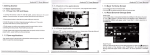
1,1,7、ⅣIFI FunCtion
1Homθ
screenˉ
CliCk“ Not Vis ble to other B|uetooth dev ces″
+sETTlNGs-◆ NotWork-・
2Choose Hotsρ ot-ˉ lnput Password→
Android TV User Manual
to all nearby Bluetooth deViCθ
select"VViˉ Fi” to
,the mθ nu tumsto“ Vis bIe
s",2mhutes countdown begin
open WlFlfunc"on
Connectto thθ network
seleotthe target devioeˇ ˇ
ithin2minutes,connection Wi"be done
automatica"y,some doVioθ s nθ θd to enter pai"ng。 °de,usua"yis O000or1234
1.1~9 BIuetooth FunCtion
Home screen→ sETTINGs→ 0the「 ˉMore setung→
1.1.8Ethernet Function
1Home screen→ sETTlNGs→ Nθ tWork→
select“ Ethernet” to open Ethernθ
function
21nser1network cable,netWork W"l be connected automaucaIIy
t
BIuet° °
th→
0N