1
21 2MiraCast
2.1Adˇ anced operations
0porat ons on Deˇ ices∶
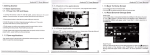
HomΘ scroen→ MyΓ ecommend→ Mlracast→ 0pen Miracast serVice
21,1、 ⅣLAN Hotspot
0pera"ons° n
Android TV User ManuaI
Android TV User ManuaI
Android TV User Manual
d when deVioe begin to sear°
Corresp° nding dθ vl∞ wⅢ bθ
"stθ ck"acCeρ t" ′
ars,cl
a popˉ up mˇ
h,
"e w ndoW app③
Deˇ ioes
・P° rtablo hotspot
Homθ screen→ sETTlNGs→ 0ther→ More setung→ M° re ˉ
→ select° Portab|e Wiˉ Fi hotspot"
seIect“ set up、 ″卜Fi hotspot” to set up“
“
Password” parameters
NetWork ssID`
“
seou"ty`
deˇ ice w"l disρ Igy otho「 deViCθ s
2.1.3DLNA
0pθ ratIons on other deVices(f° rexampl° MIu12)
Homo scrθ θn→ set"ngs→ WLAN→ Pross monu・ WLAN Display→
FInd thθ doˇ iCes searched,c"ok inVitθ
i?
☆Ensure oonnected to the Wirod nθ twork.deVice can be Vsed as WⅡ eless AP to support
q9
Ensure that othθ r dΘ v cΘ s l ke lphone,Andro d smart phone,etc
have oρ ened iMθ d|ashare, and they are in the samθ IOcaI
Wire ess LAN W"h thls dθ vice
0pera"ons on DeVioθ ∶
Home screen→ Myrθ commend→ Media Center→
DLNA DMR→ star1DMR→ 0N